Itch.io, a prominent open marketplace for independent digital games, has rolled out a significant update to its desktop application, version 26.20.0, introducing highly anticipated features designed to enhance user experience and foster greater interoperability within the PC gaming ecosystem. The update, launched today, addresses long-standing community requests, most notably integrating itch.io games directly into Steam, enabling a headless launch mode, and simplifying the process of linking existing game folders. These enhancements underscore itch.io’s commitment to empowering users with greater control over their gaming libraries and streamlining access to the vast catalog of independent titles it hosts.
Deep Dive: Steam Shortcuts – Bridging Digital Gaming Ecosystems
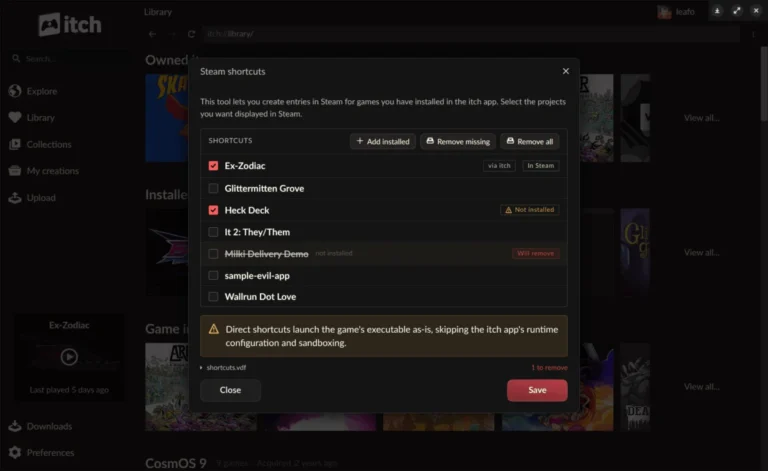
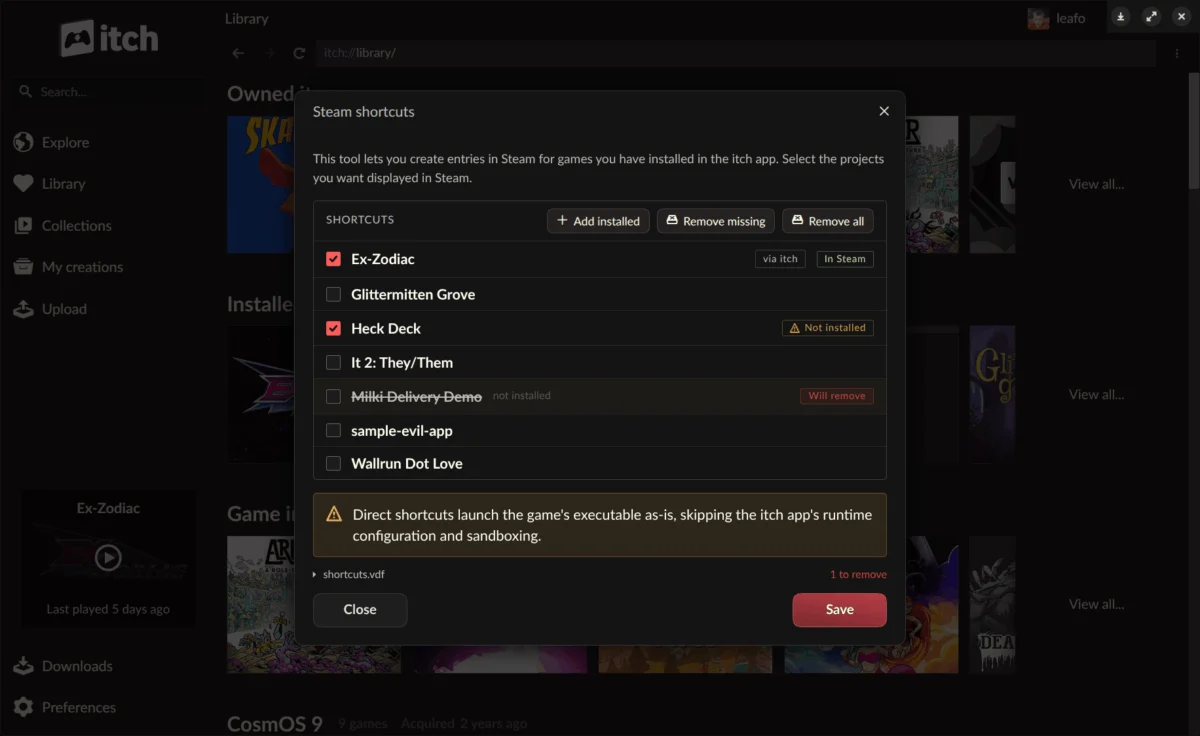
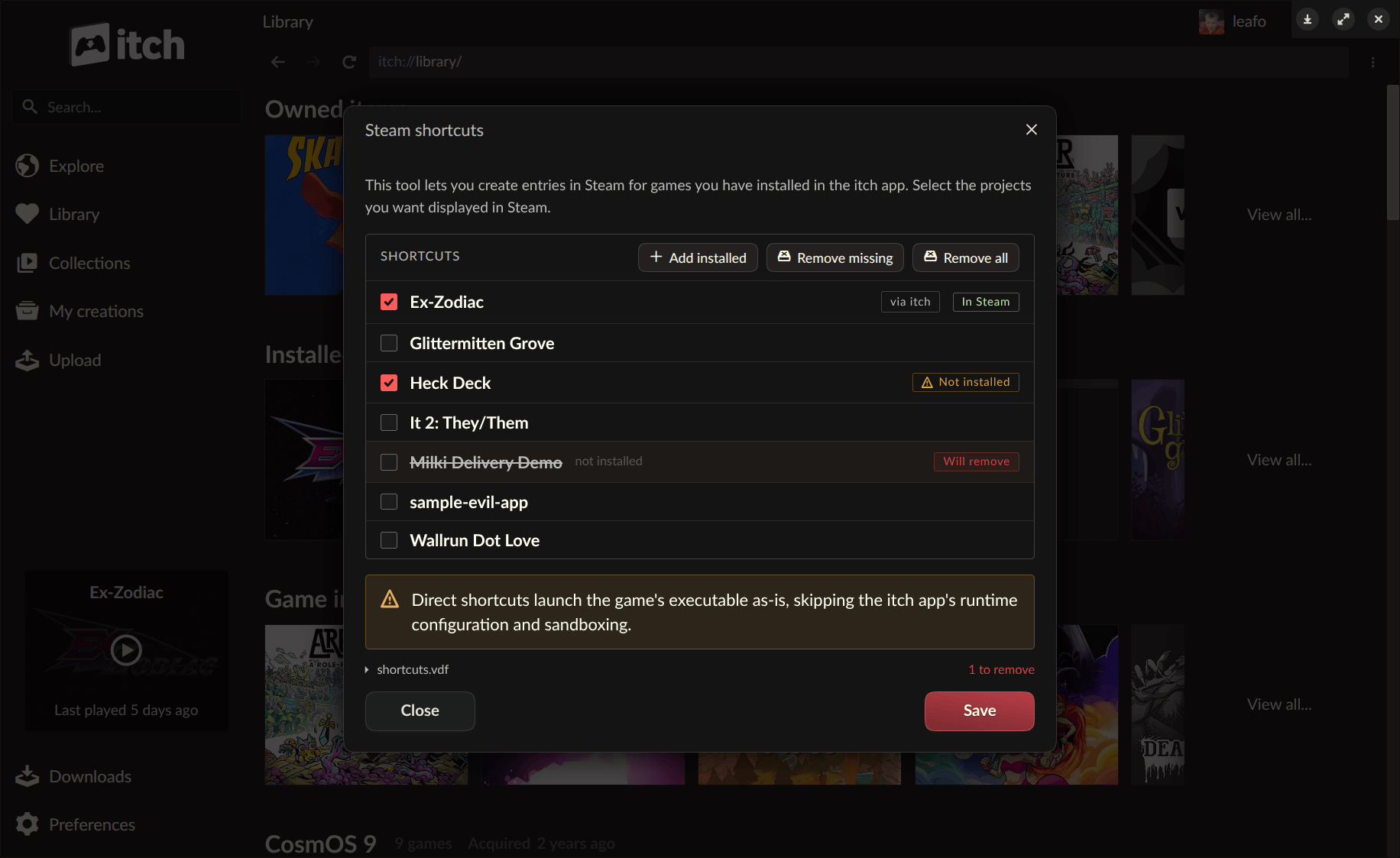
The headline feature of the v26.20.0 update is the introduction of Steam shortcuts, a functionality that allows users to add games installed through the itch.io app directly into their Steam library. This development is particularly impactful for players deeply embedded in the Steam ecosystem, especially those utilizing devices like the Steam Deck or navigating their libraries via Steam’s Big Picture mode. Historically, managing a diverse collection of games across multiple platforms, such as Steam, Epic Games Store, GOG, and independent launchers like itch.io, has presented a logistical challenge for many PC gamers. This new integration offers a cohesive solution, enabling users to centralize their game access points without the need to switch between different applications.
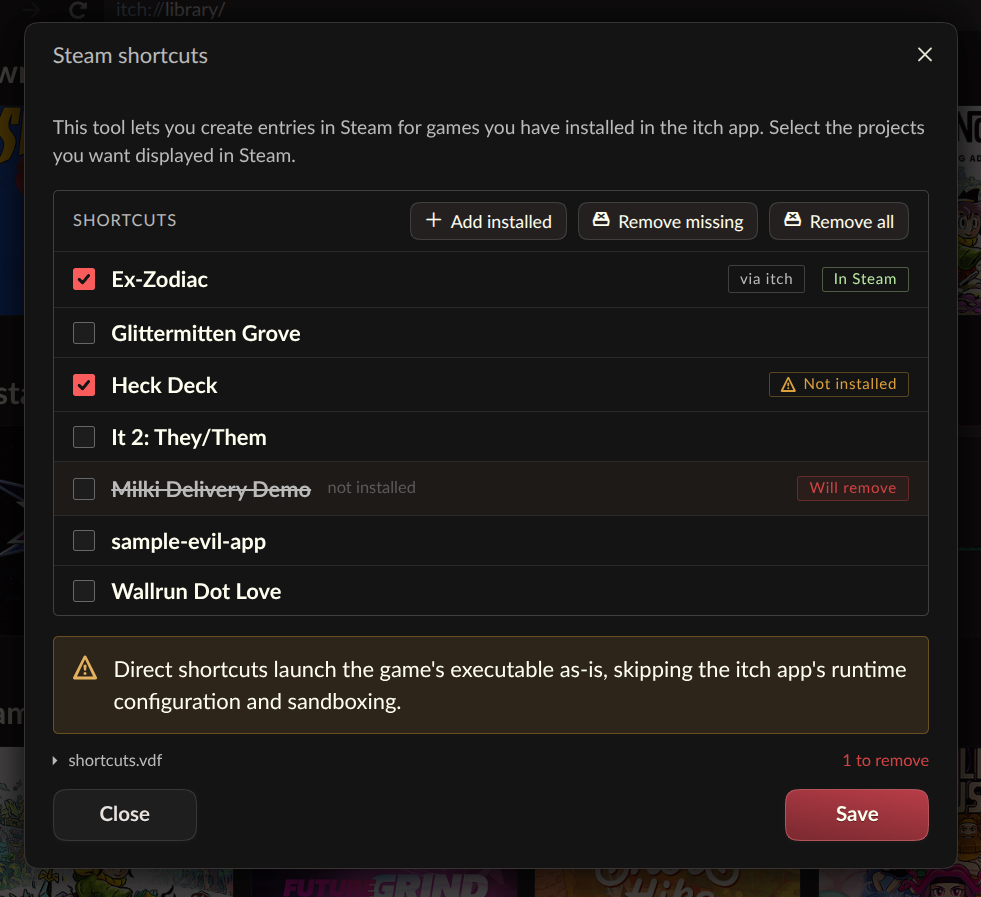
With this update, any game installed via the itch.io app can now appear alongside Steam-native titles, launchable directly from the Steam interface. This eliminates friction for users who prefer the unified library management and social features offered by Steam. Upon synchronization, all linked itch.io games are automatically categorized into a dedicated "itch.io collection" within Steam, ensuring tidy organization and easy discoverability. The tool for creating these shortcuts is conveniently accessible either through the itch.io app’s preferences page or by simply right-clicking any installed game within the itch.io library and selecting the "Steam Shortcuts" option.
While this feature represents a significant leap forward in platform interoperability, itch.io has transparently labeled it as "somewhat experimental." This cautious approach is characteristic of itch.io’s development philosophy, which often involves community feedback loops to refine new functionalities. Users are actively encouraged to test the feature and report any bugs or compatibility issues through the designated GitHub issues page, reinforcing the platform’s open-source ethos and collaborative development model. To maximize compatibility across a wide range of indie titles, each shortcut can be configured with two distinct launch modes, offering flexibility to accommodate varying game architectures and user setups. This adaptability is crucial given the diverse nature of games hosted on itch.io, which span numerous engines, frameworks, and operating system targets.
The decision to prioritize Steam integration reflects the evolving landscape of PC gaming, where Steam continues to dominate market share and user engagement. For many players, Steam is the default gateway to their gaming experiences. By bridging this gap, itch.io not only enhances the convenience for its existing user base but also potentially expands the visibility and accessibility of its unique catalog of independent games to a broader audience who might primarily interact with games through Steam. This strategic move acknowledges the reality of player habits while maintaining itch.io’s distinct identity as a haven for indie creators.
The Innovation of Headless Launching: Empowering Customization and Integration
Central to the success of the Steam shortcuts feature is the introduction of a novel "headless" launch mode for itch.io games. This groundbreaking functionality allows installed games to be launched with the full backing of the itch.io app’s infrastructure, but without the graphical user interface (GUI) of the app itself needing to be actively running. This innovation was a direct technical prerequisite for the seamless Steam integration, as it enables Steam to invoke itch.io games directly, bypassing the need for the itch.io app to foreground.
The headless launch mode is executed via a simple command-line interface: itch-setup --run-game <gameId> [--profile-id <profileId>]. While initially conceived to facilitate Steam shortcuts, itch.io’s development team has designed this feature with broader applicability in mind. It is not exclusively tied to Steam; any external launcher, custom shortcut system, or script can leverage this command to initiate an itch.io game. This decision aligns perfectly with itch.io’s long-standing commitment to open standards and empowering its community with tools for customization and extensibility.
The implications of this headless mode extend far beyond mere convenience. It opens up a myriad of possibilities for users and third-party developers looking to create bespoke gaming environments or integrate itch.io titles into comprehensive front-ends. For instance, users who prefer minimalist desktop setups, or those who utilize home theater PCs (HTPCs) with custom launchers, can now incorporate itch.io games seamlessly. It also paves the way for deeper integration with other game management tools or even operating system-level scripting for automated game launching.
Crucially, the headless launch mode does not compromise the robust features and configurations managed by the itch.io app. All user-defined settings, such as sandboxing, prerequisite checks, per-game launch configurations, playtime tracking, and the secure API key passed to the game, remain fully operational. Under the hood, this functionality is powered by a new butler launch subcommand, which directly interfaces with the user’s existing itch.io app database to execute the launch machinery. This intricate technical detail ensures that the security, stability, and integrity of the game environment are maintained, even when the main app window is not visible.
However, it is important to note that not all game types are supported by the headless mode. Specifically, HTML5 games, which inherently require a web browser environment, will still necessitate the full itch.io app to launch. In such cases, attempting to use the --run-game command for an HTML5 title will automatically trigger the launch of the itch.io app to facilitate the game’s execution. To further support developers and power users interested in building their own custom launchers or integrating with the itch.io app, the platform has also provided a comprehensive guide on interfacing with the itch.io app through its butler documentation, found at https://itch.io/docs/butler/launcher-integration.html. This resource exemplifies itch.io’s dedication to transparency and providing the necessary tools for its community to innovate.
Streamlining Library Management: The "Link Existing Folder" Feature
Another significant enhancement in v26.20.0 is the introduction of the "Link existing folder" option, a highly practical feature designed to address a common pain point for many itch.io users. Prior to this update, if a user had downloaded an itch.io game outside of the official app – perhaps through a direct browser download, as part of a bundle from another platform, or even a local backup – integrating it into their itch.io app library would often require a full re-download through the app itself. This could be inconvenient, time-consuming, and wasteful of bandwidth, especially for larger game files or users with limited internet access.
The new "Link existing folder" option offers a straightforward solution. When attempting to install a game, users will now find this option alongside the traditional download choices in the game’s install dialog. By selecting this, users can point the itch.io app to an existing directory on their system containing the game files. Once linked, the game seamlessly appears in the user’s library as if it had been installed directly through the app, and it can be launched and managed like any other app-installed title.
Itch.io describes this feature as an "escape hatch," emphasizing its purpose for specific scenarios rather than a primary installation method. The platform clarifies that, for the sake of simplicity and speed, no files are verified when a folder is linked. The app effectively "takes your word" that the specified folder contains the correct game files. This approach makes it exceptionally useful for situations where re-downloading is impractical, or for projects that offer external download links that the app might not be able to process autonomously. For example, a developer might provide a large game file via a cloud storage link, and users can now download it directly and then link it to their itch.io app for centralized management. This feature significantly enhances the flexibility and user-friendliness of the itch.io platform, catering to a wider array of download and management preferences.
Background and Chronology: Itch.io’s Journey of Innovation
Itch.io has carved out a unique and vital niche in the digital games distribution landscape since its inception in 2013. Founded on principles of openness, community support, and generous revenue sharing for developers (often allowing creators to set their own revenue split, including 100%), it has become a beloved platform for independent game developers and players alike. Unlike larger, more corporate storefronts, itch.io has consistently fostered an environment that champions experimentation, diverse content, and direct interaction between creators and their audience.
The itch.io desktop app, an open-source project itself, has been a cornerstone of this ecosystem, providing a convenient way for users to discover, download, and manage their growing libraries of indie games. The development of the app has been iterative and highly responsive to community feedback. Features like Steam shortcuts and headless launching are not sudden additions but rather the culmination of requests that have circulated within the itch.io community "a few times over the years." This indicates a methodical development process, where user needs are cataloged, prioritized, and eventually integrated into the platform’s evolving capabilities.
Version 26.20.0 is part of a continuous cycle of improvements, reflecting itch.io’s ongoing commitment to refining its tools and services. The platform’s open-source nature extends beyond its codebase; it actively encourages community participation in various forms, including translation efforts. The update announcement itself includes a call for users to contribute translations for the app on Weblate, demonstrating a global outlook and a desire to make the platform accessible to a wider international audience. This collaborative spirit is a hallmark of itch.io’s identity and a key factor in its sustained growth and relevance in the indie game scene.
Broader Implications and Industry Context
The release of itch.io v26.20.0 carries significant implications for various stakeholders within the gaming industry.
For Users: The most immediate and tangible benefit is enhanced convenience. The ability to consolidate diverse gaming libraries into a single, familiar interface like Steam reduces "launcher fatigue" – the frustration of managing multiple applications to access different games. For owners of the Steam Deck, a portable gaming PC that leverages Steam’s Big Picture mode, this update is particularly transformative, making itch.io games feel like first-class citizens within their handheld experience. It also empowers power users and enthusiasts to create highly customized game launching solutions, integrating itch.io titles into their preferred setups with unprecedented ease.
For Developers: While itch.io has always been celebrated for its developer-friendly policies, these technical enhancements could indirectly boost visibility for indie titles. By making itch.io games easier to integrate into popular user workflows, developers on the platform stand to gain from increased playability and reduced friction for potential players. The headless launch mode also offers new avenues for developers to test and manage their games within automated build pipelines or custom testing environments, further streamlining their development processes.
For Itch.io as a Platform: This update strengthens itch.io’s competitive position. In an industry increasingly dominated by large platforms, itch.io distinguishes itself by offering flexibility, openness, and a deep commitment to its community. By providing robust interoperability features, it makes a compelling case for users who might otherwise stick exclusively to Steam due to convenience. It reinforces itch.io’s image as a forward-thinking platform that listens to its users and adapts to the evolving needs of the gaming community, rather than building a walled garden. This strategic move could attract a new demographic of users who appreciate the vast indie catalog but prioritize integrated library management.
Broader Industry Trend: The update also speaks to a larger trend in the digital entertainment landscape: the increasing demand for interoperability and open standards. As consumers amass digital content across numerous platforms, the ability to manage and access that content seamlessly becomes a critical factor in user satisfaction. Itch.io’s implementation of headless launching via a command-line interface provides a blueprint for how smaller platforms can integrate with larger ecosystems without sacrificing their unique identity or underlying technical controls. This approach contrasts with more restrictive, proprietary systems and suggests a potential future where players have greater agency over their digital libraries, regardless of where they purchased their content.
How to Access the Update and Community Engagement
Users eager to experience these new features can obtain the latest version of the itch.io app by visiting https://itch.io/app. For those who already have the app installed, the update process is automatic, with the application seamlessly updating itself in the background. Users can also manually check for updates via the Preferences screen within the app.
Itch.io maintains its commitment to transparency and community involvement by providing a full list of changes, fixes, and security hardening measures in the comprehensive release notes available on its GitHub page. This practice allows technical users and curious individuals to delve into the specifics of the update. Furthermore, the platform continues to invite contributions from its global community, particularly for app translations. Users interested in helping to localize the itch.io app can do so through the Weblate platform at https://weblate.itch.zone/projects/itchio/itch/. This ongoing collaborative effort ensures that the itch.io app remains accessible and user-friendly for a diverse international audience, embodying the platform’s foundational values of inclusivity and community empowerment.
The positive initial reactions from the community, as evidenced by comments praising the Steam integration, highlight the immediate impact and appreciation for these long-awaited features. An itch.io spokesperson might emphasize that this update is a testament to the platform’s dedication to its user base, demonstrating that feedback is not only heard but actively translated into tangible improvements that enhance the overall gaming experience. As itch.io continues to evolve, these strategic enhancements solidify its position as a vital and adaptable hub for independent game development and consumption.
About the Author