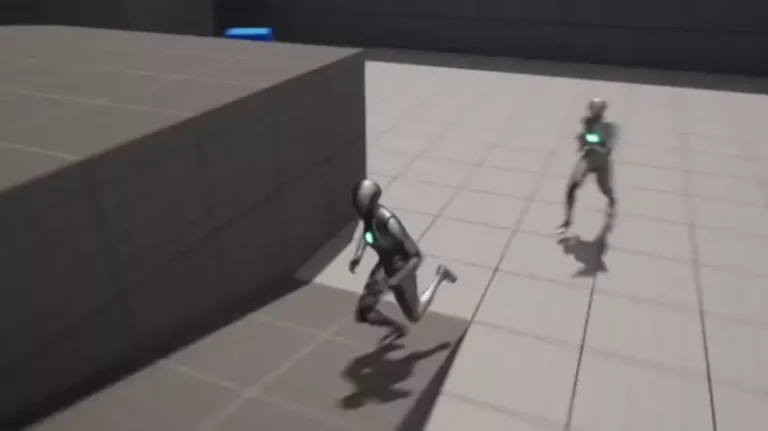
The integration of advanced Artificial Intelligence (AI) behaviors, such as characters or adversaries actively pursuing and interacting with the player, has long been a cornerstone of immersive and dynamic video game experiences. Traditionally, implementing such complex functionalities required extensive coding knowledge and significant development time. However, a recent development within Unreal Engine 5 (UE5) is revolutionizing this process, demonstrating how sophisticated AI player-following capabilities can be achieved with remarkable ease, requiring only a handful of visual scripting nodes known as Blueprints. This streamlined approach significantly lowers the barrier to entry for developers, enabling both seasoned professionals and independent creators to enrich their games with responsive and engaging AI without deep dives into complex programming languages.
The Evolution of In-Game AI and Unreal Engine’s Role

The journey of AI in video games has been one of continuous evolution, moving from simple, pre-scripted movements to highly adaptive and reactive behaviors. Early game AI often relied on rudimentary pathfinding algorithms and trigger-based actions, leading to predictable enemy patterns and less dynamic gameplay. As hardware capabilities advanced and game engines became more sophisticated, the potential for complex AI grew exponentially. Modern games demand AI that can realistically navigate environments, react to player actions, and contribute to a believable game world, whether it’s a relentless predator in a survival horror title, a loyal companion in an RPG, or an opposing force in a strategic combat scenario.
Unreal Engine, developed by Epic Games, has consistently been at the forefront of this evolution, providing developers with powerful tools to create visually stunning and technically robust games. With the release of Unreal Engine 5, Epic Games has further emphasized accessibility and efficiency, particularly through its robust Blueprint visual scripting system. Blueprints allow developers to create game logic without writing a single line of C++ code, using a node-based interface that visually represents programming concepts. This system has democratized game development, making advanced features, once exclusive to large studios with dedicated programming teams, available to a much broader audience. The ability to implement complex AI tracking with just a few Blueprint nodes exemplifies this commitment to empowering creators.
Technical Breakdown: Streamlining AI Player Pursuit in UE5
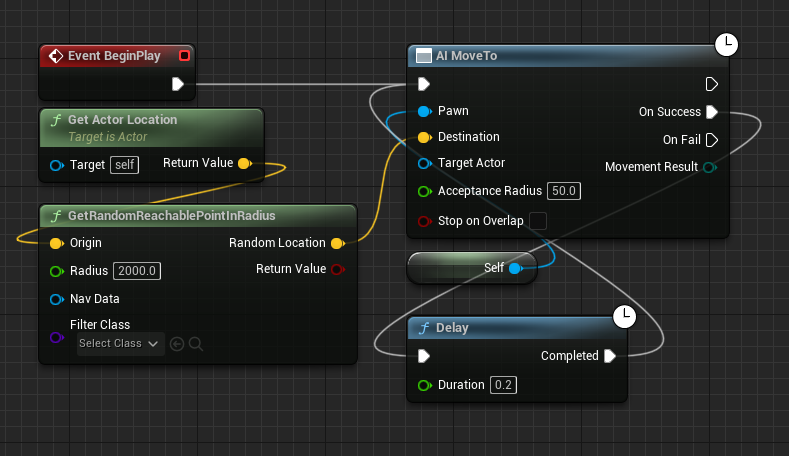
The core of this simplified AI implementation hinges on refining existing movement logic. Developers often begin with basic AI movement, such as having characters patrol specific areas or move to random reachable points within a defined radius. The initial setup, as detailed in previous guides focusing on NavMesh integration, typically involves nodes that direct an AI character to a calculated destination.
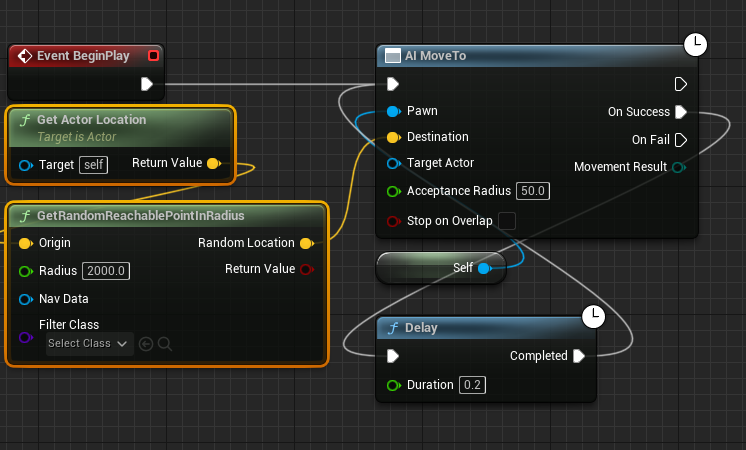
The process to transition from random movement to player pursuit is remarkably direct. It commences by identifying and modifying the existing Blueprint graph responsible for AI navigation. Specifically, two key nodes, "Get Actor Location" and "GetRandomReachablePointInRadius," which are designed to find arbitrary points for AI movement, are targeted for removal. These nodes, while useful for initial AI wandering, become redundant when the objective shifts to tracking a specific, dynamic target like the player character. Deleting them clears the path for directing the AI’s focus.
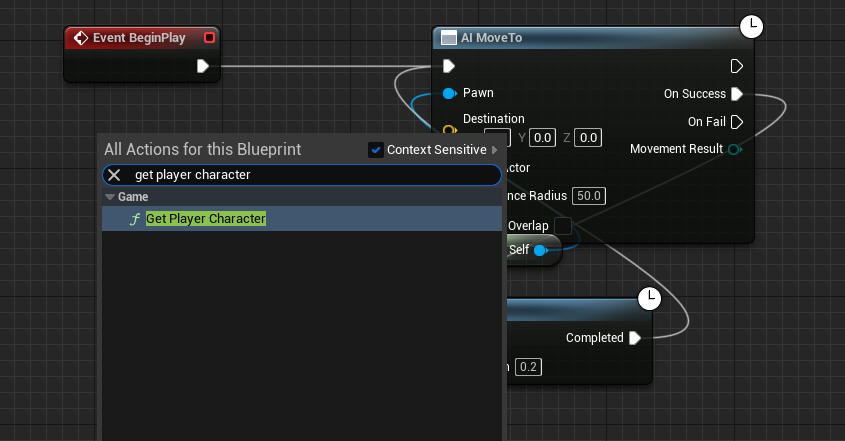
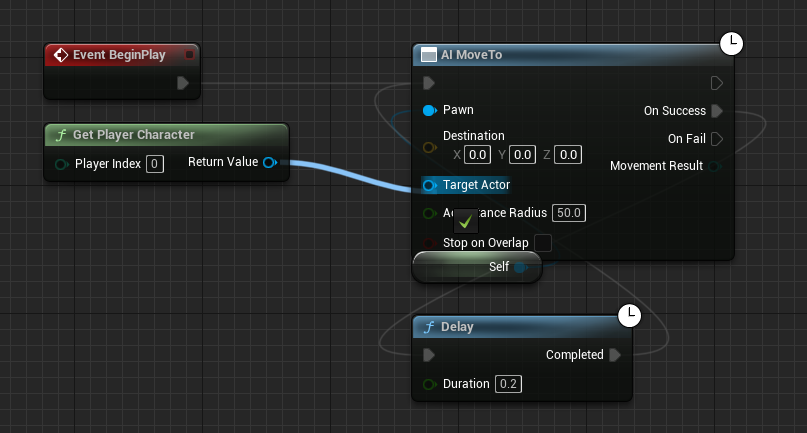
Following this preparatory step, the crucial "Get Player Character" node is introduced into the Blueprint graph. This node serves as the direct link to the player’s entity within the game world, providing real-time access to the player character’s properties, most importantly, its current location. The simplicity of retrieving the player’s reference underscores UE5’s design philosophy of providing direct access to essential game elements.
The newly added "Get Player Character" node is then connected to the "Target Actor" pin of the "AI MoveTo" node. This connection is the lynchpin of the entire operation. The "AI MoveTo" node is a powerful Blueprint function designed to command an AI controller to move its pawn (the character it controls) towards a specified target, intelligently navigating the game environment using the underlying NavMesh. By linking the "Return Value" (representing the player character) from "Get Player Character" to the "Target Actor" input of "AI MoveTo," the AI is now instructed to continuously seek and move towards the player’s current position. This effectively transforms a randomly moving AI into a persistent tracker.
A critical aspect of robust AI behavior, particularly in dynamic environments, is handling potential failures. The game world is rarely static or perfectly navigable; players might move into areas temporarily inaccessible to the AI, or pathfinding calculations might occasionally fail. To ensure the AI remains persistent in its pursuit, the "On Fail" execution pin of the "AI MoveTo" node is connected back to a "Delay" node, which then loops back to re-initiate the "AI MoveTo" command. This creates a self-correcting mechanism: if the AI fails to reach the player due to an obstruction, an unreachable location, or any other pathfinding error, it will pause briefly (as defined by the Delay) and then attempt the movement again. This continuous retry loop guarantees that the AI will relentlessly follow the player, adapting to changes in the environment and player movement, thus maintaining the intended gameplay dynamic.
The final step, though often overlooked, is to compile and save the Blueprint. This action processes the visual script into executable code, applying all the changes made within the editor to the game’s logic. Without compilation and saving, the newly configured AI behavior would not manifest during gameplay.
Implications for Game Design and Player Experience
The ability to implement such a fundamental AI behavior with minimal effort has far-reaching implications across the gaming industry.
- Enhanced Immersion and Realism: AI characters that intelligently track and react to the player contribute significantly to a game’s immersion. Whether it’s a hunter stalking its prey, a rescuer moving towards a distressed character, or a companion staying by the player’s side, dynamic following behavior makes the game world feel more alive and responsive.
- Diverse Gameplay Mechanics: This core functionality underpins a multitude of gameplay mechanics.
- Survival Horror: Imagine relentless enemies that constantly track your position, forcing stealth and strategic evasion.
- Action-Adventure: Opponents can dynamically pursue players through complex environments, leading to more engaging combat and chase sequences.
- Companion AI: Non-player characters (NPCs) can effectively follow the player, assisting in combat, solving puzzles, or simply accompanying them on their journey, enhancing narrative and cooperative gameplay.
- Stealth Games: AI patrols can be designed to actively investigate disturbances or track suspected player locations, raising the stakes for stealth mechanics.
- Accessibility for Developers: For independent developers and smaller studios, where resources are often limited, this streamlined approach is a game-changer. It allows them to integrate complex AI features without the need for dedicated AI programmers or extensive C++ development, freeing up time and resources for other creative aspects of game design.
- Rapid Prototyping: The ease of implementation facilitates rapid prototyping. Developers can quickly test different AI behaviors, adjust parameters, and iterate on gameplay mechanics, leading to more polished and innovative game designs in less time.
- Scalability: The Blueprint system’s modular nature means that this basic AI following logic can be easily extended and combined with other behaviors (e.g., attacking, defending, interacting) to create highly sophisticated and multi-faceted AI personalities.
Industry Perspectives and Future Outlook
Industry experts and game developers consistently highlight the importance of accessible tools in fostering innovation. "The democratisation of game development, largely driven by engines like Unreal Engine 5 and its visual scripting capabilities, means that creative ideas can be brought to life by a wider pool of talent," states a prominent game design lecturer. "Features that once required months of dedicated programming can now be prototyped and implemented in a fraction of the time, allowing developers to focus on unique gameplay mechanics and compelling narratives." This sentiment resonates across the industry, with many acknowledging that reducing technical hurdles is key to a vibrant and diverse gaming landscape.
Epic Games’ continued investment in Blueprint functionality underscores a strategic vision to make advanced game development accessible. By providing intuitive ways to implement complex systems, Unreal Engine 5 empowers creators to push the boundaries of interactive entertainment without being bogged down by low-level coding. This trend is expected to continue, with future updates likely to introduce even more abstracted and powerful AI tools, further simplifying the creation of intelligent, adaptive, and believable characters.
The ability to easily configure AI characters to follow players is not merely a technical convenience; it is a foundational element for crafting rich, responsive, and ultimately more enjoyable video games. As game engines like Unreal Engine 5 continue to evolve, the distinction between high-budget AAA titles and indie productions, in terms of technical sophistication, is becoming increasingly blurred, fostering an environment ripe for innovation and creative expression. This particular advancement exemplifies how targeted improvements in development tools can profoundly impact the quality and accessibility of game creation worldwide.
About the Author