The independent game platform itch.io has announced a significant enhancement to its desktop application, introducing a graphical user interface (GUI) for its ‘butler’ command-line interface (CLI) tool, enabling developers to upload game builds directly within the app. This update, accessible in app version v26.12.0 and later, marks a pivotal shift towards greater accessibility and efficiency for indie game developers managing their projects on the platform, eliminating the necessity of terminal interaction for a crucial development task. The integration is poised to broaden the appeal of ‘butler’ and its advanced delta-patching technology to a wider spectrum of creators, from seasoned professionals to those less familiar with command-line operations.
Itch.io: A Haven for Independent Game Development
Itch.io has carved out a unique and respected niche in the digital distribution landscape for video games, distinguishing itself as a truly open marketplace primarily dedicated to independent developers. Launched in 2013, the platform has grown substantially, now hosting millions of games, tools, and assets from hundreds of thousands of creators. Its ethos centers on empowering developers, offering flexible monetization options, high revenue share percentages, and a direct connection between creators and their audience. This developer-first approach has fostered a vibrant ecosystem for experimental, niche, and art-focused games that might struggle to find a home on more mainstream, curated platforms. The itch.io desktop app, an integral part of this ecosystem, provides users with a convenient way to browse, download, and manage their game libraries, while also serving as a crucial tool for developers to interact with the platform.
The Evolution of Butler: A Technical Backbone
At the core of itch.io’s efficient update mechanism lies ‘butler,’ a robust command-line interface tool specifically designed for uploading builds. Introduced several years ago, ‘butler’ was developed to address common frustrations associated with traditional file uploads, particularly for large or frequently updated projects. Unlike conventional file transfer protocols that re-upload entire game archives with every update, ‘butler’ employs a sophisticated delta-patching system. This technology works by identifying only the changes between a new build and the previously uploaded version for a specific ‘channel’ (e.g., windows-beta, linux-arm64, macos-preview).
When a developer pushes an update using ‘butler,’ the tool calculates the precise differences—new files, modified files, deleted files—and transmits only this differential data. The initial upload for a channel sends the complete build, but subsequent uploads are significantly smaller, comprising only the patch. This not only dramatically reduces upload times for developers but also conserves bandwidth for both the developers and the itch.io servers. Crucially, this benefit extends directly to players using the itch.io app; when a game updates, they download only the patch, not the entire game again, resulting in faster updates and less data consumption. Industry estimates suggest that delta patching can reduce update sizes by 70-90% for typical game updates, a substantial saving for both ends of the distribution chain. Post-upload, itch.io’s servers further optimize and re-compress these patches in the background, ensuring maximum efficiency.
Bridging the Gap: From Command Line to Graphical User Interface
While ‘butler’ has long been lauded by developers comfortable with terminal environments for its efficiency and reliability, its command-line-only nature presented a barrier for others. Many creators, particularly those focused solely on game design and artistry, may not possess extensive experience with CLI tools, finding them intimidating or cumbersome. This limitation meant that a segment of the developer community was either unable to fully leverage ‘butler’s advantages or had to navigate a steeper learning curve.
The integration of ‘butler’ into the itch.io app’s graphical interface directly addresses this challenge. By providing a user-friendly visual wrapper, itch.io has democratized access to ‘butler’s powerful features, making advanced build management accessible to all developers regardless of their technical proficiency with command lines. This move aligns with itch.io’s broader mission to lower barriers to entry for game development and distribution.
A New User Experience: Navigating the Upload Section
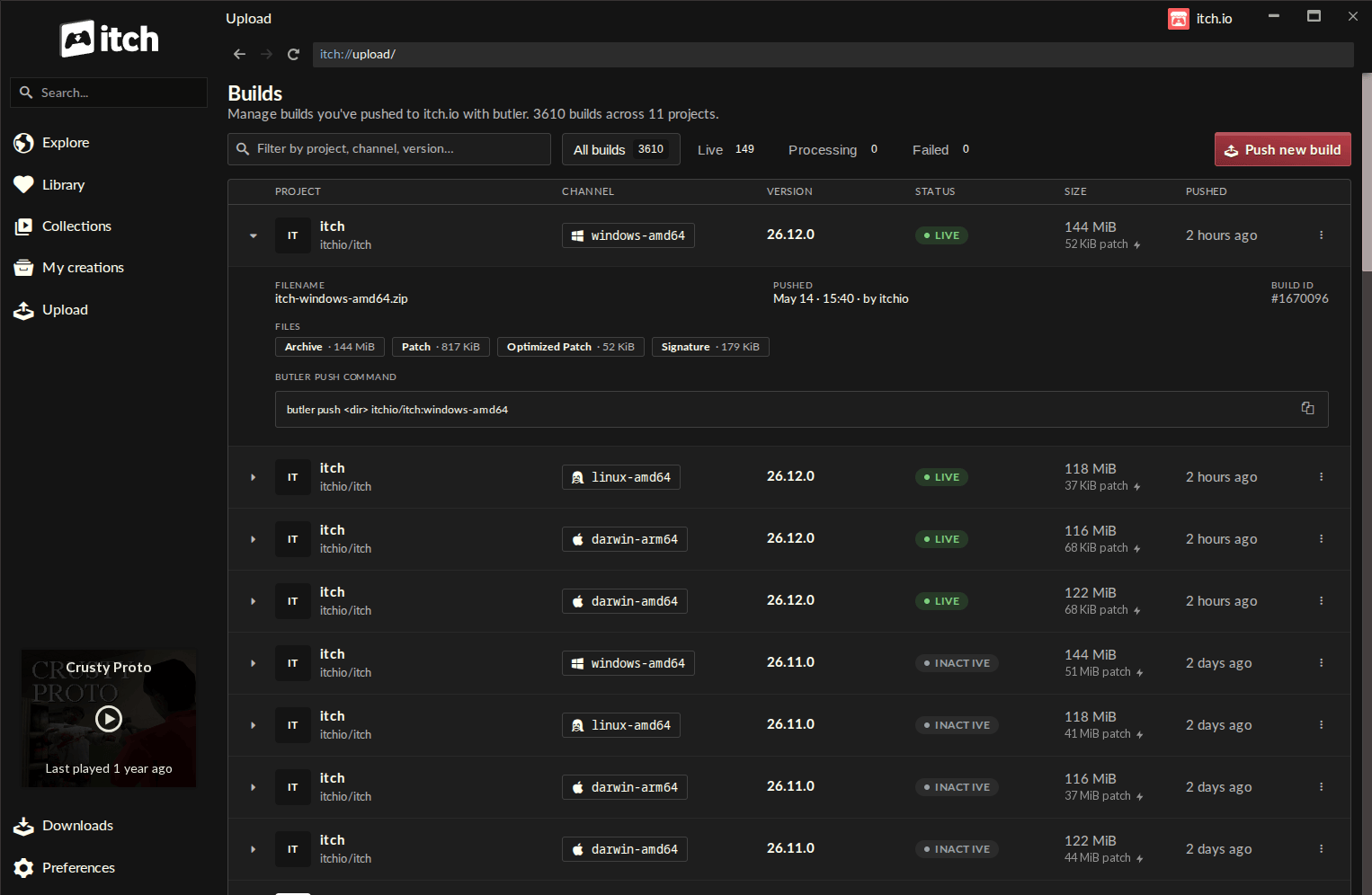
The newly introduced ‘Upload’ section within the itch.io app revolutionizes the developer workflow. Upon launching the updated application (version v26.12.0 or higher), developers will find a dedicated ‘Upload’ entry prominently displayed in the sidebar. This new navigation option leads to the ‘Builds’ page, a centralized hub for all project builds.
The ‘Builds’ page offers a comprehensive overview of every build associated with any project the logged-in account has editing privileges for. Each build is presented in an organized table format, detailing key information at a glance: the project name, the specific channel it belongs to, its version number, the current status (e.g., uploaded, processing), the file size of the build, and the exact timestamp of its push. This clear, consolidated view enhances build management, allowing developers to quickly track their project’s update history and status across multiple titles and platforms.
Streamlined Build Pushing with Intuitive Controls
The core functionality of the update lies in the "Push new build" button, accessible from the ‘Builds’ screen. Clicking this button initiates an intuitive dialog designed to guide developers through the upload process step-by-step.
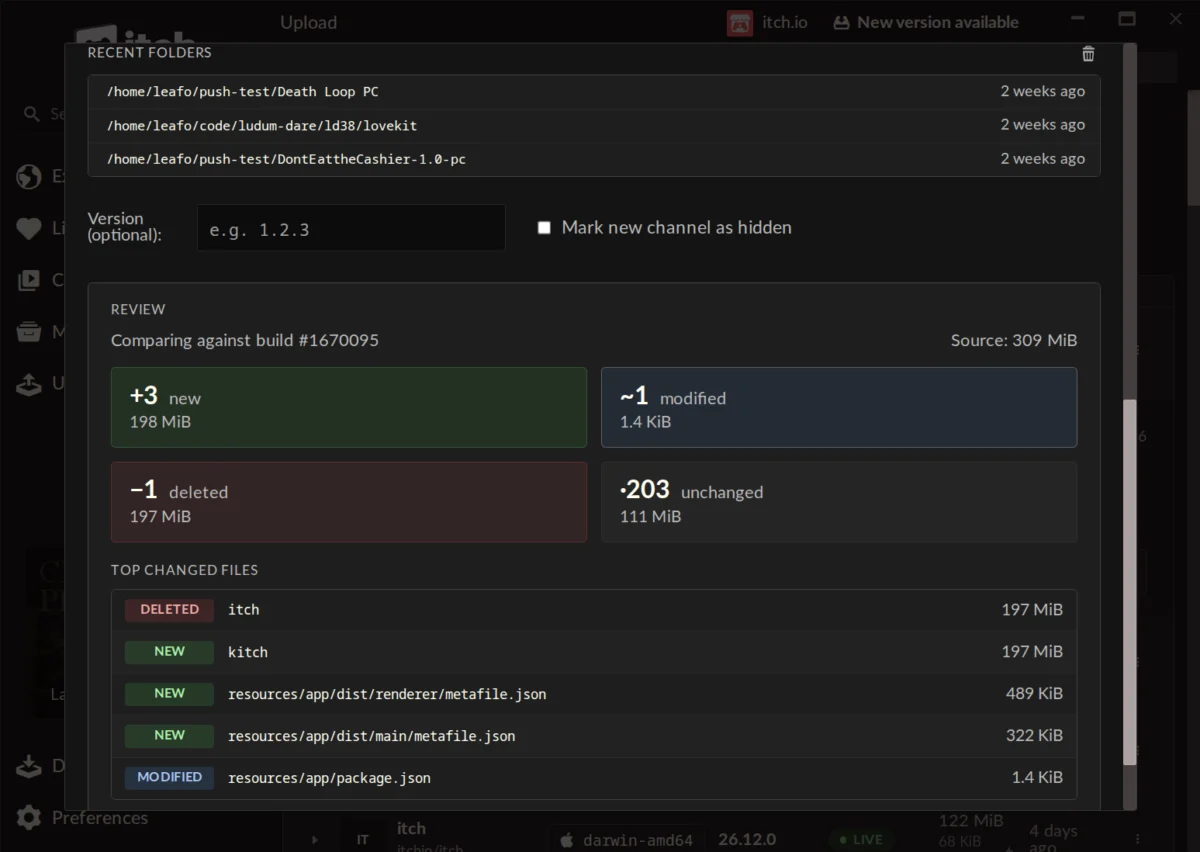
The process begins with selecting a project from a dropdown menu, followed by choosing an existing channel or creating a new one simply by typing a desired name (e.g., "alpha-test," "main-build-windows," "patch-v1.1"). Developers can also optionally assign a specific version number to the build, aiding in release tracking and user communication. The final step involves dropping a folder containing the game files or a compressed .zip archive directly into the designated area. For added convenience, the system maintains a list of recently used folders, allowing for quick selection of frequently updated project directories.
One of the most valuable features of the new GUI is the pre-upload ‘preview’ function. Before committing to an upload, developers can generate a detailed report showing what has changed since the last build on that channel. This preview clearly delineates the number of new, modified, deleted, and unchanged files, along with their respective sizes. It also highlights the largest changed files, providing critical insight into the update’s composition. This transparency serves as a crucial error-checking mechanism, allowing developers to verify that only intended changes are being pushed and to catch potential mistakes before they impact players.
Enhanced Features and Multi-Account Management
Beyond the core upload functionality, the integrated ‘butler’ tool within the itch.io app boasts several user-centric enhancements. The version of ‘butler’ embedded within the application is automatically updated, relieving developers of the burden of manual maintenance. This ensures that users are always leveraging the latest optimizations and features of the tool without any extra effort.
Furthermore, the in-app ‘butler’ utilizes the credentials of the currently logged-in itch.io account. This seamless integration simplifies workflow for developers managing multiple projects or even multiple developer profiles. The itch.io app’s robust support for multiple user profiles and rapid account switching means developers can effortlessly switch contexts and push builds from different accounts without needing to reconfigure command-line parameters or API keys. This flexibility is particularly beneficial for studios or individuals working on diverse projects under different branding.
Broader Impact and Strategic Implications
This significant update to the itch.io app carries considerable implications for both the platform’s developer community and its strategic positioning in the competitive digital distribution market. By making ‘butler’ more accessible, itch.io is reinforcing its commitment to providing powerful, yet user-friendly, tools for indie creators. This move can be seen as a strategic differentiator against larger platforms like Steam, Epic Games Store, and GOG, which often have more complex or proprietary developer SDKs. While those platforms offer broader market reach, itch.io continues to focus on a niche that values independence, flexibility, and developer empowerment.
From a developer’s perspective, the benefits are clear: reduced friction in the update process, saved time, and greater confidence in managing builds. Faster, more reliable updates encourage developers to iterate more frequently, respond to feedback quicker, and push smaller, more focused patches. This iterative development cycle is particularly vital for indie games, which often evolve significantly post-launch based on community input. The reduced bandwidth consumption for both uploads and downloads also translates to real-world cost savings for developers (less data transfer) and a better experience for players (faster updates).
The positive reception from the developer community has been notable. Comments from early adopters highlight the ease and organization the new system provides. One developer praised the new interface as "a lot faster than manually updating the webpage," noting that the "self-enforcing nature of the Compare step means I almost literally can’t mess it up." Another expressed enthusiasm, stating, "This is a very cool change, makes the app a lot more useful. Might move my software here. Thanks Itch team!!" While some feedback also touched on unrelated platform issues like moderation queues, the overwhelming sentiment regarding the ‘butler’ GUI integration has been positive, affirming itch.io’s strategic direction.
A frequently asked question among developers has been the possibility of converting existing games not originally uploaded with ‘butler’ to the new system. According to a representative from itch.io, this functionality is not currently available. A ‘butler’ push requires specific metadata alongside the file, which is computed during the upload process itself. While not an immediate priority, the platform has indicated it could be a feature considered for future development, underscoring a continuous evolution mindset.
Accessing the Update
For existing users of the itch.io app, the update process is seamless. The application features an automatic update mechanism, ensuring that users will receive the latest version without manual intervention. For those who wish to expedite the process or verify their version, a manual check for updates can be performed from the Preferences screen within the app. Developers and players new to the platform can download the itch.io app directly from the official itch.io website. To access the new ‘Upload’ tab and its associated features, users must ensure their app is running at least v26.12.0.
This GUI integration of ‘butler’ represents a significant step forward for itch.io, enhancing its appeal as a robust and developer-friendly platform. By combining powerful backend technology with an intuitive user experience, itch.io continues to empower independent creators, fostering a more efficient and accessible environment for game development and distribution. The platform eagerly anticipates the diverse array of projects and updates developers will now be able to push with newfound ease.
About the Author