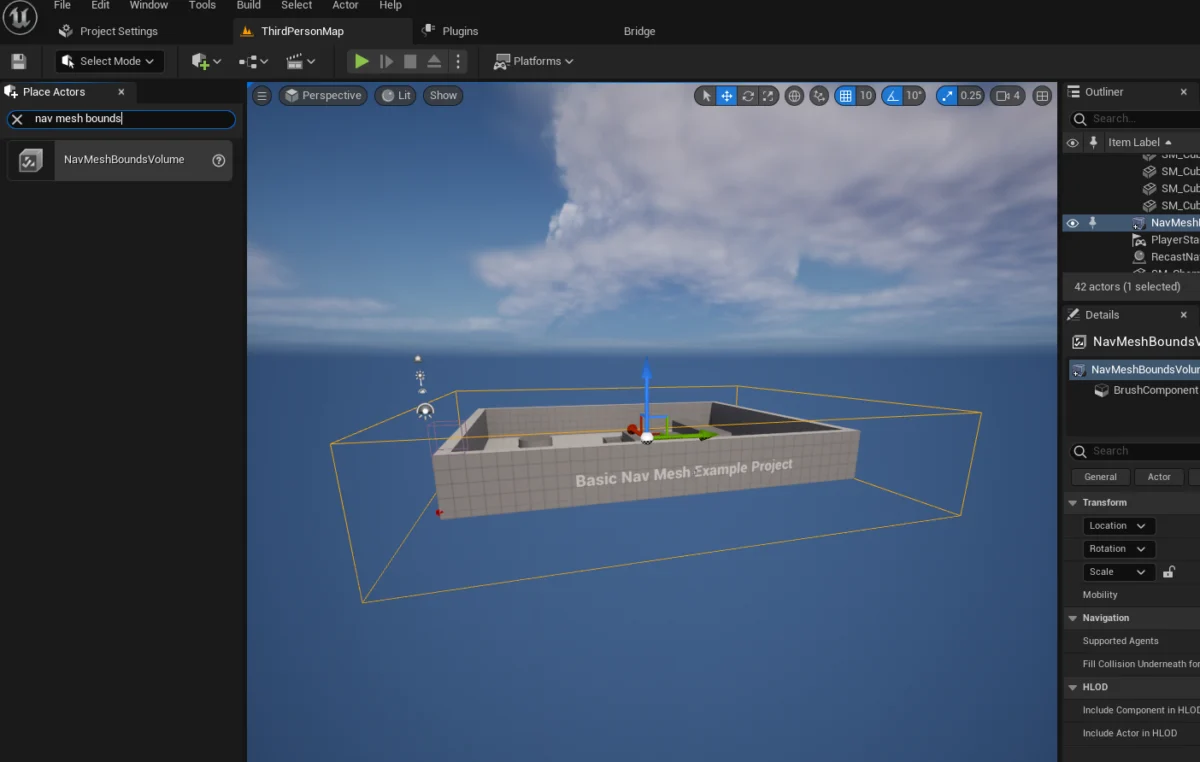
The integration of sophisticated artificial intelligence (AI) within video games has become a cornerstone of modern interactive entertainment, serving not only to enrich the atmosphere of virtual worlds but also to provide compelling and dynamic gameplay experiences for players. Unreal Engine 5 (UE5), a prominent and powerful game development platform, offers developers robust tools to implement such AI-controlled characters. A fundamental aspect of this implementation involves generating a navigation mesh, commonly known as a NavMesh, which defines the traversable areas for AI agents, alongside the meticulous setup of AI navigation logic for individual characters. While these steps are designed to be intuitive, ensuring correct configuration is paramount to avoid potential issues that could impede AI functionality and overall game performance. This detailed guide explores the process of establishing a NavMesh and configuring a basic AI character within Unreal Engine 5, contextualizing these technical procedures within the broader landscape of game AI development.
The Indispensable Role of AI in Modern Gaming

The evolution of video games has seen AI transition from simplistic, pre-scripted movements to complex, emergent behaviors that can significantly impact player immersion and challenge. From the ambient non-player characters (NPCs) that populate bustling virtual cities to the cunning adversaries that test a player’s strategic prowess, AI drives much of the dynamic interaction within game environments. In an engine like Unreal Engine 5, the capacity to create believable and efficient AI is a key differentiator, allowing developers to craft experiences that feel alive and responsive. Without effective AI, game worlds can feel static, and player interactions can become predictable, ultimately diminishing the entertainment value. The foundation for any mobile AI in a 3D environment is a reliable pathfinding system, which is precisely where the NavMesh becomes critical.
Understanding the NavMesh: The Blueprint for AI Movement
A NavMesh serves as a specialized 3D mesh that outlines all walkable surfaces within a game level, acting as a navigational map for AI agents. Unlike simpler waypoint systems or grid-based pathfinding, a NavMesh allows for more fluid, organic movement paths and efficiently handles complex geometries, slopes, and obstacles. This advanced approach significantly reduces the computational overhead for pathfinding calculations, especially in expansive and intricate levels. The process of generating a NavMesh in Unreal Engine 5 begins with the manipulation of specific editor tools.
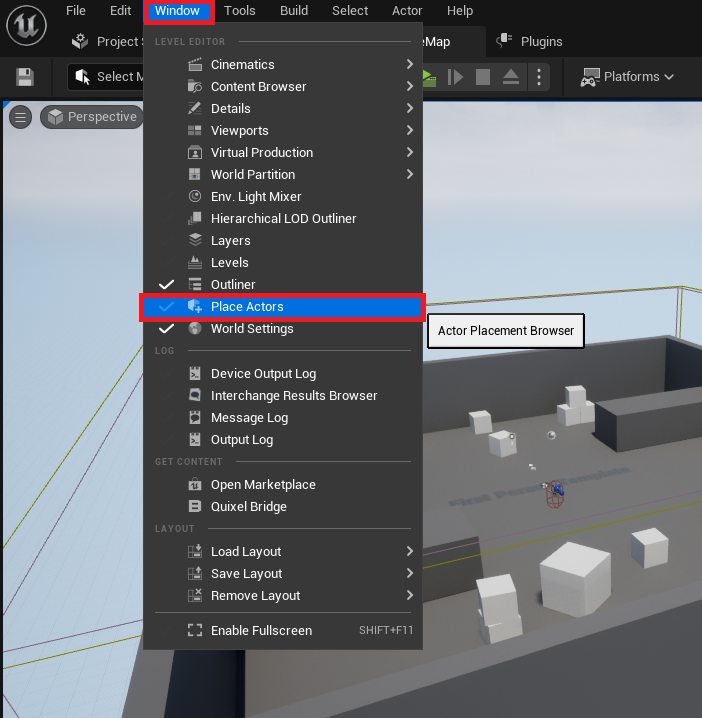
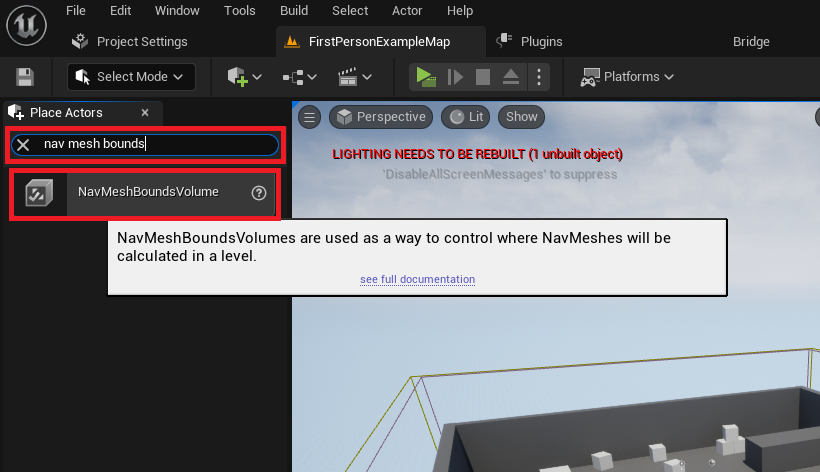
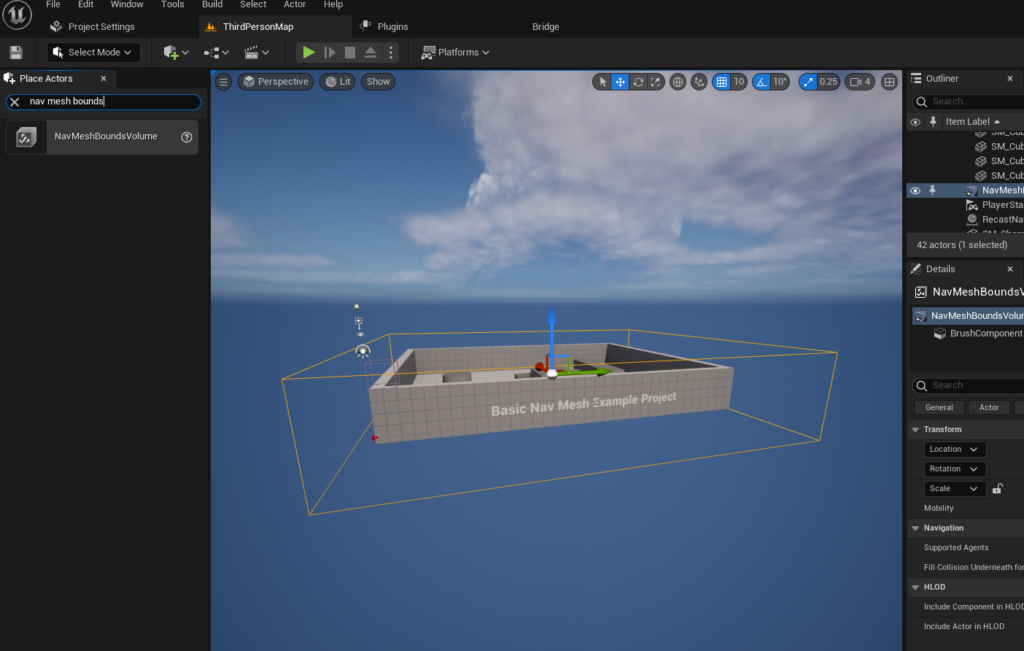
Developers initiate this process by accessing the "Place Actors" window, a central hub within the Unreal Engine 5 editor that grants immediate access to a wide array of basic objects and volumetric primitives essential for level design and functionality. This window is typically found under the "Window" menu dropdown, simplifying the discovery and placement of core components. Once opened, the "Place Actors" window allows developers to search for and deploy a NavMeshBoundsVolume actor into their level. This specific volume is categorized under the "Volumes" section of the Modes panel, indicating its function as a spatial definer rather than a visual asset.
The NavMeshBoundsVolume is not merely placed; it must be carefully scaled and positioned to encapsulate the exact areas where AI characters are expected to navigate. This volumetric bounding box acts as a generative field for the NavMesh; any walkable surface within this volume will be included in the generated mesh. The flexibility of this tool allows for volumes that are either vast, covering entire open-world segments, or highly localized, dictating movement within confined spaces. Developers must exercise judgment in sizing these volumes, as larger areas naturally demand more processing power and time for NavMesh generation. For scenarios requiring frequent environmental changes or exceptionally large maps, Unreal Engine also supports dynamic NavMesh generation, a more advanced technique that regenerates parts of the mesh on the fly, offering a crucial optimization for complex projects. This dynamic capability represents a significant leap from static, pre-computed meshes, addressing the performance challenges associated with vast or interactive environments.
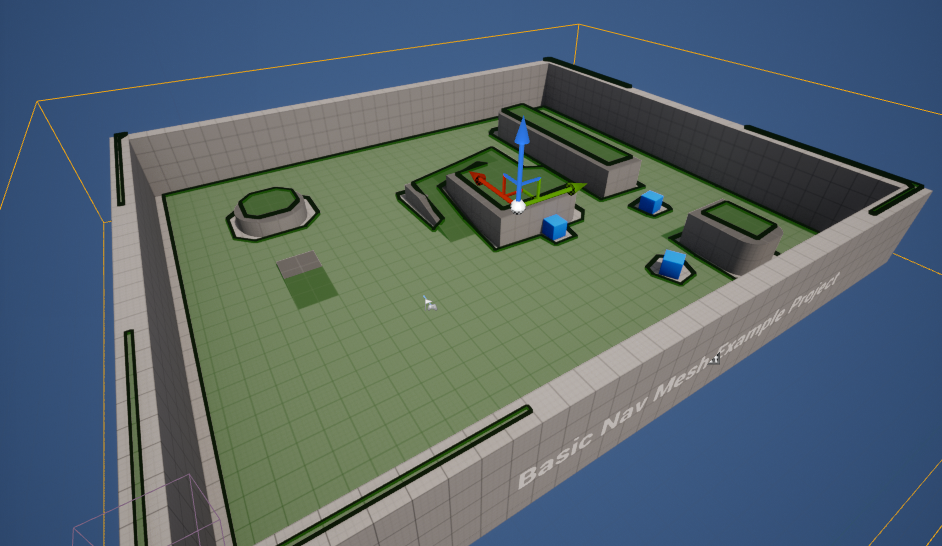
Following the precise placement and scaling of the NavMeshBoundsVolume, developers can immediately visualize the generated NavMesh by pressing the ‘P’ key on their keyboard. This debugging shortcut overlays a green mesh onto all traversable surfaces within the defined volume, providing instant visual confirmation of the NavMesh’s coverage and accuracy. This step is critical for identifying any gaps, inaccessible areas, or unintended traversable zones, allowing for immediate corrections to the NavMeshBoundsVolume‘s position or scale. The clarity and simplicity of this visualization tool underscore Unreal Engine’s commitment to developer-friendly debugging, ensuring that the foundation for AI movement is robust and error-free before proceeding to character logic.
Orchestrating AI Character Movement: Blueprinting Basic Behavior
With the NavMesh securely established, the next phase involves imbuing AI characters with the ability to leverage this navigational blueprint. For illustrative purposes, this guide often refers to the third-person template provided by Unreal Engine 5, which includes a pre-animated character blueprint—an ideal candidate for testing AI navigation without the overhead of creating custom character assets.
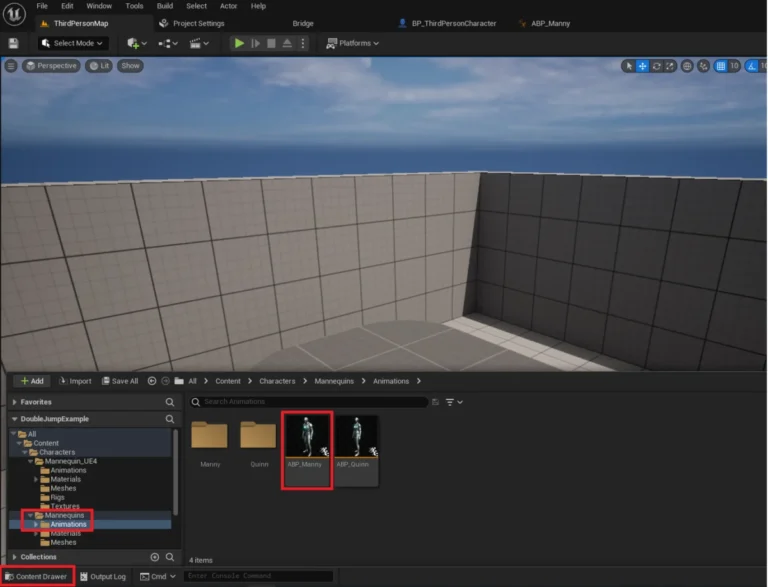
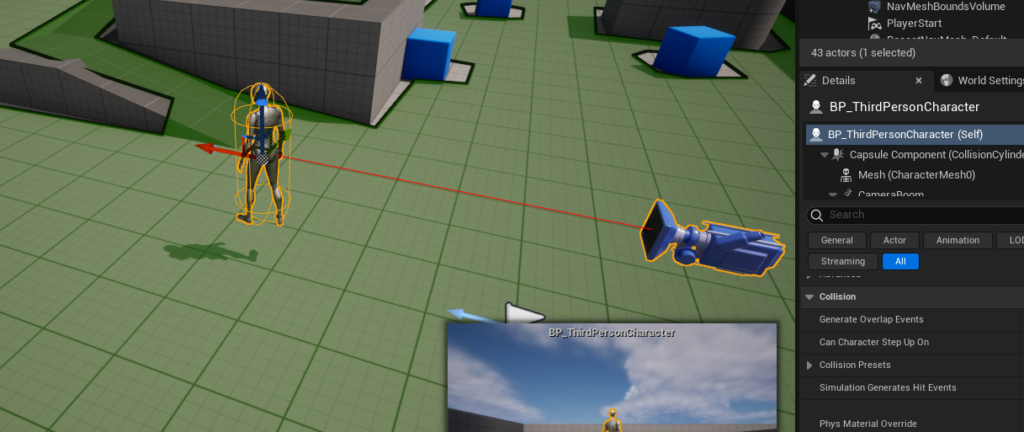
The first step in activating AI navigation for a character is to instantiate it within the level. Developers typically drag the desired character blueprint, such as the BP_ThirdPersonCharacter found in the "Third Person / Blueprints" folder, directly from the Content Drawer into the game world. This places an instance of the AI character into the scene, making it ready for behavioral scripting.
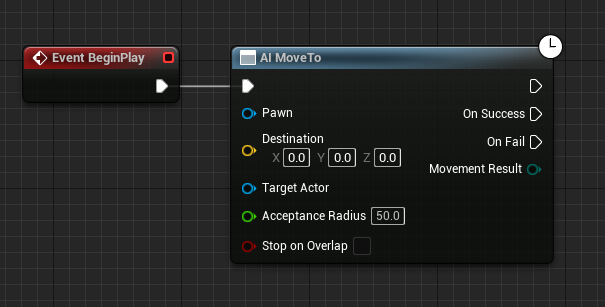
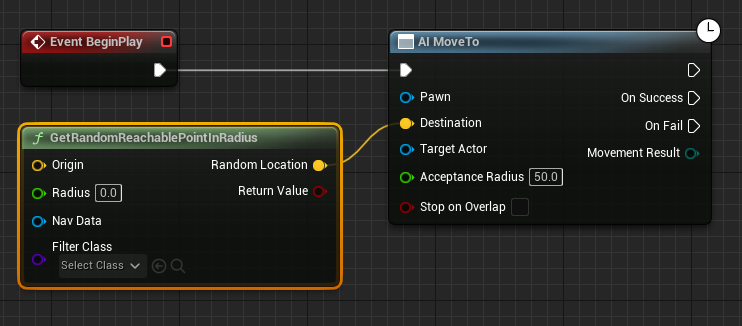
The core of AI character behavior in Unreal Engine is often defined within its Blueprint editor. A Begin Play event node serves as the entry point for the character’s AI logic, triggering a sequence of actions as soon as the game level starts. Connected to this Begin Play event is the AI MoveTo node, a pivotal component for directing an AI pawn to a specific destination. This node abstracts the complex pathfinding calculations, relying entirely on the underlying NavMesh to determine the most efficient route.
To facilitate dynamic and non-linear movement, rather than simply moving to a fixed point, a GetRandomReachablePointInRadius node is introduced. This node intelligently queries the NavMesh to find a random, valid, and traversable location within a specified radius from a given origin point. The output of this node, a yellow vector pin representing the calculated destination, is then connected directly to the yellow "Destination" pin of the AI MoveTo node. This linkage ensures that the AI MoveTo function always receives a legitimate, NavMesh-compliant target.
The "Origin" for this random point generation is typically the AI character’s current location. A Get Actor Location node is employed to retrieve the character’s current position, and its output is connected to the "Origin" yellow vector pin of the GetRandomReachablePointInRadius node. This setup ensures that the AI character will seek random destinations within a circular area centered around itself, effectively defining its roaming zone. The "Radius" input, a green pin on the GetRandomReachablePointInRadius node, dictates the size of this roaming area. For instance, setting this value to 2000 units would allow the AI to wander within a 20-meter radius (Unreal Engine units are typically centimeters by default) from its starting or current position. This parameter is crucial for balancing AI activity with desired spatial constraints, preventing characters from straying too far or remaining too stationary.
Furthermore, the AI MoveTo node requires a reference to the pawn that will be executing the movement. A "Reference to Self" node is utilized for this purpose, providing a direct pointer to the character blueprint itself. This reference is connected to the blue "Pawn" pin of the AI MoveTo node, establishing the necessary link between the movement command and the character that will perform it.
To ensure continuous movement rather than a single, isolated action, a Delay node is strategically placed after the AI MoveTo node’s "On Success" output. This Delay node introduces a pause, allowing the character to reach its current destination before initiating a new movement command. Crucially, the output of the Delay node is then looped back into the input of the AI MoveTo node. This creates a perpetual cycle: the AI moves to a random point, waits for a brief duration upon arrival, and then immediately calculates and moves to a new random point within its defined radius. This simple yet effective loop grants the AI character continuous, autonomous navigation throughout the level, utilizing the established NavMesh.
Upon completing these blueprint configurations, clicking the "Play" button in the Unreal Engine 5 editor will activate the AI character. The character will then begin to move autonomously, navigating towards random reachable locations within the bounds of the NavMesh, demonstrating the successful implementation of basic AI pathfinding and movement. This robust system forms the bedrock for more complex AI behaviors, such as patrolling, chasing, or evading, all of which rely on the fundamental ability to efficiently move through the game world.
Implications and Broader Context for Game Development
The streamlined process of setting up NavMesh and basic AI movement in Unreal Engine 5 has significant implications for the game development industry. Firstly, it contributes to the democratization of game development, allowing smaller studios and independent developers to implement sophisticated AI features without requiring extensive custom coding or specialized AI expertise. This accessibility lowers the barrier to entry for creating rich, interactive worlds, fostering innovation and diverse gameplay experiences across the industry.
Secondly, the efficiency of the NavMesh system directly impacts performance and scalability. By pre-calculating walkable surfaces, the engine avoids costly real-time geometric analysis for every AI agent’s pathfinding query. This is particularly vital in large open-world games or scenarios with numerous AI characters, where inefficient pathfinding could severely degrade frame rates. The option for dynamic NavMesh generation further enhances this, allowing for environmental changes (e.g., destructible environments, moving platforms) without requiring a full re-bake of the navigation data, thus maintaining performance even in highly interactive scenes.
The consistent improvement in AI tools within engines like Unreal Engine 5 also reflects an industry trend towards higher player expectations. Modern gamers anticipate intelligent NPCs that react believably to their surroundings, offer dynamic challenges, and contribute meaningfully to the game world’s narrative and atmosphere. Primitive AI that gets stuck on obstacles or follows predictable, uninspired paths is increasingly seen as a mark of low quality. Robust NavMesh and AI movement systems are foundational to meeting these heightened expectations, allowing developers to build layers of more complex behaviors (e.g., using Behavior Trees or Utility AI) on top of a reliable navigation base.
While this guide focuses on basic random movement, the principles laid out are extensible. Developers can easily integrate more complex decision-making processes, such as goal-oriented actions, perception systems (sight, hearing), and intricate combat routines, all of which will rely on the AI character’s fundamental ability to navigate the game environment using the NavMesh. The continuous loop created by the Delay node and the AI MoveTo node is a rudimentary form of a "state machine" or "behavior tree" where the AI is perpetually in a "wandering" state. From this foundation, developers can branch out into states like "chasing player," "fleeing," or "attacking," each with its own set of navigational and action parameters.
Concluding Remarks
The ability to create compelling AI characters is a hallmark of modern game development, and Unreal Engine 5 provides an exceptionally powerful and intuitive toolkit to achieve this. By meticulously setting up a NavMesh and configuring basic AI movement logic within the Blueprint editor, developers can bring their virtual worlds to life with autonomous, intelligent agents. This foundational understanding not only equips creators with the practical skills to implement core AI features but also provides a stepping stone for exploring more advanced AI paradigms. The accessibility and robustness of Unreal Engine 5’s AI systems empower a broad spectrum of developers to push the boundaries of interactive experiences, ensuring that the virtual characters inhabiting our digital landscapes are as dynamic and engaging as the worlds they inhabit.
About the Author