The integration and proficient utilization of Data Tables within Unreal Engine 5 represent a significant advancement in streamlining game development workflows, enabling designers and programmers to manage vast quantities of information with unprecedented efficiency and organization. This powerful feature serves as a central repository for pre-defined lists of data, accessible and modifiable across various aspects of a project, from game mechanics to user interface elements. The core principle behind Data Tables lies in their ability to base information structures on user-defined ‘structs,’ thereby enforcing data consistency and facilitating rapid iteration. This systematic approach addresses critical challenges faced by modern game development teams, particularly those dealing with complex, evolving game worlds and diverse content.
Understanding Data-Driven Development in Unreal Engine 5
Data-driven development has become a cornerstone of contemporary game design, shifting away from hard-coded values towards configurable data assets. In Unreal Engine 5, Data Tables are pivotal to this paradigm. They offer a robust mechanism for defining, storing, and retrieving structured data as an asset within the project. This asset-based storage ensures that data is persistent, easily retrievable, and modifiable directly within the Unreal Editor, eliminating the need for constant code recompilations when adjusting parameters. For instance, managing attributes for hundreds of items, characters, or quests—such as an item’s damage output, rarity level, or sell price—becomes a manageable task, allowing designers to balance gameplay elements without direct programmer intervention. This separation of data from logic not only accelerates development but also significantly enhances the scalability and maintainability of a project.
The advantages extend to collaborative environments, where Data Tables act as a "single source of truth." Multiple team members, including game designers, quality assurance testers, and content creators, can work concurrently on data sets without encountering conflicts or requiring extensive technical knowledge of the underlying code. This collaborative efficiency is particularly vital in large-scale productions where swift content iteration and balancing are paramount to success.
The Foundational Elements: Enums and Structs
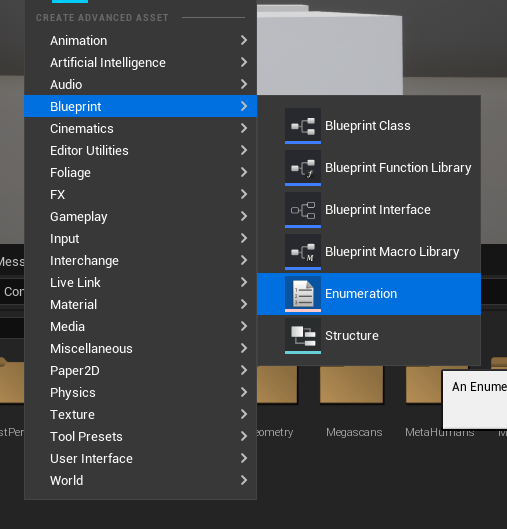
The creation and effective use of Data Tables in Unreal Engine 5 are predicated on two fundamental Blueprint assets: Enumerations (Enums) and Structures (Structs). These elements define the schema or blueprint for the data that will populate the Data Table, ensuring type safety and clarity.
-
Enumerations (Enums): Defining Discrete States
The process of establishing a Data Table typically commences with the definition of enumerations. An Enum provides a clear, human-readable way to represent a set of named integer constants, essentially defining a fixed list of discrete states or categories. For example, in the context of an RPG item system, an Enum namedEItemRaritymight define qualities such asCommon,Uncommon,Rare,Epic, andLegendary.
To create an Enum, developers navigate to the Content Browser, right-click, and selectBlueprint -> Enumeration. Once created, specific values corresponding to the desired states are added. This step is crucial as it establishes a controlled vocabulary for certain data points within the game, preventing typographical errors and ensuring consistency when assigning item rarities or other categorical properties.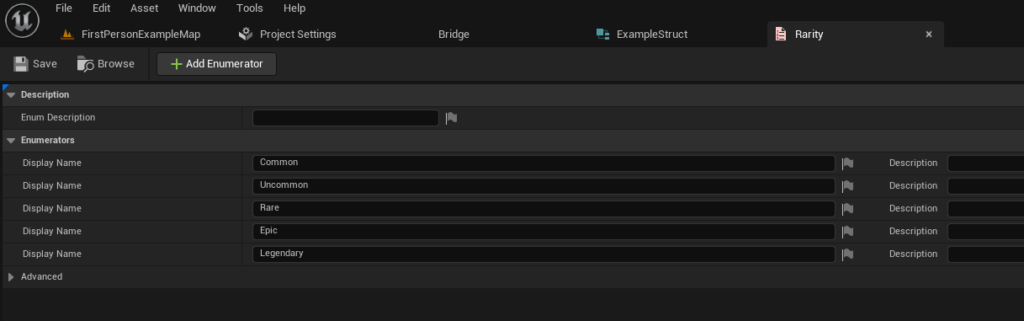
-
Structures (Structs): Grouping Related Data
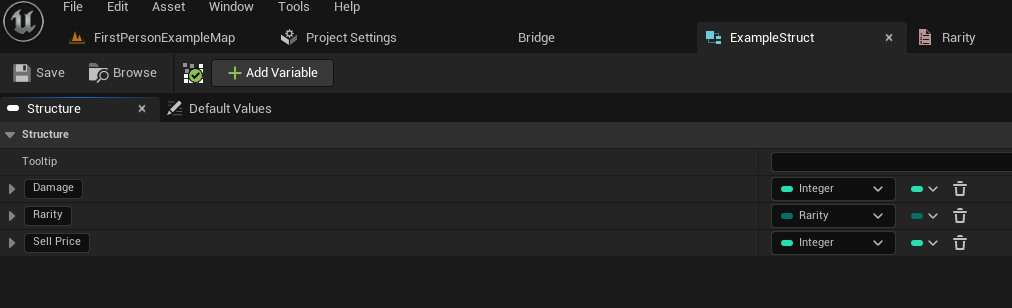
Following the creation of necessary Enums, the next logical step involves defining a Structure. A Struct is a composite data type that allows developers to group several variables of different types under a single name. This is fundamental for Data Tables because each row in a Data Table corresponds to an instance of a specific Struct, defining the types of values it will hold. For our RPG item example, a Struct namedFItemDatamight encapsulate properties likeDamage(an integer or float),Rarity(an instance of ourEItemRarityEnum), andSellPrice(an integer).
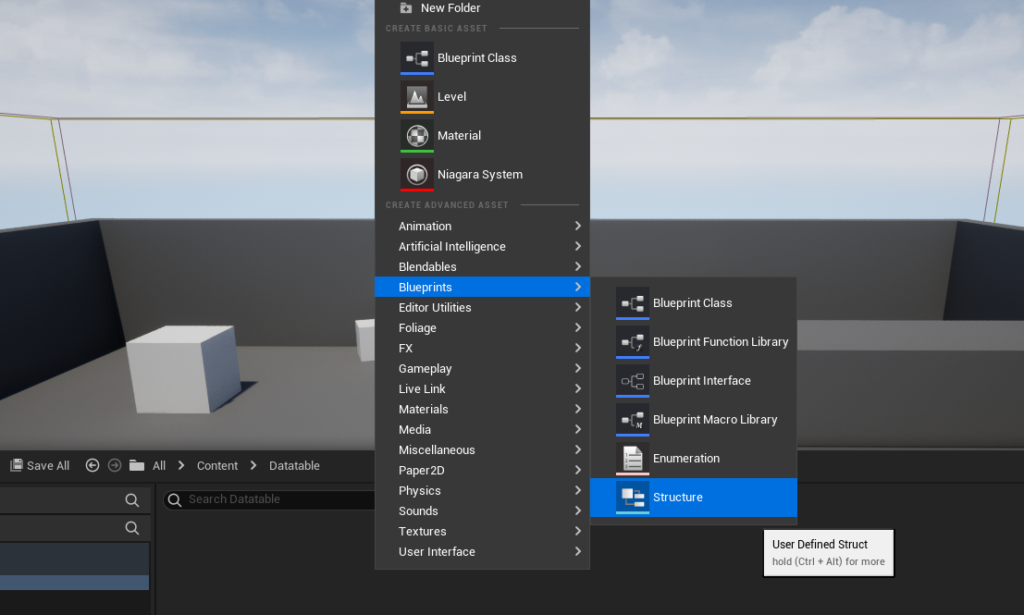
The creation process for a Struct mirrors that of an Enum: right-click in the Content Browser, then selectBlueprint -> Structure. Within the Struct editor, developers add new variables, assigning them appropriate types (e.g., Integer, Float, or custom Enums). This structured approach ensures that all related data for a particular entity (like an item) is logically bundled, making it easier to manage and access. The choice of a Struct as the basis for a Data Table is a deliberate design decision by Epic Games, promoting organized data storage and facilitating robust data validation.
Constructing and Populating the Data Table
With the foundational Enums and Structs in place, the actual Data Table asset can be created and populated. This marks the transition from defining the data schema to inputting the actual game-specific values.
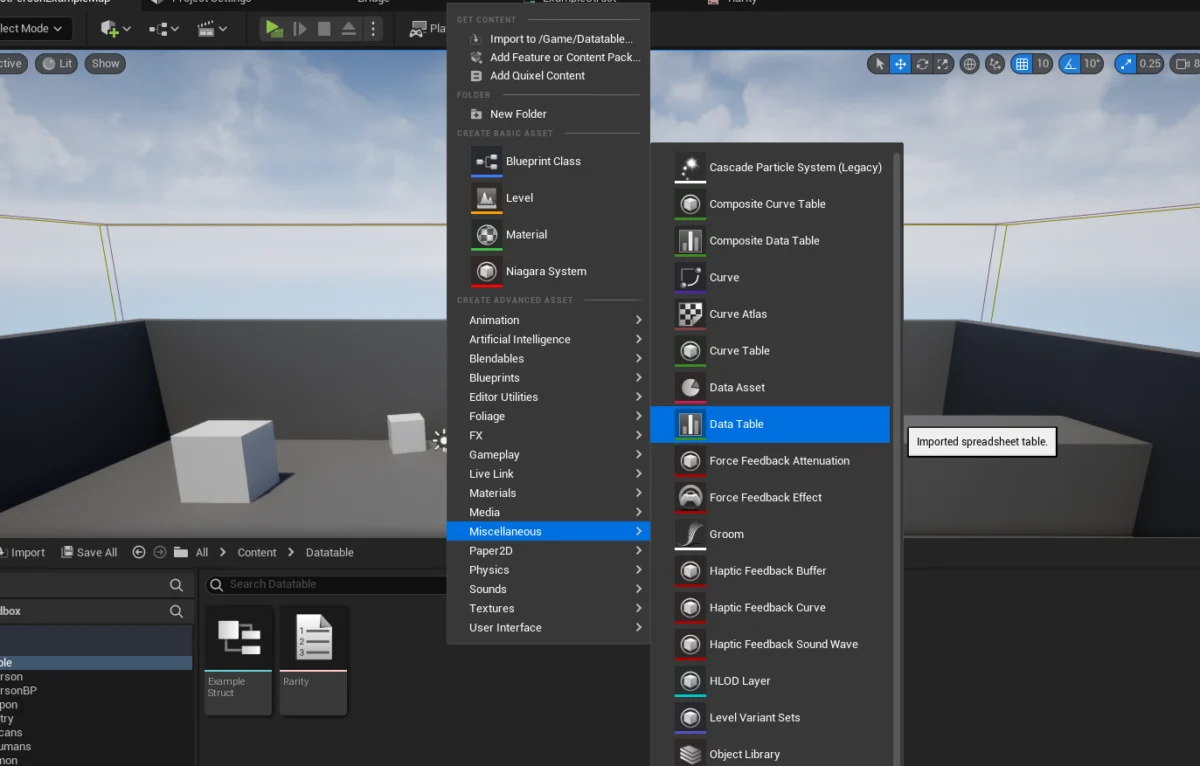
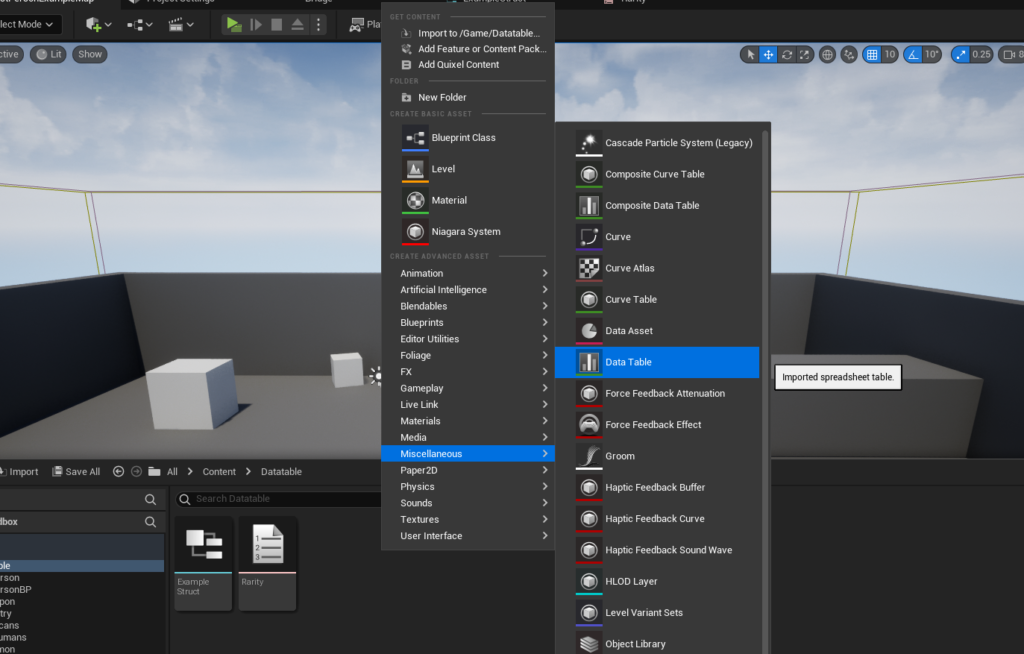
The creation of a Data Table is straightforward: within the Content Browser, right-click and select Miscellaneous -> Data Table. Upon selection, the Unreal Editor prompts the user to choose the Struct that will serve as the row structure for the new Data Table. This critical choice links the Data Table directly to the predefined schema (e.g., FItemData), ensuring that every row added will conform to the specified data types for Damage, Rarity, and SellPrice.
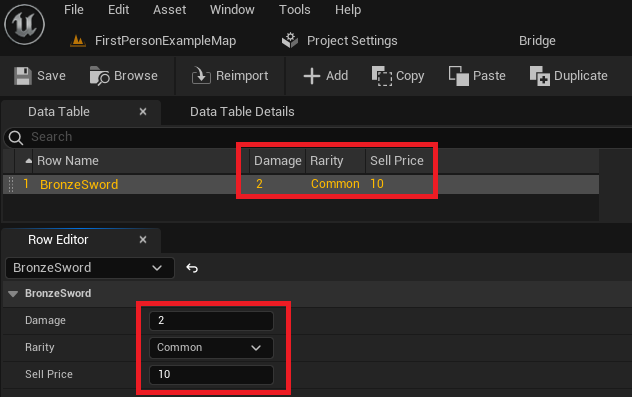
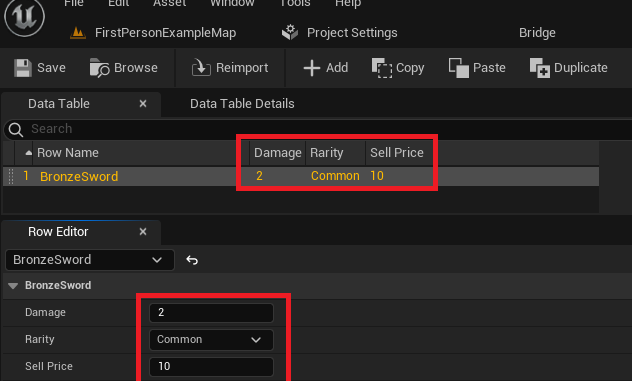
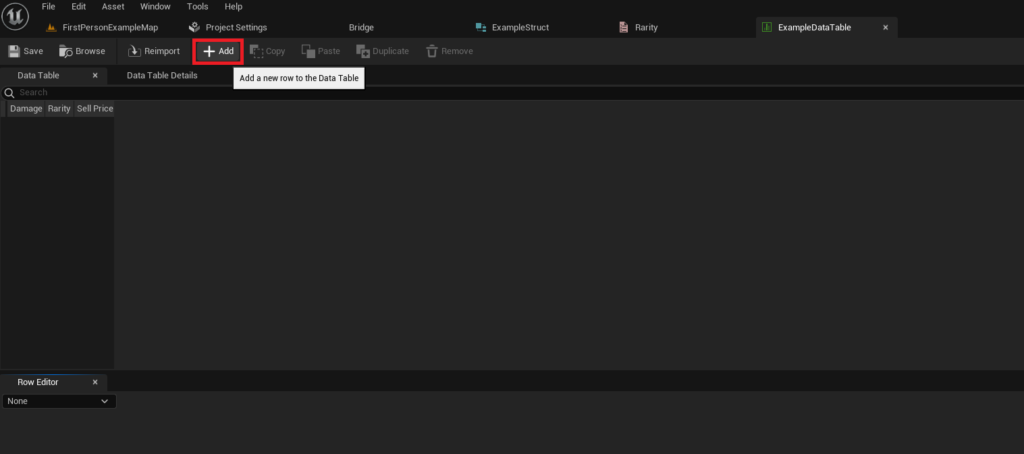
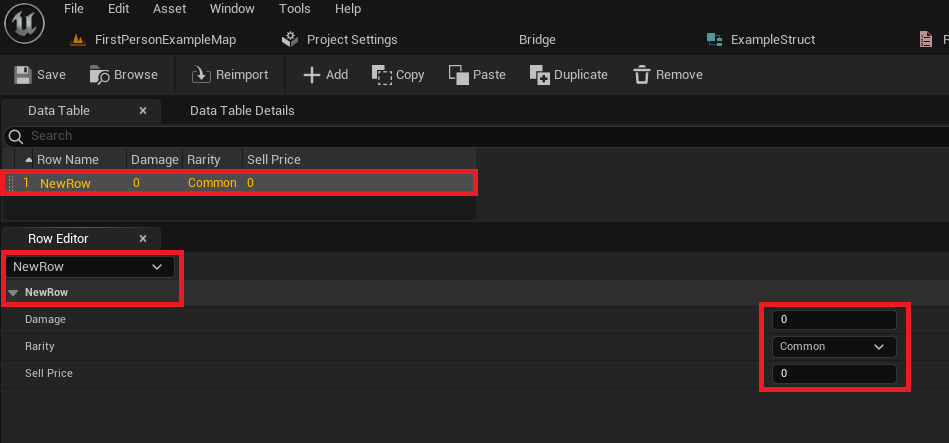
Once the Data Table is created and its row structure is defined, developers can begin populating it with data. The Data Table editor presents a tabular interface where new rows can be added. Each new row automatically inherits the default values defined in the associated Struct. A "Row Editor" panel below the main table view allows for detailed modification of individual row values. For instance, a developer might add a row named BronzeSword, then set its Damage to 10, Rarity to Common, and SellPrice to 50. The row names act as unique keys, enabling quick lookup of specific data entries. This intuitive, spreadsheet-like interface allows for rapid content creation and balancing, and it is imperative to save the Data Table asset frequently to preserve changes. The ability to modify these values directly in the editor, without touching a single line of code, significantly reduces iteration times and empowers designers to fine-tune gameplay mechanics on the fly.
Accessing and Iterating Through Data
The utility of Data Tables fully manifests when their stored data can be accessed and utilized within the game’s logic, primarily through Unreal Engine’s visual scripting system, Blueprints, or C++.
-
Retrieving Specific Data Rows
To access a specific entry, developers typically employ theGet Data Table Rownode in Blueprints. This node requires two primary inputs: a reference to the Data Table asset itself and theRow Name(the unique key) of the desired entry. If the specified row is found, theRow Foundexecution pin triggers, and theOut Rowpin provides an instance of the Struct containing all the data for that row. If the row is not found, theRow Not Foundpin executes, indicating an invalid data request.
A crucial feature of theGet Data Table Rownode is its ability to contextually adapt based on the selected Data Table. Once the Data Table asset reference is set, theRow Nameinput transforms into a dropdown menu, displaying all available row names within that table. This provides robust error checking at design time, preventing attempts to query non-existent rows. Furthermore, theOut RowStruct pin can be "split" (by right-clicking and selectingSplit Struct Pin), exposing each individual member variable (e.g.,Damage,Rarity,Sell Price) for direct use in Blueprint logic. This granular access allows developers to retrieve specific item properties and apply them to game entities dynamically.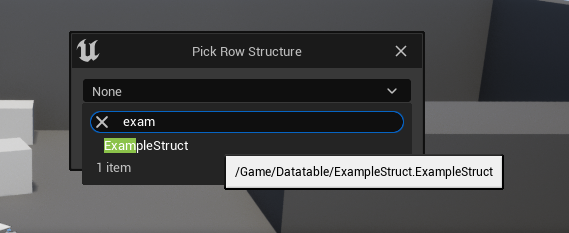
-
Looping Over All Data Table Rows
Beyond retrieving individual entries, it is often necessary to process all or a subset of data within a Data Table. For scenarios requiring iteration, such as initializing all items in a shop inventory or calculating statistics for all enemy types, theGet Data Table Row Namesnode is employed. This node, when provided with a Data Table reference, returns an array containing all theRow Names(keys) present in the table.
This array can then be fed into aFor Each Loopnode. Within each iteration of the loop, theArray Elementpin provides the currentRow Name. ThisRow Namecan then be connected to aGet Data Table Rownode, allowing the game logic to sequentially access the full data for each entry in the Data Table. This powerful combination enables dynamic generation of game content, data validation routines, or complex statistical calculations based on the entirety of the stored data. For instance, a developer could iterate through all item data to generate a dynamic list of items for a crafting system, displaying their properties and enabling gameplay interactions based on the Data Table entries.
Strategic Implications for Game Development
The strategic implementation of Data Tables in Unreal Engine 5 yields profound implications for the overall game development lifecycle and the quality of the final product.
- Streamlined Content Creation and Iteration: Data Tables dramatically accelerate the content creation pipeline. Designers can adjust gameplay parameters, balance mechanics, and add new items or characters without requiring programmer intervention or recompilation. This agility fosters a more experimental and iterative design process, leading to better-tuned gameplay.
- Enhanced Collaboration and Reduced Conflicts: By separating data from code, Data Tables minimize merge conflicts in version control systems, especially in large teams. Designers can update data assets, while programmers focus on core logic, and artists create visual assets, all working in parallel with less friction. This "single source of truth" approach ensures consistency across development stages.
- Improved Game Balance and Moddability: The centralized and accessible nature of Data Tables makes game balancing a more manageable task. Parameters can be easily tweaked and tested. Furthermore, for games that support modding, Data Tables provide a clear and accessible format for community members to create and integrate their own content, extending the life and appeal of the game.
- Facilitating Localization and Internationalization: Data Tables are indispensable for managing multi-language text. Localized strings for UI elements, quest dialogue, or item descriptions can be stored in Data Tables, allowing the game to dynamically load the appropriate language based on user settings, significantly simplifying the localization process.
- Performance and Scalability: While direct database access might be considered for extremely large datasets, for most game-related data, Unreal Engine’s Data Tables offer excellent performance characteristics. The data is loaded into memory as an asset, providing fast lookup times at runtime. This approach scales well for projects ranging from indie titles to AAA productions, supporting hundreds or thousands of unique data entries.
The Future of Data Management in Interactive Entertainment
The continued evolution of game engines like Unreal Engine 5 underscores a persistent industry trend towards greater abstraction and modularity in development. Data Tables are a prime example of this, empowering a broader range of development roles to contribute meaningfully to a project without deep programming expertise. Epic Games’ commitment to providing robust, user-friendly tools that facilitate data-driven design reinforces the importance of efficient data management as a cornerstone of modern game creation. As games grow in complexity and scope, the ability to manage, iterate, and deploy content rapidly and reliably will remain a critical differentiator. Data Tables, in their current form and with future enhancements, will undoubtedly continue to play a central role in enabling developers to build increasingly immersive and dynamic interactive experiences.
About the Author