The landscape of modern video game development continues to evolve, with player expectations for seamless, persistent experiences reaching new heights. Central to this demand is robust game data saving and loading functionality, a critical component that ensures players can resume their journeys without loss of progress. In response to this industry-wide necessity, Unreal Engine 5, Epic Games’ flagship development platform, offers a sophisticated yet accessible built-in SaveGame system. This system empowers developers to effortlessly manage game state persistence, fundamentally enhancing both the development workflow and the end-user experience. A recent demonstration highlighted the system’s ease of implementation, showcasing how developers can integrate comprehensive save/load capabilities with minimal effort, even for complex game states like player position.
The Critical Role of Game Saves in Modern Gaming
In an era where the global video game market is projected to exceed $200 billion annually, player retention and satisfaction are paramount. A fundamental aspect of this is the ability to save and load game progress reliably. Historically, game saving mechanisms varied wildly, often leading to frustrating data loss or complex, unintuitive save points. Modern gamers, accustomed to autosave features and cloud synchronization across platforms, demand a frictionless experience. A game that fails to provide consistent and reliable save functionality risks not only player dissatisfaction but also significant financial losses due to abandonment and negative reviews. For developers, a streamlined approach to implementing these systems is crucial, allowing them to focus resources on creative design rather than reinventing core infrastructure. The Unreal Engine 5 SaveGame system directly addresses this need by providing a pre-configured, engine-level solution that abstracts much of the underlying file management complexity.
Unreal Engine’s Approach to Data Persistence: The SaveGame Class
At the heart of Unreal Engine 5’s data persistence solution is the SaveGame class. This dedicated blueprint class acts as a container for all game data intended for storage. Unlike transient data stored in memory during a single play session, variables within a custom SaveGame class are marked for serialization, meaning they can be converted into a format suitable for storage and later reconstruction. This approach simplifies the process considerably: developers merely define the variables they wish to save (e.g., player health, inventory, quest progress, world state) within an instance of this class. The engine then handles the intricate details of writing this data to a file on the user’s machine and reading it back when required.
The versatility of the SaveGame class is notable, supporting nearly every common variable type, from simple booleans and integers to complex vectors, arrays, and even custom structures. This comprehensive support minimizes the need for developers to implement custom serialization routines, a common source of bugs and development overhead in other engines or bespoke systems. The physical location of these save files is platform-dependent, ensuring adherence to operating system conventions: Windows users will find them in the Local Appdata folder, macOS users in Library/Application Support, and Linux users in /home/username/.local/share. This standardized file management further contributes to the system’s reliability and ease of deployment across different environments. The abstraction provided by the engine means developers do not typically need to interact directly with these file paths, relying instead on high-level blueprint nodes.
A Step-by-Step Implementation Overview: Crafting a Persistent Experience
The implementation process, as recently outlined, demonstrates a clear, logical progression from defining the data structure to integrating save and load triggers within the game’s logic. This structured approach underscores Epic Games’ commitment to making powerful tools accessible to developers of all experience levels, particularly through its visual scripting language, Blueprints.
Establishing the Foundation: Creating the Save Class
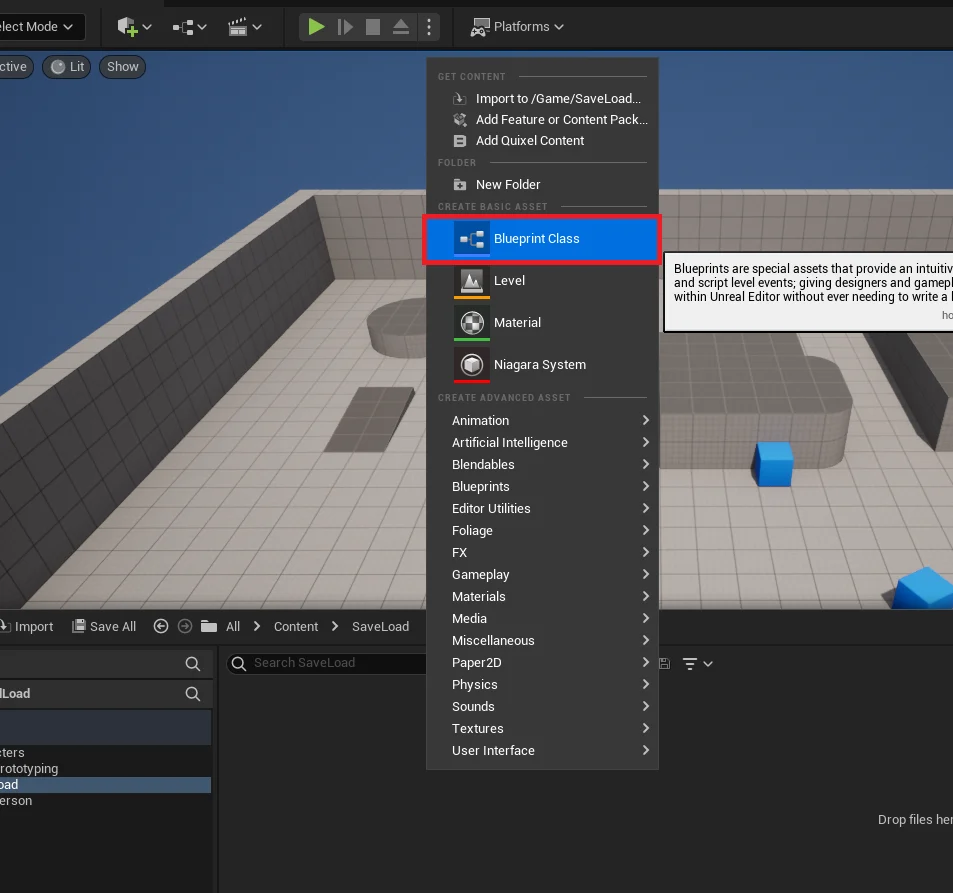
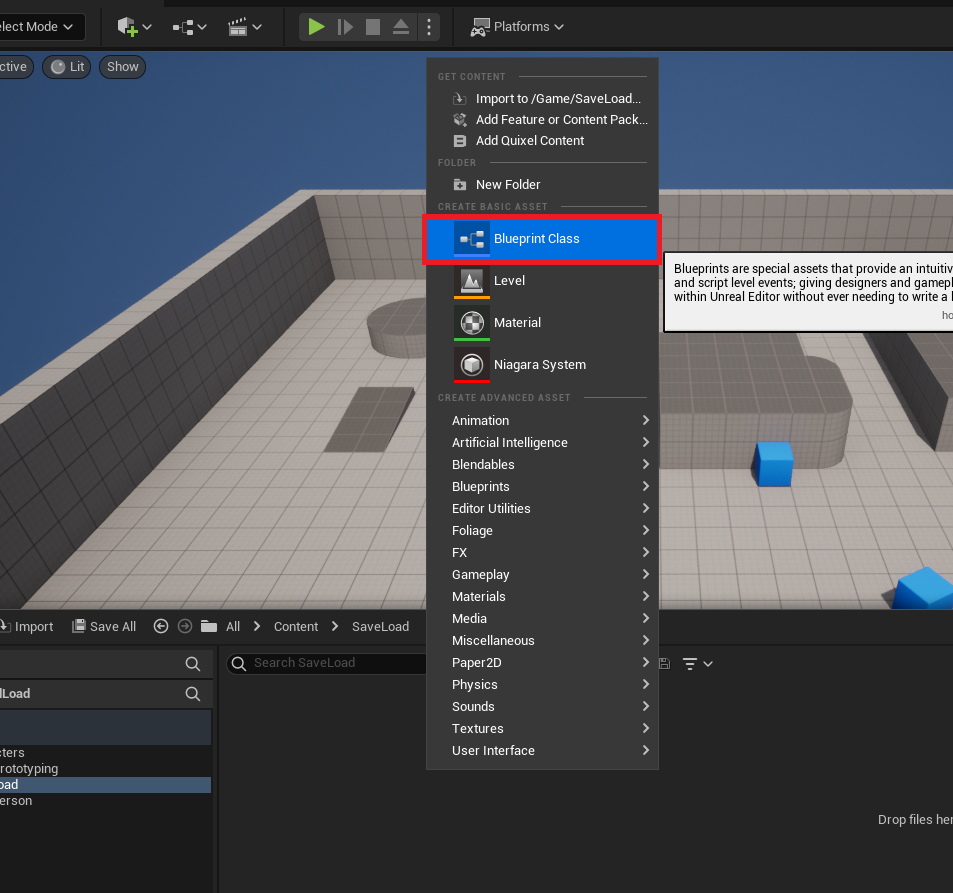
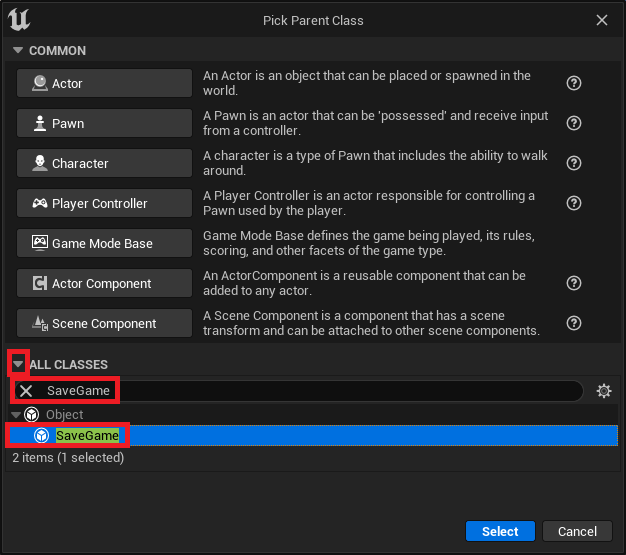
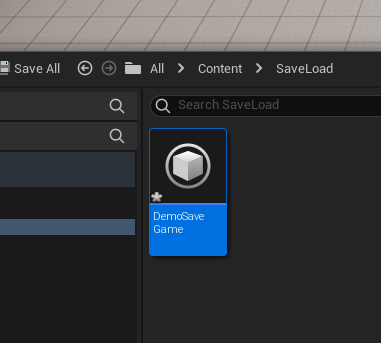
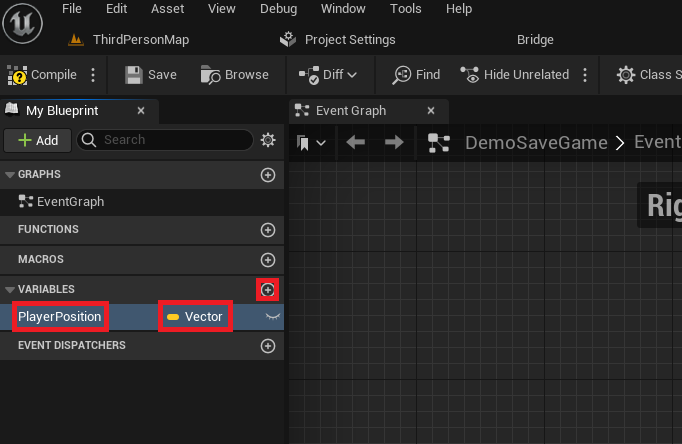
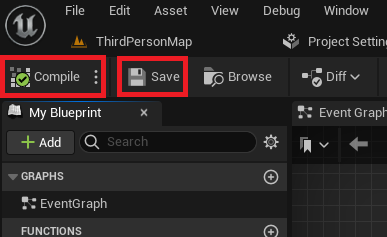
The initial phase involves creating a custom SaveGame blueprint class. This is achieved through the Unreal Engine editor’s content drawer, where developers can select the SaveGame parent class from an expanded list of options. Naming this class descriptively (e.g., "DemoSaveGame," "PlayerProgressSave") is crucial for maintainability, as this name will be referenced throughout the game logic. Once instantiated, this custom class becomes the central repository for all data points requiring persistence. For instance, in a recent demonstration, a Vector variable named "PlayerPosition" was added. This single variable, representing the player character’s coordinates in the game world, exemplifies how any critical piece of game state can be easily incorporated into the save structure. The simple act of compiling and saving this blueprint solidifies the data structure, preparing it for runtime interaction.
Integrating Core Functionality: The Game Instance as a Central Hub
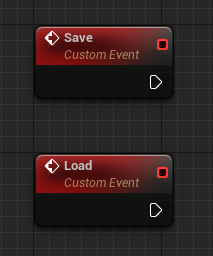
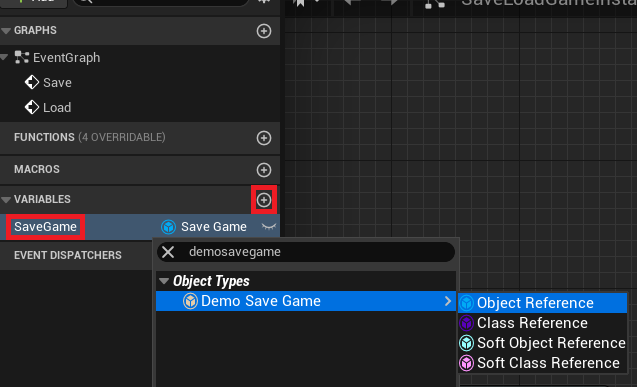
To orchestrate the saving and loading operations, a custom Game Instance blueprint is utilized. The Game Instance is a powerful, persistent object that exists for the entire duration of a game session, even across level changes, making it an ideal candidate for managing global save data. Within this Game Instance, two custom events, "Save" and "Load," are established. These events serve as the primary entry points for triggering the respective data persistence operations. Furthermore, a new variable, "SaveGame," is created within the Game Instance and set to the type of the custom SaveGame class created earlier (e.g., "DemoSaveGame"). This variable will hold a reference to the active SaveGame object in memory, allowing for direct manipulation of its contained variables and subsequent storage or retrieval.
Orchestrating Data Retrieval: The Loading Mechanism
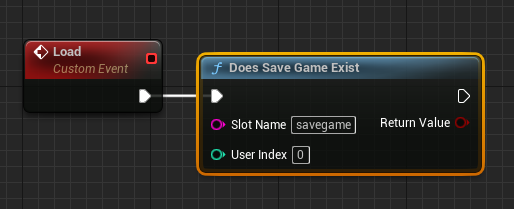
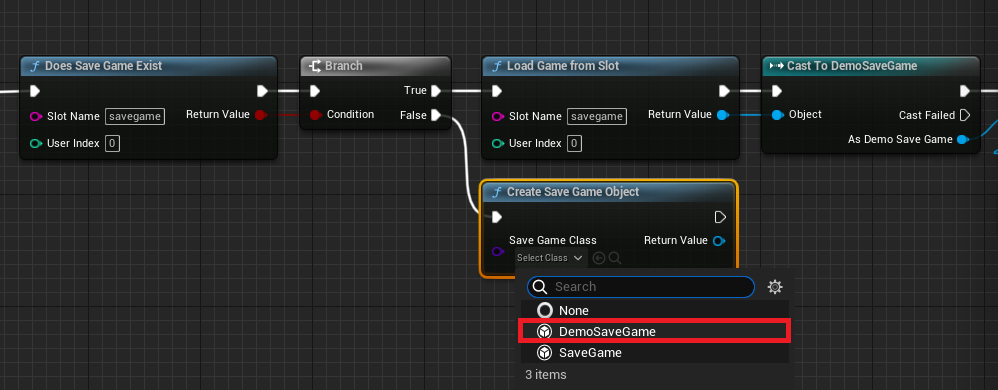
The loading mechanism begins with the "Load" event within the Game Instance. The first critical step is to determine if a save file already exists for a given "Slot Name" using the "Does Save Game Exist" node. The "Slot Name" is a developer-defined identifier (e.g., "savegame," "slot1") that uniquely identifies a particular save file on disk. This allows for multiple save slots, a common feature in many games. A "Branch" node then evaluates the existence of the save file.
-
If the Save File Exists (True Branch): The system proceeds to retrieve the stored data. A "Load Game From Slot" node is called, using the same "Slot Name." The output of this node is a generic
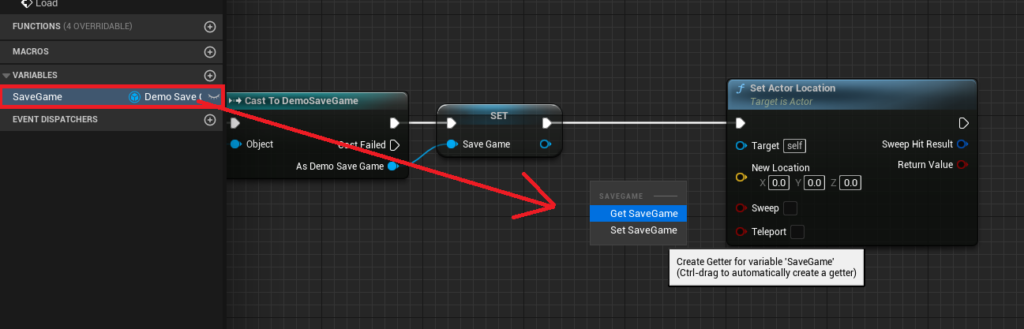
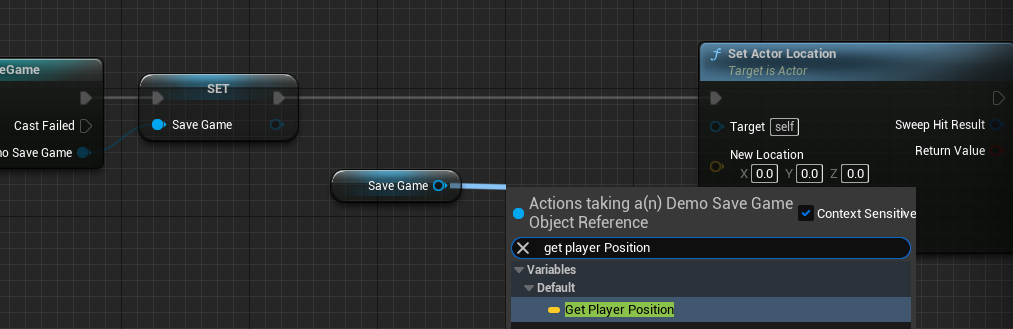
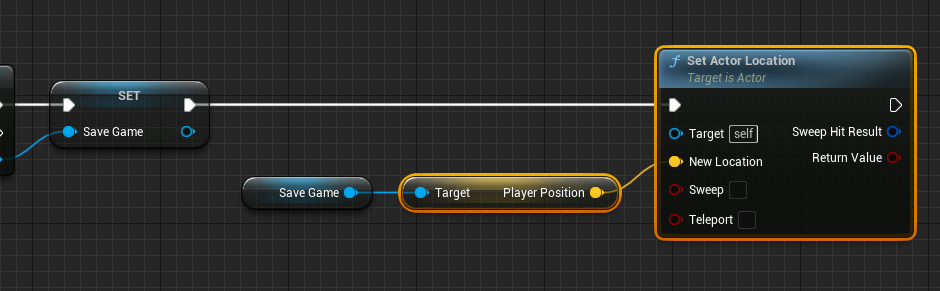
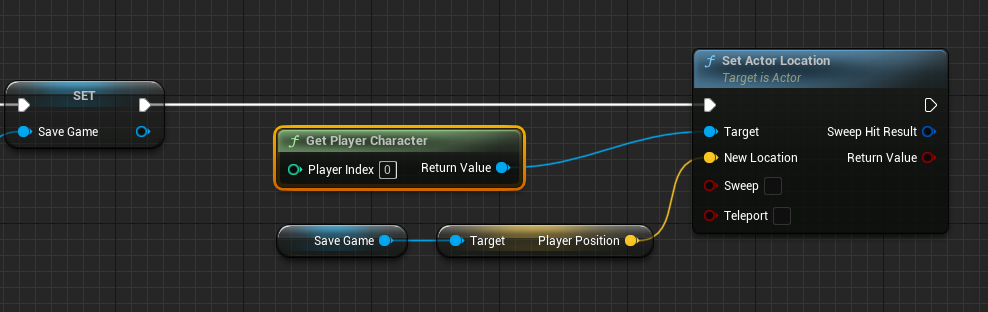
SaveGameobject, which must then be "Cast To" the specific customSaveGameclass (e.g., "Cast to DemoSaveGame") to access its unique variables. This cast operation is essential for type safety and allows the blueprint system to understand the structure of the loaded data. The successfully castSaveGameobject is then assigned to theGame Instance‘s "SaveGame" variable, establishing a live reference to the loaded data. In the example, the "PlayerPosition" variable is retrieved from this loadedSaveGameobject. Finally, a "Get Player Character" node identifies the active player, and its "Set Actor Location" node is used to teleport the player character to the coordinates stored in "PlayerPosition," effectively restoring their last saved location.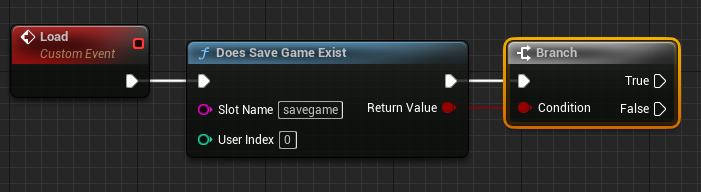
-
If the Save File Does Not Exist (False Branch): A new save file must be initialized. A "Create Save Game Object" node is used, specifying the custom
SaveGameclass as its type. This creates a fresh instance of theSaveGameobject in memory. This newly created object is then assigned to theGame Instance‘s "SaveGame" variable. This ensures that even if no prior save exists, the game always has a validSaveGameobject to interact with, preventing null reference errors and allowing the game to save data for the first time. The blueprint flow is then designed to merge with the "true" path’s logic or proceed with default game state initialization, ensuring a consistent state regardless of whether a save file was found.
Securing Progress: The Saving Mechanism
The saving process, triggered by the "Save" event in the Game Instance, ensures that the current game state is written to disk. It begins by retrieving the Game Instance‘s "SaveGame" variable and performing an "Is Valid" check. This crucial step prevents attempts to save data to a non-existent or invalid SaveGame object, a common pitfall in game development.

-
If the Save File is Valid (Is Valid Pin): The system proceeds to update the
SaveGameobject with current game data. In the demonstration, a "Get Player Character" node is used to obtain a reference to the active player, followed by a "Get Actor Location" node to retrieve their current coordinates. ThisVectorvalue is then used to "Set Player Position" within theSaveGameobject. This step updates the in-memory representation of the save data.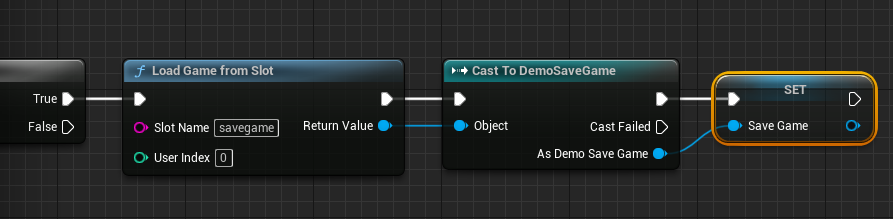
-
If the Save File is Not Valid (Is Not Valid Pin): This scenario typically occurs if the "Load" event was never called, or if the
Game Instancewas initialized without a validSaveGameobject. In this case, a "Create Save Game Object" node is called, instantiating a newSaveGameobject of the custom class. This newly created object is then assigned to theGame Instance‘s "SaveGame" variable, ensuring a valid target for saving. The flow then merges with the "Is Valid" path, allowing the newly createdSaveGameobject to be populated with current game data.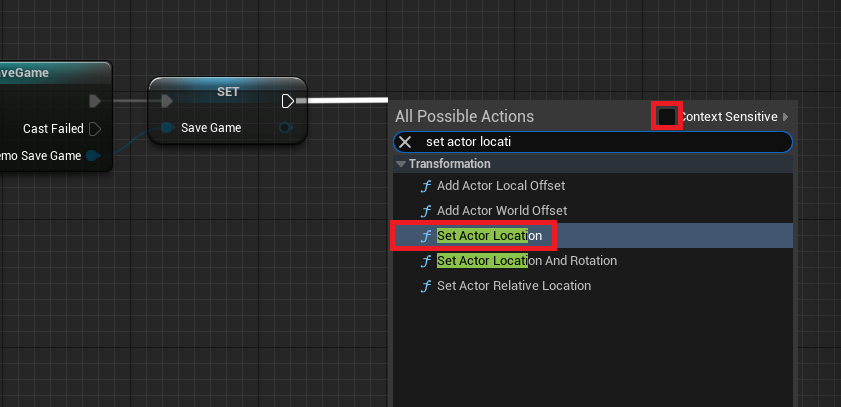
Finally, irrespective of whether the SaveGame object was newly created or already existed, the updated in-memory SaveGame object is written to disk using either the "Save Game to Slot" or "Async Save Game to Slot" node. The "Slot Name" must match the one used during loading. The choice between synchronous ("Save Game to Slot") and asynchronous ("Async Save Game to Slot") saving is an important optimization. For small amounts of data, synchronous saving is acceptable, but for larger datasets, asynchronous saving is highly recommended. Asynchronous saving performs the disk write operation in the background, preventing hitches or freezes in the game’s framerate, which is critical for maintaining a smooth player experience, especially in performance-sensitive titles.
Activating Persistence: Triggering Save and Load Events
With the core save and load logic encapsulated within the Game Instance, the final step is to trigger these events from within the game world. This is typically done through player input or specific game events (e.g., reaching a checkpoint, exiting the game). In the demonstration, keyboard inputs (e.g., "1" for Save, "2" for Load) were used. Within the Player Character blueprint, a "Key Press Event" is configured for the chosen key. From this event, a "Get Game Instance" node is used to retrieve a reference to the active Game Instance. This generic reference is then "Cast To" the custom Game Instance class, allowing access to its custom "Save" and "Load" events. By connecting the "As Game Instance" pin to calls for the "Save" and "Load" events, pressing the respective keys now seamlessly triggers the entire data persistence mechanism, saving the player’s current location or restoring their last saved position.
Broader Implications for Game Development
The Unreal Engine 5 SaveGame system carries significant implications for game developers across the spectrum, from independent studios to AAA powerhouses. For indie developers, it drastically lowers the barrier to entry for implementing robust save systems, freeing up precious development time and resources that would otherwise be spent on complex low-level programming. This allows smaller teams to compete more effectively by delivering feature-rich games with professional-grade persistence. For larger studios, the standardized and efficient nature of the system promotes consistency across projects and reduces the likelihood of costly bugs related to data corruption or loss. The flexibility to save almost any variable type, coupled with the choice between synchronous and asynchronous saving, provides the necessary tools for optimizing performance and tailoring the save experience to specific game requirements.
Furthermore, this system facilitates more rapid iteration during development. Designers and programmers can quickly implement and test new game mechanics, knowing that the underlying save system is robust enough to handle evolving data structures (with proper versioning considerations, which can be layered on top of the base SaveGame system). This agility is invaluable in today’s fast-paced development cycles. The very existence of such a comprehensive, built-in system underscores Unreal Engine’s position as a leading platform for empowering creators, focusing on reducing technical hurdles to unlock greater creative freedom.
Epic Games’ Vision and Developer Empowerment
While Epic Games has not issued a specific statement on this particular feature recently, the continued development and refinement of such core systems align perfectly with their overarching philosophy: to provide developers with powerful, accessible tools that streamline the creation process. The Unreal Engine, known for its visual scripting capabilities (Blueprints), democratizes game development, making it possible for individuals and small teams without extensive C++ programming knowledge to build complex interactive experiences. The SaveGame system is a prime example of this commitment, abstracting away the intricacies of file I/O and data serialization into user-friendly nodes. This empowers a broader range of creators to bring their visions to life, knowing that fundamental functionalities like data persistence are handled efficiently and reliably by the engine itself. The emphasis on clear documentation and guided tutorials further strengthens this ecosystem, ensuring that developers can quickly learn and deploy these critical features.
Conclusion
The Unreal Engine 5 built-in SaveGame system represents a significant asset for game developers. By providing an intuitive, flexible, and robust framework for data persistence, it addresses a fundamental requirement of modern gaming. From simplifying the creation of custom save data structures to offering clear pathways for loading and saving game states, the system empowers developers to focus on innovation and player engagement. Its support for various data types, combined with considerations for performance through asynchronous saving, ensures that games built on Unreal Engine 5 can deliver the seamless, reliable experiences players expect. As game complexity continues to grow, such foundational systems will remain indispensable, cementing Unreal Engine’s role as a vital tool in the ever-expanding world of interactive entertainment. The demonstrated ease of saving and loading even simple player positions serves as a testament to the system’s broader capabilities, promising enhanced player retention and more efficient development cycles across the industry.
About the Author