The independent game development landscape has recently witnessed a significant advancement in content delivery efficiency, as the itch.io platform rolled out a major update to its desktop application. Developers can now leverage the powerful capabilities of ‘butler,’ itch.io’s sophisticated command-line interface for build uploads, directly within a user-friendly graphical interface (GUI). This strategic enhancement, found in the app’s newly introduced "Upload" section, aims to democratize access to ‘butler’s’ differential patching technology, traditionally reserved for those comfortable with terminal commands, thereby streamlining the process of pushing game builds to the platform.
The Evolution of Itch.io and the Indie Game Ecosystem
Itch.io, since its inception in 2013, has carved out a unique and vital niche in the digital distribution space for independent video games. Founded by Leaf Corcoran, the platform distinguishes itself through its developer-centric approach, offering unparalleled flexibility in pricing models, revenue sharing, and direct communication channels between creators and players. Unlike more curated or commercially driven storefronts, itch.io embraces a vast diversity of projects, from experimental art games and game jam entries to fully-fledged commercial releases, fostering a vibrant ecosystem for creative expression and niche communities.
The platform’s rapid growth has been propelled by its commitment to empowering independent developers, often operating with limited resources and expertise. This commitment extends to providing robust tools that simplify the complex process of game development and distribution. Before this recent update, one such critical tool was ‘butler,’ a command-line utility designed to make game updates as efficient as possible. While highly effective, its reliance on a command-line interface presented a barrier to entry for a segment of the developer community, particularly those new to development or preferring visual tools.
Understanding Butler: The Command-Line Predecessor
‘Butler’ was conceived as itch.io’s answer to the perennial challenge of game updates: how to deliver new versions to players without requiring them to re-download the entire game every time. Traditional browser-based uploads or simple file hosting often necessitate a full re-download, even for minor bug fixes or small content additions. This process is inefficient, time-consuming, and costly in terms of bandwidth for both developers and players.
At its core, ‘butler’ employs a sophisticated differential patching system. When a developer pushes a new build to an existing channel (e.g., windows-beta, linux-arm64, macos-preview), ‘butler’ does not upload the entire new version. Instead, it compares the new build’s files against the previously uploaded version on that specific channel. It then calculates and uploads only the differences, or "patches," between the two versions. This method drastically reduces the amount of data transferred. For instance, a game receiving a small update might only require a patch of a few megabytes, even if the full game is several gigabytes in size.
Once uploaded, itch.io’s servers further optimize these patches through re-compression, ensuring they are as small as possible before distribution to players. Players using the itch.io app benefit directly from this technology; when an update is available for a game they own, the app downloads only the patch, not the full game. This results in significantly faster update times, reduced bandwidth consumption, and a smoother overall user experience. For developers, this translates to lower hosting costs and the ability to push updates more frequently without imposing a burden on their player base. Despite these profound advantages, the requirement of terminal proficiency meant that many developers, particularly those less technically inclined, either avoided ‘butler’ altogether or struggled with its implementation.
The Game-Changing GUI Integration: A New Era of Accessibility
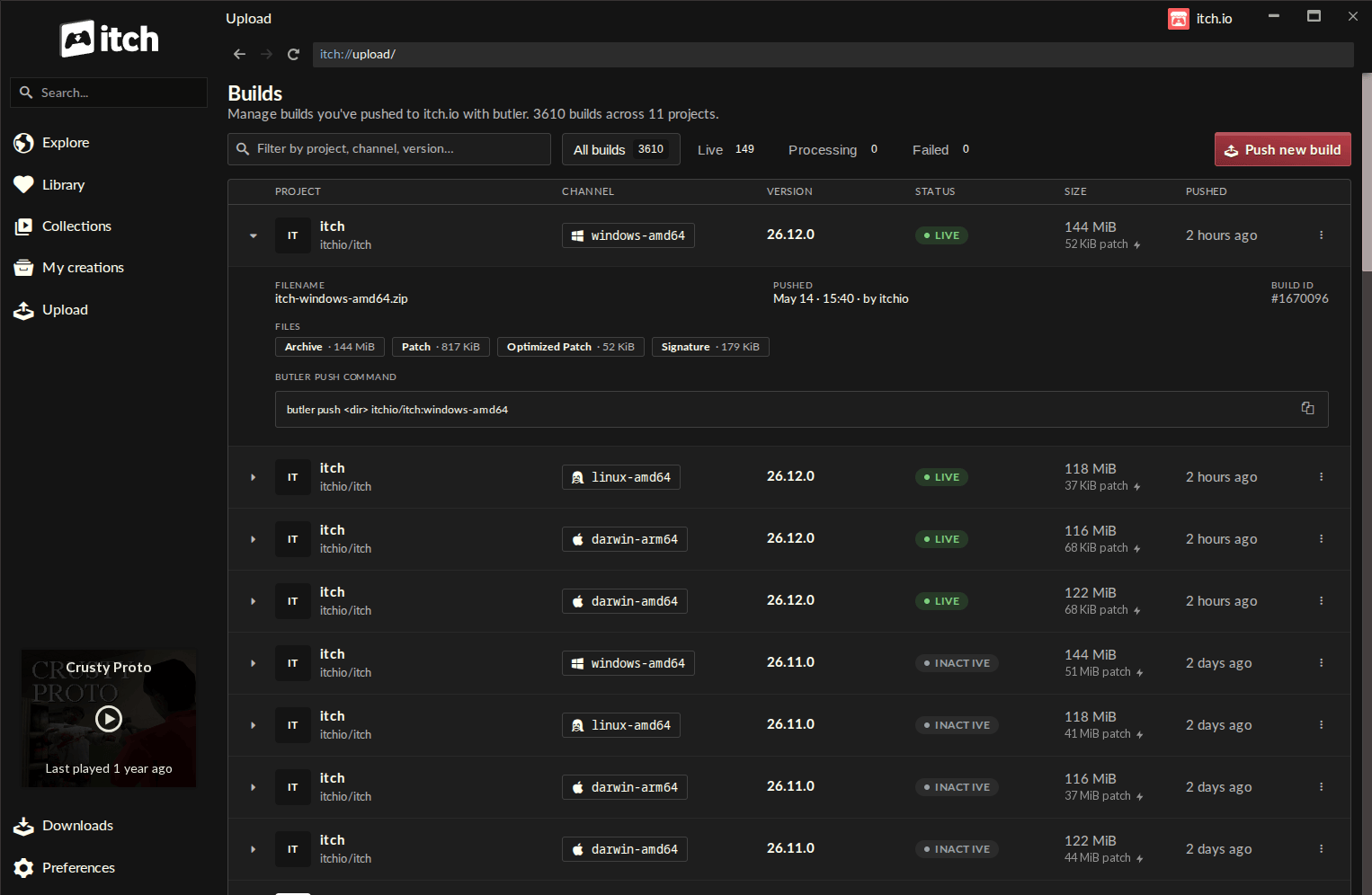
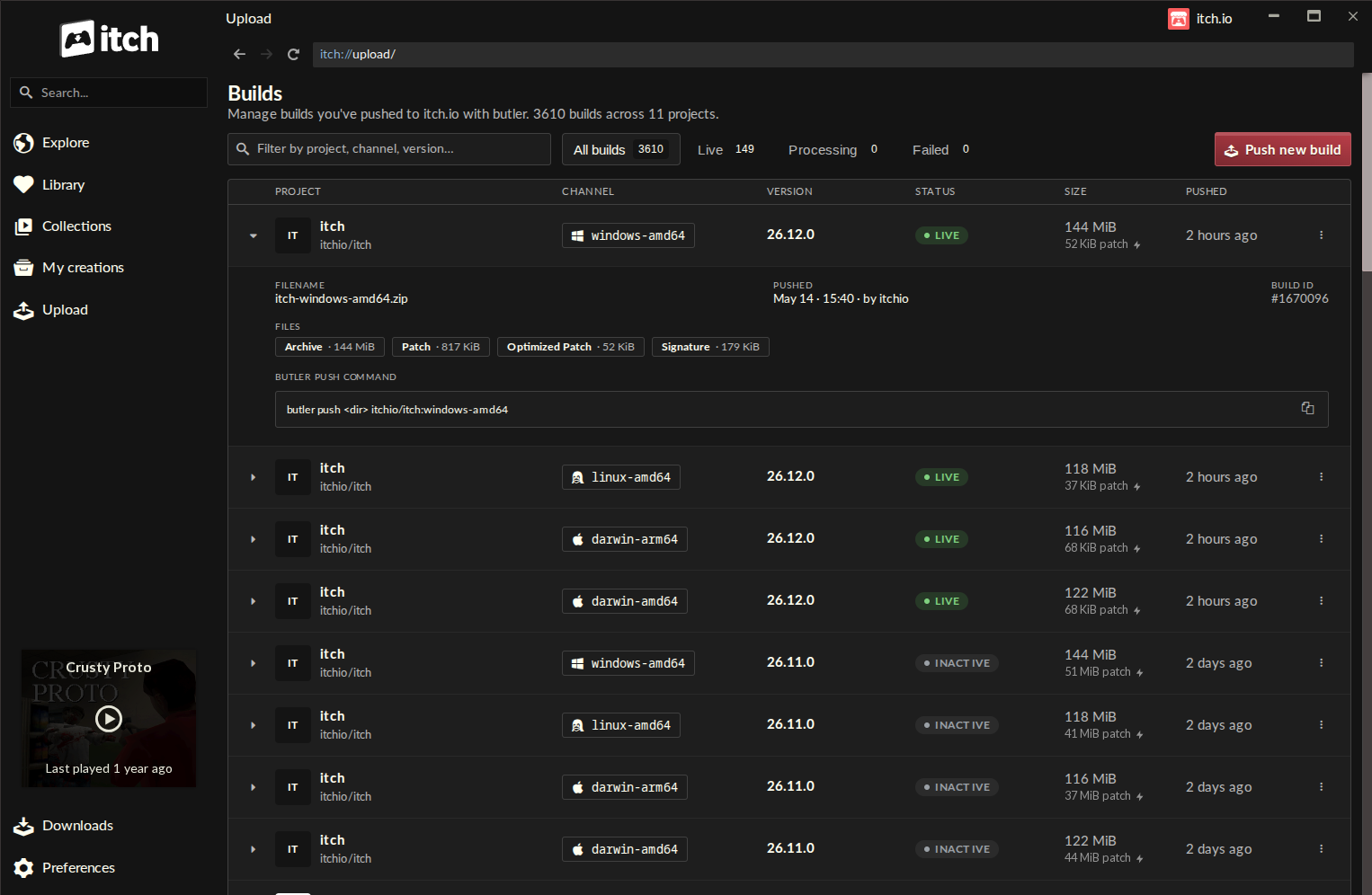
The latest iteration of the itch.io desktop app, specifically version v26.12.0 and above, addresses this long-standing accessibility gap by embedding ‘butler’s’ functionality within a intuitive graphical user interface. This integration is accessible via a dedicated "Upload" entry in the app’s sidebar, leading to a new "Builds" page.
The "Builds" page serves as a centralized dashboard for all projects associated with a developer’s account, providing a comprehensive overview of every uploaded build. Each entry clearly displays critical information such as the project name, the specific channel it was pushed to, the version number, its current status (e.g., processing, active), the file size, and the exact timestamp of the upload. This detailed logging offers developers an unprecedented level of transparency and control over their game’s distribution history, allowing for quick verification and troubleshooting.
The true innovation, however, lies in the "Push new build" dialog, initiated by a prominent button on the "Builds" screen. This dialog guides developers through a simplified, step-by-step process:
- Project Selection: Developers first select the project they wish to update from a dropdown menu, ensuring the correct game is targeted.
- Channel Management: They can then choose an existing distribution channel or, significantly, create a new one simply by typing a desired name (e.g.,
alpha-test,public-release). This flexibility allows for robust version control and phased rollouts. - Optional Versioning: An optional field for setting a specific version number helps maintain clear development timelines and player expectations.
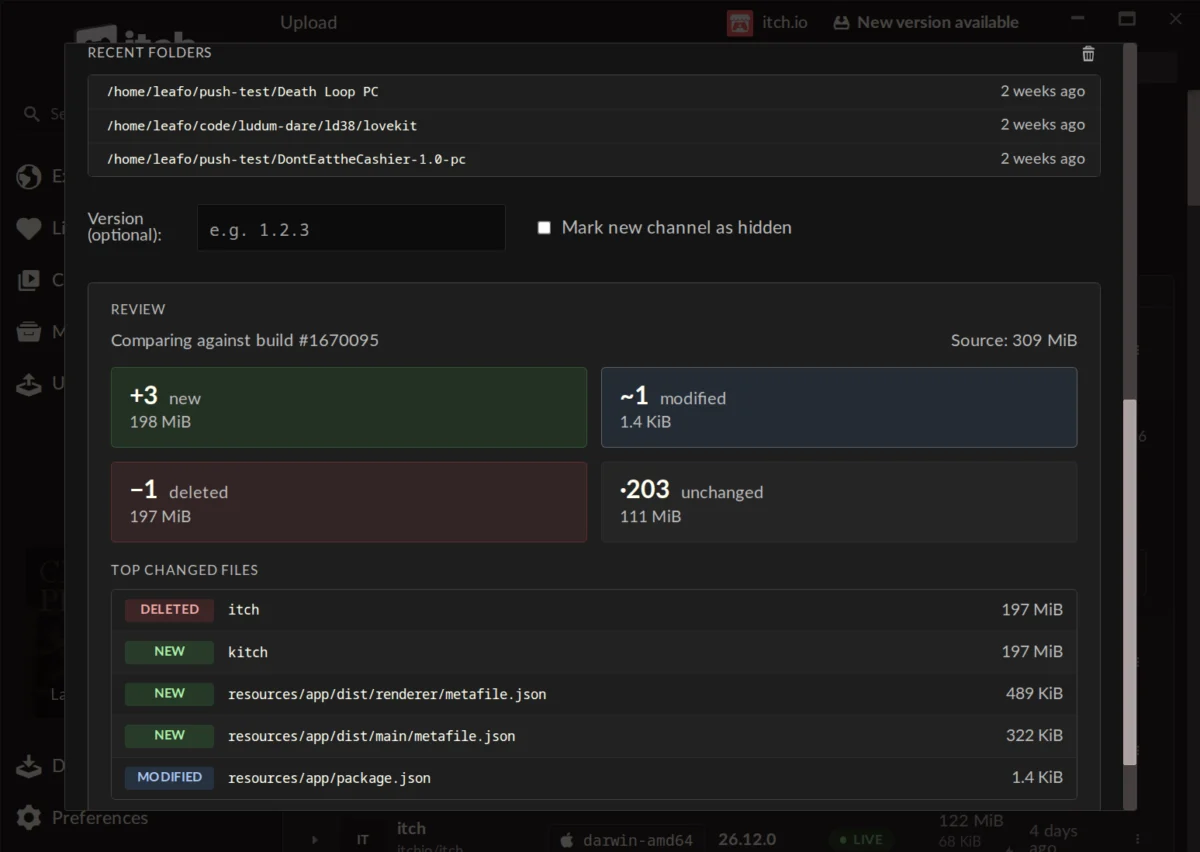
- Content Upload: The core of the process involves a simple drag-and-drop interface for uploading the game’s build – either a folder containing the game files or a compressed
.ziparchive. A "recent folders" list further enhances convenience, allowing quick access to previously used build locations.
A particularly valuable feature is the pre-upload "Preview" functionality. Before committing to an upload, developers can generate a detailed summary of the proposed changes. This preview categorizes files as new, modified, deleted, or unchanged, providing size breakdowns for each group. Crucially, it also lists the largest changed files, offering immediate insight into the nature and scope of the update. This proactive analysis tool is instrumental in preventing errors, ensuring only intended changes are pushed, and providing developers with a clearer understanding of how their updates impact overall build size and player download experience.
Furthermore, the integrated ‘butler’ within the itch.io app automatically manages its own updates, eliminating the need for developers to manually maintain the command-line tool. It also leverages the app’s existing login credentials, simplifying authentication and enabling seamless build management across multiple developer accounts if the app’s profile switching feature is utilized. This integration significantly lowers the technical overhead associated with efficient game distribution.
Implications for the Developer Ecosystem and Itch.io’s Future
This update carries profound implications for the independent game development community and itch.io’s strategic position in the market:
- Enhanced Accessibility and Inclusivity: By abstracting away the complexities of the command line, itch.io has opened up the power of ‘butler’ to a much broader audience. This includes emerging developers, those with less technical backgrounds, and creators who simply prefer a visual workflow. This move democratizes efficient game distribution, making it accessible to all, irrespective of their comfort with terminal environments.
- Increased Efficiency and Productivity: The streamlined GUI reduces the cognitive load and potential for error associated with manual command-line inputs. Developers can now push updates faster and with greater confidence, allowing them to dedicate more time to game development itself rather than build management. This efficiency encourages more frequent updates, leading to more responsive development cycles and higher quality games over time.
- Improved Player Experience: With developers more readily adopting ‘butler’s’ patching system, players will consistently benefit from smaller, faster updates. This enhances player satisfaction, reduces data consumption (a critical factor for users with limited bandwidth or mobile data plans), and encourages sustained engagement with games on the platform.
- Competitive Advantage: In an increasingly crowded digital storefront landscape, offering superior developer tools can be a significant differentiator. This ‘butler’ GUI integration strengthens itch.io’s value proposition, positioning it as a leading platform for indie developers seeking efficient, flexible, and accessible distribution solutions, potentially attracting more creators away from platforms with less intuitive or more restrictive tools.
- Data and Analytics Potential: The detailed logging on the "Builds" page could pave the way for future analytical tools, offering developers insights into build sizes over time, update frequency, and other metrics that could inform their development and release strategies.
- Community Reception: Initial feedback from the developer community has been overwhelmingly positive. Comments highlight the ease of use, improved organization, and the "self-enforcing nature" of the comparison step, which minimizes mistakes. Developers have praised the update as making the itch.io app "a lot more useful" and expressed intentions to migrate their software to the platform due to these improvements. While some inquiries about converting older, non-‘butler’ uploaded projects were raised (a feature currently not supported due to metadata requirements), the overall sentiment points to a significant step forward.
Getting the Update and Looking Ahead
For existing users of the itch.io app, the update process is seamless, as the application automatically downloads and installs new versions. Developers eager to access this new functionality immediately can manually check for updates via the app’s Preferences screen. To utilize the "Upload" tab and its integrated ‘butler’ GUI, users must be running at least v26.12.0 of the itch.io app. New users can download the itch.io app directly from the official website. For developers who still prefer or require the full command-line capabilities of ‘butler,’ comprehensive documentation remains available on the itch.io website.
This significant update underscores itch.io’s ongoing commitment to fostering a robust and developer-friendly ecosystem. By making powerful, efficient tools like ‘butler’ accessible to all, itch.io not only streamlines the technical aspects of game distribution but also empowers a wider array of creators to share their visions, ultimately enriching the diversity and vibrancy of the independent gaming world. The integration marks a pivotal moment, transforming a powerful utility into an intuitive feature, poised to enhance the workflow of countless indie developers globally.
About the Author