Unreal Engine 5 (UE5) offers a powerful and flexible suite of tools for game development, and among its most impactful features are Data Tables. These robust assets provide programmers and designers with a streamlined method to create, manage, and access extensive lists of information, fundamentally altering how game data is structured and utilized within a project. By centralizing crucial game variables into an easily accessible and editable format, Data Tables empower development teams to achieve greater efficiency, scalability, and collaborative harmony. This guide delves into the mechanics of Unreal Engine 5 Data Tables, from their foundational principles to practical implementation and broader implications for game development workflows.
The Evolving Landscape of Game Data Management
In modern game development, especially for titles featuring vast inventories, diverse character abilities, complex enemy AI, or extensive localization requirements, managing data effectively is paramount. Historically, developers might have hard-coded values directly into blueprints or C++ classes, or relied on simpler structures like arrays. However, these methods quickly become unwieldy as projects grow, leading to increased potential for errors, difficulty in balancing gameplay, and significant overhead in content updates. Data Tables emerged as a superior solution, addressing these challenges by providing a structured, editor-friendly, and persistent means of storing predefined information.
At its core, a Data Table in Unreal Engine 5 serves as a structured collection of data, akin to a spreadsheet, where each row represents a distinct entry and each column defines a specific attribute of that entry. This data is stored as an asset within your project, making it effortlessly retrievable and modifiable from any part of your game’s code, be it Blueprint visual scripting or C++. The key advantage lies in its persistence within the editor; developers can populate and fine-tune data during development, and these values remain consistent and readily available during runtime. This capability is invaluable for managing attributes of game entities such as items, characters, or enemies, allowing designers to tweak values like weapon damage, item rarity, or enemy health without requiring a code recompilation or complex data parsing. The ease of creation and low barrier to entry make Data Tables an indispensable tool for any Unreal Engine 5 project.
Core Concepts: Structs and Enums as Foundations
Before diving into the creation of a Data Table, it is crucial to understand its foundational components: Enumerations (Enums) and Structures (Structs). These elements dictate the schema and types of data that a Data Table can hold, ensuring consistency and clarity.
Creating an Enum: Defining Categories
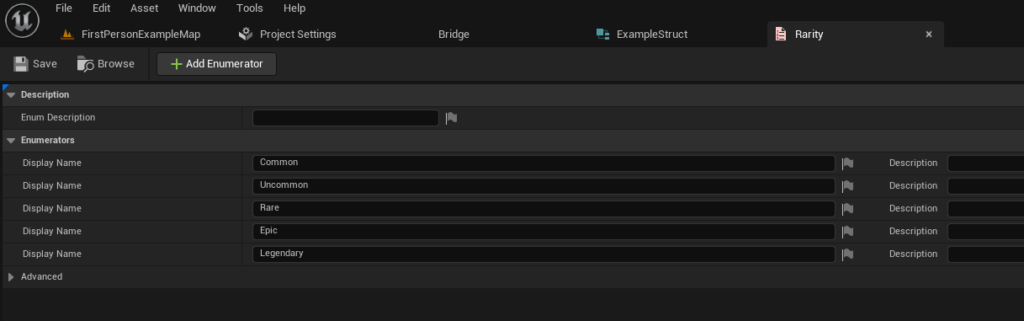
An Enum, short for Enumeration, is a distinct type consisting of a set of named integral constants. In game development, Enums are exceptionally useful for representing a fixed set of options or categories, thereby enhancing code readability and reducing the likelihood of errors associated with magic strings or arbitrary numbers. For instance, when designing an RPG, item quality can be categorized as Common, Uncommon, Rare, Epic, or Legendary. An Enum provides a clear and constrained way to represent these states.
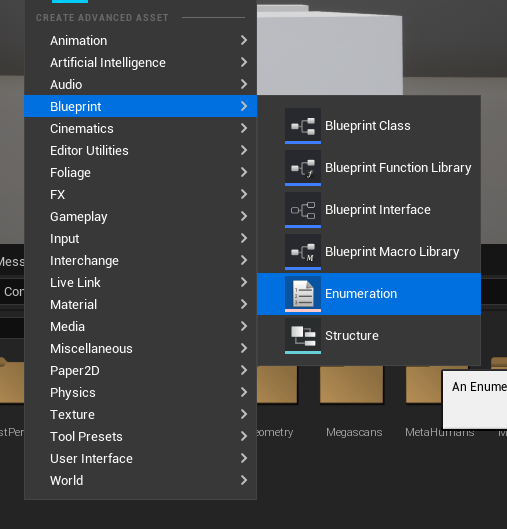
To create an Enum, navigate to the Content Browser, right-click, and select Blueprint -> Enumeration. After naming your Enum (e.g., E_ItemRarity), you can define its values. Each entry in the Enum corresponds to a specific quality level. This structured approach prevents typos and ensures that item rarity is consistently applied across the game’s systems, from loot generation to UI display. Industry best practices often recommend using Enums for any set of mutually exclusive, predefined options, as they significantly improve maintainability and make code self-documenting.
Creating Our Struct: Blueprinting Your Data
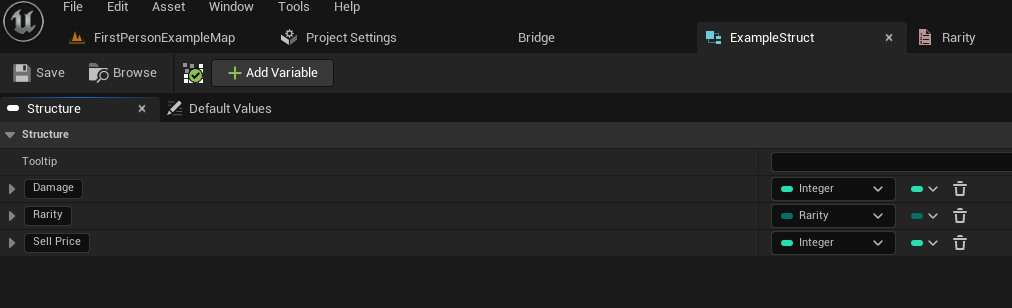
With the Enum established, the next critical step is to define a Structure (Struct). A Struct acts as a custom data type that groups several variables of different types under a single name. In the context of Data Tables, a Struct serves as the blueprint for each row of data. Every column in your Data Table will correspond to a variable defined within this Struct. This enforces a consistent data schema across all entries, preventing malformed data and simplifying data access.
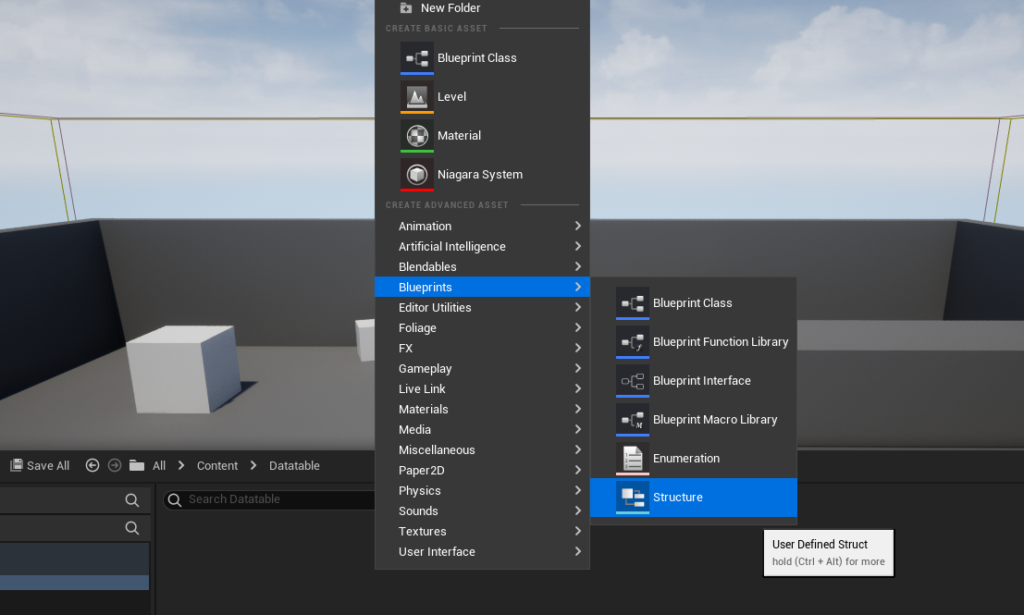
To create a Struct, right-click in the Content Browser and select Blueprint -> Structure. Name it appropriately (e.g., F_ItemData). Inside this Struct, you will define the specific attributes for your game entities. For our RPG item example, this might include:
Damage(Integer): The numerical damage value of the item.Rarity(E_ItemRarity Enum): The quality of the item, utilizing the Enum we just created.SellPrice(Float): The monetary value of the item when sold.
By defining these variables within F_ItemData, you are essentially creating a template for what each item entry in your Data Table will look like. This modular approach allows for easy expansion; if you later decide to add a new attribute like Weight or Description, you only need to modify the Struct, and the changes will propagate to your Data Table. Developers widely acknowledge Structs as crucial for data encapsulation and organization, making complex data sets manageable.
Step-by-Step Implementation: Building Your Data Table
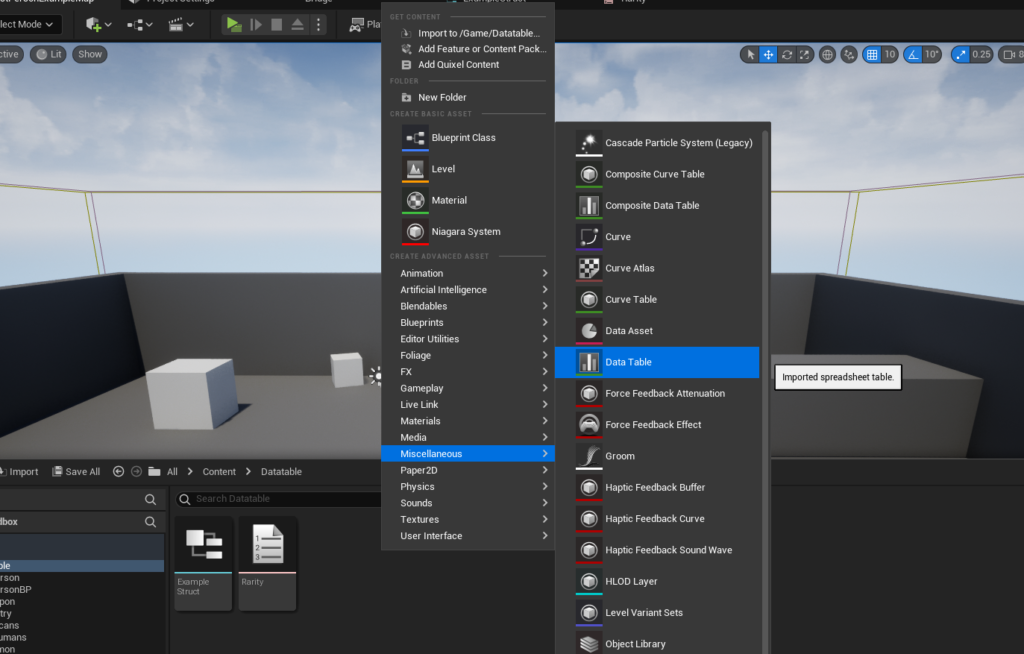
With the foundational Enum and Struct in place, the final step in setup is to create the Data Table itself. This process links your predefined data structure (the Struct) to the table asset.
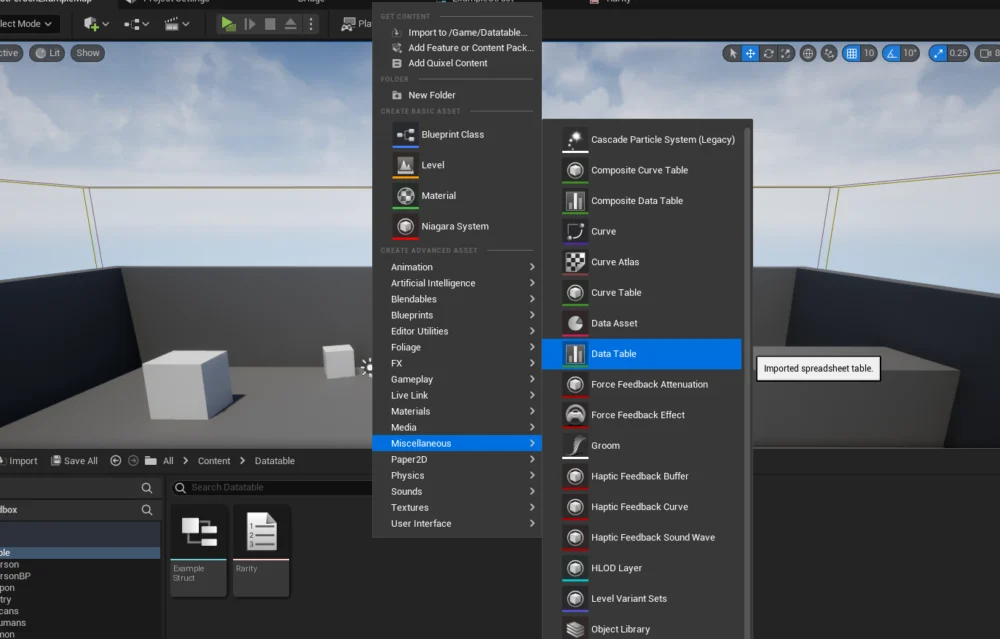
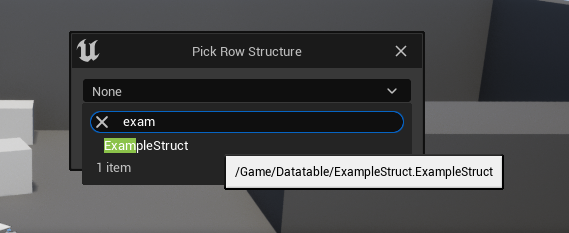
To create your Data Table, right-click in the Content Browser and select Miscellaneous -> Data Table. Upon selection, a prompt will appear, asking you to choose the "Row Structure." This is where you link your newly created Struct (e.g., F_ItemData). This action is critical, as it informs the Data Table about the specific columns and data types it will contain. Once selected, your Data Table is created, ready to be populated. The connection between the Struct and the Data Table is fundamental; the Struct provides the blueprint, and the Data Table provides the instance storage for that blueprint.
Populating and Refining Data Tables
Once the Data Table is created and configured with its base Struct, the next phase involves populating it with actual game data. This is where designers and content creators can directly input and iterate on game values without needing to interact with code.
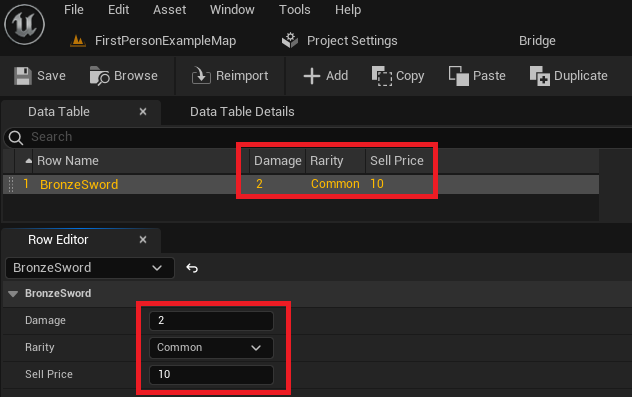
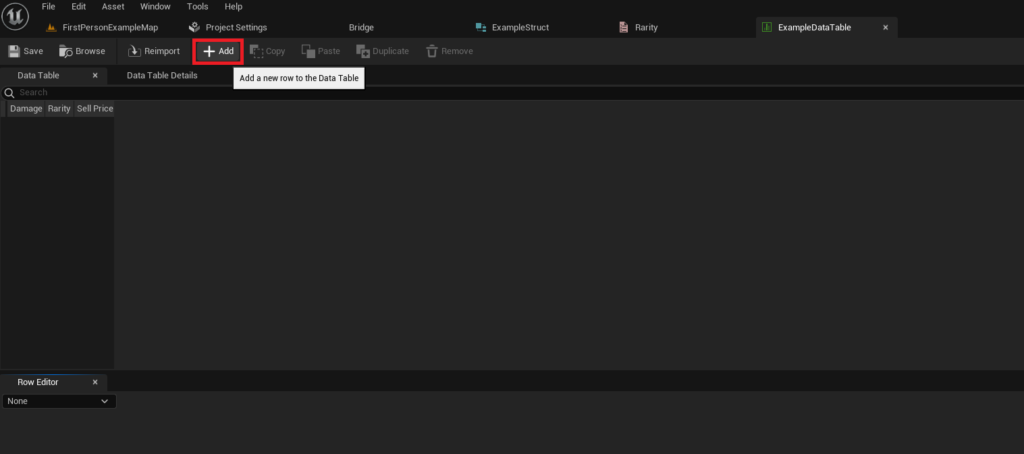
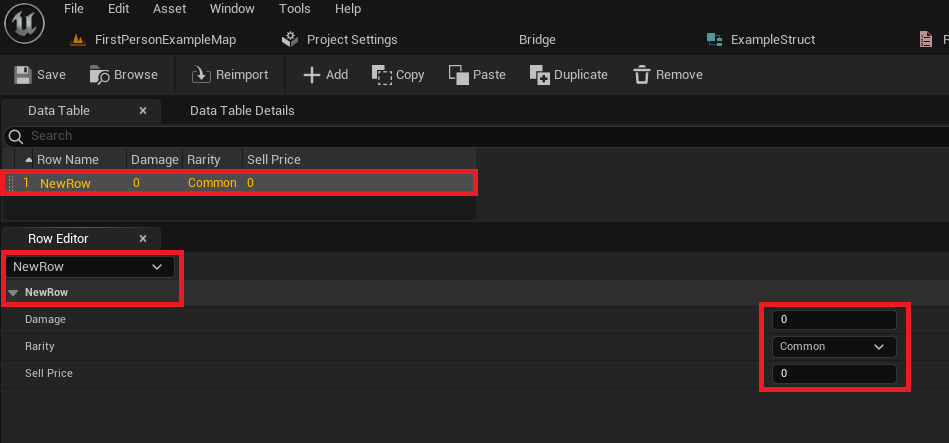
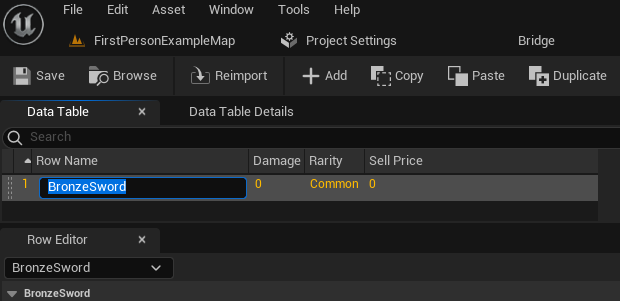
Opening the Data Table asset reveals an interface similar to a spreadsheet. Initially, it will be empty. To add new entries, simply click the "Add" button. This will generate a new row, pre-filled with default values based on the variables defined in your F_ItemData Struct. Each row will have a unique "Row Name," which acts as its primary key for lookup operations.
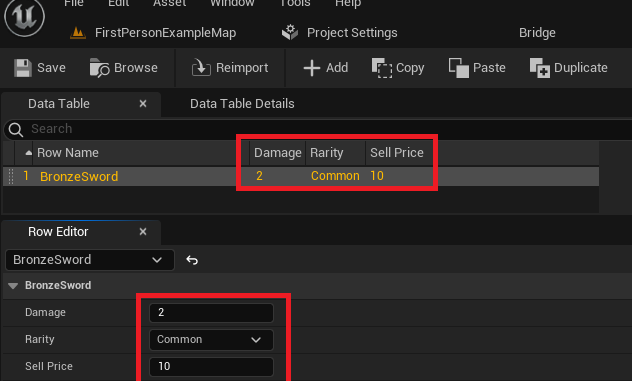
The Data Table view typically consists of two main sections: the table itself, displaying a summary of each row’s values, and the "Row Editor" panel below. The Row Editor provides a detailed view of the currently selected row, allowing you to modify individual attributes like Damage, Rarity, and SellPrice. For instance, you could create a row named "BronzeSword" and set its Damage to 10, Rarity to "Common," and SellPrice to 50. Then, you might create "SilverSword" with Damage 20, Rarity "Uncommon," and SellPrice 150.
The ability to easily add, modify, and duplicate rows empowers designers to rapidly prototype and balance game content. This iterative process is a cornerstone of agile game development, allowing for quick adjustments based on playtesting feedback. Furthermore, the visual nature of Data Tables in the Unreal Editor makes them highly accessible to non-programmers, fostering a more collaborative environment where content creators can directly manage their data. It is crucial to remember to save your Data Table frequently to prevent any loss of changes. This practice, combined with robust version control systems, ensures data integrity throughout the development cycle.
Accessing Data: Real-time Application in Unreal Engine 5
Populating a Data Table is only half the battle; the true power comes from accessing and utilizing this data within your game’s logic. Unreal Engine 5 provides straightforward methods to retrieve Data Table entries in both Blueprints and C++.
Retrieving Specific Rows
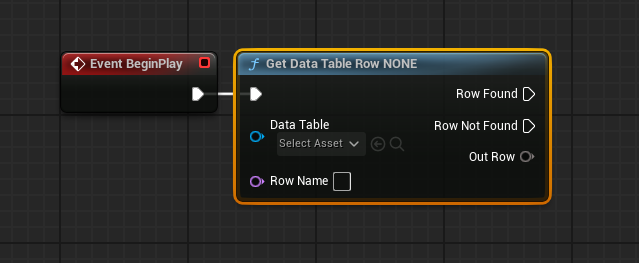
The primary node for accessing individual rows in Blueprints is Get Data Table Row. This node requires two inputs:
- Data Table Reference: A direct reference to the Data Table asset you wish to query. This can be set by selecting the asset from a dropdown menu within the node’s details.
- Row Name: The unique string identifier for the specific row you want to retrieve.
Upon execution, the Get Data Table Row node has two output execution pins: Row Found and Row Not Found. This robust error handling mechanism allows developers to implement fallback logic if a requested row does not exist, preventing runtime errors. If the row is found, the Out Row pin will contain all the data from that specific entry, structured according to your base Struct.
To easily access the individual members of the Out Row Struct, you can right-click on the Out Row pin and select "Split Struct Pin." This will expand the pin into its constituent variables (e.g., Damage, Rarity, SellPrice), making them directly usable in your Blueprint logic. This mechanism is incredibly efficient for scenarios where you need to fetch specific item stats when a player equips an item, or retrieve enemy parameters upon spawning. For example, an Event BeginPlay node in a level blueprint could retrieve the "BronzeSword" data and print its damage value to the screen, confirming the data retrieval is working as expected. This direct, key-based lookup is highly performant and forms the backbone of data-driven systems in UE5.
Advanced Data Retrieval: Looping Through Data Table Rows
While accessing individual rows by name is common, there are scenarios where you need to iterate through multiple or all entries in a Data Table. For instance, you might want to display all available items in a shop inventory, filter items based on certain criteria, or perform calculations across a subset of your data. Unreal Engine 5 provides an elegant solution for this through a combination of the Get Data Table Row Names node and a For Each Loop.
The Get Data Table Row Names node, when provided with a Data Table reference, returns an Array containing all the Row Names (keys) present in that Data Table. This array can then be connected to a For Each Loop node. The For Each Loop will execute its "Loop Body" for each element (Row Name) in the array, providing the "Array Element" as the current Row Name.
Within the For Each Loop‘s body, you can then connect the "Array Element" (which is the current Row Name) to the Row Name input of another Get Data Table Row node. This setup allows you to systematically retrieve the full data for each row in the Data Table, one by one. The Out Row pin from this Get Data Table Row node can then be split, allowing you to access and process the individual Damage, Rarity, SellPrice, or any other values for the current row within the loop.
This looping capability is vital for dynamic content generation and processing. For example, a game’s crafting system might iterate through all item recipes stored in a Data Table to determine which items a player can craft based on their inventory. Similarly, a game balancing tool could loop through all enemy data to identify outliers in health or damage values. This programmatic iteration highlights the flexibility and power Data Tables offer for complex game systems.
Implications for Game Development Workflow
The integration of Data Tables profoundly impacts various aspects of the game development workflow, offering advantages that extend beyond mere data storage.
- Designer Empowerment: Data Tables significantly reduce the dependency of designers on programmers for content adjustments. Designers can directly modify item stats, enemy properties, or quest parameters within the editor, accelerating iteration cycles and freeing up programmers for more complex systems development. This shift fosters a more collaborative and efficient team dynamic.
- Scalability and Maintainability: As projects grow, Data Tables provide a structured and centralized repository for game data. This prevents data sprawl and makes it easier to track, update, and maintain large datasets. Changes made to a Struct automatically highlight potential issues in dependent Data Tables, promoting data integrity.
- Localization Efficiency: Data Tables are an excellent choice for managing localized strings. By having a Data Table for text, with row names as unique identifiers and columns for different languages, developers can easily manage and update translations without altering game code.
- Game Balancing: The ease of modifying values in Data Tables makes game balancing an iterative and less painful process. Designers can quickly adjust numerical parameters, test changes, and revert or refine them without requiring significant development overhead.
- Performance: While Data Tables are editor assets, once loaded into memory at runtime, accessing their data is highly efficient, comparable to direct array lookups. This makes them suitable for performance-critical systems.
- Collaboration: Data Tables, being asset files, integrate seamlessly with version control systems (like Git or Perforce). This allows multiple team members to work on different parts of the game data concurrently, with clear conflict resolution mechanisms. A single source of truth for project data becomes a reality, simplifying sharing and ensuring consistency across the team.
Conclusion
Unreal Engine 5 Data Tables stand as a cornerstone of efficient and scalable game development. From their initial creation, guided by well-defined Enums and Structs, through meticulous population, and finally to their dynamic retrieval and utilization within game logic, Data Tables streamline the entire data management process. They empower development teams, foster collaboration, and accelerate content iteration, allowing designers to directly influence game balance and content without extensive coding knowledge.
By embracing Data Tables, developers can move towards a more data-driven design philosophy, where game mechanics and content are powered by easily configurable data rather than hard-coded logic. This approach not only enhances project robustness and maintainability but also ensures that games can evolve and expand with greater agility. Almost every Unreal Engine project, regardless of scale, stands to benefit significantly from the intelligent application of Data Tables, transforming complex data into a manageable and powerful asset. Mastering this fundamental feature is not just about organizing information; it’s about unlocking a more efficient, collaborative, and ultimately successful game development journey within Unreal Engine 5.
About the Author