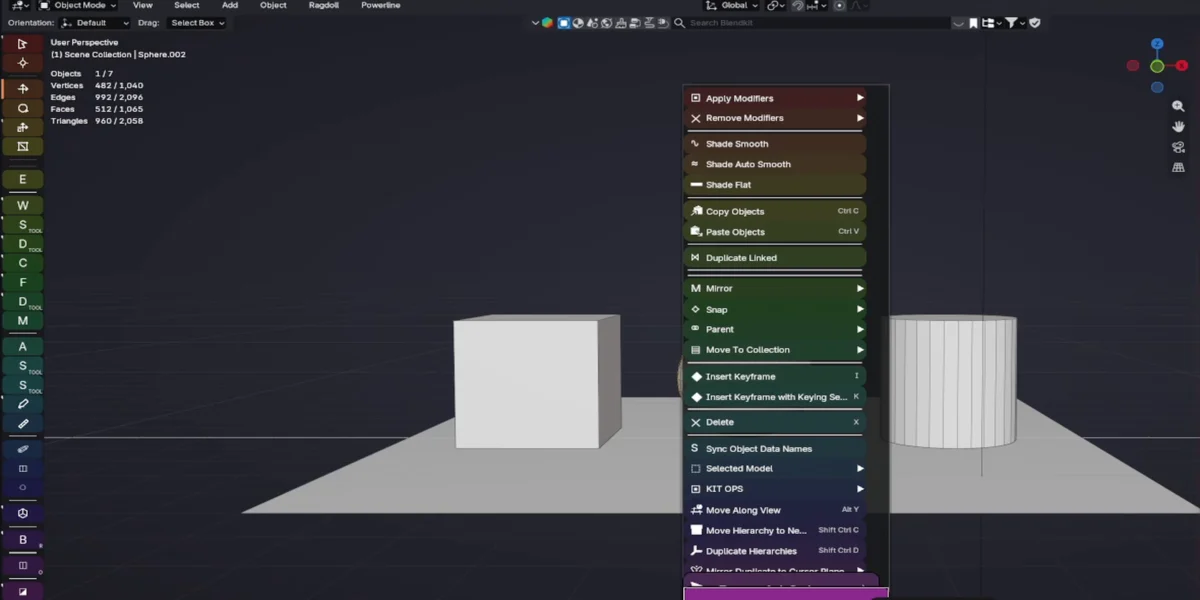
The burgeoning ecosystem of professional 3D creation software continues to evolve with the introduction of Prism Suite, a novel paid early access interface layer designed to augment the user experience within Blender, the industry-standard open-source 3D creation suite. Crucially, Prism Suite is not a replacement for Blender’s core functionalities, such as its robust modeling, animation, rendering, or file format capabilities. Instead, it fundamentally reconfigures how users interact with and access the familiar native controls they already utilize, aiming to streamline workflows and enhance productivity.
The beta version of Prism Suite represents a significant integration effort, consolidating 17 distinct add-ons into a cohesive and coordinated system. These add-ons are strategically distributed across key areas of the Blender interface, including the sidebar tabs, toolbars, menus, Properties editor, modifiers panel, shape keys editor, Timeline, Video Sequencer, various node editors, the search functionality, and workspace controls. This comprehensive approach ensures that enhancements are available across the majority of Blender’s operational areas, providing a consistent and unified user experience.
A central tenet of Prism Suite’s design is its shared interaction system. This system introduces several innovative features aimed at improving usability and visual clarity. Among these is cursor-based magnification, a tool that allows users to zoom in on specific interface elements with precision, which can be particularly beneficial for detailed work or for users with visual impairments. The suite also incorporates spectrum themes, offering a broad palette of visual styles to customize the Blender environment, potentially reducing eye strain and personalizing the workspace. Furthermore, its shortcut-aware menus are designed to dynamically display relevant keyboard shortcuts, aiding in memorization and faster command execution. Complementing these functional enhancements is a library of 788 meticulously crafted vector icons, intended to provide a clear and consistent visual language throughout the interface. The package boasts an impressive 135 theme presets, offering users a wide array of aesthetic choices right out of the box, and the entire suite installs as a single, unified Blender Extension, simplifying the installation and management process.
Background and Context: The Evolution of Blender Interfaces
Blender’s journey from a niche open-source project to a leading force in the 3D industry has been marked by continuous development and a growing community of users. As Blender’s capabilities have expanded, so too has the complexity of its interface. While powerful, the sheer breadth of features can sometimes present a steep learning curve for newcomers and even seasoned professionals. Over the years, the Blender community has developed numerous add-ons to address specific workflow needs and to offer alternative interface layouts. However, the integration of these disparate tools has often been a manual process, requiring users to manage multiple installations and configurations.
The advent of Prism Suite signifies a move towards a more integrated and curated approach to interface enhancement. By bundling a significant number of functionalities into a single, paid product, the developers are addressing a perceived market demand for a more polished and unified user experience. The decision to offer this as a paid early access product suggests a strategy of community-driven development, where initial users provide crucial feedback to refine the product before a wider release. This model has become increasingly common in software development, allowing for iterative improvements based on real-world usage.
Chronology of Development and Availability
While the precise timeline of Prism Suite’s internal development is not publicly detailed in the provided information, its current status as a "paid Early Access interface layer" indicates that it has moved beyond initial alpha testing into a phase where it is accessible to a broader audience for testing and feedback. The announcement of its availability for Windows users with Blender versions 5.1 and 5.2 marks a specific milestone. The developers have clearly stated that macOS and Linux environments are "not yet verified," which implies that ongoing work is being done to ensure compatibility and performance on these platforms. This also highlights the importance of feedback from users on these operating systems, even with the acknowledged limitations.
The pricing structure, with a beta version available for $10, and an early bird discount code "EARLYPRISM" offering 20% off until September 11, 2026, suggests a phased rollout strategy. This initial pricing aims to incentivize early adoption and gather valuable user input during the critical early access period. The extended validity of the discount code, reaching into mid-2026, indicates a commitment to a substantial early access phase, allowing ample time for testing and feature refinement.
Supporting Data and Key Features
The comprehensive nature of Prism Suite is underscored by the specific data points provided:
- 17 Coordinated Add-ons: This indicates a significant level of integration, aiming to provide a holistic interface enhancement rather than a collection of disparate tools. The coordination implies that these add-ons are designed to work harmoniously with each other.
- Ubiquitous Integration: The add-ons are spread across 10 key areas of Blender: sidebar tabs, toolbars, menus, Properties editor, modifiers panel, shape keys editor, Timeline, Video Sequencer, node editors, and search/workspace controls. This wide coverage suggests that virtually every aspect of user interaction with Blender’s core functions is touched by Prism Suite.
- Shared Interaction System: This is a core differentiator, promising a consistent user experience across different parts of the interface. Features include:
- Cursor-based Magnification: A practical tool for detailed work and accessibility.
- Spectrum Themes: A broad range of visual customization options, with 135 theme presets. This addresses user preference and can impact visual comfort during long work sessions.
- Shortcut-Aware Menus: A pedagogical and efficiency tool, helping users learn and utilize keyboard shortcuts more effectively.
- 788 Vector Icons: A substantial library of icons, contributing to a clean, modern, and easily recognizable interface.
- Installation: The package installs as a single Blender Extension, simplifying the user’s administrative tasks.
- Platform Compatibility: Currently tested on Windows with Blender 5.1 and 5.2. This is a critical piece of information for potential users.
The inclusion of a YouTube video demonstrating the "Prism Suite for Blender | Magnifying Menus, Docks & 135 Themes" further supports the claims made about its features and provides a visual demonstration for prospective users. The video’s presence indicates a marketing strategy focused on showcasing the practical benefits and aesthetic appeal of the suite.
Official Responses and Developer Intent (Inferred)
While no direct quotes from the developers of Prism Suite are provided, the nature of the product and its launch strategy allow for inferred insights into their intentions. The decision to develop and release a paid early access product suggests a team with a clear vision for improving the Blender user experience and a commitment to investing in its development. The emphasis on "paid Early Access" implies a desire to fund further development through initial sales while also leveraging the user base for crucial testing and feedback.
The developers’ stated aim to "change how you reach the native controls you already use" suggests a focus on workflow optimization and user efficiency. They are not seeking to reinvent Blender’s underlying engine but rather to make its existing power more accessible and intuitive. The comprehensive integration of 17 add-ons into a single system points to an effort to combat interface fragmentation and offer a more cohesive user experience, a common pain point for users who rely on numerous third-party tools.
The explicit mention of platform limitations (Windows only, macOS/Linux unverified) and the call for feedback from those environments demonstrate a developer strategy that prioritizes robust testing and a commitment to eventual cross-platform compatibility. This approach, while initially limiting, is a responsible one that aims to deliver a stable and well-performing product across all major operating systems.
Broader Impact and Implications for the Blender Community
The introduction of Prism Suite has several potential implications for the broader Blender community and the 3D industry:
- Enhanced Productivity for Professionals: For studios and individual artists who rely heavily on Blender, a more streamlined and customizable interface can translate directly into increased productivity and reduced development time. The ability to quickly access controls and customize the workspace can be a significant advantage in demanding production pipelines.
- Lowered Barrier to Entry: While Blender is free and open-source, its complexity can be a hurdle for beginners. Tools like Prism Suite, by offering a more intuitive and visually guided interface, could potentially make Blender more approachable for new users, fostering wider adoption.
- A Precedent for Paid Interface Enhancements: Prism Suite’s success could pave the way for other developers to create similarly integrated, paid interface solutions for Blender. This could lead to a more diverse and specialized add-on market, offering users a wider range of choices for tailoring their Blender experience.
- Feedback Loop for Blender Core Development: The extensive testing and feedback generated by early access users of Prism Suite could indirectly inform future development decisions within the core Blender project. Issues identified and solutions proposed by the Prism Suite team might highlight areas where the native Blender interface could be improved.
- The Growing "Blender Economy": As Blender’s user base grows, so too does the market for commercial add-ons and services that enhance its functionality. Prism Suite represents a significant entry into this burgeoning "Blender economy," demonstrating the commercial viability of supporting and augmenting open-source software.
- Accessibility Considerations: Features like cursor-based magnification and customizable themes directly address accessibility concerns. As the digital landscape becomes more inclusive, tools that prioritize usability for a wider range of users will become increasingly important.
However, the "paid" nature of Prism Suite also introduces a consideration of accessibility for users with limited financial resources. While the price point of $10 for the beta is relatively low, it still represents a barrier for some. The open-source ethos of Blender is built on free access, and the success of paid add-ons like Prism Suite will be watched closely by the community as it navigates the balance between commercial development and open-source principles.
In conclusion, Prism Suite’s launch as a paid early access interface layer for Blender marks a significant development in the pursuit of enhanced user experience and workflow optimization within the 3D creation software. By integrating a comprehensive suite of add-ons and introducing innovative interaction systems, it aims to provide users with greater control and customization over their Blender environment. The initial focus on Windows, with plans for broader platform support, and the community-driven feedback model, suggest a strategic approach to product development. The broader implications for productivity, accessibility, and the evolving Blender ecosystem are substantial, promising to reshape how users engage with this powerful open-source tool.
About the Author