Foundational Elements: Understanding the NavMesh System in Unreal Engine 5
At the heart of any effective AI navigation system lies the Navigation Mesh, or NavMesh. This crucial component is not merely a pathfinding algorithm but a sophisticated data structure that maps out all walkable surfaces within a game level. Unlike simpler waypoint systems or rigid grid-based navigation prevalent in earlier game development eras, a NavMesh offers a continuous, flexible representation of traversable space. This allows AI agents to find optimal paths, fluidly avoid obstacles, and dynamically react to changes in the environment. Its widespread adoption marked a significant leap in AI sophistication, enabling more fluid and natural character movement that closely mimics real-world locomotion.

Unreal Engine 5 leverages a highly optimized NavMesh system that automates much of the complex calculations previously required, streamlining the development process. For game developers, this translates into substantial time savings and a lower barrier to entry for implementing advanced AI. The process begins with defining the precise boundaries of the navigable area, a fundamental task handled by the NavMeshBoundsVolume actor within the engine.
Implementing the NavMeshBoundsVolume:
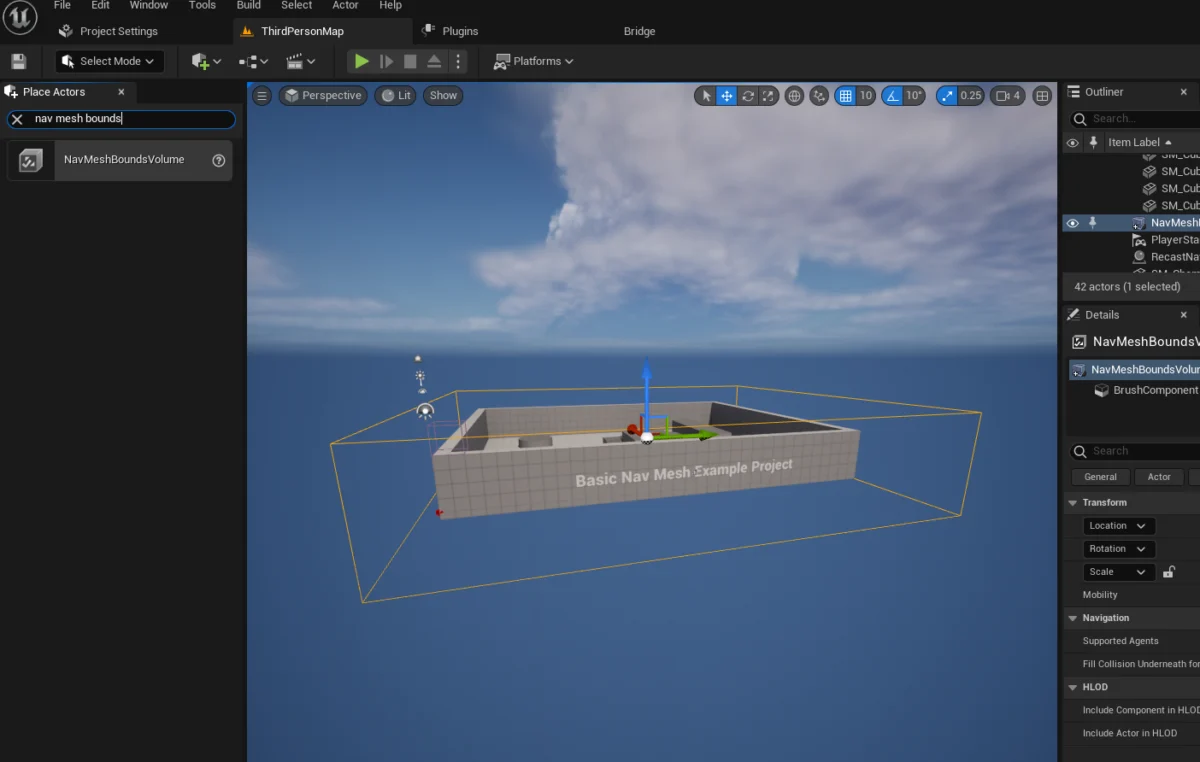
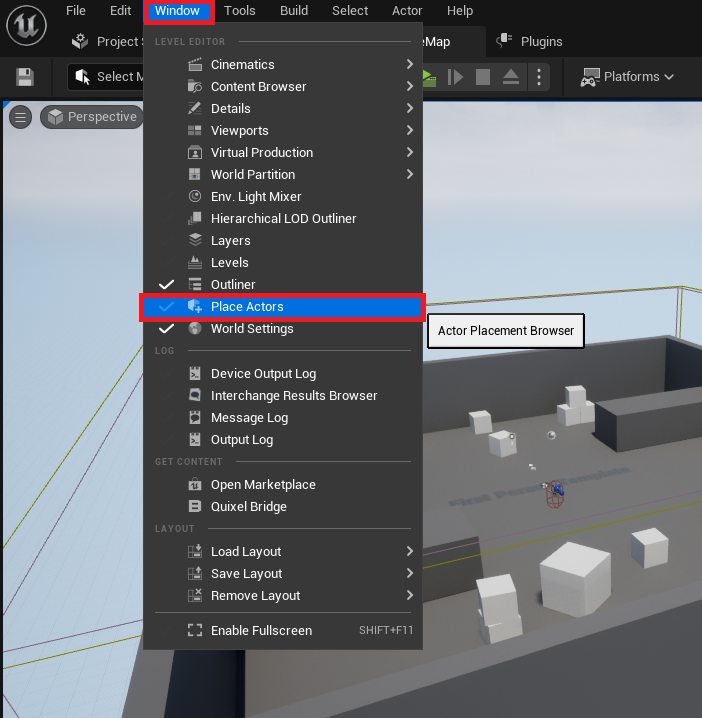
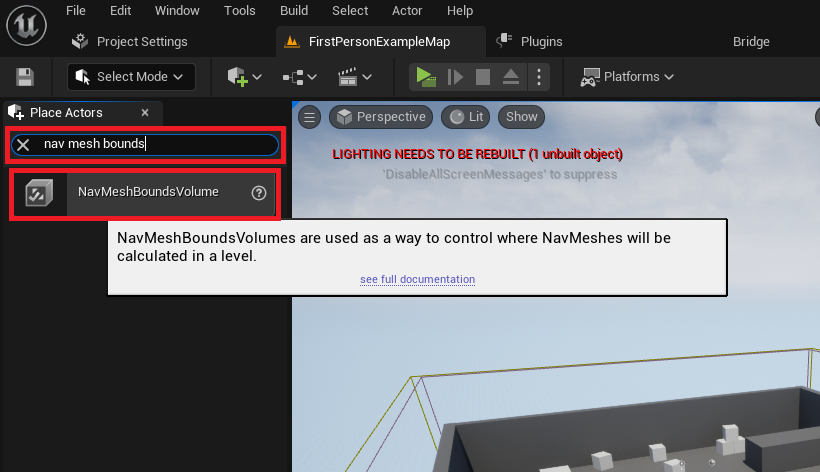
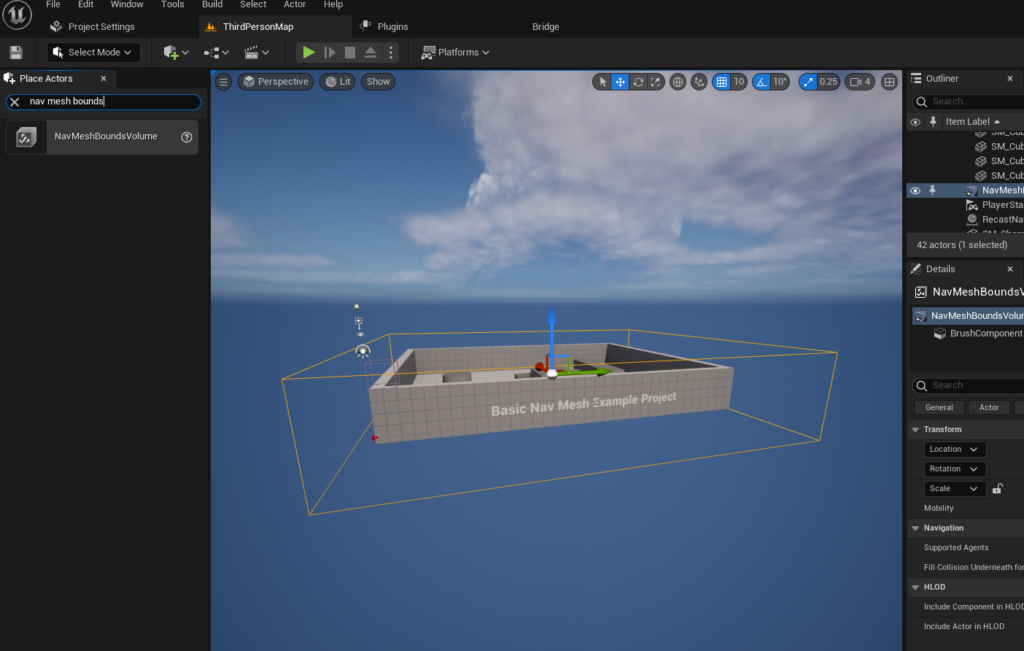
The initial, critical step in establishing a functional NavMesh involves integrating the NavMeshBoundsVolume into the game level. This specialized volume acts as a computational container, instructing the engine precisely where to generate the intricate navigation mesh data. Developers typically access this crucial component through the "Place Actors" window, a central and intuitive hub within the Unreal Engine 5 editor designed for spawning various objects, lights, and volumes. Navigating to the "Volumes" category within this panel reveals the NavMeshBoundsVolume ready for deployment into the scene.
Once placed, the strategic positioning and accurate scaling of this volume are paramount. It must meticulously encompass all areas where AI characters are expected to move, ensuring no critical path is inadvertently omitted. The inherent flexibility of this system allows for volumes of any size, from small, confined architectural spaces to expansive, sprawling open worlds. However, developers must meticulously consider the performance implications of their design choices: larger volumes naturally demand more computational resources and a greater amount of time for initial generation and subsequent updates. For projects involving highly dynamic environments—such as those with destructible terrain or procedurally generated elements—or exceptionally vast maps, Unreal Engine 5 offers advanced features like dynamic NavMesh generation. This sophisticated capability optimizes performance by intelligently regenerating only the affected areas rather than recalculating the entire mesh. This continuous adaptation is vital for modern games, ensuring that AI agents can seamlessly navigate and respond to environmental changes in real-time, maintaining a consistent level of intelligence and immersion.
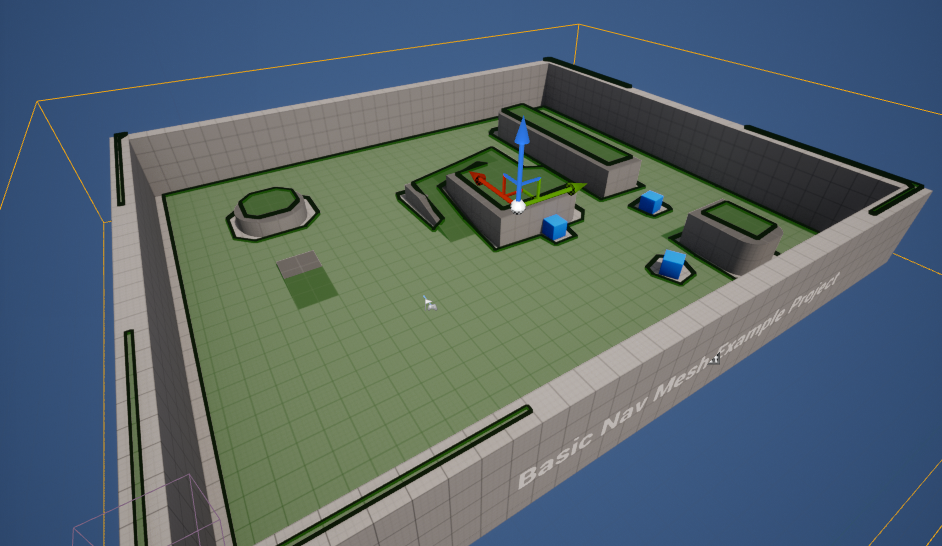
Following the precise sizing and strategic positioning of the NavMeshBoundsVolume, developers possess a crucial validation tool: pressing the ‘P’ key. This action instantly toggles a debug visualization mode, rendering the generated NavMesh as a distinct, often green, overlay directly onto the walkable surfaces of the level. This immediate visual feedback is indispensable for identifying any unintended gaps in the mesh, inaccessible areas that AI should be able to reach, or conversely, unwanted navigable zones where AI should not venture. This allows for precise, iterative adjustments and provides concrete assurance that the AI will behave exactly as intended. A correctly generated NavMesh appears as a seamless, interconnected network of polygons, providing unequivocal evidence that the AI pathfinding algorithms have a robust and accurate roadmap for movement throughout the defined space.
Engineering AI Behavior: Guiding Characters Through Complex Worlds
With the foundational NavMesh meticulously in place, the subsequent phase involves programming the AI characters to effectively utilize this rich navigation data. Unreal Engine 5’s Blueprint visual scripting system offers an exceptionally intuitive and powerful method for defining complex AI behaviors without the necessity of writing a single line of C++ code. This significantly broadens the accessibility of advanced AI implementation to a wider range of developers, including technical designers and artists who might not possess extensive programming backgrounds. For demonstration purposes, leveraging the engine’s built-in "Third Person Template" provides an immediate, pre-animated character model, which greatly simplifies the setup process for basic AI navigation testing and rapid prototyping.
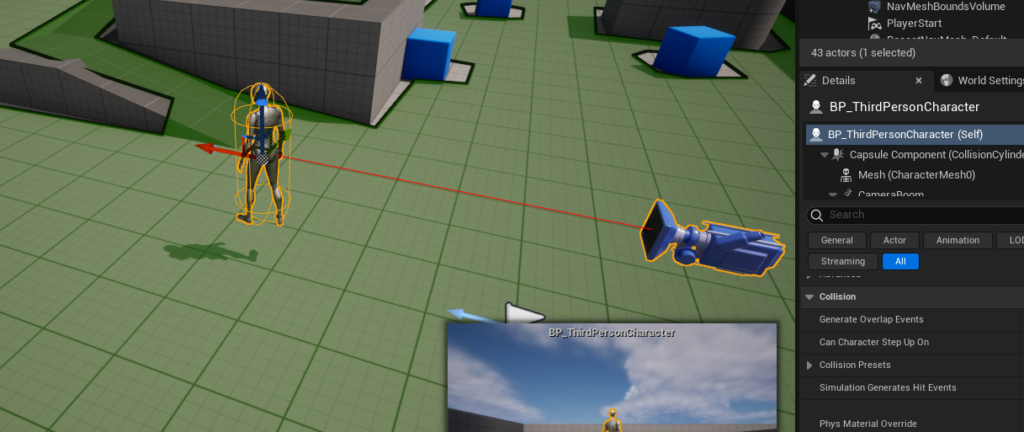
The journey of an AI character within a game level typically commences with its instantiation. Developers accomplish this by simply dragging the desired character blueprint—often conveniently located within the "Third Person / Blueprints" folder of a project created using the Third Person Template—directly into the game world. This action places an instance of the character into the scene, immediately ready to be imbued with intelligence and purpose.
Blueprint-Driven AI Logic: A Developer’s Toolkit
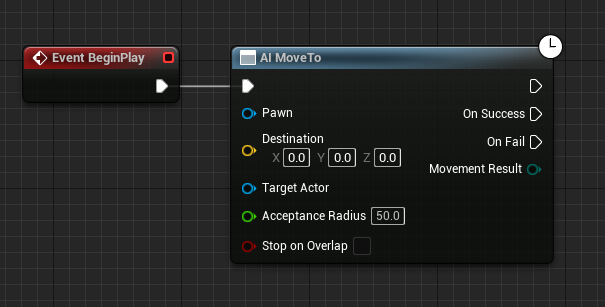
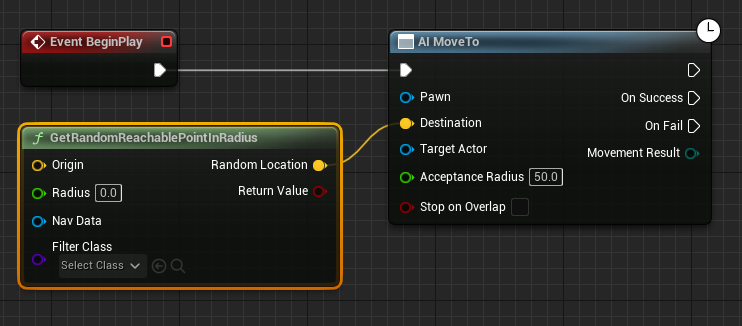
The very core of AI character movement and decision-making in Unreal Engine 5 is meticulously defined within the character’s Blueprint editor. This robust visual scripting environment empowers developers to string together a logical sequence of nodes, each representing a specific action, an event trigger, or a piece of data manipulation. The "Begin Play" event serves as the fundamental entry point for initiating any AI routine or behavioral sequence as soon as the game simulation commences. Directly connected to this foundational event is the AI MoveTo node, which functions as the central command for instructing an AI pawn to move towards a specific, predetermined location within the game world.
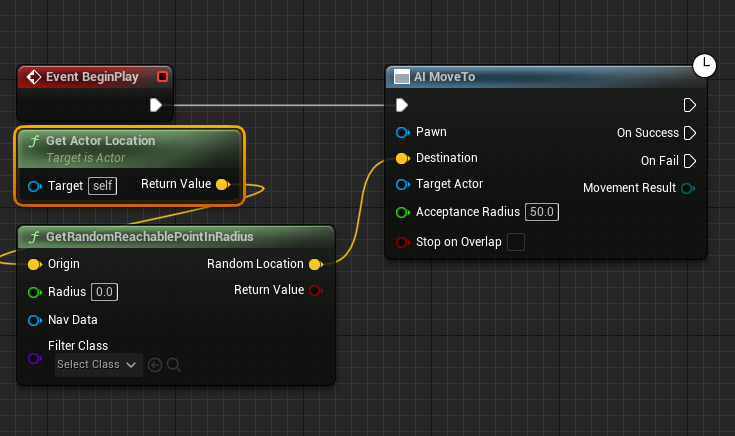
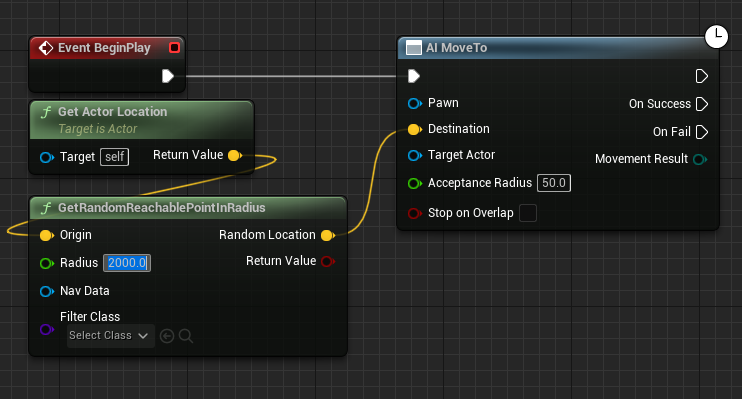
To enable dynamic and non-linear movement, which is essential for creating believable ambient characters, patrol routines, or reactive behaviors, the GetRandomReachablePointInRadius node becomes an indispensable tool. This intelligent node performs a query against the established NavMesh, efficiently searching for a valid, walkable point within a specified radius originating from a given position. Crucially, it guarantees that the randomly selected destination is indeed traversable by the AI character, thereby preventing common pitfalls such as attempting to move through solid walls, falling off cliffs, or becoming stuck in inaccessible geometry. The output of this node, typically represented by a yellow vector pin signifying the calculated destination coordinates, is then directly linked to the "Destination" input pin of the AI MoveTo node, completing the pathfinding instruction.
The "Origin" for this intelligent random point generation is typically set to the AI character’s current location, which is dynamically retrieved using the Get Actor Location node. This establishes the character’s immediate vicinity as the logical center point for its roaming or patrol behavior. A numerical "Radius" value, often expressed in Unreal Engine units (e.g., "2000" units as demonstrated in many basic setups), dictates the maximum permissible distance from this origin within which a random reachable point can be found. This parameter offers developers fine-grained control over the AI’s roaming area, allowing for the creation of highly varied behaviors, ranging from tight, localized patrols within small rooms to expansive, exploratory wanderings across vast open landscapes.
Furthermore, the AI MoveTo node requires an explicit reference to the "Pawn" that is intended to execute the movement command. This is typically achieved by creating a "Reference to Self" node, which provides a direct link to the character whose Blueprint is currently being edited. This self-referencing mechanism is a common and efficient pattern in Blueprint scripting, ensuring that actions and commands are precisely applied to the correct actor instance.
To create a continuous patrol or an endless roaming behavior, rather than a single, isolated movement, a robust looping mechanism is implemented. After the AI MoveTo node successfully completes its designated task (a success state indicated by its "On Success" execution pin), a Delay node is strategically introduced into the Blueprint graph. This node effectively pauses the execution flow for a specified duration, allowing the character to momentarily rest or remain stationary at its newly reached destination. Once this delay concludes, the execution flow intelligently loops back to the AI MoveTo node, thereby initiating the search for a new random reachable point and seamlessly sending the character on its next journey. This simple yet remarkably effective feedback loop creates a perpetually moving AI character that intelligently navigates the environment, exhibiting dynamic and engaging behavior.
Upon compiling and meticulously saving the Blueprint, and subsequently initiating gameplay by clicking "Play" in the editor, the AI character will immediately commence its programmed movement routine. It will leverage the pre-generated NavMesh to efficiently find its way through the level, demonstrating the seamless integration of environment data and sophisticated character logic. This powerful synthesis showcases the inherent flexibility and robust capabilities of Unreal Engine 5’s comprehensive AI development tools.
The Broader Impact: Enhancing Game Design and Player Immersion
The efficient implementation of NavMesh and AI character navigation in Unreal Engine 5 extends far beyond merely moving characters from point A to point B; it fundamentally shapes the possibilities of game design and significantly elevates the player experience across all genres.
Impact on Game Design:
Robust AI navigation systems empower designers to craft more intricate, believable, and expansive levels. Without the arduous task of manually defining every possible path, designers can channel their creativity into developing complex architectural layouts, dense urban environments, or sprawling, organic natural landscapes, confident that AI agents will intelligently and reliably find their way. This capability is particularly vital for open-world games, where characters often need to navigate vast, dynamic terrains without appearing "stuck" or illogical. Furthermore, it enables sophisticated gameplay mechanics such as stealth missions where AI patrols follow unpredictable routes, or tactical combat scenarios where enemies intelligently flank players, seek dynamic cover, and coordinate movements. The ability to quickly iterate on AI behaviors through Blueprint further accelerates the design process, allowing for rapid prototyping and meticulous refinement of core gameplay loops.
Enhanced Player Immersion:
From a player’s perspective, well-implemented AI navigation translates directly into a more believable and immersive world. Non-player characters that move naturally, react intelligently to dynamic obstacles, and exhibit varied, non-linear patrol patterns contribute significantly to the sense of a living, breathing environment. Conversely, "dumb AI" that frequently gets stuck on level geometry, clips through objects, or follows rigidly predictable, robotic paths can quickly shatter immersion and frustrate players, leading to a diminished experience. Unreal Engine 5’s NavMesh system helps to prevent these common pitfalls by providing a reliable, optimized foundation for intelligent movement, allowing AI characters to navigate complex scenes with a degree of realism that dramatically enhances the overall fidelity and perceived intelligence of the game world. This directly contributes to higher player engagement and satisfaction, crucial metrics in the intensely competitive gaming market.
Developer Efficiency and Accessibility:
One of Unreal Engine 5’s greatest strengths lies in its unwavering commitment to developer accessibility and empowerment. The visual scripting nature of Blueprints, when combined with powerful underlying systems like the NavMesh, effectively democratizes game development. This means that developers without extensive C++ programming knowledge can still create sophisticated and nuanced AI behaviors, fostering more diverse development teams and significantly accelerating innovation across the industry. This inherent efficiency translates into faster iteration times, reduced development costs, and the remarkable ability for smaller independent studios to compete effectively with larger ones by leveraging advanced engine features with unparalleled ease.
Scalability for Large-Scale Projects:
The architectural design of Unreal Engine’s navigation system is meticulously crafted with scalability as a core principle. Whether a developer is working on a small-scale indie project or a massive AAA blockbuster featuring hundreds or even thousands of concurrent AI agents, the NavMesh can be optimized to perform with remarkable efficiency. Features like dynamic generation, intelligent streaming, and highly customizable navigation parameters allow developers to precisely tailor the system to meet specific project requirements, ensuring that performance remains robust and consistent even in the most highly complex and demanding scenarios. This inherent scalability is a key factor in Unreal Engine 5’s widespread adoption across the entire industry, catering to the needs of independent creators and major studios alike.
Unreal Engine’s Commitment to Accessible AI Development
Epic Games, the visionary company behind Unreal Engine, has consistently demonstrated an unwavering commitment to empowering creators with robust yet remarkably accessible tools. The seamlessly integrated NavMesh and Blueprint system for AI character movement are prime examples of this foundational philosophy. Industry experts frequently commend Unreal Engine for its comprehensive suite of AI development tools, which intelligently streamline complex tasks and allow developers to focus their creative energies on imaginative execution rather than getting bogged down in low-level programming intricacies. This enduring commitment is tangibly reflected in continuous updates and iterative improvements to the engine, ensuring that developers always have access to cutting-edge technology to realize their most ambitious creative visions. The extensive ecosystem surrounding Unreal Engine, including comprehensive documentation, vibrant community forums, and a wealth of educational resources, further supports developers in mastering these powerful AI features and pushing the boundaries of interactive entertainment.
Challenges and Future Outlook
While Unreal Engine 5’s AI navigation tools are remarkably robust and user-friendly, developers must remain acutely mindful of potential challenges. Incorrect NavMeshBoundsVolume placement or improper scaling can inadvertently lead to inaccessible areas for AI characters or cause them to become visually stuck, breaking immersion. Performance optimization for very large or highly dynamic levels also requires careful consideration of NavMesh generation settings and the overall complexity of AI behaviors. However, the engine provides numerous customizable parameters and sophisticated debugging tools to address these potential issues effectively and efficiently.
Looking towards the future, the deeper integration of machine learning techniques and more advanced behavioral AI is poised to fundamentally revolutionize game character intelligence. Foundational systems like Unreal Engine 5’s NavMesh will undoubtedly remain a crucial building block, providing the essential underlying spatial awareness and efficient pathfinding capabilities upon which more sophisticated and adaptive AI layers can be meticulously constructed. As games continue to evolve, becoming even more interactive, dynamic, and reactive to player input, the ability for AI to intelligently understand and navigate complex 3D environments will only grow in paramount importance, making foundational knowledge of systems like NavMesh more valuable than ever for aspiring and experienced game developers alike.
Conclusion: A Cornerstone of Modern Game Development
The ability
About the Author