A groundbreaking new add-on for the popular open-source 3D creation suite Blender, named "Tabs," is poised to fundamentally alter how users interact with the software, introducing a familiar yet powerful tabbed interface akin to modern web browsers and game engines. Developed and released to the Blender community, this add-on addresses long-standing user desires for more efficient workspace management and fluid transitions between different editing environments within the complex application. The introduction of "Tabs" promises to streamline workflows, boost productivity, and offer a more intuitive user experience for both novice and seasoned Blender professionals.
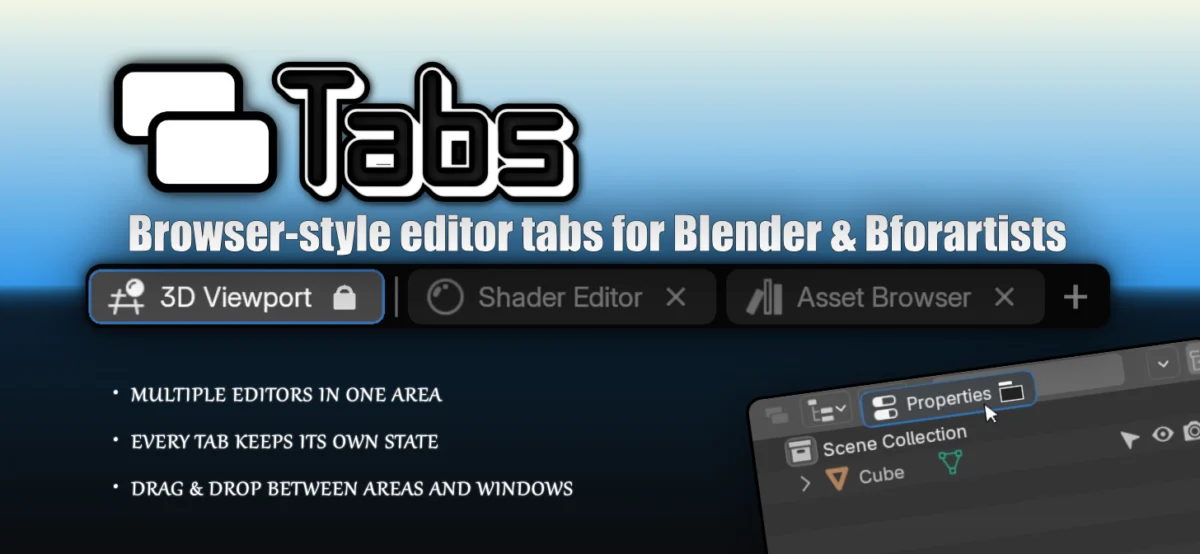
The core functionality of the "Tabs" add-on lies in its ability to consolidate multiple Blender editors into a single, unified area. This means users can now open and manage various editing windows – such as the 3D Viewport, Shader Editor, Node Editor, and even the Video Sequence Editor – within one panel. Each tab within this area retains its independent state, allowing users to seamlessly switch between different tasks without the need to constantly open and close individual editor windows or resize panels. This organizational paradigm shift directly tackles the common challenge of managing a cluttered workspace, a persistent issue in complex 3D software where numerous tools and editors are often required simultaneously.
Empowering User Control and Customization
"Tabs" offers a comprehensive suite of features designed to give users granular control over their workspace. The ability to add, rename, reorder, and close tabs provides an unprecedented level of flexibility. Users can personalize their tabbed areas to suit specific project needs or personal preferences. For instance, a modeler might create a tabbed area dedicated to modeling, featuring the 3D Viewport, the Outliner, and the Properties panel, all readily accessible. A texture artist could configure a similar area with the Image Editor, Shader Editor, and Node Editor.
Beyond simple organization, the add-on introduces advanced functionalities for dynamic layout management. A key feature is the capability to drag a tab to another existing area, effectively merging tabbed workspaces or transferring specific editors between different parts of the Blender interface. This drag-and-drop functionality allows for rapid reconfiguration of the entire Blender layout on the fly, adapting to the evolving demands of a creative process. Furthermore, users can "tear off" a tab to create an entirely new, independent window. This is particularly useful for dedicating a separate monitor to a specific editor or for isolating a particular tool for focused work.
Enhancing Stability and Layout Dependency
A critical aspect of "Tabs" that addresses a common point of frustration in complex software is the ability to "lock" tabs. This feature is invaluable for users who have meticulously crafted their Blender layout, often a time-consuming process. By locking specific tabs, users can ensure that critical editors or configurations remain in place, preventing accidental changes or closures that could disrupt their workflow or necessitate a complete layout rebuild. This lock mechanism is particularly beneficial in collaborative environments or when working on projects with strict technical requirements, where a stable and predictable interface is paramount.
The development of "Tabs" can be seen as a response to a growing demand within the Blender community for more modern and efficient user interface paradigms. While Blender has a powerful and highly customizable interface, its traditional approach of distinct editor windows and split panels can, for some users, feel less intuitive and more cumbersome compared to the tabbed interfaces prevalent in other professional software. The inspiration drawn from web browsers and game engines, which have perfected tabbed interfaces for managing numerous elements simultaneously, is a clear indicator of the add-on’s design philosophy: to bring a familiar, user-friendly, and highly efficient organizational structure to Blender.
Background and Community Impact
The Blender community has a rich history of developing and contributing innovative add-ons that extend the software’s capabilities. This ecosystem of community-driven development is a cornerstone of Blender’s enduring success and its ability to remain competitive with proprietary software. The release of "Tabs" fits perfectly within this tradition, offering a solution to a perceived gap in Blender’s native interface. Such add-ons often emerge from the direct experiences and needs of active users, highlighting the collaborative spirit that defines the Blender project.
While specific data on the development timeline and initial release date of "Tabs" are not detailed in the provided information, its presence on a platform like BlenderNation suggests it has undergone some level of testing and community engagement. The future impact of "Tabs" is likely to be significant. By simplifying workspace management, it has the potential to lower the barrier to entry for new users who might be intimidated by Blender’s interface complexity. For experienced users, it offers a substantial productivity boost, allowing them to focus more on creative tasks and less on interface navigation.
Potential Implications for Workflow and Development
The implications of "Tabs" extend beyond mere cosmetic improvements. A more efficient and intuitive interface can directly translate to faster project completion times, reduced cognitive load for users, and potentially fewer errors caused by accidental interface manipulations. This can be particularly impactful in professional studios where time and efficiency are critical factors.
Furthermore, the success of "Tabs" could inspire further development in UI/UX innovation within the Blender ecosystem. It might encourage developers to explore other modern interface paradigms that could further enhance Blender’s usability and appeal to a broader range of users. The ability to integrate such powerful features through an add-on system is a testament to Blender’s flexible architecture.
The add-on’s developers have not yet released official statements regarding future development plans or specific statistics on user adoption. However, the immediate interest generated by such a functional enhancement is typically high within the active Blender user base. Reviews and feedback from early adopters will undoubtedly shape the future iterations of the "Tabs" add-on, potentially leading to even more sophisticated features and deeper integration with Blender’s core functionalities. The community’s response will be a key indicator of its long-term success and its place within the vast library of Blender add-ons.
The concept of tabbed interfaces has been a staple in personal computing for decades, popularized by web browsers like Netscape Navigator and later by Internet Explorer, Firefox, and Google Chrome. Game engines, too, have heavily relied on tabbed interfaces for managing complex project assets and editor windows. The application of this well-understood and widely adopted pattern to Blender’s professional 3D environment is a logical and highly beneficial evolution. It leverages user familiarity, reducing the learning curve associated with mastering the software’s intricate interface.
The "Tabs" add-on, by allowing users to manage multiple editors within a single area, directly addresses the challenge of screen real estate. In a typical Blender session, users often divide their screen into numerous panels, each dedicated to a specific editor. While this offers flexibility, it can also lead to a fragmented view and require constant scrolling or resizing. Tabs consolidate these editors, presenting them in a compact and easily navigable manner. This not only tidies up the workspace but also improves focus by allowing users to see only the relevant editors at any given time.
A Chronology of Interface Evolution in 3D Software
The quest for more efficient user interfaces in 3D modeling and animation software has been a continuous process. Early 3D applications often featured very basic interfaces, relying on command-line input or rudimentary graphical elements. As software matured, dedicated windows for different editors became standard. This approach, while functional, presented challenges in terms of managing a multitude of windows.
The introduction of docked panels and tabbed interfaces in professional software like Adobe Photoshop and later in game development tools marked a significant leap forward. These innovations aimed to create more cohesive and less overwhelming user experiences. Blender, while offering extensive customization through its panel system, has historically maintained a distinct windowing paradigm for its editors. The "Tabs" add-on represents a modern reinterpretation of this, bringing a more contemporary and streamlined approach.
The timing of such an add-on’s release is often influenced by broader trends in software design and user expectations. As users become accustomed to highly intuitive and efficient interfaces in their daily digital interactions, the demand for similar experiences in professional creative tools intensifies. The "Tabs" add-on appears to be a direct response to this evolving user expectation within the Blender community.
Supporting Data and Community Adoption (Inferred)
While specific download numbers or active user statistics for the "Tabs" add-on are not provided, its presence on BlenderNation, a prominent hub for Blender news and add-ons, suggests it has garnered attention and likely seen considerable interest. Add-ons that solve common user pain points, such as interface clutter and workflow inefficiencies, tend to achieve widespread adoption within the Blender community. The success of previous add-ons that have enhanced Blender’s interface or introduced new functionalities can serve as an indicator of the potential impact of "Tabs." For instance, add-ons that automate repetitive tasks or provide new modeling tools often see thousands of downloads and widespread use.
The "Community Reporter" designation for the author of the original article indicates that this news is likely being disseminated through a community-driven channel, further emphasizing the organic nature of such developments within open-source projects. This type of reporting often highlights tools that are actively being used and appreciated by the Blender user base.
Official Responses and Future Outlook
As an add-on, "Tabs" is a community-driven initiative rather than an official feature developed by the core Blender developers. Therefore, direct "official responses" from the Blender Foundation in the traditional sense are unlikely. However, the Blender Foundation actively supports and promotes community contributions that enhance the software. The inclusion of such add-ons in community news outlets and discussions on official Blender forums signifies their integration into the broader Blender ecosystem.
The future outlook for "Tabs" appears bright. Its core functionality addresses a fundamental aspect of user interaction with complex software. As more users discover and integrate "Tabs" into their workflows, it is likely to become an indispensable tool for many. Further development could include deeper integration with Blender’s Python API, allowing for more advanced scripting and customization of tabbed areas, or even the development of presets for different professional disciplines. The potential for this add-on to become a de facto standard for interface management within Blender is significant, given its elegant solution to a persistent user challenge.
The add-on’s ability to allow users to "lock" tabs is particularly noteworthy for its contribution to workflow stability. In professional 3D production pipelines, where complex scenes and intricate workflows are the norm, accidental closures or rearrangements of essential editors can lead to significant delays and frustration. The locking mechanism provides a safety net, ensuring that critical parts of the user’s meticulously crafted workspace remain intact. This feature, coupled with the drag-and-drop functionality for tab relocation, creates a dynamic yet controlled environment, empowering users to tailor their interface precisely to their needs without fear of accidental disruption. This level of control is often a key differentiator for professional software, and "Tabs" effectively brings it to Blender users.
About the Author