
In the dynamic landscape of modern game development, Unreal Engine 5 (UE5) stands as a powerful and versatile platform, renowned for its cutting-edge graphics capabilities and robust toolset. A cornerstone of its development ecosystem is Blueprint, a visual scripting system that empowers designers and programmers alike to rapidly prototype, iterate, and build complex game logic without delving into traditional code. However, as projects grow in scope and complexity, developers frequently encounter scenarios where Blueprint code, despite its accessibility, begins to exhibit performance bottlenecks that cannot be resolved through further optimization within the visual scripting environment. This limitation, coupled with the absence of Blueprint nodes for certain advanced C++ features, necessitates a strategic approach to maintain optimal performance and unlock the engine’s full potential. The solution lies in the intelligent integration of C++ through Blueprint Function Libraries, a mechanism that allows developers to harness the raw speed and efficiency of compiled C++ code while maintaining seamless interoperability with existing Blueprint systems.
The Inherent Strengths and Limitations of Unreal Engine’s Scripting Paradigms
To fully appreciate the significance of C++ Blueprint Function Libraries, it is crucial to understand the distinct advantages and inherent trade-offs associated with Unreal Engine’s primary scripting paradigms: Blueprint and C++.
Blueprint offers an intuitive, node-based visual scripting interface that significantly lowers the barrier to entry for game development. Its strengths include:
- Rapid Prototyping: Developers can quickly experiment with game mechanics and systems, seeing immediate results without compile times.
- Accessibility for Non-Programmers: Game designers, artists, and level designers can implement complex logic without needing extensive programming knowledge, fostering greater collaboration.
- Clarity and Readability: Visual graphs can often be easier to follow for certain types of logic compared to text-based code, especially for team members less familiar with programming syntax.
- Hot Reloading: Changes made in Blueprint can be seen almost instantly in the editor, streamlining the iteration process.
Despite these considerable benefits, Blueprint comes with limitations, primarily concerning performance and low-level access. Blueprint scripts are interpreted or run within a virtual machine, which inherently introduces overhead compared to compiled C++ code. For computationally intensive tasks, such as complex AI pathfinding, intricate physics simulations, large-scale data processing, or high-frequency updates, Blueprint can become a significant performance bottleneck, leading to frame rate drops and an unresponsive user experience. Furthermore, some advanced engine features, external library integrations, or highly optimized algorithms are simply not exposed through standard Blueprint nodes, requiring direct C++ implementation.
Conversely, C++ provides direct access to the Unreal Engine source code and the underlying hardware, offering unparalleled performance and control:
- Superior Performance: C++ code compiles directly to machine code, resulting in significantly faster execution speeds compared to interpreted Blueprint scripts. This is critical for performance-sensitive operations.
- Low-Level Control: Developers gain granular control over memory management, system resources, and intricate engine functionalities.
- Extensive Libraries: C++ boasts a vast ecosystem of external libraries and frameworks, allowing developers to integrate specialized functionalities not available out-of-the-box in Blueprint.
- Complex Algorithms: Ideal for implementing highly optimized, complex algorithms that demand maximum computational efficiency.
However, C++ development in Unreal Engine also presents its own set of challenges. It requires a deeper understanding of programming concepts, memory management, and the engine’s architecture. Iteration times can be slower due to compilation cycles, and debugging can be more complex. A complete restructuring of an existing Blueprint-heavy project to C++ is often a daunting, time-consuming, and error-prone endeavor, making it an impractical solution for optimizing specific slow sections.
The Hybrid Imperative: C++ Blueprint Function Libraries as a Performance Bridge
Recognizing these complementary strengths and weaknesses, the industry has increasingly gravitated towards a hybrid development model within Unreal Engine. This approach leverages Blueprint for rapid prototyping, high-level game logic, and designer-driven tasks, while reserving C++ for performance-critical systems, core engine modifications, and complex computations. C++ Blueprint Function Libraries are a fundamental component of this hybrid strategy, acting as the critical bridge that allows developers to inject optimized C++ functionality directly into their Blueprint graphs without a full project overhaul.
A C++ Blueprint Function Library is a built-in Unreal Engine class specifically designed to expose static C++ functions to the Blueprint environment. This means that once a function is written in C++ and marked appropriately, it becomes available as a node within the Blueprint editor, indistinguishable in usage from native Blueprint nodes. This capability allows development teams to:
- Optimize Bottlenecks: Identify specific Blueprint graphs or nodes that are causing performance issues and rewrite the underlying logic in C++.
- Access Advanced Features: Utilize C++ features, operating system APIs, or third-party libraries that do not have native Blueprint equivalents.
- Enhance Reusability: Create highly optimized, reusable C++ functions that can be called from multiple Blueprints across the project, promoting cleaner code and easier maintenance.
- Improve Team Workflow: Allow programmers to focus on performance-critical C++ modules, while designers continue to build game logic visually in Blueprints, fostering efficient collaboration.
Setting the Foundation: Prerequisites for C++ Integration
Before embarking on the creation of a C++ Blueprint Function Library, developers must ensure their Unreal Engine 5 environment is adequately prepared. The primary prerequisite is a foundational understanding of C++ programming within the Unreal Engine context. This includes familiarity with Unreal’s specific C++ syntax, macros (like UCLASS, UFUNCTION, UPROPERTY), and object-oriented principles as applied to the engine’s framework.
Equally critical is the installation of a compatible Integrated Development Environment (IDE) capable of compiling C++ code. Unreal Engine 5 projects, by default, require a C++ compiler and associated toolchain. The most common choices for developers are:

- Visual Studio (Windows): The industry standard for C++ development on Windows, offering robust debugging tools and integration with Unreal Engine.
- Xcode (macOS): Apple’s IDE, essential for C++ development on macOS, providing the necessary compiler and project management tools.
- Visual Studio Code (Cross-platform): A lightweight yet powerful code editor with extensive C++ extensions, suitable for developers across Windows, macOS, and Linux, often used in conjunction with a separate compiler toolchain (like Clang or MSVC).
If a developer’s project is initially Blueprint-only and an IDE is not installed, Unreal Engine will intelligently prompt the user to install the necessary components when attempting to create a new C++ class, guiding them through the setup process. This ensures that the C++ compilation pipeline is correctly configured, allowing the engine to build and integrate the newly written C++ code into the project.
Chronology of Implementation: Creating and Populating a C++ Blueprint Function Library
The process of creating and utilizing a C++ Blueprint Function Library follows a clear, step-by-step chronology designed for efficient integration.
Step 1: Enabling C++ in the Project
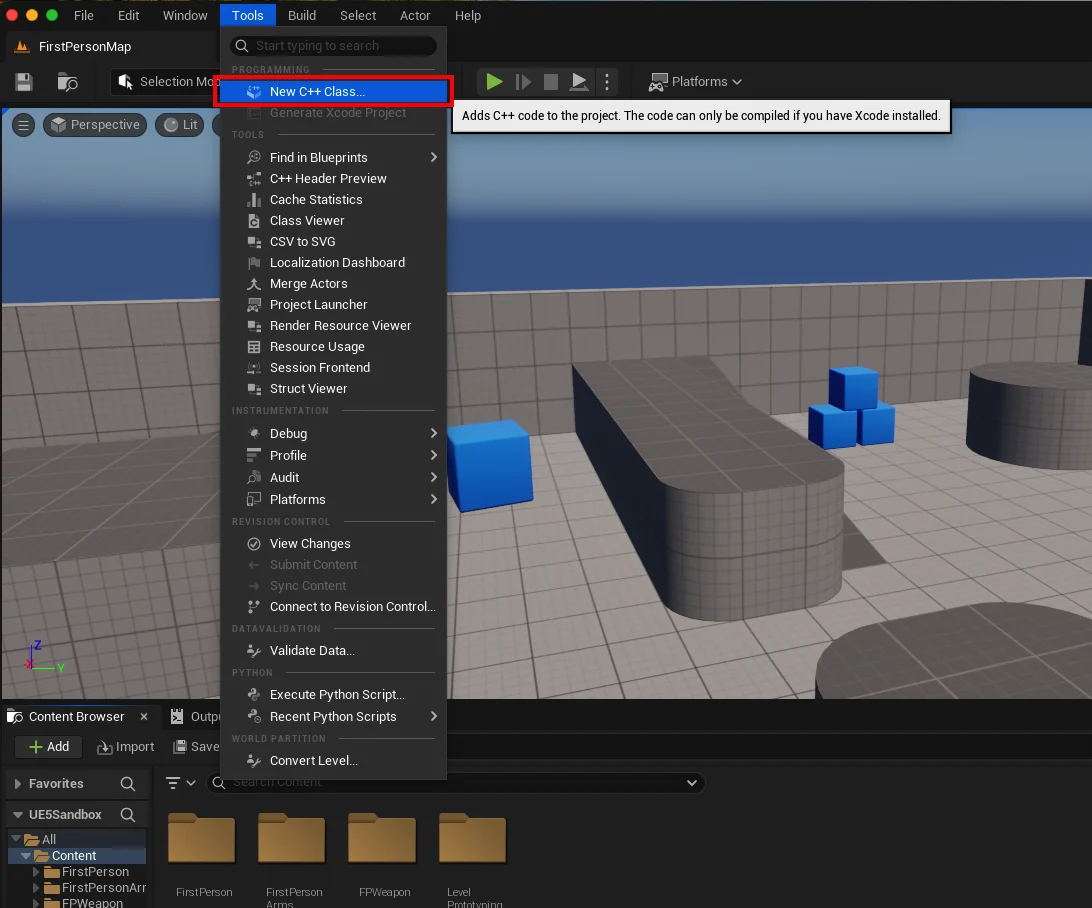
The first action involves verifying or enabling C++ capabilities within an Unreal Engine project. This is straightforward: navigating to the "Tools" dropdown menu at the top of the editor and selecting "New C++ Class." If the project is Blueprint-only, this action will initiate the setup for C++ development, potentially involving the installation of a suitable IDE if none is detected. For instance, a macOS user would be prompted to install Xcode. This initial step transforms a purely visual scripting project into a hybrid one, ready to accommodate C++ code.
Step 2: Defining the Library Class
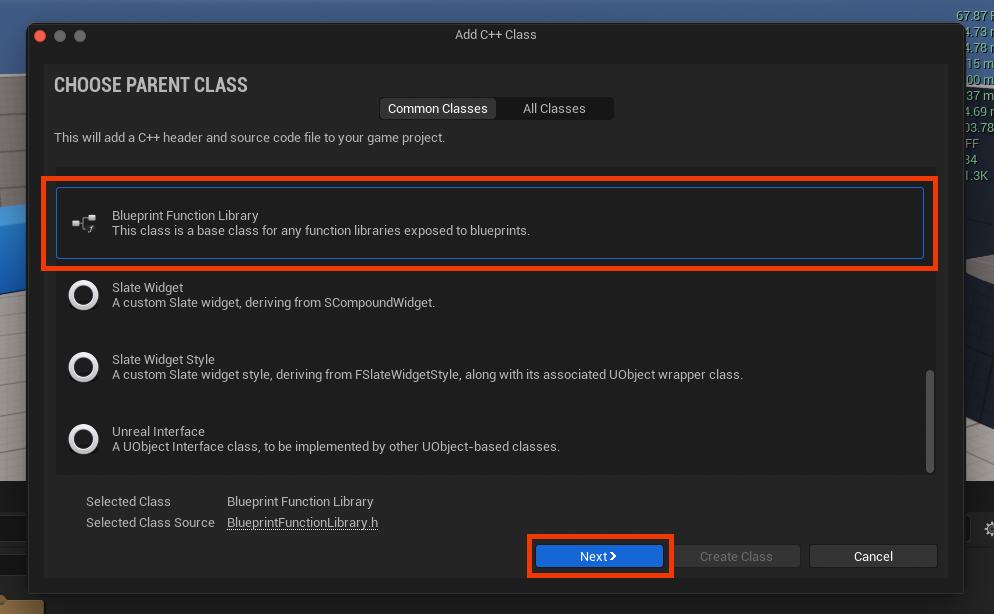
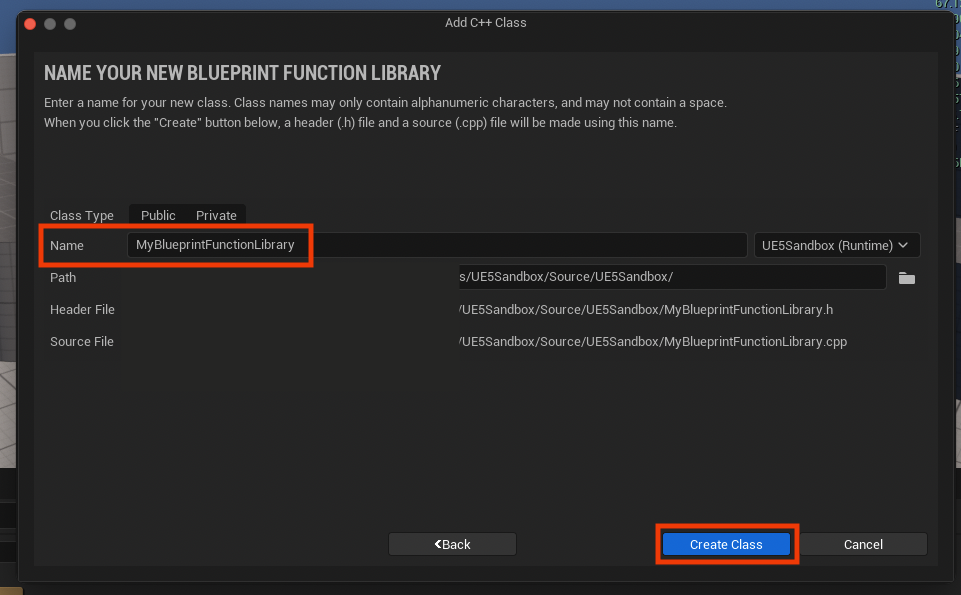
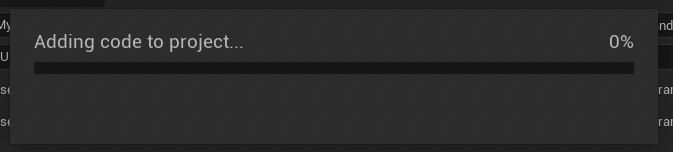
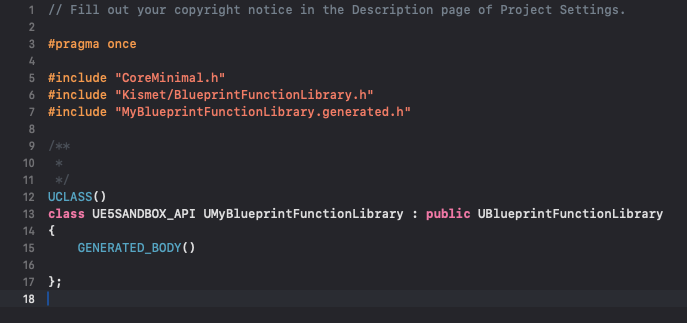
Upon successful C++ project setup, the "New C++ Class" dialog will present a list of parent classes. For a Blueprint Function Library, the developer must scroll down and select "Blueprint Function Library" from the available options. This parent class provides the necessary boilerplate and inheritance structure to ensure that the new C++ class can expose its functions to Blueprints. Following this, the developer is prompted to assign a name to the new class. Adhering to Unreal Engine’s naming conventions, which typically involve camel case with initial capital letters (e.g., "MyBlueprintFunctionLibrary" or "GameplayUtilityLibrary"), is recommended for clarity and consistency across large projects. After naming, the engine compiles the new class files, generating the .h (header) and .cpp (source) files within the project’s source directory. This compilation phase is crucial as it integrates the structural definition of the new library into the engine’s reflection system.
Step 3: Crafting C++ Functions for Blueprint Exposure
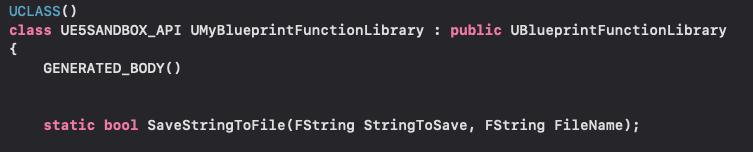
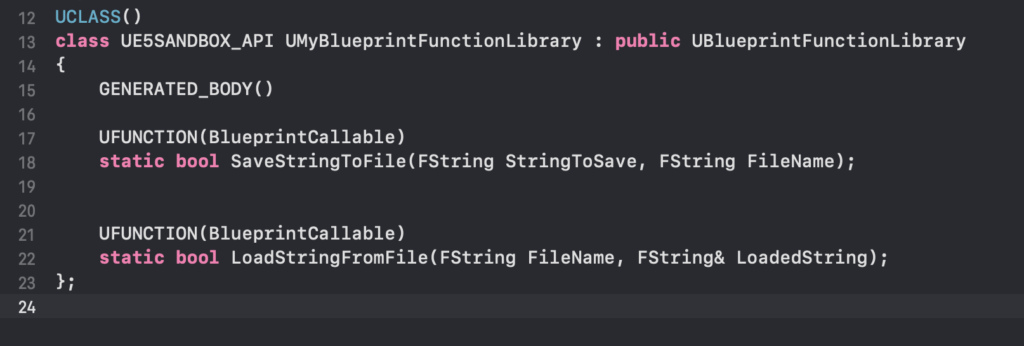
Once the new C++ Blueprint Function Library is generated and compiled, the core development shifts to the chosen IDE. Here, the developer interacts with the newly created .h and .cpp files. The header file (.h) serves as the declaration point for functions, while the source file (.cpp) contains their implementations.
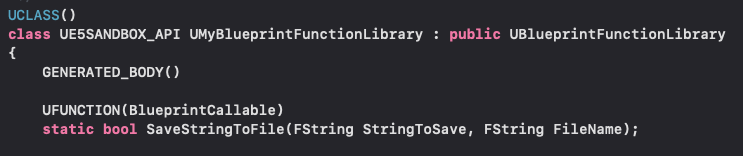
Two critical elements are required for exposing C++ functions to Blueprints:
- The
staticKeyword: Functions within a Blueprint Function Library must be declared asstatic. This is paramount because Blueprint Function Libraries themselves are not instantiated as objects in the game world. Static functions belong to the class itself, not an instance of the class, allowing them to be called directly as nodes in Blueprint without requiring an object reference. This design choice simplifies their use and makes them universally accessible. - The
UFUNCTIONMacro: This macro is a cornerstone of Unreal Engine’s reflection system. By decorating a C++ function withUFUNCTION(), developers signal to the engine that this function should be exposed to the editor and potentially to Blueprints. Key specifiers withinUFUNCTION()enhance its utility:BlueprintCallable: This specifier explicitly marks the function as callable from Blueprints, making it appear as a node in the Blueprint editor.Category="MyCategory": This optional but highly recommended specifier helps organize Blueprint nodes in the editor’s context menu. Grouping related functions under logical categories (e.g., "FileOperations", "MathUtilities", "CustomAI") significantly improves discoverability and workflow for designers.
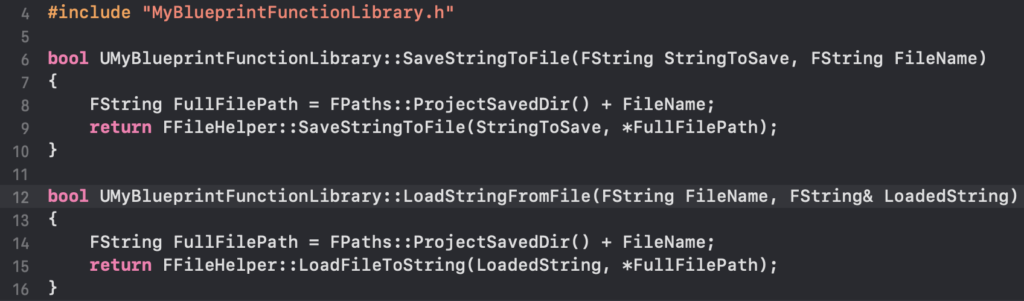
For example, implementing a simple string read/write system, as demonstrated, involves creating two static C++ functions: one to save a string to a file and another to load a string from a file. The Save String to File function might return a boolean indicating success or failure, while Load String from File would return the string content. The implementation within the .cpp file would leverage Unreal Engine’s FFileHelper class, a robust utility for file system operations, showcasing how C++ can interact directly with system resources in an optimized manner. After adding these function declarations and definitions, the project must be recompiled. This final compilation step integrates the new C++ logic into the engine, making the Blueprint nodes available.
Seamless Integration: Accessing C++ Functions in Blueprints
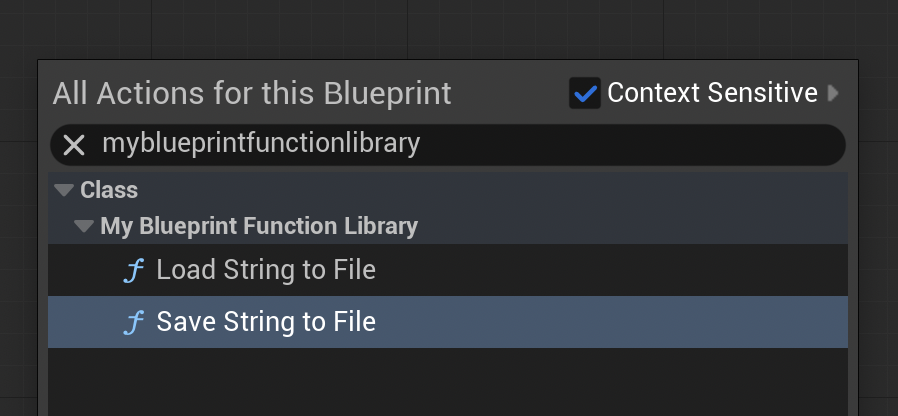
With the C++ Blueprint Function Library successfully compiled, its functions become immediately accessible within any Blueprint editor. By right-clicking on the Blueprint graph and typing the name of the created library or the function, the newly exposed C++ nodes will appear in the context-sensitive action menu. These nodes will function identically to native Blueprint nodes, accepting inputs and providing outputs as defined in their C++ signatures.
Demonstration: Practical Application in File I/O
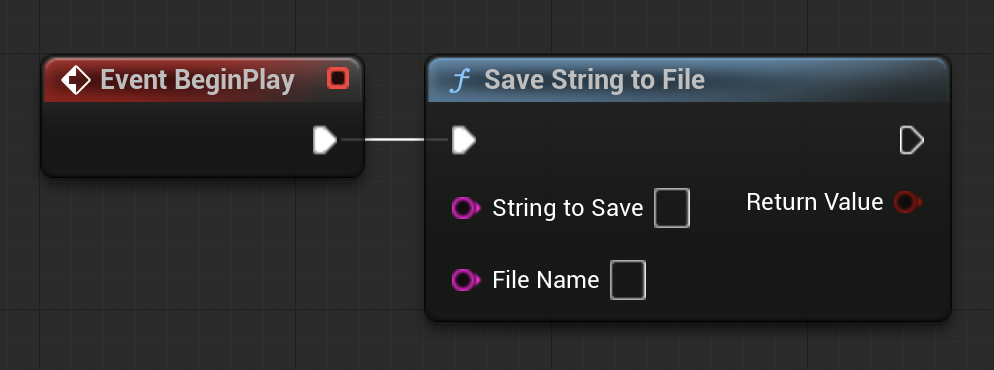
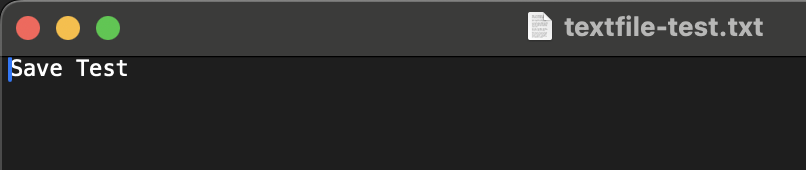
To illustrate the practical utility, consider the file I/O example. A developer can open a Level Blueprint and, on a BeginPlay event, drag out a "Save String to File" node (from their custom C++ library). They can then connect a string literal (e.g., "Save Test") and specify a file name (e.g., "textfile-test.txt"). Upon playing the game in the editor, this C++ function, executed via Blueprint, will write the specified string to a file within the project’s /Saved directory.
Conversely, to demonstrate reading, a developer could manually create a file (e.g., "loadtest.txt") in the /Saved folder and populate it with content (e.g., "Loading Test"). Then, within the same Level Blueprint, they would connect a "Load String from File" node, specify "loadtest.txt" as the target, and connect its output to a "Print String" node. When the game starts, the C++ function would efficiently read the file’s content, and the Blueprint would then display "Loading Test" on the screen, verifying the seamless interaction between C++ and Blueprint for essential game functionalities.
Broader Impact and Implications for Game Development
The adoption of C++ Blueprint Function Libraries carries significant implications for the efficiency, scalability, and performance of Unreal Engine projects:
- Optimized Performance Profile: By offloading computationally intensive tasks to C++, games can achieve higher frame rates, reduce stuttering, and provide a smoother, more responsive user experience, even on less powerful hardware. This directly contributes to a game’s market competitiveness and player satisfaction.
- Enhanced Scalability: Projects can grow significantly in complexity without hitting hard performance ceilings. Core systems can be built robustly in C++, while gameplay variations and content remain flexible within Blueprint. This modularity allows for easier management of large codebases.
- Robustness and Maintainability: Centralizing critical, performance-sensitive logic in C++ can lead to more stable and maintainable code. C++ offers stronger typing and compile-time error checking, catching issues earlier in the development cycle. When implemented thoughtfully, these libraries become reliable, tested components.
- Expanding Developer Skillsets: This hybrid approach underscores the increasing demand for Unreal Engine developers proficient in both visual scripting and C++. Teams that foster this dual expertise can maximize productivity and innovation.
- Community and Plugin Ecosystem: C++ Blueprint Function Libraries are fundamental to creating and sharing advanced functionalities within the Unreal Engine community. Plugin developers frequently use this method to expose complex C++ features to a wider audience of Blueprint-focused creators, enriching the entire ecosystem.
- Future-Proofing Projects: As hardware capabilities evolve and player expectations for game fidelity increase, the ability to leverage C++ for maximum performance ensures that Unreal Engine projects remain competitive and adaptable to future technological demands.
In conclusion, C++ Blueprint Function Libraries represent a critical paradigm in Unreal Engine 5 development, offering a pragmatic and powerful solution to the inherent limitations of purely visual scripting. By allowing developers to selectively infuse their Blueprint projects with the speed, efficiency, and expanded capabilities of C++, these libraries not only provide tangible performance improvements but also unlock a vast array of hidden functionalities within the engine. This hybrid methodology empowers development teams to craft more sophisticated, performant, and scalable games, solidifying Unreal Engine’s position as a leading platform for ambitious interactive experiences.
About the Author








