Data tables in Unreal Engine 5 represent a cornerstone of efficient and scalable game development, offering programmers and designers a robust mechanism to manage pre-defined lists of information. This fundamental feature streamlines content creation, simplifies data iteration, and fosters collaborative workflows, proving indispensable for projects ranging from indie titles to expansive AAA experiences. The core principle revolves around structuring data in a tabular format, where each entry, or "row," conforms to a predefined data schema known as a "struct."
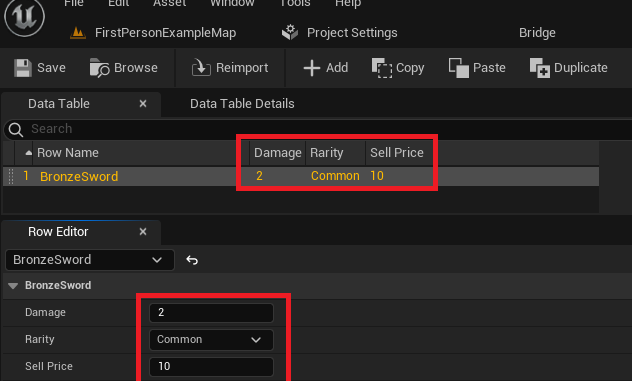
At its heart, a Data Table in Unreal Engine 5 is a versatile asset designed to store structured data in an accessible and persistent manner. Unlike hardcoded values or scattered variables, data tables centralize information, allowing developers to define a list of data entries, each identifiable by a unique key. This structured approach ensures that critical game parameters, item specifications, character attributes, quest details, or environmental configurations are not only consistently formatted but also easily retrievable and modifiable from any part of the project’s codebase, be it Blueprints or C++. The data, stored directly within the Unreal Editor, persists across development sessions, enabling designers to populate and refine game content iteratively without requiring programmer intervention for code changes. This capability significantly accelerates development cycles and empowers content creators with direct control over game parameters. For instance, defining attributes for various in-game items or enemies becomes a streamlined process where designers can set values for damage, rarity, sell price, or health points, knowing these values are immediately available and persistent within the game’s runtime environment.
The Evolution of Data Management in Game Engines
The inclusion and robust implementation of data tables reflect a broader trend in game development towards data-driven design. Historically, game logic and data were often intertwined, leading to rigid systems that were difficult to update or scale. As games grew in complexity and scope, the need for flexible data management solutions became paramount. Early approaches involved custom file formats (XML, JSON) or direct database integrations, which, while functional, often required custom parsers and presented integration challenges within the engine environment. Epic Games, with Unreal Engine, has continuously evolved its data management tools, with Data Tables standing out as a user-friendly and powerful solution that abstracts away much of the underlying complexity. This allows teams to maintain a single source of truth for their game’s dynamic content, mitigating inconsistencies and reducing the risk of bugs associated with disparate data sources. Industry experts often cite data tables as a critical component for achieving agility in game development, particularly in live-service games where content updates and balancing adjustments are frequent.
Foundational Elements: Enums and Structs
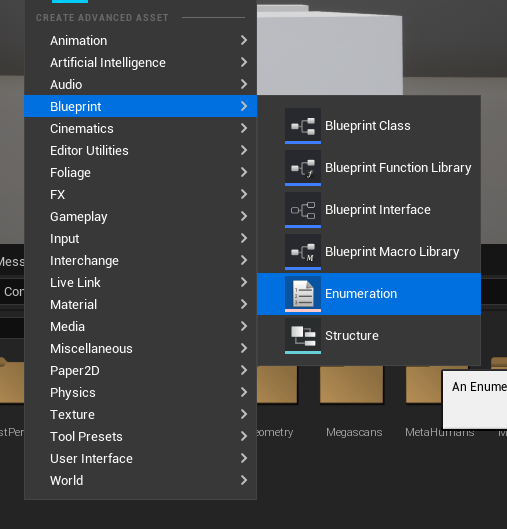
Before a Data Table can be brought to life, two foundational elements must be established: Enumerations (Enums) and Structures (Structs). These define the very nature and organization of the data that the table will hold.
Defining Categorical Values with Enums
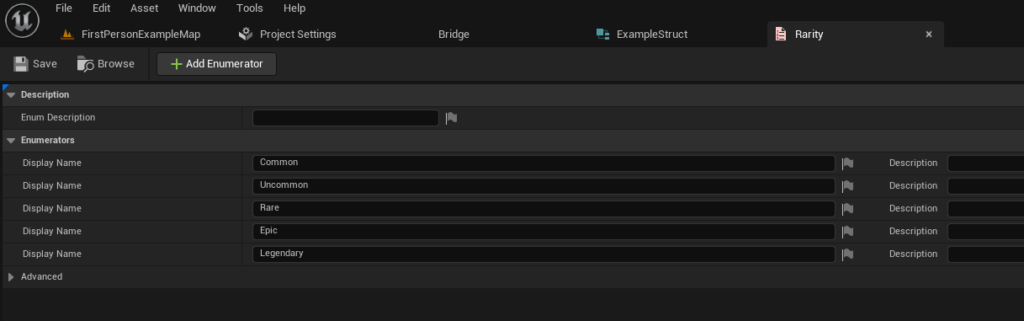
An Enum, short for Enumeration, serves as a mechanism to define a set of named integer constants. In game development, enums are invaluable for representing discrete categories or states, providing both clarity and type safety. Instead of using arbitrary numbers (often referred to as "magic numbers") to denote different item rarities, quest stages, or enemy types, an enum allows developers to assign meaningful names to these values. For instance, to classify the quality of a role-playing game item, an ItemRarity enum can be created with values such as Common, Uncommon, Rare, Epic, and Legendary.
Creating an enum in Unreal Engine 5 is straightforward:
- Navigate to the Content Browser.
- Right-click anywhere in an empty space.
- Select
Blueprint->Enumeration. - Name the new enum (e.g.,
E_ItemRarity). - Open the enum and define the required values. Each entry corresponds to a specific rarity level, ensuring consistent categorization across all items. This practice enhances readability for team members and reduces potential errors associated with numerical assignments.
Structuring Data with Structs
The Struct, or Structure, is arguably the more critical precursor to a Data Table. A struct is a custom data type that groups together a collection of variables (members) under a single name. These variables can be of different types (e.g., integer, float, boolean, string, or even other enums). In the context of data tables, a struct acts as the blueprint for each row, defining the "columns" and their respective data types. When creating a data table, it explicitly asks which struct it should be based upon, thereby dictating the data schema for all entries.
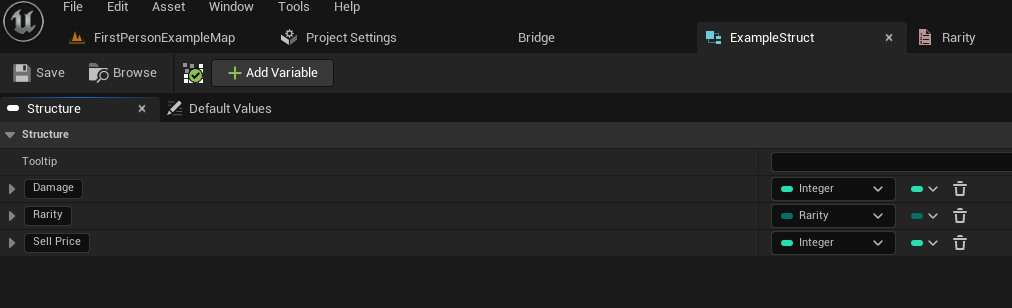
Following the ItemRarity example, a struct named F_ItemData (conventionally prefixed with F for Unreal structs) could be created to define the characteristics of an item. This struct might include:
Damage: A float to represent the item’s offensive power.Rarity: AnE_ItemRarityenum value, linking back to our defined rarity categories.SellPrice: An integer indicating the item’s value.
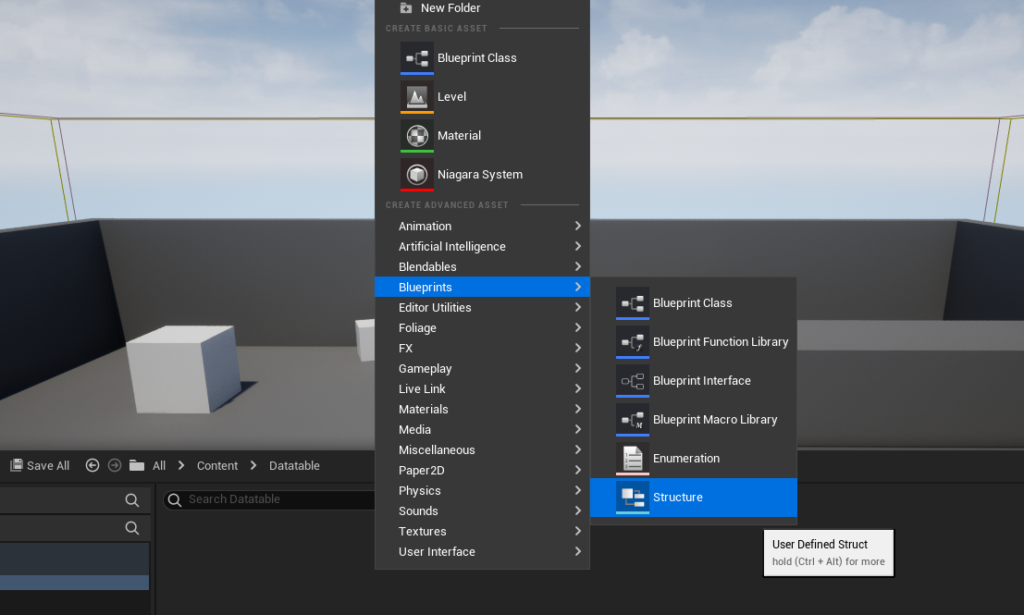
To create a struct:
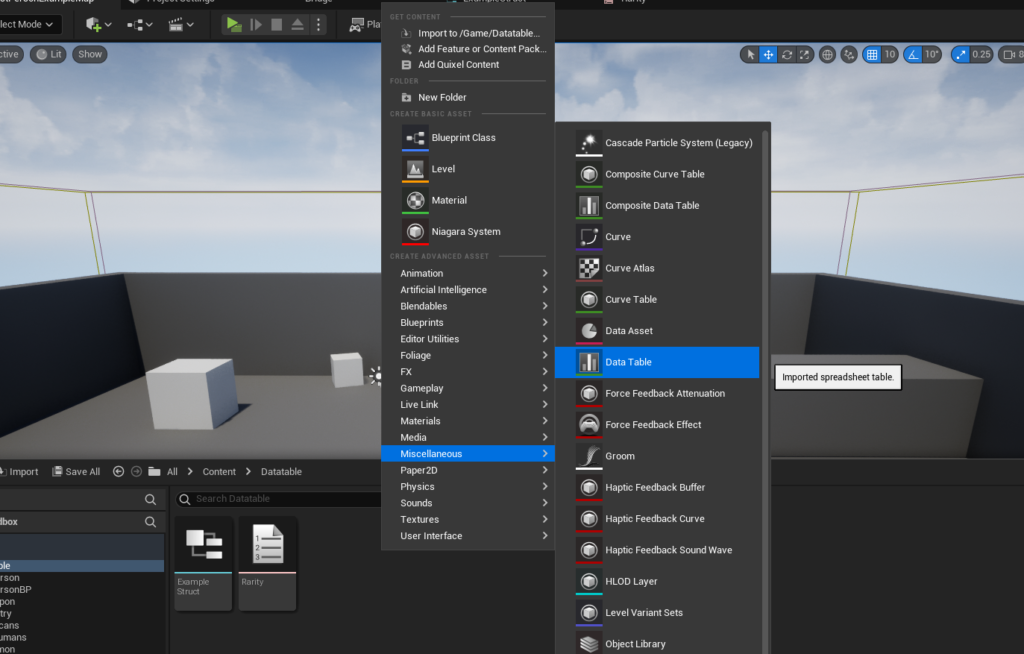
- Right-click in the Content Browser.
- Select
Blueprint->Structure. - Name the new struct (e.g.,
F_ExampleStructorF_ItemData). - Open the struct and add new variables, assigning them appropriate types (e.g.,
Floatfor Damage,E_ItemRarityfor Rarity,Integerfor Sell Price). This step is crucial as it directly determines the fields available for each row in the subsequent data table.
Constructing and Populating the Data Table
With the foundational enum and struct in place, the creation of the Data Table itself becomes the next logical step. This process binds the defined structure to a tabular asset, ready for data entry.
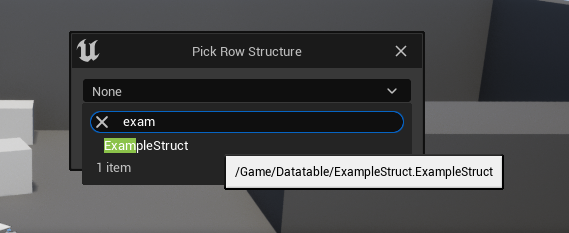
Initiating the Data Table Asset
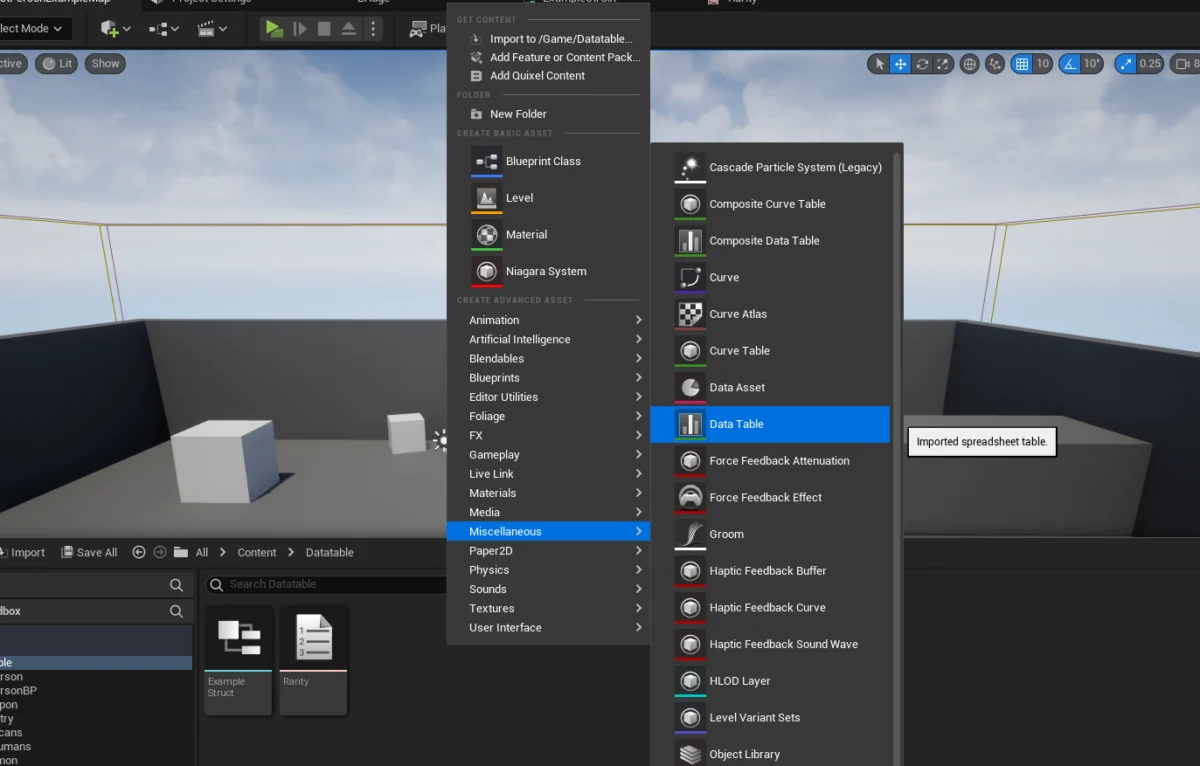
The Data Table asset is created similarly to enums and structs, but it resides under a different category:
- Right-click in the Content Browser.
- Select
Miscellaneous->Data Table. - A pop-up will immediately appear, prompting the user to select the
Row Structure. This is where the previously created struct (e.g.,F_ExampleStructorF_ItemData) is chosen. This selection is irreversible without recreating the data table, highlighting its importance in establishing the table’s schema.
Populating Data and Iterative Design
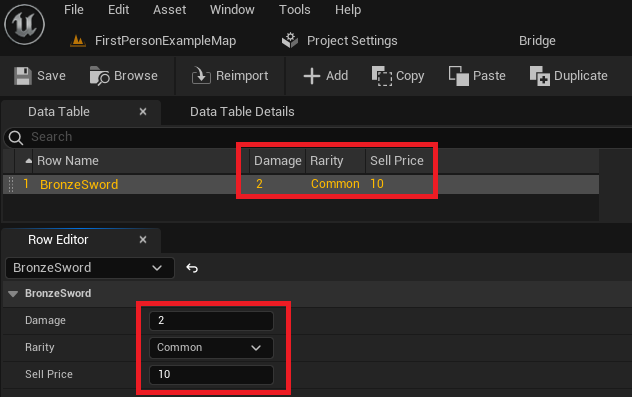
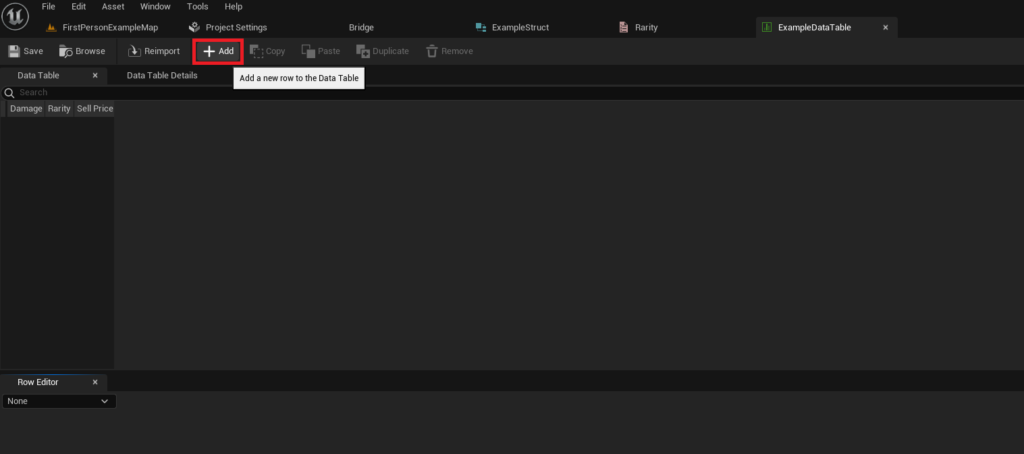
Once the Data Table is created and associated with its struct, it can be opened and populated with actual game data. The interface presents a tabular view where rows can be added, each corresponding to an instance of the chosen struct.
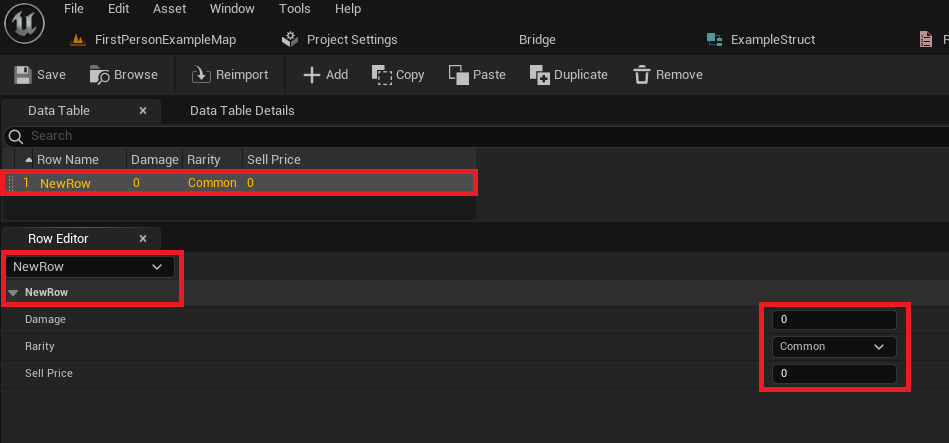
- Adding Rows: Click the
Addbutton within the Data Table editor. A new row will appear, pre-filled with the default values defined in the struct. - Naming Rows: Each row requires a unique
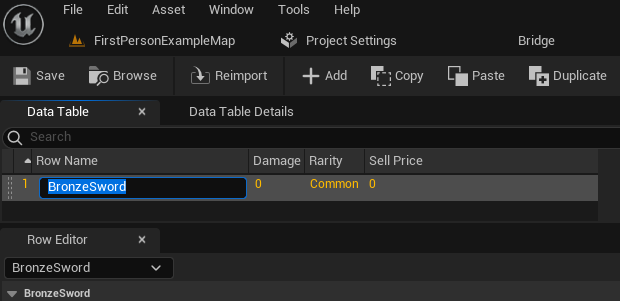
Row Name. This name acts as the key by which the data for that specific row will be retrieved at runtime. For consistency and clarity, it is crucial to use descriptive and unique identifiers (e.g.,BronzeSword,IronShield,HealingPotion). The Row Name can be changed by clicking on the default name provided. - Editing Values: Below the table view, the
Row Editordisplays the individual fields of the selected row, allowing developers to input specific values forDamage,Rarity,Sell Price, and any other variables defined in the struct. Changes made in the Row Editor are immediately reflected in the table above. - Scalability and Iteration: This process can be repeated to create as many entries as needed, from a handful of items to thousands of distinct entities. The visual nature of the Data Table editor facilitates rapid iteration and balancing by designers, allowing them to adjust values and test changes without compiling code. It is paramount to frequently
Savethe Data Table asset to prevent loss of work.
Accessing Data Tables at Runtime
Populating a data table is only half the equation; the real power lies in its ability to be queried and utilized within the game’s logic. Unreal Engine 5 provides straightforward Blueprint nodes (and corresponding C++ functions) to access data table rows, either individually or through iteration.
Retrieving Specific Rows with Get Data Table Row
To access a particular entry, the Get Data Table Row node is employed. This node requires two primary inputs:
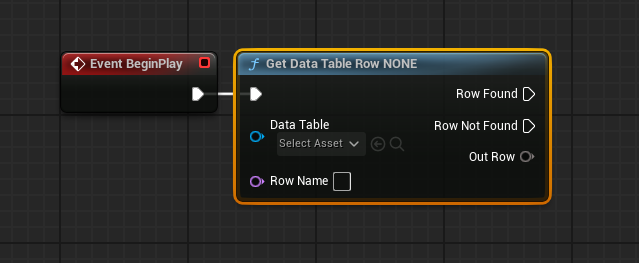
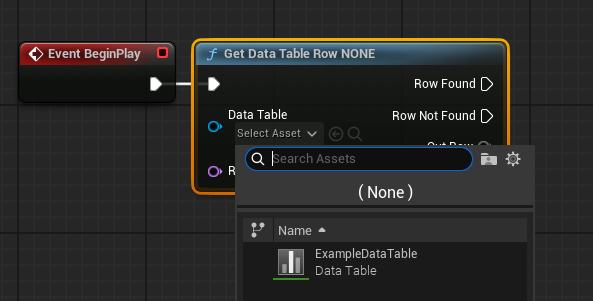
- Data Table Reference: A direct reference to the Data Table asset created earlier. This is typically set by selecting the asset from a dropdown menu on the node itself.
- Row Name: The unique identifier (string) of the specific row whose data is to be retrieved. This can be directly typed into the node or dynamically supplied from another variable.
The Get Data Table Row node offers two execution pins:
- Row Found: This pin executes if a row matching the provided
Row Nameis successfully located. - Row Not Found: This pin executes if no row with the specified
Row Nameexists in the data table, providing a crucial mechanism for error handling and fallback logic.
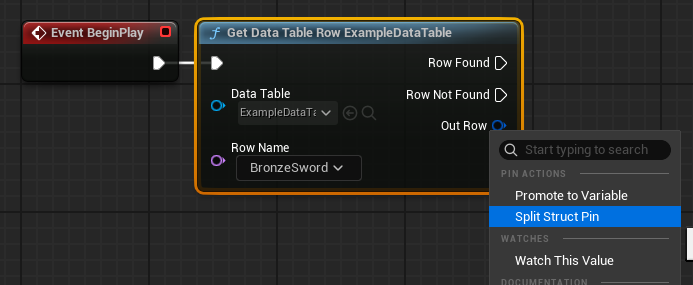
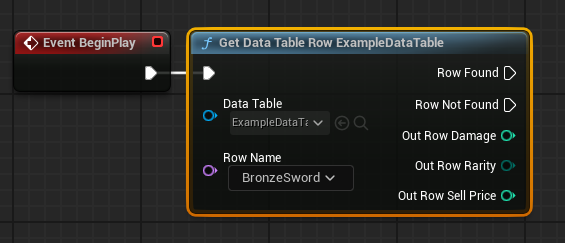
The primary output of this node is Out Row, which contains all the data from the found row, packaged as an instance of the chosen struct. To access individual fields (e.g., Damage, Rarity, Sell Price) from the Out Row, the struct pin can be right-clicked and Split Struct Pin selected. This expands the struct into its constituent variables, allowing them to be connected to other Blueprint nodes for use in game logic (e.g., displaying item stats, calculating combat damage, or determining sale value). Importantly, when a Data Table Reference is set, the Row Name input often transforms into a dropdown list, displaying all available row names, further aiding developer efficiency and preventing typos.
Iterating Through All Rows for Comprehensive Processing
For scenarios requiring processing of all or multiple entries in a data table (e.g., populating an inventory, generating enemy spawns based on difficulty, or performing mass data validation), iterating over the data table is essential.
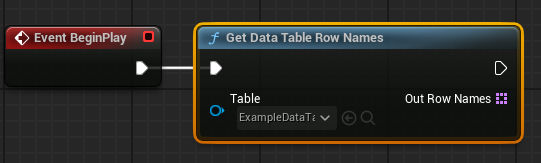
- Retrieving All Row Names: The
Get Data Table Row Namesnode is used first. This node takes the Data Table asset reference as input and returns anArrayofNames, where eachNamecorresponds to aRow Namein the table. - Looping with
For Each Loop: The outputArrayfromGet Data Table Row Namesis then connected to aFor Each Loopnode. This standard Blueprint loop iterates through each element in the array. - Accessing Data within the Loop: Inside the
For Each Loop, theArray Element(which is aNamerepresenting aRow Name) is connected to theRow Nameinput of aGet Data Table Rownode. This setup ensures that in each iteration of the loop, the data for the current row name is retrieved. TheOut Rowcan then be split and its values used for whatever purpose the game logic dictates, such as adding items to a dynamic list, performing calculations, or updating UI elements.
This looping capability allows for powerful and flexible data processing, enabling dynamic game systems that respond to the content defined within the data tables.
Broader Implications and Strategic Advantages
The effective utilization of Data Tables in Unreal Engine 5 extends far beyond simple data storage; it fundamentally impacts project scalability, team collaboration, and long-term maintainability.
- Scalability: As projects grow, the volume of data inevitably increases. Data tables provide a structured and performant way to manage this growth, supporting hundreds or even thousands of distinct entries without bogging down the development process or runtime performance.
- Maintainability and Balancing: Game balancing is an iterative process. With data tables, designers can tweak numeric values (e.g., weapon damage, enemy health, item prices) and categorical properties (e.g., item rarity) without requiring code recompilation. This dramatically speeds up balancing passes and content updates, making the game easier to maintain over its lifecycle.
- Team Collaboration: Data tables foster a clear separation of concerns. Programmers can focus on building robust game systems that interact with the data, while designers and content creators can concentrate on populating and refining that data. This reduces dependencies and bottlenecks, allowing different disciplines to work more independently and efficiently.
- Localization: Data tables are frequently employed for managing localization data, where each row represents a unique text string identified by a key, with columns for different languages. This provides a centralized and easily updateable system for translating game content.
- Version Control Integration: As asset files, data tables integrate seamlessly with version control systems like Git or Perforce. This allows teams to track changes, revert to previous versions, and merge updates effectively, which is crucial for collaborative development.
- Data Validation: While the engine provides structural integrity, advanced teams often implement custom data validation routines (e.g., ensuring no item has a negative sell price) using Blueprint validation utilities or C++ code, further enhancing data reliability.
Conclusion
Unreal Engine 5’s Data Tables are an indispensable tool for modern game development. By providing a clear, structured, and accessible method for storing and managing game data, they empower developers to build more scalable, maintainable, and content-rich experiences. From initial setup involving enums and structs to the dynamic retrieval and iteration of data at runtime, mastering data tables streamlines workflows, enhances collaboration, and ultimately contributes to the efficiency and quality of any Unreal Engine project. Their ability to act as a single source of truth for diverse game parameters, without requiring C++ knowledge for content creation, solidifies their position as a core asset in the game developer’s toolkit. As the complexity of interactive experiences continues to evolve, robust data management solutions like Unreal Engine’s Data Tables will remain critical to successful game creation.
About the Author