In the dynamic landscape of modern game development, the pursuit of optimal performance and flexible workflow remains a paramount objective. While Unreal Engine 5’s visual scripting system, Blueprints, offers unparalleled speed in prototyping and iterative design, complex or computationally intensive tasks frequently encounter performance limitations that necessitate a more robust solution. This challenge is precisely addressed by the strategic implementation of C++ Blueprint Function Libraries, a powerful feature designed to seamlessly integrate the raw speed and expanded capabilities of C++ directly into existing Blueprint graphs, thereby optimizing project efficiency and expanding creative horizons.
The Dual-Nature of Unreal Development: Blueprints vs. C++
Unreal Engine has long empowered developers with a hybrid development environment, offering two primary avenues for logic implementation: C++ and Blueprints. Blueprints, Epic Games’ visual scripting language, are celebrated for their accessibility, rapid iteration capabilities, and ease of use, making them an ideal choice for designers, artists, and even programmers looking to quickly prototype features or implement game logic without delving into complex syntax. This visual approach significantly reduces development time for many tasks, fostering a more intuitive and collaborative workflow across diverse teams.
However, the inherent advantages of visual scripting come with certain trade-offs, particularly concerning raw execution speed. Blueprints operate within a virtual machine, incurring overhead due to interpretation and runtime checks, which can lead to performance bottlenecks when handling extensive calculations, frequent data manipulation, or highly optimized algorithms. In contrast, C++ offers direct hardware access, compile-time optimizations, and unparalleled control over memory management, resulting in significantly faster execution speeds—often orders of magnitude quicker than equivalent Blueprint logic. This makes C++ indispensable for performance-critical systems such as physics simulations, complex AI behaviors, large-scale data processing, and rendering pipelines.
Identifying the Performance Bottleneck: When Blueprints Reach Their Limit
Developers often find themselves in a scenario where a game development project, initially built with expediency in mind using Blueprints, begins to exhibit performance degradation. This is particularly noticeable in segments of the game requiring numerous calculations per frame, such as advanced character movement, complex inventory systems, intricate environmental interactions, or sophisticated AI decision-making. While initial Blueprint implementations might suffice for prototyping, as the project scales and demands on the CPU increase, these Blueprint-driven systems can become an "optimization ceiling," preventing the game from achieving target frame rates or responsiveness. At this juncture, conventional Blueprint optimization techniques, such as refactoring or reducing node count, may no longer yield tangible improvements, signaling a need for a more fundamental shift in implementation. Furthermore, C++ offers access to a broader spectrum of engine features and external libraries that may not have readily available Blueprint nodes, limiting functionality for purely Blueprint-based projects.
C++ Blueprint Function Libraries: A Strategic Solution for Hybrid Development
The C++ Blueprint Function Library emerges as a critical tool to navigate this performance dichotomy without necessitating a complete project overhaul. It is a specialized Unreal Engine class designed to host C++ functions that can be seamlessly invoked from within Blueprint graphs. This architecture allows developers to encapsulate performance-intensive logic or unique C++ functionalities into highly optimized, compiled code, which then becomes exposed and accessible within the familiar Blueprint editor. The primary benefits are multi-fold:
- Accelerated Execution: By migrating computationally heavy Blueprint sections to C++, developers can achieve substantial performance gains. Functions executing in C++ benefit from direct compilation, bypassing the runtime overhead of the Blueprint virtual machine, leading to more efficient resource utilization and smoother gameplay experiences.
- Expanded Functionality: C++ provides direct access to the entirety of the Unreal Engine API, operating system features, and third-party libraries. This capability allows developers to implement complex algorithms, integrate with hardware-specific features, or utilize external data structures that might otherwise be impossible or impractical to achieve solely within Blueprints.
- Seamless Integration: Crucially, C++ Blueprint Function Libraries are designed for effortless interoperability. Once C++ functions are properly defined and exposed, they appear as standard nodes within the Blueprint editor, allowing designers and Blueprint programmers to incorporate high-performance C++ logic into their existing visual graphs without requiring deep C++ knowledge or complex data marshalling.
- Improved Code Organization and Maintainability: Centralizing specific functionalities within a C++ library can lead to cleaner, more modular codebases. Performance-critical elements are isolated, making them easier to optimize, debug, and maintain by C++ specialists, while the Blueprint layer focuses on high-level game logic and creative iteration.
A Step-by-Step Integration Guide: Harnessing C++ Power
Implementing a C++ Blueprint Function Library involves a structured process, beginning with environment setup and culminating in the integration of high-performance C++ nodes into Blueprint workflows.
1. Prerequisites and Environment Setup:
Before embarking on C++ development within Unreal Engine 5, developers must ensure they possess a foundational understanding of C++ programming concepts and have an appropriate Integrated Development Environment (IDE) installed. For Windows users, Microsoft Visual Studio (with "Game development with C++" workload) is the standard. MacOS users typically rely on Xcode. Unreal Engine will prompt users to install the necessary IDE if it’s not detected, facilitating the initial setup.
2. Project Type Assessment:
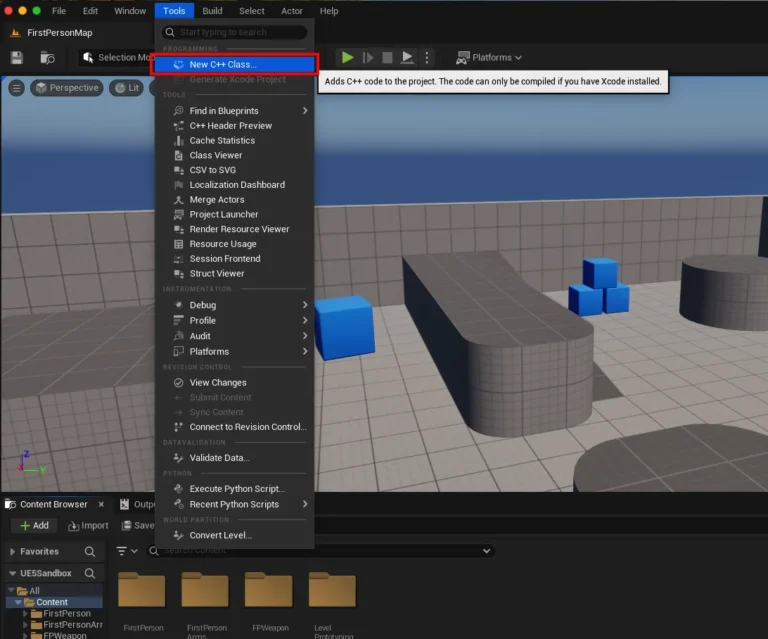
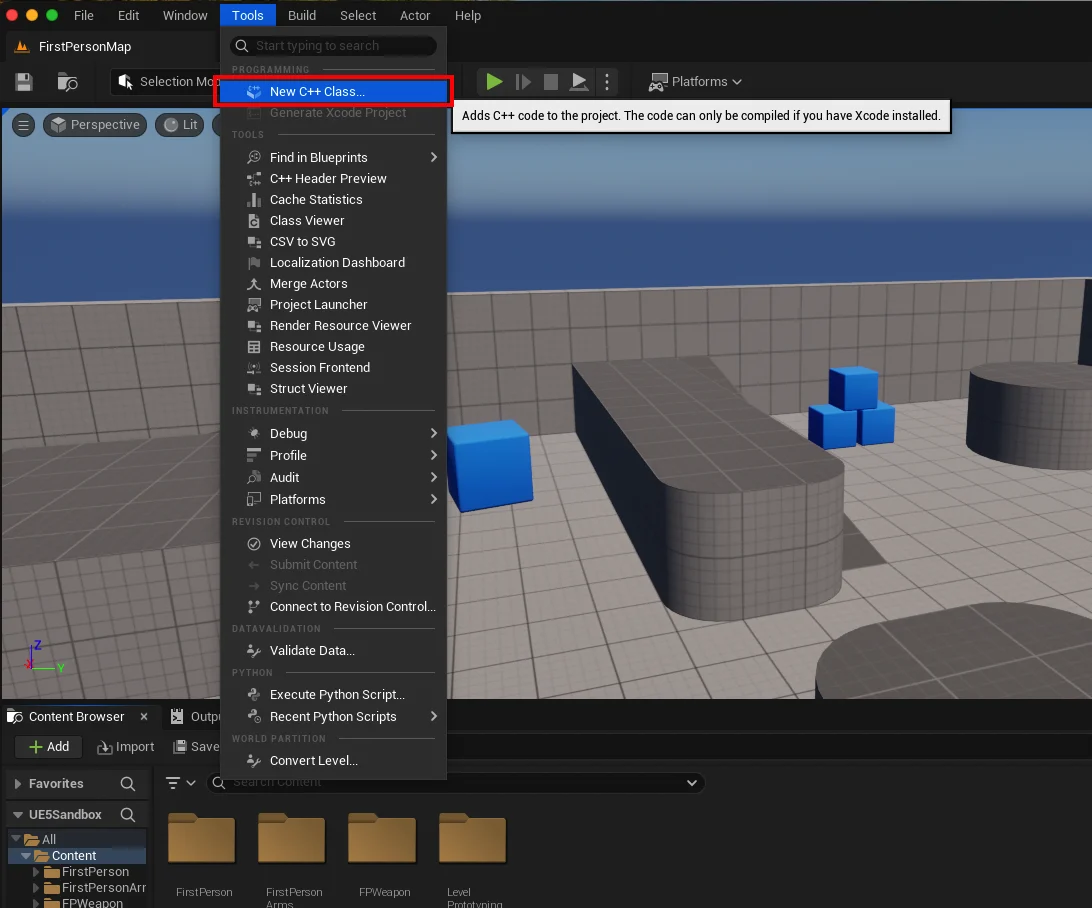
The first practical step within the Unreal Editor is to ascertain whether the current project is configured for C++ development. This is easily done by navigating to the "Tools" dropdown menu at the top of the screen and selecting "New C++ Class." If the project is purely Blueprint-based, the engine will guide the user through the process of adding C++ support, which typically involves installing the aforementioned IDEs.
3. Creating the Blueprint Function Library Class:
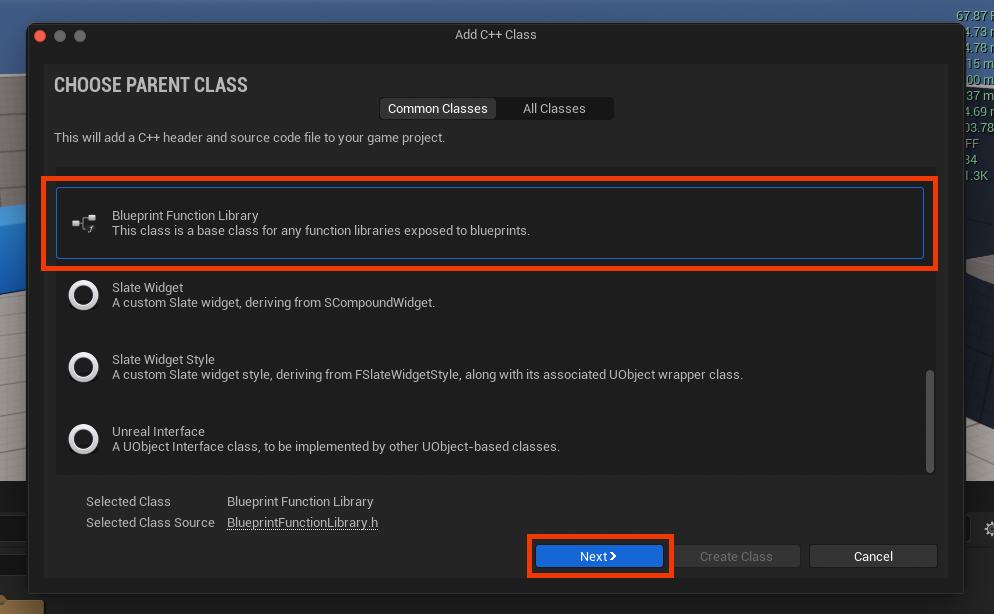
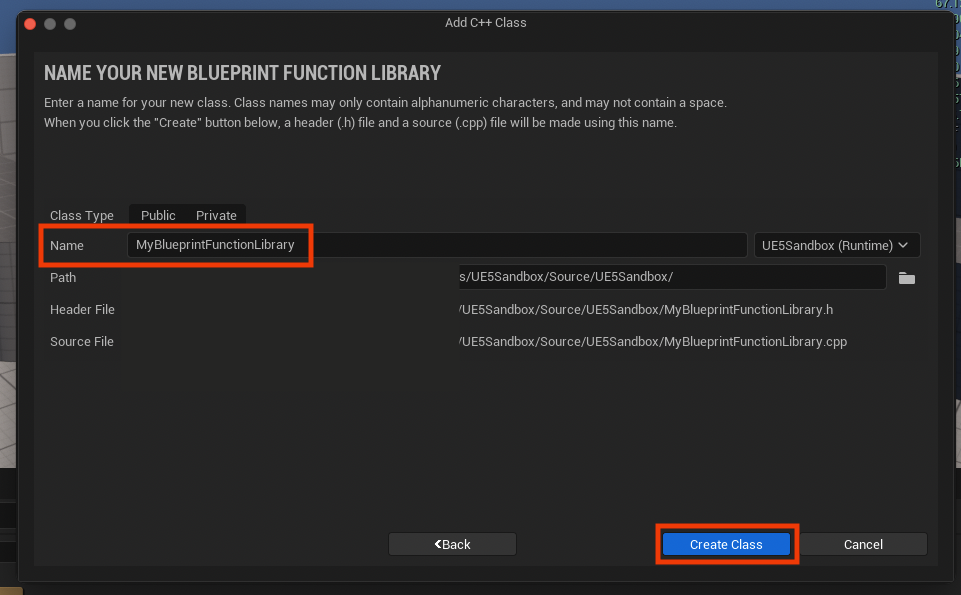
Upon initiating the "New C++ Class" process, a dialog box prompts the selection of a "Parent Class." To create a Blueprint Function Library, developers must scroll through the available classes and choose "Blueprint Function Library." This selection ensures the new C++ class inherits the necessary framework to expose static functions to Blueprints. Following this, the class requires a descriptive name, adhering to Unreal Engine’s naming conventions (e.g., MyBlueprintFunctionLibrary, using PascalCase for clarity). This naming convention aids in readability and consistency across large projects. After naming, the engine compiles the new C++ files, generating a .h (header) and a .cpp (source) file for the newly created class within the project’s source directory. This compilation process integrates the new class definition into the engine’s build system, making it ready for code implementation.

4. Implementing Functions within the Code IDE:
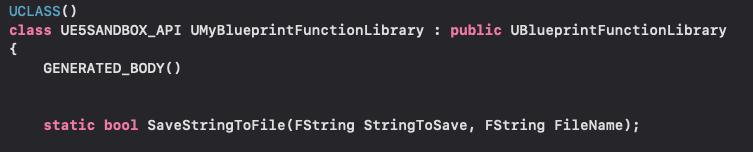
With the C++ class established, the next phase involves defining and implementing the desired C++ functions. The header file (.h) serves as the declaration point for these functions. A crucial aspect here is the use of the static keyword in the function declaration. Static functions belong to the class itself rather than an instance of the class, meaning they can be called directly without needing to create an object reference, which is essential for Blueprint nodes that operate globally.
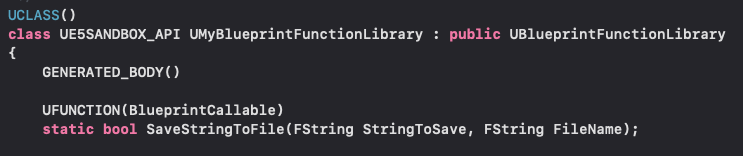
To make these C++ functions visible and usable within the Blueprint editor, they must be adorned with the UFUNCTION macro. This macro is a core component of Unreal Engine’s reflection system, instructing the engine to expose the function to Blueprints. The BlueprintCallable specifier within UFUNCTION explicitly marks the function for Blueprint access.
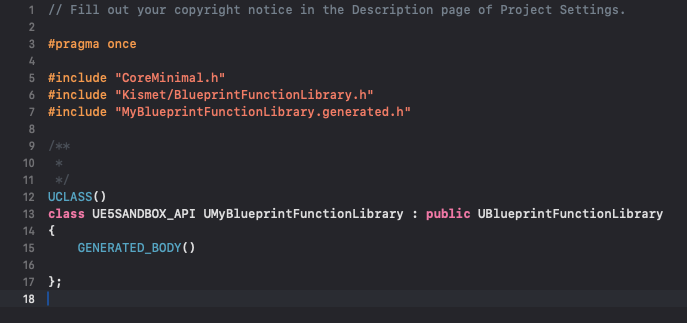
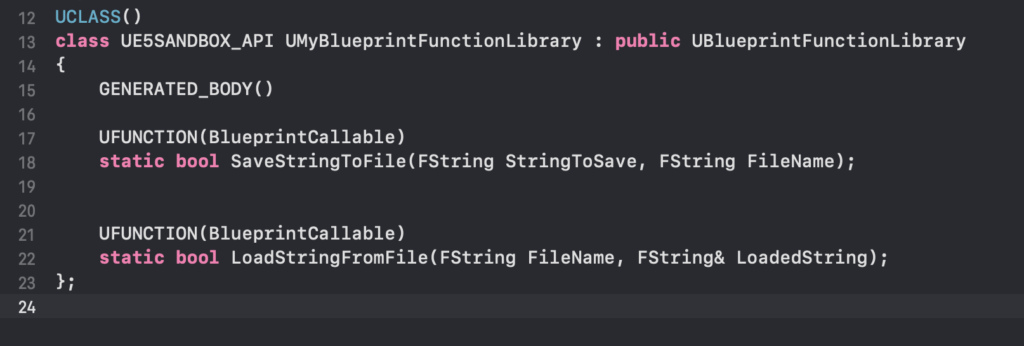
For instance, to create a basic string read and write system, two static functions might be declared in the header file:
// MyBlueprintFunctionLibrary.h
#pragma once

#include "CoreMinimal.h"
#include "Kismet/BlueprintFunctionLibrary.h"
#include "MyBlueprintFunctionLibrary.generated.h"

UCLASS()
class UMyBlueprintFunctionLibrary : public UBlueprintFunctionLibrary

    GENERATED_BODY()

public:
    UFUNCTION(BlueprintCallable, Category = "File Operations")
    static bool SaveStringToFile(FString InString, FString FileName);

    UFUNCTION(BlueprintCallable, Category = "File Operations")
    static FString LoadStringFromFile(FString FileName);
;
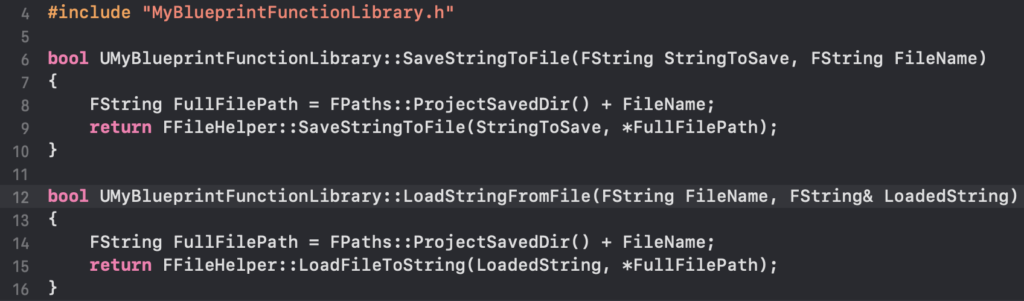
The implementation of these functions resides in the .cpp source file. Here, the raw C++ logic is written, potentially leveraging Unreal Engine’s extensive internal libraries. For the string read/write example, the FFileHelper class, part of Unreal Engine’s core utilities, is ideal. This class provides convenient methods for file operations, demonstrating how C++ can tap into lower-level engine functionalities that are abstracted or unavailable in Blueprints.
// MyBlueprintFunctionLibrary.cpp
#include "MyBlueprintFunctionLibrary.h"
#include "Misc/FileHelper.h"
#include "HAL/PlatformFileManager.h"

bool UMyBlueprintFunctionLibrary::SaveStringToFile(FString InString, FString FileName)

    FString FullPath = FPaths::ProjectSavedDir() + FileName; // Save to project's Saved directory
    return FFileHelper::SaveStringToFile(InString, *FullPath);


FString UMyBlueprintFunctionLibrary::LoadStringFromFile(FString FileName)

    FString ResultString = TEXT("");
    FString FullPath = FPaths::ProjectSavedDir() + FileName; // Load from project's Saved directory
    FFileHelper::LoadFileToString(ResultString, *FullPath);
    return ResultString;
After defining and implementing the functions, the project must be compiled. This process transforms the C++ code into machine-executable instructions, integrating the new functionalities into the Unreal Engine executable. Once compiled, the Unreal Editor should be relaunched to ensure the engine reflects the latest C++ changes.
Real-World Application and Demonstration
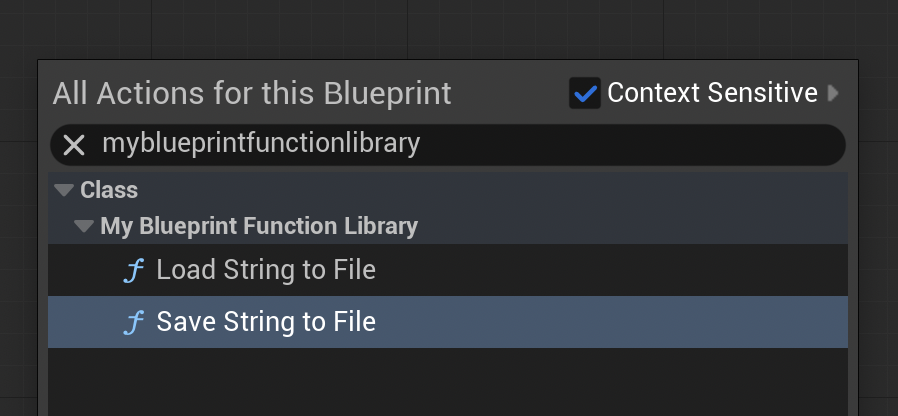
Upon recompilation and editor restart, the newly created C++ functions become instantly accessible within any Blueprint editor. By right-clicking within a Blueprint graph and typing the function name (e.g., "Save String To File" or "Load String From File"), the corresponding C++ Blueprint node will appear in the context menu, ready to be integrated.
A practical demonstration might involve the following:
- Saving Data: In a Level Blueprint, a
BeginPlayevent could trigger theSaveStringToFilenode. A custom string (e.g., "Hello from C++ via Blueprint!") is input, along with a desired filename (e.g., "mydata.txt"). Upon playing the game in the editor, this C++ function, invoked from Blueprint, executes, creating a new file in the project’s/Saveddirectory containing the specified string. - Loading Data: To verify, a separate
BeginPlayevent or an action could trigger theLoadStringFromFilenode, targeting the previously saved "mydata.txt". The output string from this node can then be connected to aPrint Stringnode, displaying the loaded content directly on the screen during gameplay. This confirms the seamless round-trip of data handling, entirely facilitated by the C++ Blueprint Function Library.
Strategic Implications for Game Development
The integration of C++ Blueprint Function Libraries carries significant strategic implications for modern game development:
- Optimizing Development Cycles: By selectively migrating performance-critical logic to C++, teams can avoid costly and time-consuming full-Blueprint-to-C++ rewrites. This approach preserves the agility of Blueprint development for general game logic while leveraging C++ for areas demanding maximum efficiency.
- Enhancing Team Collaboration: BFLs serve as a crucial bridge between C++ programmers and Blueprint-centric designers/artists. C++ developers can craft high-performance, robust backend functionalities, exposing them through user-friendly Blueprint nodes. This empowers designers to integrate complex systems without needing to delve into the C++ codebase, fostering more efficient and independent workflows.
- Scalability and Scope: The ability to offload heavy computations to C++ significantly enhances a project’s scalability. Developers can undertake more ambitious game designs, incorporate more complex systems, and handle larger datasets without compromising performance targets, thereby expanding the potential scope and technical fidelity of their titles.
- Performance Benchmarks and Industry Standards: While specific performance gains are workload-dependent, it is widely accepted within the industry that C++ can execute certain operations tens, or even hundreds, of times faster than their Blueprint equivalents, especially in tight loops or data-intensive scenarios. BFLs provide a direct pathway to achieving these industry-standard performance benchmarks.
- Reinforcing Epic Games’ Vision: The robust integration of C++ Blueprint Function Libraries underscores Epic Games’ commitment to a hybrid development paradigm within Unreal Engine 5. This philosophy acknowledges the strengths of both C++ and Blueprints, providing developers with the tools to harness each technology where it excels, leading to more powerful, efficient, and creatively unbound game projects.
In conclusion, C++ Blueprint Function Libraries are not merely a technical workaround but a fundamental component of advanced Unreal Engine 5 development. They offer a sophisticated yet accessible pathway to unlock the full potential of the engine by seamlessly blending the rapid iteration of visual scripting with the unparalleled performance and deep functionality of C++. For developers striving to push the boundaries of performance, expand feature sets, and streamline cross-disciplinary workflows, mastering C++ Blueprint Function Libraries is an indispensable skill, ensuring that their projects are both powerful and efficient.
About the Author