The double jump, a ubiquitous and cherished mechanic across the gaming landscape, has long been a staple in titles ranging from foundational retro classics to cutting-edge modern blockbusters. Games such as the critically acclaimed Castlevania: Symphony of the Night, the notoriously challenging Crash Bandicoot series, the whimsical adventures of the Kirby franchise, and the expansive worlds of Banjo-Kazooie have all leveraged this core platforming element to craft intricate level designs and reward player mastery. Its enduring appeal lies in its ability to enhance player agency, open new avenues for exploration, and provide a satisfying sense of aerial control. Now, Unreal Engine 5 (UE5) is further democratizing this fundamental mechanic, offering developers a remarkably straightforward pathway to integrate double jump functionality, complete with crucial animation improvements that elevate the overall player experience.
The Enduring Legacy of a Core Mechanic
The concept of the double jump dates back decades, evolving from simple single-button presses to sophisticated multi-stage aerial maneuvers. Its genesis can be traced to early platformers where a second mid-air jump provided crucial extensions to reach, escape hazards, or navigate complex environments. This seemingly simple action fundamentally alters player perception of space and movement, transforming static environments into dynamic playgrounds. For players, it represents a moment of extended control, a chance to correct a misjudged leap, or to reach an otherwise inaccessible ledge. For game designers, it unlocks a vast array of possibilities for level design, introducing verticality, secret passages, and challenging sequences that test timing and spatial awareness. The mechanic is not merely functional; it contributes significantly to the "feel" of a character, imparting a sense of agility and empowerment that resonates deeply with players across various genres. From fast-paced action games to intricate puzzle platformers, the double jump remains a testament to effective, intuitive game design.
Unreal Engine 5: Empowering Game Creators
Unreal Engine 5 stands at the forefront of game development technology, renowned for its cutting-edge graphics capabilities, robust toolset, and commitment to developer accessibility. Epic Games’ flagship engine has consistently pushed the boundaries of what is possible in real-time rendering and interactive experiences. A key philosophy driving UE5’s design is the simplification of complex development tasks, allowing creators to focus more on innovative gameplay and artistic vision rather than wrestling with intricate coding challenges. The streamlined implementation of the double jump serves as a prime example of this commitment, showcasing how powerful engine features can be exposed through intuitive interfaces, making high-quality mechanics attainable for both seasoned professionals and aspiring indie developers. This ease of access significantly lowers the barrier to entry for creating sophisticated character controllers, fostering innovation and accelerating the prototyping phase of game development.
Streamlined Implementation: The Core Mechanics in UE5
Integrating basic double jump functionality into an Unreal Engine 5 project is a remarkably efficient process, primarily leveraging the engine’s built-in Character Movement Component. The process typically begins by utilizing the standard Third Person template, a common starting point for many projects due to its pre-configured character and movement setup.
The initial steps involve:
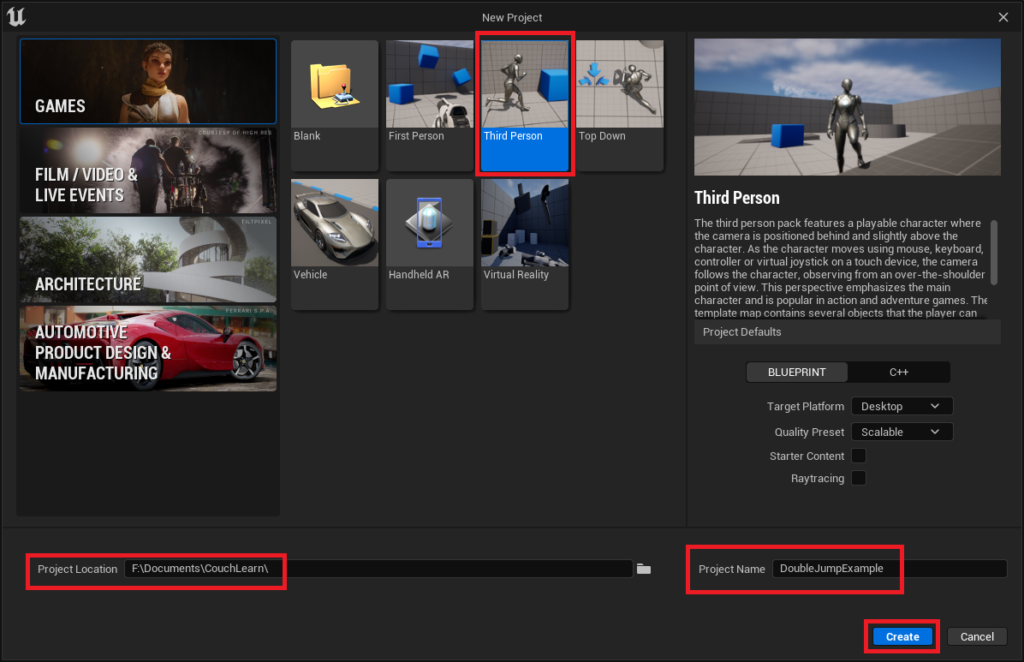
- Project Creation: Launching Unreal Engine 5 and selecting the "Third Person" template from the new project window. Developers specify a project location and name before initiating creation. This template provides a functional character blueprint (
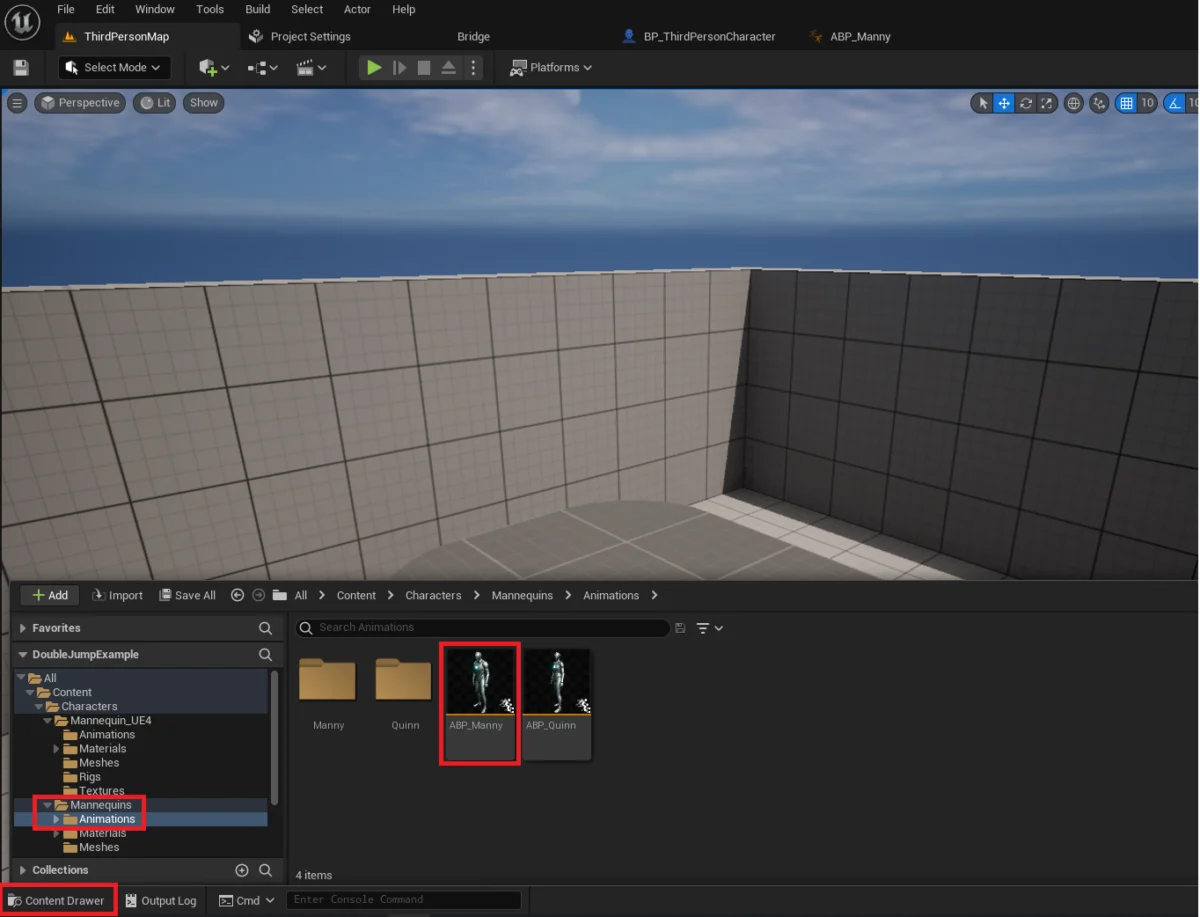
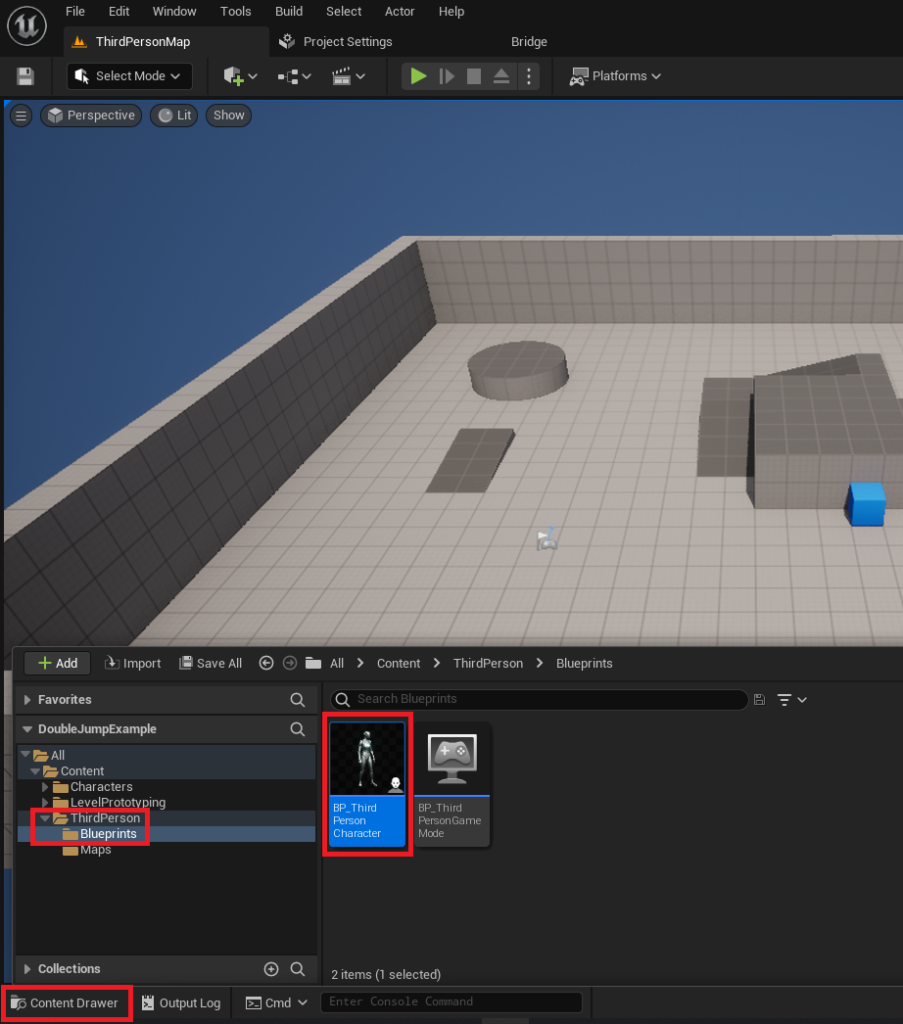
BP_ThirdPersonCharacter) ready for modification. - Accessing the Character Blueprint: Once the UE5 editor is open, the developer navigates to the Content Drawer, typically found at the bottom left, and locates the
BP_ThirdPersonCharacterobject within theContent/ThirdPerson/Blueprintsfolder. This blueprint is the central hub for defining character behaviors and properties. - Modifying Jump Parameters: Inside the
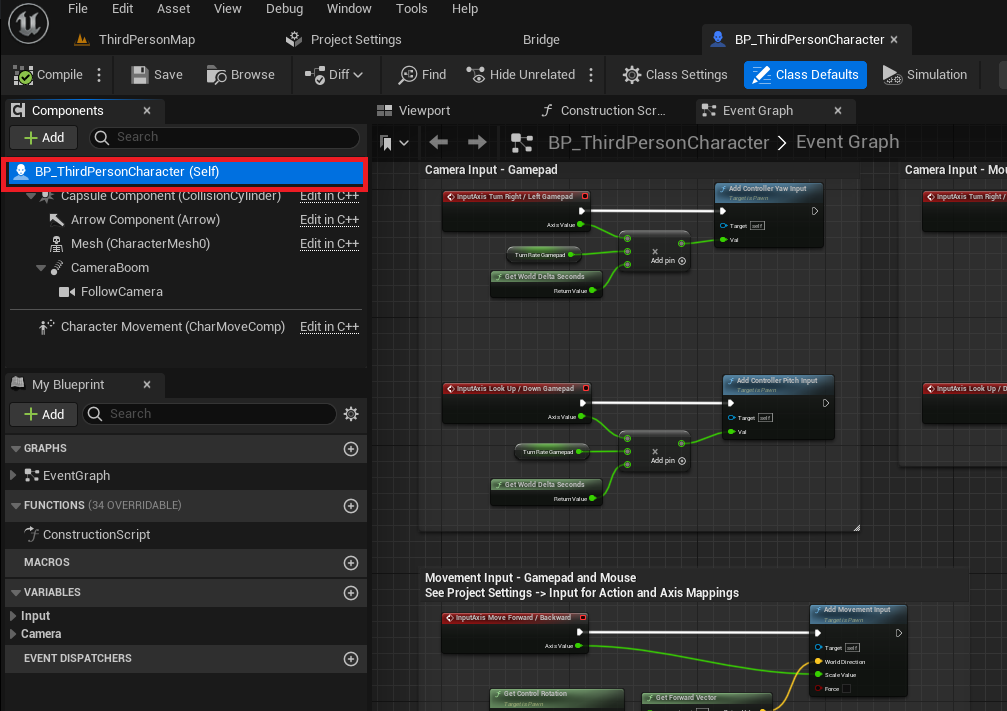
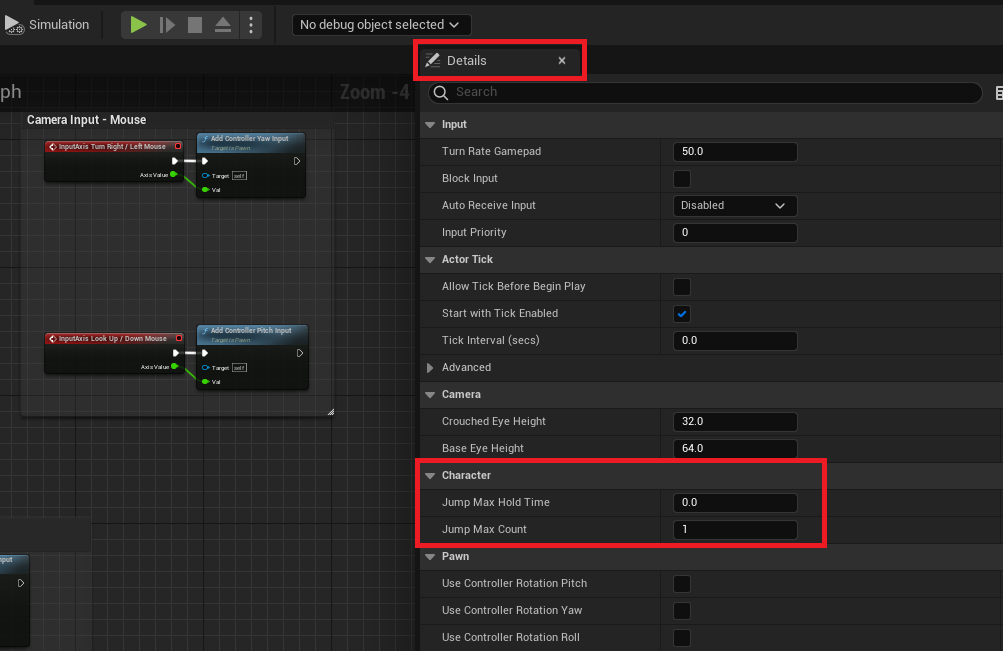
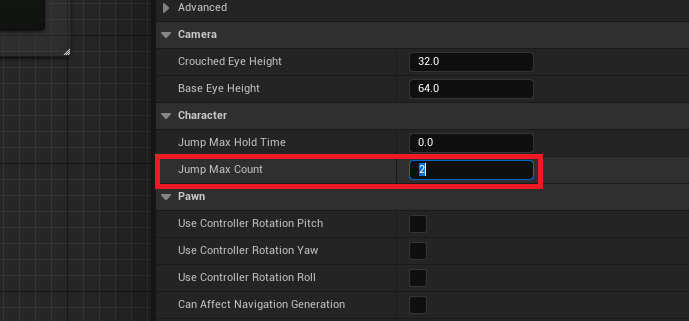
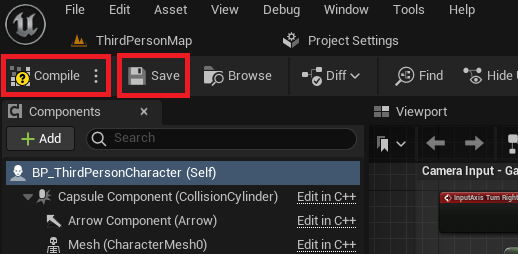
BP_ThirdPersonCharacterblueprint editor, the developer selects the blueprint class itself, represented by text like "BP_ThirdPersonCharacter (Self)." This action populates the "Details" tab on the right side of the editor with the character’s properties. Within this tab, under the "Character" category, lies the "Jump Max Count" parameter. By default, this value is set to 1, allowing for a single jump. To enable a double jump, this value is simply changed to 2. This single numerical adjustment fundamentally alters the character’s aerial capabilities, allowing the engine’s inherent movement component to automatically track and permit an additional jump input while airborne. For projects requiring more advanced aerial maneuvers, such as triple or quadruple jumps, this value can be adjusted accordingly to suit specific gameplay requirements. - Compiling and Saving: Following any modification within a blueprint, it is imperative to click the "Compile" and "Save" buttons located in the top left of the blueprint editor. This action processes the changes and stores them, ensuring that the new double jump functionality is correctly integrated into the project.
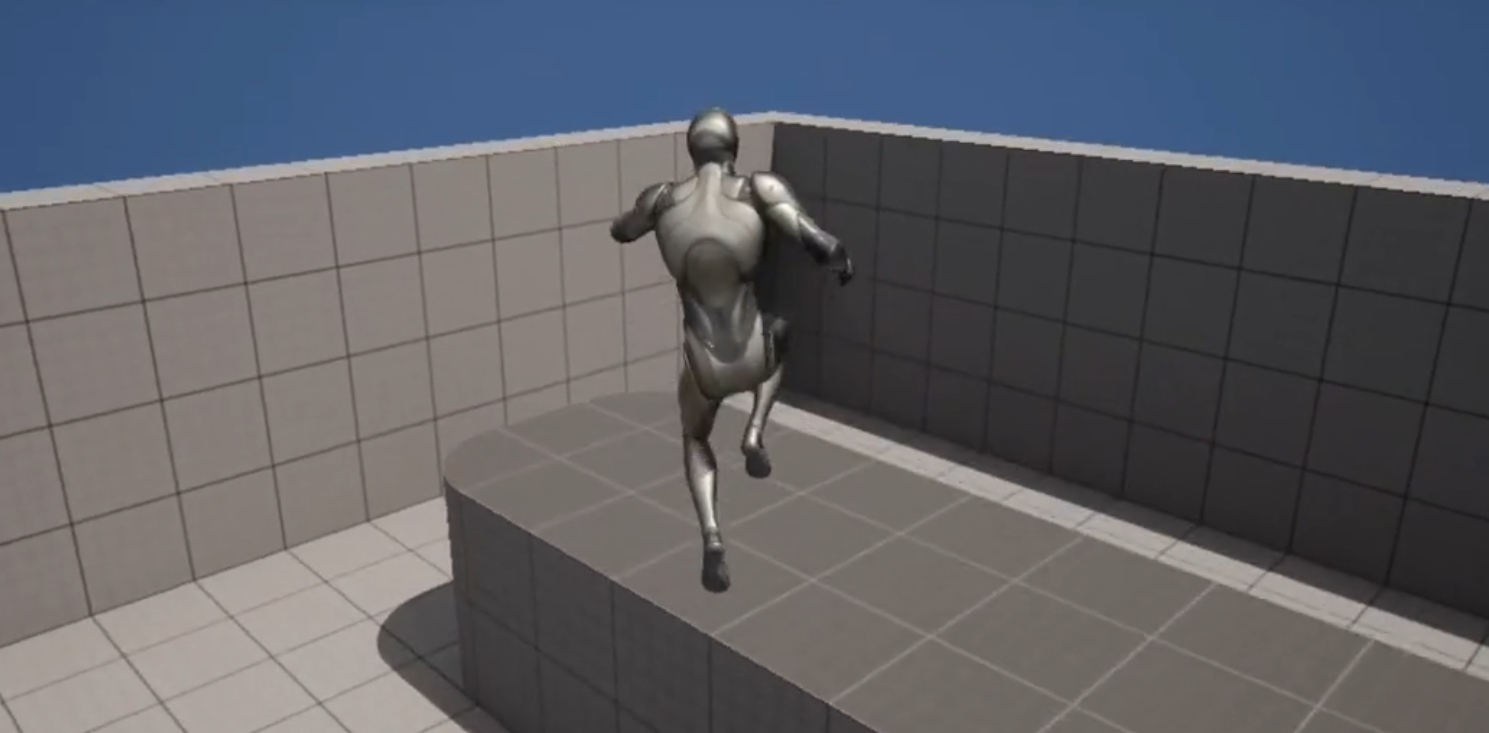
Upon completion of these steps, the character is immediately capable of executing a double jump. However, initial testing often reveals a common aesthetic limitation: while the functionality is present, the associated jump animation typically plays only once, leaving the second jump visually unreinforced and potentially feeling less impactful. This is where the intermediate-level animation improvements become critical for a polished player experience.
Elevating Player Experience: The Art of Animation Integration
While the foundational double jump functionality is remarkably easy to implement, a truly immersive experience demands more than just mechanical execution; it requires compelling visual feedback. The default animation behavior, where the jump animation plays only for the initial leap, can detract from the satisfaction of performing a second jump. To address this, developers must delve into the animation blueprint, specifically the state machine that governs character animations.
The process for enhancing the double jump animation involves:
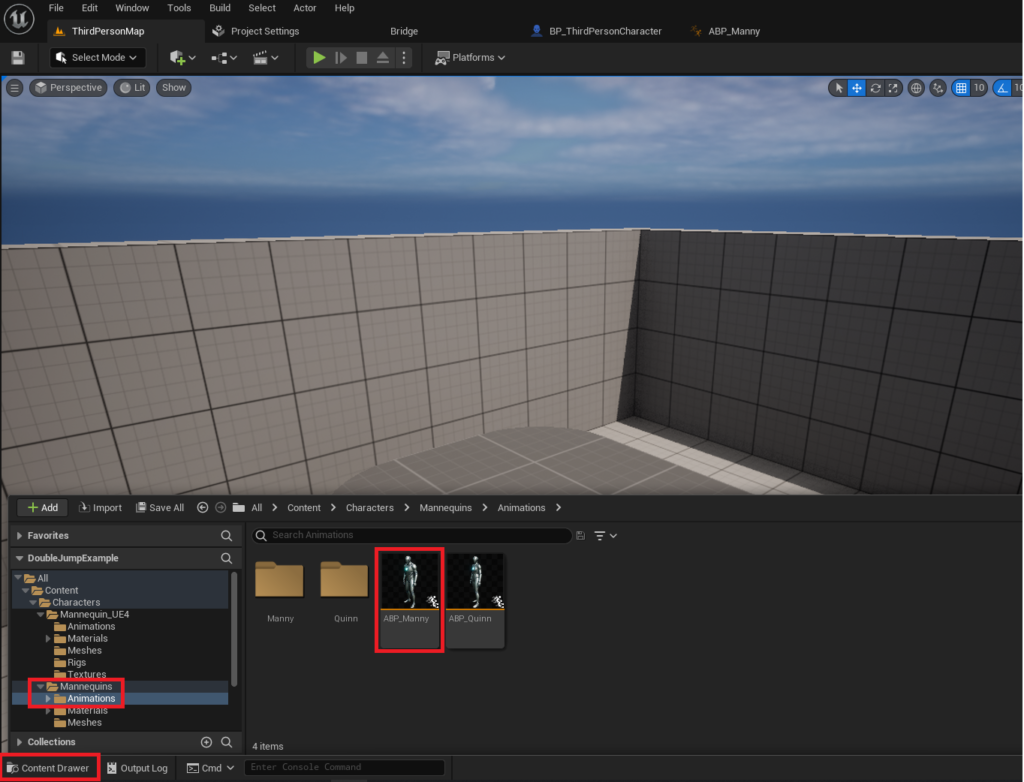
- Accessing the Animation Blueprint: From the Content Drawer, the developer locates and opens the
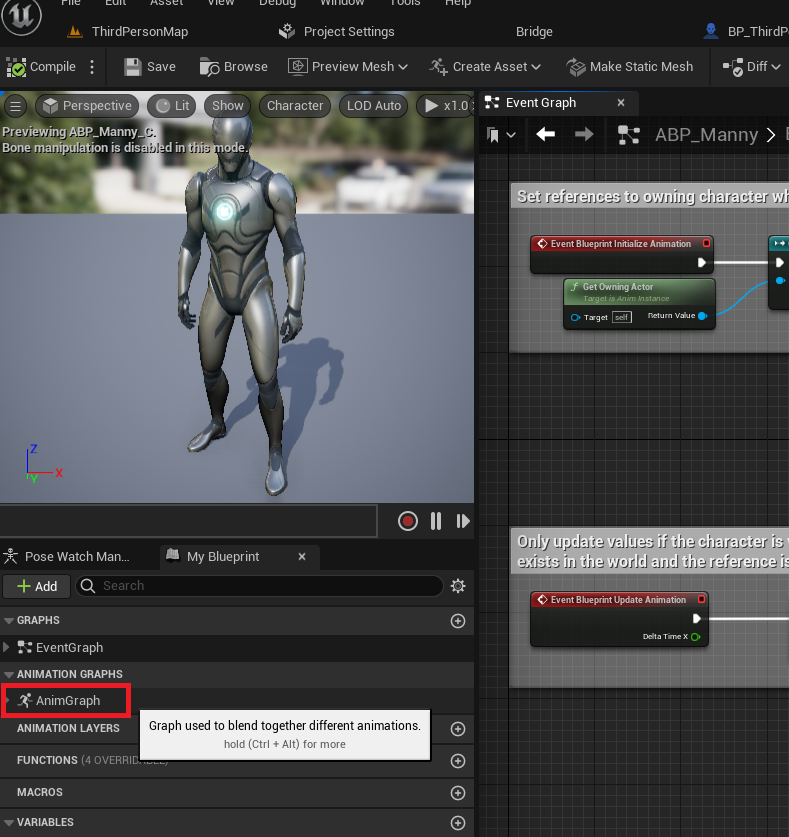
ABP_Mannyobject, typically found in theContent/Characters/Mannequins/Animationsfolder. This Animation Blueprint (ABP) controls how the character mesh animates in response to various gameplay states and inputs. - Navigating the Animation Graph: Within the Animation Blueprint editor, the developer double-clicks the "AnimGraph" text in the left panel. The AnimGraph is where the logic for blending and transitioning between different animation states is defined.
- Exploring the Main States State Machine: Inside the AnimGraph, the "Main States" state machine is the central element dictating major character animation transitions (e.g., idle, walk, run, jump, fall). Double-clicking this state machine reveals its internal network of animation states and the rules governing their transitions.
- Creating a New Transition: To ensure the jump animation can be re-triggered during a double jump, a new transition is created. The developer drags a connection from the "Fall Loop" state to the "Jump" state within the "Main States" state machine. This action establishes a potential pathway for the character’s animation to move from a falling state back into a jumping state.
- Defining Transition Logic: The newly created transition is represented by an arrow icon. Clicking this icon opens the transition editor, a dedicated space for defining the conditions under which this specific animation transition can occur. Here, a series of blueprint nodes are added to establish the logical gates for the animation reset:
Is FallingNode: This node checks if the character is currently airborne and descending. It’s crucial because the second jump typically occurs while the character is already in a falling state after the initial jump.Input_JumpNode: This node checks if the jump input (e.g., spacebar, A button) has been pressed by the player. This is the trigger for the second jump.Jump Current CountNode: This node retrieves the current number of jumps the character has performed in the current aerial sequence. For a double jump, the animation should reset only when this count is greater than 1, indicating that the player is attempting their second (or subsequent) jump, not their initial one.- Logical Gates (
ANDoperator): These conditions are typically combined using anANDoperator, ensuring that the animation transition only occurs if all conditions are met: the character is falling, the jump input has been received, and it’s not the very first jump.
These blueprint nodes collaboratively instruct the animation system to return to the jumping animation state when the conditions for a double jump are met. The result is a character that visually reacts to each jump input, providing dynamic and satisfying feedback to the player. This seemingly small detail significantly enhances player immersion and the overall perceived quality of the game.
Developer Insights and Industry Implications
The ease with which Unreal Engine 5 facilitates the implementation of core mechanics like the double jump carries significant implications for the game development industry. Industry experts frequently commend the engine’s approach to abstracting complex functionalities behind intuitive interfaces. This allows development teams, especially smaller independent studios, to allocate more resources to innovative gameplay mechanics, narrative depth, and artistic refinement, rather than spending extensive time on foundational programming.
"The democratizing power of engines like Unreal Engine 5 cannot be overstated," remarks a veteran game developer who requested anonymity. "Being able to implement a robust double jump with proper animation in just a few clicks frees up precious development cycles. It means smaller teams can achieve a level of polish that was once reserved for triple-A studios, directly contributing to a richer and more diverse gaming landscape."
The rapid prototyping capabilities enabled by such features are also invaluable. Developers can quickly iterate on character movement and platforming challenges, testing different jump heights, air controls, and level designs without significant overhead. This iterative approach leads to more refined and engaging gameplay experiences. Furthermore, the emphasis on robust animation integration highlights a growing industry standard: functional mechanics must be paired with compelling visual and auditory feedback to truly resonate with players. A character that visually responds to every action enhances immersion and provides a clearer understanding of game state, which is crucial for player satisfaction.
Looking Ahead: The Future of Accessible Game Development
The advancements in Unreal Engine 5, exemplified by the simplified double jump implementation and accessible animation tools, underscore a broader trend towards democratizing game development. By providing powerful yet user-friendly toolsets, Epic Games is empowering a new generation of creators to bring their visions to life with unprecedented efficiency and quality. While the guide focuses on a foundational double jump, the underlying principles of the Character Movement Component and Animation Blueprints offer avenues for further customization. Developers can explore variations such as altering jump height for the second jump, introducing unique animations for different jump stages, or integrating particle effects to visually accentuate the aerial maneuver.
The availability of comprehensive documentation, such as the official blueprint guide for setting up new character meshes and the extensive ACharacter documentation for advanced jump settings in C++, provides further resources for developers looking to push the boundaries of their projects. In conclusion, Unreal Engine 5 is not just a tool for building games; it is a catalyst for innovation, making sophisticated game mechanics more accessible and enabling developers to focus on crafting truly memorable interactive experiences. The enhanced double jump in UE5 is a clear indicator of a future where high-quality game development is within reach for all.
About the Author