Unreal Engine 5 continues to empower developers with robust tools, and its Data Table feature stands out as a critical innovation for streamlined game data management. This powerful asset class provides programmers and designers with a centralized, pre-defined repository for game-specific information, moving away from fragmented data storage and towards a more efficient, scalable, and collaborative development paradigm. The adoption of Data Tables within game development workflows marks a significant step towards truly data-driven design, offering substantial benefits in terms of iteration speed, maintainability, and team collaboration.
Understanding the Core Concept: What is a Data Table?
At its essence, an Unreal Engine 5 Data Table is a highly adaptable asset designed to define and store lists of structured data. Each entry within a Data Table is uniquely identified by a key, typically a row name, which allows for rapid and precise retrieval of associated values. This structured approach ensures data consistency and makes the asset incredibly easy to manage directly within the Unreal Editor. Unlike hardcoded values or scattered variables, Data Tables are persistent assets within the project, meaning data defined during development remains intact and accessible throughout the game’s runtime. This characteristic is particularly advantageous for managing large quantities of game elements such as items, enemies, character statistics, dialogue lines, or level configurations, where designers frequently need to adjust values without requiring direct code modifications.
The utility of Data Tables extends across numerous game mechanics. For instance, in a role-playing game (RPG), a Data Table could meticulously define every weapon, piece of armor, or consumable item, detailing attributes like damage values, rarity levels, sell prices, icon paths, or special abilities. Similarly, for enemy AI, a Data Table might specify health points, attack patterns, loot drops, and behavioral parameters for various enemy types. Quest systems can leverage Data Tables to outline objectives, rewards, and narrative branches, while level design can use them to configure environmental parameters or spawn points. This centralized approach significantly reduces the potential for errors and inconsistencies that often arise when data is spread across multiple blueprints or code files.
The Evolution of Data Management in Game Development
The need for efficient data management in game development has evolved considerably over the decades. Early games often hardcoded all game logic and data directly into the source code. As games grew in complexity, developers began seeking ways to separate data from code, leading to the use of configuration files (like INI or XML), spreadsheets, and custom scripting languages. However, these methods often presented their own set of challenges, including difficult integration with the game engine, manual parsing requirements, and a steep learning curve for non-programmers.
The rise of modern game engines like Unreal Engine has ushered in an era where data-driven design is not just a best practice but a fundamental approach. Data-driven development emphasizes configuring game behavior and content through external data rather than embedding it directly into logic. This paradigm shift offers immense advantages: designers can tweak game balance, add new content, or modify existing elements without requiring a programmer to compile new code. This dramatically accelerates iteration cycles, fosters greater collaboration between different disciplines within a development team, and ultimately leads to more polished and responsive gameplay experiences. Unreal Engine 5’s Data Tables are a direct answer to this demand, providing an intuitive, engine-native solution that integrates seamlessly with both Blueprint visual scripting and C++ code.
Practical Implementation: A Step-by-Step Overview
Implementing Data Tables in Unreal Engine 5 follows a logical progression, starting with defining the structure of the data itself before populating the table. This process ensures that the data is organized and accessible in a consistent manner.
1. The Prerequisite: Structuring Data with Enums
Before constructing the primary data structure, it’s often beneficial to define custom enumerations (Enums). Enums provide a way to create a list of named integer constants, which are incredibly useful for representing distinct states or categories. For instance, in the context of an RPG item, an Enum can perfectly define item rarity levels, such as "Common," "Uncommon," "Rare," "Epic," and "Legendary."
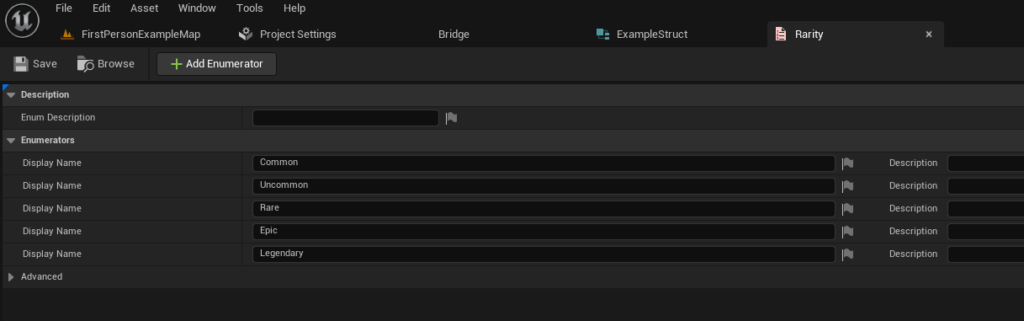
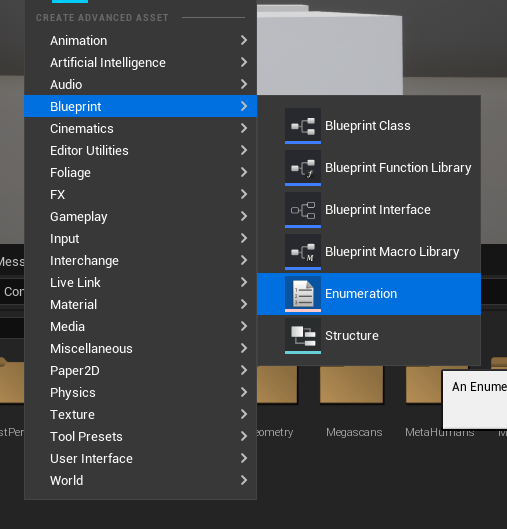
Creating an Enum is a straightforward process within the Unreal Editor. Developers can simply right-click in the Content Browser, navigate to the "Blueprint" category, and select "Enumeration." Once created, descriptive values are added, each corresponding to a specific rarity tier. This foundational step ensures that any future data referencing item rarity will adhere to a standardized, predefined set of options, preventing typos or inconsistent naming conventions that could lead to errors.
2. Defining the Data Blueprint: The Role of Structs
The true backbone of a Data Table is the Structure (Struct) it is based upon. A Struct in Unreal Engine acts as a custom data type, allowing developers to group together related variables into a single, cohesive unit. This is crucial because a Data Table’s rows are essentially instances of this defined Struct. When creating a Data Table, the engine specifically asks which Struct it should use as its template, dictating the types and names of the columns (data fields) that each row will contain.
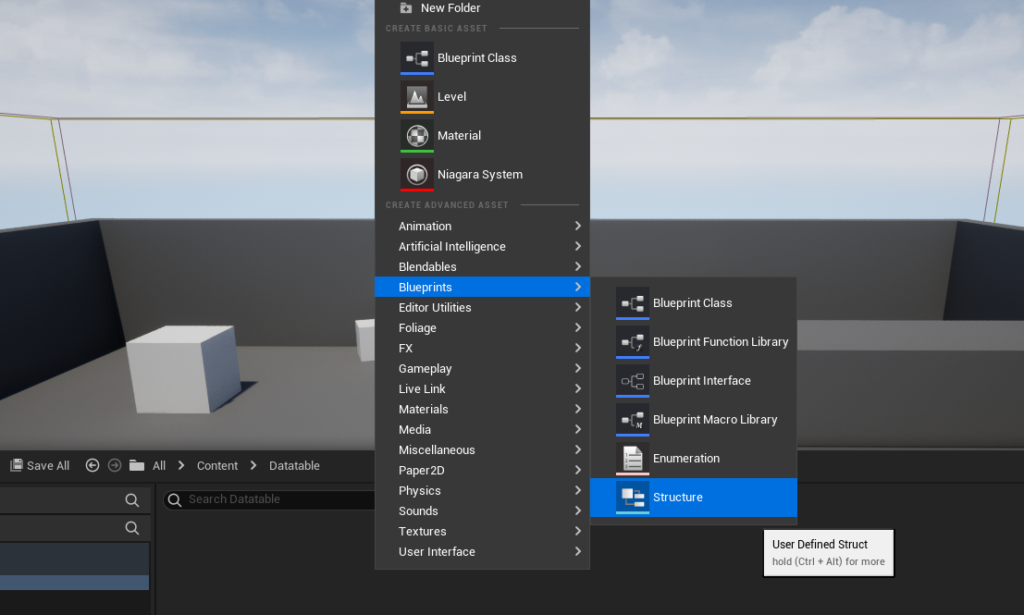
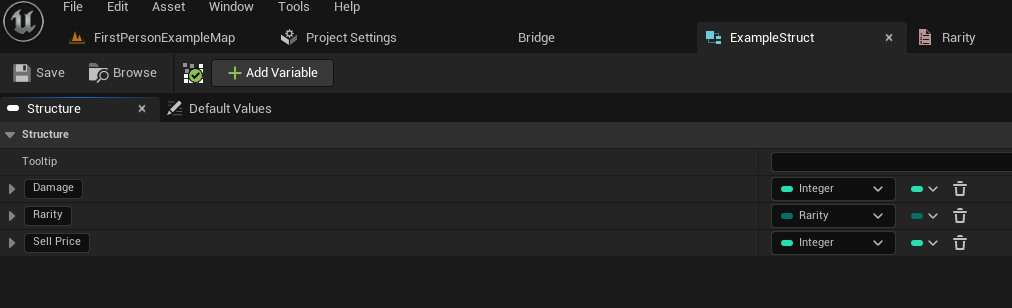
To create a Struct, developers again right-click in the Content Browser, find the "Blueprint" category, and select "Structure." Following the RPG item example, a Struct named ExampleStruct might be created. Within this Struct, variables corresponding to item attributes would be defined: an integer for Damage, a reference to the previously created ItemRarityEnum for Rarity, and a float for SellPrice. Each variable is given a specific type, ensuring data integrity. This structured approach means that every entry in the Data Table will consistently have these three defined properties, simplifying data access and manipulation later on.
3. Constructing the Data Table: The Central Repository
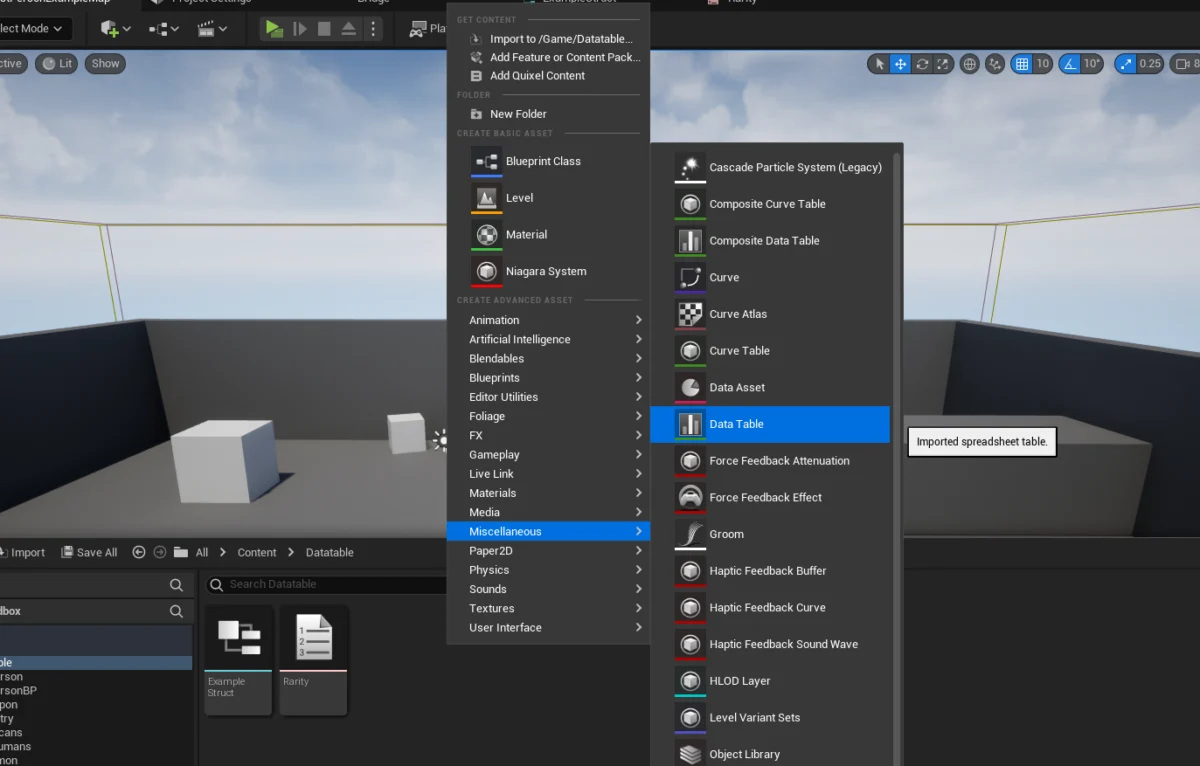
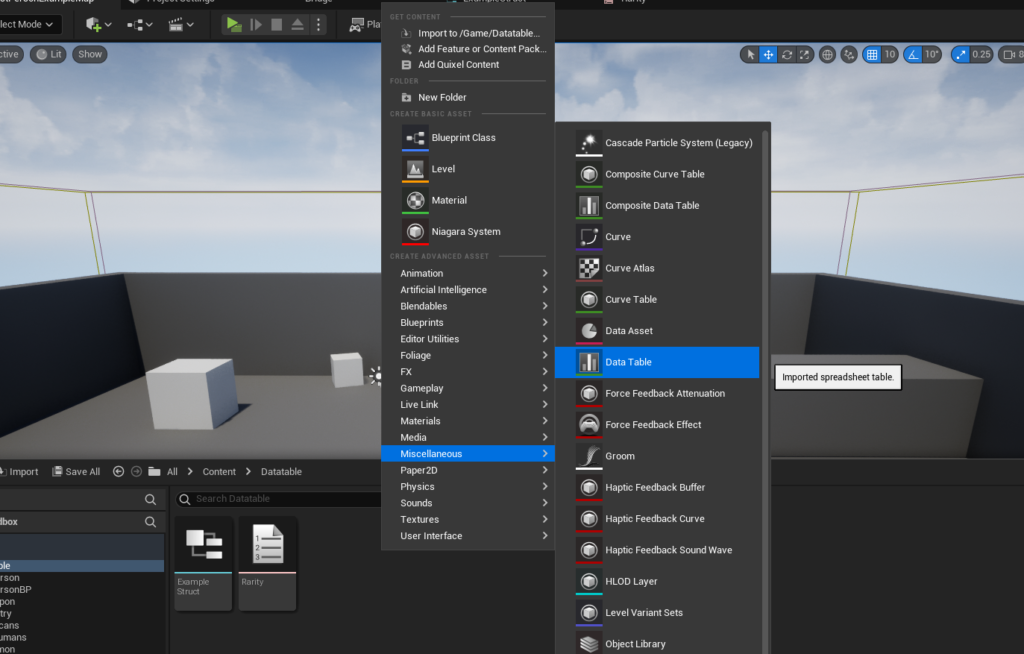
With the foundational Enum and Struct in place, the Data Table itself can now be created. This asset serves as the central repository for all instances of the defined Struct. The creation process is similar to Enums and Structs: a right-click in the Content Browser, selecting "Data Table" from the "Miscellaneous" category.
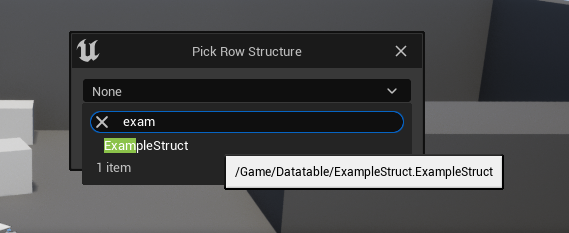
Upon creation, a crucial prompt appears, asking the developer to choose the "Row Structure." This is where the previously created ExampleStruct is selected. This selection irrevocably links the Data Table to the ExampleStruct, meaning every row subsequently added to this Data Table will automatically conform to the structure defined by ExampleStruct. This tight coupling between the Struct and the Data Table is fundamental to maintaining data consistency and facilitating easy retrieval.
4. Populating the Table: Adding and Managing Data Rows
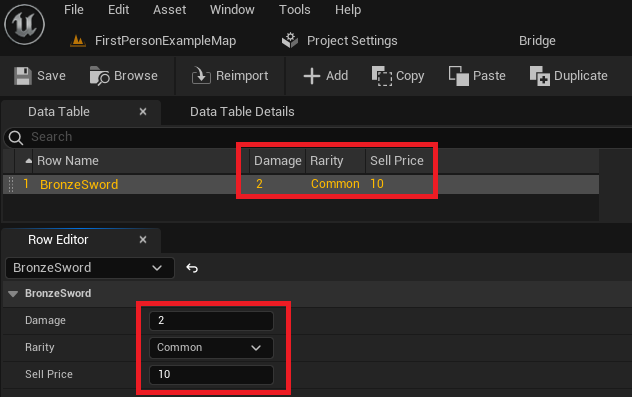
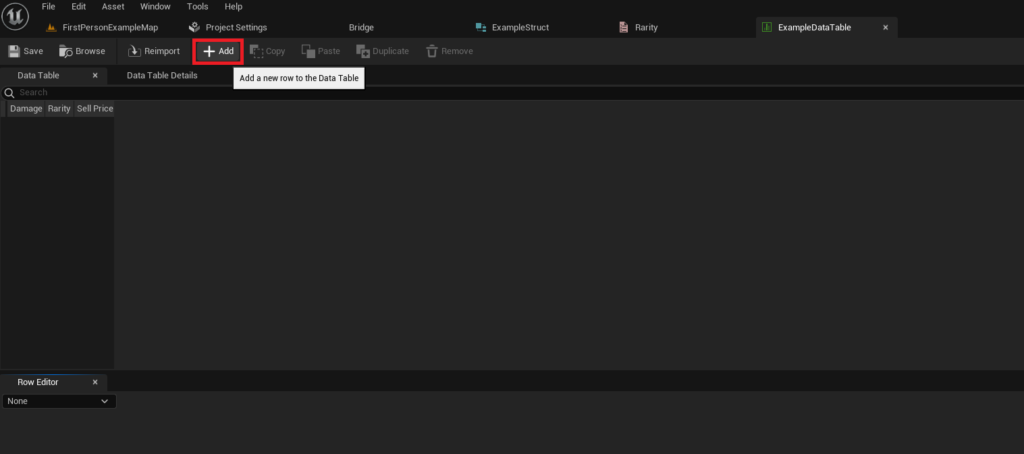
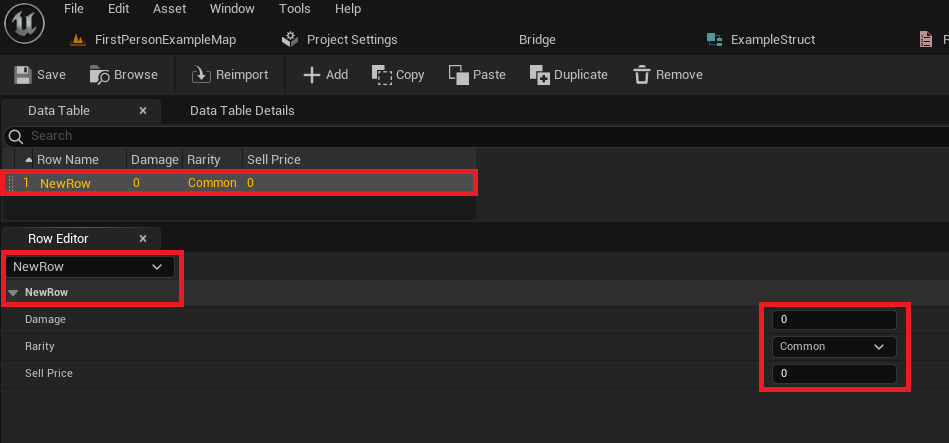
Once the Data Table is configured with its target Struct, it becomes an interactive spreadsheet-like interface within the Unreal Editor. Developers can now begin populating it with actual game data. By simply clicking the "Add" button, a new row is appended to the table, pre-filled with default values as defined in the ExampleStruct.
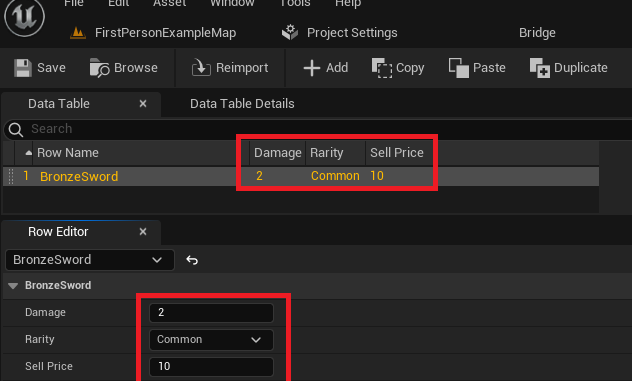
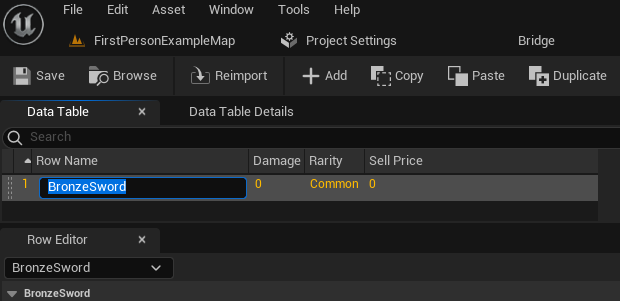
Each row in the Data Table represents a unique data entry, identifiable by its "Row Name." This name acts as the primary key for accessing that specific row’s data. For instance, a row might be named "BronzeSword," and its corresponding fields (Damage, Rarity, Sell Price) can then be individually adjusted within the "Row Editor" panel. This visual, intuitive interface allows designers to input and modify data efficiently, seeing changes reflected instantly. The ability to create an unlimited number of entries, each with unique values for the defined properties, underscores the scalability of Data Tables. Crucially, the editor continuously displays the changes, and regular saving is essential to persist these modifications within the project. This hands-on, direct manipulation of game data within the engine environment significantly streamlines the content creation pipeline.
Accessing and Utilizing Data: Fueling Dynamic Gameplay
The true power of Data Tables is realized when their stored information is dynamically accessed and used within the game’s logic, typically through Unreal Engine’s Blueprint visual scripting system or C++ code.
1. Retrieving Specific Data: The ‘Get Data Table Row’ Node
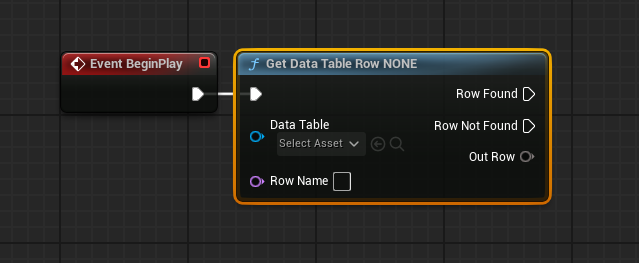
To retrieve data for a specific entry, the "Get Data Table Row" Blueprint node is employed. This node requires two primary inputs: a reference to the Data Table asset itself and the "Row Name" (the unique key) of the specific row whose data is sought.
When the node executes, it checks for the existence of the specified row. If the row is found, the "Row Found" execution pin is triggered, and the Out Row pin outputs the complete data of that row, packaged as an instance of the ExampleStruct. If the row name does not exist, the "Row Not Found" pin is triggered, indicating an invalid query. This robust error handling prevents crashes and allows developers to implement fallback logic. To make the retrieved data easily consumable, the Out Row struct can be "split" by right-clicking on its pin and selecting "Split Struct Pin." This action exposes all individual variables (Damage, Rarity, Sell Price) within the Struct as separate output pins, ready to be connected to further game logic, such as applying damage, displaying item information, or calculating inventory value. This dynamic retrieval capability is fundamental for creating responsive game systems where data can be fetched on demand.
2. Iterating Through Data: Looping for Comprehensive Logic
Beyond accessing individual rows, it is often necessary to process all entries within a Data Table, for example, to calculate total inventory value, filter items by rarity, or perform global data validation. For this, Unreal Engine provides mechanisms to loop through all available rows.
The "Get Data Table Row Names" node is the starting point for iteration. This node takes a Data Table reference as input and returns an array containing all the "Row Names" (keys) present in that table. This array of names can then be fed directly into a "For Each Loop" node. The "For Each Loop" node iterates through each element of the array, executing its "Loop Body" for every row name. Within each iteration, the "Array Element" output of the loop, which represents the current row name, can be connected to the "Row Name" input of a "Get Data Table Row" node. This setup allows the game logic to sequentially retrieve the full data for each row in the Data Table, enabling complex operations such as populating dynamic menus, calculating aggregated statistics, or performing data-driven content generation. This iterative processing capability underscores the flexibility and scalability that Data Tables bring to game development.
Industry Impact and Developer Perspectives
The seamless integration and intuitive nature of Data Tables in Unreal Engine 5 have a profound impact on game development workflows and team dynamics.
Enhanced Collaboration and Iteration: "Data Tables have transformed how our design and programming teams interact," remarks a hypothetical lead designer at a mid-sized studio. "Designers can directly adjust game values—enemy health, weapon damage, item costs—without needing a programmer to write or recompile code. This dramatically accelerates our iteration speed and allows us to fine-tune gameplay much faster." This sentiment highlights how Data Tables break down silos, enabling parallel development and reducing bottlenecks.
Democratizing Data for Designers: Traditionally, direct manipulation of game data often required technical expertise. Data Tables, especially when coupled with Blueprint, empower game designers, technical artists, and even level designers to manage complex data sets. A hypothetical technical artist might state, "Before Data Tables, I often had to rely on programmers to input specific visual parameters or object properties. Now, I can define and adjust these values myself, directly within the engine, which frees up engineering time for more complex systems." This democratization of data control fosters creativity and reduces dependencies.
Scalability and Maintainability: As games grow in scope, managing vast amounts of data becomes a critical challenge. Data Tables offer a structured, centralized solution that improves maintainability. "The ability to have a single source of truth for all our game item data means less chance of inconsistencies and fewer bugs," a hypothetical lead programmer notes. "When we need to update a game mechanic that affects multiple items, we only need to modify the Data Table, rather than hunting through countless individual blueprints or code files." This centralized approach simplifies debugging and ensures consistency across the entire project.
The Future of Data-Driven Development in UE5
Unreal Engine 5’s Data Tables are more than just a convenient feature; they represent a fundamental component in the modern data-driven game development toolkit. By providing an accessible, robust, and integrated solution for managing structured data, they empower development teams to build richer, more dynamic, and more easily maintainable game worlds. The benefits, from accelerated iteration and enhanced collaboration to improved scalability and reduced error rates, are undeniable. As game complexity continues to increase, tools like Data Tables will remain indispensable, allowing developers to focus their creative energy on crafting compelling experiences rather than wrestling with convoluted data management challenges. The ongoing evolution of Unreal Engine is likely to further enhance these capabilities, solidifying Data Tables as a cornerstone of efficient and effective game production.
About the Author