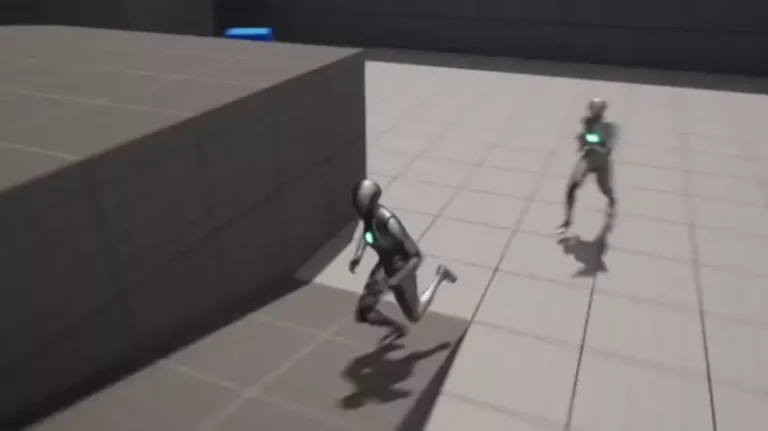
The pervasive and beloved double jump mechanic, a staple in gaming from retro classics to contemporary titles, is now remarkably simple to integrate into projects developed within Unreal Engine 5 (UE5). This streamlining capability, demonstrated through a concise guide for developers, underscores Epic Games’ commitment to democratizing game creation, allowing designers to imbue their characters with this essential platforming ability with minimal technical overhead, while also offering pathways for sophisticated animation fidelity.
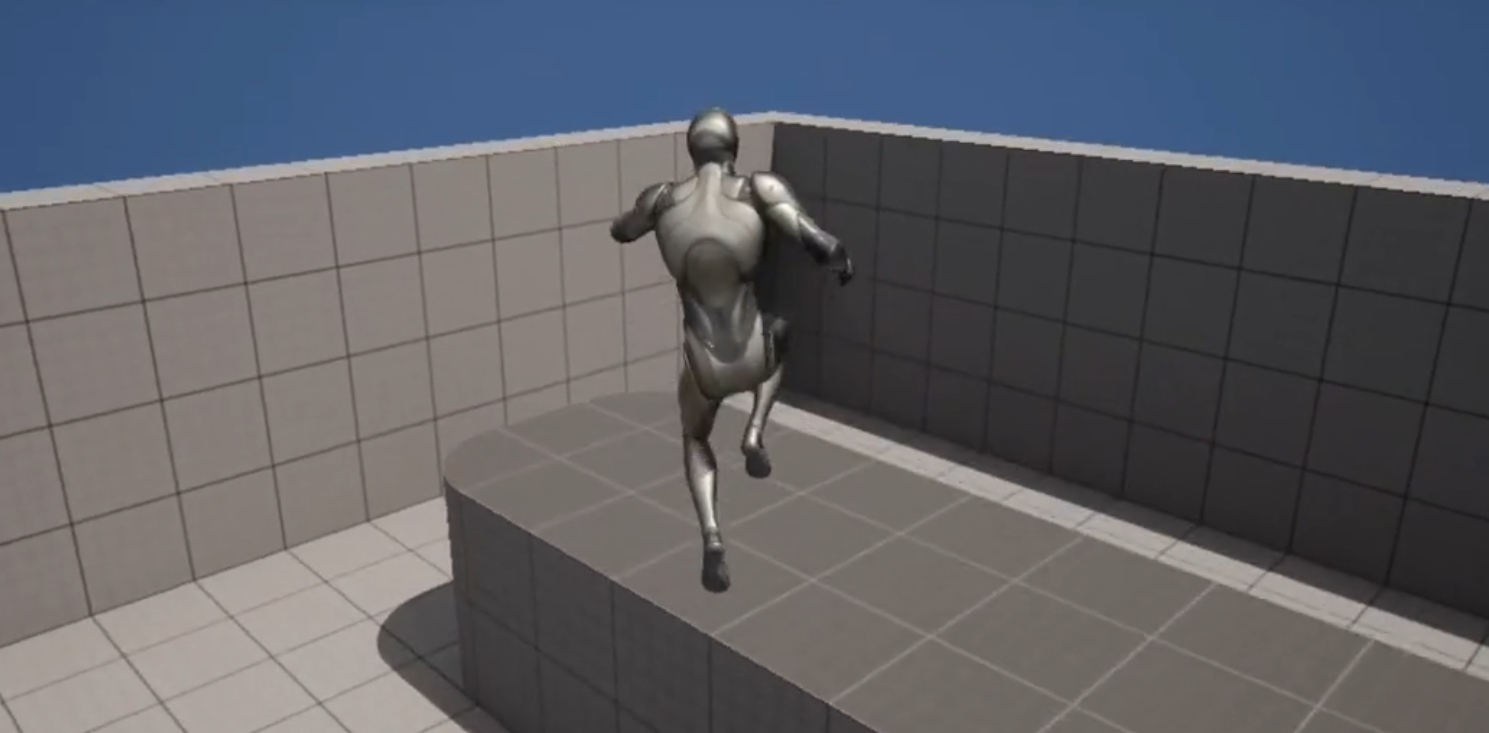
The double jump, a fundamental movement ability allowing characters to execute a second leap while airborne, has been a cornerstone of game design for decades. Its presence often defines the verticality, exploration, and challenge of platforming segments, making it indispensable in genres ranging from action-adventure to role-playing games. Titles like Castlevania: Symphony of the Night, Crash Bandicoot, the Kirby series, and Banjo-Kazooie are just a few examples where this mechanic is not merely a bonus, but a critical tool for progression and player expression. The ability to extend airtime or alter trajectory mid-jump adds a layer of depth and tactical consideration that significantly enhances gameplay.
The Enduring Legacy of the Double Jump in Gaming
The concept of a character performing a second jump mid-air, defying conventional physics, dates back to early arcade and console games. While its exact origin is debated, precursors can be seen in titles like 1986’s Rastan Saga, where a mid-air attack could propel the character further, or 1984’s Dragon Buster, which featured a rudimentary second jump. However, it was arguably in the late 1980s and early 1990s that the double jump solidified its place as a distinct and intentional mechanic. Mega Man X (1993) famously introduced the ‘Air Dash’ which, while not a traditional double jump, offered similar utility in mid-air maneuverability. Castlevania: Symphony of the Night (1997) then popularized the ability as a standard traversal tool for protagonist Alucard, integrating it seamlessly into its sprawling, interconnected castle design.
Over the years, the double jump evolved beyond mere verticality. In games like Crash Bandicoot, it became synonymous with precise platforming challenges, requiring players to time their jumps perfectly to navigate treacherous environments. In the Kirby series, multiple jumps and flight capabilities are central to the character’s identity and core gameplay loop, offering players immense freedom in movement. Banjo-Kazooie combined a basic jump with Kazooie’s ‘Flap Flip’ ability, essentially a double jump, to navigate its expansive 3D worlds. These examples illustrate the mechanic’s versatility and its capacity to enrich diverse gameplay experiences, from tight, linear platformers to open-world exploration. Its continued relevance in modern titles, whether as a core ability or an unlockable upgrade, speaks to its timeless appeal and functional elegance.
Unreal Engine 5: Empowering Creators with Streamlined Tools
Unreal Engine 5, Epic Games’ latest iteration of its powerful game development suite, has been designed with a core philosophy of empowering developers, from seasoned professionals to burgeoning hobbyists. Its suite of advanced features, including the revolutionary Lumen global illumination and Nanite virtualized geometry systems, often captures headlines for their graphical fidelity. However, equally significant, though perhaps less visibly glamorous, are the improvements to workflow and accessibility for implementing fundamental game mechanics. The engine’s robust Blueprint visual scripting system stands at the forefront of this effort, allowing developers to create complex gameplay logic without writing a single line of code.
The integration of a double jump mechanic in UE5 serves as a prime example of this developer-centric approach. What might have previously required intricate C++ coding or multi-layered Blueprint graphs in earlier engine versions or other development environments, is now largely a matter of adjusting a single parameter within the character’s core properties. This reduction in technical complexity is not merely a convenience; it represents a significant lowering of the barrier to entry for aspiring game designers and accelerates prototyping for experienced studios, allowing creative energy to be channeled into innovative gameplay and narrative rather than foundational systems.
Chronology of Implementation: Achieving Double Jump in UE5
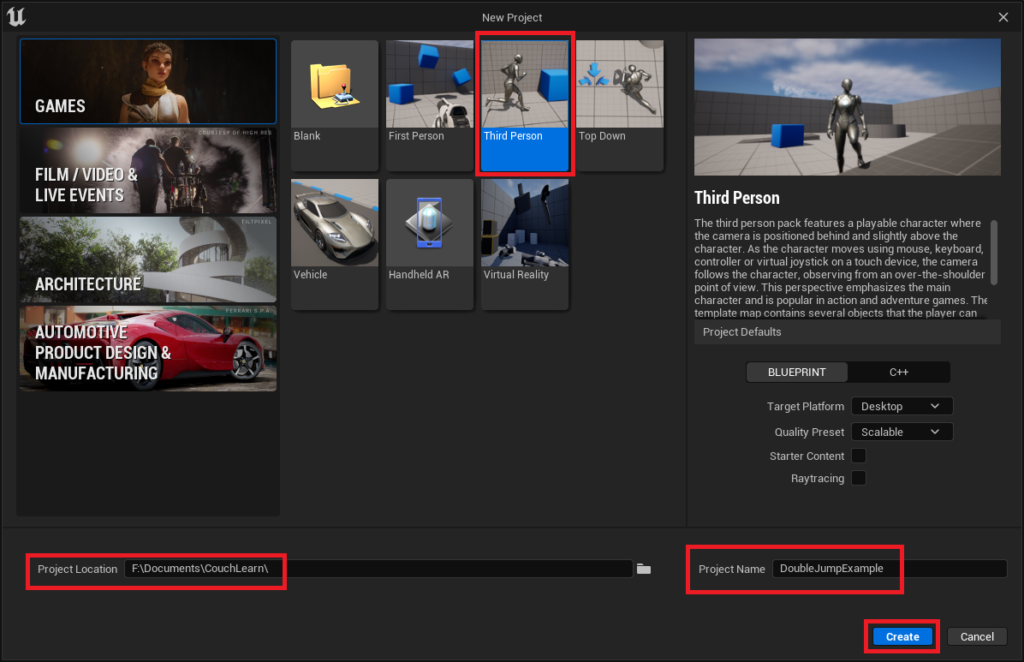
The process of implementing a double jump in Unreal Engine 5 is characterized by its simplicity, particularly when leveraging the engine’s pre-configured templates. For new developers, starting with the Third Person template project, readily available in the New Project window, provides an immediate operational character blueprint. This template offers a fully functional character, complete with movement and jumping capabilities, serving as an ideal foundation for customization.
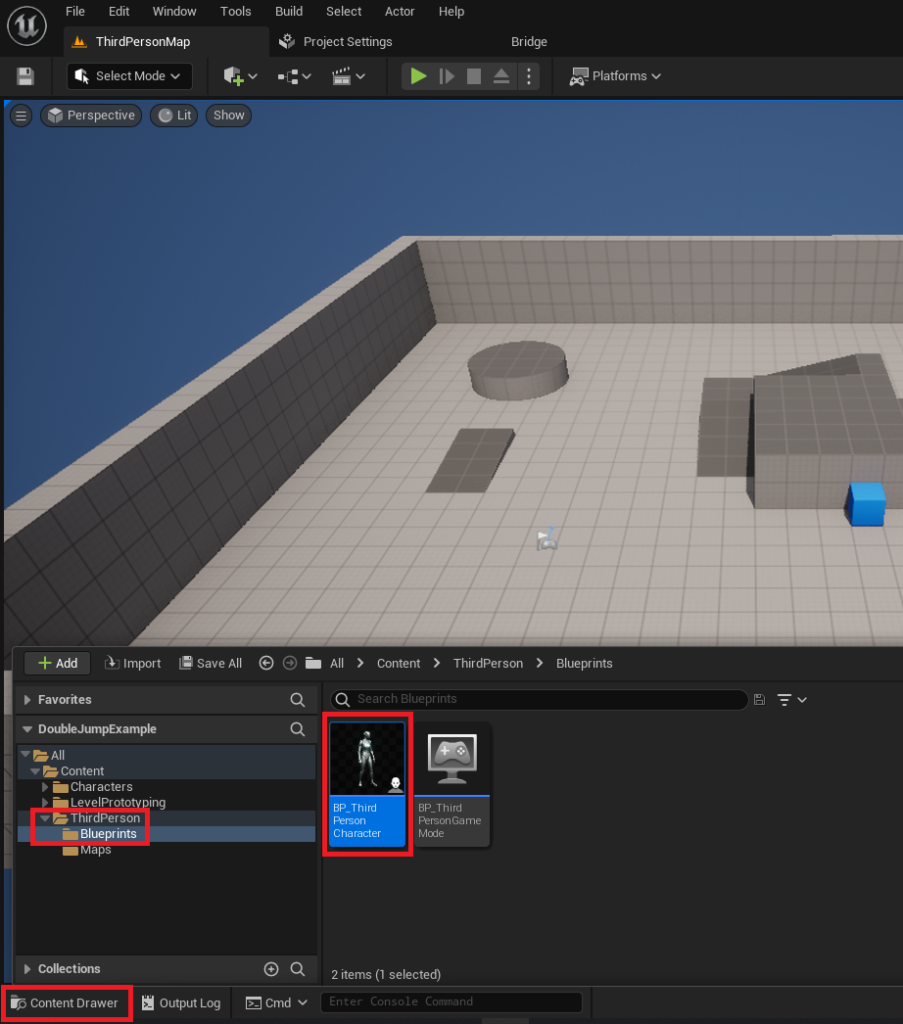
The initial step involves creating this template project, defining a project location, and assigning a name before clicking the "Create" button. Once the Unreal Engine editor loads the new project, developers navigate to the "Content Drawer" and locate the BP_ThirdPersonCharacter object within the Content/ThirdPerson/Blueprints folder. This asset represents the core character blueprint, housing all the logic and properties for the player-controlled entity.
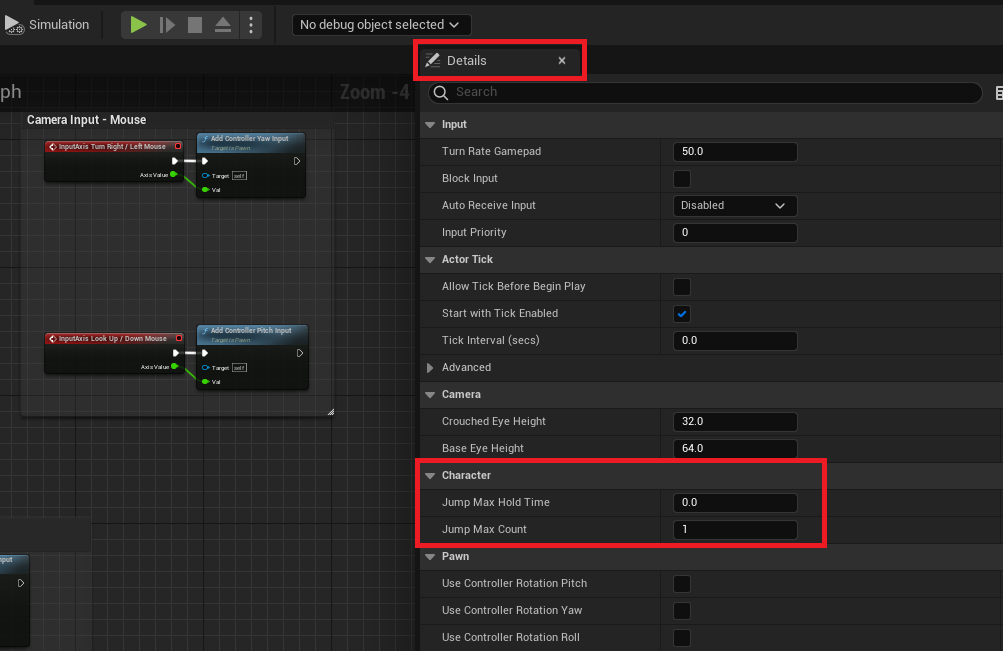
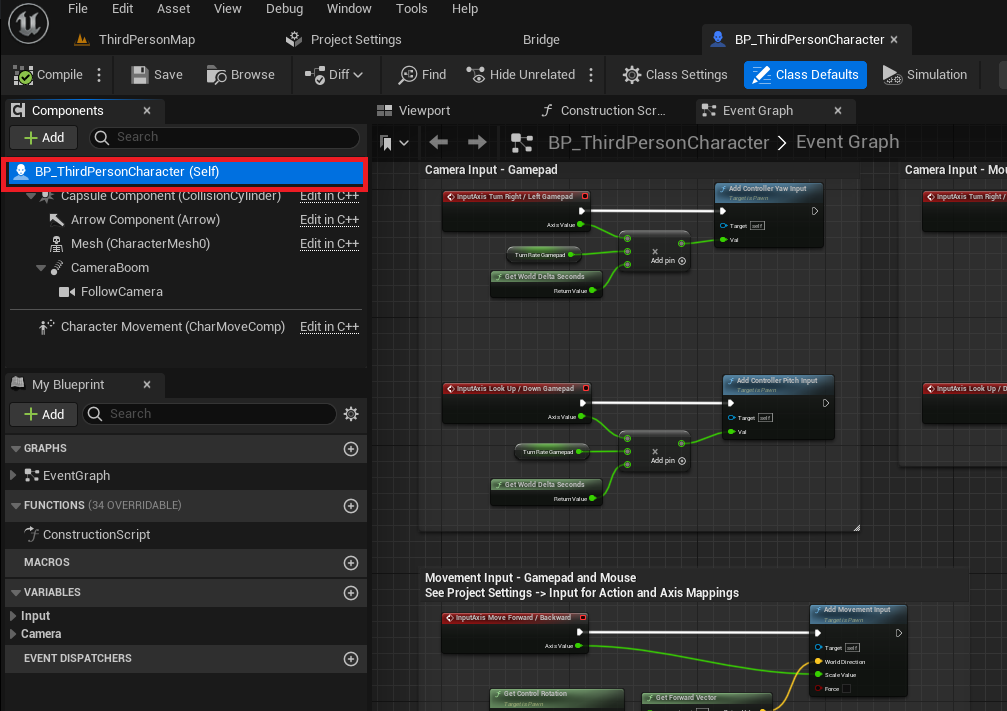
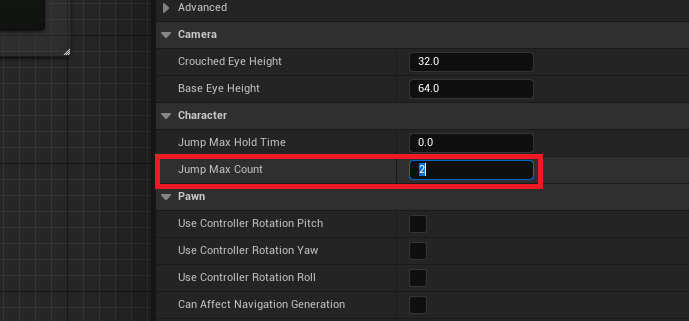
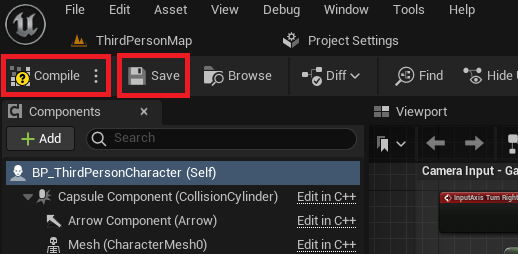
Upon opening the BP_ThirdPersonCharacter blueprint, the primary modification for enabling the double jump functionality is remarkably straightforward. Developers must first select the blueprint class itself, identified as "BP_ThirdPersonCharacter (Self)," which highlights it in the editor. Following this selection, attention shifts to the "Details" tab on the right side of the blueprint editor. Within this panel, under the "Character" category, lies a parameter labeled "Jump Max Count." By default, this value is set to ‘1’, allowing only a single jump. To enable a double jump, this value is simply changed to ‘2’. Should a game design necessitate more than two jumps, this parameter can be adjusted accordingly, offering flexible control over character aerial maneuverability. After modifying this value, it is crucial to click the "Compile" and "Save" buttons in the top left of the blueprint editor to apply the changes and preserve the modifications.
At this juncture, the character gains the ability to double jump. A simple in-editor test reveals the core functionality is present; however, a noticeable limitation often emerges: the jump animation typically plays only once, irrespective of the number of jumps executed. This results in a visual discontinuity, as the character appears to freeze or maintain the initial jump pose during subsequent mid-air leaps. Addressing this visual feedback issue constitutes the next, slightly more advanced, phase of implementation, elevating the player experience.
Animation Refinements: Enhancing Visual Feedback
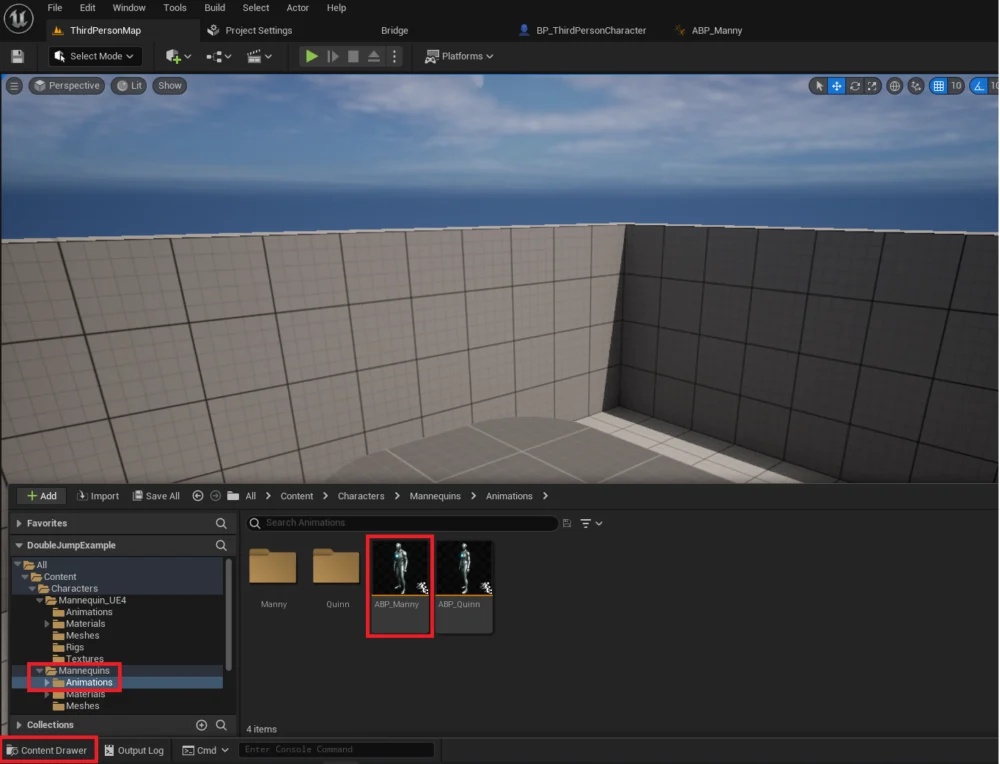
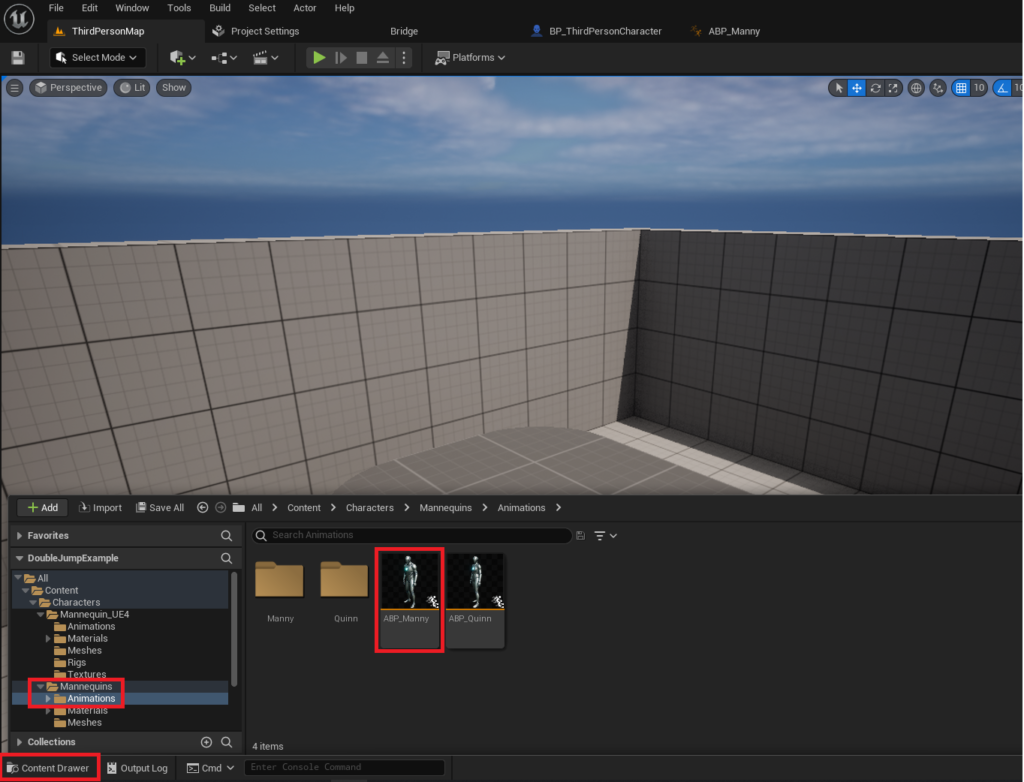
To achieve a more polished and visually responsive double jump, developers can delve into the character’s animation blueprint. This intermediate difficulty step ensures that the character’s animations accurately reflect the player’s actions, providing crucial visual cues. The process begins by opening the "Content Drawer" and locating the ABP_Manny object, typically found in the Content/Characters/Mannequins/Animations folder. This asset is the animation blueprint responsible for controlling the character’s various poses and movements.
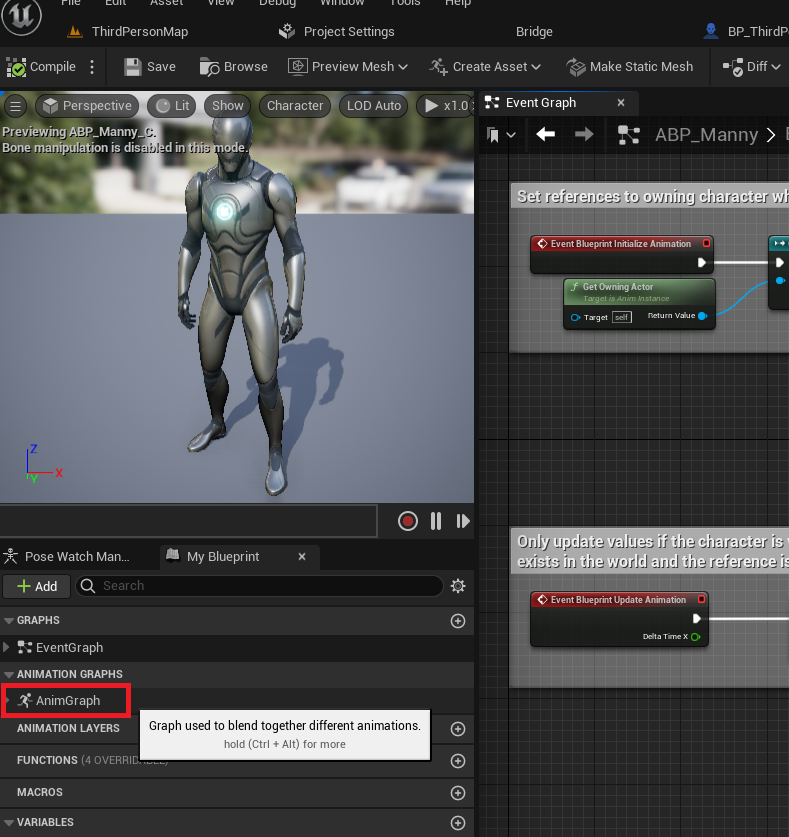
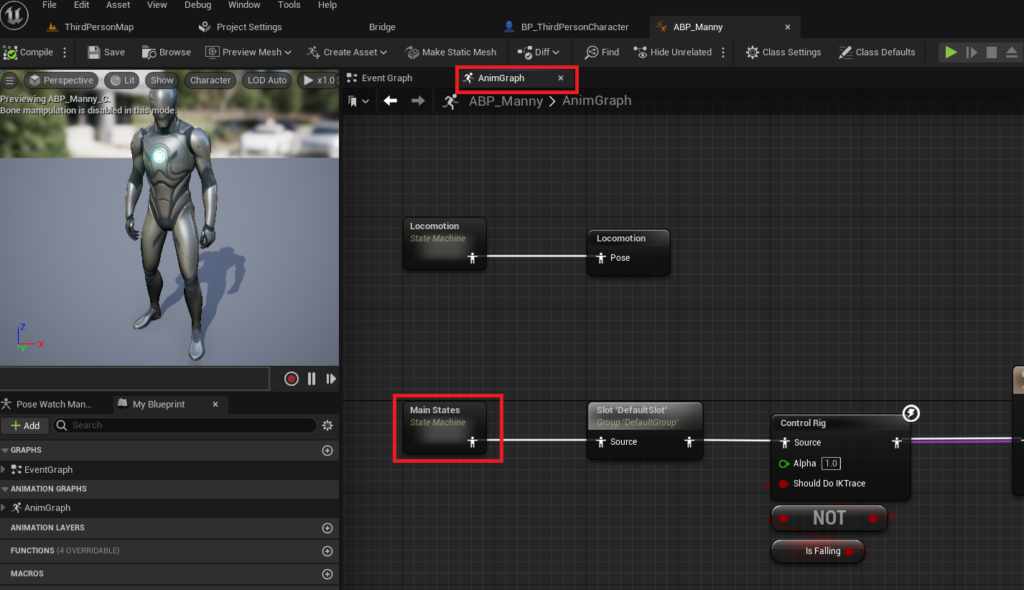
Once the animation blueprint editor is open, developers navigate to the "AnimGraph" on the left side of the window, which houses the logic for blending and transitioning between different animation states. Within the AnimGraph, the "Main States" state machine is the focal point, as it governs the primary animation transitions for the character, including jumping and falling.
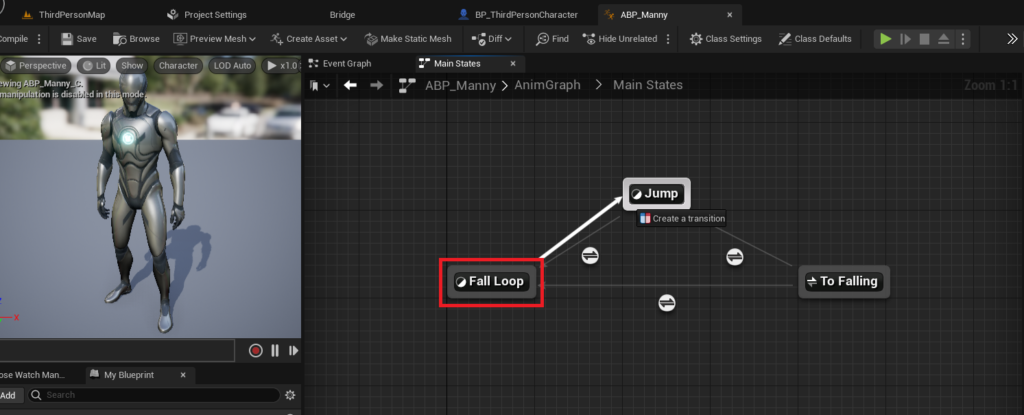
The key to re-triggering the jump animation lies in establishing a new transition within this state machine. Developers drag a connection from the "Fall Loop" state to the "Jump" state. This action creates a new transition pathway, visually represented by an arrow and text indicating "Create a transition." This new transition signifies a potential pathway for the animation system to move from a state of falling to a state of jumping, even if the character is already airborne.
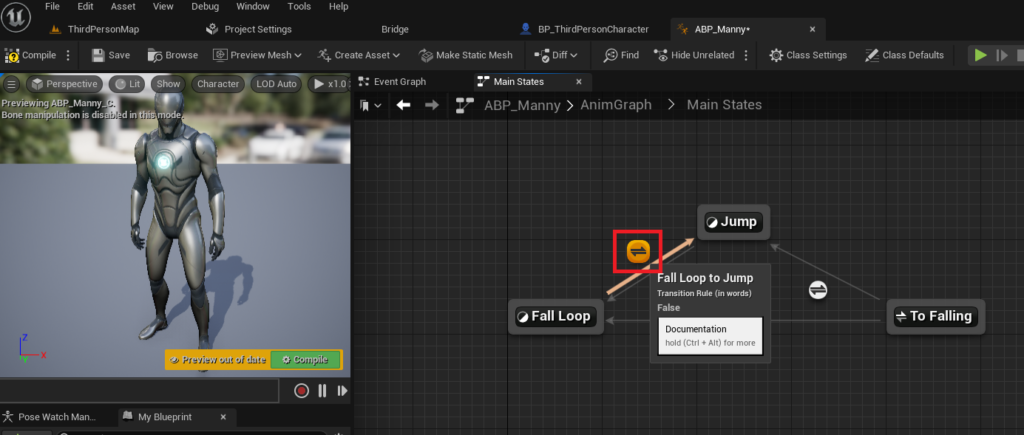
With the transition established, the next step involves opening its dedicated editor by clicking the transition icon. Inside the transition editor, specific Blueprint nodes are added to define the conditions under which this transition should occur. These nodes are configured to check if the character is currently falling (Is Falling) and, crucially, if the character has a remaining jump count greater than zero (Jump Current Count > 0). By combining these conditions, the animation state is instructed to return to the jumping animation whenever a double jump is triggered while the character is already in a falling state. This logic ensures that each subsequent jump in the air correctly plays the designated jump animation, providing clear and immediate visual feedback to the player.
After configuring these Blueprint nodes, compiling and saving the animation blueprint is essential to apply the changes. The result is a significantly improved double jump experience, where the character’s animations fluidly respond to each jump input, enhancing both the aesthetic appeal and the tactile feel of the character’s movement. This level of refinement, while requiring a few additional steps, showcases the depth of control UE5 offers over character behavior and presentation.
Implications and Broader Impact
The ease with which complex mechanics like the double jump can be implemented in Unreal Engine 5 carries significant implications for the game development landscape. Firstly, it substantially lowers the barrier to entry for new developers and smaller independent studios. What once demanded a foundational understanding of C++ programming or intricate Blueprint construction now requires minimal configuration, freeing up valuable development time and resources. This efficiency allows creators to focus on unique game design elements, narrative, and artistic vision rather than getting bogged down in boilerplate mechanics.
Industry experts frequently commend Epic Games for its dedication to fostering a developer-friendly ecosystem. The Blueprint system, in particular, has been lauded as a "game-changer" by numerous independent developers for its ability to facilitate rapid prototyping and iteration. A spokesperson from Epic Games might hypothetically emphasize how features like the simplified jump mechanics align with their overarching vision of empowering creators to bring their ideas to life with unprecedented ease and speed. This philosophy not only supports individual innovation but also contributes to a more diverse and vibrant gaming market.
Furthermore, the robust character movement component within UE5 provides a solid foundation for even more advanced mechanics. Developers can easily build upon the double jump by adding features like wall jumps, air dashes, glides, or special aerial attacks, all while maintaining a consistent and responsive character controller. The modularity and extensibility of the engine mean that foundational elements can be quickly established, then incrementally refined and expanded upon to create truly unique and engaging player experiences.
The provision of comprehensive documentation and a thriving community further amplifies these benefits. Developers encountering challenges or seeking to implement more sophisticated behaviors can readily access official guides, community forums, and a wealth of tutorials, accelerating their learning curve and problem-solving capabilities. This collaborative environment ensures that the accessibility offered by features like the simplified double jump extends throughout the entire development journey.
Conclusion
Unreal Engine 5 continues to solidify its position as a powerhouse for game development, not only through its cutting-edge graphical capabilities but also through its profound commitment to developer accessibility and workflow efficiency. The streamlined implementation of a classic mechanic like the double jump, requiring minimal configuration for core functionality and offering clear pathways for advanced animation refinement, exemplifies this commitment. By simplifying what was once a moderately complex task, UE5 empowers a broader spectrum of creators to realize their creative visions, fostering innovation and contributing to an ever-evolving landscape of interactive entertainment. The enduring appeal of the double jump, now more accessible than ever, ensures that characters will continue to defy gravity in captivating new ways for generations of players to come.
About the Author