Unreal Engine 5, Epic Games’ cutting-edge game development platform, empowers creators with a robust suite of tools designed for efficiency and scalability. Among these, Data Tables stand out as a particularly potent feature, providing a structured, accessible, and highly flexible method for managing game-critical information. This functionality allows programmers and designers alike to create and interact with pre-defined lists of data, fundamentally streamlining the development workflow and fostering a more data-driven approach to game design.
The core utility of a Data Table lies in its ability to serve as a centralized repository for structured information. Unlike hardcoded values embedded directly within game logic, Data Tables decouple data from code, allowing for easier modification, balancing, and content generation. When initializing a Data Table within Unreal Engine 5, developers are prompted to select a specific Struct (structure) upon which the table will be based. This Struct acts as a blueprint, defining the types and names of the data entries that each row in the table will hold. This foundational step ensures data consistency and provides a clear schema for all subsequent entries, making it an indispensable tool for projects ranging from indie titles to AAA blockbusters.
The Evolution of Data Management in Game Development
The concept of externalizing game data is not new, but its implementation has evolved significantly with modern game engines. Historically, much of a game’s logic and content parameters were hardcoded, meaning any change, no matter how minor—be it an item’s damage value, an enemy’s health, or a quest objective—required a programmer to modify code and recompile the project. This process was time-consuming, prone to errors, and created significant bottlenecks, particularly in larger development teams.
The advent of data-driven design, facilitated by tools like Unreal Engine’s Data Tables, revolutionized this paradigm. By storing variables in easily editable assets, game development teams gained unprecedented agility. Designers can adjust gameplay parameters, content creators can populate item inventories, and localizers can manage text strings, all without direct programmer intervention or recompilation. This shift not only accelerates development cycles but also fosters a more collaborative environment where different disciplines can work in parallel, iterating rapidly on game features. Data Tables represent a mature and highly optimized solution within this broader movement, offering a powerful, accessible interface for managing complex data sets.
Understanding the Mechanics: What is an Unreal Engine 5 Data Table?
At its heart, a Data Table in Unreal Engine 5 is a sophisticated asset designed to define and store lists of data, accessible through a unique key for each entry. This data is not ephemeral; it persists as an asset within the project, making it remarkably straightforward to retrieve and update from any point within the game’s code, whether in C++ or Blueprint visual scripting. Crucially, the data remains resident within the Unreal Editor, allowing developers to create and modify entries during development, with these changes becoming instantly available for use during runtime.
Consider the common scenario of managing items or enemies in a game. Instead of individual items having their stats hardcoded or defined in separate, disparate assets, a single Data Table can hold comprehensive data for hundreds or thousands of items. Each row in the table might represent a unique item, with columns defining attributes such as name, damage, rarity, sell price, icon path, and special abilities. Similarly, enemy types could be managed, detailing health, attack power, movement speed, and loot tables. This consolidated approach ensures that all related data is in one place, easily auditable, and consistently applied across the game. The simplicity and minimal overhead involved in creating and utilizing Data Tables make them an attractive solution for efficient data management in any Unreal Engine 5 project.
The Foundational Steps: Enums and Structs
Before a Data Table can be populated with meaningful information, two critical preliminary assets must be established: an Enumeration (Enum) and a Structure (Struct). These serve as the logical building blocks that define the very nature of the data a Data Table will hold.
-
Creating an Enum (Enumeration):
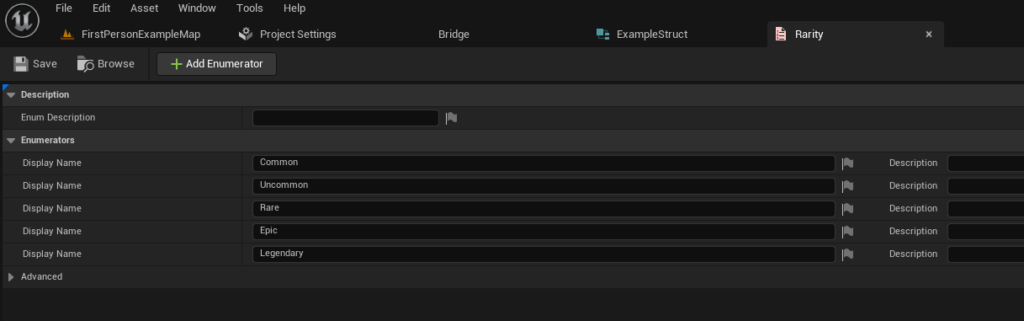
An Enum provides a defined list of named constants, offering a type-safe way to represent distinct categories or states. In the context of game development, this is invaluable for attributes like item rarity, character classes, quest statuses, or damage types. For instance, creating anEItemRarityenum might include values such as "Common," "Uncommon," "Rare," "Epic," and "Legendary."
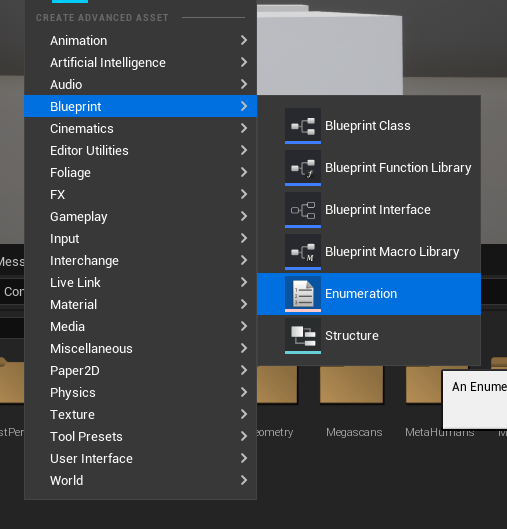
The process involves right-clicking in the Content Browser, selecting "Enumeration" under the "Blueprint" category, and then defining the required values. This standardization prevents errors that could arise from using arbitrary strings and enhances code readability. By dictating a finite set of options, enums ensure that data entries consistently adhere to predefined classifications, a critical aspect for maintainable and scalable projects.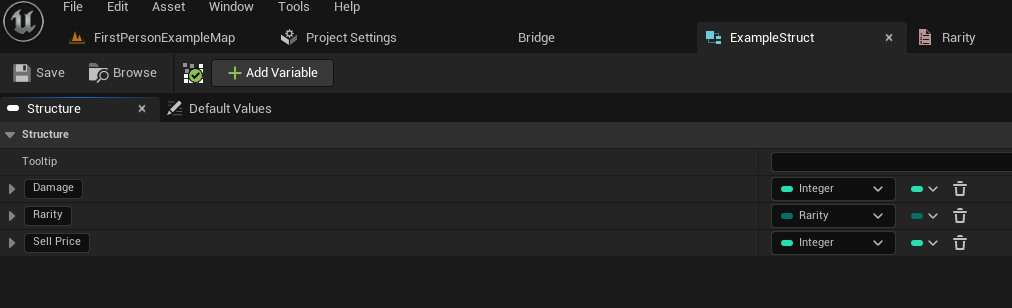
-
Creating our Struct (Structure):
Once an Enum is in place, the next step is to define aStruct. A Struct is a composite data type that groups related variables (members) under a single name. It acts as the schema or template for each individual row within the Data Table. For an item system, aFItemDatastruct might include members like:ItemName(Text)Damage(Integer or Float)Rarity(using theEItemRarityEnum created earlier)SellPrice(Integer)ItemDescription(Text)ItemIcon(Texture 2D reference)
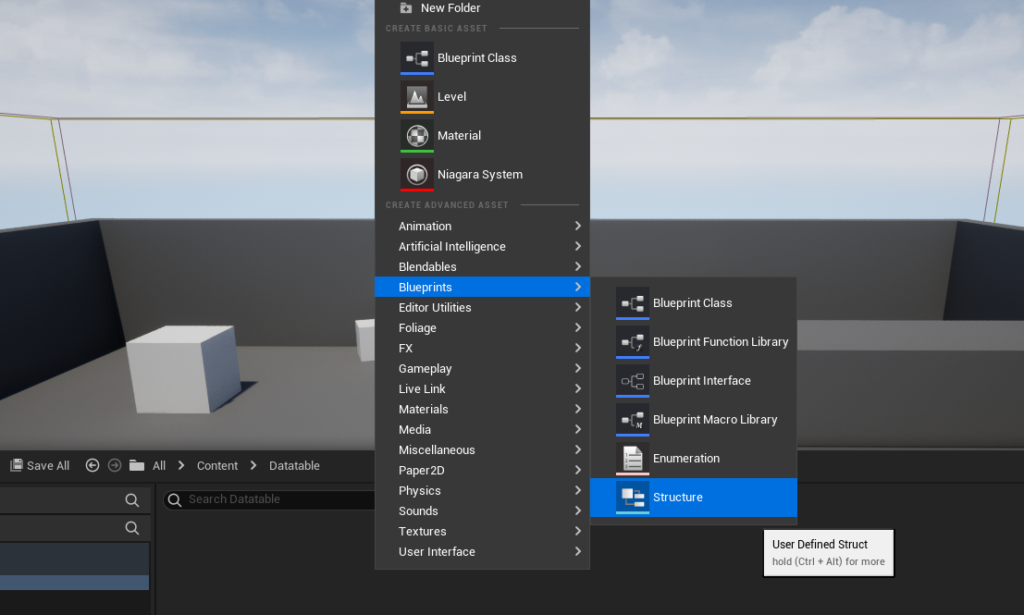
To create a Struct, one again right-clicks in the Content Browser and selects "Structure" under the "Blueprints" category. Within the Struct editor, developers add new variables and assign their types, including previously defined Enums. This design ensures that every item entry in the Data Table will possess these specific attributes, providing a consistent and organized data model. The Struct effectively dictates the columns of the Data Table, while each row will be an instance of that Struct.
Instantiating and Populating the Data Table
With the foundational Enum and Struct established, the actual Data Table asset can now be created. This process is straightforward and mirrors the creation of other Unreal Engine assets.
-
Creating the Data Table Asset:
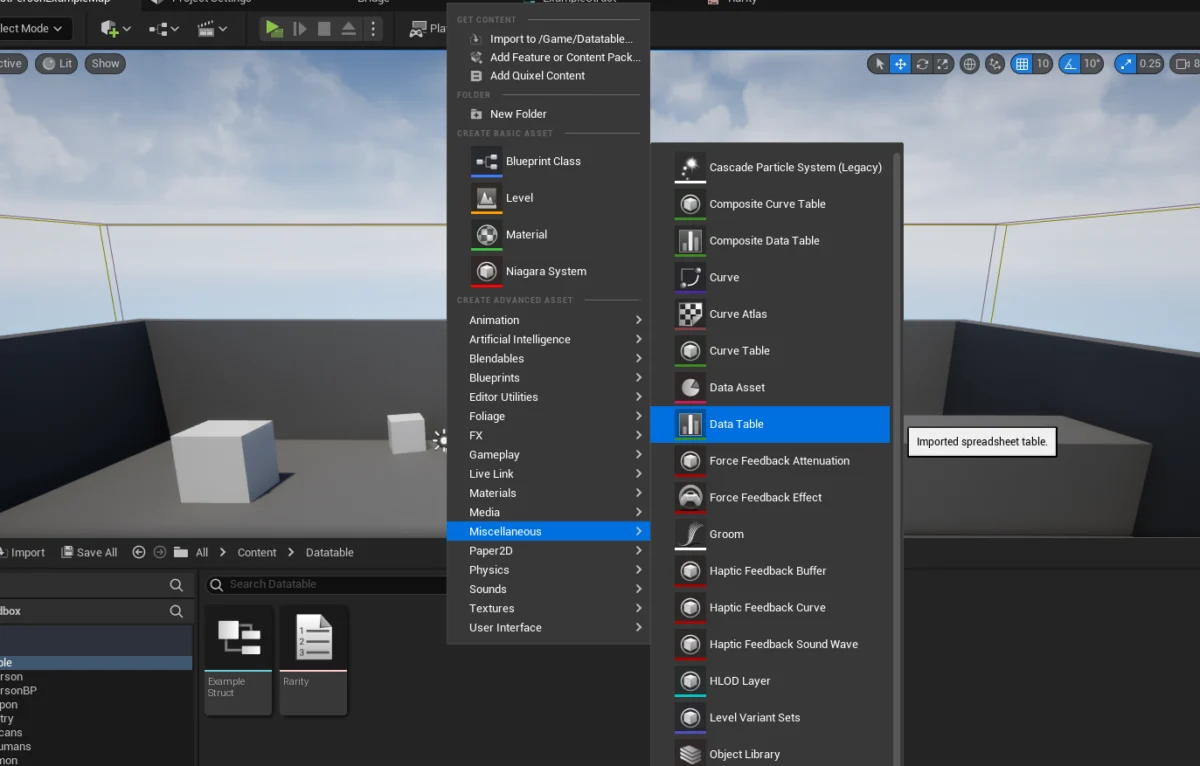
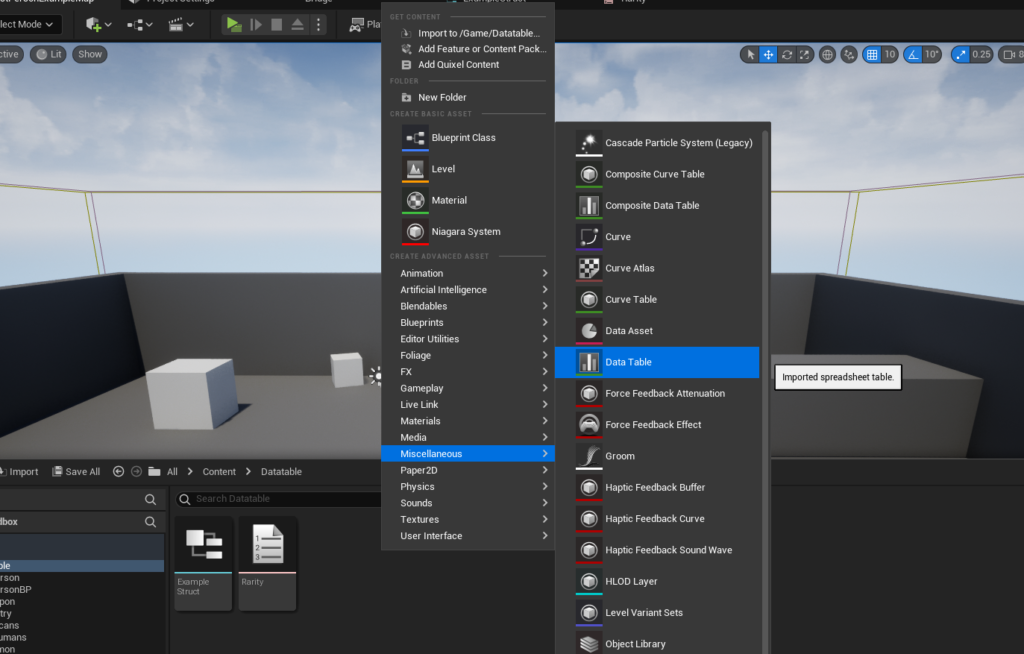
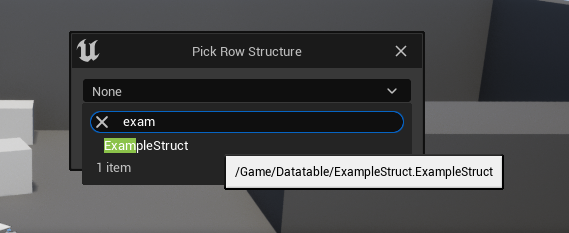
By right-clicking in the Content Browser and navigating to the "Miscellaneous" category, developers can select "Data Table." Upon selection, a crucial prompt appears, asking whichStructwill serve as the "Row Structure" for this Data Table. This is where the previously created Struct (e.g.,FItemData) is linked, fundamentally defining the data types and arrangement for every row within the table. This linkage is paramount; it ensures that the Data Table adheres to a strict, pre-defined schema, preventing malformed data entries. -
Adding Values to the Data Table:
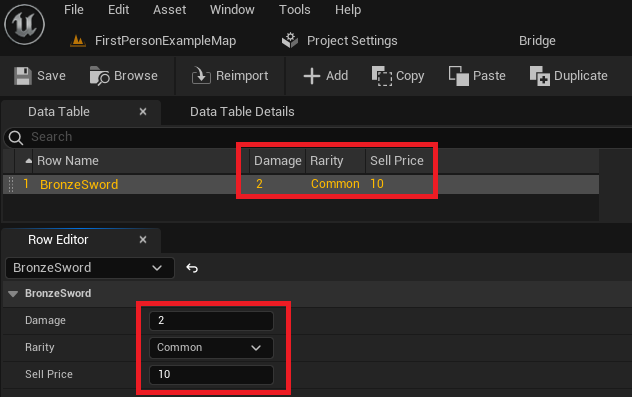
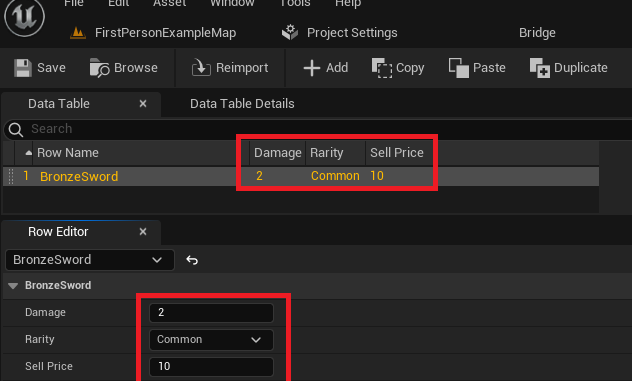
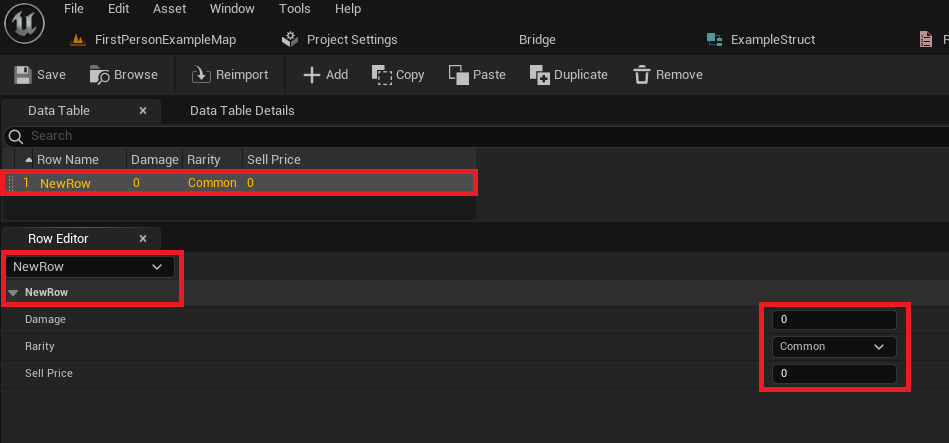
Once the Data Table is created and its Row Structure is defined, it can be opened for editing. The interface typically presents a spreadsheet-like view. The first step to populating it is to click the "Add" button, which inserts a new row. Each new row automatically inherits the default values defined in the associated Struct.
The primary interaction point for populating data is the "Row Editor" panel, usually located below the main table view. Here, developers can modify the values for each attribute within the selected row. For instance, for a row named "BronzeSword," the "Damage" might be set to 10, "Rarity" to "Common" (selected from theEItemRarityenum dropdown), and "Sell Price" to 50.
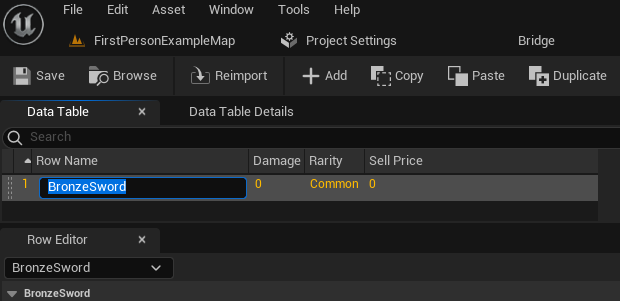
A critical aspect of Data Tables is the "Row Name." Each row requires a unique identifier, which acts as the key for retrieving that specific data entry. By default, new rows are given generic names (e.g., "NewRow_0"). Developers can easily rename these to meaningful identifiers like "BronzeSword," "IronShield," or "GoblinEnemy_Basic." This unique row name is what game logic will use to request specific data.
The ability to create and modify numerous entries rapidly is a major advantage. Designers can add hundreds of items, enemies, or quest details, tweaking values in the editor without needing to involve programmers for every change. This promotes rapid iteration and fine-tuning of game mechanics, leading to a more polished and balanced player experience. It is crucial to remember to save the Data Table asset frequently to prevent loss of work, as changes are not automatically committed until saved.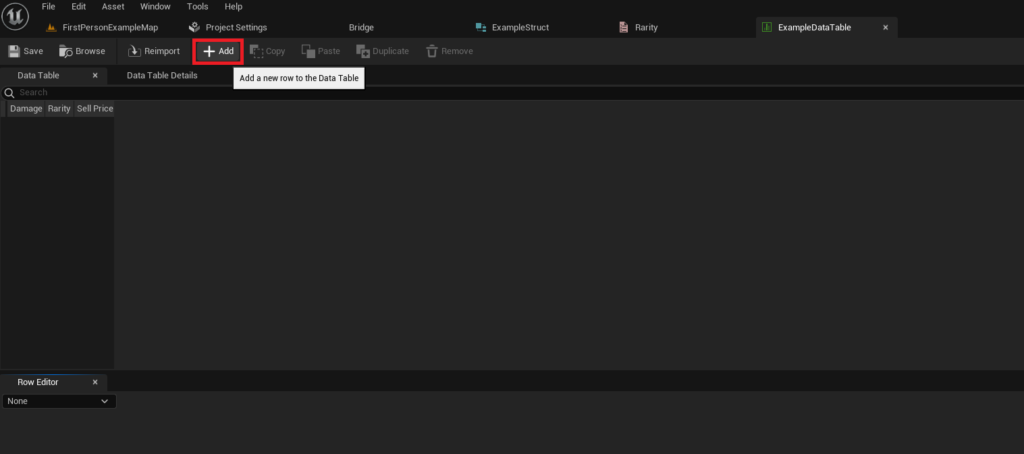
Runtime Access: Integrating Data Tables into Game Logic
The true power of Data Tables manifests when their stored information is accessed and utilized within the game’s runtime logic. Unreal Engine’s Blueprint visual scripting system provides intuitive nodes for this purpose, making data retrieval straightforward for both programmers and designers.
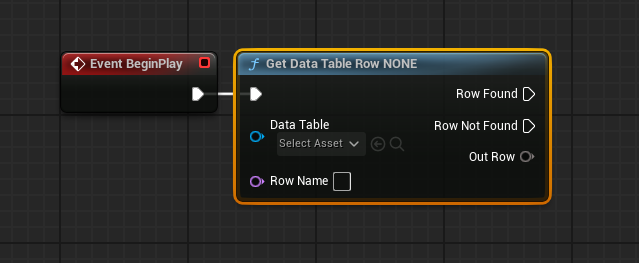
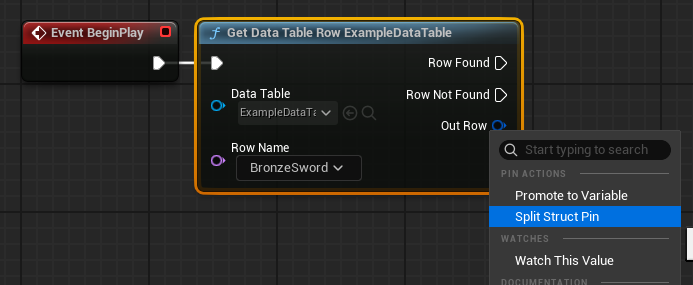
The primary node for accessing individual data entries is the Get Data Table Row node. This node requires two key inputs:
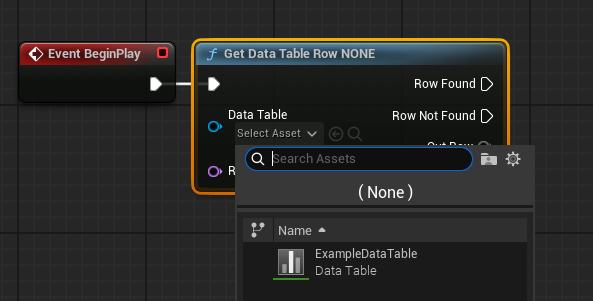
- Data Table Reference: A direct link to the specific Data Table asset (e.g.,
DT_Items) that contains the desired data. This can be set directly within the node’s details panel via a dropdown selector, listing all Data Tables in the project. - Row Name: The unique identifier (the string name) of the specific row whose data is to be retrieved (e.g., "BronzeSword"). This can be manually entered, selected from a dropdown if the Data Table reference is set, or dynamically passed in from another part of the game logic.
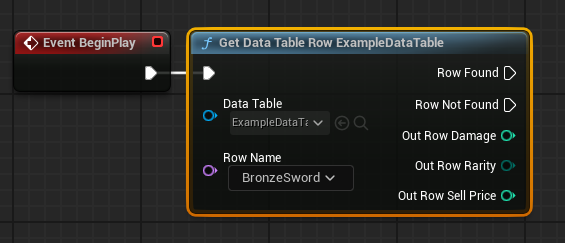
The Get Data Table Row node offers two execution outputs: Row Found and Row Not Found. This conditional execution is vital for robust error handling. If a row matching the provided Row Name is successfully located, the Row Found pin executes, and the Out Row pin provides a copy of the Struct containing all the data for that row. Conversely, if no matching row is found (e.g., due to a typo in the Row Name), the Row Not Found pin executes, and the Out Row data will be invalid.
To easily access the individual attributes within the retrieved Out Row Struct, developers can right-click on the Out Row pin and select "Split Struct Pin." This action expands the single Struct pin into separate output pins for each variable defined in the Struct (e.g., "Damage," "Rarity," "Sell Price"). These individual pins can then be connected to other Blueprint nodes to drive game logic, update UI elements, or modify game objects. For example, the "Damage" value from the "BronzeSword" row could be directly used to calculate player attack power.
Advanced Data Management: Looping Through Data Table Rows
While accessing individual rows is fundamental, many game systems require the ability to process multiple or all entries within a Data Table. For instance, a game might need to display all available weapons in a shop, validate enemy data, or calculate the total value of an inventory. Unreal Engine 5 provides efficient mechanisms for iterating over Data Table entries.
The Get Data Table Row Names node is crucial for this purpose. When provided with a Data Table reference, this node returns an Array containing all the unique Row Names present in that Data Table. This array then becomes the input for a For Each Loop node.
The For Each Loop node is a standard Blueprint construct that iterates through each element of an array. By connecting the Out Row Names array from Get Data Table Row Names to the Array input of the For Each Loop, developers can process each Row Name sequentially.
Inside the Loop Body of the For Each Loop, the Array Element pin provides the current Row Name being processed. This Array Element (which is a Name type) can then be connected directly to the Row Name input of a Get Data Table Row node.
This powerful combination allows developers to retrieve the full data Struct for every row in the Data Table, one by one. Within the Loop Body, the retrieved Out Row values can be utilized for a multitude of purposes: dynamically spawning game objects, populating UI lists, performing calculations, or applying effects based on the data. Once all elements in the array have been processed, the Completed pin of the For Each Loop executes, indicating the completion of the iteration. This looping capability is essential for building dynamic and scalable game features that respond to large datasets.
Broader Implications and Strategic Advantages
The strategic adoption of Data Tables in Unreal Engine 5 yields significant advantages across various facets of game development:
- Scalability: As projects grow in complexity and content volume, Data Tables provide a robust and organized way to manage vast amounts of data without overwhelming codebases. This is critical for large-scale open-world games or titles with extensive item libraries.
- Enhanced Team Collaboration: Data Tables act as a "single source of truth" for specific data sets. Programmers define the Structs, establishing the data schema, while designers, content creators, and QA testers can then populate and modify the data directly within the editor. This parallel workflow significantly reduces inter-departmental dependencies and accelerates content creation.
- Rapid Iteration and Game Balancing: Designers can fine-tune game parameters (e.g., weapon damage, enemy health, currency drop rates) in real-time within the editor, testing changes instantly without requiring a developer to recompile code. This facilitates rapid prototyping, iterative design, and efficient game balancing, leading to a more refined player experience.
- Localization Efficiency: Data Tables are an ideal solution for managing localized text strings. All text requiring translation can be stored in a Data Table, keyed by a unique identifier. This allows localization teams to work on translation files independently, integrating updates seamlessly without touching game code.
- Reduced Development Time and Cost: By streamlining data management and empowering non-programmers to handle content, Data Tables reduce the overall time and cost associated with development. Fewer code changes mean fewer bugs and less time spent on debugging.
- Moddability and Extensibility: In certain contexts, Data Tables can be exposed or designed in a way that allows modders to create and inject new content (e.g., new items, enemies) simply by adding rows to a Data Table, extending the game’s lifespan and community engagement.
- Maintainability and Auditing: Consolidating data into structured tables makes it easier to review, audit, and maintain. Changes are centralized, and the impact of modifications can be more easily understood and tracked, especially when integrated with version control systems.
Conclusion: A Cornerstone of Modern Game Development
In conclusion, Unreal Engine 5’s Data Tables are far more than a simple data storage mechanism; they represent a fundamental pillar of efficient, collaborative, and scalable game development. By providing an intuitive and powerful way to define, populate, and access structured information, they empower development teams to build richer, more dynamic, and more easily manageable game worlds. From accelerating content creation and simplifying game balancing to fostering seamless team collaboration and enhancing project scalability, Data Tables are an indispensable tool for any Unreal Engine project aiming for success in the demanding landscape of modern game design. Their ability to facilitate a data-driven approach, without requiring deep C++ knowledge for content creators, solidifies their position as a cornerstone technology for developers seeking to maximize productivity and deliver exceptional interactive experiences.
About the Author