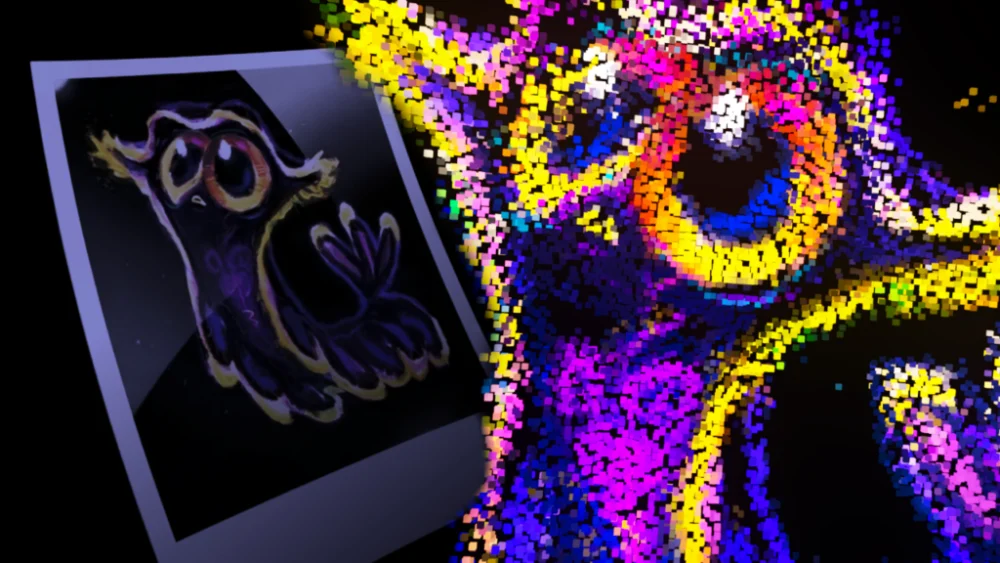
A recent tutorial released by TiFi Design on BlenderNation details a sophisticated method for transforming any static image into an animated, voxel-based 3D asset utilizing Blender’s powerful Geometry Nodes system. This advanced technique allows creators to procedurally generate a volumetric representation of an image, with each pixel translated into a distinct voxel, offering a unique artistic and technical approach to digital asset creation. The tutorial, published on March 7, 2026, by TiFi Design, a known Blender enthusiast and educator, aims to demystify the process for users seeking to expand their 3D animation and modeling capabilities.
The Art and Science of Voxelization in 3D
Voxelization, in its simplest form, is the process of converting a 2D image into a 3D representation composed of voxels, which are essentially 3D pixels. Unlike traditional 3D modeling that relies on polygons, voxel art uses a grid of cubes to form shapes and volumes. This approach can lend itself to a distinct aesthetic, often reminiscent of retro video games or a building-block construction. However, the procedural application of this technique, especially when driven by image data and enhanced with animation, elevates it beyond a simple aesthetic choice into a complex procedural generation workflow.
Geometry Nodes in Blender have revolutionized how artists can create and manipulate geometry non-destructively. This node-based system allows users to build complex structures and effects by connecting various nodes, each performing a specific operation. The ability to leverage Geometry Nodes for image-based voxelization signifies a significant advancement in procedural content generation within the software, offering a high degree of control and flexibility.

Unpacking the Tutorial’s Methodology
The core of TiFi Design’s tutorial lies in its systematic approach to translating image data into a 3D voxel grid. While specific node configurations are detailed within the video, the underlying principles likely involve:
- Image Data Input: The process begins with an input image. This image’s pixel data—specifically its color information—serves as the blueprint for the voxel generation.
- Grid Creation: A 3D grid is established within Blender. The density and resolution of this grid will directly influence the detail of the final voxel model.
- Voxel Instancing: Each point or cell within the 3D grid is then evaluated based on the corresponding pixel data from the input image. This evaluation determines whether a voxel should be generated at that location. The color of the pixel might dictate the color of the voxel, or it could influence other properties like size or opacity.
- Procedural Animation: The "animated" aspect of the voxelization suggests that the process is not static. This could be achieved through several methods:
- Time-based manipulation: Modifying the grid, voxel placement, or voxel properties over time using the timeline.
- Dynamic image data: Utilizing animated images or sequences as the input, where each frame generates a new voxel configuration.
- Algorithmic animation: Implementing node setups that create movement patterns for the voxels, such as expansion, contraction, pulsing, or displacement, independent of the source image’s animation.
- Material and Shading: The tutorial likely also covers how to apply appropriate materials and shaders to the generated voxels to achieve the desired visual output, whether it’s a clean, uniform look or a more textured, nuanced appearance.
The advantage of this procedural approach is its inherent flexibility. Once the node setup is created, artists can theoretically import any image and have it voxelized and animated automatically. This dramatically speeds up the workflow for creating unique visual effects, character elements, or abstract art pieces.
Background and Context: The Rise of Proceduralism in 3D
The development of Blender’s Geometry Nodes has been a significant factor in the growing trend of procedural content generation across the 3D industry. This shift away from purely manual modeling offers several advantages:
- Efficiency: Procedural workflows can generate vast amounts of detail and complexity with relatively simple setups, saving considerable time compared to manual creation.
- Flexibility and Iteration: Changes made to the initial parameters or input data can propagate throughout the entire generated model, allowing for rapid iteration and refinement of designs.
- Scalability: Procedural systems can often be scaled to produce variations of a theme or to generate assets at different levels of detail.
- Artistic Control: While seemingly automated, procedural workflows offer a high degree of artistic control. Artists define the rules and parameters, essentially guiding the generation process to achieve their desired aesthetic.
The ability to voxelize images using Geometry Nodes fits perfectly within this paradigm. It bridges the gap between 2D artistic assets and 3D volumetric creation, opening up new avenues for artists working in game development, animation, visual effects, and even generative art.

Supporting Data and Industry Trends
The demand for dynamic and visually engaging 3D content continues to rise across various sectors. In the gaming industry, for instance, the creation of unique environments and character assets is crucial for player immersion. Procedural generation techniques, including voxel-based methods, have become integral to developing large, detailed worlds efficiently. Titles like "Minecraft" and "Valheim" have demonstrated the widespread appeal and technical feasibility of voxel art.
Furthermore, the proliferation of real-time rendering engines and the increasing accessibility of powerful 3D software like Blender have democratized sophisticated visual creation. Tutorials like TiFi Design’s are vital in disseminating these advanced techniques to a broader audience, empowering independent artists and small studios to compete with larger productions.
The date of the tutorial’s release, March 7, 2026, places it within a period where real-time rendering, AI-assisted content creation, and advanced proceduralism are at the forefront of 3D software development. Blender’s ongoing commitment to enhancing its procedural tools through continuous updates further underscores the relevance of such tutorials.
Potential Implications and Broader Impact
The ability to procedurally voxelize any image with animation has several potential implications for various creative fields:

- Enhanced Animation Workflows: Animators can now create complex, volumetric particle effects or character elements by simply sourcing existing images. This could be particularly useful for abstract animations, motion graphics, or visualizers.
- Game Development Assets: Developers can quickly generate voxel-based assets for games, potentially for environmental elements, destructible objects, or even character components. The animation aspect adds a layer of dynamism that can make game worlds feel more alive.
- Visual Effects (VFX): For film and television, this technique could be employed to create unique visual effects, such as digital debris, abstract energy forms, or stylized character transformations.
- Generative Art: Artists exploring generative art can integrate image analysis with procedural 3D generation to create evolving, data-driven art installations or digital pieces.
- Educational Tools: The tutorial itself serves as an educational resource, demonstrating the power and versatility of Blender’s Geometry Nodes. It encourages users to think procedurally and explore creative solutions to complex visual challenges.
The accessibility of this technique, made possible by the free and open-source nature of Blender, is a significant factor. It lowers the barrier to entry for sophisticated 3D creation, fostering innovation and artistic expression.
Official Responses and Community Reactions
While no direct "official response" from a governing body is applicable to a community-driven tutorial, the platform of BlenderNation serves as a critical conduit for disseminating such information within the Blender community. The website’s focus on tutorials, news, and artist showcases means that a well-executed and informative tutorial like TiFi Design’s is likely to be met with positive engagement.
Community reactions, typically observed in comment sections and social media shares, often highlight the tutorial’s clarity, the presenter’s expertise, and the practical applicability of the technique. Users often express gratitude for the detailed explanations and the innovative solutions presented. The fact that the tutorial is categorized under "Videotutorials" further emphasizes its pedagogical intent and its place within the broader educational landscape of Blender users.
The author, TiFi Design, identifies as a "Blender enthusiast and YouTuber" dedicated to creating tutorials. This self-description aligns with the community-driven ethos of Blender, where creators often share their knowledge to help others learn and grow. The explicit invitation to visit their YouTube channel suggests a commitment to ongoing education and community building around Blender.

Conclusion
TiFi Design’s tutorial on voxelizing any image in Blender using Geometry Nodes represents a significant contribution to the growing body of knowledge surrounding procedural 3D asset creation. By demystifying a complex technique, it empowers a wider range of artists and developers to leverage the power of Blender’s node-based systems. The ability to transform 2D imagery into animated 3D voxel structures opens up a wealth of creative possibilities across various industries, underscoring the continuous evolution and increasing accessibility of advanced 3D visualization tools. As proceduralism continues to shape the future of digital content creation, tutorials like this serve as essential guides, fostering innovation and democratizing sophisticated artistic expression.
About the Author