The widespread adoption of Blueprint in Unreal Engine projects stems from its intuitive visual interface, which enables developers to rapidly iterate, prototype features, and manage game logic without delving into complex code syntax. This visual scripting paradigm significantly democratizes game development, allowing artists, designers, and less code-proficient developers to contribute directly to gameplay systems. However, as projects scale in complexity and demand for performance intensifies, the interpretive nature of Blueprints can lead to execution slowdowns. Operations involving large data sets, complex mathematical calculations, frequent string manipulations, or intense physics simulations often highlight the limitations of Blueprint’s runtime efficiency. At such junctures, the inherent speed and efficiency of C++—a compiled language with direct memory access—become indispensable.
Historically, migrating slow Blueprint logic to C++ often necessitated a significant refactoring of a project’s architecture, potentially disrupting ongoing development and requiring substantial time investment. This structural shift could be daunting, especially for teams heavily invested in Blueprint-centric workflows. Furthermore, many advanced C++ features and specific Unreal Engine API functionalities lack direct Blueprint node equivalents, leaving developers with a choice: forgo certain optimizations or embark on a full C++ codebase migration. The C++ Blueprint Function Library directly addresses these dilemmas by providing a seamless, integrated pathway for developers to harness C++’s capabilities without dismantling their existing Blueprint structures.
Understanding the C++ Blueprint Function Library
A C++ Blueprint Function Library is a specialized Unreal Engine class that serves as a conduit, enabling functions written in C++ to be directly invoked and utilized within both C++ code and, crucially, within Blueprint graphs. This architectural design is foundational to Unreal Engine’s hybrid development philosophy, allowing developers to optimize performance-critical sections of their game logic by reimplementing them in C++ while maintaining the overall structure and designer-friendliness of their Blueprint projects. By encapsulating C++ functionality within these libraries, teams can selectively offload demanding tasks, thereby significantly boosting execution speed and overall game responsiveness. The library essentially allows for the creation of custom Blueprint nodes that execute compiled C++ code, offering the best of both worlds: C++ performance accessible via Blueprint’s visual interface.
Prerequisites for Implementation
Implementing C++ Blueprint Function Libraries requires a foundational understanding of C++ programming within the Unreal Engine environment. Developers must be familiar with basic C++ syntax, object-oriented programming principles, and Unreal Engine’s specific C++ conventions, such as macros and UObjects. Beyond conceptual knowledge, a suitable Integrated Development Environment (IDE) is essential for compiling C++ code. For Windows users, Microsoft Visual Studio is the standard, while macOS developers typically utilize Xcode. Linux users often opt for Visual Studio Code with appropriate extensions or CLion. These IDEs provide the necessary tools for code editing, debugging, and, most importantly, compiling the C++ source files into executable code that the Unreal Engine can integrate. The engine itself will often prompt the installation of a recommended IDE if one is not detected, streamlining the setup process for new C++ projects.
Establishing a C++ Enabled Project
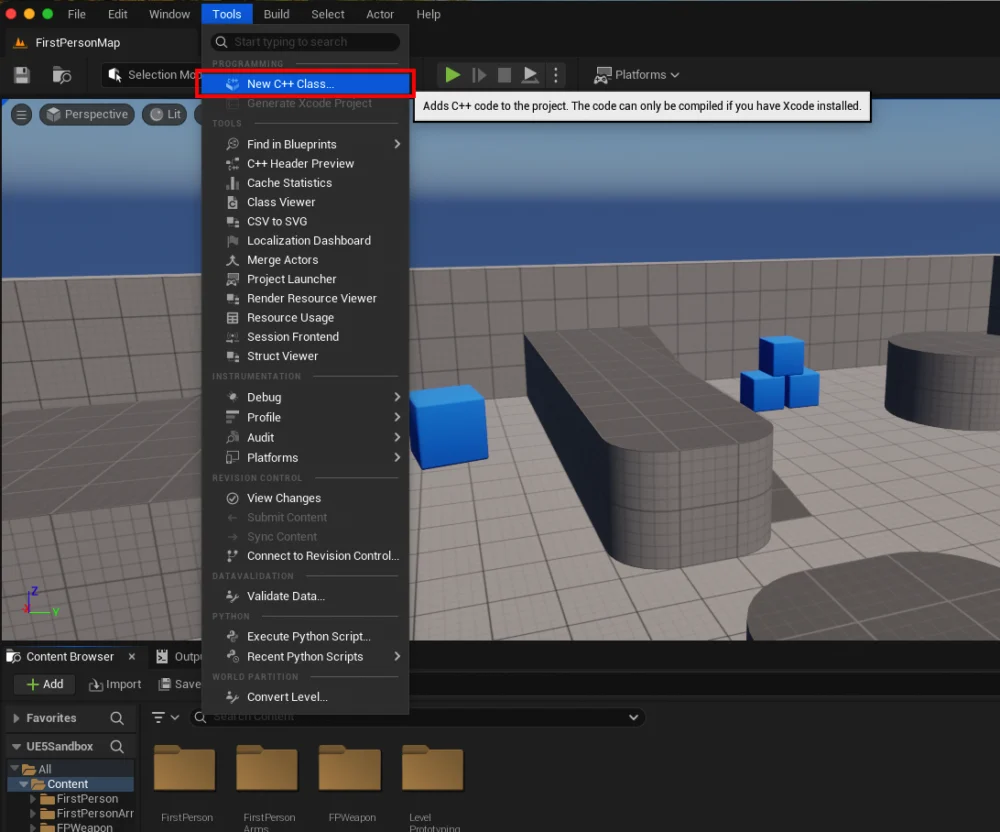
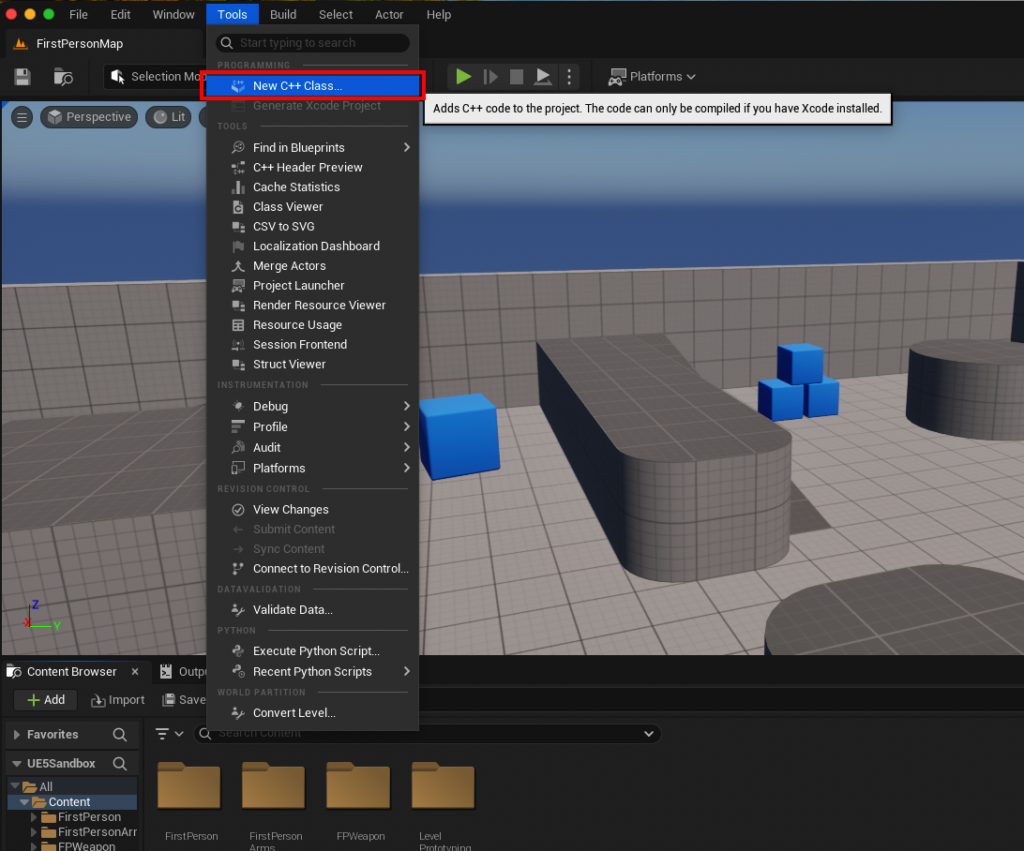
The initial step in leveraging C++ Blueprint Function Libraries involves ensuring the Unreal Engine project is configured for C++ development. While Unreal Engine supports Blueprint-only projects, C++ integration necessitates a C++-enabled project structure. This can be verified or initiated by navigating to the "Tools" dropdown menu within the Unreal Editor and selecting "New C++ Class." If the project is not already C++-enabled, the engine will guide the user through the process, potentially requiring the installation of an IDE and a subsequent recompilation of the project files. This foundational step ensures that the necessary build environment and project directories for C++ source files are correctly established.
Creating the Blueprint Function Library Class
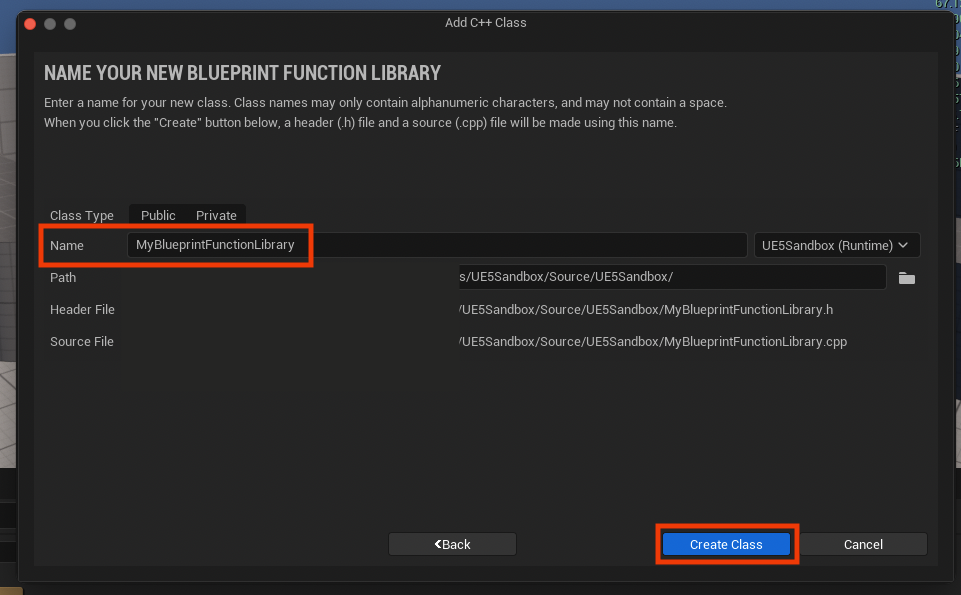
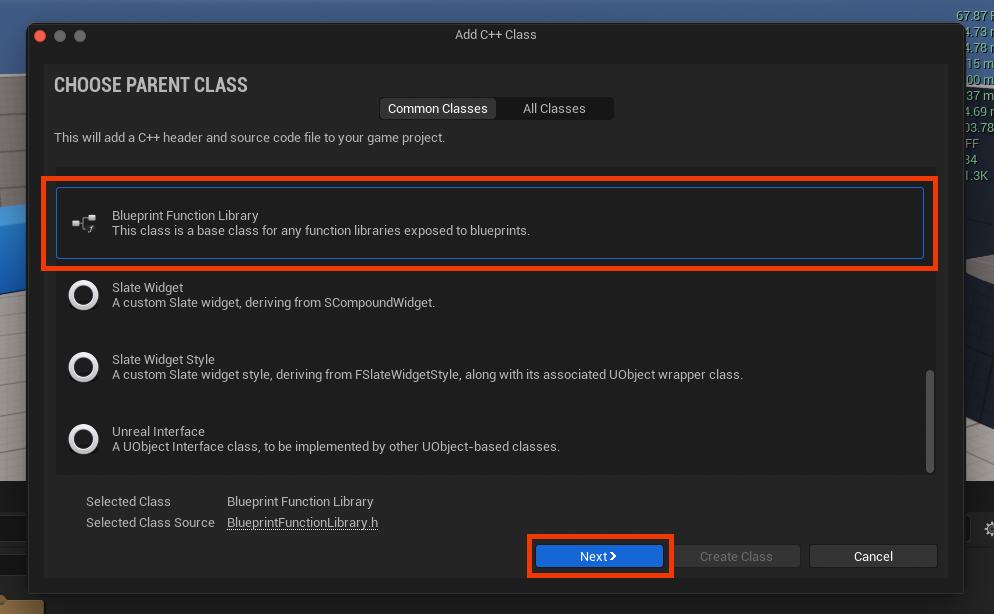
Once the project is C++-enabled, the next phase involves creating the specific Blueprint Function Library class. Through the "New C++ Class" dialog, developers are presented with a selection of "Parent Classes." To create a Blueprint Function Library, one must scroll down and select "Blueprint Function Library" as the base class. This selection is crucial as it inherits the necessary properties and macros that allow C++ functions within this class to be exposed to the Blueprint system. Following the parent class selection, a clear and descriptive name for the new library is required. Adhering to Unreal Engine’s naming conventions, which typically involve camel case with capital letters for each word (e.g., MyBlueprintFunctionLibrary), enhances code readability and maintainability. After naming and confirming, the engine compiles the new C++ files, generating a .h header file and a .cpp source file corresponding to the chosen class name. This compilation process integrates the new class structure into the project, preparing it for function implementation.
Implementing Functions within the IDE
Upon successful compilation, the newly generated .h and .cpp files become accessible within the chosen IDE. The header file (.h) serves as the declaration point for the functions, defining their signatures and specifying how they will interact with the Unreal Engine reflection system. The source file (.cpp) contains the actual implementation logic of these functions.
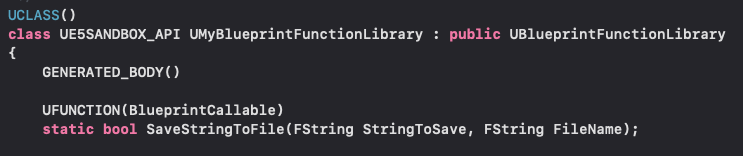
For a function to be accessible within Blueprints, specific Unreal Engine macros are required. The UFUNCTION() macro is paramount, signaling to the Unreal Engine’s reflection system that the following function should be exposed. Within this macro, specifiers like BlueprintCallable are used to indicate that the function can be called from Blueprints, and Category helps organize the function within the Blueprint editor’s context menu, making it easily discoverable.

A critical keyword for Blueprint Function Libraries is static. By declaring functions as static, they become accessible globally without the need for an object instance. This is fundamental to Blueprint Function Libraries, as developers can invoke these functions directly from any Blueprint graph without first creating or referencing an object of the library’s class.
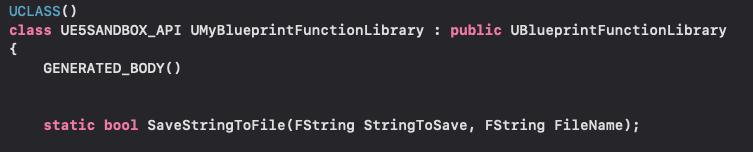
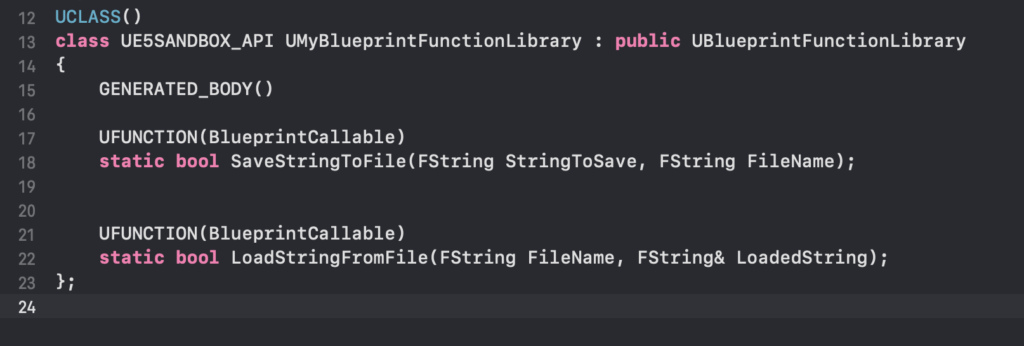
Consider a practical example, such as implementing a robust file I/O system for saving and loading strings. The original article illustrates this with SaveStringToFile and LoadStringFromFile functions. In the header file, their declarations would resemble:
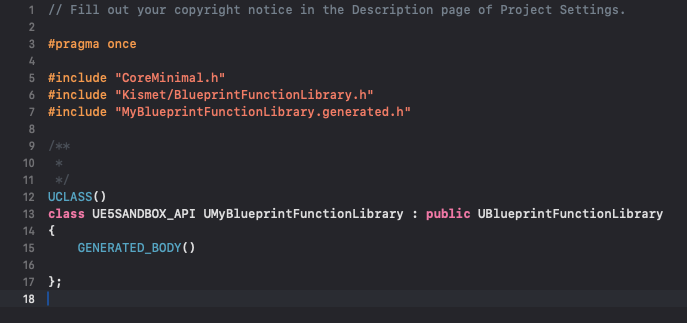
UCLASS()
class UMyBlueprintFunctionLibrary : public UBlueprintFunctionLibrary

    GENERATED_BODY()

public:
    UFUNCTION(BlueprintCallable, Category = "File Operations")
    static bool SaveStringToFile(const FString& InString, const FString& FileName);

    UFUNCTION(BlueprintCallable, Category = "File Operations")
    static FString LoadStringFromFile(const FString& FileName);
;
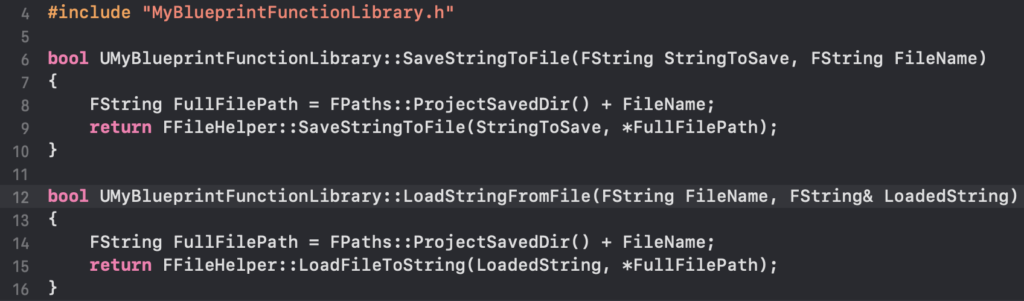
In the corresponding .cpp file, the implementation would leverage Unreal Engine’s FFileHelper class, which provides convenient utilities for file system operations. For instance:
#include "MyBlueprintFunctionLibrary.h"
#include "Misc/FileHelper.h"
#include "HAL/PlatformFileManager.h"

bool UMyBlueprintFunctionLibrary::SaveStringToFile(const FString& InString, const FString& FileName)

    return FFileHelper::SaveStringToFile(InString, *(FPaths::ProjectSavedDir() + FileName));


FString UMyBlueprintFunctionLibrary::LoadStringFromFile(const FString& FileName)

    FString ResultString;
    FFileHelper::LoadFileToString(ResultString, *(FPaths::ProjectSavedDir() + FileName));
    return ResultString;
This C++ implementation for file operations offers significant advantages over a purely Blueprint-based approach. C++ provides more direct control over file system interactions, often resulting in faster execution, especially for large files or frequent access. It also allows for more robust error handling and access to low-level file attributes that might not be exposed through standard Blueprint nodes. Once the C++ code is written, the project must be compiled, and the Unreal Editor relaunched for the changes to take effect and for the new functions to be recognized by the Blueprint system.
Accessing C++ Functions in Blueprints
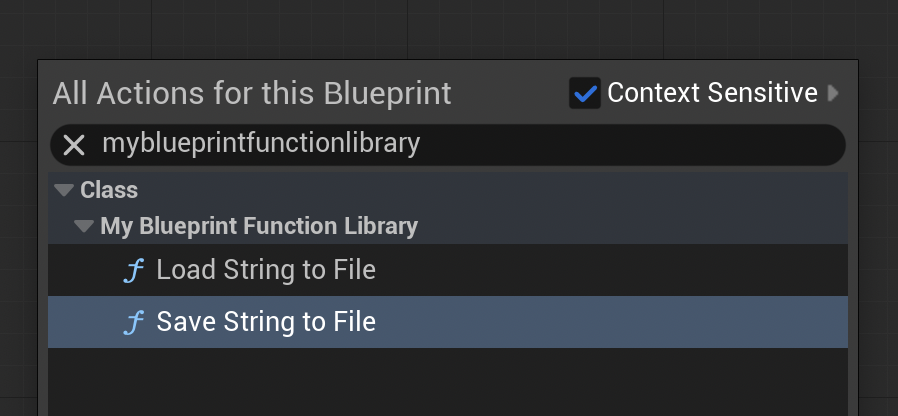
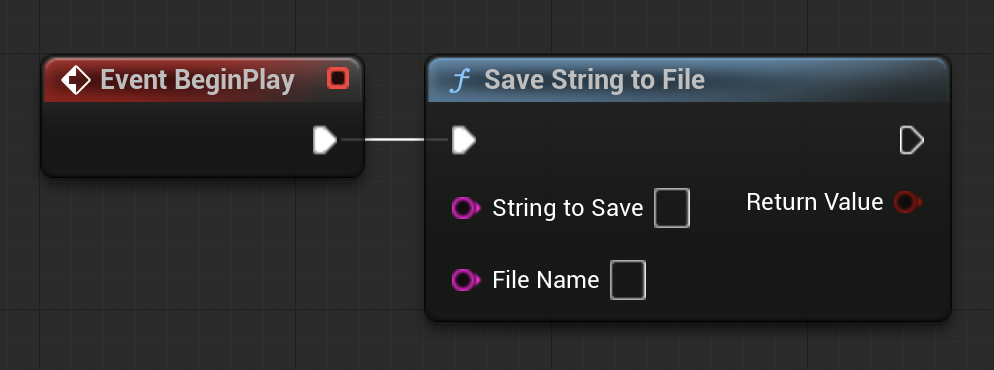
After successful compilation and editor relaunch, the C++ functions become seamlessly integrated into the Blueprint environment. Within any Blueprint graph—be it a Level Blueprint, an Actor Blueprint, or a Widget Blueprint—developers can right-click to bring up the context-sensitive action menu. Typing the name of the Blueprint Function Library (e.g., "MyBlueprintFunctionLibrary") or the specific function name (e.g., "Save String To File") will reveal the newly exposed C++ functions as callable nodes. These nodes appear with the specified Category and function name, complete with their defined input and output pins matching the C++ function’s parameters and return types. The visual representation in Blueprint accurately reflects the underlying C++ logic, allowing designers to utilize powerful C++ features without needing to understand the underlying code.
Demonstration and Validation of Functionality
To validate the integration, the provided example illustrates the file I/O functionality within a Level Blueprint.
Phase 1: Saving a String
A "Begin Play" event node is linked to the SaveStringToFile C++ Blueprint Library function. A literal string, such as "Save Test," is provided as the InString input, and a file name, "textfile-test.txt," is specified for FileName. Upon playing the project in the editor, the SaveStringToFile function executes, writing the "Save Test" string to a file named "textfile-test.txt" within the project’s /Saved directory. Verification involves manually navigating to this directory and opening the .txt file, confirming the presence of the saved string.
Phase 2: Loading a String
For the loading demonstration, a separate file, "loadtest.txt," is manually created in the /Saved folder, containing the string "Loading Test." This sets up the scenario for the LoadStringFromFile function. In the Level Blueprint, the LoadStringFromFile C++ Blueprint Library function is connected, with "loadtest.txt" as its FileName input. The output string from this function is then connected to a "Print String" node. When the project is played, the LoadStringFromFile function retrieves the content of "loadtest.txt," which is then displayed on the screen via the "Print String" node, confirming successful data retrieval. This direct visual feedback in the editor provides immediate validation of the C++ function’s operation and its seamless interaction with Blueprint.
Strategic Implications for Game Development
The strategic integration of C++ Blueprint Function Libraries has profound implications for modern game development workflows in Unreal Engine 5:
- Performance Optimization: For CPU-bound tasks, complex algorithms, or operations requiring direct hardware interaction, C++ offers superior performance. By moving these critical sections into C++ libraries, developers can achieve significant frame rate improvements, reduced latency, and a smoother overall player experience. This is especially crucial for high-fidelity games, VR applications, or titles targeting performance-sensitive platforms.
- Access to Advanced Engine Features: Many low-level Unreal Engine API functions and external libraries are primarily exposed through C++. Blueprint Function Libraries grant designers and Blueprint-centric developers access to these powerful capabilities without needing extensive C++ knowledge, expanding the scope of what can be achieved purely within Blueprints.
- Enhanced Collaboration: This hybrid approach fosters better collaboration between programming teams and design/art teams. Programmers can develop highly optimized, robust C++ modules, which designers can then readily integrate and manipulate within Blueprint, focusing on gameplay logic and creative iteration rather than performance minutiae. This separation of concerns improves workflow efficiency and reduces dependencies.
- Project Scalability and Maintainability: As projects grow, managing complex Blueprint graphs can become challenging. Encapsulating intricate logic in C++ libraries makes the overall project more modular, easier to debug, and more maintainable. C++ code, being compiled, also provides stronger type safety and compile-time error checking, contributing to more stable applications.
- Reduced Development Time for Complex Systems: While initial C++ setup requires specific knowledge, the ability to selectively optimize parts of a Blueprint project avoids the larger undertaking of a full C++ rewrite, saving considerable development time and resources in the long run. It allows teams to iterate quickly with Blueprints, then surgically optimize where necessary.
Conclusion
C++ Blueprint Function Libraries represent a cornerstone of efficient and scalable development in Unreal Engine 5. They provide a powerful and elegant solution to the perennial challenge of balancing rapid development velocity with uncompromising performance demands. By enabling the seamless integration of high-performance C++ code directly into Blueprint graphs, developers can unlock hidden engine functionalities, significantly optimize computationally intensive operations, and streamline collaborative workflows. This hybrid approach empowers teams to build more ambitious, performant, and feature-rich games, ensuring that Unreal Engine 5 projects can meet the escalating expectations of the modern gaming landscape. Embracing this methodology is not merely a technical advantage but a strategic imperative for maximizing the potential of the Unreal Engine platform.
Further Reading:
- Official blueprint function library documentation from Epic Games
- Click here to read more of our C++ guides for Unreal Engine
About the Author