BlenderNation, a prominent online platform dedicated to the open-source 3D creation suite Blender, has published a new video tutorial demonstrating an advanced technique for transforming any image into animated voxels using the software’s powerful Geometry Nodes system. The tutorial, authored by TiFi Design, a known Blender enthusiast and content creator, offers a deep dive into procedural generation and visual effects, catering to intermediate to advanced Blender users.
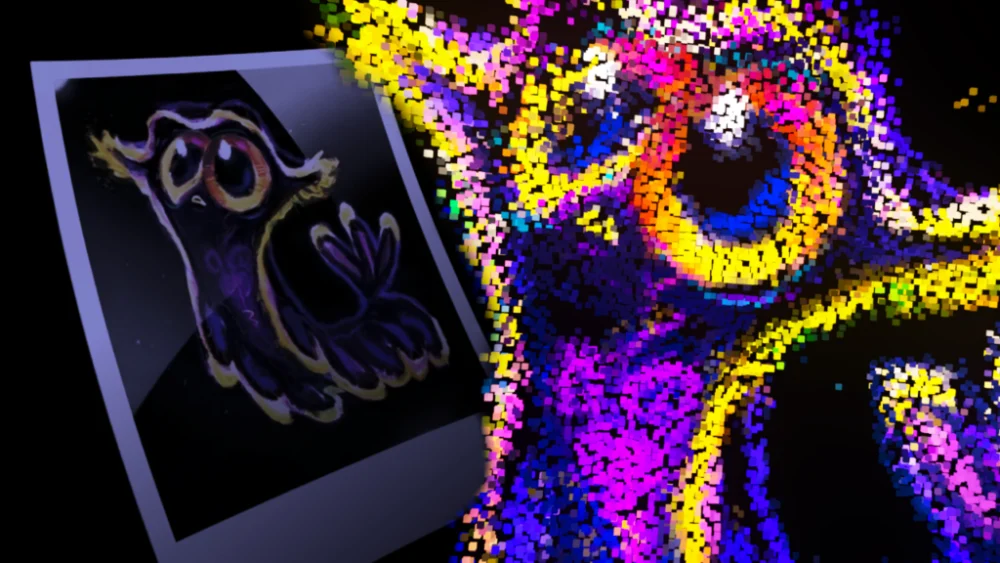
The technique detailed in the tutorial leverages Blender’s Geometry Nodes, a node-based system that allows users to create complex procedural geometry and effects without traditional modeling or animation workflows. By inputting an image into the Geometry Nodes setup, users can procedurally generate a 3D voxel representation of that image. Crucially, the tutorial highlights how this process can be animated, adding a dynamic dimension to the voxelized output. This method opens up a wide array of creative possibilities, from abstract art pieces to intricate visual effects for animation and motion graphics.
Understanding the Power of Procedural Generation in Blender
Procedural generation is a cornerstone of modern 3D content creation, enabling artists to generate complex details and variations with a set of rules and parameters, rather than manual effort. Geometry Nodes, introduced in Blender 3.0, has significantly expanded the capabilities for procedural workflows. It allows users to build node trees that define how geometry is created, modified, and manipulated. This approach offers immense flexibility, as changes to parameters can instantly update the entire generated output, facilitating rapid iteration and experimentation.
The ability to voxelize an image procedurally is a testament to the versatility of Geometry Nodes. Voxels, short for "volume pixels," are the fundamental building blocks of three-dimensional raster graphics. They represent a value on a regular grid in three-dimensional space. Traditional voxelization often involves converting a 3D model into a grid of voxels, or using voxel-based modeling techniques. However, applying this concept directly to a 2D image and making it animated adds a layer of complexity that is elegantly addressed by TiFi Design’s tutorial.

The Workflow: From Image to Animated Voxels
While the specific technical details of the node setup are best explored within the video tutorial itself, the underlying principles involve several key steps. Firstly, the image is sampled, typically by mapping its pixel data to points in 3D space. Each point’s color or luminance information is then used to influence the creation or appearance of a corresponding voxel. This could involve instancing cubes or other primitives at these points, with their scale or opacity controlled by the image data.
The "animated" aspect likely involves manipulating these instanced voxels over time. This could be achieved through various means within Geometry Nodes, such as:
- Time-based transformations: Applying animated rotations, translations, or scaling to the voxels based on the passage of time.
- Noise textures: Using procedural noise patterns to introduce dynamic movement and variation to the voxel positions or scales.
- Attribute manipulation: Driving animated changes through user-defined attributes that evolve over the animation timeline.
- Image sequence input: If the source image is an animation sequence, the Geometry Nodes setup can be designed to read from each frame, creating a dynamic voxel animation directly driven by the input video.
The tutorial’s emphasis on voxelizing any image suggests a robust and adaptable node tree that can handle various image types, resolutions, and aspect ratios. This adaptability is a hallmark of well-designed procedural systems.
TiFi Design: A Consistent Contributor to Blender Education
TiFi Design has established a presence within the Blender community by consistently producing educational content. Their YouTube channel, as mentioned in the author’s bio, is dedicated to helping others learn Blender, focusing on "cool stuff." This commitment to accessible education is vital for fostering growth within the Blender ecosystem. Tutorials like this one not only showcase advanced techniques but also demystify them, empowering a broader range of users to explore complex workflows.

The date of publication, March 7, 2026, places this tutorial within a period of continuous innovation and development in Blender. The rapid evolution of Geometry Nodes since its inception has made it a focal point for many tutorials and user-created addons. Content creators like TiFi Design play a crucial role in translating the cutting-edge features of Blender into practical, actionable knowledge for the community.
Implications and Broader Impact
The ability to procedurally voxelize and animate images has several significant implications for 3D artists and designers:
- Enhanced Visual Effects: This technique can be used to create unique and eye-catching visual effects for films, commercials, and music videos. Imagine a logo that dissolves into animated voxels, or a portrait that dynamically reconstructs itself from pixelated blocks.
- Abstract Art and Motion Graphics: The inherent artistic potential of voxel art, combined with animation, makes this technique ideal for creating abstract visual pieces for digital art installations, animated intros, or background visuals.
- Game Development Assets: While the current tutorial focuses on rendering, the principles could potentially be adapted for real-time applications in game development, allowing for dynamic and stylized asset generation.
- Creative Exploration: For individual artists, this method provides a new avenue for creative exploration, allowing them to experiment with their existing imagery in a novel 3D context.
The fact that this is achieved procedurally with Geometry Nodes means that the resulting voxel animation is not a fixed, pre-rendered effect. Artists can tweak parameters, swap out images, and adjust animation settings to generate countless variations without having to manually recreate each element. This efficiency is invaluable in professional pipelines.
Community Engagement and Support
BlenderNation’s role in disseminating such tutorials is also noteworthy. As a platform that relies on community contributions and ad revenue, it serves as a crucial hub for Blender news, updates, and educational content. The article includes a prompt for users to support BlenderNation if they are blocking ads, highlighting the platform’s reliance on its community for continued operation. This symbiotic relationship between content creators, platforms, and users is fundamental to the growth and sustainability of open-source projects like Blender.

The "About the Author" section further reinforces TiFi Design’s identity as a Blender enthusiast and educator, linking directly to their YouTube channel. This transparency and direct connection to the creator’s broader work are beneficial for users who wish to explore more of their content.
Future Trajectories
As Blender continues to evolve, with ongoing development in areas like Geometry Nodes, real-time rendering (Eevee), and AI integration, techniques like the one presented in this tutorial will likely become even more sophisticated. We can anticipate future developments that might include:
- Real-time Voxel Animation: Integration with Eevee or other real-time renderers for interactive voxel effects.
- Advanced Voxel Manipulation: More nuanced control over voxel shape, material properties, and dynamic behaviors.
- AI-Assisted Voxelization: Potential for AI to intelligently interpret images and generate more complex or artistic voxel structures.
The tutorial by TiFi Design on voxelizing images with Geometry Nodes is a valuable addition to the wealth of Blender educational resources. It showcases a powerful technique that combines artistic vision with technical proficiency, demonstrating the immense creative potential unlocked by Blender’s procedural workflows. For anyone looking to push the boundaries of their 3D artistry, exploring this tutorial and the underlying principles of Geometry Nodes is a worthwhile endeavor.
About the Author