The sophisticated integration of artificial intelligence (AI) within video game environments has long been a benchmark for immersive and dynamic player experiences. Modern game development, particularly within powerful engines like Unreal Engine 5 (UE5), increasingly emphasizes accessible and robust tools for creating AI-controlled characters. A recent spotlight on UE5’s built-in navigation mesh (NavMesh) system and basic AI character setup highlights how these foundational tools are empowering developers to populate virtual worlds with intelligent agents, contributing significantly to atmosphere and interactive gameplay. This structured approach to AI pathfinding not only simplifies a traditionally complex aspect of game design but also democratizes its implementation across projects of all scales.
The Evolution of In-Game AI and Pathfinding
The journey of AI in video games has seen remarkable advancements, from rudimentary state machines controlling static enemies to complex decision-making systems that adapt to player actions. Central to this evolution is pathfinding – the ability for AI characters to navigate from one point to another within a game world, avoiding obstacles and traversing varied terrain. Early implementations often relied on manually defined waypoints or computationally intensive search algorithms, which could be cumbersome to implement and optimize. The advent of NavMeshes revolutionized this by providing a data-driven approach. Instead of calculating paths across every polygon in a complex 3D environment, AI characters navigate across a simplified, traversable mesh, drastically reducing computational overhead and ensuring more fluid, intelligent movement.
Unreal Engine, a dominant force in game development, has consistently been at the forefront of providing developers with advanced tools for AI implementation. UE5 continues this legacy, offering an intuitive and powerful NavMesh system that serves as the bedrock for all AI movement. This system automatically analyzes level geometry to identify walkable surfaces, generating a network of navigable polygons that AI agents can use to plan their routes. The accessibility of these tools means that even independent developers and smaller studios can achieve levels of AI sophistication previously reserved for large-budget productions, fostering a richer ecosystem of interactive digital experiences.
Setting the Foundation: Unreal Engine 5’s NavMesh System
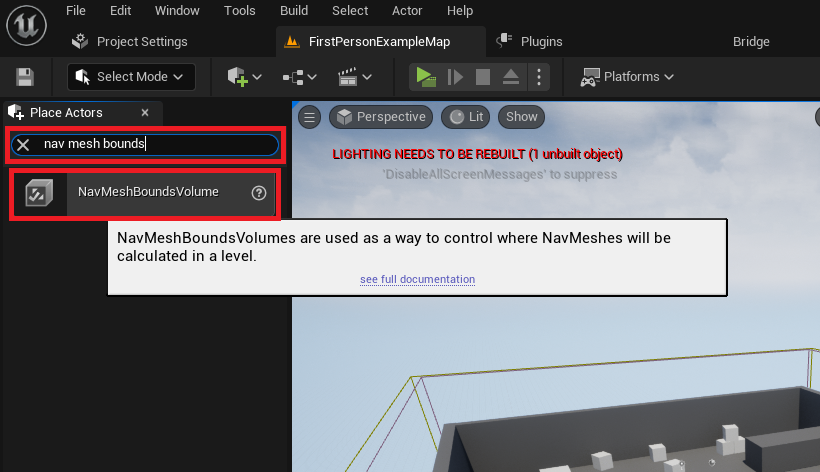
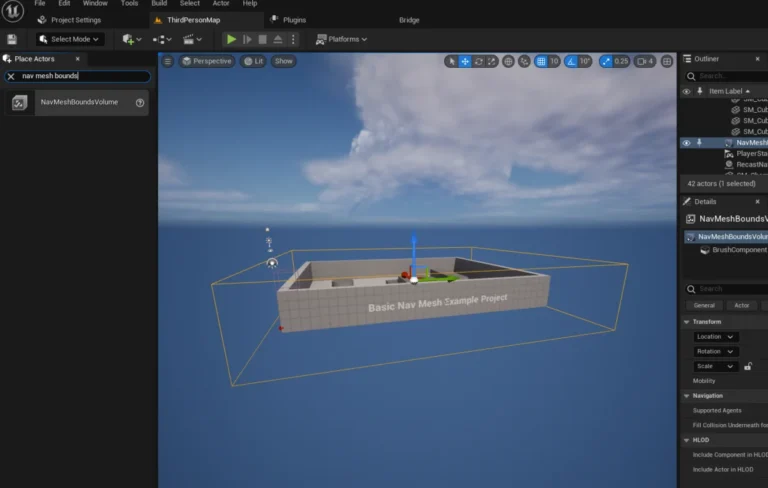
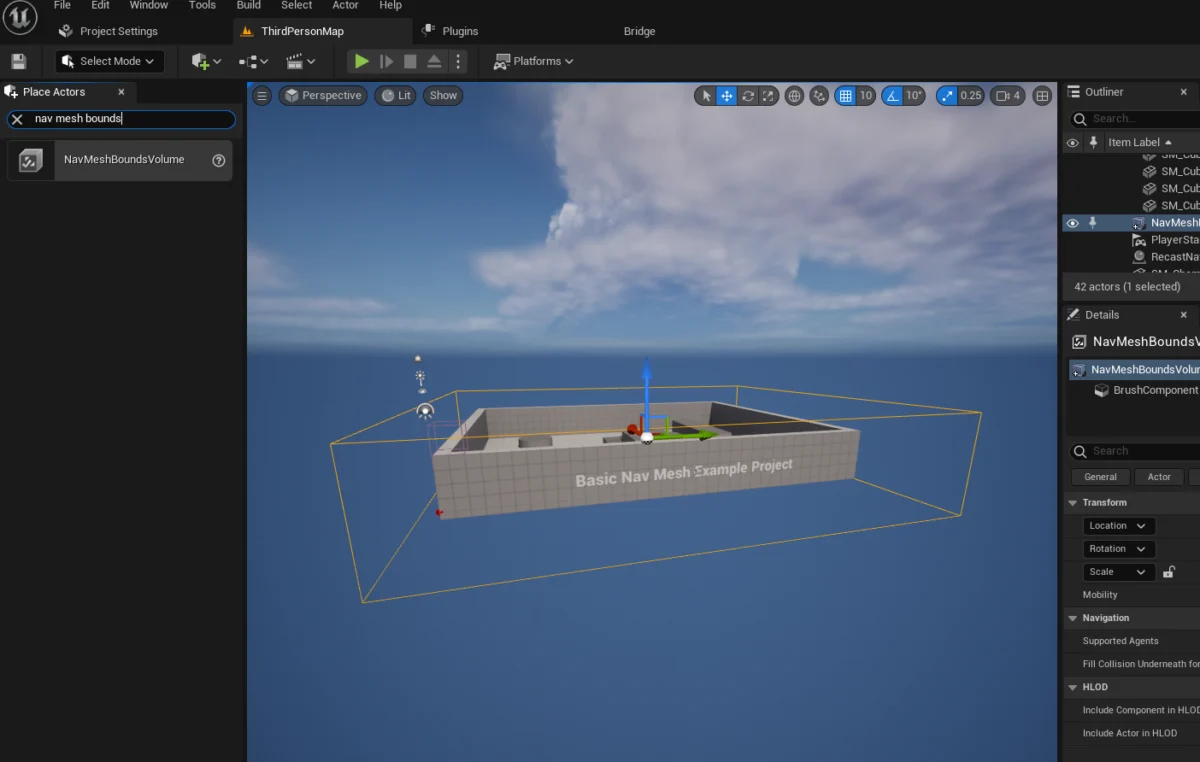
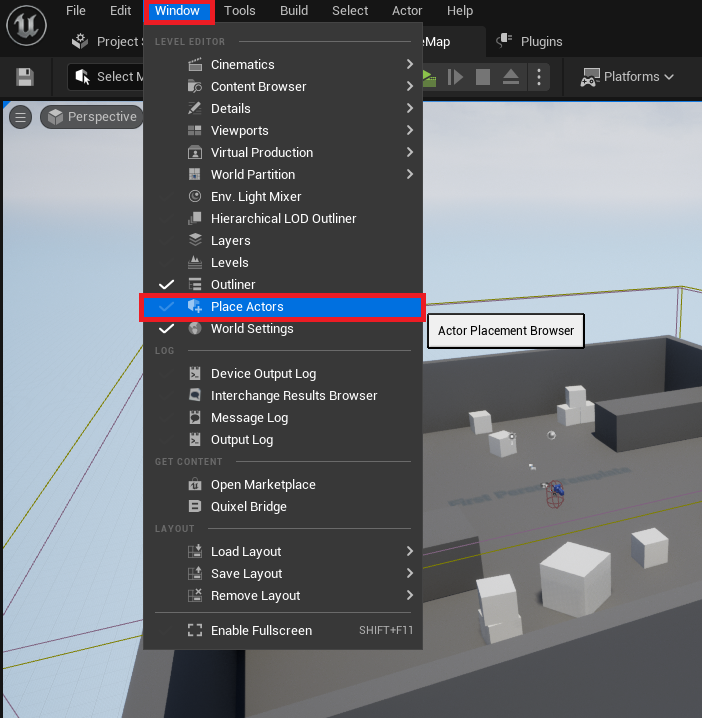
The initial step in enabling AI navigation within an Unreal Engine 5 level involves establishing a comprehensive NavMesh. This process begins by accessing the editor’s ‘Place Actors’ window, a central hub for spawning various objects and volumes into the game world. Through this interface, developers can locate and introduce the NavMeshBoundsVolume actor. This specific volume serves as the conceptual boundary within which the NavMesh will be generated, defining the playable area for AI characters.
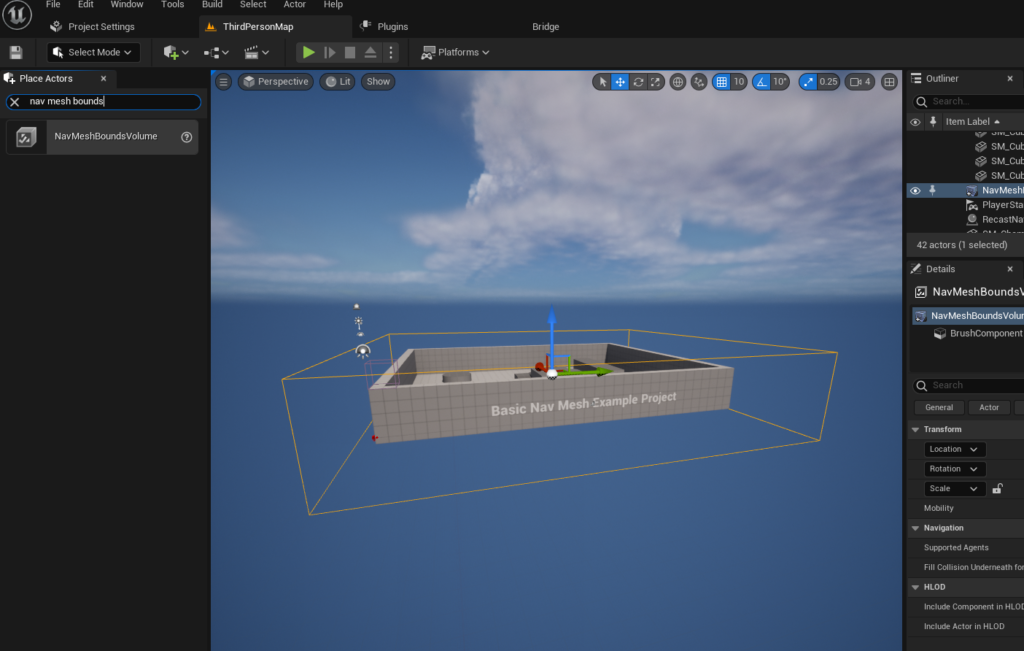
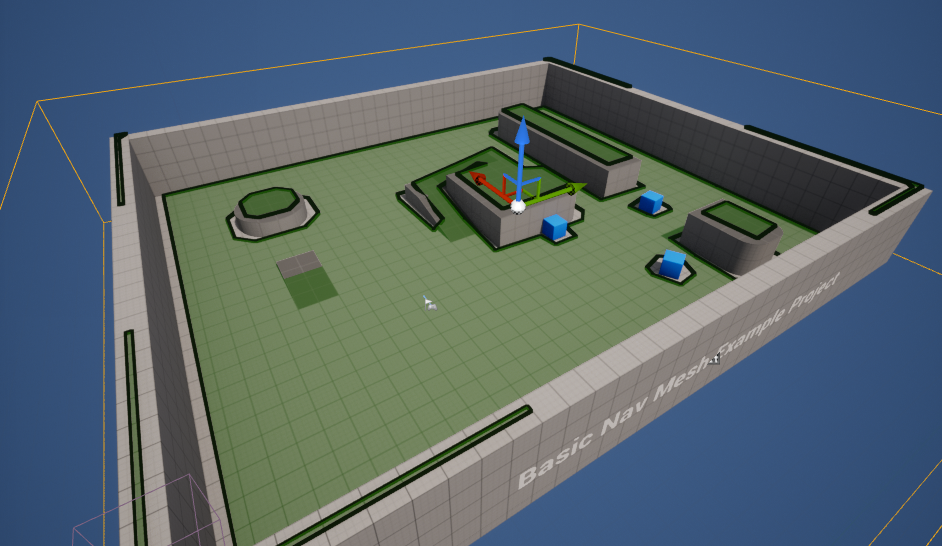
Once placed in the level, the NavMeshBoundsVolume requires careful scaling and positioning to encompass all areas intended for AI movement. This scalability is a critical feature, allowing developers to define navigation zones that range from small, confined spaces to expansive open-world environments. The size and complexity of this volume directly influence the generation time and runtime performance of the NavMesh. Larger, more intricate environments may benefit from dynamic NavMesh generation techniques, which optimize performance by only calculating navigation data for areas immediately relevant to AI agents. The engine provides visual feedback, allowing developers to press the ‘P’ key to toggle the visualization of the generated NavMesh. This debug view, typically a green overlay on walkable surfaces, is indispensable for confirming that the NavMesh accurately reflects the traversable areas and correctly identifies obstacles or non-navigable zones. Any gaps or incorrect areas in this visualization prompt immediate adjustments to the NavMeshBoundsVolume or underlying geometry.
Programming Autonomous Behavior: The AI Character Blueprint
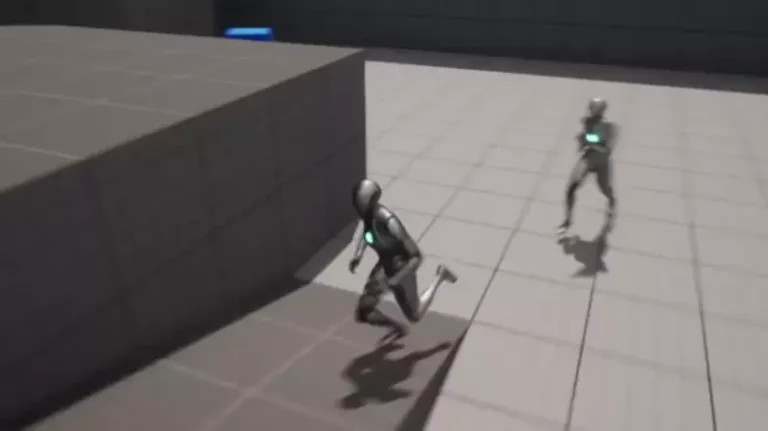
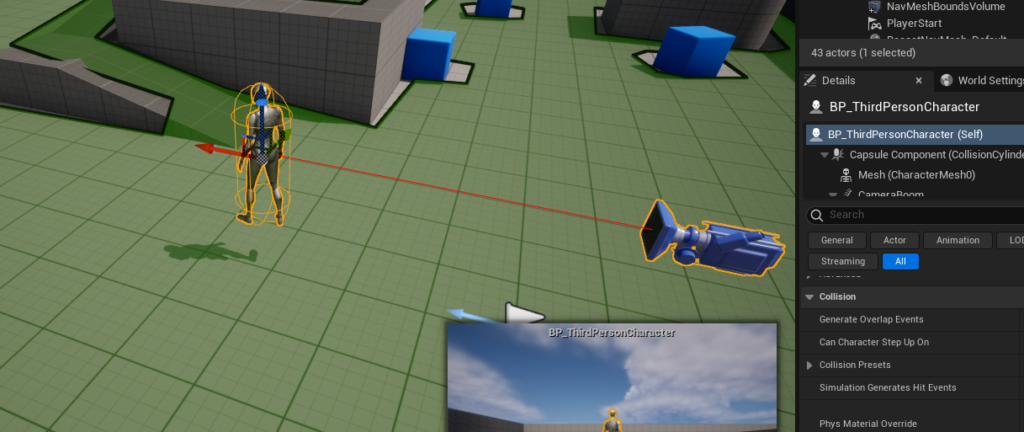
With the navigation environment established, the next phase involves imbuing AI characters with the logic necessary to utilize the NavMesh for autonomous movement. For demonstration purposes, developers often leverage existing templates, such as Unreal Engine 5’s Third Person Template, which provides a pre-animated character blueprint. This allows for immediate testing of AI navigation without the overhead of creating character assets from scratch.
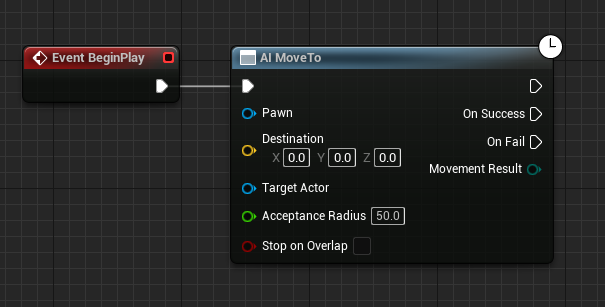
The core of AI character control in UE5 often resides within its Blueprint visual scripting system. This node-based interface allows for powerful programming logic without writing a single line of code. To initiate AI movement, a Begin Play event node is typically used, triggering the AI’s initial actions when the game starts. Connected to this is the AI MoveTo node, a fundamental component that instructs an AI character to move to a specified destination. This node requires two key inputs: the Pawn (a reference to the AI character itself, often obtained via a Reference to Self node) and the Destination (the target location).
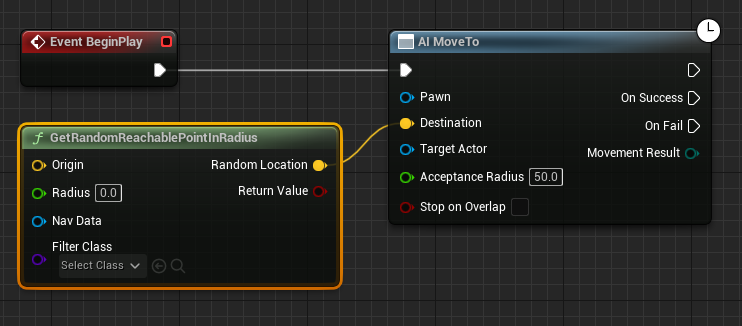
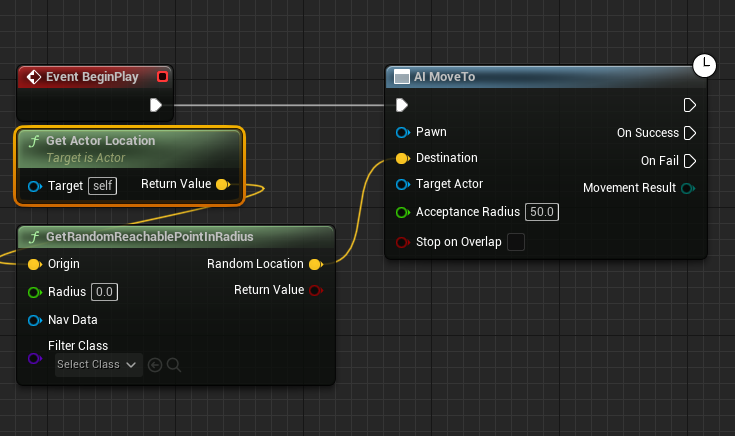
To facilitate dynamic and exploratory AI behavior, the Destination input is often linked to a GetRandomReachablePointInRadius node. This node is pivotal for creating AI that roams within a defined area rather than moving to a fixed point. It requires an Origin point, which is typically the AI character’s current location (retrieved using a Get Actor Location node), and a Radius value. The Radius determines the maximum distance from the Origin within which a random, navigable point will be sought. For instance, a radius of 2000 units would instruct the AI to find a random destination within a 20-meter sphere around its current position. This combination ensures that the AI character consistently selects valid, reachable points on the NavMesh, preventing it from attempting to navigate through walls or off cliffs.
To ensure continuous movement, a Delay node is strategically placed after the AI MoveTo node completes its action (specifically, after the On Success output pin). This Delay node introduces a brief pause before looping back and triggering another AI MoveTo command, creating a perpetual cycle of random navigation. This loop allows the AI character to continually find new destinations within its defined radius, providing a sense of persistent, organic movement within the game world. Upon pressing "Play" in the editor, the configured AI character will then commence moving towards randomly generated locations, effectively utilizing the underlying NavMesh for pathfinding.
Democratizing AI: Impact on Game Development and Player Experience
The accessibility and power of Unreal Engine 5’s AI navigation tools have significant implications for the broader game development landscape. Firstly, they democratize the creation of complex game worlds. Developers, irrespective of their coding expertise, can now implement sophisticated AI behaviors, freeing up resources that might otherwise be spent on custom pathfinding solutions. This allows for a greater focus on narrative, level design, and other creative aspects, ultimately leading to more polished and engaging games.
Secondly, these tools enhance player immersion. Games featuring intelligent AI characters that navigate realistically and dynamically contribute to a more believable and responsive virtual environment. Whether it’s ambient non-player characters (NPCs) populating a bustling city, enemies intelligently flanking players, or companions seamlessly following the protagonist, well-implemented AI makes the game world feel alive and reactive. The ability to quickly iterate on AI behaviors means designers can fine-tune interactions and challenges, creating a more balanced and enjoyable experience. The visual debugging tools, such as the NavMesh overlay, further accelerate this process, allowing for rapid identification and rectification of navigation issues.
Performance Considerations and Advanced Applications
While UE5’s NavMesh system is highly optimized, developers must remain cognizant of performance implications, especially in large-scale environments. Extensive NavMeshBoundsVolume coverage can lead to increased memory usage and longer generation times. Strategies such as breaking down large areas into smaller, manageable NavMesh volumes, or employing dynamic NavMesh generation techniques (which calculate navigation data on the fly as needed) become crucial for maintaining optimal performance. Furthermore, the complexity of AI behavior can be scaled significantly beyond simple random movement. The AI MoveTo node serves as a basic building block, but it can be integrated into more elaborate AI systems, such as Behavior Trees or Utility AI, which allow for complex decision-making, perception systems, and interaction with game logic. These advanced systems enable AI characters to respond to environmental stimuli, engage in combat, or execute intricate mission objectives.
The Future of In-Game Intelligence
The continuous refinement of AI tools within game engines like Unreal Engine 5 underscores a commitment to pushing the boundaries of interactive entertainment. By simplifying fundamental aspects like pathfinding and movement, developers are empowered to dedicate more resources to creating truly innovative and intelligent AI behaviors. This not only enhances the realism and replayability of current titles but also paves the way for future advancements in adaptive AI, procedural content generation, and emergent gameplay. As these tools become even more sophisticated and integrated, the line between pre-scripted events and truly dynamic, AI-driven interactions will continue to blur, promising an exciting future for digital worlds populated by increasingly lifelike and intelligent inhabitants.
About the Author