The dynamic landscape of game development within Unreal Engine 5 frequently presents developers with a crucial juncture: balancing the rapid prototyping and accessibility of Blueprint visual scripting with the raw performance and deep system access offered by C++. While Blueprint excels in iterative design and empowering non-programmers, every ambitious project eventually confronts scenarios where Blueprint code execution becomes a bottleneck, proving too slow or lacking the granular control required for complex systems. This challenge, often encountered as projects scale, necessitates a strategic integration of C++ to maintain optimal performance and unlock the full potential of the engine.
The Blueprint-C++ Synergy in Unreal Engine
Unreal Engine’s architectural philosophy is built upon a robust C++ core, with Blueprint acting as a powerful abstraction layer. Blueprint allows for swift logic implementation, event handling, and asset manipulation without delving into compiled code. Its visual nature democratizes development, enabling designers and technical artists to contribute directly to gameplay systems. However, this convenience comes with inherent overhead. Operations that are computationally intensive, such as complex mathematical calculations, large data processing, or frequent iterations over collections, can exhibit noticeable performance degradation when implemented purely in Blueprint.
Historically, addressing these performance ceilings required a significant architectural shift, often necessitating a complete rewrite of problematic Blueprint sections into C++. This approach, while effective, can be time-consuming and disruptive, particularly for established projects with extensive Blueprint dependencies. Furthermore, certain advanced engine features, external library integrations, or low-level system calls simply do not have equivalent Blueprint nodes, leaving developers unable to leverage critical functionalities without venturing into C++.
Introducing the C++ Blueprint Function Library: A Bridge to Efficiency
The C++ Blueprint Function Library emerges as a pivotal solution to these challenges, offering a seamless and highly efficient method to integrate C++ functionality directly into existing Blueprint graphs. This built-in Unreal Engine class allows developers to author C++ code designed specifically to be callable from both other C++ modules and, crucially, from Blueprints. By encapsulating performance-critical logic or unique C++ features within these libraries, developers can achieve the speed and efficiency of compiled C++ while maintaining the flexibility and accessibility of their Blueprint-driven projects. This hybrid approach significantly reduces the need for extensive refactoring, enabling targeted optimizations and feature enhancements without disrupting the broader Blueprint codebase. The impact is immediately tangible: smoother gameplay, faster computations, and access to a wider array of programming possibilities.
Prerequisites for C++ Integration
To embark on integrating C++ Blueprint Function Libraries, a foundational understanding of C++ programming within the Unreal Engine environment is essential. This includes familiarity with Unreal’s object model, common data types, and the overall project structure. Additionally, developers must have a suitable Integrated Development Environment (IDE) installed to compile C++ code. Popular choices include Visual Studio for Windows, Xcode for macOS, and Visual Studio Code (with appropriate extensions) across platforms. The Unreal Engine editor intelligently prompts users to install a compatible IDE if none is detected, streamlining the setup process. This ensures that the necessary tools are in place to translate human-readable C++ code into executable machine instructions that the engine can utilize.
Establishing a C++-Enabled Project Environment
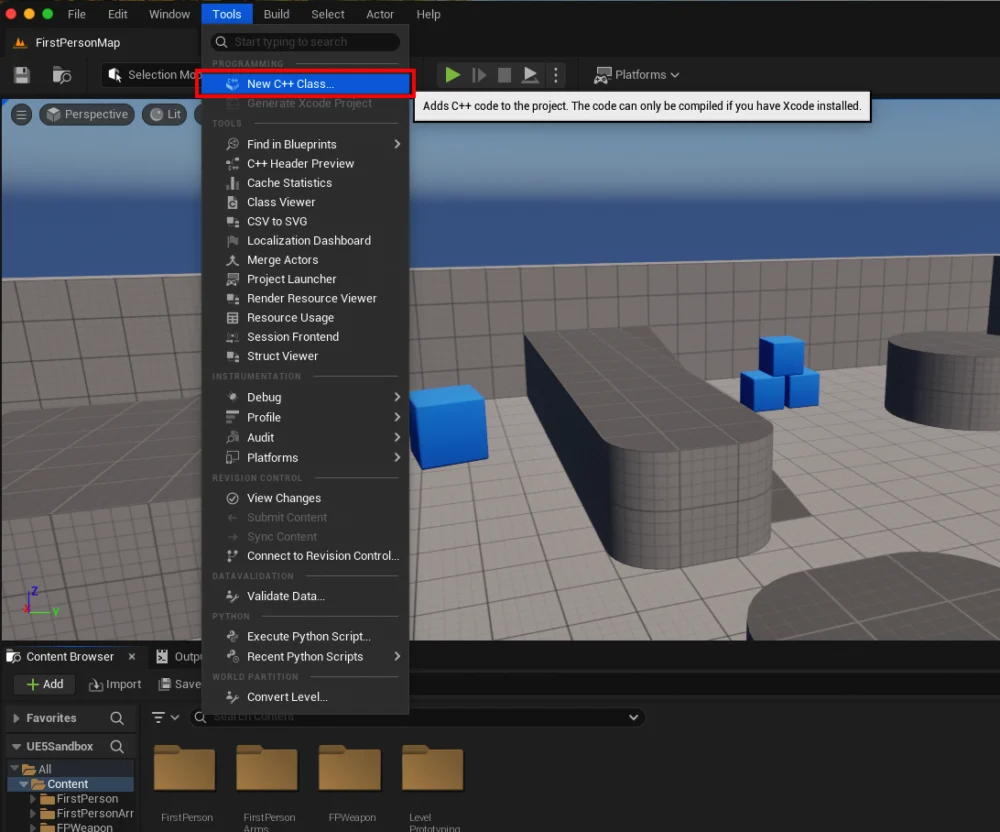
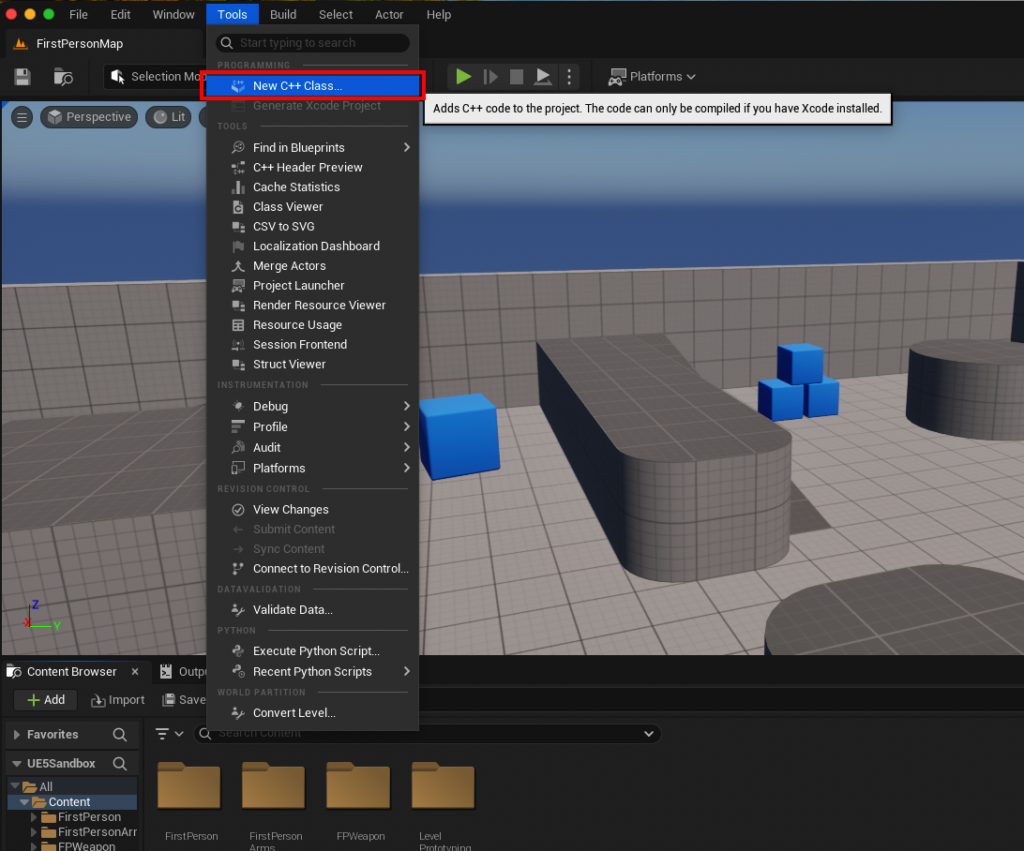
The initial step in creating a C++ Blueprint Function Library involves verifying or converting the project to support C++. Unreal Engine projects can be initiated as either pure Blueprint projects or C++ projects. To determine a project’s C++ status, developers can navigate to the "Tools" dropdown menu within the Unreal Editor and select "New C++ Class." If the project is not already C++-enabled, this action will prompt the engine to configure the necessary C++ files and modules, often requiring a brief restart and compilation process. This ensures that the project structure can accommodate C++ source files and that the build system is correctly set up to compile them. For macOS users, as in a recent demonstration, this might involve installing Xcode, which provides the compiler and development environment required for C++ on that platform.
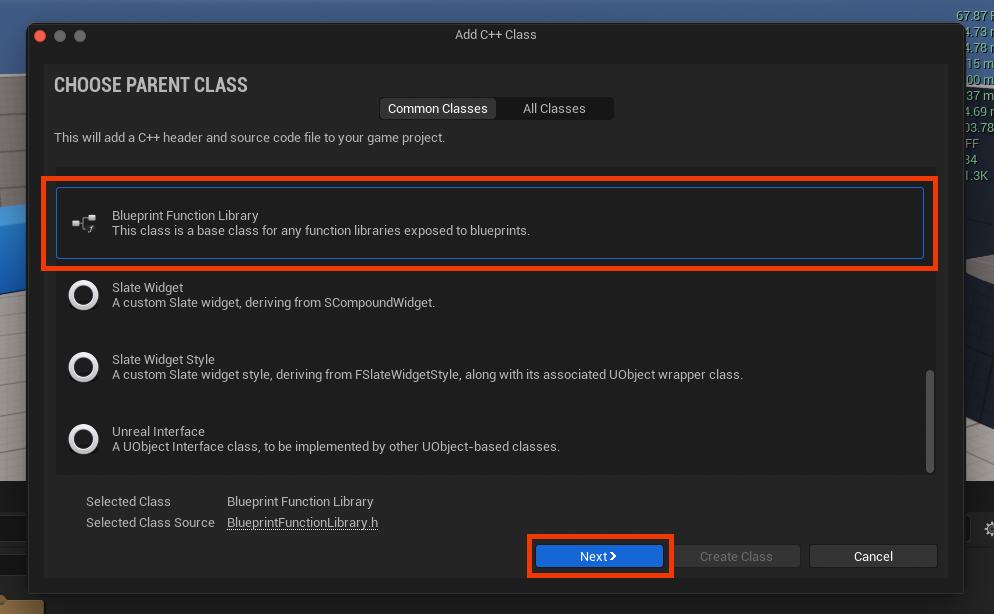
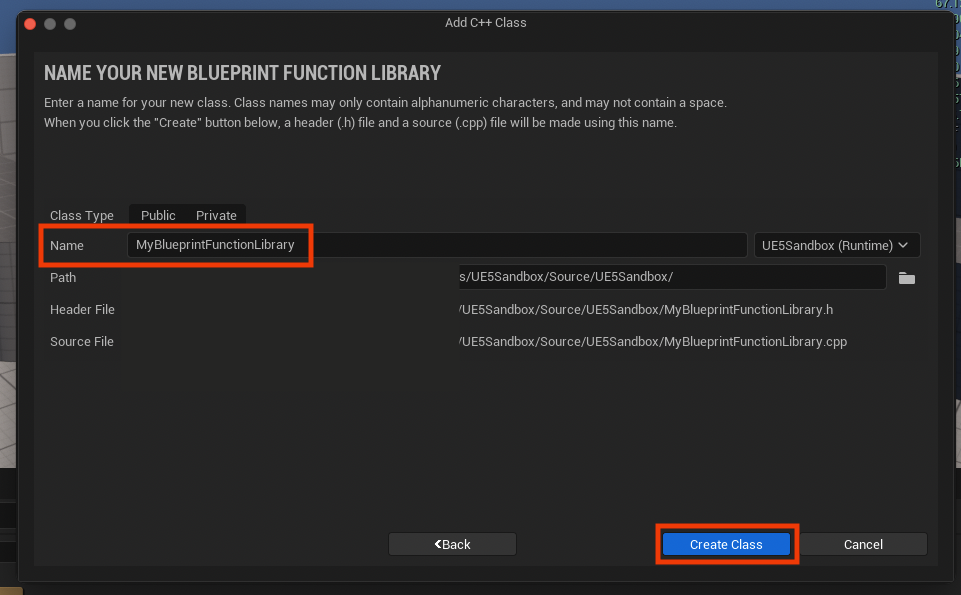
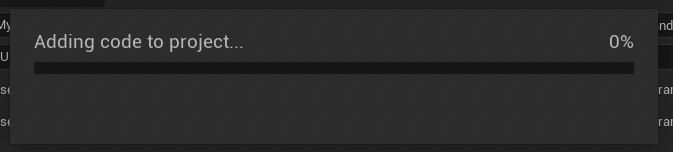
Once the project is confirmed to be C++-enabled, the "New C++ Class" dialog proceeds to the "Parent Class" selection. Here, the critical choice is "Blueprint Function Library," which is typically found near the bottom of the extensive list of Unreal Engine classes. Selecting this class establishes the correct inheritance chain and foundational structure for the new library. Following this, developers are prompted to name their new class. Adhering to Unreal Engine’s established naming conventions, which typically involve a clear, descriptive name with PascalCase (e.g., MyBlueprintFunctionLibrary), is recommended for maintainability and code readability. Upon confirmation, the engine compiles the new C++ files, integrating them into the project and preparing them for code implementation. This compilation phase is crucial, as it transforms the class definition into usable components within the engine.
Inside the Integrated Development Environment (IDE): Crafting the Library
After the initial class creation and compilation, the developer’s attention shifts to their chosen IDE. The Unreal Engine generates two primary files for the new Blueprint Function Library: a .h header file and a .cpp source file, both bearing the chosen class name (e.g., MyBlueprintFunctionLibrary.h and MyBlueprintFunctionLibrary.cpp). The header file (.h) serves as the declaration point for the library’s functions, defining their signatures and any associated metadata, while the source file (.cpp) contains the actual implementation logic.

Declaring Functions for Blueprint Exposure
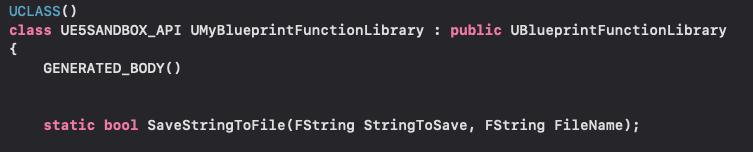
Within the header file, functions intended for Blueprint exposure must be declared with specific Unreal Engine macros and keywords. A fundamental requirement is the static keyword, which designates the function as belonging to the class itself rather than an instance of the class. This enables Blueprint nodes to call the function directly without needing a specific object reference, significantly simplifying integration. For instance, a function designed to save a string to a file might be declared as static bool SaveStringToFile(const FString& InString, const FString& InFileName);.
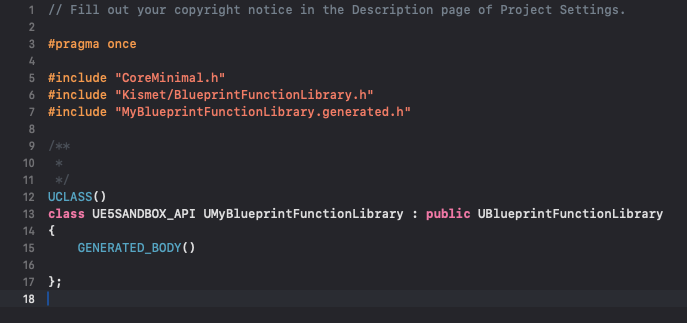
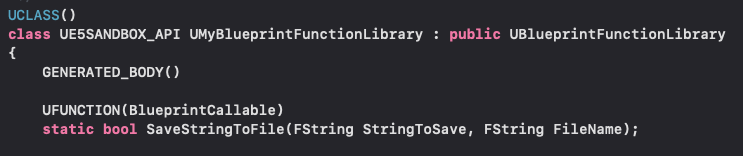
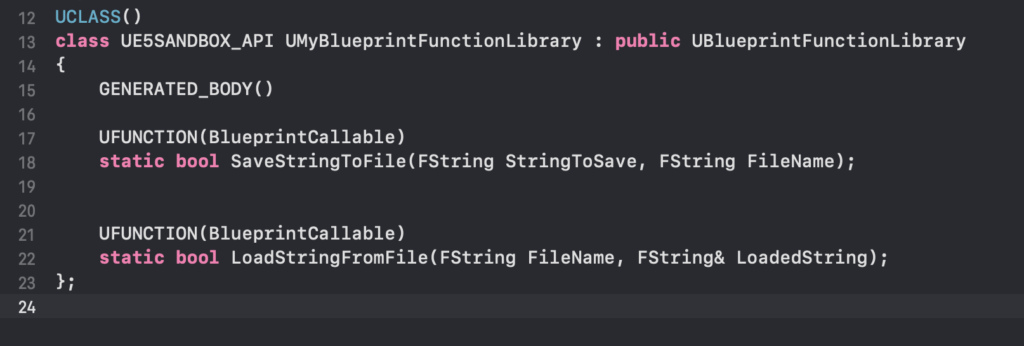
The most critical element for Blueprint visibility is the UFUNCTION macro. This macro, placed directly above the function declaration, signals to the Unreal Header Tool (UHT) that this function should be exposed to the Unreal Engine reflection system and, consequently, to Blueprint. Various specifiers can be added to the UFUNCTION macro to control how the function appears and behaves in Blueprint, such as BlueprintCallable (to make it callable from Blueprint), Category (to organize it within the Blueprint editor’s context menu), and DisplayName (to provide a custom name). For a simple file I/O example, the declaration might look like:
UCLASS()
class UMyBlueprintFunctionLibrary : public UBlueprintFunctionLibrary

    GENERATED_BODY()

public:
    UFUNCTION(BlueprintCallable, Category = "File I/O")
    static bool SaveStringToFile(const FString& InString, const FString& InFileName);

    UFUNCTION(BlueprintPure, Category = "File I/O")
    static bool LoadStringFromFile(FString& OutString, const FString& InFileName);
;
Here, BlueprintCallable allows the function to be executed as part of an event flow, while BlueprintPure indicates a function that doesn’t modify game state and can be called without execution pins, often used for getter-like operations.
Implementing Functionality in the Source File
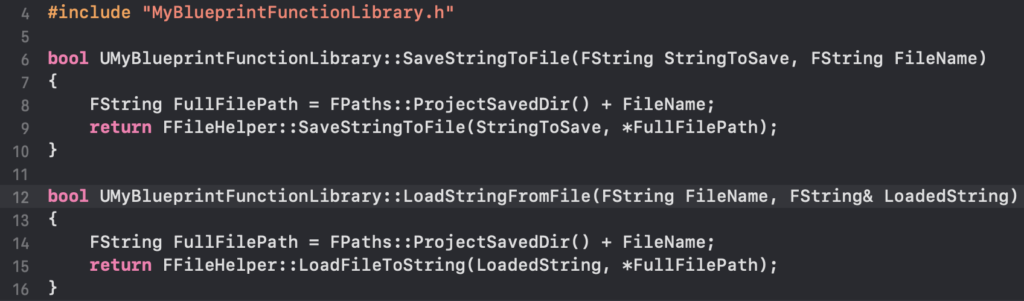
With declarations in place, the .cpp file is where the actual C++ logic resides. This is where developers can harness the full power of C++: direct memory management, integration with external libraries, advanced algorithms, and access to low-level Unreal Engine APIs that are not exposed via Blueprint. For the file I/O example, the implementation would utilize Unreal Engine’s FFileHelper class, a powerful utility for file operations.
#include "MyBlueprintFunctionLibrary.h"
#include "Misc/FileHelper.h"
#include "HAL/PlatformFileManager.h"

bool UMyBlueprintFunctionLibrary::SaveStringToFile(const FString& InString, const FString& InFileName)

    // Get the project's Saved directory
    FString SaveDirectory = FPaths::ProjectSavedDir();
    FString FullPath = SaveDirectory + InFileName;

    // Use FFileHelper to save the string to the file
    // EFileWrite::FILEWRITE_NoFail ensures the operation completes without failing on partial writes
    bool bSuccess = FFileHelper::SaveStringToFile(InString, *FullPath, FFileHelper::EEncodingOptions::AutoSet, &IFileManager::Get(), EFileWrite::FILEWRITE_NoFail);

    if (!bSuccess)

        UE_LOG(LogTemp, Error, TEXT("Failed to save string to file: %s"), *FullPath);

    return bSuccess;


bool UMyBlueprintFunctionLibrary::LoadStringFromFile(FString& OutString, const FString& InFileName)

    FString SaveDirectory = FPaths::ProjectSavedDir();
    FString FullPath = SaveDirectory + InFileName;

    // Check if the file exists before attempting to load
    if (!FPlatformFileManager::Get().GetFileManager().FileExists(*FullPath))

        UE_LOG(LogTemp, Warning, TEXT("File does not exist: %s"), *FullPath);
        OutString = ""; // Ensure OutString is empty on failure
        return false;


    // Use FFileHelper to load the string from the file
    bool bSuccess = FFileHelper::LoadFileToString(OutString, *FullPath);

    if (!bSuccess)

        UE_LOG(LogTemp, Error, TEXT("Failed to load string from file: %s"), *FullPath);

    return bSuccess;
This example demonstrates a practical application: creating a robust file save/load system. While Blueprint has some basic file operations, a C++ implementation offers greater control, error handling, and potential for complex data serialization, making it ideal for persistent game data, configuration files, or user-generated content. Once the C++ code is written, the project must be compiled, typically from within the IDE or via the Unreal Editor, before the new functions become available in Blueprint.
Integrating and Demonstrating in Blueprint
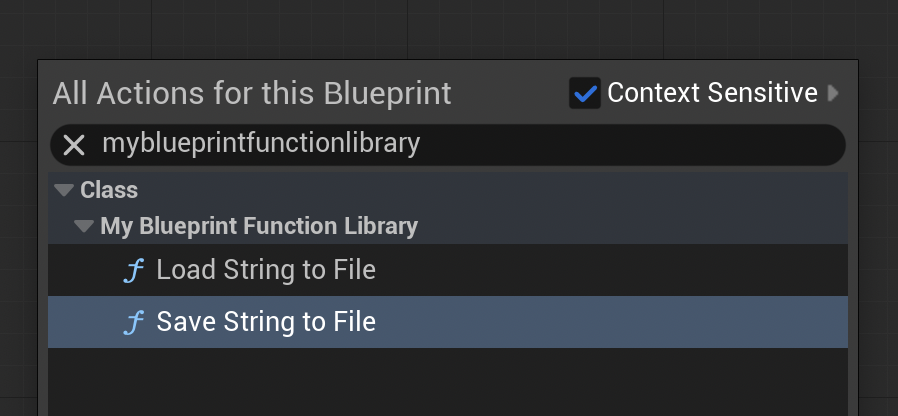
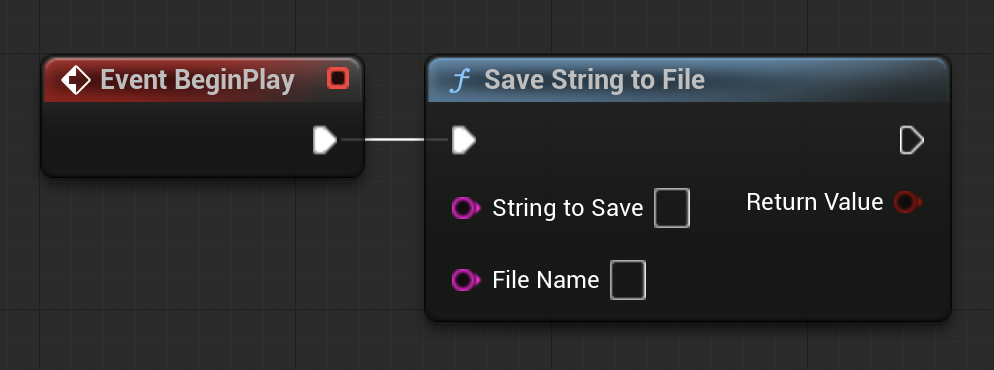
Upon successful compilation and editor relaunch, the newly created C++ functions seamlessly appear within the Blueprint editor. By right-clicking in any Blueprint graph and typing the class name or function name (e.g., "MyBlueprintFunctionLibrary," "Save String to File"), the corresponding C++ nodes become available. This direct exposure is a testament to the power of the UFUNCTION macro and Unreal’s reflection system.
To illustrate, consider a simple demonstration within a Level Blueprint. A "BeginPlay" event can trigger a C++ SaveStringToFile function, saving a specific string (e.g., "Save Test") to a designated file (e.g., "textfile-test.txt") within the project’s /Saved directory. Upon running the game, the file is created, and its contents verified, confirming the C++ function’s execution. Conversely, to demonstrate loading, a separate file (e.g., "loadtest.txt") can be manually created in the /Saved folder with a distinct string (e.g., "Loading Test"). A C++ LoadStringFromFile function, also triggered by "BeginPlay" and connected to a "Print String" node, will then retrieve this content and display it on screen, visually confirming the successful data retrieval. These simple demonstrations underscore the effortless integration and immediate functional benefits of C++ Blueprint Function Libraries.
Broader Implications and Strategic Advantages
The adoption of C++ Blueprint Function Libraries extends beyond mere performance gains; it represents a strategic advantage for game development studios and individual creators alike.
- Performance Optimization: For computationally intensive tasks, C++ offers orders of magnitude faster execution than Blueprint. Benchmarking studies often show C++ functions executing in microseconds where Blueprint equivalents might take milliseconds, a critical difference in high-performance loops or complex physics simulations. This directly translates to higher frame rates, reduced latency, and a more responsive player experience.
- Access to Native Engine Features: C++ provides direct access to the vast Unreal Engine API, enabling developers to tap into functionalities not exposed through Blueprint. This includes advanced rendering features, network protocols, operating system interactions, and custom engine modifications.
- Third-Party Library Integration: Many powerful libraries for physics, AI, data compression, or cryptographic functions are written in C/C++. Blueprint Function Libraries provide the gateway to integrate these external resources directly into Unreal Engine projects, expanding capabilities without reinventing the wheel.
- Code Maintainability and Scalability: While Blueprints are excellent for initial design, managing very large and complex Blueprint graphs can become cumbersome. Migrating stable, performance-critical, or reusable logic to C++ improves maintainability. C++ code, when well-structured, is often easier to refactor, test, and version control, supporting long-term project scalability.
- Team Collaboration: This hybrid approach fosters better collaboration between programmers and designers. Programmers can develop highly optimized C++ modules, expose them through Blueprint Function Libraries, and then allow designers to integrate these powerful tools into their visual scripts without needing C++ knowledge. This empowers designers while ensuring core logic remains robust and performant.
- Reduced Development Time: By providing targeted C++ optimizations, developers can avoid complete overhauls, saving significant development time and resources. The ability to incrementally optimize specific parts of a Blueprint project rather than rewriting entire systems is a powerful efficiency gain.
Conclusion
C++ Blueprint Function Libraries in Unreal Engine 5 offer a compelling solution for developers seeking to maximize performance, extend functionality, and enhance the scalability of their projects. By understanding what these libraries are, how to create them, and how to effectively integrate them into Blueprint workflows, developers can strategically leverage the strengths of both C++ and Blueprint. This hybrid development paradigm is not merely a technical workaround but a fundamental strategy for crafting sophisticated, performant, and maintainable games in the demanding landscape of modern game development. The ability to seamlessly transition between visual scripting and compiled code ensures that Unreal Engine remains a versatile and powerful platform for creators of all technical backgrounds.
About the Author