
The critical importance of robust game data persistence in modern video games cannot be overstated. As the global gaming market continues its exponential growth, projected to reach over $300 billion by 2027, player expectations for seamless progression, uninterrupted gameplay, and reliable data retention have never been higher. Recognizing this fundamental need, Unreal Engine 5 (UE5) offers a sophisticated, yet remarkably accessible, built-in SaveGame system. This integrated solution empowers developers to effortlessly manage the saving and loading of crucial game data, streamlining development workflows and enhancing the overall player experience across a diverse range of platforms.
The Evolution of Game Data Persistence
Historically, game developers often grappled with the complex task of implementing custom data serialization and deserialization routines. Early games relied on rudimentary methods such as password systems or simple memory dumps. As games grew in complexity, so did the challenge of storing player progress, inventory, world states, and other dynamic data. This often required significant engineering effort, leading to bespoke solutions that could be prone to bugs, difficult to maintain, and time-consuming to develop. The introduction of standardized, engine-level solutions like Unreal Engine’s SaveGame system marks a significant evolutionary leap, abstracting much of this complexity and allowing developers to focus more on creative design and gameplay mechanics rather than low-level file I/O.
Understanding the Core Mechanism: The SaveGame Class
At the heart of Unreal Engine 5’s data persistence solution lies the SaveGame class. This foundational Blueprint or C++ class is specifically designed to act as a container for all data intended for storage. Unlike traditional approaches where developers might manually write data to various file formats, the SaveGame class provides a pre-configured framework that handles the intricacies of serialization. Any variable added to a custom SaveGame blueprint—ranging from simple integers and booleans to complex structs, vectors, and even references to other game objects (with appropriate handling for serialization)—can be automatically saved and subsequently loaded. This universality across variable types significantly reduces the overhead typically associated with data structuring for persistence.
The data encapsulated within an instance of a SaveGame class is then written to a file stored on the user’s local machine. The engine intelligently manages the file paths, ensuring consistent storage locations across different operating systems:
- Windows: Typically found within the user’s Local AppData folder.
- MacOS: Located in
Library/Application Support. - Linux: Stored in
/home/username/.local/share.
This standardized file management ensures that developers do not need to concern themselves with platform-specific file system operations, further simplifying the process. The engine handles the byte-level encoding and decoding, presenting developers with a high-level, function-based interface.
Prerequisites for Implementation: A Developer’s Toolkit
For developers looking to integrate this powerful system, a foundational understanding of Unreal Engine’s development environment is essential. This includes:
- Basic Unreal Engine Concepts: Familiarity with the editor interface, project structure, and fundamental game object types.
- Blueprint Proficiency: The SaveGame system is heavily leveraged through Unreal Engine’s visual scripting language, Blueprints. Developers need to be comfortable creating and manipulating Blueprint actors, understanding event graphs, and working with variables.
- Custom Game Instances: The
Game Instanceis a crucial component in this setup. It is a unique class that persists throughout the entire lifespan of a game application, making it an ideal central repository for managing global game states and, critically, theSaveGameobject itself. Understanding how to create and utilize a customGame Instanceis paramount for global save/load functionality. - Custom Events: The ability to define and call custom events within Blueprints is used to orchestrate the save and load operations.
- Input Actions: To trigger save and load operations during gameplay, developers must be proficient in setting up and handling input actions, which map player inputs (like keyboard presses or gamepad buttons) to specific game events.
These prerequisites highlight Epic Games’ design philosophy: to provide robust tools that are accessible to a broad range of developers, from seasoned programmers to visual scripting enthusiasts.

The Implementation Process: A Step-by-Step Methodology

Implementing the SaveGame system involves a structured series of steps, ensuring data integrity and reliable operation.
1. Defining the Custom Save Class:
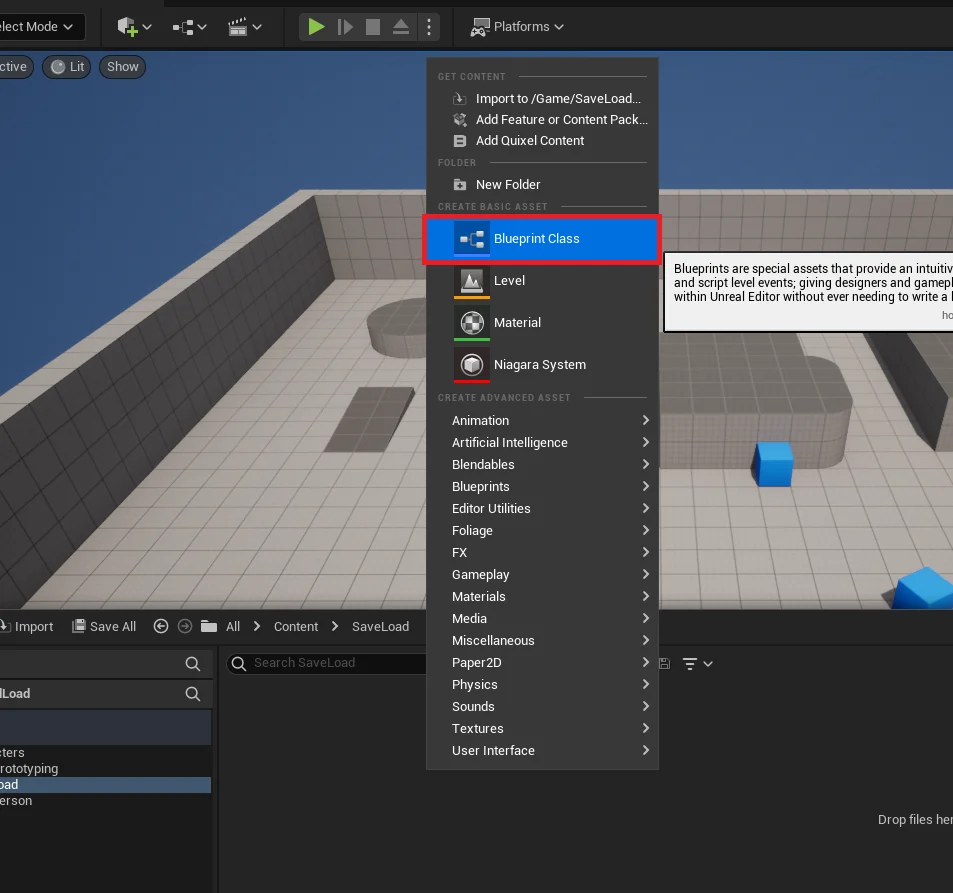
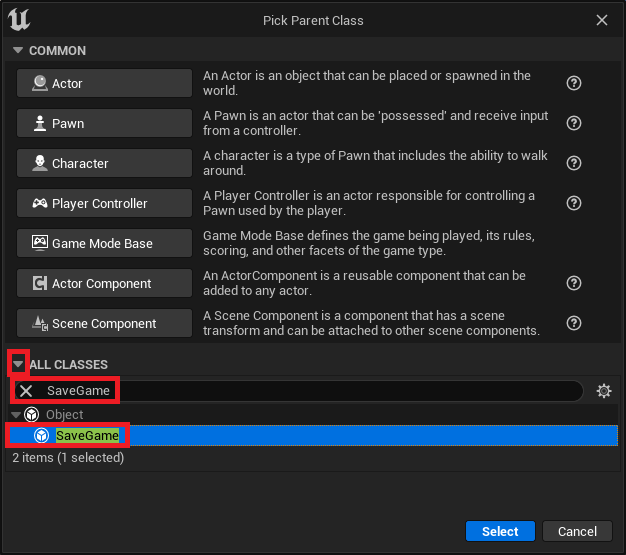
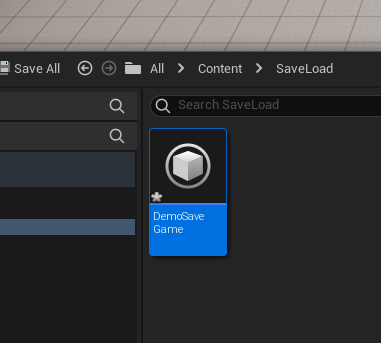
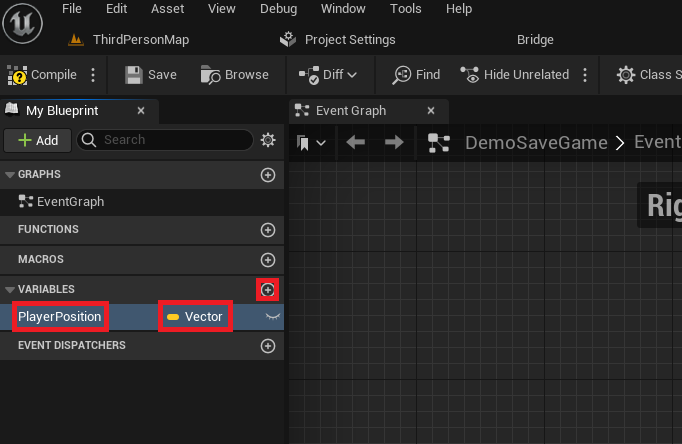
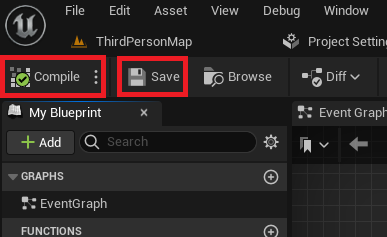
The first practical step for a developer is to create a new Blueprint Class derived from the SaveGame base class. This custom class acts as the schema for the data to be saved. For instance, a developer might name it PlayerProgressSaveGame or, as in a demonstration, DemoSaveGame. Within this custom SaveGame Blueprint, developers define the specific variables they wish to persist. A common example is a Vector variable named PlayerPosition to store the player’s last known coordinates. This step effectively dictates what data will be stored. Once variables are defined, the Blueprint must be compiled and saved to register these changes within the engine.
2. Integrating Save/Load Functionality within the Game Instance:
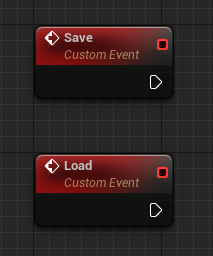
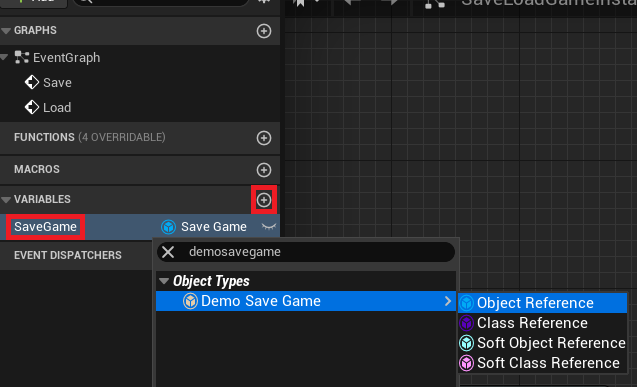
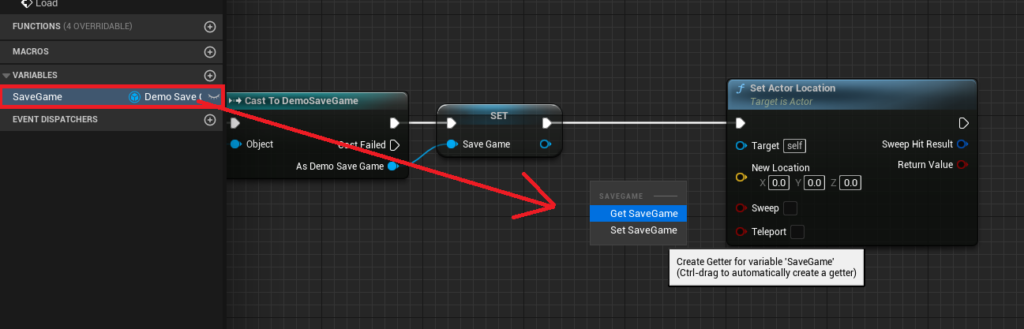
The Game Instance, due to its persistent nature, is the ideal location to house the overarching save and load logic. Developers typically add two custom events to their custom Game Instance Blueprint: Save and Load. Additionally, a new variable, often named SaveGame, is created within the Game Instance and set to reference the custom SaveGame class created in the previous step (e.g., DemoSaveGame object reference). This variable will hold the active SaveGame object, whether loaded from disk or newly created.
3. Implementing the Load Logic:
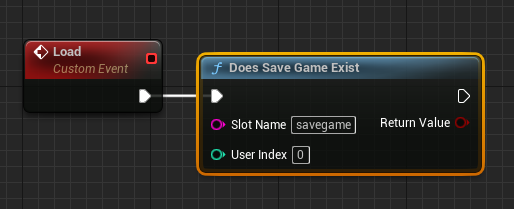
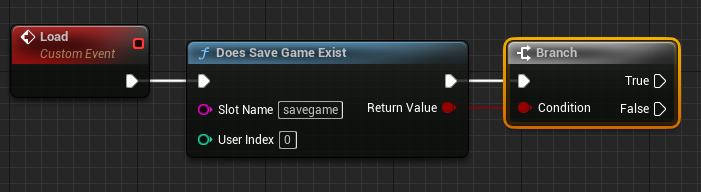
The Load event initiates the process of retrieving data. The core of this logic involves checking for the existence of a save file using the Does Save Game Exist node. This node requires a "Slot Name," a unique identifier for the save file (e.g., "savegame"). Different slot names allow for multiple save files (e.g., "slot1", "slot2").
- Conditional Branching: A
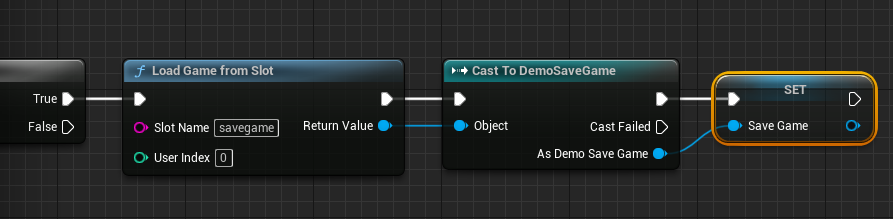
Branchnode follows, directing execution based on whether the save file exists.- If Save File Exists (True Path): The
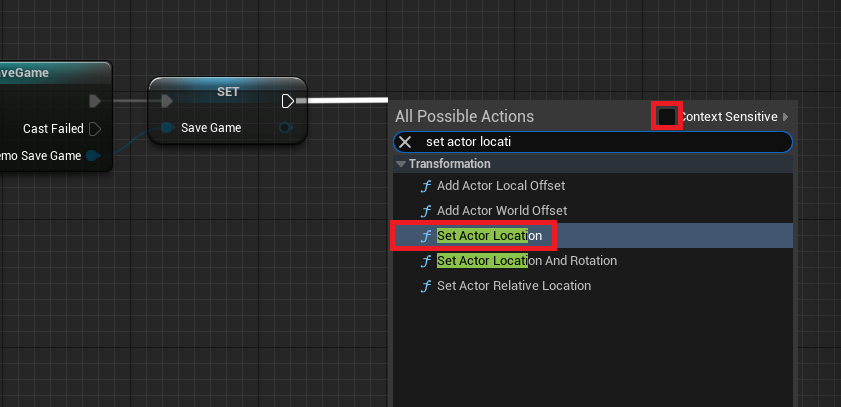
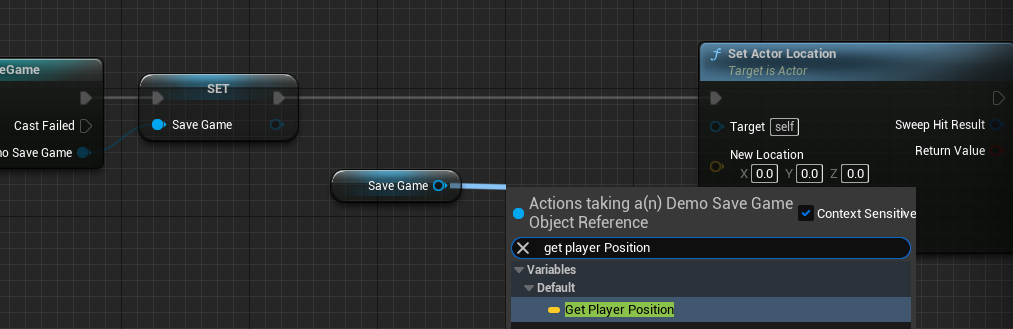
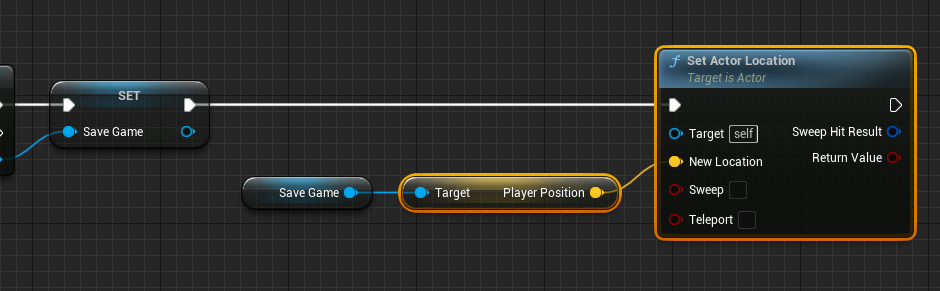
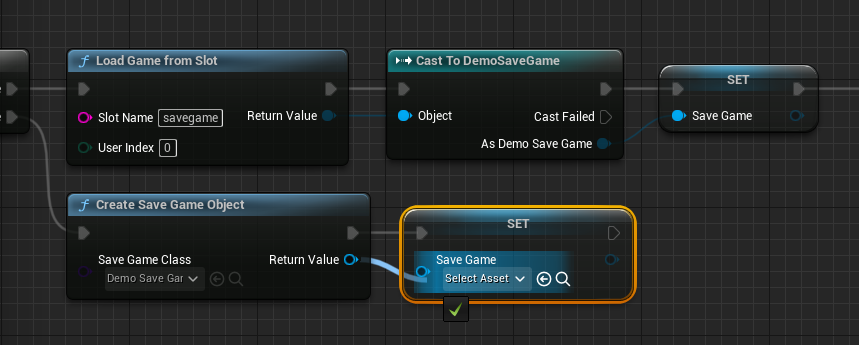
Load Game From Slotnode is executed, using the same "Slot Name." The output of this node, which is a genericSaveGameobject, is thenCast Tothe specific customSaveGameclass (e.g.,Cast to DemoSaveGame). This cast is crucial for accessing the custom variables defined within that class. The successfully cast object is then assigned to theGame Instance‘sSaveGamevariable. From this point, the loaded data can be used to restore game state, such as callingSet Actor Locationon theGet Player Characterto move the player to theirPlayerPositionstored in theSaveGameobject. - If Save File Does Not Exist (False Path): If no save file is found, a new
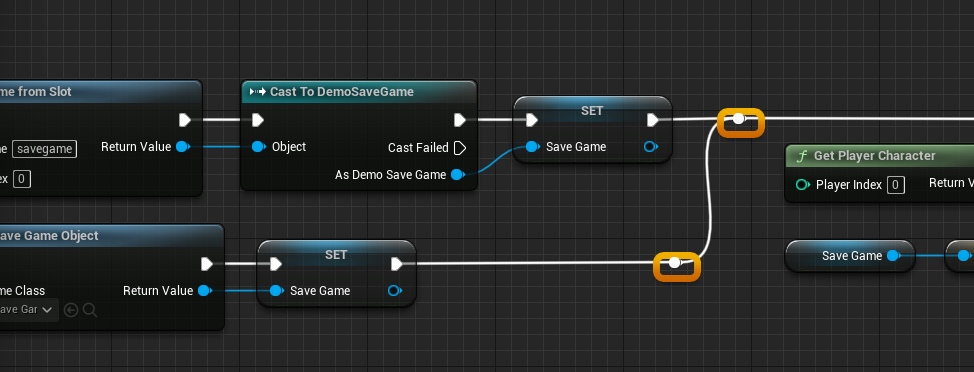
SaveGameobject must be created. This is achieved using theCreate Save Game Objectnode, specifying the customSaveGameclass. This newly created object is then assigned to theGame Instance‘sSaveGamevariable, ensuring there is a valid object to work with, even if no previous save existed. The blueprint connections are carefully arranged to ensure a clean and readable flow, often utilizing reroute nodes for clarity.
- If Save File Exists (True Path): The
4. Implementing the Save Logic:
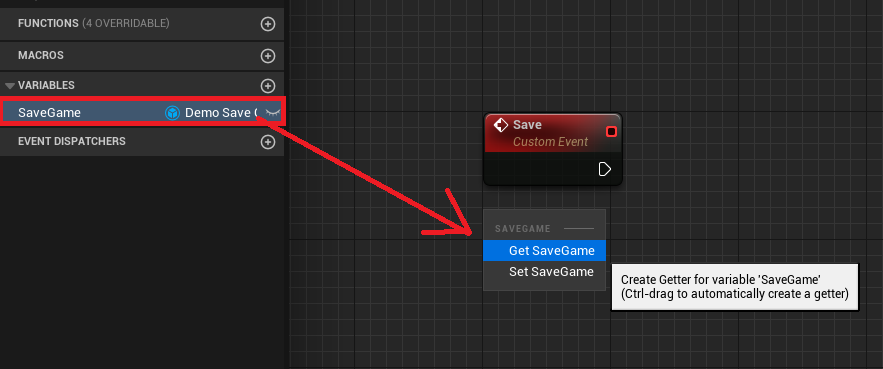
The Save event is responsible for writing current game data to disk. This process begins by retrieving the Game Instance‘s SaveGame variable.
-
Validity Check: An
Is Validnode checks if theSaveGameobject reference is valid. This is a critical defensive programming step, preventing attempts to save data to a non-existent object.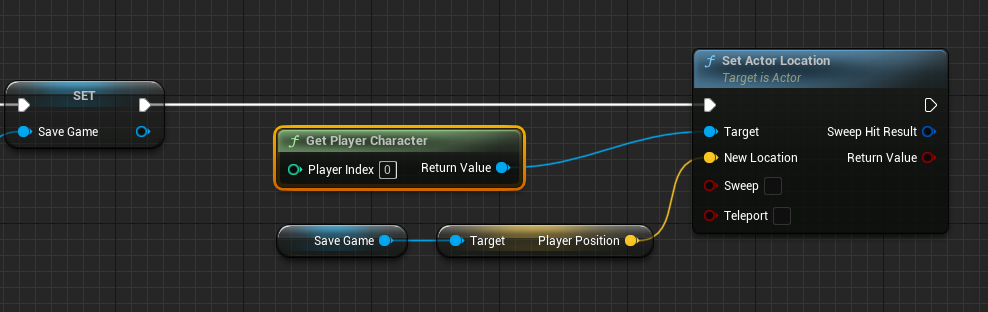
- If Save File is Valid (True Path): If the
SaveGameobject is valid (meaning it was either loaded or newly created), the current player data is retrieved. For example,Get Player Character‘sGet Actor Locationis used to obtain the player’s current position. ThisVectorvalue is then used toSet Player Positionon theSaveGameobject itself. - If Save File is Not Valid (False Path): If the
SaveGameobject is not valid (e.g., the game is trying to save before a load operation has occurred or if an error prevented its creation), a newCreate Save Game Objectnode is executed, creating an instance of the customSaveGameclass. This new object is then assigned to theGame Instance‘sSaveGamevariable, ensuring a valid target for the data. After creation, the player’s position is set on this newly created object.
- If Save File is Valid (True Path): If the
-
Final Data Commit: Regardless of whether the
SaveGameobject was initially valid or had to be created, the final step involves committing the data to disk. This is done using either theSave Game to SlotorAsync Save Game to Slotnode, again specifying the consistent "Slot Name."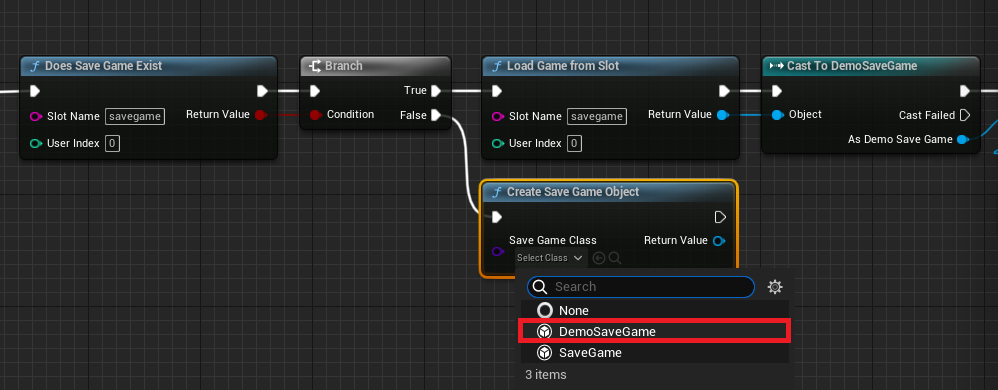
Save Game to Slot: This is a synchronous operation, meaning it blocks game execution until the save is complete. It is suitable for small amounts of data where a momentary pause is acceptable.Async Save Game to Slot: This is an asynchronous operation, performing the save in the background without blocking the game thread. It is highly recommended for larger datasets to prevent hitches or freezes in gameplay, ensuring a smoother player experience.
5. Triggering Operations from Gameplay:
To make the save and load functionality accessible to players, developers integrate these custom events with input actions. In a typical setup, a Key Press Event (e.g., pressing ‘1’ for save, ‘2’ for load) is configured within the Player Character Blueprint. On activation, these events retrieve the Game Instance (Get Game Instance followed by Cast To the custom Game Instance) and then call the respective Save or Load custom events. This provides a direct, player-initiated mechanism for data persistence.
Broader Implications and Industry Impact
The UE5 SaveGame system offers significant implications for game development:
- Accelerated Development Cycles: By providing an out-of-the-box solution, Epic Games drastically reduces the engineering effort required for data persistence. This allows development teams, particularly smaller indie studios, to allocate more resources to core gameplay, art, and narrative, rather than reinventing fundamental backend systems.
- Enhanced Player Experience: Reliable save systems are foundational to player retention. Players expect their progress to be preserved, and the robust nature of the UE5 system minimizes data loss, corruption, and frustrating gameplay interruptions. This directly contributes to higher player satisfaction and engagement.
- Support for Complex Games: Modern open-world games and titles with branching narratives or persistent world states demand sophisticated data management. The UE5 SaveGame system scales effectively to handle a wide array of data types, enabling developers to build more ambitious and intricate game worlds without being hampered by persistence limitations.
- Democratization of Development: Tools like the SaveGame system, accessible through Blueprints, lower the barrier to entry for aspiring game creators. Individuals and small teams can implement professional-grade features without needing extensive programming knowledge, fostering innovation within the industry.
- Cross-Platform Consistency: While the example focuses on local storage, the underlying principles and the abstract nature of the
SaveGameclass lay the groundwork for more advanced persistence solutions, including potential integrations with cloud saving services or custom backend databases for cross-platform play.
Epic Games’ continuous investment in developer-centric tools like the Unreal Engine 5 SaveGame system underscores its commitment to empowering creators and pushing the boundaries of interactive entertainment. By simplifying a historically complex aspect of game development, UE5 is not just offering a feature; it is facilitating a new era of creative freedom and robust player experiences. The ease with which critical game data can now be managed is poised to influence the design and scope of future titles, making more immersive and persistent virtual worlds a tangible reality for both developers and players.
About the Author








