
Unreal Engine 5 (UE5) continues to empower developers with robust tools for creating immersive and complex interactive experiences. Among these, Data Tables stand out as a particularly potent feature, providing a structured and efficient method for managing large volumes of game-related information. This system allows programmers and designers to establish predefined lists of data, accessible and modifiable throughout a project’s lifecycle, thereby streamlining development, enhancing collaboration, and bolstering the scalability of game systems. The integration of Data Tables within the Unreal Editor ensures that critical game data is not only persistent but also easily retrievable and updateable, a cornerstone of modern, data-driven game design.
The Imperative of Data-Driven Design in Modern Game Development
The contemporary landscape of game development is characterized by ever-increasing complexity. Modern titles, particularly those in genres such as Role-Playing Games (RPGs), Massive Multiplayer Online (MMO) games, and open-world adventures, demand meticulous management of vast datasets. These can include anything from character statistics, item properties, enemy behaviors, quest parameters, localization strings, and intricate crafting recipes. Historically, developers often resorted to hardcoding these values directly into game logic or scattering them across numerous Blueprint assets. This approach, while functional for smaller projects, quickly becomes unwieldy, prone to errors, and a significant bottleneck for iteration and collaboration on larger teams.
The evolution towards data-driven design addresses these challenges head-on. By externalizing data from core game logic, developers can modify game balance, introduce new content, or adjust existing features without requiring fundamental code changes or recompilation. This paradigm shift significantly reduces development cycles, empowers non-programming team members (such as game designers and content creators) to directly influence game parameters, and ultimately leads to more robust and maintainable game systems. Unreal Engine’s Data Table feature is a direct manifestation of this principle, offering a native, optimized solution for structured data storage within the engine’s ecosystem.
Architectural Foundations: Enums and Structures
The efficacy of Unreal Engine 5 Data Tables is intrinsically linked to their underlying architectural components: Enumerations (Enums) and Structures (Structs). These elements serve as the blueprints that dictate the type and organization of data that a Data Table can hold, ensuring type safety and logical coherence.
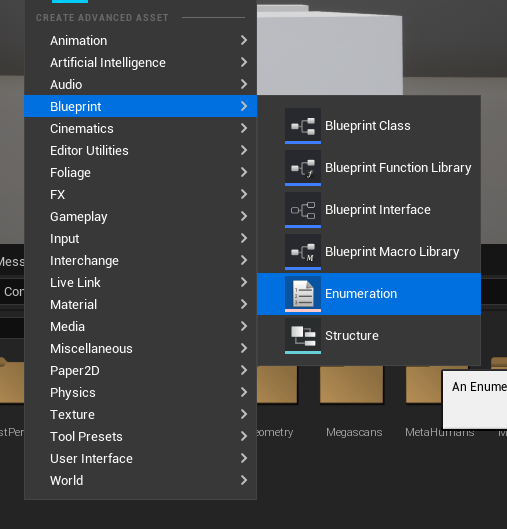
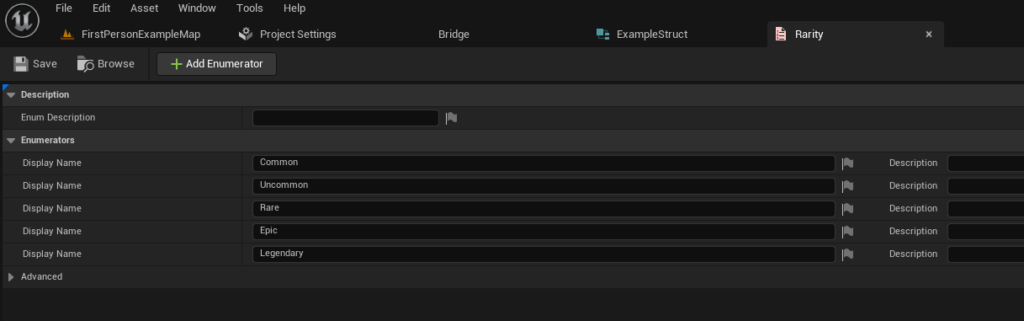
Before a Data Table can be created, a developer typically defines the specific data structure it will utilize. This begins with Enumerations, which provide a clear, human-readable way to represent a fixed set of distinct values. For instance, in the context of an RPG, an EItemRarity Enum could be established to categorize item quality, with values such such as "Common," "Uncommon," "Rare," "Epic," and "Legendary." This not only makes data easier to interpret but also prevents invalid inputs by restricting choices to a predefined list. The creation process involves a simple right-click in the Content Browser, navigating to the "Blueprint" category, and selecting "Enumeration," followed by defining the required values. The flexibility of Enums allows for comprehensive categorization, critical for game systems that rely on tiered attributes.
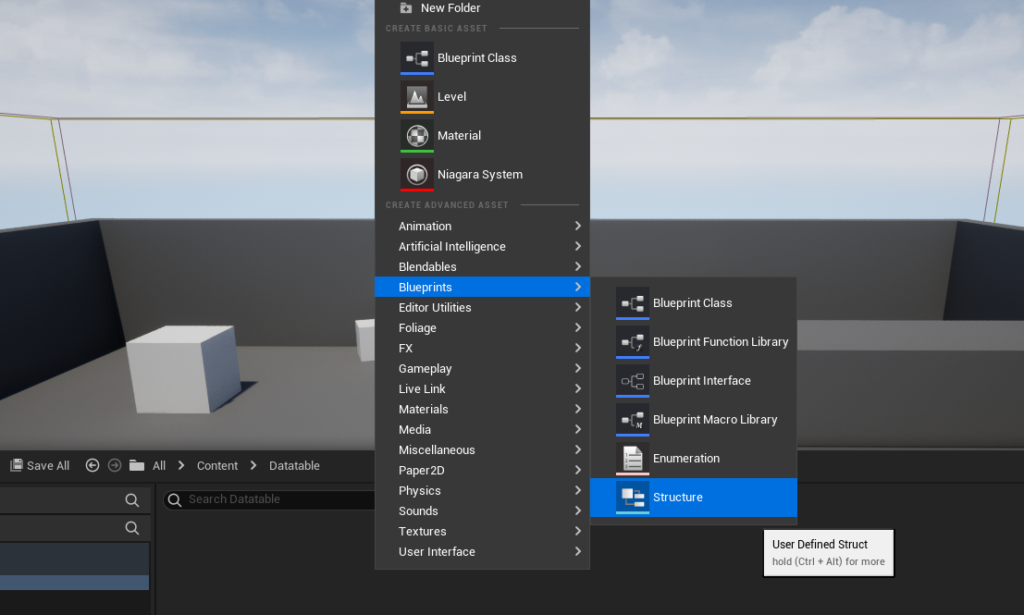
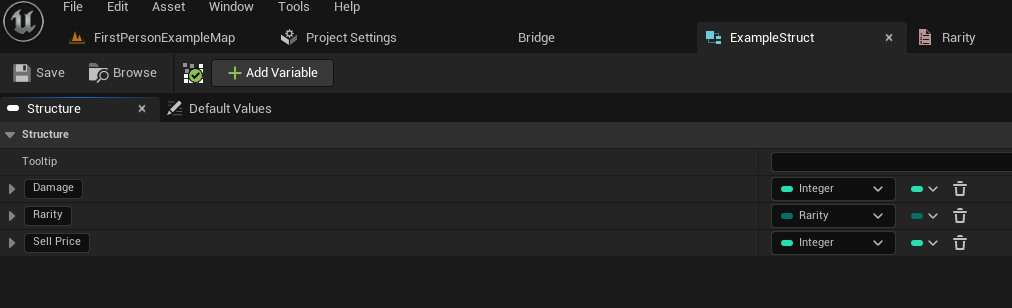
Following the Enum definition, a Structure is then created. A Struct acts as a custom data type, aggregating multiple variables (which can include the previously defined Enums, as well as integers, floats, booleans, strings, and other complex types) into a single, cohesive unit. For our RPG item example, an FItemData Struct might contain variables like Damage (an integer), Rarity (an instance of the EItemRarity Enum), and SellPrice (a float). This aggregation is crucial because each row in a Data Table will conform to this single Struct, ensuring that all entries share a consistent set of properties. The process for creating a Struct mirrors that of an Enum: a right-click in the Content Browser, selecting "Structure" under the "Blueprints" category. Once created, fields are added to the Struct, specifying their names and types, effectively defining the schema for future data entries. This two-step process—first defining categorical types with Enums, then assembling them into coherent data blocks with Structs—lays a robust foundation for the Data Table itself.
Constructing and Populating the Data Table Asset
With the foundational Enums and Structs in place, the creation of the Data Table asset becomes the next logical step. Within Unreal Engine 5, Data Tables are treated as first-class assets, meaning they reside within the Content Browser and can be managed like any other asset (e.g., textures, meshes, Blueprints). This asset-centric approach simplifies version control, migration, and team collaboration.
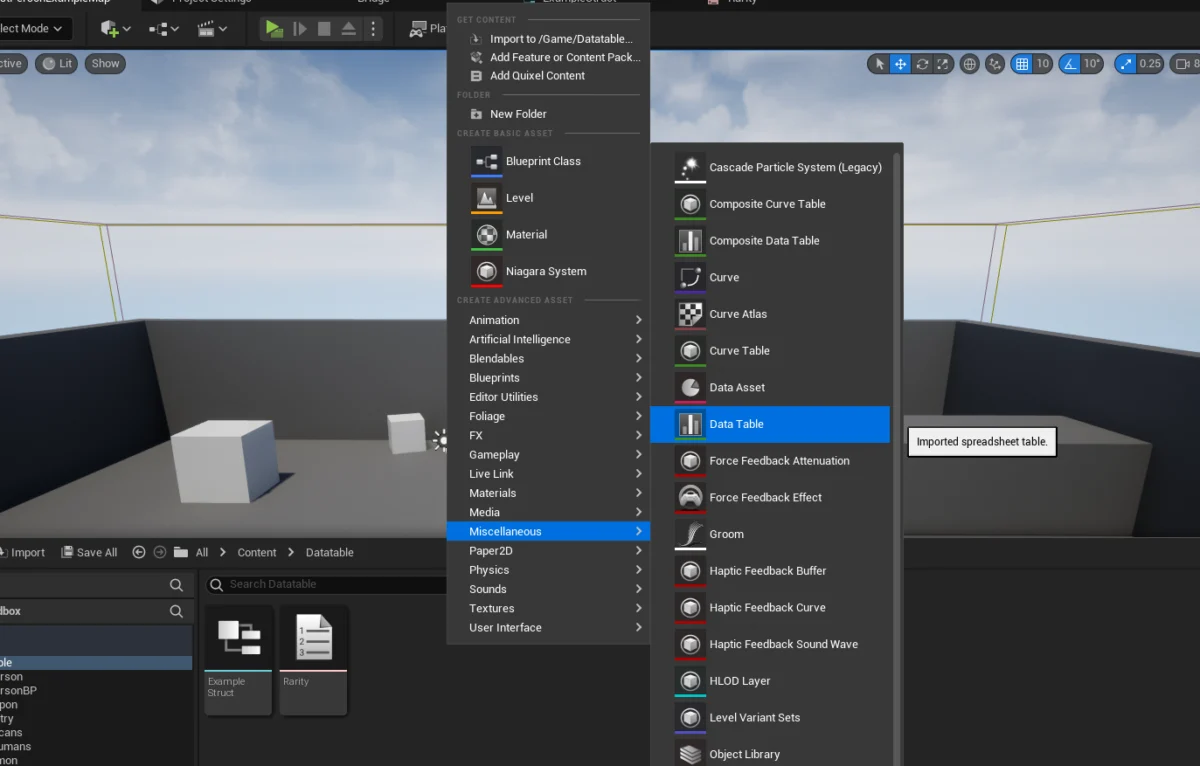
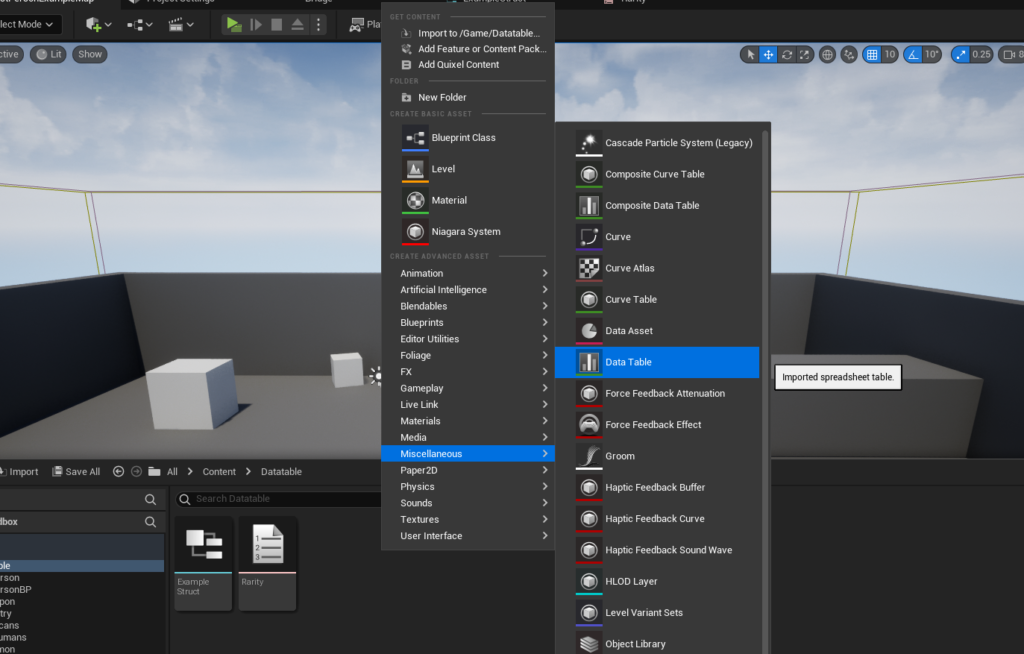
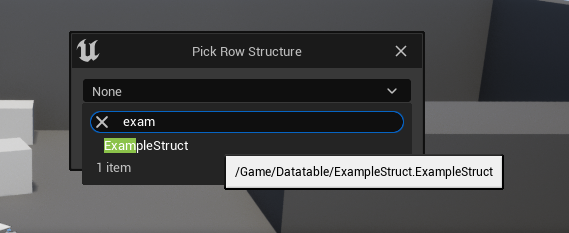
To initiate the creation, developers again right-click within the Content Browser, navigate to the "Miscellaneous" category, and select "Data Table." A critical prompt then appears, asking the developer to choose the specific Struct that will serve as the row structure for the new Data Table. This choice is immutable and dictates the columns and data types available for all subsequent entries in that particular Data Table. By linking the Data Table to a predefined Struct, Unreal Engine enforces data consistency across all rows, preventing errors that might arise from mismatched data types or missing fields. For our example, selecting the FItemData Struct ensures that every item entry in this Data Table will possess Damage, Rarity, and SellPrice attributes.
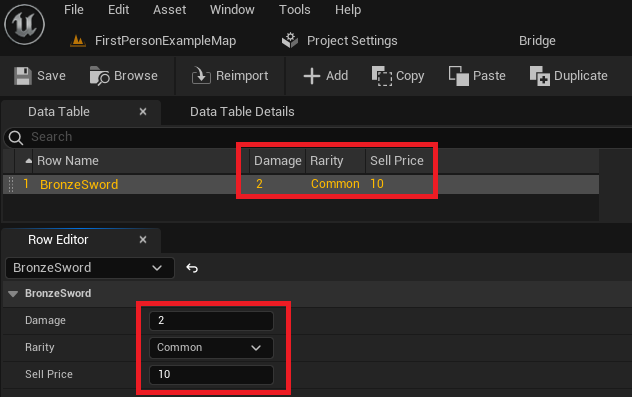
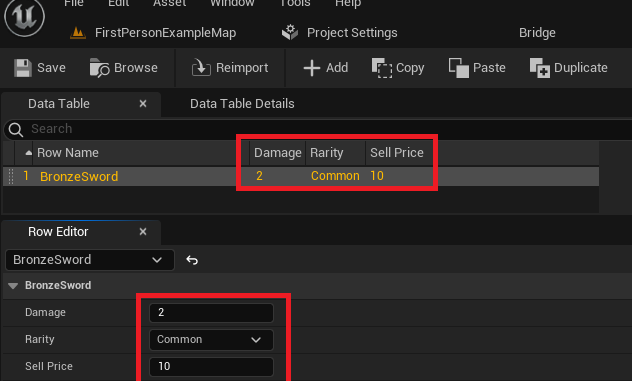
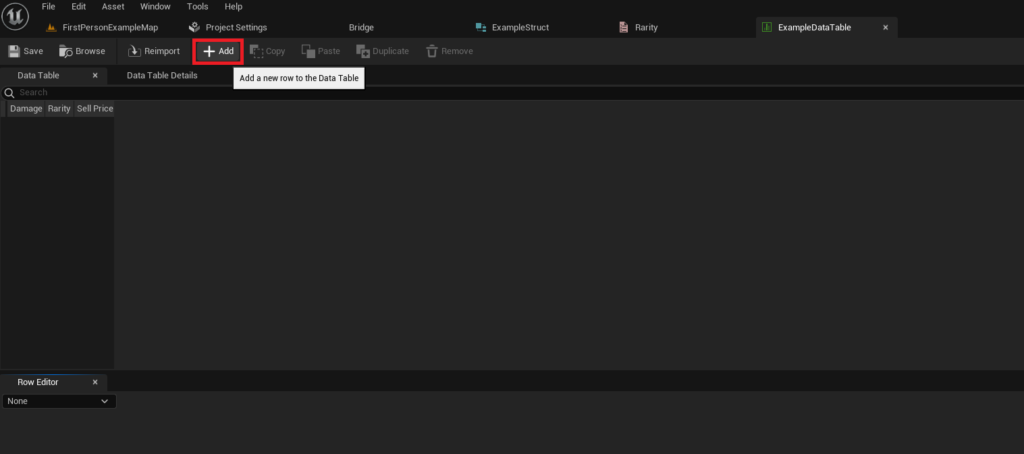
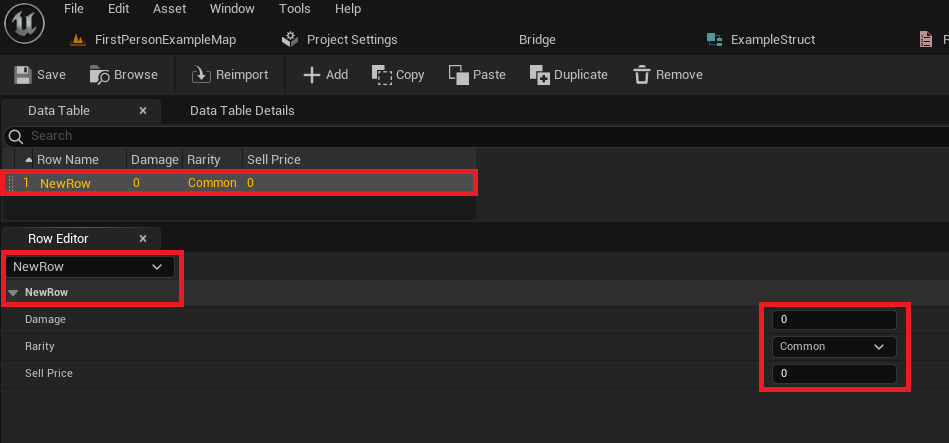
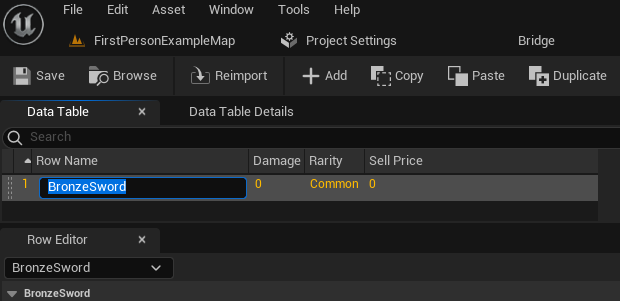
Once the Data Table asset is created and associated with its Struct, the next phase involves populating it with actual game data. Opening the Data Table asset reveals a spreadsheet-like interface within the Unreal Editor. This intuitive interface allows designers and developers to add new rows, each representing a distinct data entry (e.g., a "BronzeSword" item). Each row is identified by a unique "Row Name," which acts as a primary key for efficient data retrieval at runtime. When a new row is added, it is automatically populated with default values based on the associated Struct. Users can then modify these values directly within the table view or through a dedicated "Row Editor" panel, which provides a more detailed breakdown of each field. This direct manipulation within the editor allows for rapid iteration and balancing of game data. For instance, a designer can quickly create entries for various swords, each with different damage values, rarity levels, and sell prices, and observe these changes immediately within the game environment after saving the asset. The "single source of truth" principle is paramount here; all team members refer to and modify the same centralized data, drastically reducing discrepancies and integration issues. Frequent saving is emphasized as a best practice to preserve these valuable data entries.
Dynamic Data Access: Powering Gameplay Logic
The true power of Data Tables materializes when this structured data is accessed and utilized by game logic at runtime. Unreal Engine 5 provides straightforward mechanisms, primarily through Blueprint nodes, to interact with Data Tables, allowing dynamic retrieval and application of game parameters.
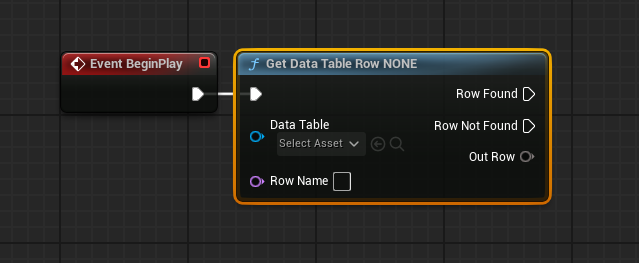
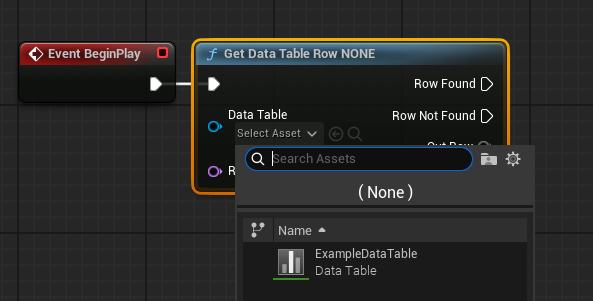
The most fundamental operation is retrieving a specific data row. This is achieved using the "Get Data Table Row" node within Blueprints. This node requires two primary inputs: a reference to the Data Table asset itself and the "Row Name" (the unique key) of the specific entry to retrieve. Upon execution, the node attempts to locate the specified row. It provides two output execution pins: "Row Found" and "Row Not Found," allowing developers to implement conditional logic based on the success of the retrieval. More importantly, if the row is found, an "Out Row" pin outputs the retrieved data, packaged as an instance of the Struct that the Data Table is based on.
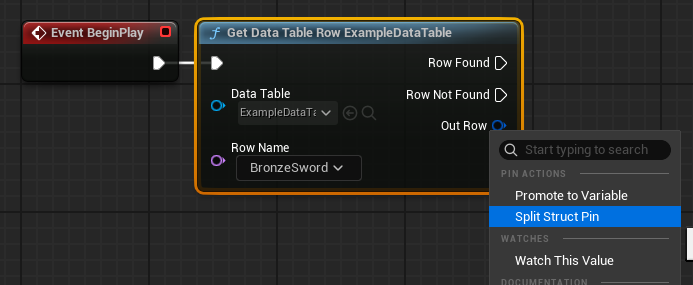
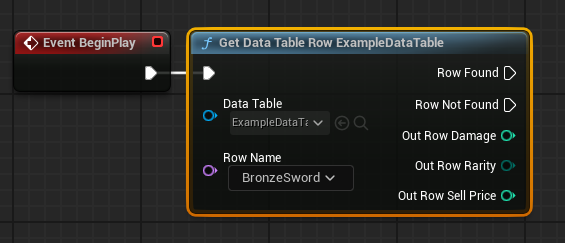
To access the individual fields within the "Out Row" Struct, developers can "Split Struct Pin" by right-clicking on the output pin. This action expands the Struct into its constituent variables (e.g., Damage, Rarity, SellPrice), making them individually accessible for use in subsequent game logic. For example, upon equipping a "BronzeSword" identified by its row name, the game can retrieve its Damage value and apply it to the player’s attack statistics, or display its Rarity in the user interface. The "Row Name" input itself often becomes a dropdown menu populated with all available row names from the referenced Data Table, offering convenient selection during development, though it can also be dynamically fed by other game variables.
Beyond accessing individual rows, developers frequently need to process all entries within a Data Table. This is particularly useful for tasks like populating an in-game shop, displaying an entire inventory, or performing calculations across all enemy types. Unreal Engine facilitates this through the "Get Data Table Row Names" node, which returns an Array containing all the unique row names defined in a given Data Table. This Array can then be fed into a "For Each Loop" node. The "For Each Loop" iterates through each row name, and for every iteration, the current "Array Element" (which is a row name) can be passed to a "Get Data Table Row" node. This setup allows the game to sequentially retrieve the data for every entry in the Data Table, enabling complex logic to be applied to all defined items, enemies, or other data-driven entities. For instance, a game might loop through all item data to generate a dynamic item database at startup, or to check for items that meet certain criteria (e.g., all items of "Epic" rarity). This iterative access underscores the flexibility and utility of Data Tables in managing diverse and extensive game content.
Industry Perspectives on Data-Driven Design
Leading game development studios and industry veterans consistently advocate for data-driven design, with Data Tables in Unreal Engine 5 being a prime example of its practical application. Experts in game architecture and production management frequently highlight how this approach fosters greater project integrity and efficiency.
One of the most significant benefits, often cited by development teams, is the democratization of content creation and balancing. Game designers, who may not possess programming expertise, can directly modify values in Data Tables without needing to touch a single line of code or Blueprint logic. This dramatically accelerates the iteration process for game balancing, allowing designers to experiment with different values for item damage, enemy health, or quest rewards and see immediate results. This separation of concerns—data from logic—also minimizes the risk of introducing programming errors when adjustments are made.
Furthermore, Data Tables serve as a crucial collaborative tool. In large teams, multiple individuals or departments might be responsible for different aspects of game data. A centralized Data Table acts as a "single source of truth," ensuring that all team members are working with the most current and consistent information. For instance, the audio team might reference a Data Table for sound event triggers, while the VFX team references it for particle effects associated with specific items or abilities. This consistency reduces communication overhead and prevents conflicting data versions that can plague complex projects. Quality Assurance (QA) teams also benefit immensely, as they can more easily verify data values and track changes, streamlining the testing process. The ability to export and import Data Tables (e.g., as CSV files) further enhances their utility, allowing for external tools or spreadsheets to be used for mass data entry or analysis before re-importing into the engine. This interoperability is highly valued in pipelines that integrate various specialized tools.
Beyond Basics: Advanced Applications and Scalability
The utility of Data Tables extends far beyond simple item or enemy statistics, touching upon virtually every facet of scalable game development. Their inherent structure and engine integration make them ideal for a multitude of advanced applications.
Localization: Data Tables are an excellent solution for managing localization strings. A single Data Table can hold all in-game text, with columns for different languages. When the game’s language setting changes, it can dynamically retrieve the appropriate text column, ensuring consistent and easily updateable localized content. This centralizes the localization effort, making it simpler to add new languages or update existing translations without modifying numerous individual assets.
Configuration Management: Beyond gameplay data, Data Tables can store configuration settings for various game systems, such as graphics presets, input mappings, or server connection details. This allows for dynamic adjustments to game behavior without requiring code changes or patching, especially useful for live-service games.
Procedural Generation Seeds: For games utilizing procedural content generation, Data Tables can store seeds, parameters, or rulesets that guide the generation process. This provides designers with fine-grained control over the generated content while maintaining a data-driven approach.
Modding Support: While requiring additional development, Data Tables can be structured in a way that allows external modification by modders. By providing modders with templates and clear guidelines, they can create their own item sets, enemy variations, or questlines that integrate seamlessly with the core game, extending its lifespan and community engagement.
Performance Considerations: From a technical standpoint, Unreal Engine’s native Data Table implementation is optimized for runtime access. Unlike parsing custom JSON or XML files, which can introduce overhead, Data Tables are loaded and processed efficiently by the engine, contributing to smoother gameplay and faster load times. This optimization is particularly critical for games that frequently query large datasets.
The broader implication is that Data Tables foster a highly iterative and adaptable development environment. As game requirements evolve or new content is introduced, the structured and easily modifiable nature of Data Tables ensures that the core game systems remain robust and manageable. This flexibility is paramount in an industry characterized by rapid technological advancements and shifting player expectations.
Conclusion: The Indispensable Role of Data Tables
In summary, Data Tables in Unreal Engine 5 represent an indispensable tool for modern game development. They provide a powerful, efficient, and collaborative framework for managing vast quantities of game data. By mastering the creation, configuration, population, and runtime implementation of Data Tables, developers can significantly enhance the scalability, maintainability, and overall quality of their projects. From defining intricate item inventories and complex enemy behaviors to streamlining localization efforts and facilitating collaborative design workflows, Data Tables offer a robust solution for a wide array of data management challenges. Their integration within the Unreal Editor, coupled with the underlying principles of Enums and Structs, ensures that even the most ambitious projects can maintain a clean, organized, and data-driven architecture, ultimately contributing to richer and more engaging player experiences without necessitating extensive C++ knowledge. As game complexity continues to grow, the adoption of such data-driven methodologies will remain a cornerstone of successful and efficient game production.
About the Author








