
The landscape of modern video game development is profoundly shaped by the sophistication of artificial intelligence (AI), which imbues virtual worlds with dynamic life and offers players engaging, responsive experiences. From bustling cityscapes populated by non-player characters (NPCs) to formidable adversaries executing complex combat strategies, AI-controlled entities are instrumental in creating immersive atmospheres and delivering compelling gameplay. Unreal Engine 5 (UE5), a leading real-time 3D creation tool developed by Epic Games, has emerged as a pivotal platform for developers seeking to implement advanced AI functionalities, particularly in character navigation. This robust engine provides a suite of intuitive tools designed to simplify the traditionally complex process of generating navigation meshes (NavMeshes) and configuring AI characters for autonomous movement, thereby democratizing access to sophisticated AI behaviors for studios of all sizes.
The core challenge in enabling AI characters to traverse virtual environments realistically lies in providing them with an understanding of the navigable space. This is where the NavMesh system becomes indispensable. A NavMesh is essentially a data structure that represents the walkable areas within a game level, allowing AI agents to calculate efficient paths while avoiding obstacles such as walls, pits, and dynamic elements. Without a properly generated NavMesh, AI characters would either remain static, collide haphazardly with scenery, or require painstakingly scripted movements for every possible scenario—a method that quickly becomes unfeasible for large, open-world environments. Unreal Engine 5 addresses this fundamental requirement with a streamlined approach that empowers developers to quickly define and visualize these navigable zones, forming the foundation for all subsequent AI movement.
The Evolution of AI Pathfinding in Gaming

The journey of AI pathfinding in video games spans decades, evolving from rudimentary grid-based systems and pre-defined waypoints to today’s highly optimized NavMesh solutions. Early games often relied on simple coordinate checks or a series of interconnected nodes, where AI characters would move from one point to the next along a pre-determined graph. While functional for linear levels or simple enemy patrols, these methods struggled with complex geometries, dynamic environmental changes, and the need for emergent behavior. The introduction of navigation meshes marked a significant leap forward, offering a more flexible and performance-friendly alternative. Instead of discrete points, NavMeshes represent walkable areas as a continuous surface, allowing for smoother, more natural character movement and enabling AI to react intelligently to changing environments.
Epic Games, through its continuous development of the Unreal Engine, has been at the forefront of this evolution. With each iteration, from Unreal Engine 3 to the latest UE5, the AI toolset has grown more powerful and user-friendly. UE4 introduced significant advancements in AI, including Behavior Trees and Environmental Query Systems (EQS), which provided developers with more sophisticated ways to design AI decision-making. Unreal Engine 5 builds upon this legacy, refining the core pathfinding mechanisms and integrating them seamlessly into its next-generation development environment. The emphasis in UE5 is on visual scripting and intuitive workflows, reducing the barrier to entry for developers who might not have extensive programming backgrounds but wish to implement complex AI behaviors.
Establishing Navigable Space: The NavMeshBoundsVolume
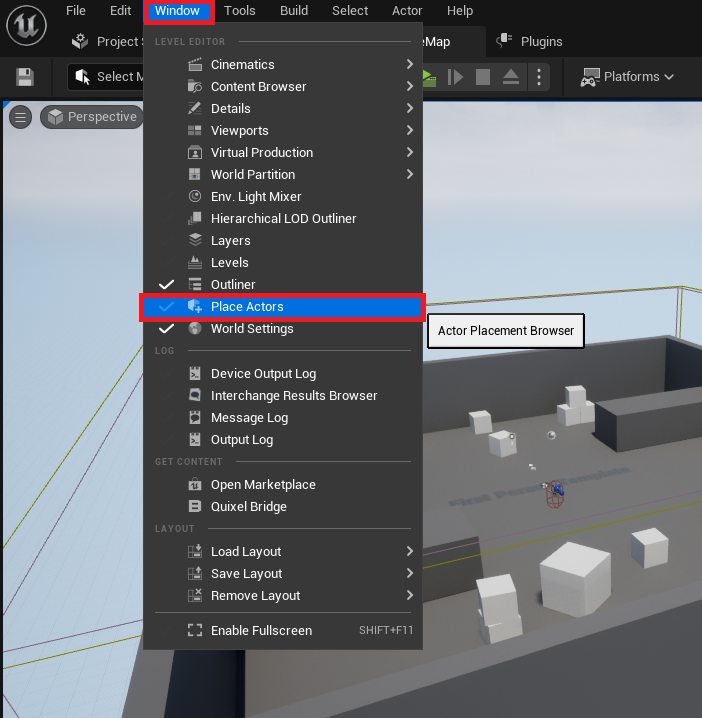
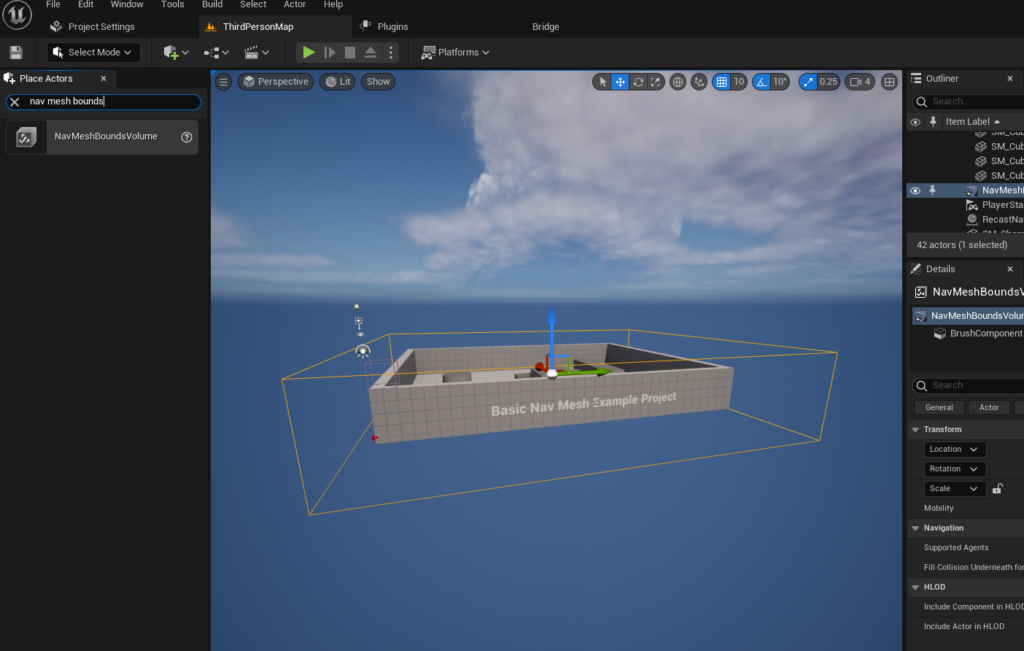
The process of creating a NavMesh in Unreal Engine 5 begins with the deployment of a specific volumetric actor: the NavMeshBoundsVolume. This element serves as the primary tool for instructing the engine where to generate the navigation data. To initiate this, developers first access the "Place Actors" window, a central hub within the Unreal Engine editor for integrating fundamental scene elements and volumes. This window, typically accessed via the "Window" menu, provides a categorized list of assets that can be spawned directly into the current level, ranging from basic geometric shapes to complex environmental effects.
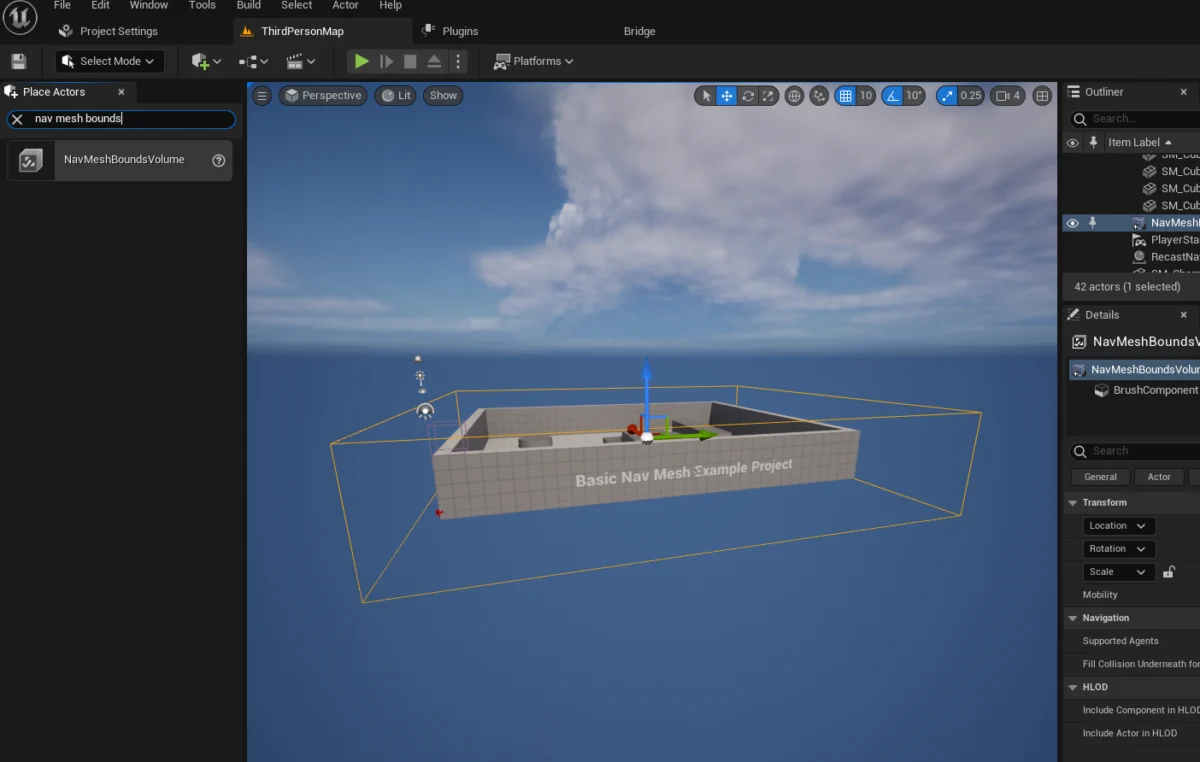
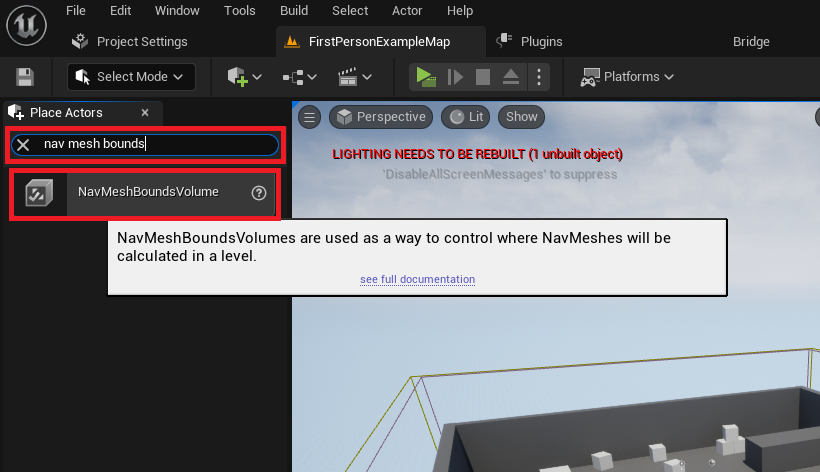
Once the "Place Actors" window is active, developers navigate to the "Volumes" category, where the "NavMeshBoundsVolume" actor is located. Dragging and dropping this volume into the level is the initial physical step in defining the AI’s operational area. This seemingly simple action has profound implications, as the dimensions and placement of this volume directly dictate the extent of the generated NavMesh. The subsequent critical phase involves scaling and positioning the NavMeshBoundsVolume to precisely encapsulate the desired navigable terrain for AI characters. This can range from a confined room for a localized encounter to expansive sections of an open-world map. The flexibility to adjust its size allows developers to tailor the NavMesh generation to specific gameplay requirements, ensuring that AI can reach all intended locations without attempting to traverse inaccessible areas.
A key consideration during this scaling phase is the balance between coverage and performance. Larger NavMeshes naturally require more computational resources and time to generate, especially when relying on static baking processes. However, Unreal Engine also supports dynamic NavMesh generation, a feature that allows the navigation data to update in real-time as the environment changes, accommodating scenarios with movable obstacles or destructible environments. This dynamic capability, while more resource-intensive, provides unparalleled flexibility for complex interactive scenes. Developers interested in optimizing this process can explore dedicated guides on dynamic pathfinding, which delve into the nuances of real-time NavMesh updates and their performance implications.
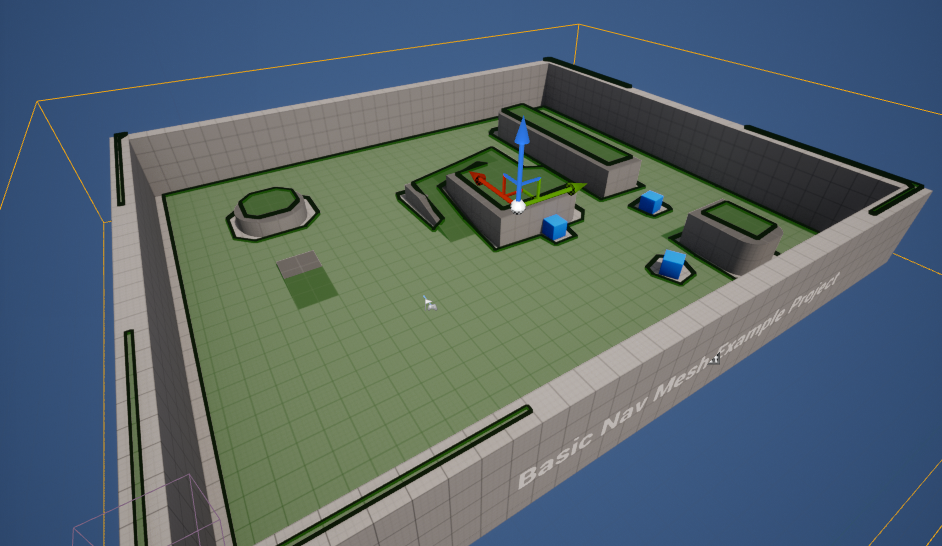
To visually confirm the correct setup and generation of the NavMesh, Unreal Engine 5 offers a convenient debugging feature. By simply pressing the ‘P’ key on the keyboard (a common shortcut for visualizing pathfinding data), the editor overlays the level with a green mesh. This green overlay precisely delineates the areas where AI characters can navigate, providing immediate feedback on the NavMesh’s coverage and accuracy. Any gaps, unreachable platforms, or unwanted navigable zones become instantly apparent, allowing developers to make real-time adjustments to the NavMeshBoundsVolume or the underlying level geometry until the desired pathfinding area is achieved. This visual debug mode is a cornerstone of efficient AI development, enabling rapid iteration and troubleshooting.
Bringing Characters to Life: Configuring Basic AI Movement
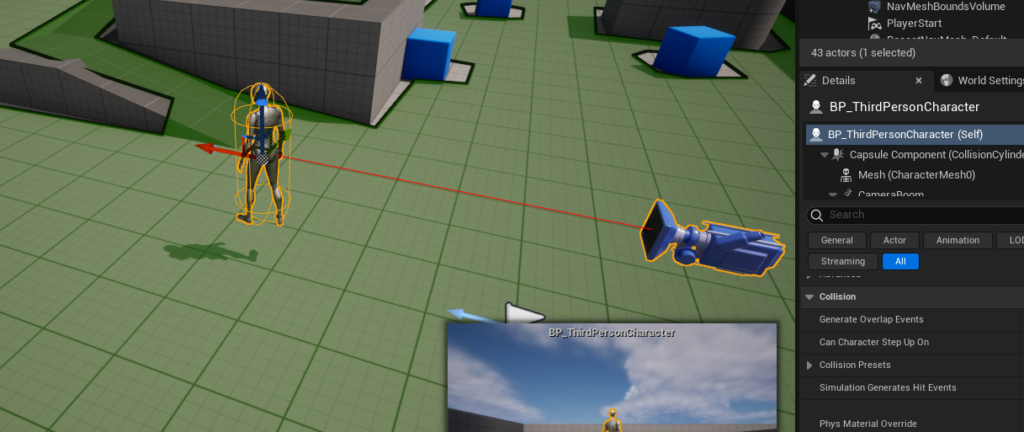
With the navigable terrain established, the next phase involves imbuing AI characters with the ability to leverage this NavMesh for autonomous movement. For demonstration purposes and ease of access, many developers, including those following this guide, often utilize Unreal Engine 5’s robust Third Person Template. This template comes pre-packaged with an animated character blueprint, complete with movement animations and a basic control scheme, providing a perfect starting point for testing AI navigation without the need to create a character from scratch. The character blueprint, typically found within the "Third Person / Blueprints" folder in the Content Drawer, represents the AI agent that will traverse the environment.
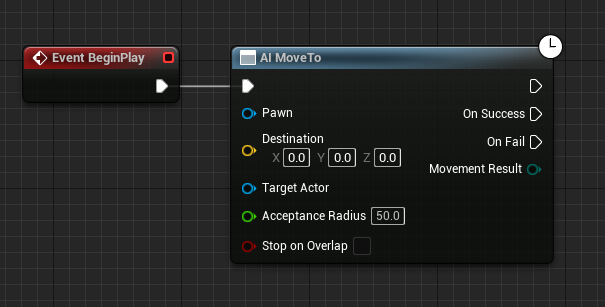
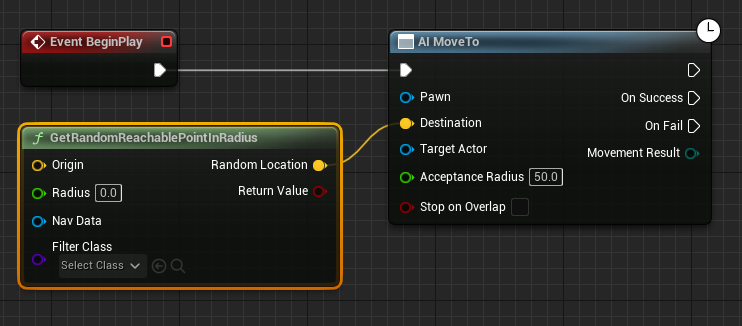
The foundational logic for AI movement in Unreal Engine 5 is often constructed using the Blueprint visual scripting system. Blueprints offer a powerful, node-based interface that allows developers to define game logic without writing a single line of code, making complex functionalities like AI accessible to a broader audience. Within the character’s blueprint editor, the sequence for basic AI movement typically begins with a "Begin Play" event. This event triggers the defined logic as soon as the game level starts, serving as the entry point for the AI’s initial behavioral routine.
Connected to the "Begin Play" event is the "AI MoveTo" node, a central component in Unreal Engine’s AI framework. This node is responsible for instructing an AI pawn to move towards a specified destination. It abstracts away the complex pathfinding calculations, relying on the underlying NavMesh to determine the most efficient route. The "AI MoveTo" node requires several key inputs, including the pawn that is to move, and crucially, a destination target.
To provide a dynamic and non-linear movement pattern, the "GetRandomReachablePointInRadius" node is employed. This node is connected to the "Destination" pin of the "AI MoveTo" node, effectively instructing the AI character to choose a random, valid location within a defined radius. This approach is highly effective for creating patrol routes, ambient character movement, or simple exploration behaviors. For the "GetRandomReachablePointInRadius" node to function correctly, it needs an "Origin" point around which to calculate the random destination. This is typically supplied by a "Get Actor Location" node, which retrieves the current position of the AI character itself. By using the character’s own location as the origin, the AI is effectively instructed to roam within a circular area centered on its current position.
The "Radius" parameter of the "GetRandomReachablePointInRadius" node is a critical tunable value, dictating the extent of the AI’s roaming area. A larger radius, such as the example value of "2000" units, allows the AI to cover more ground and explore a wider area, while a smaller radius confines its movement to a more localized zone. This parameter offers developers fine-grained control over the AI’s spatial behavior, enabling them to design distinct roaming patterns for different character types or gameplay scenarios.
To ensure the "AI MoveTo" node correctly identifies the character it needs to move, a "Reference to Self" node is connected to the "Pawn" input pin. This node simply provides a reference to the blueprint instance itself, unambiguously identifying the AI character that is meant to execute the movement command. This self-referential connection is a common pattern in Blueprint scripting, establishing clear ownership of actions.
Finally, to create a continuous and perpetual roaming behavior, a "Delay" node is introduced. This node is connected from the "On Success" output pin of the "AI MoveTo" node. The "On Success" pin fires once the AI character successfully reaches its designated destination. After a brief delay, the output of this "Delay" node is then looped back to the input of the "AI MoveTo" node, effectively creating a feedback loop. This cyclical arrangement ensures that once the AI character arrives at one random destination, it pauses for a specified duration (defined by the delay) before requesting a new random reachable point and initiating movement towards it. This simple yet effective loop establishes a persistent, autonomous wandering behavior for the AI character within the defined NavMesh boundaries.
Upon executing the game (by clicking "Play" in the editor), the character, now equipped with this Blueprint logic, will begin its programmed journey, navigating towards random locations within the confines of the generated NavMesh. The seamless integration of NavMesh generation and Blueprint-driven AI movement underscores Unreal Engine 5’s commitment to providing accessible yet powerful tools for game developers.
Broader Impact and Implications for Game Development
The streamlined process for implementing AI navigation in Unreal Engine 5 carries significant implications for the broader game development industry. Firstly, it substantially lowers the barrier to entry for aspiring developers and small independent studios. Traditionally, sophisticated AI pathfinding required deep programming knowledge and complex algorithms. UE5’s visual scripting and intuitive NavMesh tools empower creators to implement advanced AI behaviors without extensive coding, allowing them to focus more on creative design and gameplay mechanics rather than low-level technicalities. This democratizes access to technologies previously reserved for larger, well-funded studios.
Secondly, the efficiency and robustness of UE5’s AI navigation system directly impact game design possibilities. Developers can design more intricate and expansive levels, confident that their AI characters will be able to navigate them intelligently. This facilitates the creation of more believable virtual worlds, where NPCs move naturally, enemies flank players effectively, and companions follow without getting stuck. The ability to quickly iterate on NavMesh generation and AI behaviors allows designers to experiment with level layouts and encounter designs more fluidly, leading to more polished and engaging player experiences.
Furthermore, the continuous development of AI features within Unreal Engine points towards future trends in game development. As computational power increases, so too will the complexity of in-game AI. We can anticipate even more sophisticated AI behaviors driven by machine learning, adaptive algorithms, and procedural content generation that allows AI to learn from player interactions and dynamically alter its behavior. Unreal Engine’s existing framework, with its strong emphasis on modularity and extensibility, is well-positioned to integrate these future advancements, keeping its users at the cutting edge of interactive entertainment.
However, despite the ease of setup, challenges can still arise. Improperly scaled NavMeshBoundsVolumes, incorrect character collision settings, or overly complex Blueprint logic can lead to AI characters exhibiting unintended behaviors—such as getting stuck, falling through the world, or failing to find paths. This highlights the importance of thorough testing and utilizing the engine’s debugging tools, like the ‘P’ key NavMesh visualization, to ensure optimal performance and reliable AI behavior.
In conclusion, Unreal Engine 5 stands as a powerful testament to Epic Games’ dedication to empowering creators. By simplifying the often-complex tasks of NavMesh generation and basic AI character navigation, UE5 not only accelerates development cycles but also enables a new generation of games to feature more intelligent, dynamic, and immersive AI experiences. The foundational steps outlined for setting up NavMesh and basic AI movement demonstrate the engine’s accessibility and robust capabilities, paving the way for increasingly sophisticated virtual worlds where AI characters seamlessly contribute to the richness and depth of gameplay.
About the Author








