
The seamless saving and loading of game data stands as a fundamental pillar of modern interactive entertainment, directly influencing player immersion and retention. In response to this critical requirement, Unreal Engine 5 (UE5) offers a sophisticated, yet remarkably accessible, built-in SaveGame system that empowers developers to manage game state persistence with unparalleled efficiency. This integrated framework facilitates the effortless storage and retrieval of diverse game data to and from local files, requiring only a handful of functions to implement, significantly reducing development overhead. This guide explores the architecture and implementation of UE5’s SaveGame system, highlighting its impact on contemporary game development practices.
The Imperative of Persistence: Why Saving Matters
In the landscape of modern gaming, where titles often boast sprawling open worlds, complex character progression, and intricate narrative choices, the ability to reliably save and resume progress is non-negotiable. Players expect their efforts to be preserved, whether they’re tracking quest progress, managing inventory, or maintaining a character’s unique statistics and location. A robust save system prevents frustration, encourages exploration, and ultimately enhances the overall player experience, acting as a silent guardian of hundreds of hours of gameplay. Without it, even the most meticulously crafted virtual worlds would crumble under the weight of lost progress, rendering player achievements ephemeral.
A Historical Perspective: The Evolution of Game Saves
The journey of game data persistence has evolved dramatically since the early days of video gaming. In the 1970s and 80s, rudimentary methods like password systems (e.g., Metroid, Castlevania) allowed players to resume at specific points, albeit with often cumbersome alphanumeric codes. The advent of battery-backed SRAM in cartridges (e.g., The Legend of Zelda, Final Fantasy) in the late 80s marked a significant leap, offering internal save capabilities directly within the game media. As consoles transitioned to disc-based formats, external memory cards became standard, providing multiple save slots for different players or playthroughs. PC gaming, meanwhile, often leveraged direct file system access for save data, though this frequently required developers to implement custom serialization and deserialization routines from scratch.
The current era, characterized by massive open-world games and persistent online experiences, demands far more sophisticated solutions. Modern games must handle a myriad of data points—player position, inventory items, quest states, NPC relationships, environmental changes, and more—often across vast virtual spaces. This increased complexity necessitated standardized, engine-level solutions to abstract away the low-level file I/O operations, allowing developers to focus on gameplay rather than data management plumbing. Unreal Engine’s SaveGame system represents the culmination of this evolution, providing a high-level, flexible, and powerful abstraction for persistent data.
Unreal Engine’s Solution: The USaveGame System
At the core of Unreal Engine 5’s data persistence capabilities lies the USaveGame class. This pre-configured abstract base class is purpose-built to facilitate the serialization and deserialization of variables, simplifying what would otherwise be a complex programming task. When a developer needs to save game data, they extend this USaveGame class to create a custom blueprint or C++ class, populating it with all the specific variables pertinent to their game state.
The USaveGame Class: A Foundation for Data
The USaveGame class itself doesn’t inherently save data; rather, it acts as a container. Developers define custom variables within their derived SaveGame class—be it a player’s health, current ammunition, inventory contents, or the state of a specific puzzle. When a save operation is initiated, the values of these variables are written to a binary file on the user’s machine. Conversely, during a load operation, these values are read back from the file and populated into the corresponding variables within an instance of the SaveGame class, making them accessible to the game logic. This clear separation of concerns—data definition in the SaveGame class and save/load logic in the Game Instance—promotes modularity and maintainability.

Versatility in Data Types and Storage Locations

One of the key strengths of the USaveGame system is its versatility. Almost every standard variable type supported by Unreal Engine can be saved and loaded using this class. This includes primitive types like integers, booleans, floats, and strings, as well as more complex structures such as Vectors, Rotators, Transforms, custom Structs, and Arrays of these types. While object references (like references to specific actors in the world) require careful handling (often by saving unique IDs and re-spawning/re-referencing upon load), the system provides robust support for the vast majority of data a game needs to persist.
The save files themselves are stored in standardized, user-specific locations, ensuring proper application data management and user privacy across different operating systems:
- Windows: Typically found within the user’s
Local Appdatafolder, under a subdirectory specific to the game. - MacOS: Located in
Library/Application Support, again within a game-specific folder. - Linux: Stored in
/home/username/.local/share, adhering to common Linux application data conventions.
These standardized locations are crucial for ensuring operating system compatibility and preventing conflicts with other applications or user data, aligning with industry best practices for application sandboxing.
Asynchronous vs. Synchronous Saving: Performance Considerations
A critical aspect for developers to consider when implementing save functionality is the impact on game performance, particularly for larger games with extensive save data. Unreal Engine offers two primary nodes for writing data to disk:
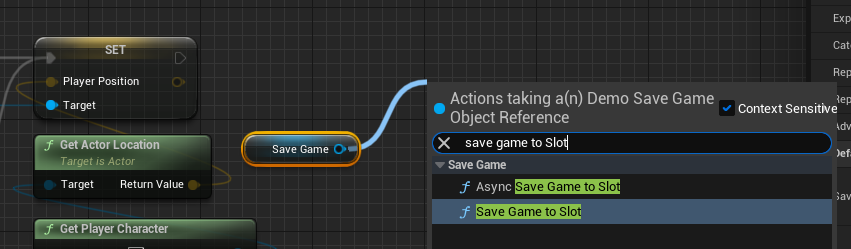
Save Game to Slot(Synchronous): This node performs the save operation immediately and blocks the game thread until the write is complete. For small amounts of data, the delay might be imperceptible. However, if a game needs to save a significant amount of information, a synchronous save can cause noticeable hitches or frame drops, disrupting the player experience.Async Save Game to Slot(Asynchronous): This node is designed to address performance concerns by executing the save operation on a separate thread. This allows the game’s main thread to continue rendering and processing gameplay logic without interruption, leading to a smoother experience for the player. While slightly more complex to manage due to its asynchronous nature (requiring callbacks for completion), it is the recommended approach for games saving substantial data. This reflects Epic Games’ commitment to providing tools that enable high-performance game development without sacrificing ease of use.
The use of "Slot Names" further enhances the system’s flexibility, allowing developers to manage multiple distinct save files. This could be used for different player profiles, multiple playthroughs, or even incremental autosaves, all stored under unique identifiers within the same game directory.
Blueprint-Driven Implementation: A Developer’s Advantage
One of Unreal Engine’s most significant contributions to game development is its Blueprint visual scripting system. The SaveGame system is fully exposed to Blueprints, enabling designers and less code-savvy developers to implement complex data persistence without writing a single line of C++. This accessibility democratizes game development, allowing a wider range of creators to bring their visions to life.
Defining the Custom Save Class
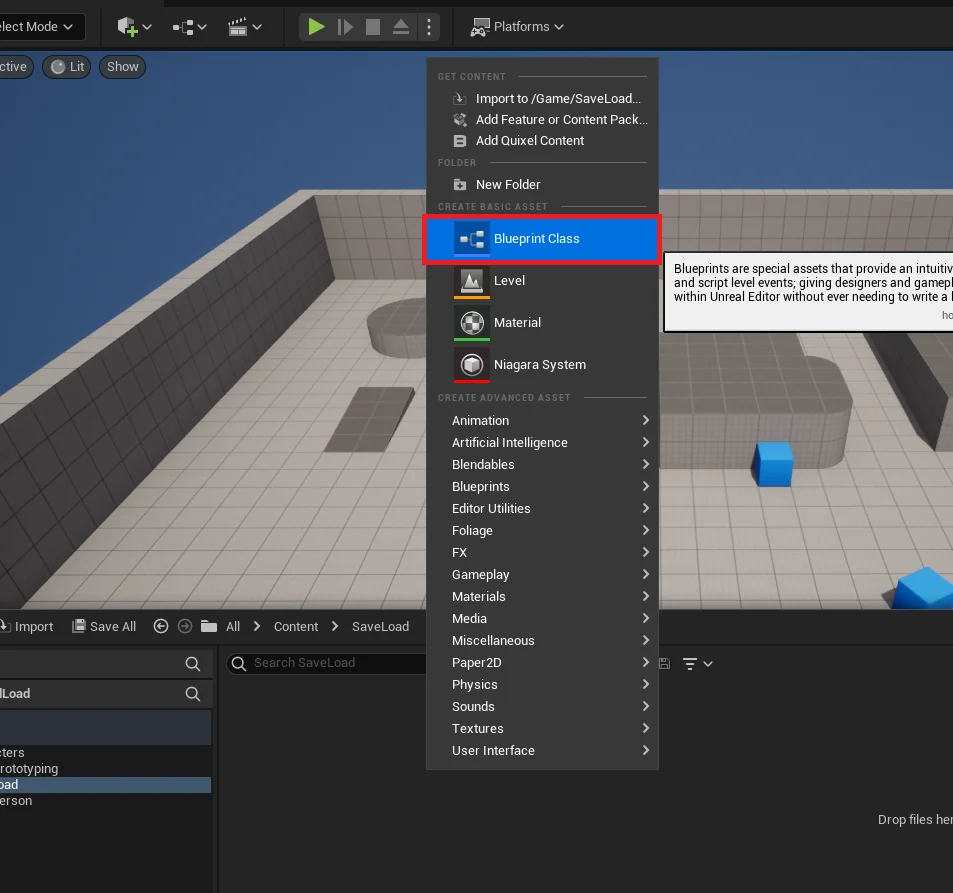
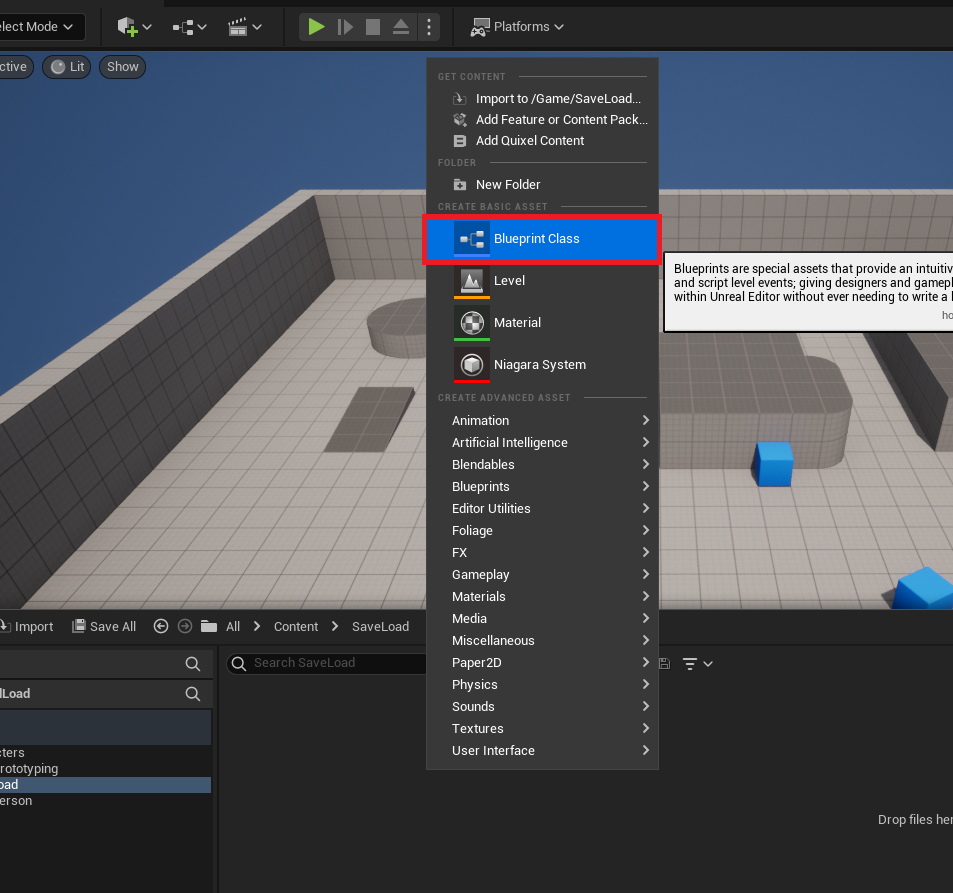
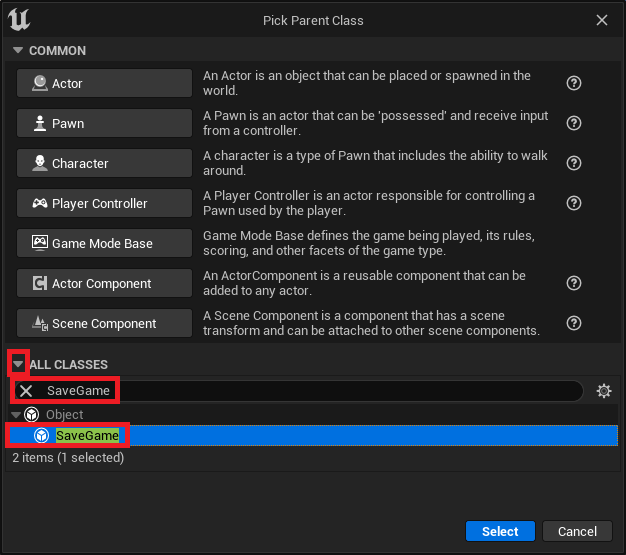
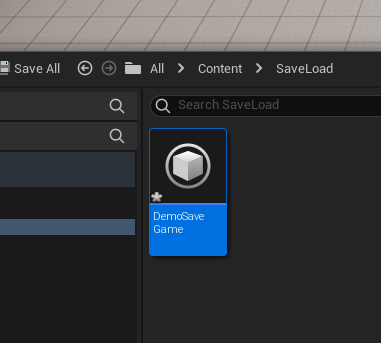
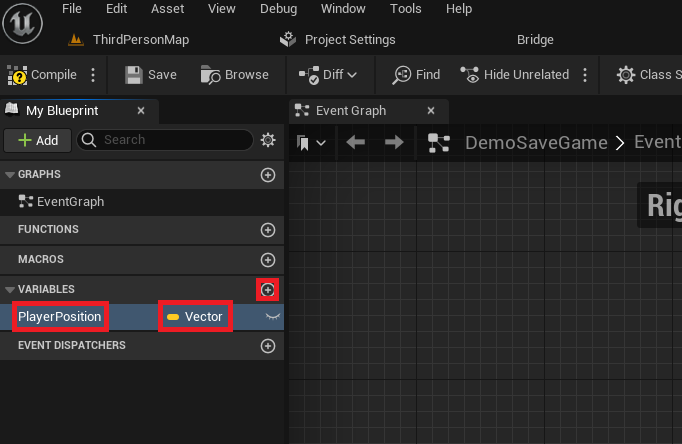
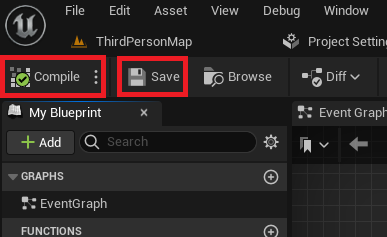
The implementation journey begins in the Unreal Editor’s Content Drawer. Developers initiate the process by extending the base USaveGame class to create a new Blueprint class. This custom class, for instance, named "DemoSaveGame," then serves as the blueprint for the data structure to be saved. Within this custom SaveGame Blueprint, variables are added to represent the game state. For example, a Vector variable named "PlayerPosition" can be added to store the player’s coordinates. After defining these variables, compiling and saving the Blueprint ensures that these data structures are ready for use.
Integrating Logic via the Game Instance
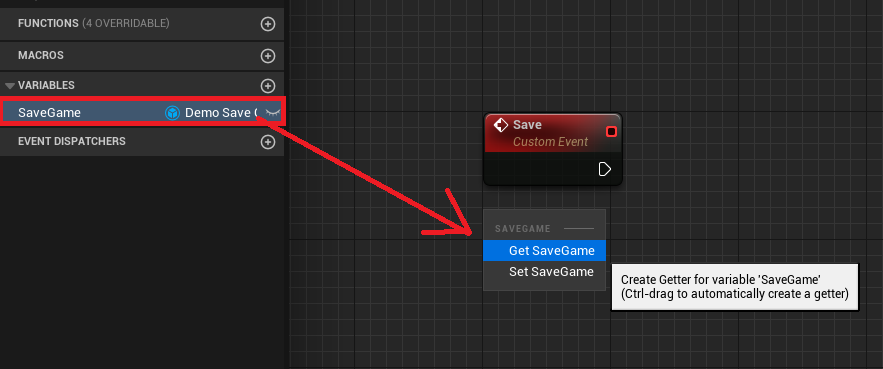
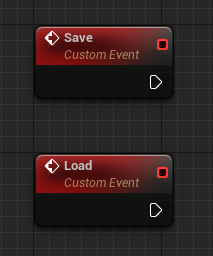
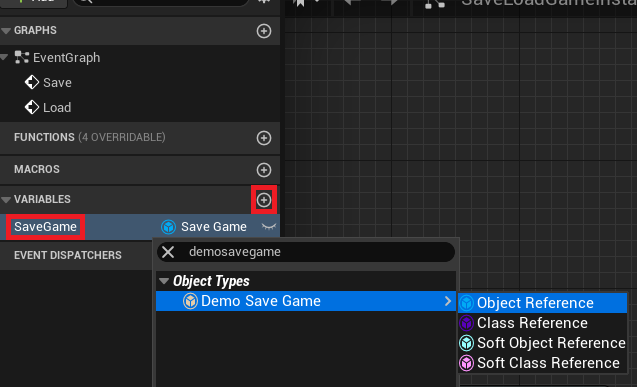
The Game Instance is a special Unreal Engine object that persists throughout the entire lifetime of a game, even across level changes. This makes it an ideal central hub for managing global game data, including the SaveGame object. Developers add two custom events to their custom Game Instance Blueprint: "Save" and "Load." A new variable, typically named "SaveGame" and typed to the custom SaveGame class (e.g., "DemoSaveGame"), is also created within the Game Instance. This variable will hold a reference to the active SaveGame object.
The Core Save/Load Workflow
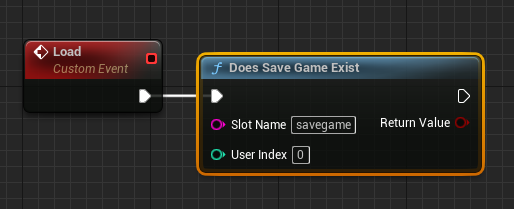
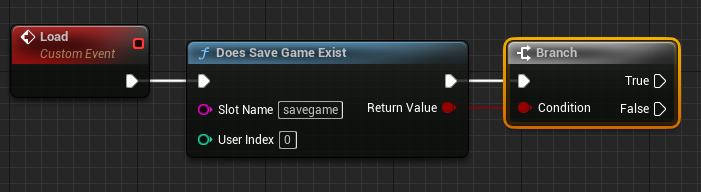
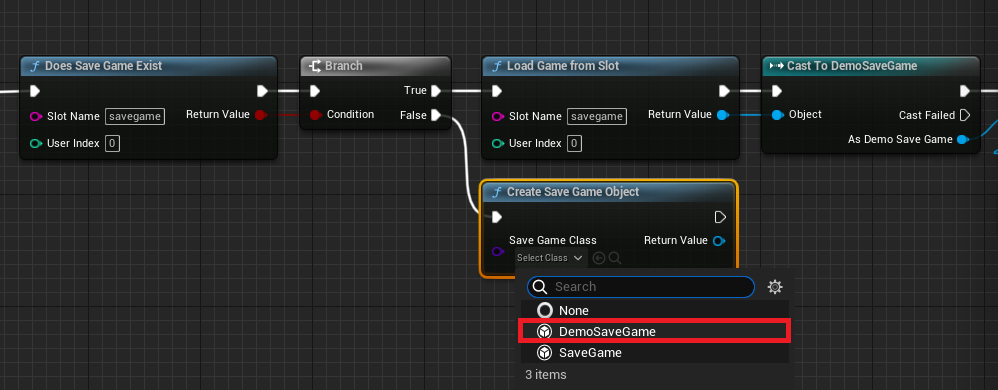
The "Load" event orchestrates the retrieval of data. It first employs a "Does Save Game Exist" node to check for a previously saved file using a specified "Slot Name." This conditional check is crucial for handling first-time players or corrupted save data.
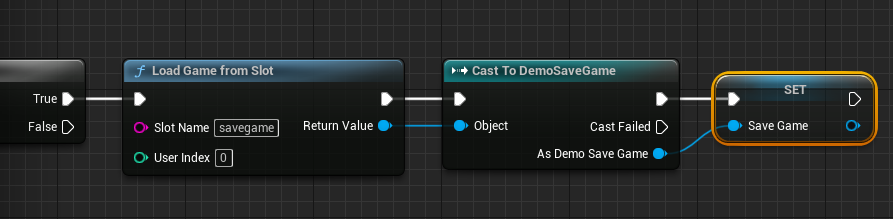
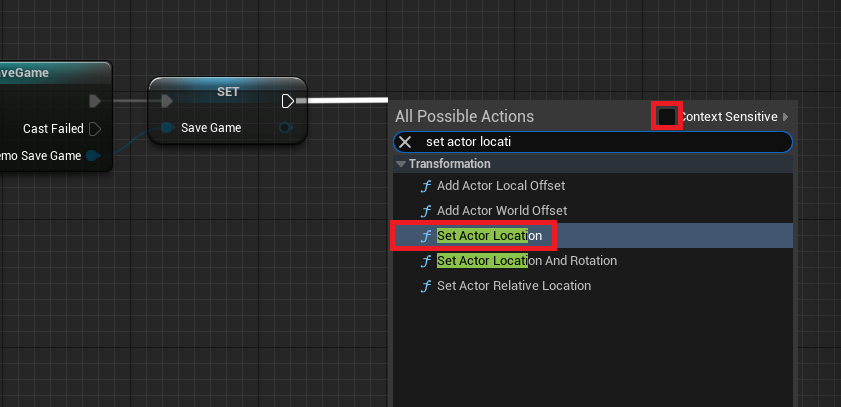
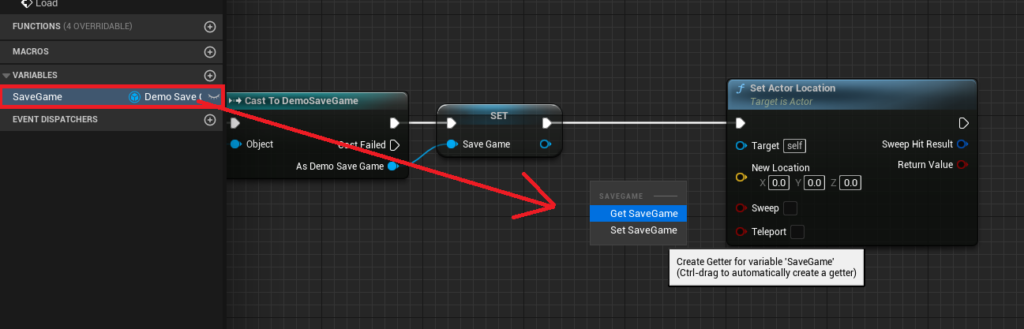
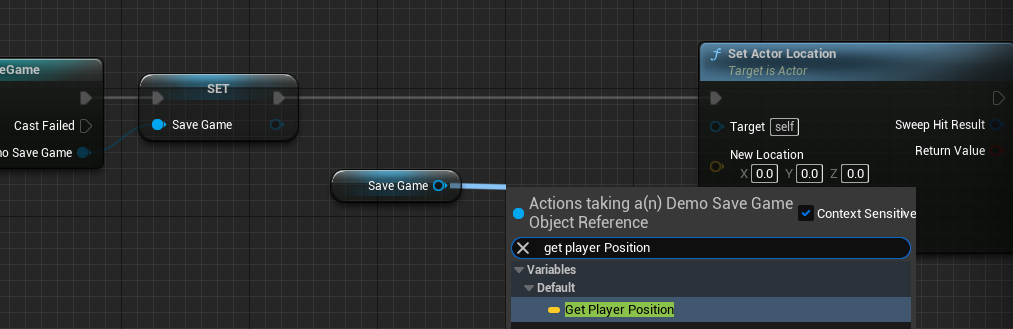
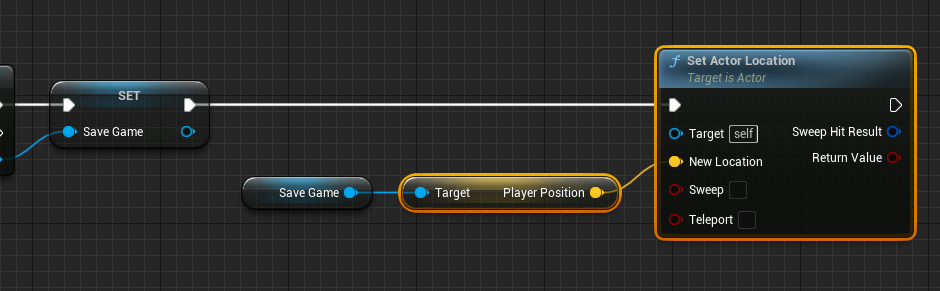
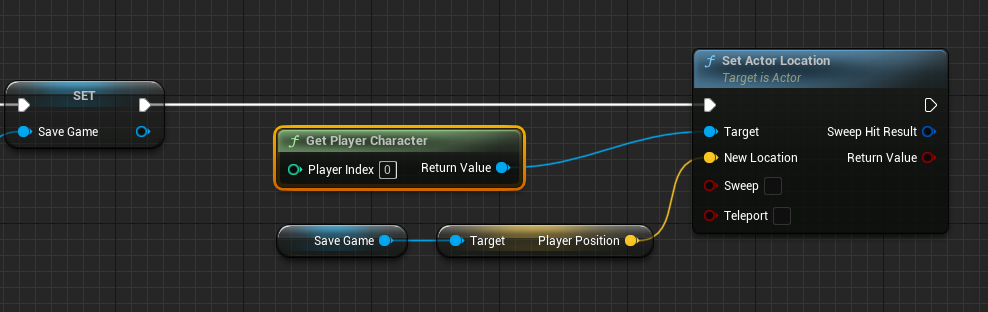
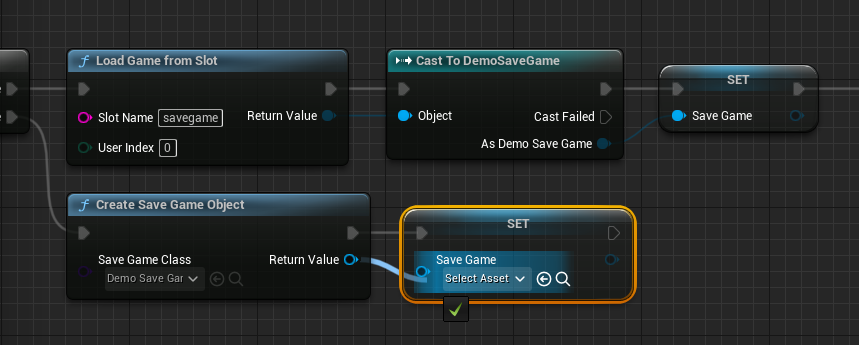
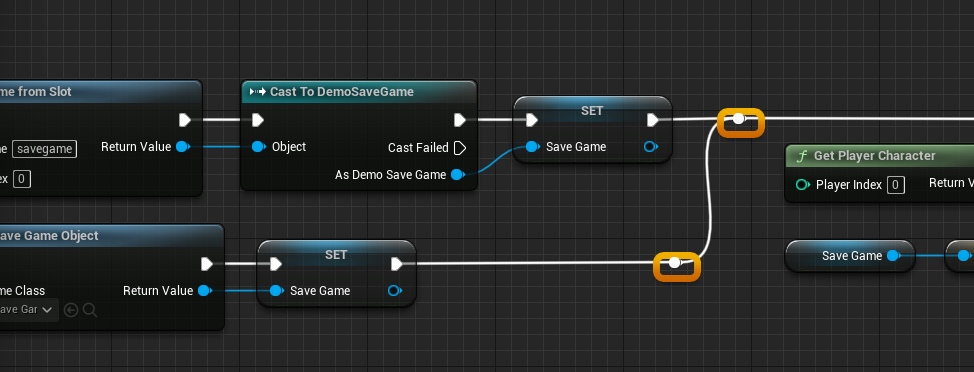
- If a save file exists (True branch): The system uses a "Load Game From Slot" node to retrieve the raw save data. This data is then "Cast To" the custom SaveGame class (e.g., "Cast to DemoSaveGame") to access its specific variables. The
Game Instance‘s "SaveGame" variable is then set to this loaded object. Finally, game-specific logic, such as a "Set Actor Location" node, can be executed, using the loaded data (e.g., "PlayerPosition") to restore the game state (e.g., moving the player character). - If no save file exists (False branch): A "Create Save Game Object" node is used to instantiate a new SaveGame object of the custom class. This new object is then assigned to the
Game Instance‘s "SaveGame" variable, ensuring that there’s always a valid object to work with, even if no previous save exists.
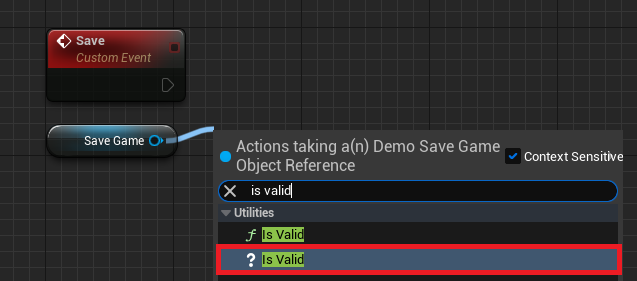
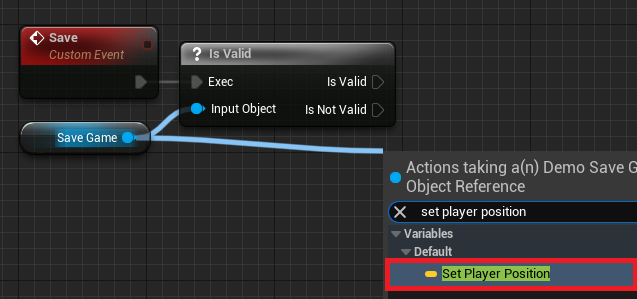
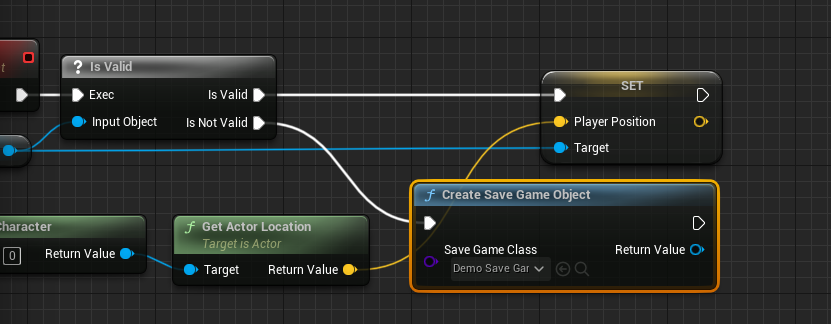
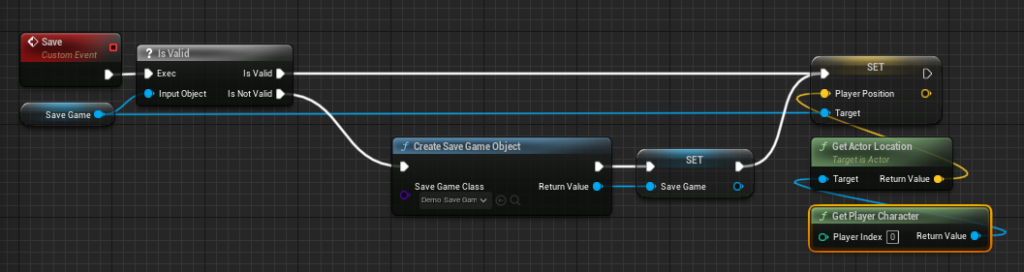
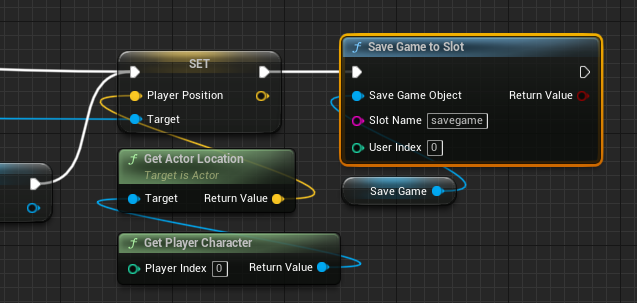
The "Save" event is responsible for writing the current game state to disk. It typically begins by validating if the "SaveGame" object in the Game Instance is valid (i.e., has been loaded or created).
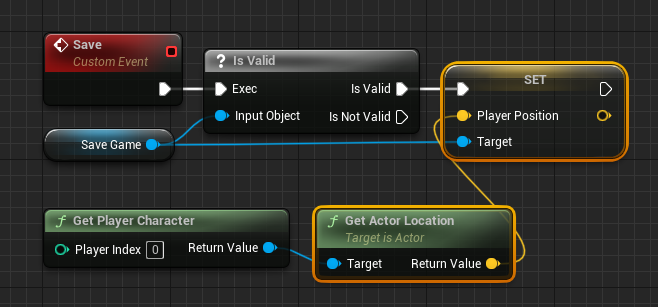
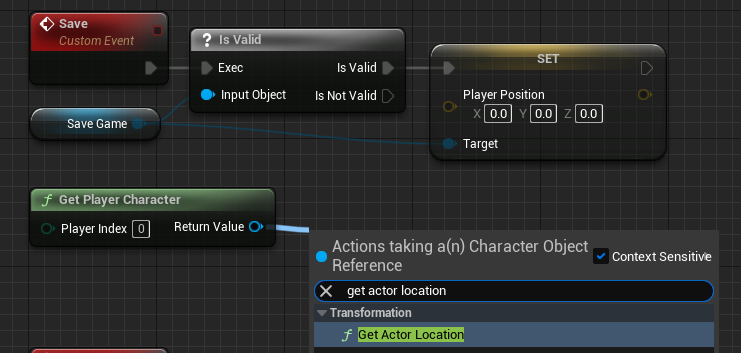
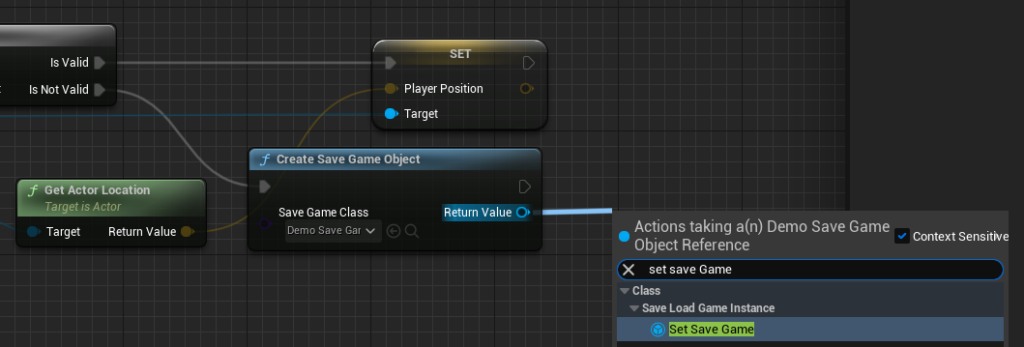
- If the SaveGame object is valid: The game’s current state (e.g., the player character’s current "Actor Location") is retrieved and used to "Set Player Position" within the SaveGame object.
- If the SaveGame object is not valid: A new SaveGame object is created and assigned, similar to the "False" branch of the Load event, before the player position is set.
Finally, either a "Save Game to Slot" or "Async Save Game to Slot" node is called, passing the updated SaveGame object and the chosen "Slot Name" to write the data to the file system. The choice between synchronous and asynchronous saving depends on the volume of data and performance requirements, with the asynchronous option being preferred for large saves to maintain smooth gameplay.
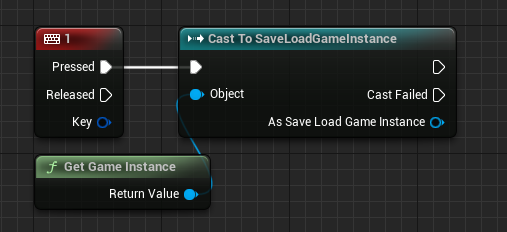
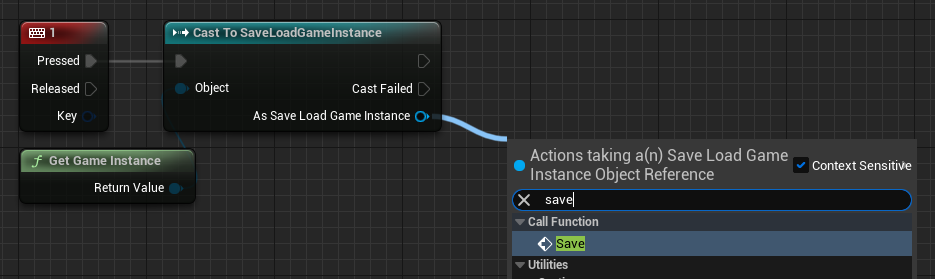
To trigger this functionality, developers typically integrate key press events within their player character Blueprint. For instance, pressing the "1" key might call the "Save" event on the Game Instance, while pressing "2" calls the "Load" event, providing immediate feedback on the system’s operation.
Industry Insights and Developer Experience
Epic Games, the visionary force behind Unreal Engine, consistently champions developer-centric tools that simplify complex tasks. The robust and user-friendly SaveGame system exemplifies this philosophy. Industry analysts and experienced game developers frequently laud the system for its abstraction of low-level file I/O operations, which historically consumed significant development time. "The Unreal Engine SaveGame system is a game-changer, especially for indie studios or smaller teams," remarks Sarah Chen, a senior technical artist at a prominent game development studio. "It allows designers to implement complex save logic directly in Blueprints, freeing up programmers to tackle more intricate engine-level challenges. This dramatically accelerates prototyping and iteration cycles."
Furthermore, the system’s inherent flexibility allows it to scale from simple checkpoint saves in linear games to intricate, multi-layered persistence in expansive RPGs. The clear structure and explicit nodes make debugging and maintenance significantly easier compared to bespoke, ad-hoc save solutions often seen in earlier development cycles.
Broader Implications for Game Development
The integration of such a comprehensive SaveGame system within Unreal Engine 5 carries significant implications for the broader game development landscape:
- Enhanced Developer Productivity: By providing a ready-made, easy-to-use solution, Epic Games drastically reduces the time and resources developers need to allocate to implementing save functionality. This allows teams to focus more on innovative gameplay mechanics, rich content creation, and overall polish.
- Improved Game Quality and Player Experience: A reliable save system is foundational to a high-quality game. The built-in tools minimize the risk of bugs related to data corruption or lost progress, leading to a more stable and enjoyable experience for players. The option for asynchronous saving ensures that even large save operations do not interrupt gameplay flow, further enhancing player satisfaction.
- Increased Accessibility for New Developers: The Blueprint-friendly nature of the SaveGame system lowers the barrier to entry for aspiring game developers. Students and hobbyists can implement sophisticated data persistence without deep programming knowledge, fostering creativity and innovation within the community.
- Scalability for Diverse Projects: Whether a project is a small, single-player experience or a large-scale multiplayer title requiring complex server-side persistence (which can integrate with this client-side system), the
USaveGameframework provides a solid, scalable foundation. - Standardization and Community Support: The widespread adoption of Unreal Engine’s official save system fosters a common language and set of best practices among developers. This leads to a wealth of community-driven tutorials, troubleshooting resources, and shared knowledge, further accelerating development for everyone.
Conclusion
Unreal Engine 5’s built-in SaveGame system is a testament to Epic Games’ commitment to empowering developers with powerful, yet accessible tools. By abstracting the complexities of data serialization and file management, it enables creators to focus on the artistic and gameplay aspects of their projects, confident that player progress will be reliably preserved. As games continue to grow in scope and complexity, the importance of robust, easy-to-implement data persistence solutions like the USaveGame system will only continue to rise, solidifying its role as an indispensable component in the modern game development toolkit. Its blend of power, flexibility, and Blueprint accessibility makes it a cornerstone for creating engaging and persistent interactive experiences that resonate with players worldwide.
About the Author








