
Unreal Engine 5, Epic Games’ flagship development platform, continues to empower creators with an array of powerful tools designed to streamline the game development process. Among these, Data Tables stand out as a particularly indispensable feature, offering a robust and flexible solution for managing vast amounts of game-specific information. This functionality allows programmers and designers to establish and access pre-defined lists of structured data, centralizing critical game parameters and fostering a more efficient, data-driven workflow.
Understanding Data Tables: A Centralized Hub for Game Logic
At its core, a Data Table in Unreal Engine 5 serves as an asset that stores a collection of structured data. This data is organized into rows, each uniquely identified by a key, and each row adheres to a pre-defined schema provided by a Structure (Struct). The utility of this approach lies in its ability to define a consistent list of information, enabling developers to store and retrieve varying values based on specific identifiers.
The primary advantage of Data Tables is their accessibility and persistence. Stored as project assets, they are effortlessly retrievable and updatable from any part of the game’s codebase, whether C++ or Blueprints. Furthermore, the data within these tables remains persistent within the Unreal Editor, allowing developers to populate and modify game values during the design phase, which then become available at runtime. This separation of data from core logic is paramount in modern game development, where parameters for items, enemies, quests, or character statistics are constantly being tweaked for balancing and iteration. Instead of hardcoding values or sifting through complex code, designers can directly manipulate these parameters within the editor, significantly accelerating the development cycle and reducing the risk of introducing bugs through code changes.
This approach aligns with the industry’s broader shift towards data-driven design, a methodology that prioritizes externalizing game parameters from code. Historically, game logic often contained hardcoded values for everything from weapon damage to character movement speed. This made balancing and updates a cumbersome process, often requiring code recompilation and potentially introducing new errors. Data Tables, however, provide a clean, accessible interface for managing these variables, reflecting a commitment by engine developers like Epic Games to provide tools that enhance both productivity and project scalability.
Foundational Elements: Structuring Data with Enums and Structs
Before a Data Table can be effectively utilized, two fundamental Unreal Engine asset types, Enumerations (Enums) and Structures (Structs), must be established. These prerequisites define the very fabric of the data that the Data Table will hold, ensuring type safety, organization, and consistency.
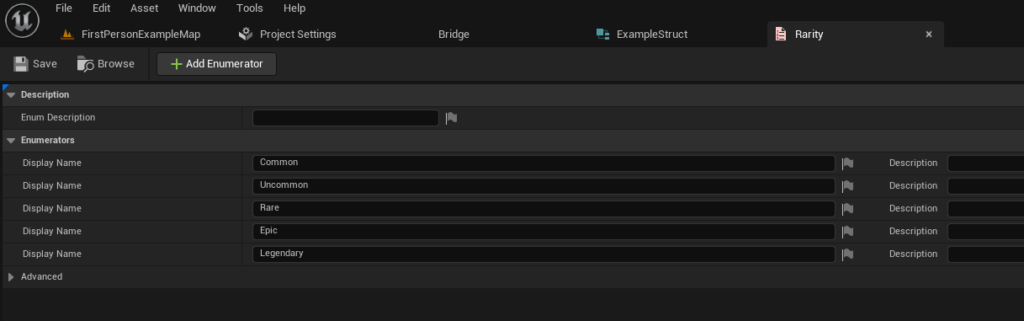
The Role of Enumerations (Enums):
An Enumeration, or Enum, in programming, is a distinct data type that consists of a set of named integer constants. In the context of game development, Enums are invaluable for representing a fixed set of distinct states or categories. For instance, instead of using arbitrary integer values (e.g., 0, 1, 2) to denote item rarity, an Enum allows for clear, descriptive names such as "Common," "Uncommon," "Rare," "Epic," and "Legendary." This not only improves code readability but also prevents errors by restricting input to a predefined set of valid options.
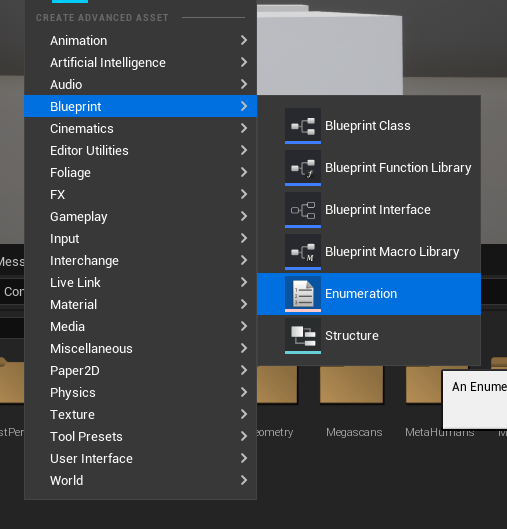
To create an Enum in Unreal Engine 5, developers typically navigate to the Content Browser, right-click, and select "Blueprints" followed by "Enumeration." Once created, descriptive names are assigned to each enumeration value. For our example, representing item quality in a role-playing game, an EItemRarity Enum would be populated with the aforementioned rarity levels. This foundational step ensures that subsequent data entries referring to item rarity will adhere to a consistent and clearly defined set of options.
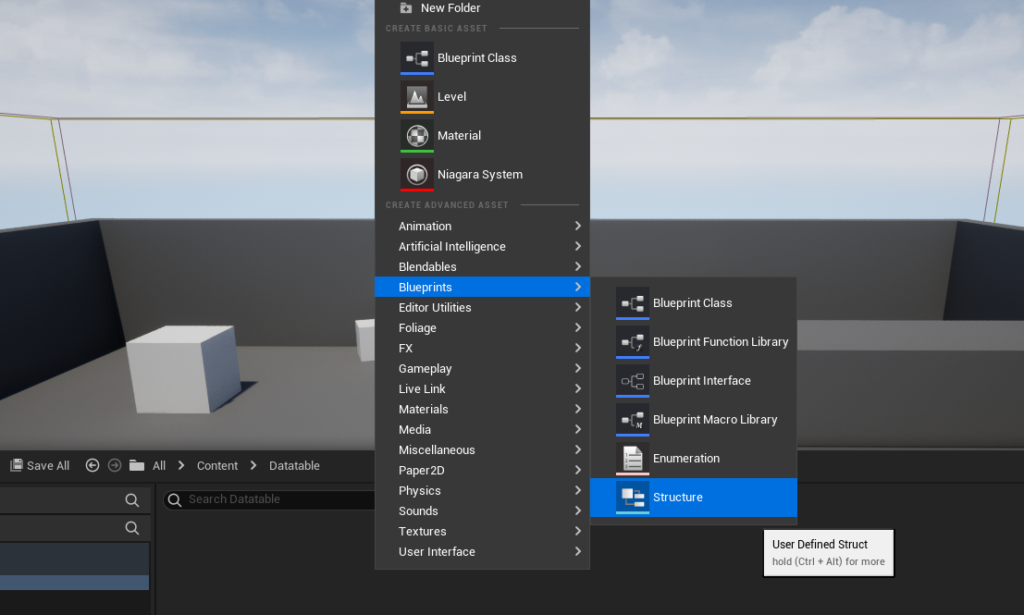
Defining Data Blueprints with Structures (Structs):
Following the creation of any necessary Enums, the next crucial step is to define a Structure (Struct). A Struct is a custom data type that can encapsulate multiple variables of different types under a single, cohesive unit. In essence, it acts as a blueprint or schema for a single row within a Data Table, dictating the types and names of the data fields that each entry will possess.
For instance, if a Data Table is intended to store information about various in-game items, a Struct named FItemData might be created. This Struct would contain variables such as Damage (an integer or float), Rarity (referencing our EItemRarity Enum), and SellPrice (another integer). The power of the Struct lies in its ability to group related data logically, ensuring that every item entry in the Data Table will consistently have these three attributes, each with its specified data type.
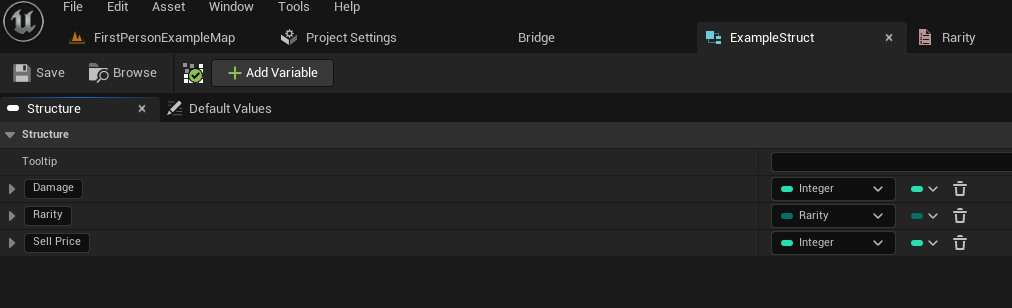
Creating a Struct follows a similar process to Enums: right-clicking in the Content Browser, selecting "Blueprints," and then "Structure." Within the Struct editor, developers add new variables, assigning them appropriate names and types, including any custom Enums created previously. The integration of the EItemRarity Enum into the FItemData Struct for the Rarity variable exemplifies how these foundational elements build upon each other to create a robust data definition. This hierarchical structuring is critical for maintaining data integrity and facilitating scalable content management across large-scale projects.
Constructing the Data Table: From Concept to Asset
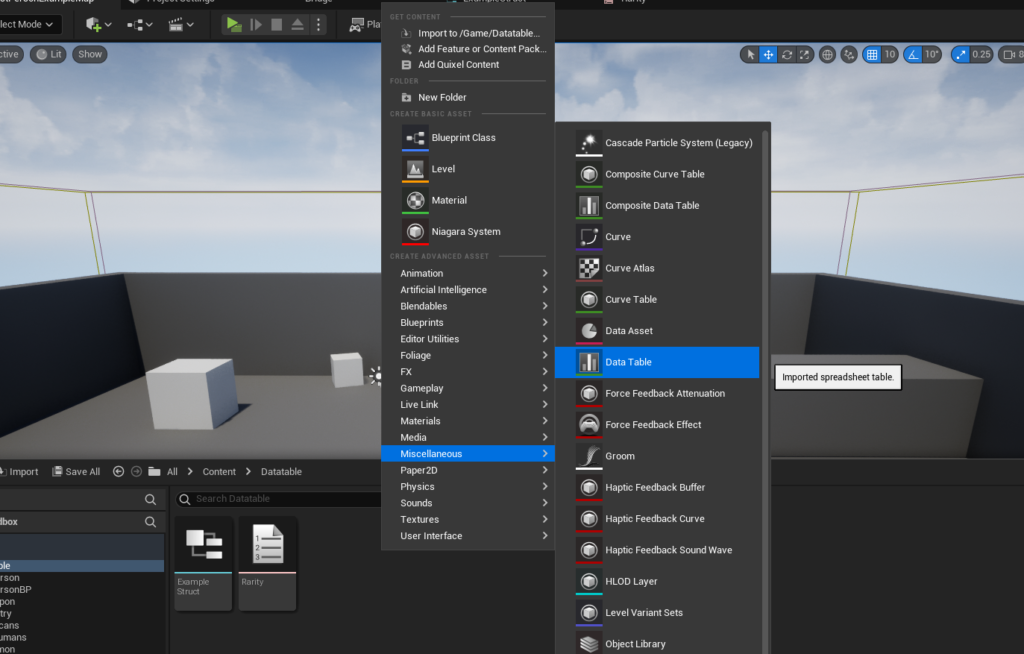
With the foundational Enums and Structs meticulously defined, the final step in establishing the data framework is the creation of the Data Table asset itself. This asset will serve as the repository for all the game data structured according to the previously defined Struct.
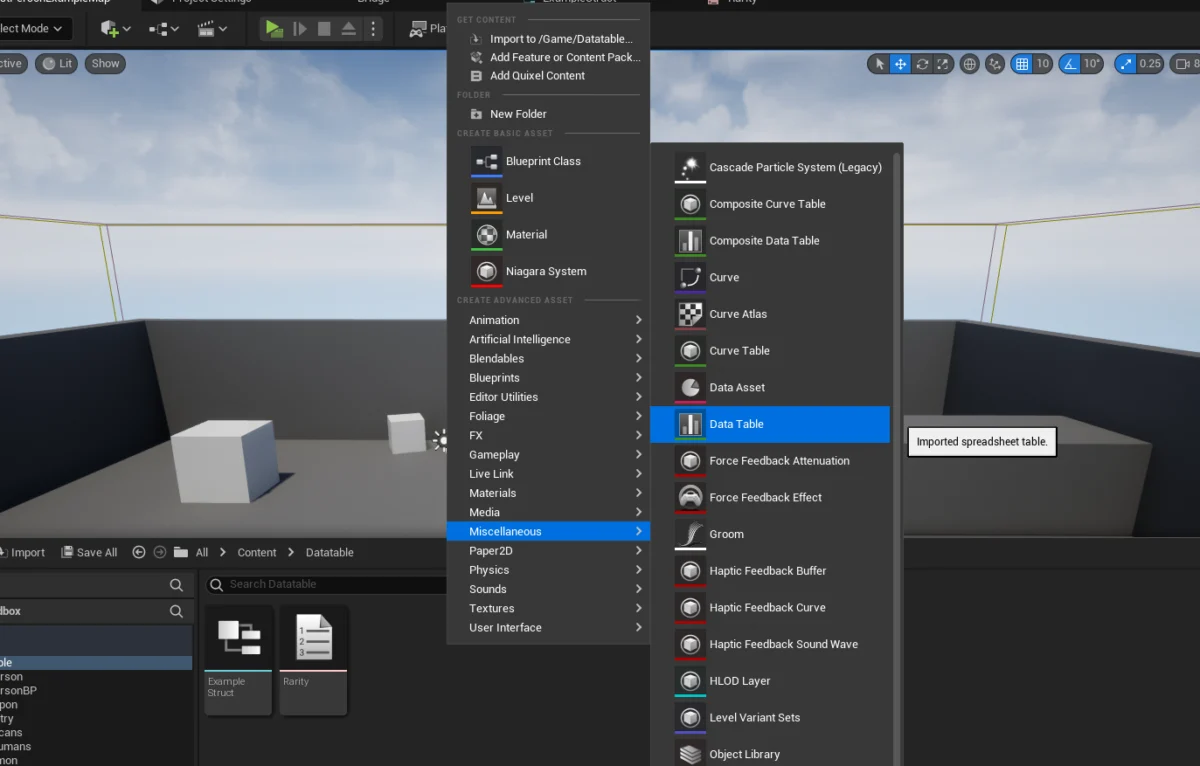
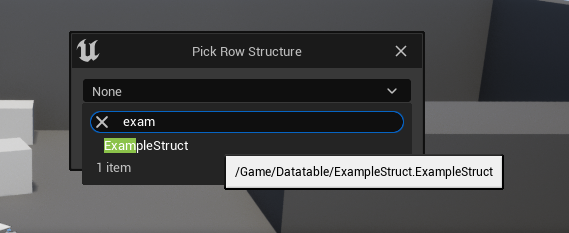
The creation process is straightforward: within the Content Browser, a right-click brings up a context menu. Under the "Miscellaneous" category, the "Data Table" option is selected. Upon choosing this, a crucial prompt appears, asking the developer to select the "Row Structure." This is where the pre-defined Struct, such as our FItemData (or ExampleStruct as per the original guide), is chosen. This selection irrevocably links the Data Table to the Struct, ensuring that every row subsequently added to the table will conform precisely to the FItemData schema, containing fields for Damage, Rarity, and Sell Price. This dependency is fundamental, as it dictates the types of values the Data Table will hold and how they will be organized.
Populating Data Tables: Empowering Designers and Developers
Once the Data Table asset is created and correctly configured with its associated Struct, the next phase involves populating it with actual game data. This is where the system truly shines in empowering non-programmatic roles within a development team.
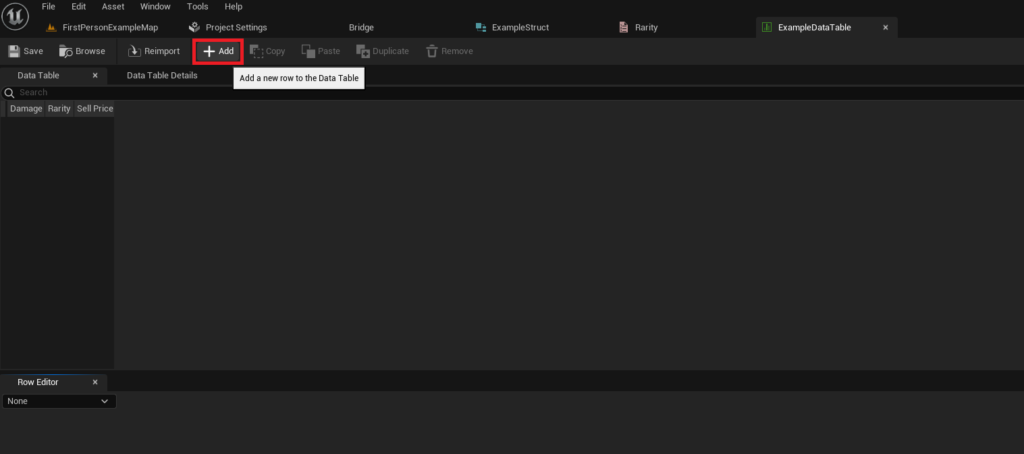
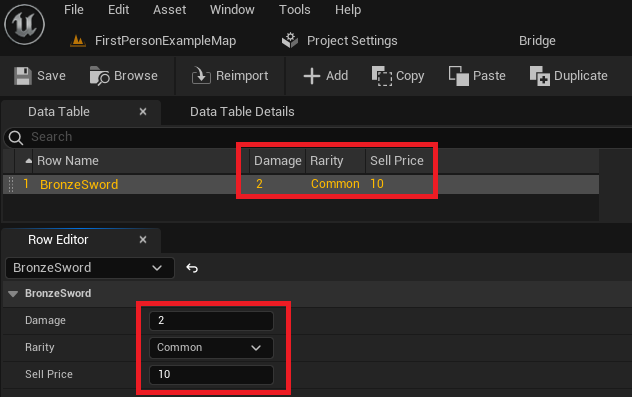
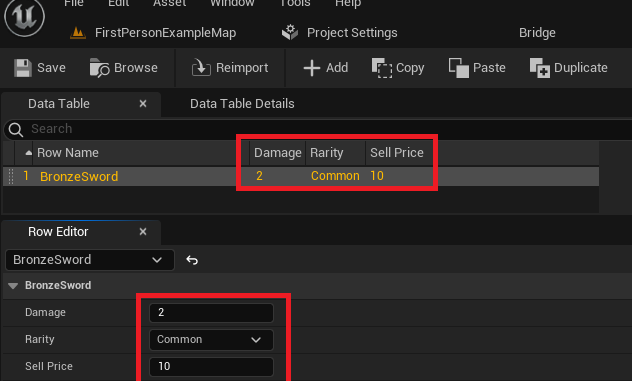
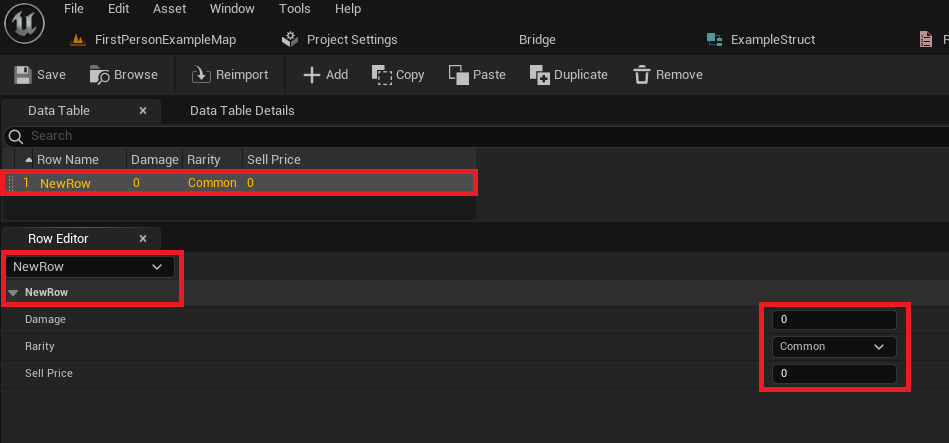
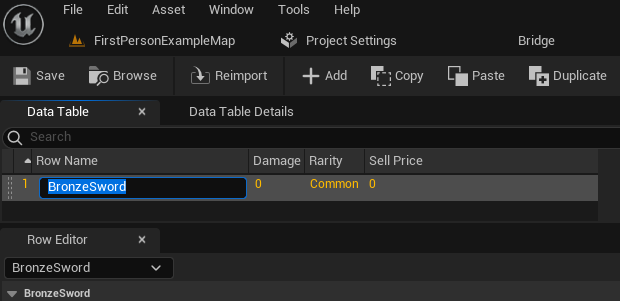
Upon opening the Data Table, an intuitive interface is presented. Developers or designers can simply click the "Add" button to introduce a new row. Each new row initially populates with default values derived from the Struct’s definitions. A critical aspect of Data Tables is the "Row Name" field. This field serves as the unique identifier or "key" for each data entry. For instance, instead of an abstract ID, an item might be named "BronzeSword," providing a human-readable and easily referenced key for that specific item’s data.
The Data Table editor also features a "Row Editor" panel, typically located below the main table view. This panel displays the individual fields of the selected row, allowing for easy modification of values such as Damage, Rarity, and Sell Price. As changes are made in the Row Editor, they are immediately reflected in the main Data Table view above, offering real-time feedback. This direct manipulation capability is transformative for game balancing and content iteration. Designers can rapidly create numerous entries, tweak statistics, and test changes without requiring any code alterations or recompilations. The entire dataset for items, enemies, or any other game system can reside within this single, accessible asset, fostering a truly data-driven approach to game design. It is crucial to remember to "Save" the Data Table asset frequently to ensure all modifications are persistently stored within the project.
Accessing Data Tables: Integrating Information into Game Logic
With the Data Table populated, the final, and arguably most impactful, step is learning how to access and utilize this structured data within the game’s logic. Unreal Engine 5 provides straightforward Blueprint nodes for both retrieving specific data entries and iterating through an entire table.
Retrieving Specific Rows:
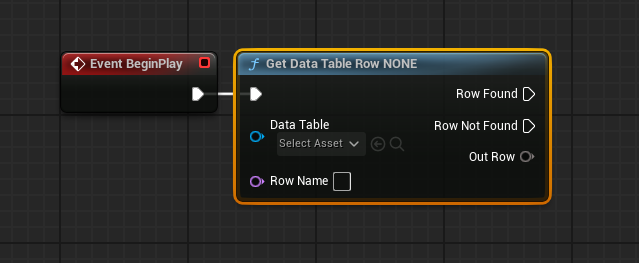
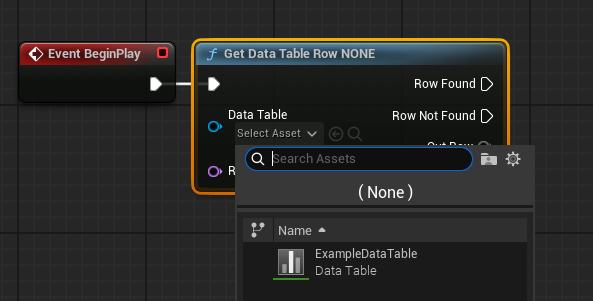
To access a single, specific data entry, the Get Data Table Row node is employed. This node requires two primary inputs: a reference to the Data Table asset itself and the "Row Name" (the unique key) of the specific entry desired. When executed, the node attempts to locate the row corresponding to the provided name.
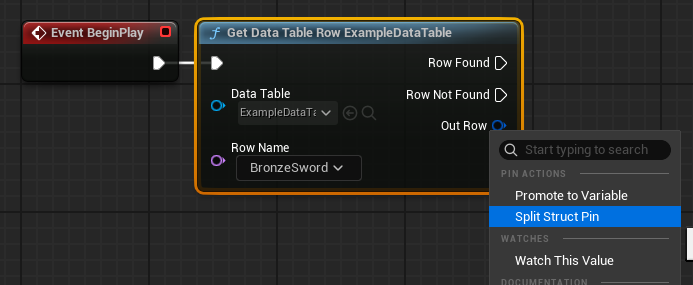
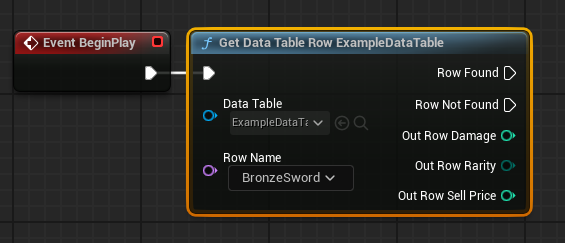
The Get Data Table Row node offers two execution pins for flow control: "Row Found" and "Row Not Found." This robust error handling allows developers to implement conditional logic based on whether the requested data exists. If the row is found, the Out Row pin will contain the entire Struct’s data for that entry. To access individual fields within this Struct (e.g., Damage, Rarity, Sell Price), the Out Row pin can be right-clicked and "Split Struct Pin" selected, exposing each variable as a separate output pin. Furthermore, if the "Row Name" input is left unconnected, it often transforms into a convenient dropdown menu listing all available row names within the selected Data Table, simplifying selection during development. This method of retrieval is ideal for scenarios where a specific item’s data is needed, such as when a player equips a particular weapon or an enemy of a known type is spawned.
Iterating Through Data Tables: Handling Collections
Beyond retrieving individual entries, it is often necessary to process all or multiple entries within a Data Table. For such scenarios, Unreal Engine 5 provides the Get Data Table Row Names node. This node, given a Data Table asset reference, returns an Array containing all the unique "Row Names" (keys) present in the table.
This array of row names can then be fed into a For Each Loop node. The For Each Loop is a fundamental programming construct that executes a set of actions for each element in an array. In this context, for every "Row Name" in the array obtained from Get Data Table Row Names, the Loop Body of the For Each Loop will execute.
Within this loop, the "Array Element" output (which represents the current row name) can be connected to the "Row Name" input of a Get Data Table Row node. This creates a powerful mechanism: for each row name in the Data Table, its corresponding data is fetched. The Out Row data can then be utilized for various purposes, such as populating an in-game shop inventory, generating a list of all possible enemy types, or performing batch calculations on item statistics. This looping capability is crucial for dynamic content generation and game systems that need to react to or display all available data.
Broader Implications and Strategic Advantages
The implementation of Data Tables in Unreal Engine 5 transcends mere data storage; it fundamentally alters and improves several critical aspects of game development:
- Development Efficiency: By separating data from code, Data Tables significantly reduce development time. Iteration on game balance, content parameters, and feature configurations becomes a matter of editing values in a table rather than modifying and recompiling code. This agility is invaluable in fast-paced development cycles.
- Team Collaboration: Data Tables act as a single source of truth for game data, facilitating seamless collaboration between different disciplines. Designers can directly adjust values without programmer intervention, artists can reference consistent asset parameters, and quality assurance teams can easily verify data. This minimizes bottlenecks and fosters parallel workflows.
- Scalability and Maintenance: As projects grow in complexity, managing hundreds or thousands of items, characters, or levels can become unwieldy. Data Tables provide a structured, scalable solution that simplifies the addition of new content and the maintenance of existing systems. Updates and patches become less risky as changes are localized to data rather than distributed across code.
- Data-Driven Design Philosophy: Embracing Data Tables encourages a data-driven design philosophy, where game mechanics are flexible and easily modifiable through external data. This leads to more robust, adaptable game systems that can be tuned and expanded long after initial development, supporting live operations and content updates.
- Industry Context: The adoption of such data management tools is a hallmark of professional game development studios, from large AAA publishers to agile indie teams. It reflects a mature understanding of project management and the need for efficient workflows in an increasingly complex and competitive industry.
Conclusion: The Cornerstone of Flexible Game Development in Unreal Engine 5
In conclusion, Data Tables in Unreal Engine 5 represent an essential tool for any developer aiming to build robust, scalable, and collaborative projects. From the initial conceptualization of data through Enums and Structs, to the meticulous population and dynamic retrieval of information, the entire workflow is designed to optimize efficiency and maintainability.
The ability to create, configure, populate, and implement these tables without requiring deep C++ knowledge democratizes content management, allowing designers and other non-programmers to exert direct control over significant portions of game logic. By centralizing game data, reducing hardcoding, and streamlining iteration, Data Tables stand as a cornerstone of flexible and modern game development practices in Unreal Engine 5, proving indispensable for any project seeking to efficiently manage its growing complexity.
About the Author








