
Unreal Engine 5 (UE5) continues to set industry standards for game development, offering a comprehensive suite of tools designed to empower creators from independent studios to AAA powerhouses. Among its most fundamental and versatile features are Data Tables, a critical component for implementing robust data-driven design in any interactive project. These tables serve as structured repositories for predefined information, enabling programmers and designers alike to manage, access, and iterate on game data with unparalleled efficiency and collaborative ease.
The Imperative of Data-Driven Design in Modern Game Development
In the rapidly evolving landscape of video game production, the ability to quickly iterate, scale content, and maintain consistency across vast projects is paramount. Hardcoding values directly into source code or Blueprints can lead to inflexible systems, cumbersome updates, and increased risk of errors. This challenge led to the widespread adoption of data-driven design principles, where gameplay parameters, item specifications, character statistics, and other dynamic elements are externalized into accessible data structures. Data Tables in Unreal Engine 5 represent a highly refined implementation of this philosophy, offering a native, editor-integrated solution that streamlines development workflows.
Unreal Engine’s commitment to providing tools that democratize game creation is evident in the design of Data Tables. They are not merely a programmer’s utility but a powerful resource for technical designers, content creators, and quality assurance specialists. By decoupling data from logic, teams can work in parallel, allowing designers to tweak game balance or add new content without requiring a programmer to modify and recompile code. This agility is a cornerstone of efficient project management and rapid prototyping, making Data Tables an indispensable asset in any serious UE5 project.
Understanding the Core: What is an Unreal Engine 5 Data Table?
At its heart, an Unreal Engine 5 Data Table is an asset that stores a collection of structured data, typically based on a defined Blueprint Struct or a C++ Struct inheriting from FTableRowBase. This asset allows developers to create a list of data entries, each uniquely identified by a "key" (a row name, typically an FName), and store different values for a predefined set of properties within that entry.
The data within these tables is stored directly as an asset within the Unreal Editor, ensuring seamless integration with the engine’s asset management system. This approach offers several key advantages:
- Centralized Data Management: All related data for a specific category (e.g., items, enemies, abilities) resides in a single, easily locatable asset.
- Editor Integration and Persistence: Data can be created, viewed, and modified directly within the Unreal Editor. These changes are saved persistently with the project, meaning designers can populate data during development and have it readily available at runtime without additional loading mechanisms.
- Ease of Retrieval and Update: The engine provides straightforward nodes in both Blueprint and C++ to query data tables, allowing rapid access to specific rows based on their unique key. Updates are as simple as modifying a value in the table asset.
- Type Safety and Structure: By basing a Data Table on a Struct, developers enforce a consistent data schema for all entries. This ensures type safety and prevents erroneous data input, contributing to a more stable and predictable game.
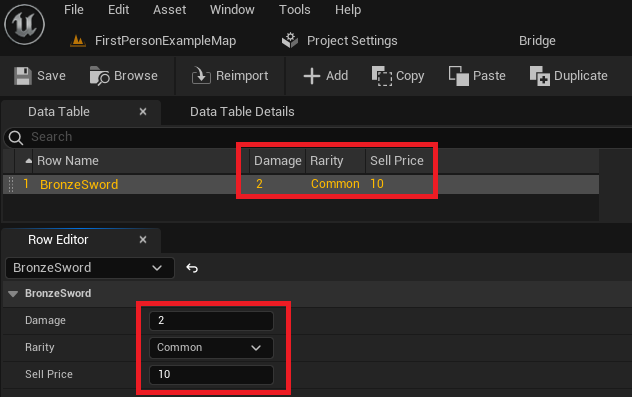
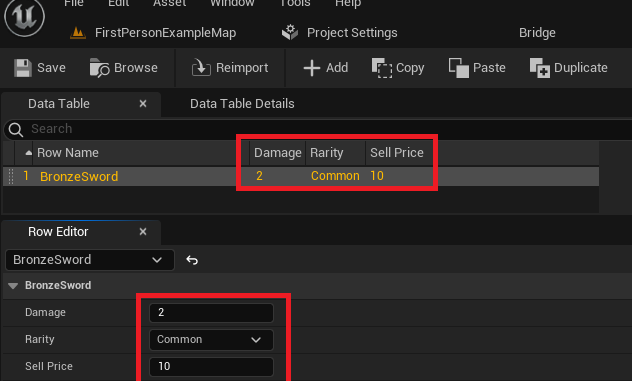
Consider the practical implications: instead of manually adjusting damage values for dozens of unique weapons across various Blueprint classes, a designer can open a single "WeaponData" Data Table, locate the "BronzeSword" row, and modify its damage attribute. This change instantly propagates to all game systems referencing that specific data table entry, illustrating the power of this data-driven approach.
Establishing the Foundation: Enums and Structs
Before a Data Table can be populated, its underlying structure must be defined. This process typically involves creating an Enumeration (Enum) and a Structure (Struct), which together establish the schema for the data entries.
1. Defining an Enumeration (Enum) for Categorical Data
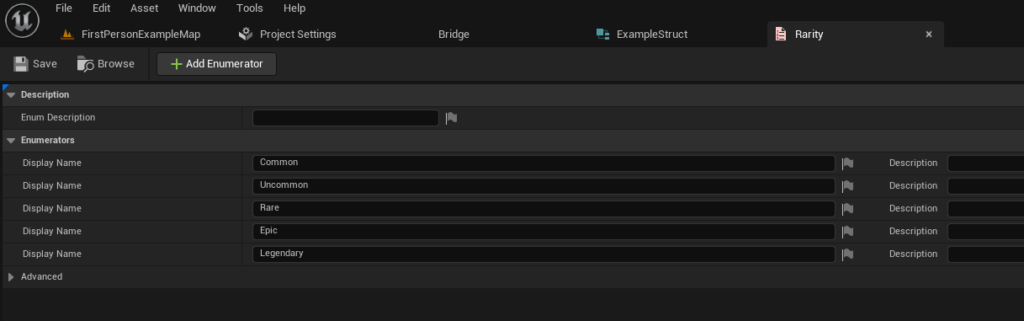
Enums are fundamental for representing a fixed set of named constant values, providing clarity and type safety for categorical data. In the context of game development, enums are frequently used for defining item rarities, character classes, status effects, or other distinct states.
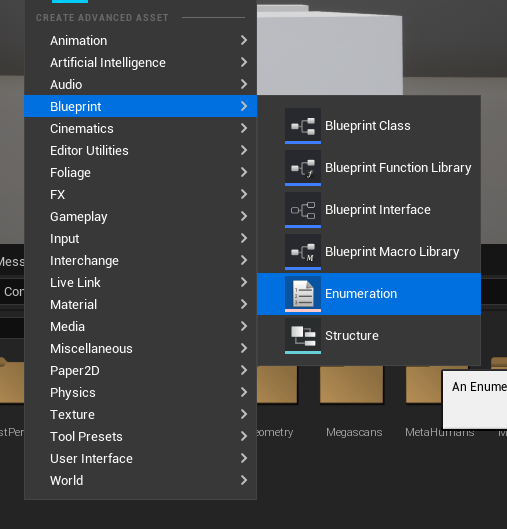
- Creation Process: To create an Enum, developers navigate to the Content Browser, right-click, and select
Blueprints > Enumeration. A descriptive name, such asE_ItemRarity, is then assigned. - Value Assignment: Within the Enum editor, specific values are added. For an item rarity system in a role-playing game (RPG), these might include
Common,Uncommon,Rare,Epic,Legendary, andMythic. Each entry is assigned an internal index, but its descriptive name enhances readability in both editor and code. The use of enums standardizes these categories, preventing typos or inconsistencies that could arise from using raw strings or integers. This early step is crucial for maintaining data integrity and simplifying future game logic that relies on these distinct categories.
2. Constructing the Data Schema: The Blueprint Struct
The Blueprint Struct acts as the blueprint for each row in the Data Table, defining the types and names of all the properties an individual data entry will possess. All Structs intended for use with Data Tables must implicitly or explicitly inherit from FTableRowBase if created in C++. However, for Blueprint-only projects, Unreal Engine handles this underlying inheritance automatically when a Struct is created and subsequently selected as a Data Table’s row structure.
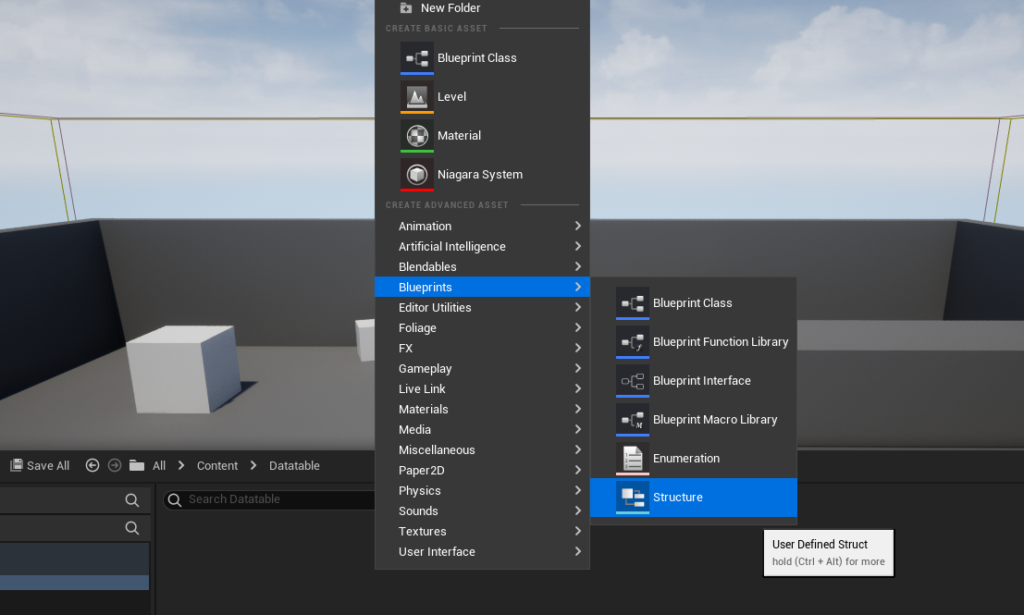
- Creation Process: Similar to Enums, a Struct is created by right-clicking in the Content Browser and selecting
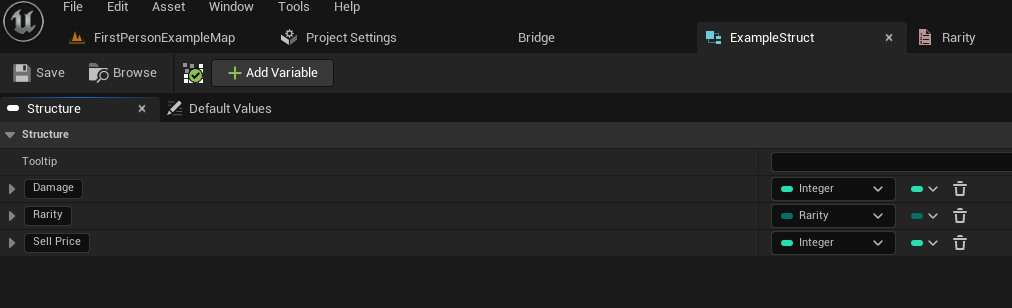
Blueprints > Structure. A name likeF_ItemData(using theFprefix is a common convention for Structs) is appropriate. - Adding Variables: Inside the Struct editor, variables are added, each with a specific type and name, to represent the characteristics of an item. For an RPG item, this might include:
Damage(Integer): Representing the item’s offensive power.Rarity(E_ItemRarity Enum): Utilizing the previously created enum to assign a quality level.SellPrice(Integer): Defining the monetary value when selling the item.- Additional variables could include
ItemName(Text),IconTexture(Texture2D Object Reference),Description(Text),Weight(Float), orEquipSlot(another custom Enum).
- Benefits of Structs: By consolidating these related properties into a single Struct, developers create a cohesive and easily manageable data package. This structured approach ensures that every item entry in the Data Table will consistently have these defined properties, promoting order and reducing the likelihood of missing data.
Creating the Data Table Asset
With the foundational Enum and Struct in place, the Data Table asset itself can now be generated.
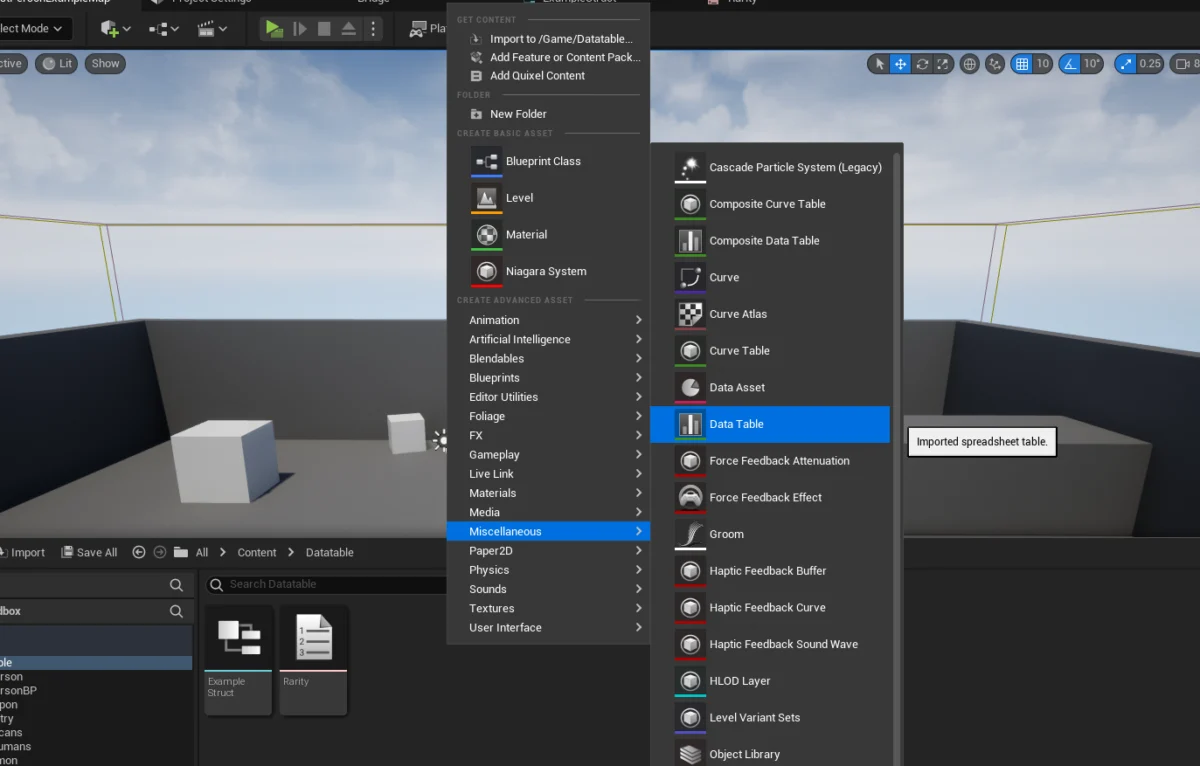
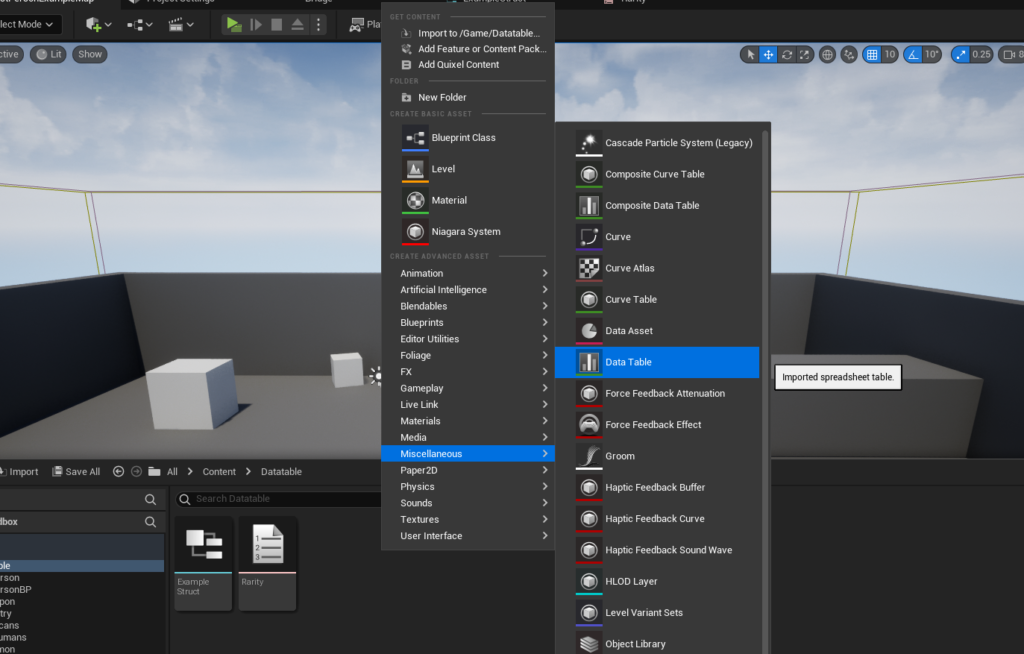
- Generation Steps: In the Content Browser, right-click, navigate to
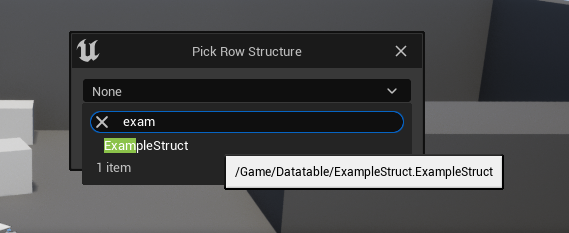
Miscellaneous > Data Table. - Struct Selection: Upon creation, a pop-up window prompts the developer to select the "Row Structure." This is where the
F_ItemDataStruct, defined earlier, is chosen. This crucial step links the Data Table to its schema, ensuring that every row added to the table will conform to the properties defined withinF_ItemData. - Naming Convention: The Data Table asset should be given a clear and descriptive name, such as
DT_ItemData, following standard Unreal Engine naming conventions (DT_prefix for Data Tables).
Populating the Data Table: The Editor Workflow
Once the Data Table asset is created and linked to its Struct, it becomes a powerful tool for content creation. Double-clicking the DT_ItemData asset opens the Data Table editor, presenting a tabular view for data entry.
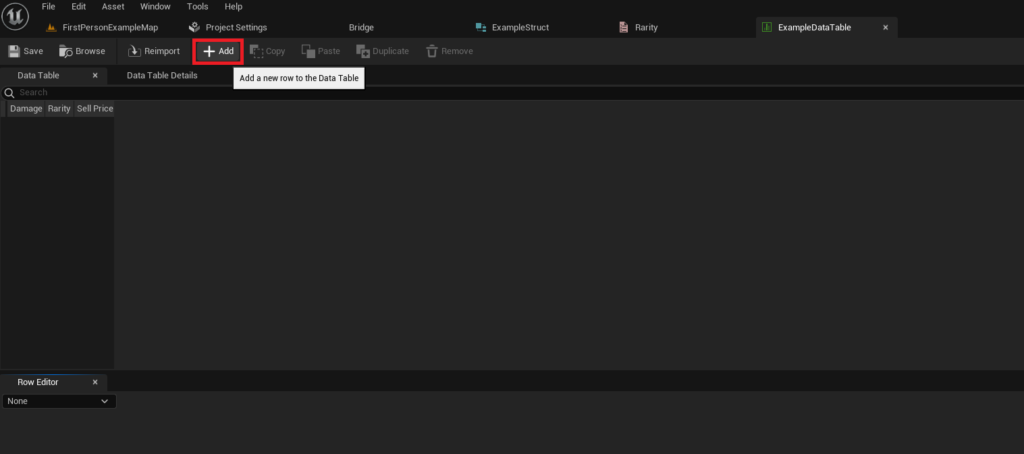
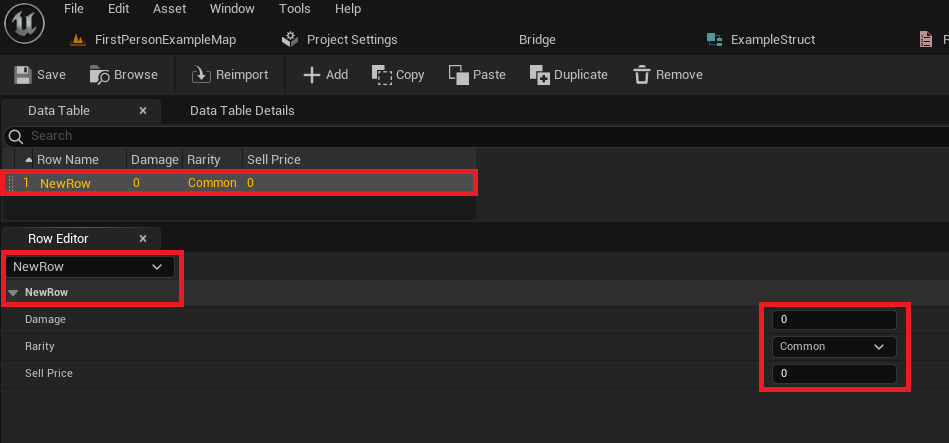
- Adding Rows: The editor features an "Add" button, which, when clicked, generates a new row in the table. Each new row automatically inherits the default values defined in the
F_ItemDataStruct. - Row Editor and Value Assignment: Below the main table view, the "Row Editor" pane provides a detailed interface for modifying the values of the currently selected row. Here, developers can input specific data for each property (Damage, Rarity, Sell Price, etc.).
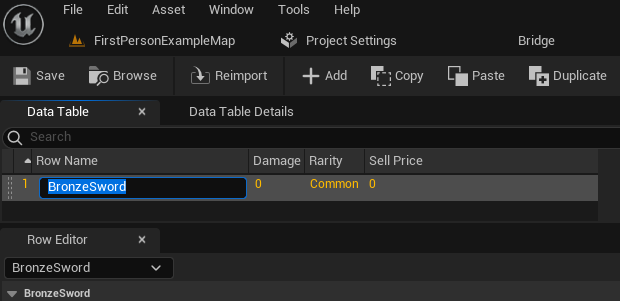
- Defining Row Names (Keys): Crucially, each row requires a unique "Row Name." This name serves as the primary key for accessing that specific data entry programmatically. For an item like a bronze sword, an intuitive row name would be
BronzeSword. Consistent and descriptive naming conventions for rows are vital for efficient data retrieval. - Iterative Data Entry: The process is highly iterative. Developers can add multiple rows, assigning unique names like
SilverSword,GoldSword,MagicStaff,HealthPotion, and populate their respective properties. This workflow enables designers to quickly define a wide array of game items or other content without touching any code. - Saving Changes: A fundamental best practice in Unreal Engine development, especially when working with data assets, is to
Savefrequently. Unsaved changes to a Data Table asset will be lost if the editor closes unexpectedly.
This visual and interactive approach to data population significantly reduces the barrier to entry for content creators, allowing them to directly influence gameplay parameters and introduce new assets into the game world without deep programming knowledge.
Accessing Data Tables in Gameplay Logic
Once populated, the true power of Data Tables is realized through their integration with game logic, typically via Blueprints or C++. Unreal Engine provides dedicated nodes and functions for efficient data retrieval.
1. Direct Row Access: The Get Data Table Row Node
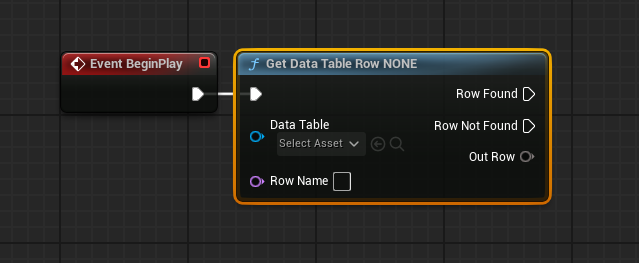
For accessing a specific data entry based on its unique row name, the Get Data Table Row node is the primary tool.
- Node Setup:
- Data Table Reference: This input pin requires a reference to the specific Data Table asset (
DT_ItemDatain our example). This can be set directly in the node’s details panel or dynamically provided via a variable. - Row Name: This input pin takes an
FName(a string-like identifier optimized for Unreal Engine) corresponding to the unique name of the row to be retrieved (e.g.,BronzeSword). The node often provides a dropdown list of available row names from the referenced Data Table, aiding in selection and preventing typos.
- Data Table Reference: This input pin requires a reference to the specific Data Table asset (
- Output Pins:
- Row Found (Execution Pin): This pin executes if a row matching the provided
Row Nameis successfully found. - Row Not Found (Execution Pin): This pin executes if no row with the specified
Row Nameexists. This is crucial for robust error handling, allowing developers to implement fallback logic or log warnings. - Out Row (Struct Pin): If the row is found, this pin outputs the
F_ItemDataStruct containing all the properties (Damage, Rarity, Sell Price) of the retrieved row.
- Row Found (Execution Pin): This pin executes if a row matching the provided
- Splitting the Struct Pin: The
Out Rowpin initially appears as a single Struct. By right-clicking it and selectingSplit Struct Pin, the Struct expands into individual output pins for each of its member variables (e.g.,Damage,Rarity,SellPrice). This provides direct access to the specific data points needed for game logic.
This direct access method is ideal for scenarios where a specific item or entity’s data is required, such as when a player equips an item, an enemy spawns, or a quest requires data about a particular objective.
2. Iterating Through Data Tables: Looping Over Rows
In many gameplay scenarios, it’s necessary to process all or a subset of entries within a Data Table. Examples include displaying all items in a shop inventory, calculating aggregate statistics, or performing validation checks on all defined entities.
- Getting Row Names: The
Get Data Table Row Namesnode is the first step. It takes a Data Table reference and outputs anArrayofFNames, where eachFNamecorresponds to a unique row name in the table. - The
For Each LoopNode: The output array fromGet Data Table Row Namesis then connected to theArrayinput of aFor Each Loopnode. This node iterates through each element in the array, executing itsLoop Bodypin for every row name.- Array Element (Output Pin): During each iteration, this pin provides the current
FName(row name) from the array.
- Array Element (Output Pin): During each iteration, this pin provides the current
- Combining for Looped Access: The
Array Elementfrom theFor Each Loopis then connected to theRow Nameinput of aGet Data Table Rownode (configured with the same Data Table reference). This setup allows the game logic to retrieve theF_ItemDataStruct for each row, one by one, enabling operations on all entries. - Applications: This looping mechanism is invaluable for systems like dynamic inventory displays, crafting recipes that list all possible outcomes, or AI systems that evaluate different enemy types. It facilitates comprehensive data processing and ensures that all defined content can be integrated into dynamic gameplay systems.
Broader Impact and Strategic Implications
The integration of Data Tables within Unreal Engine 5 extends far beyond simple data storage, profoundly influencing team dynamics, project scalability, and the overall quality of game development.
1. Enhanced Collaboration and Workflow Efficiency:
Data Tables act as a shared "single source of truth" for critical game data. Designers can adjust item statistics, enemy behaviors, or quest parameters directly in the editor without requiring programmer intervention. This significantly reduces dependencies between team members, allowing designers to rapidly prototype and balance gameplay, while programmers can focus on core system development. This concurrent workflow accelerates development cycles and fosters a more collaborative environment.
2. Scalability and Content Expansion:
As games grow in scope, the ability to add new content seamlessly becomes crucial. Data Tables excel here, allowing the addition of hundreds or even thousands of new items, characters, or levels by simply adding new rows and populating their data. This eliminates the need for code changes or recompilation, making content expansion highly scalable and less prone to introducing new bugs into the codebase. This agility is a key differentiator for projects aiming for long-term support and frequent content updates.
3. Maintainability and Reduced Error Rates:
Centralizing data in structured tables drastically improves project maintainability. Instead of hunting through multiple Blueprint classes or C++ files for a specific value, developers know exactly where to find and modify it. The structured nature of Data Tables, enforced by Structs, also reduces the chance of data entry errors, as values are constrained by their defined types. This leads to a more robust and predictable game experience.
4. Facilitating Game Balancing and Iteration:
Game balancing is an ongoing process that often requires numerous adjustments to numerical values (damage, health, speed, cost). Data Tables provide an ideal environment for this. Designers can quickly modify values, test them in-game, and revert or refine them with minimal overhead. This rapid iteration cycle is vital for achieving well-tuned gameplay mechanics that resonate with players.
5. Localization and Internationalization:
While not explicitly covered in the guide, Data Tables are frequently employed in conjunction with String Tables for game localization. By storing localized text strings in Data Tables, developers can easily manage multiple language versions of in-game text, descriptions, and UI elements, making the game accessible to a global audience. This highlights the extensibility of Data Tables beyond purely numerical or categorical data.
6. Empowering Non-Programmers:
Unreal Engine’s philosophy consistently emphasizes tools that democratize development, making powerful features accessible to creators of all technical backgrounds. Data Tables, especially when combined with Blueprint scripting, perfectly embody this principle. They allow non-programmers, such as game designers, to directly author and manage significant portions of game content, reducing bottlenecks and fostering creative autonomy.
Conclusion
Data Tables stand as a cornerstone of efficient and scalable game development within Unreal Engine 5. This comprehensive guide has detailed the process from defining foundational enumerations and structures to creating, populating, and ultimately leveraging Data Tables in gameplay logic. By embracing this data-driven approach, developers can cultivate highly organized projects, streamline collaborative workflows, and build dynamic, adaptable game worlds that are easy to maintain and expand. The ability to manage complex game data efficiently and without the need for extensive C++ knowledge solidifies Data Tables as an indispensable tool for any Unreal Engine 5 project aiming for professionalism, scalability, and robust performance.
About the Author








