
Data persistence, manifested through robust save and load systems, is an indispensable pillar of modern video game development, directly influencing player engagement, satisfaction, and the overall integrity of a game experience. Without the ability to reliably store and retrieve player progress, game states, and crucial dynamic information, the immersive worlds and intricate narratives crafted by developers would lose their fundamental replayability and value. Unreal Engine 5, a leading platform in game development, addresses this critical need with a sophisticated yet accessible built-in SaveGame system, empowering developers to seamlessly integrate data persistence into their projects with remarkable efficiency. This system facilitates the straightforward serialization of game data to files stored on the user’s machine, enabling effortless retrieval and application of this data through a concise set of functions. This guide delves into the architecture, implementation, and best practices for leveraging Unreal Engine 5’s SaveGame system, providing a comprehensive understanding for developers aiming to create resilient and player-friendly experiences.

The Imperative of Data Persistence in Modern Gaming
The landscape of contemporary video games demands more than just engaging gameplay; it necessitates a commitment to preserving the player’s journey. From single-player epics with sprawling narratives to multiplayer experiences tracking player statistics and inventories, the expectation for persistent data is universal. Industry data consistently highlights player frustration and abandonment rates skyrocketing when save systems are unreliable or non-existent. A study by gaming analytics firms often indicates that games with frequent and reliable auto-save features, combined with intuitive manual save options, report higher player retention rates and more positive community sentiment. The emotional investment players make in their characters, accomplishments, and progress underscores the technical imperative of robust save systems. Losing hours of gameplay due to a crash or an oversight in saving can be devastating, leading to negative reviews, reduced sales, and long-term damage to a developer’s reputation. Historically, save systems have evolved from simple memory card blocks to complex database-driven solutions, each iteration driven by the ever-increasing complexity of game worlds and player expectations for seamless continuity. Unreal Engine’s SaveGame system provides a refined, engine-level abstraction that handles many of the underlying complexities of file I/O and data serialization, allowing developers to focus on what data to save rather than how to save it at a low level.
Unreal Engine’s Native SaveGame System: An Architectural Overview
At the heart of Unreal Engine 5’s data persistence mechanism lies the SaveGame class. This foundational Blueprint or C++ class acts as a dedicated container for all the variables and data structures that a developer intends to preserve across game sessions. Unlike standard Blueprint actors or objects, the SaveGame class is specifically designed for serialization, meaning it can be converted into a format suitable for storage (e.g., a binary file) and then reconstructed back into an object when needed. This serialization process is largely handled by the engine, abstracting away the intricacies of converting complex data types into a stream of bytes and vice-versa.
When data is saved, the engine takes the SaveGame object, extracts the values of its declared variables, and writes them into a file on the user’s local storage. Conversely, when data is loaded, the engine reads this file, reconstructs a SaveGame object, and populates its variables with the stored values. This elegant design ensures that developers can manage their save data in a structured, object-oriented manner. The system is remarkably versatile, supporting the saving and loading of almost every standard Blueprint variable type, including primitive types (integers, booleans, floats), complex types (vectors, rotators, transforms), arrays, maps, and even references to other UObject derived classes, provided they are themselves serializable or handled with specific logic.
The location of these save files is platform-dependent, adhering to standard operating system conventions for application data storage. On Windows systems, save files are typically found within the user’s Local Appdata folder, ensuring they are separated from the game’s core installation files. For macOS users, the files reside in Library/Application Support, while Linux environments place them under /home/username/.local/share. This standardized approach ensures that save files are managed appropriately by the operating system, often making them resilient to game uninstalls or re-installations, and allowing for potential cloud synchronization through external services. While SaveGame is highly effective for local data persistence, developers building multiplayer online games often supplement or replace it with server-side database solutions for enhanced security, scalability, and cross-platform consistency. However, for the vast majority of single-player or local multiplayer scenarios, the SaveGame system provides a robust and performant solution.
Crafting Your Custom SaveGame Class: The Foundation of Data Storage
The initial step in implementing data persistence in Unreal Engine 5 involves defining what exactly needs to be saved. This is achieved by creating a custom SaveGame Blueprint class, which will serve as the blueprint for your game’s save data structure. This process begins within the Unreal Editor’s Content Drawer.
Creation Steps:
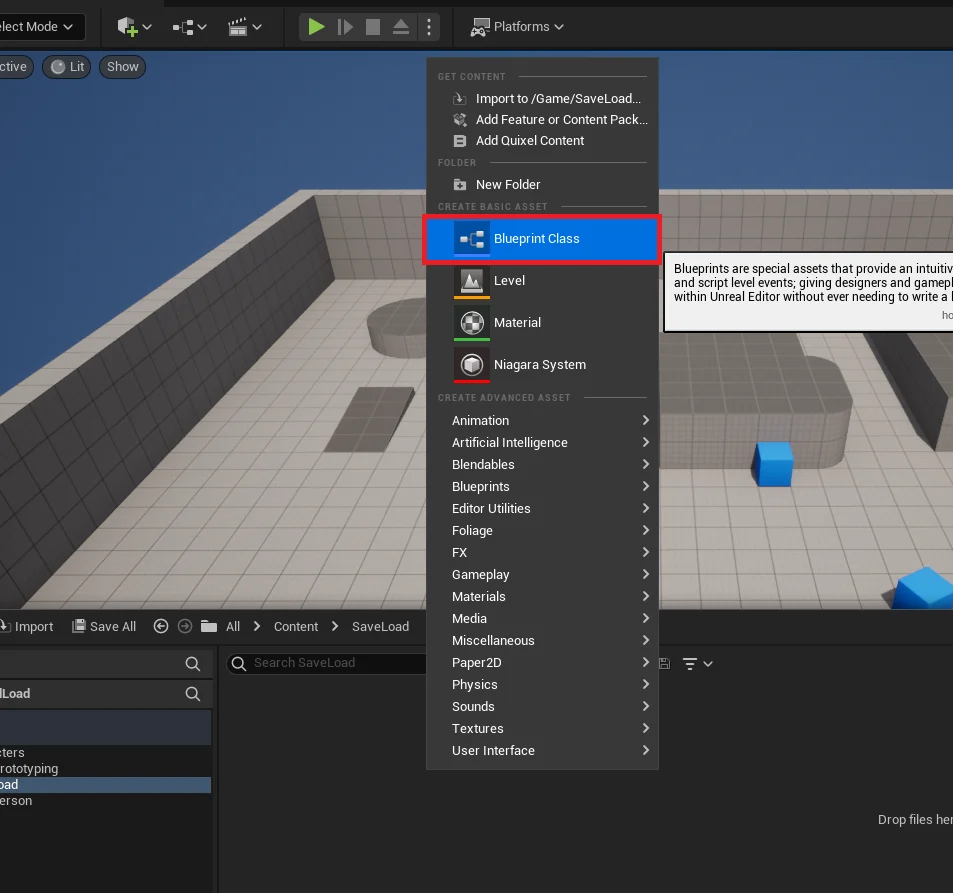
- Initiate Blueprint Creation: Navigate to the Content Browser, right-click, and select "Blueprint Class."
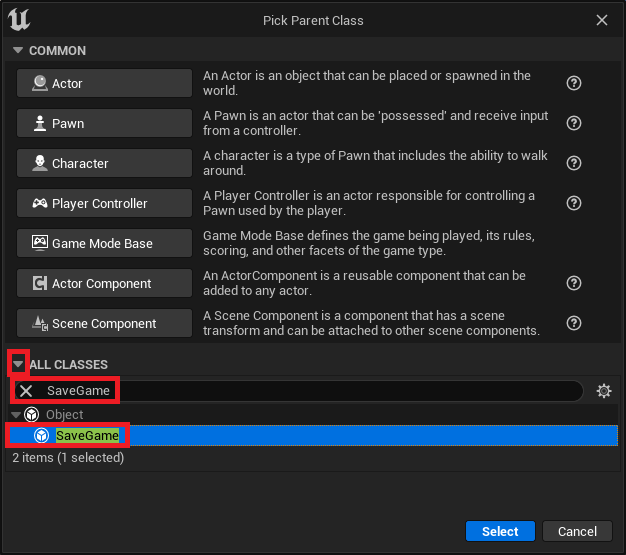
- Select Parent Class: In the "Pick Parent Class" dialog, expand "All Classes" by clicking the dropdown arrow. Search for "SaveGame" and select it as the parent class.
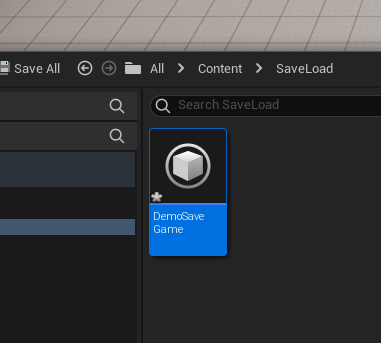
- Name Your Class: Assign a clear and descriptive name to your new
SaveGameBlueprint, such asBP_GameSaveDataor, as in our example,DemoSaveGame. This name is crucial as it will be referenced throughout your save/load logic.
Once the SaveGame class is created, the next critical phase involves populating it with the variables that represent the game state you wish to preserve. Thoughtful planning at this stage is paramount. Consider every piece of dynamic information that defines a player’s progress or the world’s state:
- Player Attributes: Health, mana, experience points, skill levels, inventory items, equipped gear.
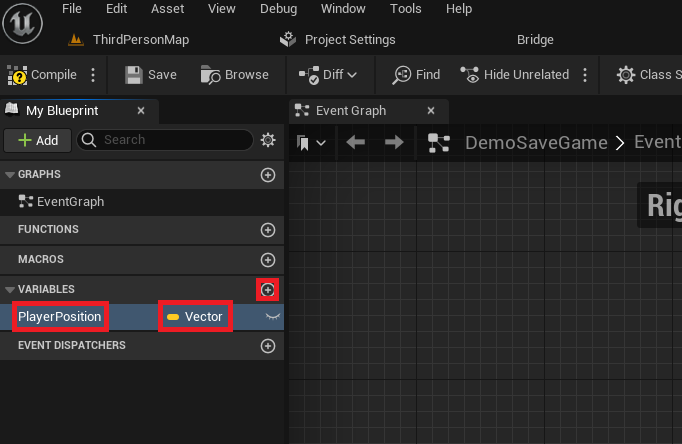
- Player Position and Orientation: Crucial for restoring the player’s exact location in the world, often represented by a
VectorandRotator. For this guide, aVectorvariable namedPlayerPositionis used to store the character’s coordinates. - Quest Progress: Current quest, completed quests, quest stage flags.
- World State: State of interactable objects, doors opened, enemies defeated, collectibles found.
- Game Settings: Volume levels, graphical preferences, key bindings.
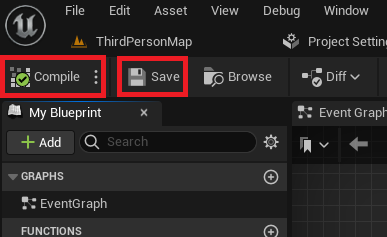
Each variable added to your custom SaveGame class will automatically become a candidate for serialization. Unreal Engine handles the internal mechanisms to store these variable values efficiently. After adding all necessary variables, it is imperative to "Compile" and "Save" the Blueprint. This action finalizes the class definition, making its variables accessible to other parts of your game’s logic and ensuring that the engine correctly registers its serializable properties. As your game evolves, you may need to add or modify variables in this class. While SaveGame is flexible, managing changes to its structure across game updates requires careful versioning strategies to prevent save file corruption for existing players.
Implementing Save and Load Logic within the Game Instance: The Central Hub
The GameInstance class in Unreal Engine is a special object that persists for the entire duration of a game session, even across level transitions. This characteristic makes it the ideal, centralized location for managing global game state and, crucially, for housing the core save and load functionality. By centralizing this logic, developers ensure that the save/load operations are consistently accessible and managed, regardless of which level is loaded or which specific actor is currently active.
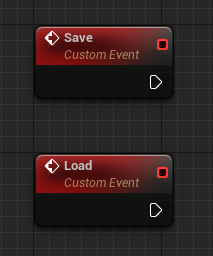
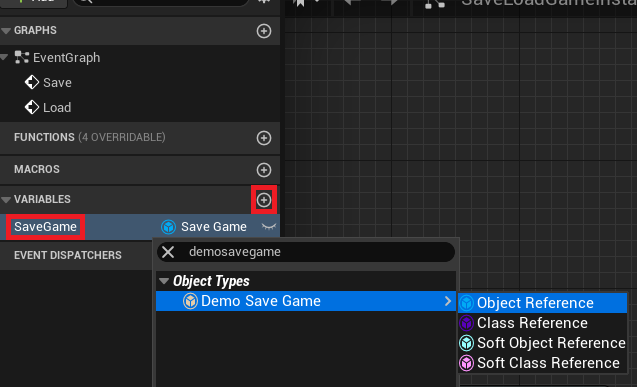
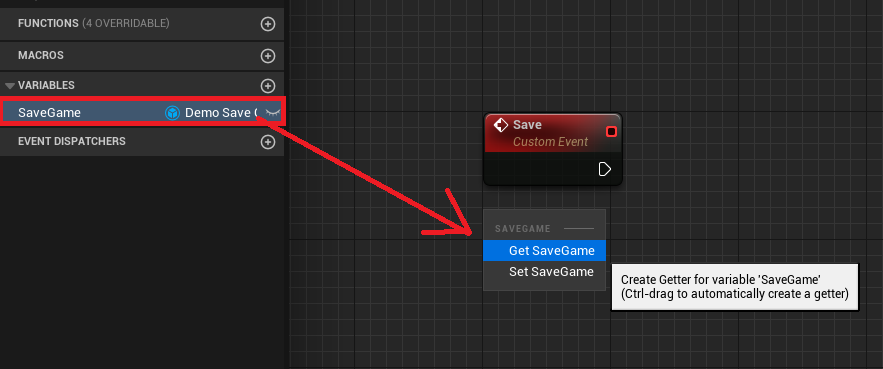
To establish this central hub, two custom events—Save and Load—are added to the GameInstance Blueprint. These events will serve as the entry points for triggering the respective data persistence operations. Furthermore, a variable named SaveGame (of the type corresponding to your custom SaveGame class, e.g., DemoSaveGame object reference) is declared within the GameInstance. This variable will hold a reference to the currently active SaveGame object in memory, allowing for easy access to the loaded or newly created save data.

Loading Workflow Analysis: Retrieving Game State
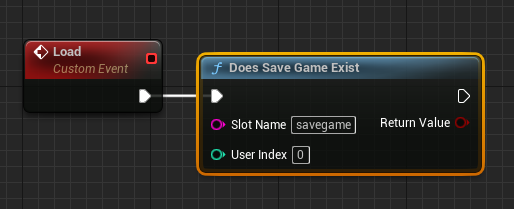
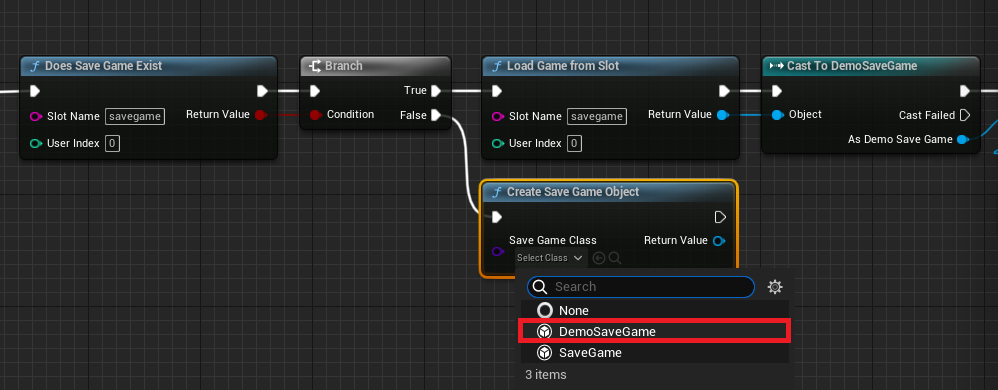
The Load event orchestrates the retrieval of saved data. This process is designed to be robust, handling scenarios where a save file might not yet exist.

- Existence Check: The first step involves a
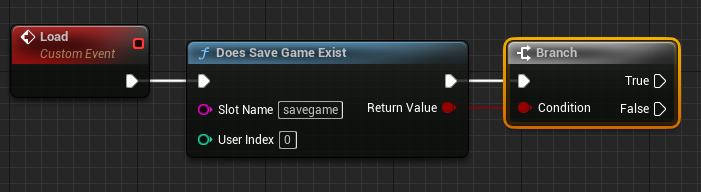
Does Save Game Existnode. This node takes a "Slot Name" (a unique identifier for a particular save file, allowing for multiple save slots, e.g., "savegame"). It returns a boolean indicating whether a save file with that name is present on disk. - Conditional Branching: A
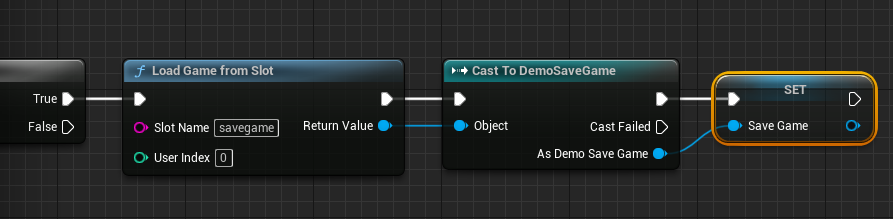
Branchnode follows, directing the flow based on theDoes Save Game Existresult.- If True (Save File Exists):
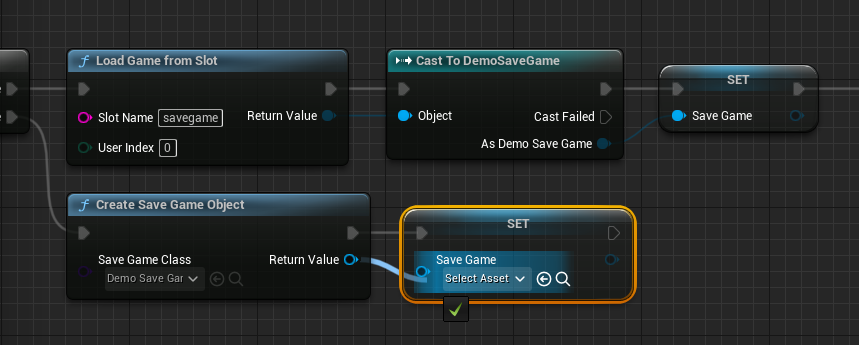
Load Game From Slot: This node reads the data from the specified "Slot Name" file and returns a genericUSaveGameobject.Cast To [Your Custom SaveGame Class]: SinceLoad Game From Slotreturns a genericUSaveGameobject, it must be cast to your specificDemoSaveGameclass (e.g.,Cast to DemoSaveGame). This step is crucial for accessing the custom variables (likePlayerPosition) you defined within yourSaveGameBlueprint.- Store Reference: The successfully cast
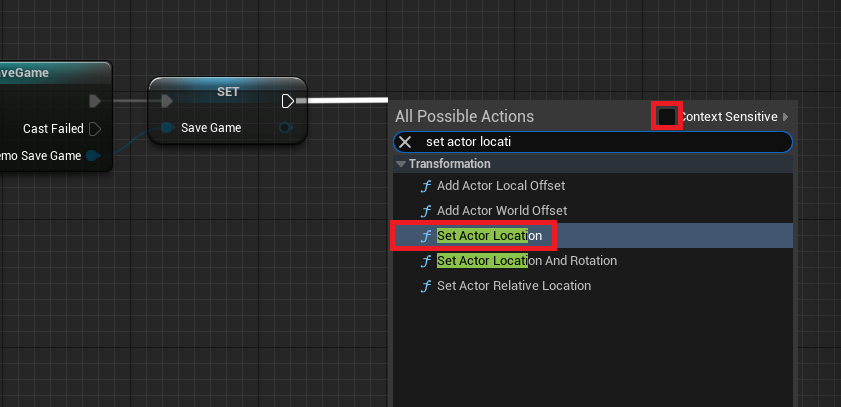
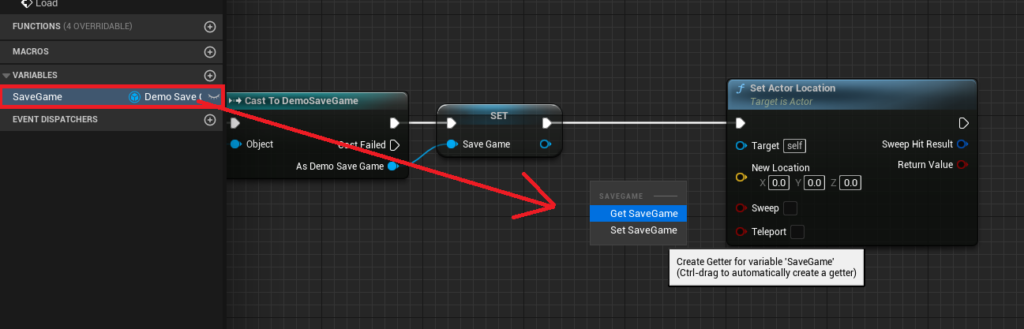
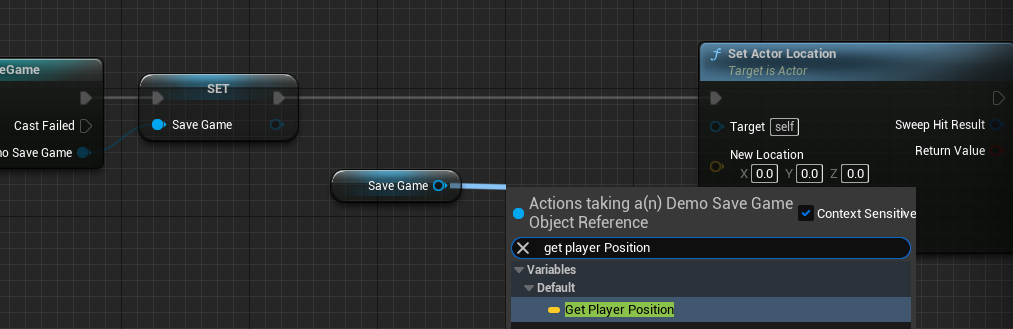
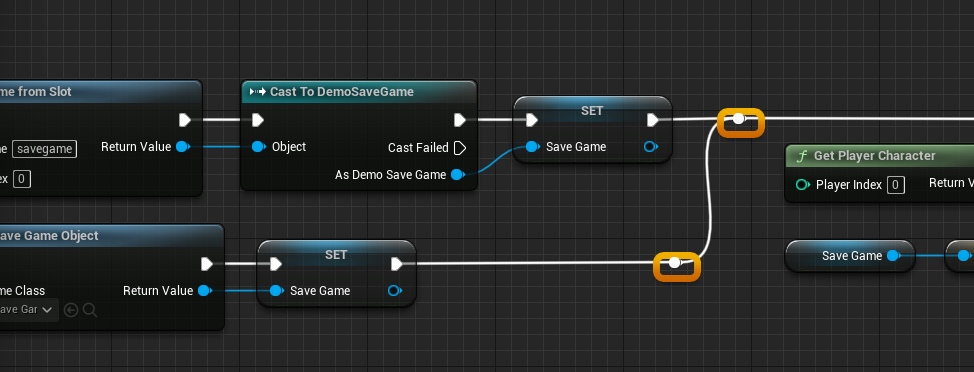
DemoSaveGameobject is then stored in theSaveGamevariable within theGameInstance. This makes the loaded data globally accessible. - Apply Loaded Data: The game state is then restored using the loaded variables. For instance, the
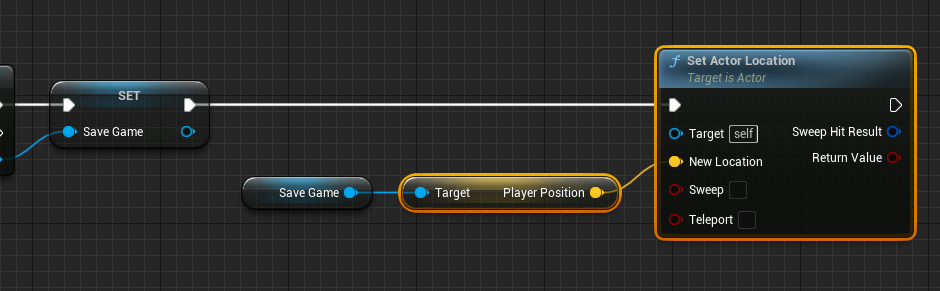
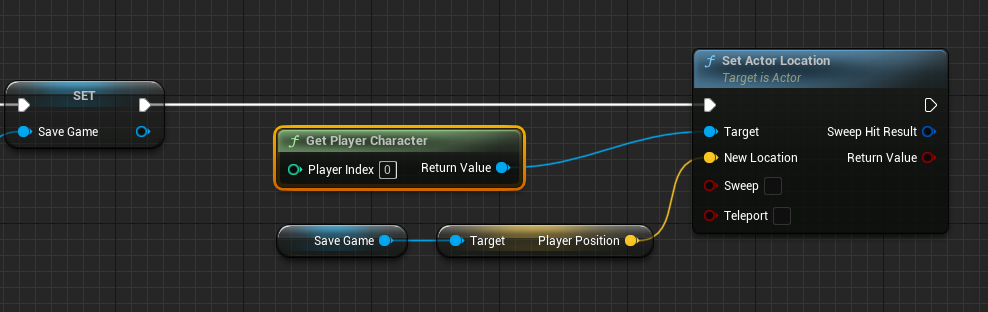
PlayerPositionvariable from theSaveGameobject is retrieved and used with aSet Actor Locationnode. This node requires a "Target," which is obtained via aGet Player Characternode, ensuring the currently controlled player character is moved to the saved coordinates.
- If False (Save File Does Not Exist):
Create Save Game Object: If no save file is found, a newSaveGameobject must be created in memory to represent the initial game state. This node takes your customSaveGameclass as input.- Store Reference: This newly created
SaveGameobject is then stored in theSaveGamevariable of theGameInstance. This ensures that even in a fresh game, there’s a validSaveGameobject ready to be populated and eventually saved.
- If True (Save File Exists):
To enhance readability and maintainability in complex Blueprint graphs, developers should utilize Blueprint reroute nodes (double-clicking on white execution lines) and thoroughly comment their logic.
Saving Workflow Analysis: Storing Current Game State
The Save event is responsible for capturing the current game state and writing it to disk. This process also incorporates checks to ensure a valid SaveGame object exists before attempting to write data.
- Validity Check: The first action in the
Saveevent is to retrieve theSaveGamevariable from theGameInstanceand pass it to anIs Validnode. This determines if aSaveGameobject has been successfully loaded or created.- If Valid (Save Game Object Exists):
- Populate Data: The current game state is gathered and assigned to the variables within the
SaveGameobject. For example, aGet Player Characternode is used to obtain a reference to the player, followed by aGet Actor Locationnode to retrieve its current coordinates. ThisVectorvalue is then set on thePlayerPositionvariable of theSaveGameobject using aSet Player Positionnode. This ensures theSaveGameobject accurately reflects the player’s current location. - Write to Disk: Finally, the
SaveGameobject (now containing the updated game state) is written to a file. Developers have two primary options here:Save Game to Slot: This is a synchronous operation, meaning the game’s execution will pause until the save operation is complete. It’s suitable for small amounts of data or situations where a brief pause is acceptable.Async Save Game to Slot: This is an asynchronous operation, allowing the game to continue running while the save occurs in the background. This is highly recommended for larger save files or performance-critical games, as it prevents hitches and maintains a smooth user experience. Both nodes require the "Slot Name" (matching the one used during loading) and theSaveGameobject itself.
- Populate Data: The current game state is gathered and assigned to the variables within the
- If Not Valid (Save Game Object Does Not Exist):
Create Save Game Object: Similar to the load process, if theSaveGameobject is not valid (e.g., the game is trying to save before a load operation has occurred, or a new game hasn’t been properly initialized), a newSaveGameobject is created.- Store Reference: This new object is assigned to the
GameInstance‘sSaveGamevariable. - Proceed to Populate and Write: The execution flow then connects to the data population and disk-writing steps, ensuring that even a first-time save operation correctly initializes and stores data.
- If Valid (Save Game Object Exists):
Triggering Save/Load Operations: Player Interaction and System Events
With the core save and load logic encapsulated within the GameInstance, the next step is to trigger these operations at appropriate times during gameplay. While the guide demonstrates manual triggers via key presses, real-world applications often involve a combination of manual, automatic, and event-driven saves.
Manual Triggers (Player Input):
As illustrated in the tutorial, binding save and load operations to specific key presses provides direct player control. In the Player Character Blueprint (e.g., ThirdPersonCharacterBP), an Input Action event (e.g., Keyboard 1 for Save, Keyboard 2 for Load) is used. When the key is pressed:
Get Game Instance: A reference to the activeGameInstanceis obtained.Cast To [Your Custom Game Instance Class]: The genericGameInstancereference is cast to your specific customGameInstanceBlueprint (e.g.,Cast To BP_GameInstance) to access the customSaveandLoadevents.- Call Events: The
SaveorLoadevent on the customGameInstanceis then invoked.
This setup allows players to manually save their progress at any point by pressing ‘1’ and load their last saved state by pressing ‘2’.
Automatic Saves (Auto-Save):
For a seamless player experience, automatic saving is crucial. This can be implemented in several ways:
- Checkpoints: Trigger a
Saveevent when the player reaches specific points in a level. - Timers: Periodically save the game state (e.g., every 5 minutes) using a timer in the
GameInstance. - Level Transitions: Automatically save before loading a new level and load after the new level is ready.
- Game Exit: Implement a save prompt or automatic save when the player attempts to quit the game.
Integrating auto-save requires careful consideration to avoid disrupting gameplay. Asynchronous saving (Async Save Game to Slot) is particularly beneficial here to prevent performance hitches.
Event-Driven Saves:
Certain game events might necessitate a save operation:
- Major Quest Completion: After a significant quest objective is met.
- Inventory Changes: When a valuable item is acquired or lost.
- Player Death/Respawn: Saving before death allows for reloading, while saving after respawn marks new progress.
Regardless of the trigger mechanism, the principle remains the same: obtain a reference to the GameInstance, cast it, and call the appropriate Save or Load custom event. This centralized approach ensures consistency and simplifies the management of game state persistence.
Advanced Considerations and Best Practices
While the core SaveGame system is robust, developing a truly resilient and user-friendly persistence system requires attention to several advanced considerations:
- Error Handling and Corruption: Save files can become corrupted due to unexpected crashes, power outages, or even malicious tampering. Implement robust error handling, such as checking the return value of
Load Game From Slotfor null or invalid objects, and perhaps maintaining multiple backup save files (e.g., a primary save, and a secondary "last known good" save). Inform players clearly if a save file is corrupted and offer options to start a new game or load an older backup. - Security: For games containing sensitive player data (e.g., high scores, in-game currency, multiplayer statistics),
SaveGamefiles stored locally are susceptible to tampering. WhileSaveGamedoes not offer built-in encryption, developers can implement custom encryption/decryption routines when writing to and reading from disk, or use checksums to detect unauthorized modifications. For critical data, server-side storage and validation are always the most secure options. - Save Game Versioning: As games evolve, the structure of the
SaveGameclass may change (variables added, removed, or type-changed). Loading an old save file with a newSaveGameclass can lead to crashes or data loss. Implement a versioning system (e.g., an integer variableSaveGameVersionin yourSaveGameclass). When loading, compare the loaded version with the current game’s version. If they differ, implement migration logic to update old save data to the new format, or gracefully inform the player that the save is incompatible. - Performance Optimization: Large save files, especially those containing extensive world state or inventory data, can lead to noticeable hitches during synchronous saves. Prioritize
Async Save Game to Slotfor any non-trivial save operation. Additionally, consider only saving data that has actually changed since the last save, or compressing save data before writing to disk, althoughSaveGameoffers good default compression. - User Interface Feedback: Provide clear visual and auditory feedback to the player when a save or load operation occurs. A simple "Saving…" message, an icon, or a sound effect reassures the player that their progress is being preserved and prevents them from accidentally quitting during a save operation.
- Cloud Saves and Platform Integration: While
SaveGamehandles local storage, modern gaming often demands cloud save functionality (e.g., Steam Cloud, PlayStation Plus Cloud Storage, Xbox Cloud Save). Implementing these typically involves integrating with platform-specific APIs to upload and download theSaveGamefiles to and from cloud services. This provides an additional layer of security and convenience for players, allowing them to continue their game across different devices or after re-installing their operating system.
Conclusion
The SaveGame system in Unreal Engine 5 is a powerful and flexible tool that empowers developers to build robust and player-centric data persistence into their games. By understanding its architectural principles, meticulously designing custom SaveGame classes, centralizing logic within the GameInstance, and implementing thoughtful triggering mechanisms, developers can ensure that players’ progress is reliably preserved. Furthermore, by considering advanced topics such as error handling, versioning, performance optimization, and platform integration, game creators can elevate the quality and resilience of their save systems, directly contributing to a more engaging, satisfying, and enduring player experience. The seamless retention of player progress is not merely a feature; it is a fundamental expectation that underpins the success and longevity of any modern game.
About the Author








