
The integration of a robust, built-in SaveGame system within Unreal Engine 5 (UE5) marks a significant advancement for game developers, offering a streamlined and highly efficient method for managing persistent game data. This foundational capability is not merely a convenience but an essential component of every modern game, directly influencing player engagement, retention, and the overall quality of the interactive experience. By abstracting away much of the complexity traditionally associated with data serialization and file management, UE5 empowers creators to focus more intently on gameplay innovation and narrative depth, knowing that player progress is reliably preserved.
The Indispensable Role of Game Saves in Modern Gaming
The evolution of game saving mechanisms reflects the broader progression of the video game industry itself. Early gaming eras often relied on rudimentary methods such as password systems, which were cumbersome and prone to player error, or the physical limitations of memory cards and cartridges. As games grew in complexity and scope, the demand for more sophisticated and user-friendly save systems became paramount. Today, with open-world epics, sprawling role-playing games, and intricate simulation titles dominating the market, a seamless and dependable save/load functionality is no longer a luxury but a core expectation. Players invest countless hours into virtual worlds, and the loss of progress due to an unreliable save system can be a profoundly frustrating experience, often leading to player abandonment and negative reviews.
The global video game market, valued at an estimated $187.7 billion in 2023 and projected to grow further, thrives on player satisfaction and continuous engagement. A significant component of this satisfaction stems from the assurance that progress, achievements, and customisations are securely stored. Developers face the challenge of designing systems that can capture diverse data types—from character positions and inventory items to quest progress, world states, and user preferences—and accurately restore them across game sessions, or even across different hardware platforms. Without an efficient solution, this task can consume substantial development resources, diverting attention from other critical areas.
Unreal Engine’s Approach: Simplicity Meets Power
Unreal Engine has long been at the forefront of providing powerful tools to developers, and its SaveGame system in UE5 is a testament to this philosophy. The system is designed to be highly accessible, particularly through Blueprint visual scripting, which allows even non-programmers to implement complex data persistence logic. At its core, the UE5 SaveGame system utilizes a dedicated SaveGame class, which serves as a blueprintable container for all data intended for storage. This class acts as a central repository, where developers define the specific variables—such as player coordinates, inventory arrays, character statistics, or game world flags—that need to be saved.
One of the system’s primary strengths lies in its automatic serialization and deserialization capabilities. When data needs to be saved, the engine efficiently converts the variables within the SaveGame object into a binary format, which is then written to a file on the user’s local machine. Conversely, when loading, the system reads this binary file, reconstructs the SaveGame object, and populates its variables with the stored values, ready for the game to utilize. This process minimizes manual file I/O operations and complex data parsing, significantly reducing the potential for errors and accelerating development cycles.
Technical Foundations: How the System Operates
The SaveGame class in Unreal Engine 5 is fundamentally an object that can be instantiated and populated with variables of almost any type supported by the engine. This broad compatibility means developers can save simple data types like integers and booleans, complex structures like Vectors and Rotators, and even arrays of custom Blueprint structures. The only significant consideration is that references to other UObjects or Actors typically need to be handled through unique identifiers or transformed into serializable data, as direct object references often cannot be reliably saved and reloaded across different game instances.
The generated save files are stored in standard, operating-system-specific locations, ensuring proper adherence to application data conventions and user permissions. For Windows users, these files are typically found in the Local Appdata folder; on macOS, they reside in Library/Application Support; and for Linux environments, they are located within /home/username/.local/share. These standardized paths facilitate both user access (for backup or troubleshooting) and proper application management by the operating system.

A critical aspect of the SaveGame system is the concept of a "Slot Name." Each save file is associated with a unique slot name, allowing developers to implement multiple save slots, different player profiles, or even game-specific configurations that can be loaded independently. For instance, a game might have "Slot01," "Slot02," and "AutoSave" as distinct slot names, each pointing to a separate save file on disk. This flexible naming convention is crucial for delivering a robust player experience that accommodates diverse playstyles and user preferences.

Implementing Persistence: A Developer’s Walkthrough (High-level)
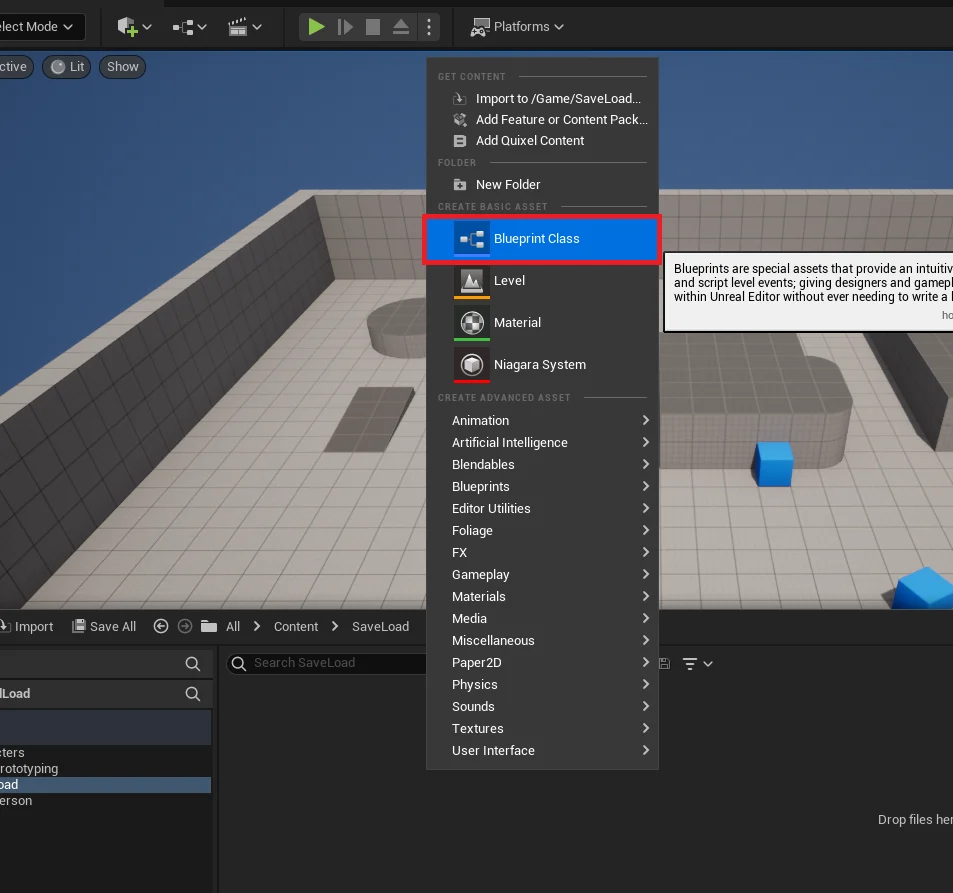
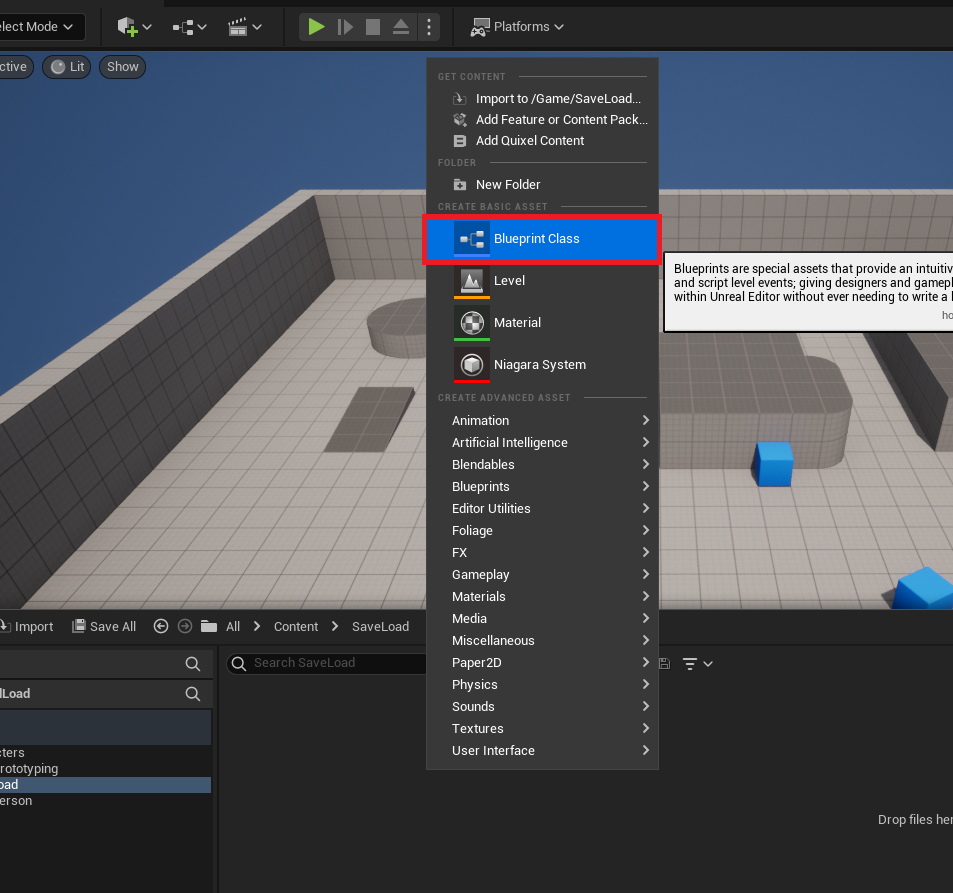
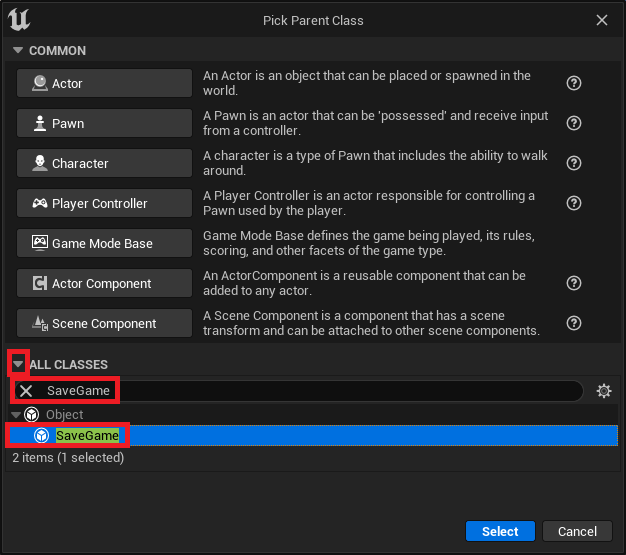
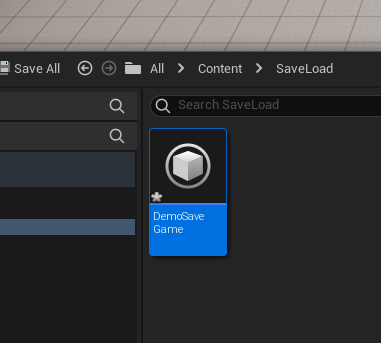
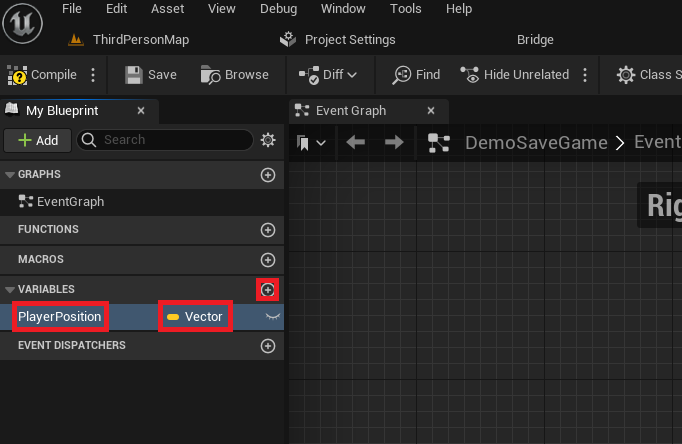
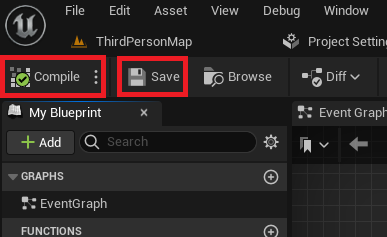
The implementation of save and load functionality in UE5, while powerful, is designed to be intuitive. It typically begins with Crafting the SaveGame Class. This involves creating a new Blueprint class derived from SaveGame, then defining all necessary variables within it. For example, a Vector variable named PlayerPosition would be added to store the player’s last known location. This class serves as the schema for all data to be persisted.
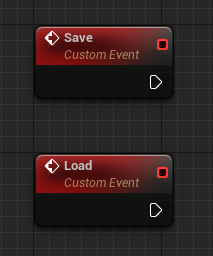
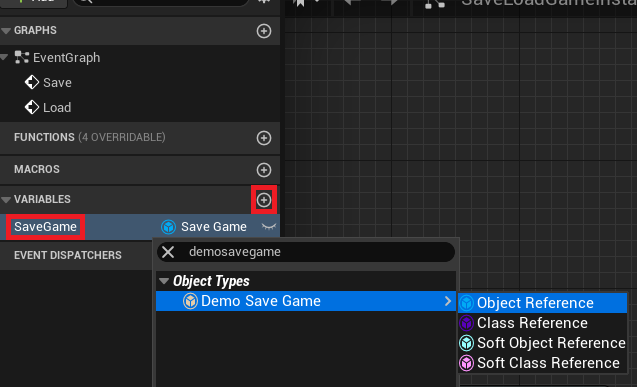
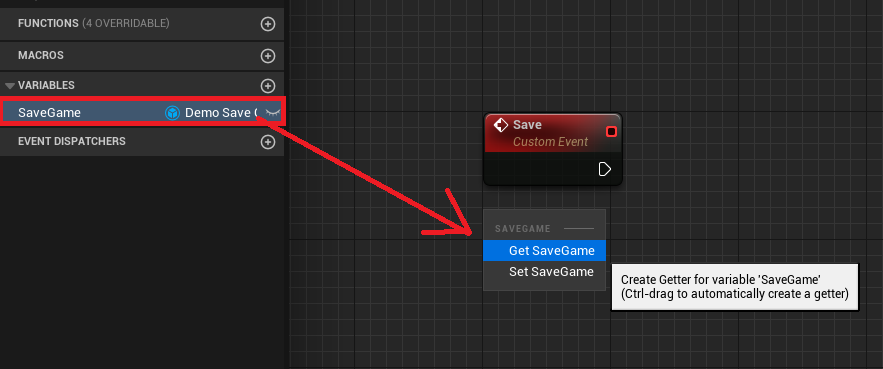
Next is Integrating Save/Load Logic with Game Instance. The Game Instance is a special Unreal Engine object that persists throughout the entire lifecycle of a game, even across level changes. This makes it an ideal place to manage the primary SaveGame object and its associated logic. Developers typically add custom events, such as "Save" and "Load," to their custom Game Instance Blueprint. A reference to the active SaveGame object is also stored as a variable within the Game Instance, ensuring it’s accessible globally.
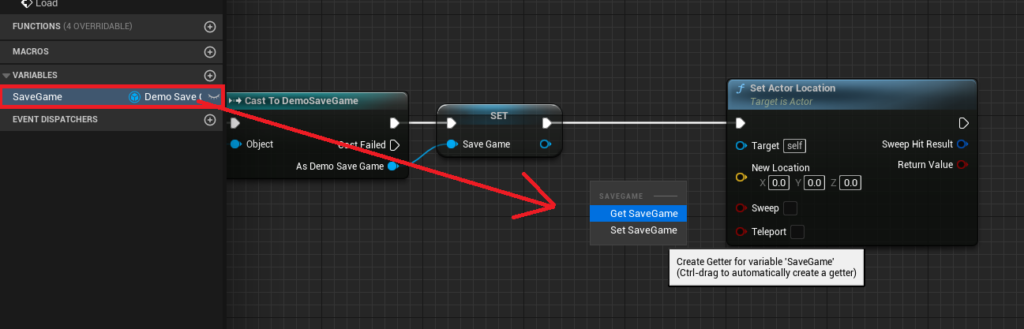
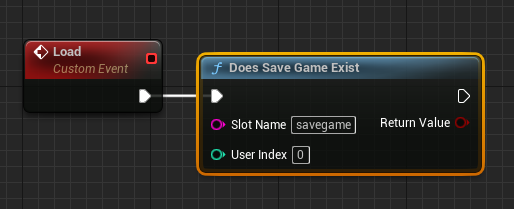
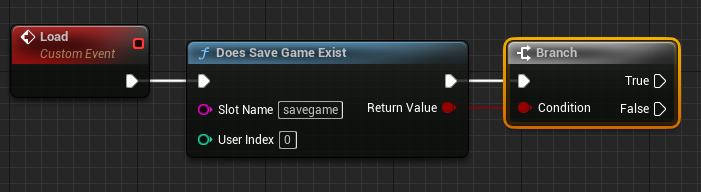
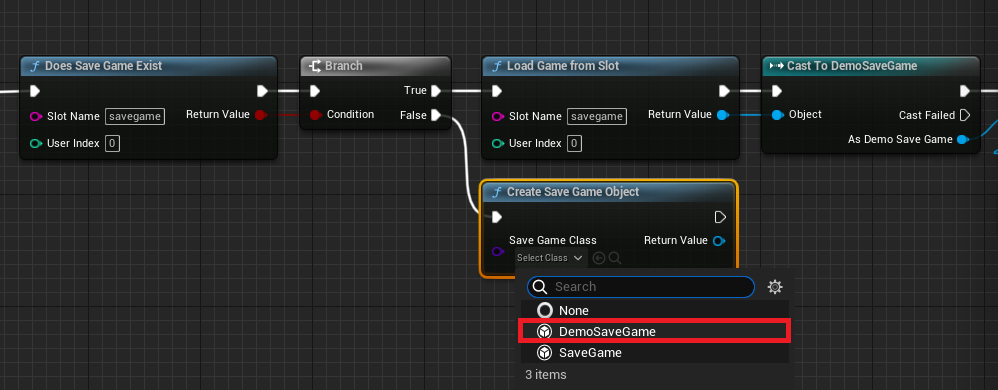
The Loading Mechanism: Ensuring Data Integrity involves a series of checks and actions. When a "Load" event is triggered, the system first uses a Does Save Game Exist node, providing the chosen Slot Name. This is critical for preventing errors if a player attempts to load a non-existent save file. A Branch node then directs the flow:
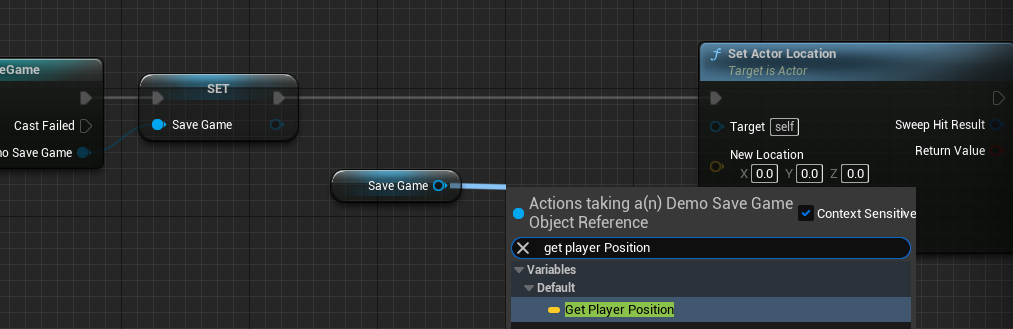
- If the save file exists (
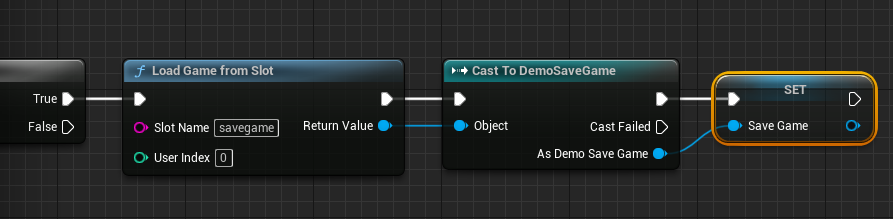
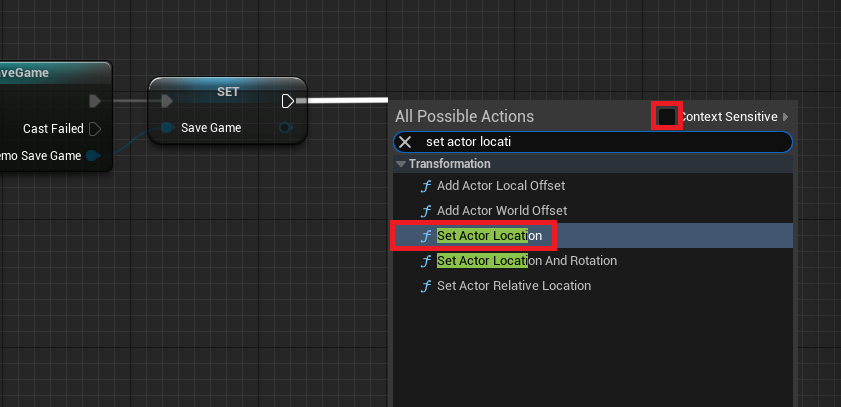
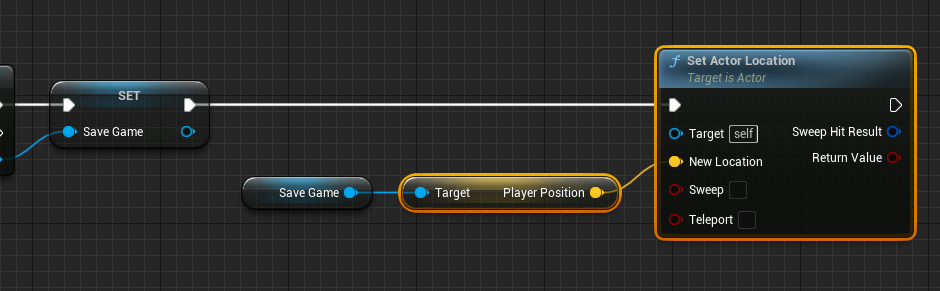
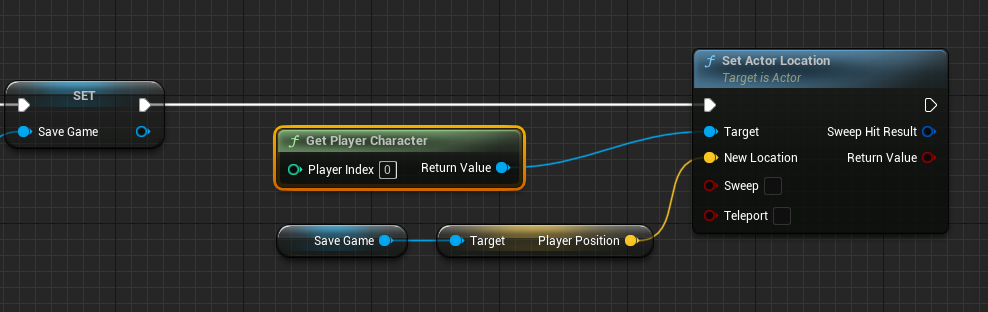
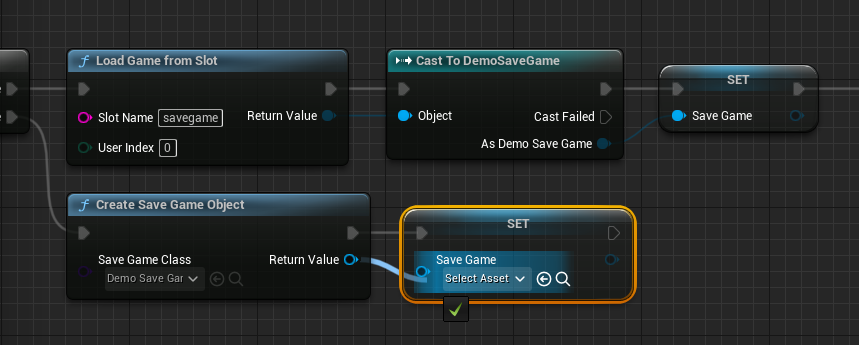
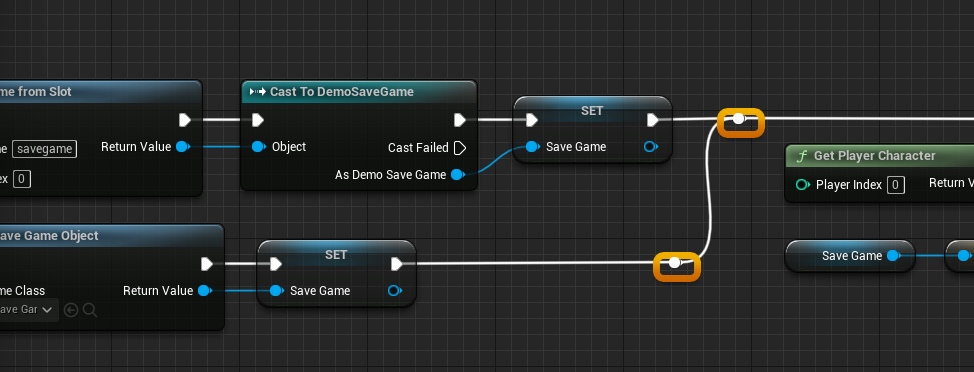
Truepath), aLoad Game From Slotnode retrieves the binary data, which is thenCast Tothe customSaveGameclass (e.g.,Cast to DemoSaveGame). The resultingSaveGameobject is then assigned to theGame Instance‘sSaveGamevariable. Finally, the loaded data, such asPlayerPosition, is extracted from this object and applied to relevant game elements, like setting theActor Locationof thePlayer Character. - If the save file does not exist (
Falsepath), aCreate Save Game Objectnode is used to generate a fresh instance of the customSaveGameclass, which is then assigned to theGame Instance‘sSaveGamevariable. This ensures that the game always has a validSaveGameobject to work with, even if no prior save exists.
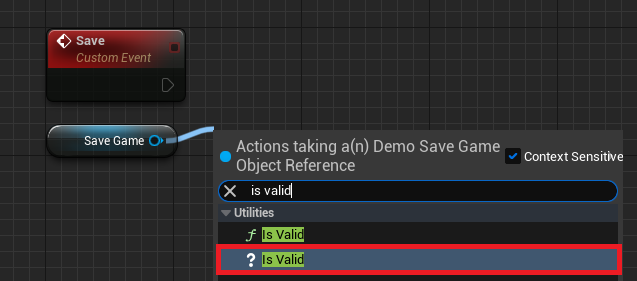
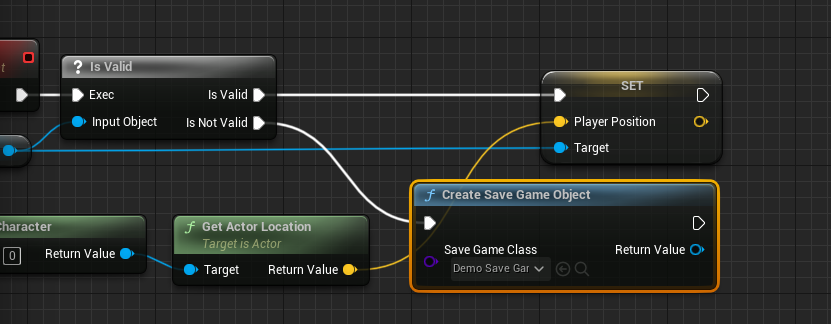
The Saving Mechanism: Capturing Progress operates similarly. Upon a "Save" event, the system first retrieves the SaveGame object reference from the Game Instance and performs an Is Valid check. This prevents attempts to save data to a non-existent or invalid object.
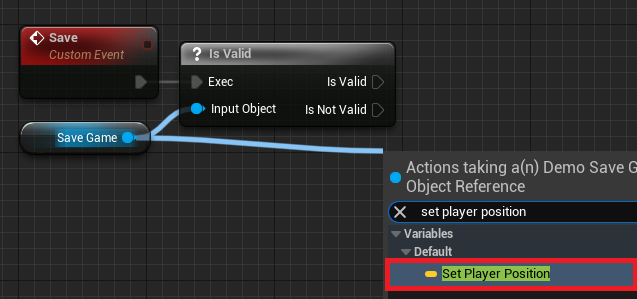
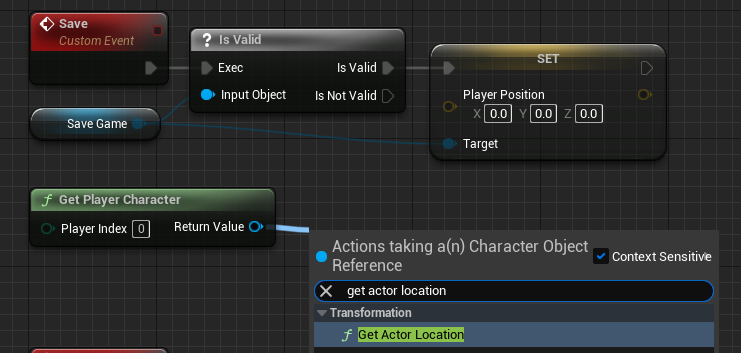
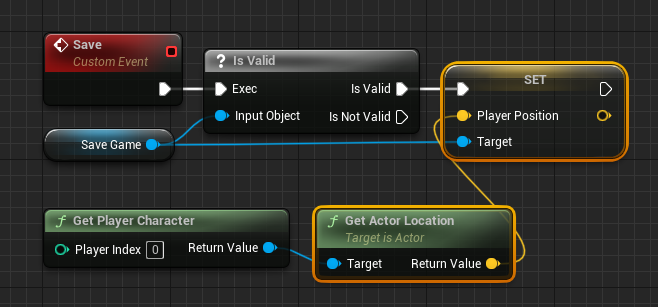
- If the
SaveGameobject is valid (Is Validpath), the current game state data (e.g., thePlayer Character‘sActor Location) is retrieved and used toSetthe corresponding variables within theSaveGameobject (e.g.,Set Player Position). - If the
SaveGameobject is not valid (Is Not Validpath), aCreate Save Game Objectnode is invoked to initialize a newSaveGameobject, which is then assigned to theGame Instance‘sSaveGamevariable. Following this, the current game data is then applied to the newly createdSaveGameobject.
Finally, irrespective of whether the SaveGame object was new or existing, the modified SaveGame object is committed to disk using either a Save Game to Slot or Async Save Game to Slot node, specifying the same Slot Name.
Performance Considerations: Synchronous vs. Asynchronous Saves
A crucial distinction in the saving process is between synchronous and asynchronous operations. The Save Game to Slot node performs a blocking save, meaning the game’s execution pauses until the data has been fully written to disk. While suitable for smaller amounts of data or situations where a brief hitch is acceptable (e.g., loading screens), this can cause noticeable frame rate drops or "stuttering" in games saving large datasets.
For games with substantial amounts of data or demanding real-time performance, the Async Save Game to Slot node is the preferred choice. This non-blocking operation performs the save in a separate thread, allowing the main game thread to continue rendering and processing gameplay logic without interruption. This ensures a smoother player experience, especially in open-world titles or games with frequent auto-saves, aligning with modern performance expectations in game development.
Empowering Developers and Elevating Player Journeys
The UE5 SaveGame system significantly enhances developer productivity by providing a high-level, integrated solution that minimizes the need for custom, error-prone file I/O code. This reduction in complexity allows development teams to iterate faster, implement save points more frequently, and experiment with different persistence strategies without being bogged down by low-level technicalities. Epic Games’ commitment to developer-friendly tools is evident in systems like this, which empower creators of all skill levels to realize their visions.
From a player’s perspective, this robust system translates directly into a more reliable and enjoyable gaming experience. Features like multiple save slots, automatic checkpoints, and the ability to seamlessly resume progress after quitting or a crash become standard and dependable. The assurance that hours of gameplay will not be lost fosters deeper immersion and encourages players to explore and engage with the game world without the underlying anxiety of data loss. This reliability is a cornerstone for building trust and loyalty within the player community.
Broader Implications and the Future of Game Persistence
The capabilities provided by UE5’s SaveGame system extend far beyond simple checkpointing. It lays the groundwork for implementing complex game mechanics such as dynamic world states that persist across sessions, intricate player progression systems, robust inventory management, and even user-generated content that can be saved and shared. Its scalability means it can support projects ranging from small indie titles to massive AAA productions with vast amounts of persistent data.
As the gaming landscape continues to evolve with cloud gaming, cross-platform play, and increasingly interconnected experiences, the need for flexible and secure data persistence solutions will only grow. While the UE5 SaveGame system primarily handles local file storage, its well-defined structure and ease of use provide a solid foundation for potential future integrations with cloud-based saving services or more advanced data synchronization protocols. It ensures that Unreal Engine remains a competitive and developer-centric platform, continually adapting to the demands of modern game design.
In conclusion, Unreal Engine 5’s built-in SaveGame system stands as a critical enabler for contemporary game development. By offering a straightforward, powerful, and performance-conscious method for managing game data persistence, it not only simplifies a notoriously complex task for developers but also directly contributes to a superior, more reliable, and ultimately more engaging experience for players worldwide. This system underscores Epic Games’ ongoing commitment to providing state-of-the-art tools that drive innovation and elevate the art of interactive entertainment.
About the Author








