The seamless preservation of player progress is a cornerstone of modern video game design, fundamentally shaping player engagement and satisfaction. Unreal Engine 5 (UE5), a leading real-time 3D creation tool, offers developers a robust and integrated solution for this critical function through its built-in SaveGame system. This sophisticated yet accessible framework allows for the efficient saving and loading of diverse game data to persistent files on a user’s machine, ensuring that players can resume their adventures exactly where they left off. The system is designed to be highly flexible, accommodating nearly all variable types and integrating smoothly within the engine’s Blueprint visual scripting environment, thereby democratizing complex data management for a wide range of development teams.

The Imperative of Persistence in Modern Gaming
The evolution of video games from arcade coin-ops to sprawling open-world epics has dramatically shifted player expectations regarding data persistence. In the early days of gaming, saving progress was often rudimentary, relying on complex password systems or costly external memory peripherals. The advent of internal battery-backed SRAM in cartridges and later, dedicated memory cards for consoles, marked significant improvements. However, modern players demand a far more sophisticated and transparent system. The ability to save at any point, have progress automatically recorded, and even transfer save data across devices via cloud services, is now considered a standard feature, not a luxury. Without a reliable save/load mechanism, even the most innovative game risks frustrating players, leading to abandonment and negative reviews. Data from industry analysts, such as studies by Newzoo or Statista on player retention, consistently show that frustrating technical issues, including lost progress, are significant contributors to player churn. For instance, a 2021 survey indicated that approximately 40% of players would stop playing a game if they encountered frequent save issues or data loss, highlighting the direct link between save system integrity and commercial success.
Unreal Engine’s Solution: The SaveGame System Explained
At the core of Unreal Engine 5’s data persistence capabilities lies the SaveGame class. This foundational class serves as a blueprint for developers to define precisely what information needs to be stored and retrieved. Rather than requiring developers to implement complex file I/O operations from scratch, the SaveGame system provides a high-level abstraction, handling the intricacies of serialization and deserialization. Developers simply create a custom SaveGame Blueprint class, add variables to it (such as player position, inventory items, quest progress, or character statistics), and the engine manages the process of writing these variables to a binary file on the user’s hard drive.
The flexibility of the SaveGame class is a significant advantage. It supports a vast array of variable types, from primitive types like integers, booleans, and floats, to more complex structures such as Vectors, Rotators, Transforms, arrays, and even references to other UObjects or Actors, provided they are properly configured for serialization. This broad compatibility ensures that virtually any aspect of a game’s state can be preserved.
The saved data files are stored in platform-specific directories, ensuring adherence to operating system conventions and user data isolation:
- Windows: Typically located within the user’s
Local Appdatafolder. - MacOS: Found in
Library/Application Support. - Linux: Stored in
/home/username/.local/share.
This standardized approach simplifies cross-platform development and debugging, as developers know precisely where to expect their save files, regardless of the target environment.
Implementation Workflow: A Developer’s Practical Guide
Implementing the SaveGame system in UE5 involves a structured series of steps, primarily utilizing Blueprint visual scripting, a testament to Epic Games’ commitment to accessibility. The process typically begins by defining the data structure to be saved.
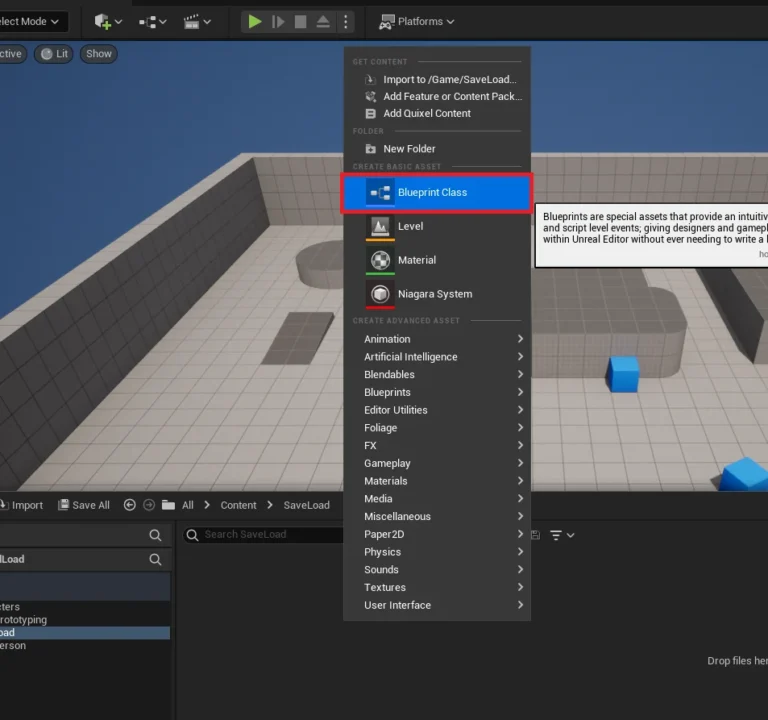
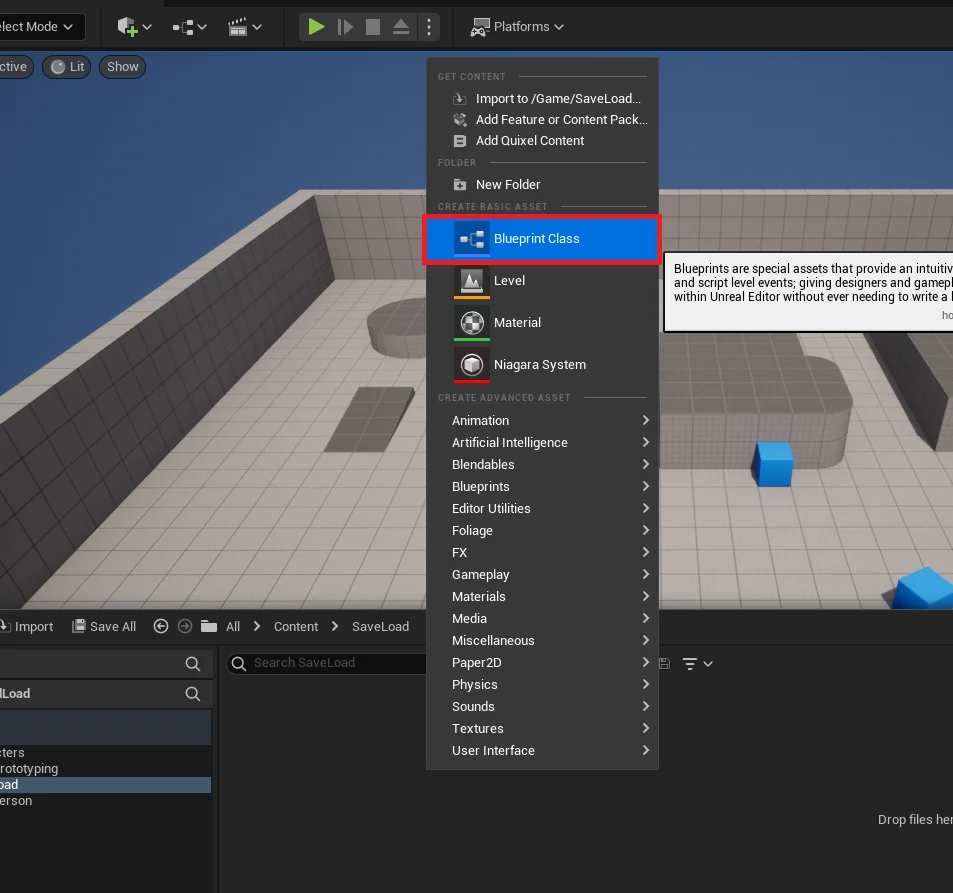
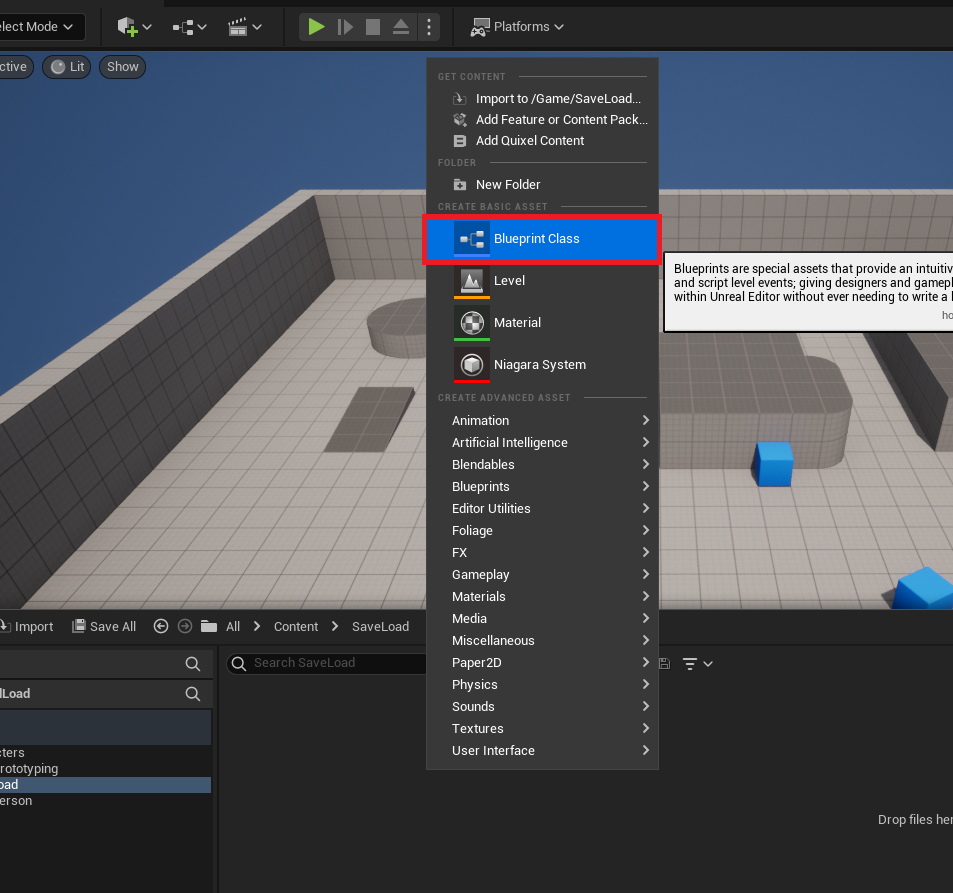
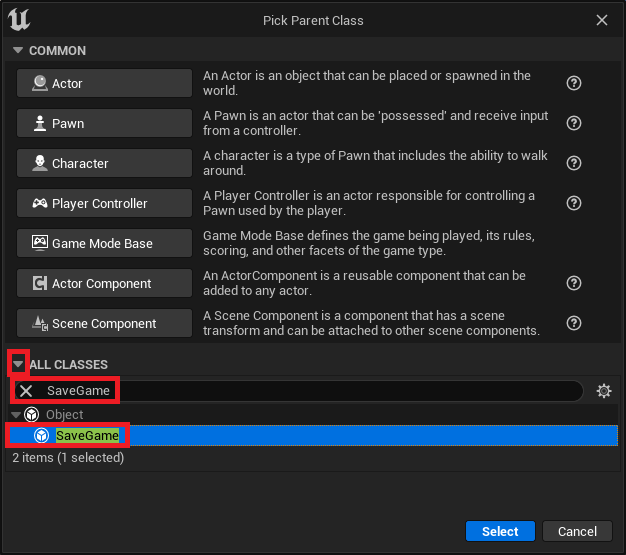
- Creating the Custom SaveGame Class: The first step is to create a new Blueprint class derived from the base
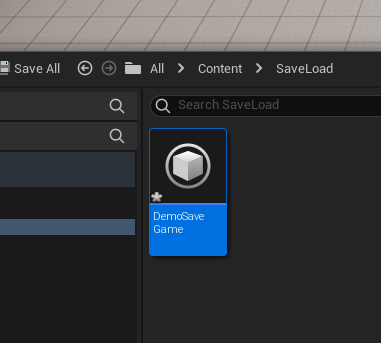
SaveGameclass. This custom class acts as a container for all the variables a developer wishes to persist. For example, a developer might name itDemoSaveGame. - Defining Variables for Persistence: Once the custom
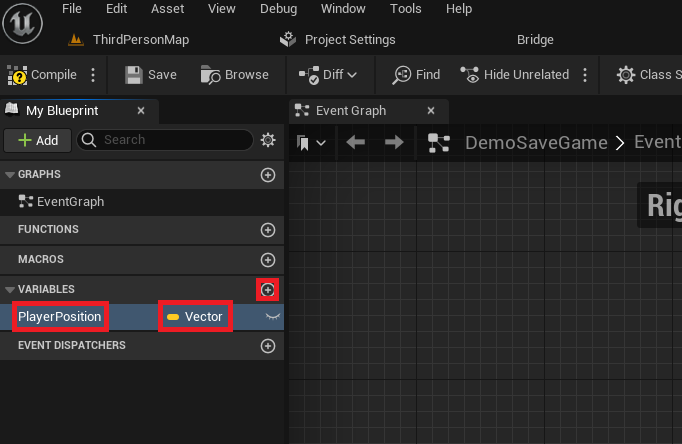
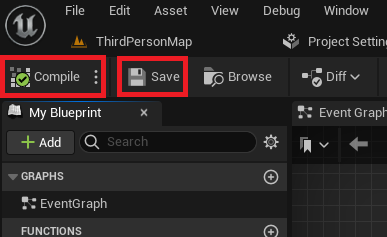
SaveGameclass is established, relevant variables are added. In a common scenario, aVectorvariable namedPlayerPositionwould be added to store the player’s spatial coordinates. Other variables could includePlayerHealth(float),CurrentLevel(integer), orInventoryItems(an array of custom structs). After adding variables, compiling and saving the Blueprint ensures these definitions are registered with the engine. - Integrating Save/Load Logic into the Game Instance: The
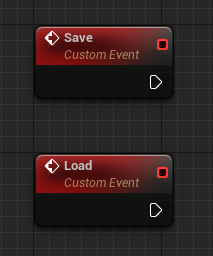
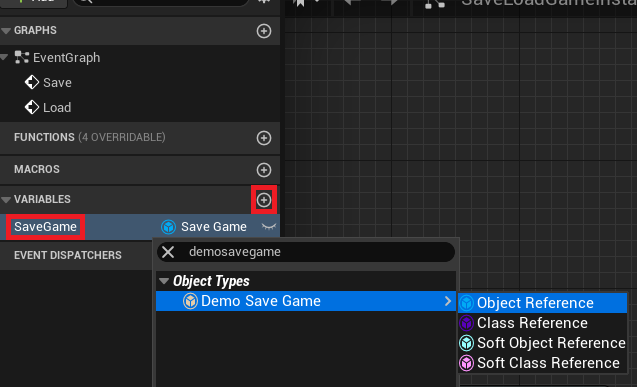
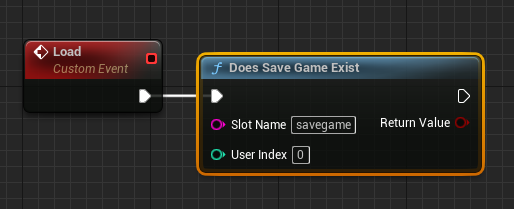
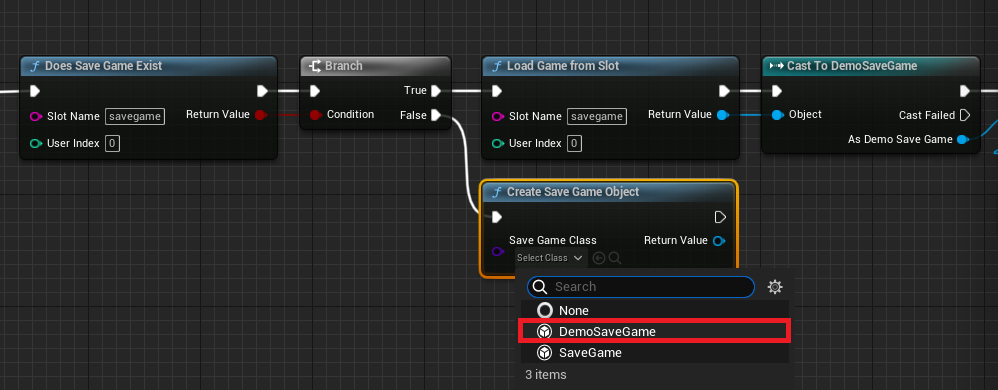
Game Instanceis a particularly suitable location for global save/load logic. Unlike Actors or Player Controllers, theGame Instancepersists throughout the entire lifespan of the game application, even across level changes. This makes it an ideal central hub for managing save data. Two custom events, typically named "Save" and "Load," are created within the customGame InstanceBlueprint. A variable of the customSaveGameclass type (e.g.,DemoSaveGameobject reference) is also added to theGame Instanceto hold the currently loaded or new save data object in memory. - Implementing the Load Functionality: The "Load" event typically starts with a
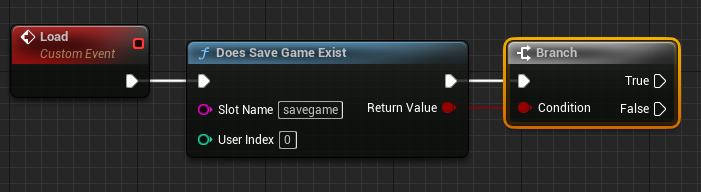
Does Save Game Existnode, which checks for the presence of a save file corresponding to a specified "Slot Name." Each unique "Slot Name" creates a distinct save file, allowing for multiple save slots or different player profiles.- If the Save File Exists (True Branch): The
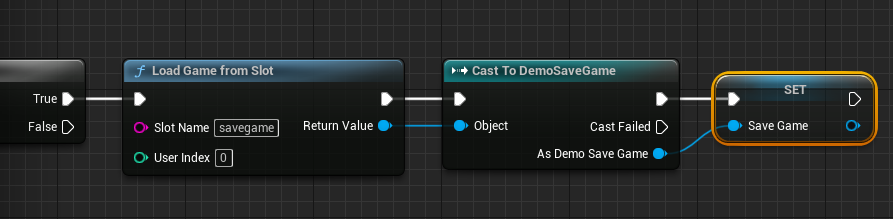
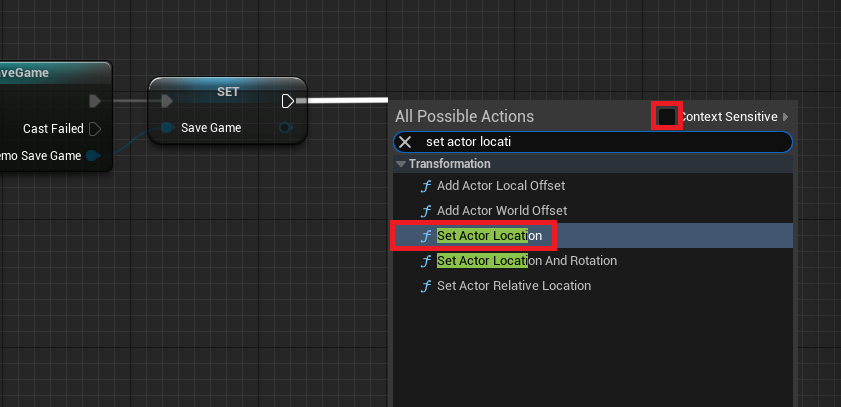
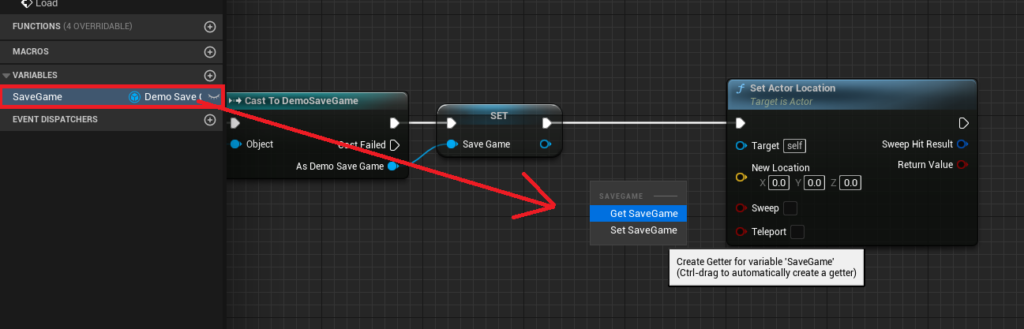
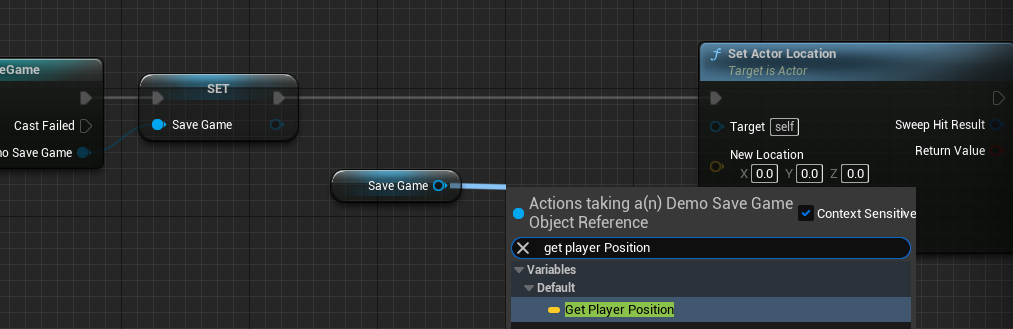
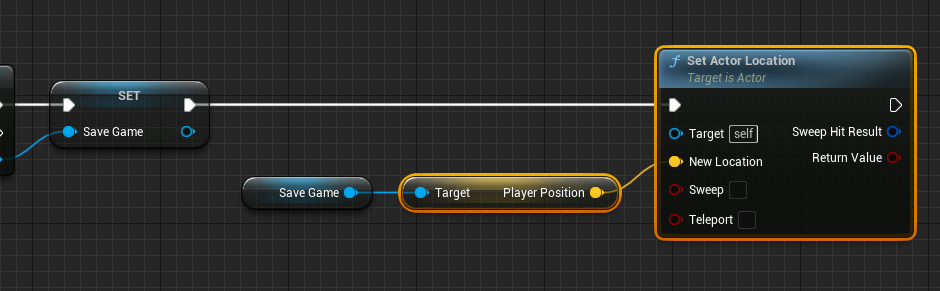
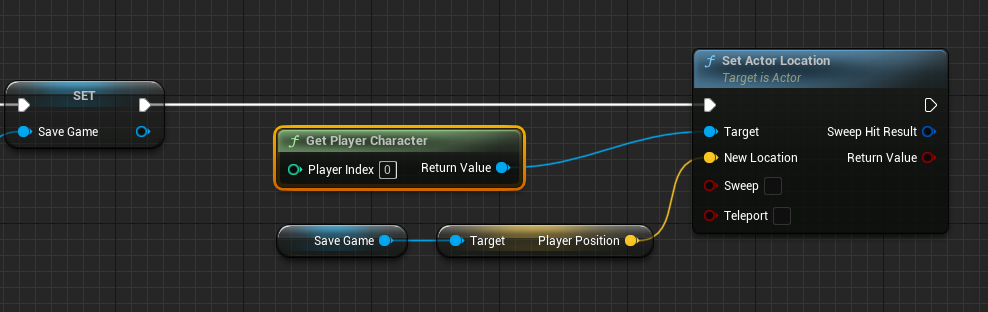
Load Game From Slotnode is executed, retrieving the raw save data. This raw data is thenCast Tothe customSaveGameBlueprint class (e.g.,Cast to DemoSaveGame) to access its defined variables. The resulting object is stored in theGame Instance‘sSaveGamevariable. Finally, game state is restored using the loaded data. For instance, thePlayerPositionvariable from the loadedSaveGameobject is used with aSet Actor Locationnode to teleport theGet Player Characterto their last saved coordinates. - If the Save File Does Not Exist (False Branch): A new
SaveGameobject is created using theCreate Save Game Objectnode, specifying the customSaveGameclass. This newly initialized object is then stored in theGame Instance‘sSaveGamevariable, effectively preparing an empty save slot for its first save operation.
- If the Save File Exists (True Branch): The
- Implementing the Save Functionality: The "Save" event begins by checking if the
Game Instance‘sSaveGamevariable holds a valid object reference using anIs Validnode.- If Valid (True Branch): The current game state is captured. For instance, the
Get Player Character‘sGet Actor Locationis retrieved and used toSet Player Positionon the activeSaveGameobject. Once all relevant variables on theSaveGameobject are updated, theSave Game to SlotorAsync Save Game to Slotnode is called, writing the updated data to the specified "Slot Name" on disk. - If Not Valid (False Branch): This scenario implies a save attempt without a valid
SaveGameobject in memory (e.g., the very first save after game launch). In this case, a newCreate Save Game Objectnode is executed, initializing a freshSaveGameobject, which is then assigned to theGame Instance‘sSaveGamevariable. Following this initialization, the game state is captured and saved as described in the "Valid" branch.
- If Valid (True Branch): The current game state is captured. For instance, the
- Triggering Save and Load Events: Finally, input events (e.g., pressing "1" for save, "2" for load) are configured within the
Player CharacterBlueprint. These events get theGame Instance,Cast Tothe customGame Instanceclass, and then call the respective "Save" or "Load" custom events defined earlier.
Performance and Scalability Considerations

A critical decision point in the save functionality is choosing between synchronous (Save Game to Slot) and asynchronous (Async Save Game to Slot) saving. This choice has significant implications for game performance and user experience.

- Synchronous Saving: The
Save Game to Slotnode performs the save operation immediately on the main game thread. For games with small amounts of save data (e.g., simple arcade games, single-level experiences), this might be perfectly acceptable as the operation is quick and barely noticeable. However, for larger games with complex save structures, a synchronous save can cause a momentary "hitch" or frame rate drop, as the game thread is blocked until the file I/O is complete. This can be jarring for players and degrade the perceived quality of the game. - Asynchronous Saving: The
Async Save Game to Slotnode delegates the save operation to a background thread. This means the main game thread remains unblocked, allowing the game to continue running smoothly while the save operation proceeds in parallel. This is the recommended approach for games with substantial save data (e.g., open-world RPGs, simulation games with extensive world states), as it maintains a consistent frame rate and provides a much smoother player experience. While slightly more complex to manage in terms of potential concurrency issues (though UE’s system handles most of this transparently), the benefits for large-scale games are undeniable.
The increasing complexity of modern game worlds, where player choices, dynamic environments, vast inventories, and branching narratives all need to be meticulously recorded, underscores the importance of an efficient save system. Games like The Witcher 3: Wild Hunt or Cyberpunk 2077 generate save files that can span tens or even hundreds of megabytes, containing thousands of individual data points. UE5’s architecture, with its support for asynchronous operations, is well-suited to handle these demands without compromising gameplay fluidity.
Industry Reactions and Developer Adoption
The presence of a robust, built-in SaveGame system within Unreal Engine 5 is consistently lauded by the developer community. Epic Games, the creators of Unreal Engine, have consistently emphasized empowering developers with comprehensive tools that abstract away common complexities, allowing them to focus on creative aspects. This approach aligns with broader industry trends favoring engine-level solutions for common programming paradigms.
Game development studios, from indie teams to large AAA enterprises, benefit immensely from such features. For smaller teams, it drastically reduces the development time and potential bug surface area associated with implementing a custom save solution. For larger studios, it provides a standardized, well-tested foundation that can be extended and customized, ensuring consistency across projects. Industry experts frequently highlight the importance of streamlined save systems, noting that "a well-implemented save system is often invisible to the player, but a poorly implemented one is immediately apparent and detrimental." The UE5 SaveGame system exemplifies this principle, working silently and efficiently in the background to bolster the player experience.
Furthermore, the integration with Blueprints means that even designers or less technically-inclined developers can contribute to and manage save data logic, fostering greater collaboration within development teams. This democratization of complex systems is a hallmark of modern game engines and a significant factor in Unreal Engine’s widespread adoption.
Broader Impact on Game Development and Player Experience
The implications of Unreal Engine 5’s SaveGame system extend far beyond mere technical convenience.
- For Developers: The system reduces boilerplate code and minimizes the risk of introducing critical bugs related to data corruption or loss. This efficiency allows development teams to allocate more resources to core gameplay mechanics, artistic endeavors, and performance optimization, ultimately leading to higher-quality products. It also simplifies the process of testing and debugging, as save states can be easily generated, shared, and analyzed.
- For Players: The primary beneficiary is the player. A reliable save system provides a sense of security and control, knowing that their time investment and progress are safe. This fosters deeper immersion and encourages players to explore, experiment, and engage with the game’s content without fear of losing valuable progress. Seamless loading experiences, especially with asynchronous saving, contribute to a perception of polish and professionalism, enhancing overall satisfaction. In a market saturated with games, player confidence in a game’s technical stability is a powerful differentiator.
- Supporting Gameplay Innovation: Beyond basic progress saving, the SaveGame system enables more sophisticated gameplay mechanics. Developers can implement complex checkpoint systems, meta-progression in roguelikes (where certain progress persists across runs), dynamic world states that remember player actions, or even user-generated content that needs to be saved and shared. The robust foundation provided by UE5’s system makes these ambitious features more attainable.
In conclusion, Unreal Engine 5’s built-in SaveGame system represents a critical component in the engine’s comprehensive toolkit for modern game development. By offering an accessible, powerful, and versatile solution for data persistence, it addresses a fundamental player expectation while simultaneously streamlining complex development workflows. This robust feature not only enhances the stability and professionalism of games built on UE5 but also empowers developers to create more engaging, persistent, and ultimately, more memorable interactive experiences, reaffirming Epic Games’ commitment to supporting the global community of game creators.
About the Author