The Evolution of AI in Interactive Entertainment

The journey of artificial intelligence in video games has been one of continuous evolution, moving from rudimentary, scripted patterns of the arcade era to the sophisticated, emergent behaviors seen in today’s triple-A titles. Early game AI primarily relied on predefined paths and state machines, dictating simple movements and reactions. As hardware capabilities advanced and game worlds grew more complex, the need for dynamic, reactive AI became paramount. Pathfinding algorithms, such as A* search, emerged as critical components, allowing AI agents to navigate intricate environments. However, the true leap in accessibility and flexibility arrived with powerful game engines like Unreal Engine, which introduced visual scripting interfaces that democratized AI development.

Unreal Engine 5, a flagship offering from Epic Games, stands at the forefront of this evolution. Its robust architecture and comprehensive suite of tools, particularly the Blueprint visual scripting system, empower developers of all skill levels to craft intricate game logic without extensive C++ programming. This accessibility is crucial for rapid prototyping and iterative design, allowing creators to quickly test and refine AI behaviors. The NavMesh system, a core component of Unreal Engine’s AI framework, provides the underlying geometric data that AI agents use to understand traversable areas, serving as the essential groundwork for any intelligent movement, including player pursuit.
Prerequisites: The Foundation of Movement – NavMesh
Before any AI character can intelligently chase or follow a player, it must first understand the physical layout of the game world. This understanding is provided by the NavMesh, a critical component detailed in previous guides, such as "Setting up a NavMesh in Unreal Engine 5." A NavMesh is an automatically generated mesh that covers all walkable surfaces within a level, providing a navigable "map" for AI agents. Without a properly configured NavMesh, AI characters lack the necessary spatial awareness to calculate paths and execute movement commands effectively. It acts as the backbone for all pathfinding operations, ensuring AI can avoid obstacles, navigate multi-level environments, and ultimately reach its intended destination, whether that’s a random point or the player’s current location.
Implementing Player Chasing: A Step-by-Step Blueprint Approach
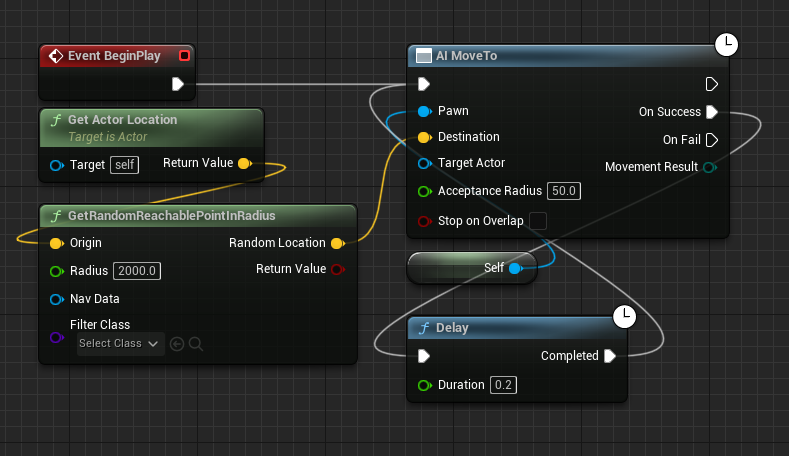
The process of transitioning an AI character from random movement to player pursuit in Unreal Engine 5 involves a series of targeted modifications within the AI’s Blueprint graph. This method capitalizes on the efficiency of the AI MoveTo node, a powerful built-in function designed for intelligent pathfinding.
1. Initial Blueprint Configuration and Node Removal:
The starting point for this transformation typically involves an AI Blueprint that has been configured for basic movement, perhaps wandering randomly. This initial setup would likely include nodes such as Get Actor Location and GetRandomReachablePointInRadius, which collectively instruct the AI to find and move to an arbitrary point within its vicinity. To enable player-specific pursuit, these nodes, which dictate the random target selection, must be removed.
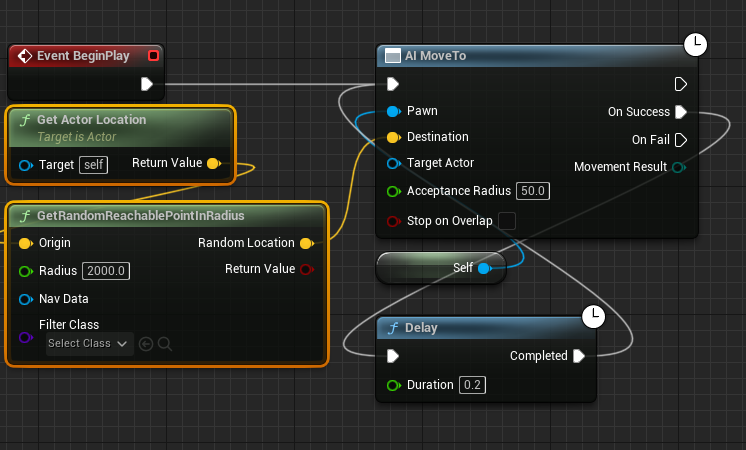
- Action: Locate and delete the
Get Actor LocationandGetRandomReachablePointInRadiusnodes from the AI’s Blueprint graph. - Rationale: These nodes are specifically designed to generate random target coordinates. For the AI to follow the player, its target must dynamically update to the player’s current position, rendering the random point generation obsolete and counterproductive. Eliminating them clears the path for implementing a player-centric targeting system. The
AI MoveTonode, which will be central to the new logic, requires a specific target, not a randomized one.
2. Identifying the Player Character:
With the random targeting nodes removed, the next crucial step is to enable the AI to identify and locate the player character within the game world. This is achieved using the Get Player Character node.
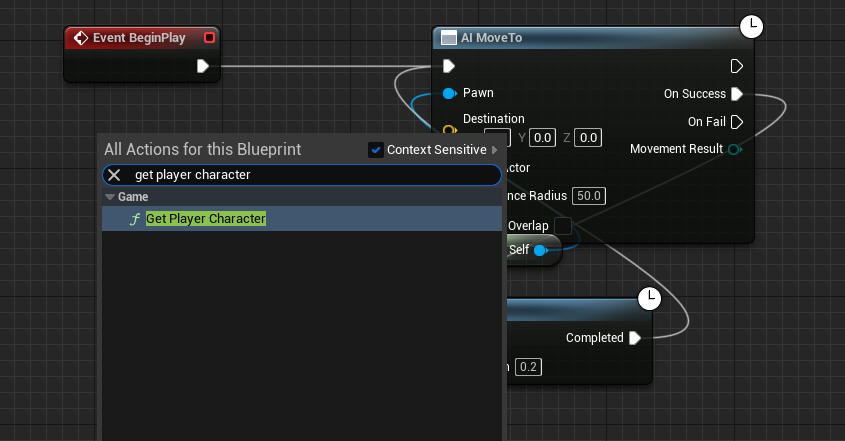
- Action: Add a new
Get Player Characternode to the Blueprint graph. - Rationale: This node serves as the direct link to the player’s controlled character. In a single-player context, it returns a reference to the primary player character. In multiplayer scenarios, it can be extended to target a specific player controller or character if needed, but for general following, it provides the necessary actor reference. Without this reference, the AI would have no object to target for its pursuit.
3. Establishing the Player as the Movement Target:
Once the Get Player Character node is in place, its output must be connected to the AI MoveTo node, which orchestrates the actual movement.
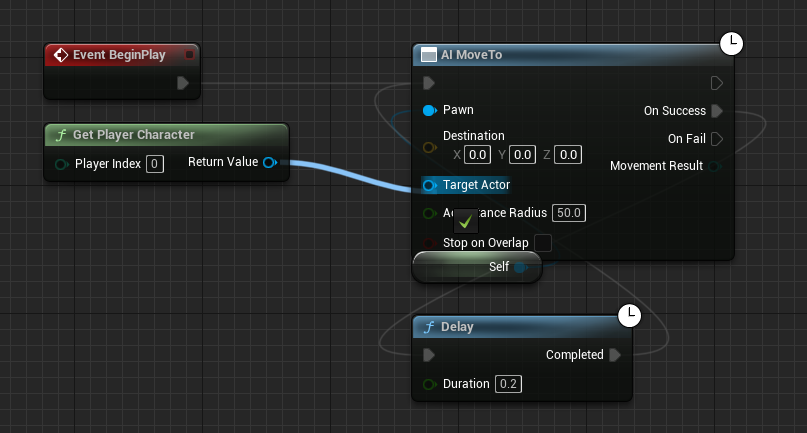
- Action: Connect the blue
Return Valuepin of theGet Player Characternode to the blueTarget Actorpin on theAI MoveTonode. - Rationale: This connection is the core of the player-following logic. The
Return Valuepin outputs a reference to the identified player character. By linking this to theTarget Actorinput of theAI MoveTonode, we are explicitly telling the AI to use the player character as its movement destination. TheAI MoveTonode will then continuously calculate the optimal path on the NavMesh to reach thisTarget Actor, ensuring the AI constantly adjusts its trajectory as the player moves. It’s important to note thatAI MoveTocan target either anActor(like the player character) or a specificLocation(a vector coordinate). Targeting the actor is more dynamic as it automatically tracks the actor’s changing position.
4. Ensuring Robust and Persistent Pursuit:
Game environments are dynamic, and an AI’s pathfinding attempts might occasionally fail due to various reasons, such as the player entering an temporarily unreachable area, a temporary obstruction, or a slight glitch in NavMesh recalculation. To prevent the AI from simply stopping its pursuit upon failure, a robust retry mechanism is essential.
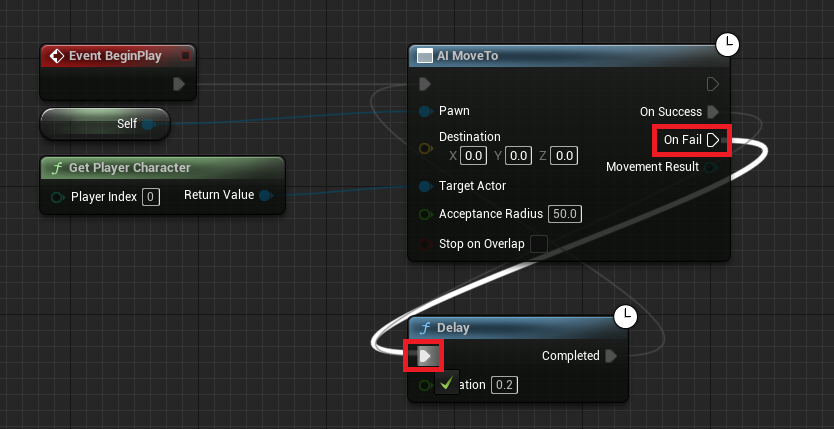
- Action: Connect the
On Failexecution pin of theAI MoveTonode to aDelaynode, and then connect theDelaynode’sCompletedexecution pin back to theAI MoveTonode’s input. - Rationale: This connection creates a resilient feedback loop. If the
AI MoveTooperation fails to find a valid path or reach its target within a certain timeframe, theOn Failpin triggers. Instead of terminating the AI’s movement logic, this trigger activates aDelaynode. TheDelaynode introduces a brief pause (e.g., 0.5 to 1.0 seconds), preventing the system from spamming pathfinding requests and consuming excessive resources. After the delay, theCompletedpin re-executes theAI MoveTonode, prompting the AI to attempt to find the player again. This ensures that the AI will continuously try to follow the player, even if there are momentary obstacles or pathfinding issues, thereby maintaining a consistent and persistent chase or follow behavior. This mechanism is crucial for creating convincing and reliable AI characters that do not easily "give up" on their objective.
5. Finalizing and Applying Changes:
After making these modifications, it is crucial to compile and save the Blueprint to ensure the changes are integrated into the game project.
- Action: Click the "Compile" button, then the "Save" button within the Blueprint editor.
- Rationale: Compiling translates the visual Blueprint logic into executable code, and saving writes these changes to the asset file. Without these steps, the modifications will not take effect when the game is played in the editor or packaged.
Supporting Data and Underlying Mechanisms
The effectiveness of this Blueprint setup is rooted in several technical underpinnings within Unreal Engine 5:
- Pathfinding Algorithms: The
AI MoveTonode internally utilizes advanced pathfinding algorithms, typically A*, to calculate the shortest and most efficient route across the NavMesh from the AI’s current location to the player’s position. This calculation is performed dynamically, adapting to changes in the player’s position and the environment. - Navigation Mesh (NavMesh) Agents: The NavMesh itself is designed to support various "navigation agents," which are essentially profiles defining how different AI types interact with the mesh (e.g., character radius, height, maximum slope). This ensures that AI characters navigate realistically according to their physical dimensions.
- Performance Optimization: Unreal Engine’s NavMesh generation and pathfinding are highly optimized. NavMesh generation can be done at design time (static) or dynamically at runtime, allowing for flexible environments. Pathfinding queries are often multithreaded and cached to minimize performance impact, especially when numerous AI characters are active.
- Acceptance Radius: While not explicitly modified in the core steps, the
AI MoveTonode typically has an "Acceptance Radius" parameter. This value dictates how close the AI needs to get to its target before considering the movement successful. For a chasing enemy, a smaller radius ensures closer pursuit, while for a companion, a larger radius might create a more natural following distance. This parameter offers a simple yet powerful way to fine-tune the AI’s behavior.
Use Cases and Broader Implications
The seemingly simple act of enabling AI to follow a player unlocks a vast array of gameplay mechanics and design possibilities, demonstrating its fundamental importance in almost every genre:
- Basic Enemy AI: This system forms the bedrock for aggressive enemies in action, horror, and adventure games. An enemy that relentlessly chases the player creates tension, requires tactical evasion, and can lead to thrilling combat encounters. This basic pursuit can be augmented with additional logic for attacking when within range, losing sight when obstructed, or patrolling when the player is not detected.
- Companion AI: From loyal sidekicks to helpful NPCs, companion AI relies heavily on this following mechanic. A companion might follow at a safe distance, offering support, carrying items, or providing dialogue. The
Acceptance Radiusis particularly useful here to maintain a comfortable spatial relationship between the player and the companion. - Escort Missions: One of the classic mission archetypes, escort missions, fundamentally depend on AI following. The escorted NPC must reliably navigate the environment while keeping pace with the player, often requiring robust
On Failhandling to ensure they don’t get stuck or left behind. This can be extended to "protect" the target AI, where the AI only moves if the player is within a certain proximity and no threats are detected. - Non-Combat AI and Environmental Interaction: Beyond combat or companionship, this mechanic can be used for passive AI behaviors, such as wildlife reacting to the player’s presence by fleeing, or even dynamic environmental elements that track the player’s movement for puzzle mechanics or ambient effects.
- Dynamic Threats in Open Worlds: In expansive open-world games, this AI behavior is critical for creating emergent threats. Whether it’s a predator tracking its prey or a rival faction patrolling an area, the ability for AI to dynamically pursue the player contributes significantly to the world’s believability and challenge.
- Accessibility for Indie Developers: The simplicity of implementing this core AI behavior using Blueprints significantly lowers the barrier to entry for independent game developers and small studios. They can quickly prototype and integrate sophisticated AI actions without needing extensive programming expertise, accelerating development cycles and allowing them to focus on unique gameplay mechanics and narrative.
Conclusion
The implementation of dynamic AI following in Unreal Engine 5, achieved through a handful of intuitive Blueprint nodes, exemplifies the engine’s power and accessibility. By systematically modifying an AI’s movement logic to target the player character and incorporating a robust retry mechanism, developers can create compelling and persistent AI behaviors that are foundational to virtually all interactive experiences. This core functionality not only enhances gameplay through engaging enemy encounters and helpful companions but also empowers a wide spectrum of developers to realize their creative visions with efficiency. As game development continues to evolve, the ability to quickly and effectively implement such crucial AI systems will remain a cornerstone of crafting immersive and dynamic virtual worlds.
About the Author