
The integration of sophisticated artificial intelligence (AI) within interactive entertainment has become a cornerstone of modern game design, enabling rich, dynamic worlds populated by believable non-player characters (NPCs). In this landscape, Unreal Engine 5 (UE5) stands as a prominent tool, offering robust frameworks for developers to craft intricate AI behaviors, with its NavMesh system serving as the foundational element for autonomous character navigation. This guide outlines the essential process of configuring a NavMesh and implementing basic AI movement within UE5, a critical skill for any developer aiming to create immersive and responsive game environments.
The Foundation of Intelligent Worlds: NavMesh in Unreal Engine 5
At its core, a Navigation Mesh, or NavMesh, is a specialized 3D mesh generated within a game environment that defines all walkable surfaces for AI-controlled characters. Unlike simple waypoint systems or grid-based pathfinding, a NavMesh offers a more efficient and realistic approach to navigation, allowing AI agents to find optimal paths around obstacles, traverse complex terrain, and dynamically react to changes in the environment. In Unreal Engine 5, the NavMesh system is highly optimized, leveraging advanced algorithms to compute paths quickly, even in sprawling open-world scenarios. This capability is paramount for games that feature large numbers of AI entities, from bustling city simulations to vast battlefields.
The process begins by clearly delineating the areas where AI characters are permitted to move. This initial setup is crucial, as any misconfiguration can lead to AI agents getting stuck, behaving erratically, or failing to navigate intended routes, issues that can severely detract from the player experience. Developers must generate this navigational mesh and then integrate it with the AI logic governing character movement. While the steps are generally straightforward, precision in their execution is key to avoiding common pitfalls. The overarching goal is to equip AI characters with the ability to intelligently traverse the game world, responding dynamically to their surroundings.
A Historical Arc: The Evolution of AI Pathfinding in Games
The concept of AI pathfinding in video games has evolved dramatically since the early days of the industry. Initially, AI movement was often rudimentary, relying on pre-scripted paths, simple state machines, or basic grid-based movement. Games like Pac-Man, released in 1980, showcased early forms of AI through its ghosts, each with distinct, albeit simple, behavioral patterns. As hardware capabilities advanced, so did the complexity of AI. The 1990s saw the rise of more sophisticated algorithms, such as Dijkstra’s algorithm and the A* search algorithm, which allowed AI to calculate optimal paths through complex mazes and environments. These algorithms formed the backbone of AI navigation in many early 3D games, but often required manual creation of navigation graphs or heavy computational resources.
The advent of NavMesh technology marked a significant leap forward. Instead of discrete nodes or grids, NavMeshes provide a continuous representation of walkable space, offering greater flexibility and efficiency. Epic Games, with its Unreal Engine series, has been at the forefront of integrating these advanced AI tools. From Unreal Engine 3, where NavMeshes became more prevalent, to Unreal Engine 4’s robust AI framework, the engine has consistently provided developers with powerful, accessible tools. Unreal Engine 5 continues this tradition, refining its NavMesh generation and AI behavior scripting capabilities, making it easier for even independent developers to implement complex AI. This historical progression underscores a consistent industry drive towards more autonomous, believable, and performance-efficient AI, vital for the increasing demands of player expectations.
Unreal Engine 5: Streamlining AI Navigation for Developers
Unreal Engine 5’s architecture is designed to empower developers with a streamlined workflow, and its AI navigation system is a testament to this philosophy. The engine’s integrated tools significantly reduce the manual effort traditionally associated with AI pathfinding, allowing creators to focus more on the narrative, gameplay mechanics, and intricate behavioral patterns rather than the underlying navigation infrastructure. This ease of use is a major factor in Unreal Engine’s widespread adoption across projects of all scales, from indie titles to AAA blockbusters.
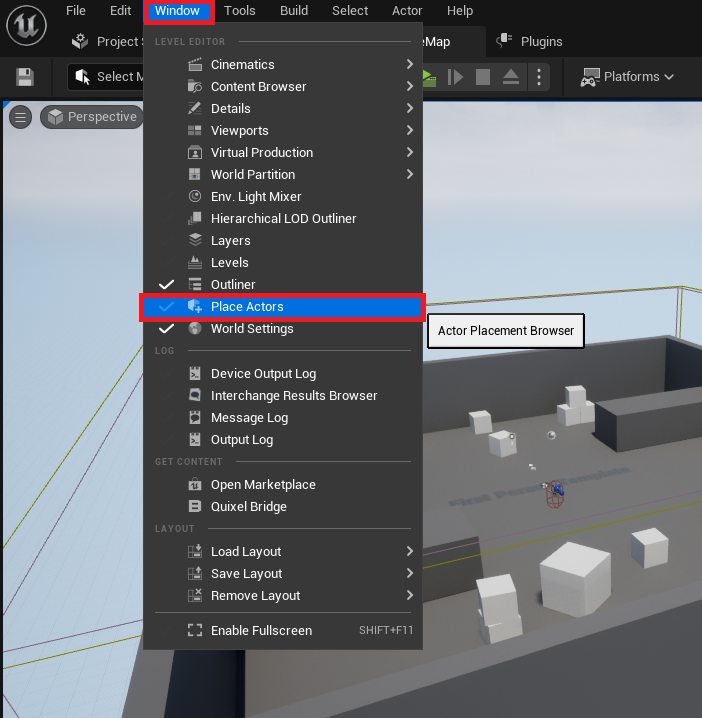
The initial phase of setting up a NavMesh involves accessing the engine’s primary interface for world population: the "Place Actors" window. This window, accessible via the "Window" menu, serves as a central hub for spawning various fundamental objects and volumes into the active level. It simplifies the process of bringing essential elements into the scene, a critical step for preparing the environment for AI interactions. The intuitive design of this interface ensures that even new users can quickly locate and deploy the necessary components for their projects, fostering a more accessible development environment.
Constructing the Navigable Blueprint: A Technical Overview
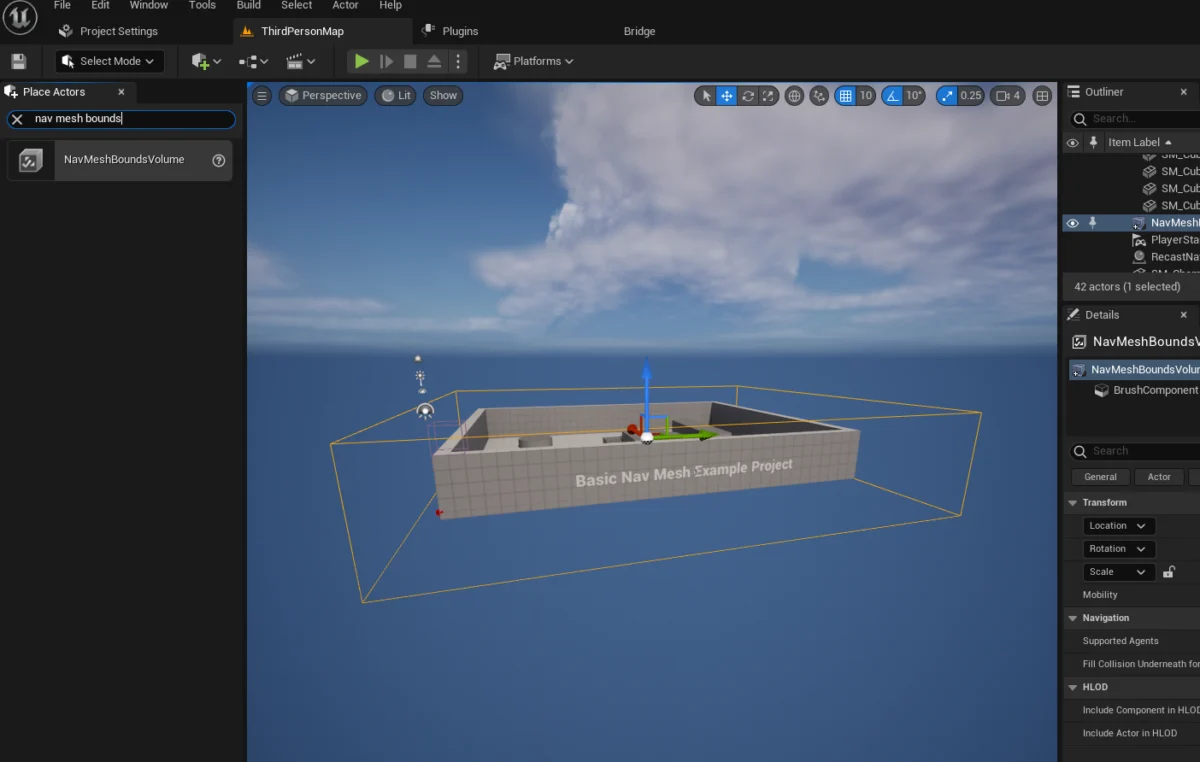
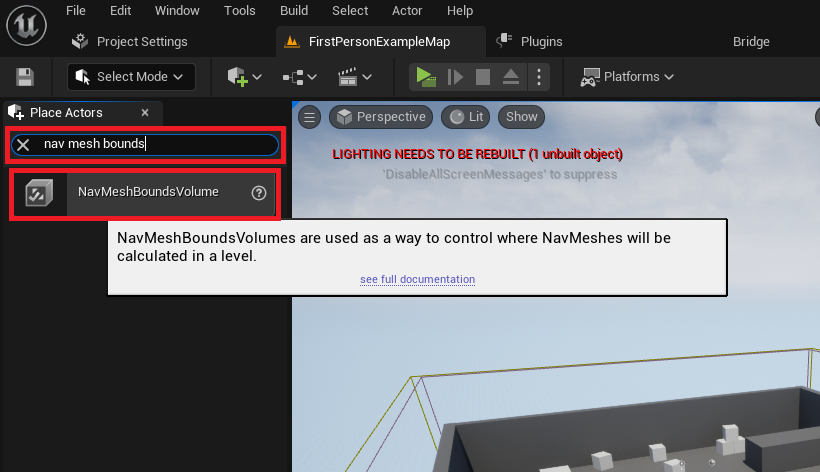
Once the Place Actors window is active, the next step involves introducing the NavMeshBoundsVolume actor into the level. This specialized volume is not merely a visual element; it is the fundamental component that instructs Unreal Engine 5 where to generate the navigation mesh. Found within the "Volumes" category of the Modes panel, this actor is a bounding box that developers strategically position and scale to encompass all areas where AI characters are expected to move. The precision in placing and sizing this volume directly impacts the quality and coverage of the generated NavMesh.
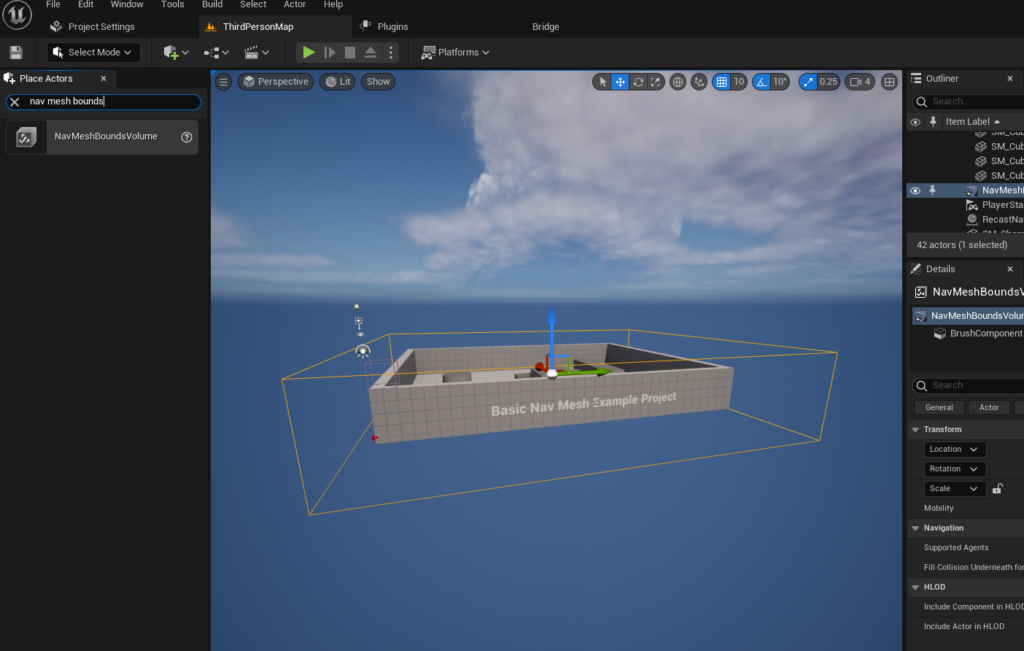
Developers must carefully scale and position the NavMeshBoundsVolume to precisely fit the desired navigable space within the level geometry. This volume acts as a computational boundary; the engine will only generate a NavMesh within its confines. The flexibility to adjust its size, whether for a small room or an expansive open world, is crucial. However, it is important to note that larger NavMeshes naturally require more computational resources and time to generate. For dynamic environments where geometry changes during runtime, Unreal Engine also supports dynamic NavMesh generation, a more advanced technique that ensures AI characters can always navigate evolving landscapes. This dynamic capability represents a significant advantage for games featuring destructible environments or procedurally generated levels, maintaining AI intelligence even as the world transforms.
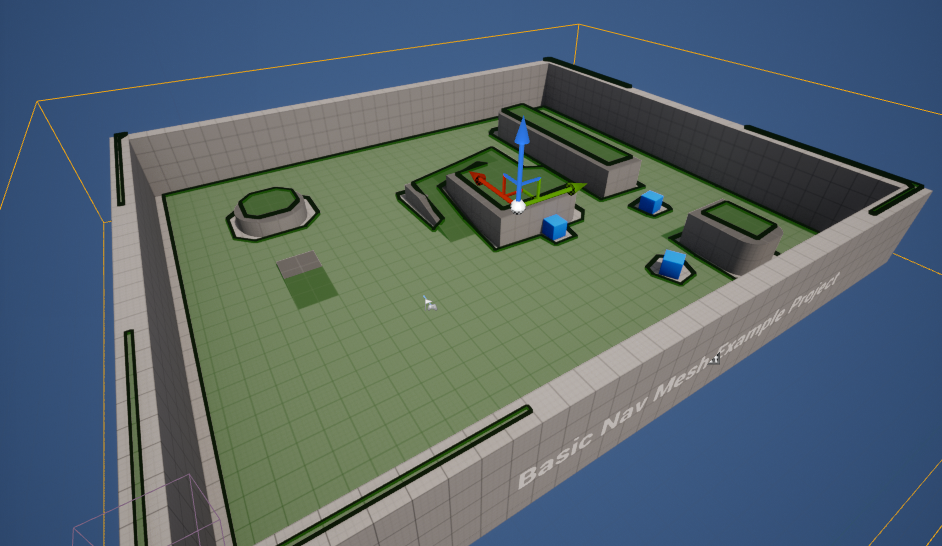
After the NavMeshBoundsVolume is correctly placed and scaled, developers can visually confirm the generated NavMesh by pressing the "P" key on the keyboard. This action toggles the debug visualization of the NavMesh, rendering it as a green overlay on all walkable surfaces within the specified volume. This visual feedback is invaluable for verifying that the NavMesh has been generated accurately and covers all intended areas, while also highlighting any gaps or inaccessible regions that might hinder AI movement. This immediate visual confirmation allows for rapid iteration and correction, preventing costly debugging later in the development cycle. It is a critical quality assurance step that ensures the AI will have a coherent and complete map of its traversable environment.
Empowering Autonomous Agents: Character AI Implementation
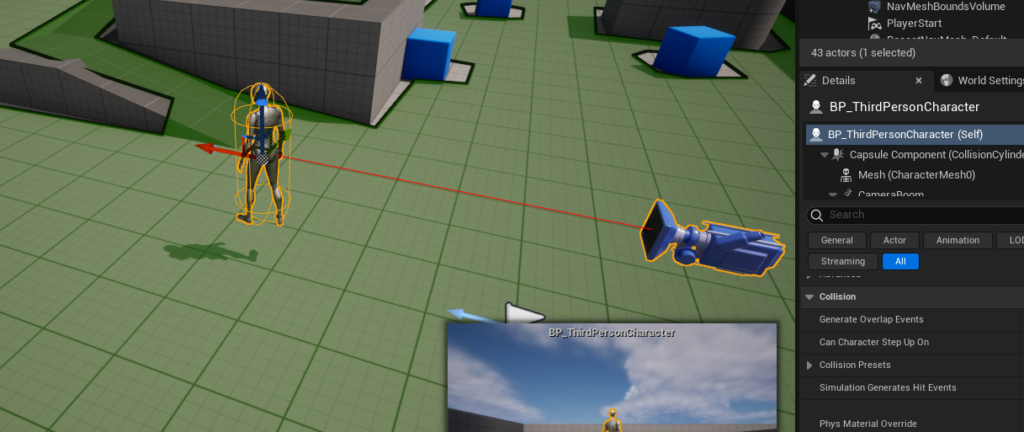
With the NavMesh established, the focus shifts to imbuing AI characters with the ability to utilize this navigation data. For demonstration purposes, many developers begin with Unreal Engine 5’s Third Person Template, which provides a pre-rigged and animated character blueprint. This template offers an excellent starting point for testing AI navigation without the overhead of creating a character from scratch. The character blueprint, typically located in the "Third Person / Blueprints" folder within the Content Drawer, serves as the base for creating intelligent agents.
The initial step in activating AI movement for this character involves dragging an instance of the character blueprint into the level. Once placed, the character’s AI behavior is configured within its blueprint editor. This is where the visual scripting language, Blueprint, comes into play, allowing developers to define complex logic without writing traditional code.
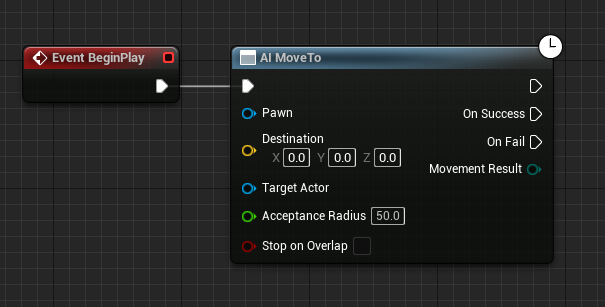
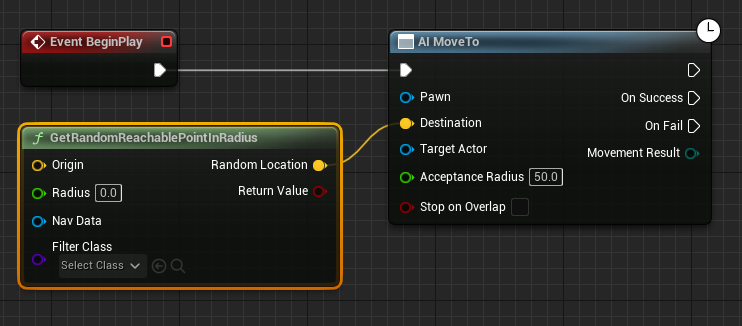
A fundamental AI behavior is initiated by the Event BeginPlay node, which triggers when the game starts. Connected to this is the AI MoveTo node, a powerful built-in function designed to command an AI character (Pawn) to move to a specified destination. This node forms the core of many AI movement patterns, from simple patrols to complex pursuit behaviors.
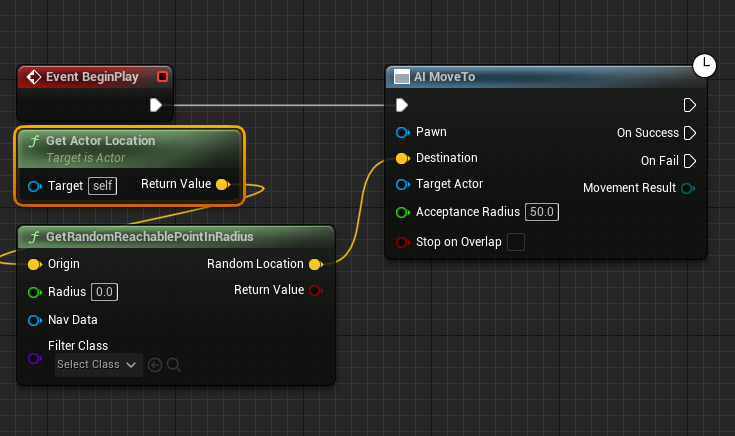
To give the AI character a sense of autonomy and random exploration, the GetRandomReachablePointInRadius node is introduced. This node intelligently queries the NavMesh to find a valid, walkable location within a specified radius from an origin point. The output of this node, a yellow vector pin representing the calculated destination, is then connected to the Destination pin of the AI MoveTo node. This linkage ensures that the AI character will attempt to move to a randomly selected, yet navigable, point within its designated roaming area.
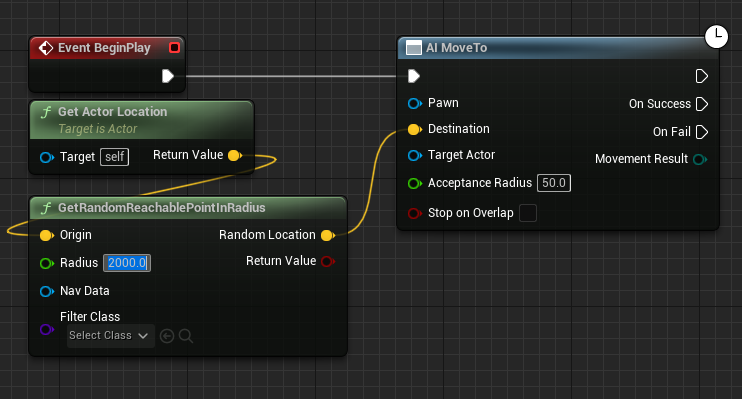
The Origin for this random point calculation is typically set to the AI character’s current location, achieved by connecting a Get Actor Location node to the Origin input of GetRandomReachablePointInRadius. This setup ensures that the AI’s random movements are always centered around its current position, preventing it from straying too far from its intended zone. The Radius input, a green pin, determines the maximum distance the AI will roam from its origin. For instance, a radius of 2000 units would allow the AI to explore a substantial area, making its movements appear more natural and less confined. This parameter is critical for tuning the AI’s perceived intelligence and its impact on gameplay.
To ensure the AI MoveTo node correctly targets the character being controlled, a Reference to Self node is connected to the Pawn input. This self-referential connection explicitly tells the AI MoveTo node which specific character instance it should command, avoiding ambiguity in scenarios with multiple AI agents.
Finally, to create continuous, looping AI movement, a Delay node is incorporated. This node is connected to the On Success output pin of the AI MoveTo node. Upon successfully reaching its destination, the AI character will pause for a specified duration (e.g., 2 seconds, configurable within the Delay node). After this delay, the execution flow loops back to the AI MoveTo node, prompting the AI to find a new random destination and repeat the process. This creates a perpetual cycle of autonomous navigation, giving the AI character a lifelike patrolling or wandering behavior without requiring constant manual intervention or complex state machines. This iterative process, easily visualized and managed through Blueprint, highlights Unreal Engine 5’s capacity to build intricate AI logic with relative ease.

Once these Blueprint nodes are correctly connected and configured, clicking "Play" in the Unreal Engine editor will initiate the game simulation. The AI character, now equipped with its NavMesh-driven navigation logic, will begin moving autonomously, seeking out random, reachable locations within its defined radius. This immediate visual feedback on AI behavior is invaluable for developers, allowing for quick testing and refinement of movement patterns and overall AI intelligence.
Beyond Basic Movement: Implications for Game Design and Player Immersion
The ability to implement basic AI navigation through NavMeshes in Unreal Engine 5 has profound implications for game design and player immersion. On a fundamental level, it allows for the creation of game worlds that feel more alive and responsive. NPCs can realistically patrol areas, chase players, or flee from danger, contributing significantly to the atmosphere and narrative. This foundational capability underpins more complex AI behaviors such as tactical decision-making, object interaction, and social simulations, all of which rely on the AI’s ability to first understand and navigate its environment.
From a game design perspective, accessible NavMesh tools enable developers to build larger, more complex levels without being burdened by the manual creation of intricate pathfinding networks. This efficiency frees up development resources to focus on other critical aspects of game creation, such as art, story, and core gameplay mechanics. Furthermore, well-implemented AI navigation enhances replayability, as AI characters can adapt to different player strategies and environmental changes, leading to unique encounters each playthrough.
For players, intelligent AI directly translates to a more engaging and challenging experience. Enemies that can intelligently flank, evade, and pursue feel more threatening and believable. Allies that can follow orders and navigate complex battlefields contribute to a sense of camaraderie and tactical depth. The seamless movement of background characters in a bustling city environment adds to the overall immersion, making the game world feel more authentic and less like a static backdrop. The perceived intelligence of AI, even through basic movement, significantly impacts a game’s critical reception and commercial success.
The Future of AI in Interactive Entertainment
The continuous evolution of AI tools within game engines like Unreal Engine 5 points towards an exciting future for interactive entertainment. As computational power increases and algorithms become more sophisticated, we can anticipate even more dynamic and adaptive AI systems. Future iterations may see NavMeshes being generated and updated in real-time with even greater efficiency, supporting fully destructible environments or procedurally generated worlds that change constantly.
Furthermore, the integration of machine learning and deep learning techniques into game AI is already a growing trend. This could lead to AI characters that learn from player behavior, adapt their strategies over time, and even generate novel behaviors that surprise and challenge players in unforeseen ways. The solid foundation provided by robust navigation systems like Unreal Engine’s NavMesh will be crucial for these advanced AI systems to function effectively within complex 3D environments. Developers will increasingly leverage these tools to create narratives driven by intelligent agents, emergent gameplay, and personalized player experiences, pushing the boundaries of what is possible in interactive storytelling.
Epic Games’ Commitment to Developer Tools
Epic Games’ consistent investment in and refinement of tools like the NavMesh system within Unreal Engine 5 underscores its commitment to empowering developers across the globe. By providing accessible, powerful, and well-documented features, Epic Games continues to democratize game development, enabling smaller teams and individual creators to achieve results previously only attainable by large studios. This philosophy has fostered a vibrant developer community and contributed significantly to the engine’s dominant market position. The ongoing updates and support for these core AI features ensure that Unreal Engine remains at the cutting edge of game development technology, continually pushing the envelope for what can be achieved in creating intelligent, interactive virtual worlds.
About the Author








