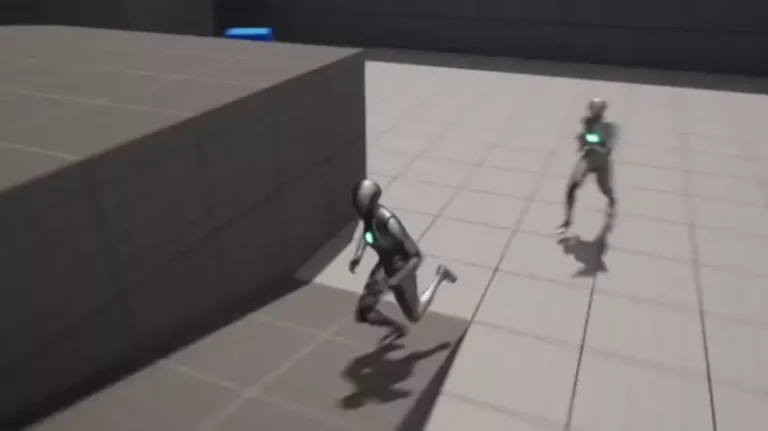
The implementation of dynamic artificial intelligence (AI) characters and enemies that can accurately chase or follow a player character is a cornerstone feature in the vast majority of modern video games, significantly contributing to player immersion and gameplay challenge. This fundamental functionality, often perceived as complex, can be achieved with remarkable ease within Unreal Engine 5 (UE5) through the intuitive visual scripting system known as Blueprints, requiring only a handful of nodes to establish robust AI pathfinding. This guide details the precise steps for integrating AI player-following capabilities in UE5, building upon foundational navigation mesh (NavMesh) principles.
Modern game development thrives on creating believable and reactive virtual worlds. At the heart of this lies AI, which governs the behavior of non-player characters (NPCs) and adversaries. From simple patrol routes to complex tactical maneuvers, AI dictates how these entities interact with the game environment and, critically, with the player. The ability for an AI character to track and pursue the player is not merely a technical feat but a critical design element that drives narrative, creates tension, and facilitates core gameplay loops, whether it’s an enemy hunter in a survival horror game, a loyal companion in an RPG, or a simple objective marker. Unreal Engine 5, with its powerful rendering capabilities and accessible development tools, provides an ideal environment for developers to implement such features efficiently. Its Blueprint system abstracts much of the underlying C++ complexity, allowing designers and programmers alike to prototype and build intricate systems visually.
Foundational Prerequisites: The NavMesh System
Before delving into the specific Blueprint configurations for AI following, it is imperative to acknowledge the bedrock upon which all intelligent AI movement in Unreal Engine operates: the NavMesh system. As outlined in the preceding guide, "Setting up a NavMesh in Unreal Engine 5," a properly configured NavMesh is not merely an optional component but a mandatory prerequisite for any AI character to navigate a game level intelligently. The NavMesh, or Navigation Mesh, is an abstract data structure that represents the traversable areas of a game world as a polygonal mesh. It acts as a roadmap for AI agents, allowing them to calculate optimal paths from their current location to a designated target point, avoiding obstacles and respecting level geometry. Without a NavMesh, AI characters would lack the spatial awareness necessary to move realistically, often colliding with environmental elements or becoming stuck. The engine’s built-in navigation system leverages sophisticated algorithms, such as A*, to compute efficient paths across this mesh, ensuring that AI movement is both logical and performant. Therefore, confirming the presence and correct generation of a NavMesh in the game level is the critical "Before we Start" step, as all subsequent AI movement logic relies entirely on its existence and accuracy.
Transitioning from Random Movement to Targeted Pursuit
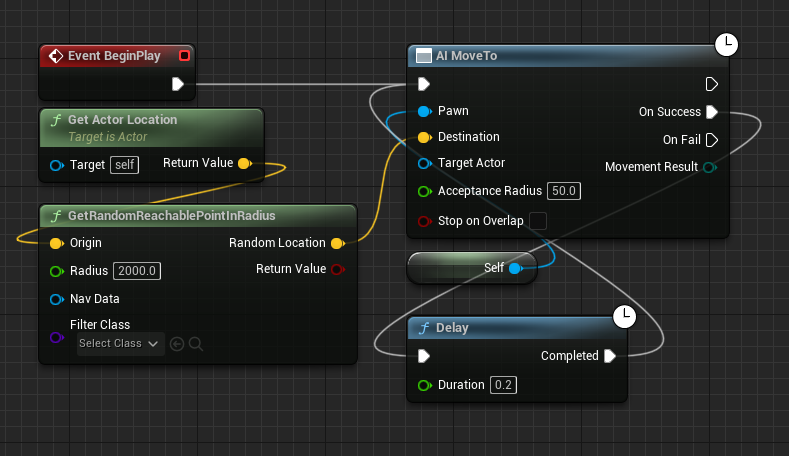
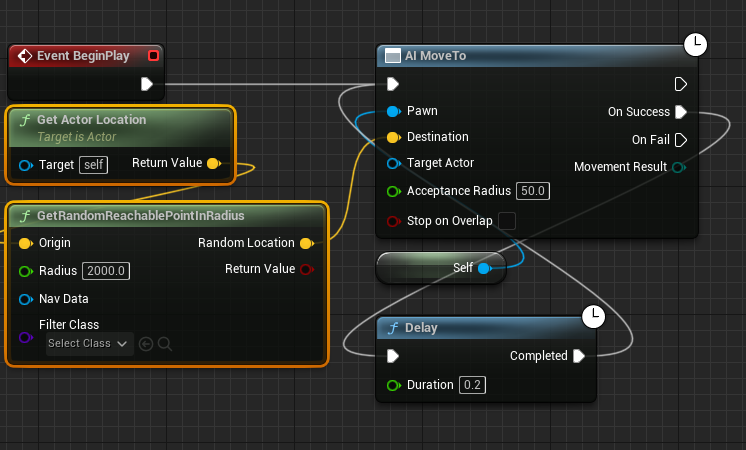
The initial setup for AI movement, as demonstrated in the previous NavMesh guide, typically involves a rudimentary system designed for AI characters to wander aimlessly within a defined radius. This preliminary configuration serves as an excellent starting point for understanding basic AI locomotion but is insufficient for the dynamic, player-focused pursuit required in most games. The previous Blueprint graph would have included nodes such as Get Actor Location (referring to the AI’s own location) and GetRandomReachablePointInRadius, which collectively instructed the AI to identify a random, valid point on the NavMesh within a certain distance from itself and then move towards it. To transition from this undirected wandering to a targeted chase, these specific nodes must be systematically removed and replaced with logic that explicitly references the player character’s position.
The first step in this transformation involves deleting the aforementioned Get Actor Location and GetRandomReachablePointInRadius nodes from the AI’s Blueprint graph. These nodes, while useful for random patrol behaviors, are fundamentally designed to generate arbitrary destinations relative to the AI itself. Since the objective is for the AI to move towards the player’s precise location, these random target generation mechanisms become redundant and counterproductive. Their removal streamlines the Blueprint graph, preparing it for the introduction of player-centric targeting logic. The clarity of this deletion is paramount; retaining them would either cause conflicts or unnecessary processing, as the AI would constantly try to reconcile between a random target and the player’s location.
Establishing the Player as the AI’s Target
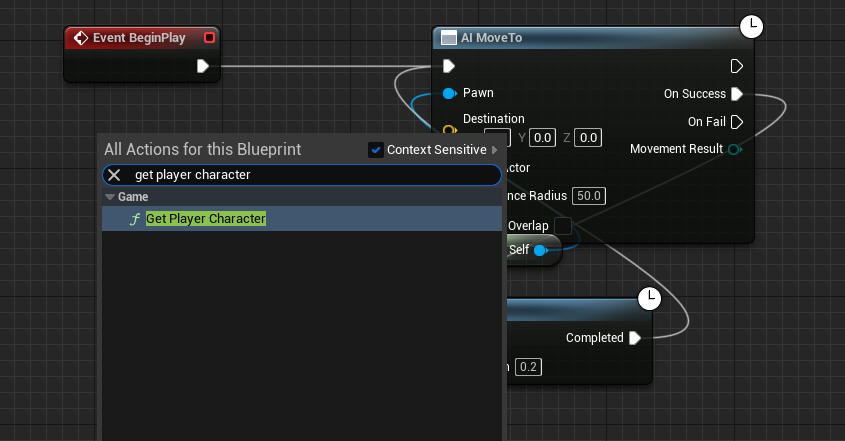
With the random target generation nodes removed, the next crucial phase involves explicitly telling the AI who to follow. This is achieved by introducing a new Blueprint node: Get Player Character. This node is a fundamental utility in Unreal Engine, designed to retrieve a reference to the currently controlled player character in the game world. It effectively serves as the AI’s "eyes" to locate its primary target. Adding this node to the Blueprint graph provides a direct conduit to the player’s instance, allowing the AI system to query its properties, most importantly, its current world location.
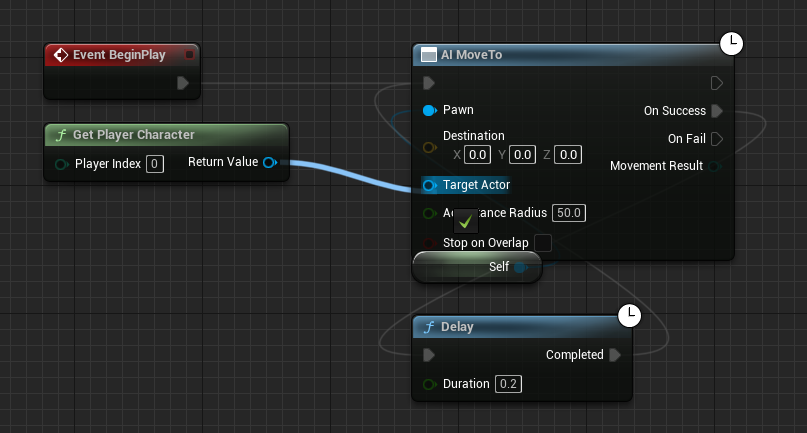
Once the Get Player Character node is present, the critical connection is made. The blue Return Value pin from the Get Player Character node must be connected to the blue Target Actor pin on the AI MoveTo node. This connection is the lynchpin of the entire AI following system. The AI MoveTo node is a powerful, high-level Blueprint function that encapsulates the complex logic of pathfinding and movement. When provided with a Target Actor, it instructs the AI controller to find a path to that actor’s current location on the NavMesh and initiate movement along that path. By feeding the Get Player Character‘s Return Value (which is a reference to the player character) into the AI MoveTo node’s Target Actor input, the AI is now explicitly directed to pursue the player. This dynamic link ensures that as the player moves, the AI MoveTo node continuously receives updated target coordinates, prompting the AI to recalculate its path and adjust its trajectory accordingly, thereby creating a persistent chase behavior.
Ensuring Robust and Persistent Pursuit: Handling Movement Failures
A common challenge in AI pathfinding is the potential for movement operations to fail. This can occur for various reasons: the player might move into an area not covered by the NavMesh, temporary obstacles might block the path, or there could be transient issues with path recalculation. A robust AI following system must account for these potential failures to prevent the AI from becoming static or "stuck." This is where the On Fail execution pin of the AI MoveTo node becomes critically important.
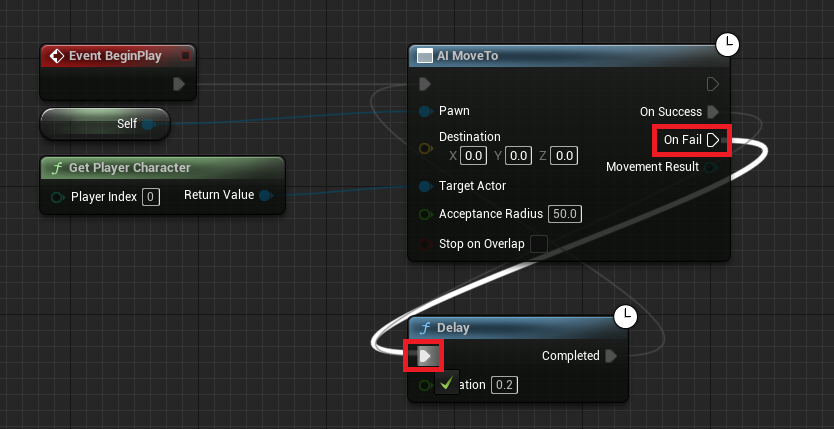
The AI MoveTo node, like many asynchronous Blueprint nodes, has two primary output execution pins: On Success and On Fail. The On Success pin executes when the AI successfully reaches its target or a point very close to it. The On Fail pin, conversely, triggers if the AI is unable to reach its target for any reason—be it an unreachable location, a blocked path, or an internal navigation error. To ensure continuous pursuit, even in challenging scenarios, the On Fail pin must be connected back into the flow of the AI’s movement logic. Specifically, it should be connected to a Delay node, which then loops back to re-initiate the AI MoveTo command.
Connecting the On Fail pin to a Delay node introduces a crucial retry mechanism. When an AI MoveTo operation fails, the Delay node pauses the execution of the AI’s movement logic for a specified duration (e.g., 0.5 to 1 second). After this delay, the execution flow continues, triggering another AI MoveTo command to the player’s current location. This cycle ensures that if the AI temporarily loses its path or the player moves to an momentarily inaccessible spot, the AI will not give up. Instead, it will pause briefly, re-evaluate the situation, and attempt to find a new path. This continuous retry loop is vital for maintaining persistent AI following, making the AI resilient to minor navigation glitches or dynamic changes in the environment. The Delay node is also critical for performance; without it, a failed AI MoveTo operation might instantly trigger another, potentially causing a tight loop that consumes excessive CPU resources. The delay provides a necessary breather, preventing performance bottlenecks and allowing the navigation system time to re-evaluate the game state.
Finalizing and Testing the AI System
Once all the Blueprint nodes are correctly configured and connected—the Get Player Character node feeding into AI MoveTo‘s Target Actor pin, and the On Fail pin cycling back through a Delay node to re-initiate movement—the final, but often overlooked, step is to Compile and Save the Blueprint. This action processes the visual script into executable code, applying all the changes made within the Blueprint editor to the game’s runtime logic. Without compiling and saving, the modifications will not take effect when the game is played in the editor or packaged. It is a fundamental workflow step in Unreal Engine development, ensuring that the updated AI behavior is correctly integrated. After compilation, developers can then test the AI by playing the level in the editor, observing how the AI character now dynamically tracks and pursues the player, adapting its movement to the player’s actions and the environment.
Advanced Considerations and Technical Nuances
While the outlined Blueprint setup provides a functional and robust AI following system, professional game development often involves layering additional complexities to refine the AI’s behavior.
- Performance Optimization: The frequency of
AI MoveTocalls and the duration of theDelaynode are critical for performance. A very short delay might cause the AI to constantly recalculate paths, potentially leading to performance hits, especially with many AI agents. Conversely, a long delay might make the AI appear sluggish or unresponsive. Striking the right balance is essential. - Pathfinding Accuracy and Cost: The
AI MoveTonode has parameters likeAcceptance RadiusandbStopOnOverlap. TheAcceptance Radiusdefines how close the AI needs to get to the target before considering the movement successful. Adjusting this can prevent jittering when the AI is very close to the player. - AI Perception Systems: In real-world games, this basic following mechanic is typically augmented with AI Perception components. Instead of the AI "knowing" the player’s exact location at all times, perception systems (like sight and hearing) dictate when the AI becomes aware of the player and begins pursuit. If the player breaks line of sight or becomes silent, the AI might switch to a "searching" state rather than relentless following. This adds realism and strategic depth.
- Behavior Trees and State Machines: For more complex AI behaviors that involve multiple states (e.g., patrolling, chasing, attacking, fleeing, searching), developers often transition from simple Blueprint event graphs to Behavior Trees or State Machines. These systems provide a structured way to define complex decision-making logic, allowing AI to dynamically switch between different actions based on environmental stimuli and internal states. The
AI MoveTonode would then be a leaf node within such a tree, executed only when the AI’s current behavior dictates a chase. - Obstacle Avoidance and Crowd Simulation: For multiple AI agents, further systems might be integrated to prevent agents from colliding with each other or getting stuck in tight spaces. Unreal Engine’s navigation system often includes basic avoidance, but more advanced crowd simulation tools can be employed for large groups of AI.
Diverse Use Cases in Modern Gaming
The fundamental AI following system, despite its relatively straightforward implementation with a few Blueprint nodes, serves as the backbone for an astonishing variety of AI behaviors across different game genres. Its utility extends far beyond simple enemy pursuit, enabling rich and dynamic interactions within game worlds.
- Antagonistic AI (Enemies & Bosses): This is perhaps the most immediate and impactful use case. From the relentless stalker in a survival horror game like Resident Evil or Alien: Isolation, where every step is a calculated pursuit, to the aggressive combatants in an action RPG or FPS, the AI’s ability to chase the player directly fuels tension, challenges combat skills, and drives narrative segments. Boss encounters often rely on complex variations of this, where the boss actively hunts the player across an arena.
- Companion AI (Allies & Pets): On the opposite end of the spectrum, friendly NPCs, animal companions, or even quest-giving characters frequently need to follow the player. In games like Fallout or The Last of Us, companion AI provides tactical support, carries items, or simply enriches the narrative by being a constant presence. The same
AI MoveTologic, targeting the player, forms the basis for this cooperative following, often with additional logic to manage distance, avoid friendly fire, or trigger specific contextual interactions. - Objective Markers & Guides: In certain games, AI characters might serve as guides, leading the player to the next objective. This effectively reverses the chase, with the player following the AI, but the underlying AI logic for movement remains a variation of targeted pathfinding, often towards a predefined point or another character.
- Stealth and Evasion Mechanics: The existence of a robust AI following system inherently creates opportunities for stealth gameplay. Players must actively evade or outmaneuver pursuing AI, utilizing cover, environmental distractions, or specific abilities to break the AI’s line of sight or disrupt its pathfinding. This interplay between pursuit and evasion forms the core of many stealth-action titles.
- Dynamic Environmental Interaction: More sophisticated implementations might see AI reacting to player-induced environmental changes. For example, if a player destroys a bridge, the AI following them might recalculate a new, longer path, showcasing intelligent adaptation rather than simply getting stuck.
- Simulation and Sandbox Games: Even in less combat-focused genres, AI following can be crucial. In simulation games, NPCs might follow specific routines that include tracking other NPCs or dynamic objects, contributing to a living, breathing world. In sandbox games, AI companions or even creatures might exhibit following behaviors based on player interaction or environmental triggers.
Broader Impact and Future Implications
The seemingly simple act of an AI character following a player has profound implications for game design and player experience. It moves beyond static environments and predetermined encounters, fostering dynamic gameplay where player choices directly influence AI behavior. This interactivity is a cornerstone of immersive experiences, making players feel truly present and influential within the virtual world.
As AI technology continues to advance, particularly with the integration of machine learning and more sophisticated neural networks, the fidelity and intelligence of AI following mechanics are set to evolve further. Future implementations may incorporate predictive movement, where AI anticipates player actions, or adaptive learning, where AI improves its pursuit strategies over time based on player behavior patterns. Procedural generation techniques combined with AI could lead to infinitely varied chase sequences, each unique and challenging.
The accessibility provided by tools like Unreal Engine 5’s Blueprint system democratizes the development of these complex features, allowing a wider range of creators to implement sophisticated AI without needing deep programming expertise. This fosters innovation and creativity, pushing the boundaries of what is possible in interactive entertainment.
Conclusion
The process of enabling AI characters to follow a player in Unreal Engine 5 is a testament to the power and flexibility of its Blueprint visual scripting system. By understanding the foundational role of the NavMesh and systematically implementing a few key nodes—deleting random movement logic, identifying the Get Player Character, connecting it to AI MoveTo, and establishing a robust retry mechanism with On Fail and Delay—developers can quickly establish a core AI behavior that is both functional and resilient. This fundamental mechanic is not an isolated feature but a versatile building block, enabling a vast spectrum of gameplay experiences, from intense chase sequences and strategic companion interactions to immersive world building. Mastering this basic AI movement system opens the door to creating more complex, engaging, and believable AI behaviors, ultimately enriching the player’s journey through virtual worlds. The simplicity of its implementation belies the profound impact it has on the overall quality and depth of modern video games, standing as a critical component in the ever-evolving landscape of interactive entertainment.
About the Author