The bedrock of efficient and scalable software development, particularly within complex interactive environments like video games, lies in the principle of modularity. In the realm of Unreal Engine 5 (UE5), this principle finds robust expression through Blueprint Functions, self-contained units of visual scripting logic designed to streamline development, enhance maintainability, and foster collaborative workflows. These functions serve as indispensable tools for developers, allowing the creation of reusable code blocks that can be invoked repeatedly across various parts of a project, significantly reducing redundancy and improving code organization.
Understanding the Core: The Role of Functions in Programming and UE5 Blueprints
At its heart, a function in programming is a sequence of instructions designed to perform a specific task. It encapsulates a block of code, giving it a name, and allowing it to be executed from any point within the program that needs that specific task performed. This fundamental concept is mirrored in Unreal Engine 5’s Blueprint visual scripting system. Blueprint Functions are visual representations of these code blocks, offering a clear and intuitive way for both programmers and designers to implement complex logic without delving into traditional text-based coding languages like C++.
The primary advantage of functions, both in text-based programming and Blueprints, is their capacity for reusability. Instead of duplicating the same set of nodes or lines of code multiple times, a developer can create a single function and "call" it whenever the logic is required. This not only makes the Blueprint graph cleaner and easier to read but also centralizes the logic. For instance, a complex calculation like CalculateDamage that needs to be applied to various entities (player, enemies, environmental hazards) can be defined once within a function. Should the damage calculation formula require adjustments – perhaps due to a game balance patch or a new armor mechanic – the change only needs to be made in one place: the CalculateDamage function itself. This singular point of modification drastically reduces the risk of introducing new bugs, saves development time, and ensures consistency across the entire project.
Furthermore, Blueprint Functions facilitate abstraction. They allow developers to think about higher-level tasks rather than getting bogged down in the minute details of every operation. A function named HealPlayer clearly communicates its intent, regardless of the intricate logic it contains (e.g., checking health limits, playing an animation, updating UI). This level of abstraction is crucial for managing the inherent complexity of modern game development, where projects can easily involve millions of lines of code or thousands of Blueprint nodes.
The Evolution of Visual Scripting: Unreal Engine’s Blueprint Philosophy
Unreal Engine’s commitment to visual scripting has been a cornerstone of its development environment for many years, evolving significantly from its early Kismet system to the powerful Blueprints of today. Epic Games, the creators of Unreal Engine, introduced Blueprints as a deliberate strategy to democratize game development. By providing a robust visual scripting interface, they aimed to empower a wider range of development roles—from technical artists and level designers to gameplay programmers—to contribute directly to the game’s logic without needing extensive C++ knowledge.
This philosophy has fostered a more iterative and collaborative development cycle. Designers can prototype gameplay mechanics rapidly, seeing immediate results in the editor, while programmers can focus on optimizing core systems in C++ and exposing crucial functionalities as Blueprint nodes or functions. This integration allows for a powerful synergy, combining the performance benefits of compiled C++ with the rapid iteration and accessibility of visual scripting.
Blueprint Functions are a key component of this philosophy. They bridge the gap between simple, direct event-driven logic and complex, modular programming paradigms. The ability to create custom functions with definable inputs and outputs allows Blueprint-only projects to achieve a level of architectural sophistication previously reserved for C++ codebases. This means smaller studios or individual developers can create highly organized and maintainable projects, competing effectively in an increasingly demanding industry.
Implementing Fundamental Logic: Creating a Basic Function in UE5
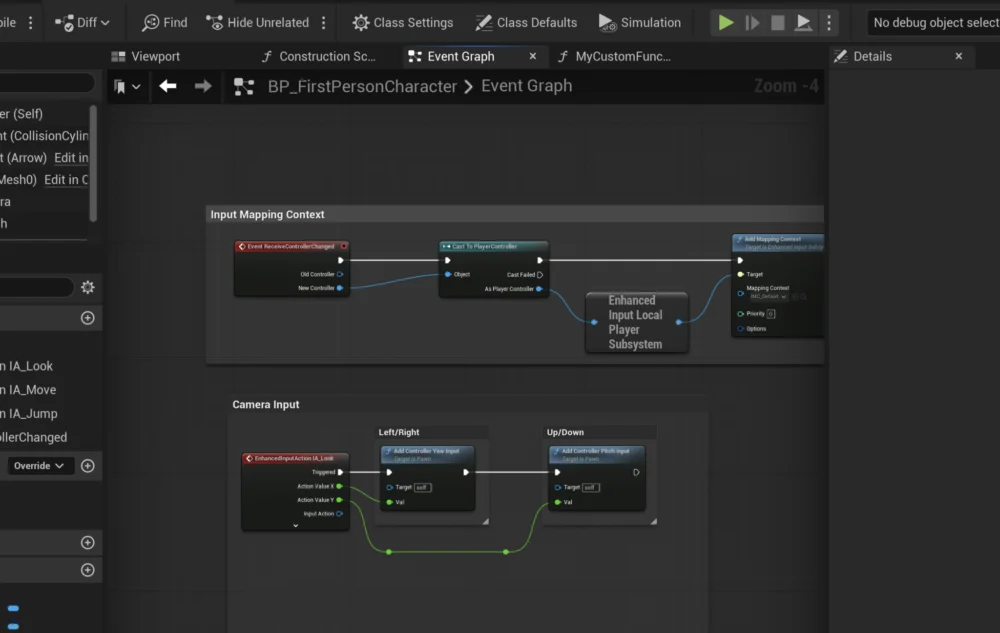
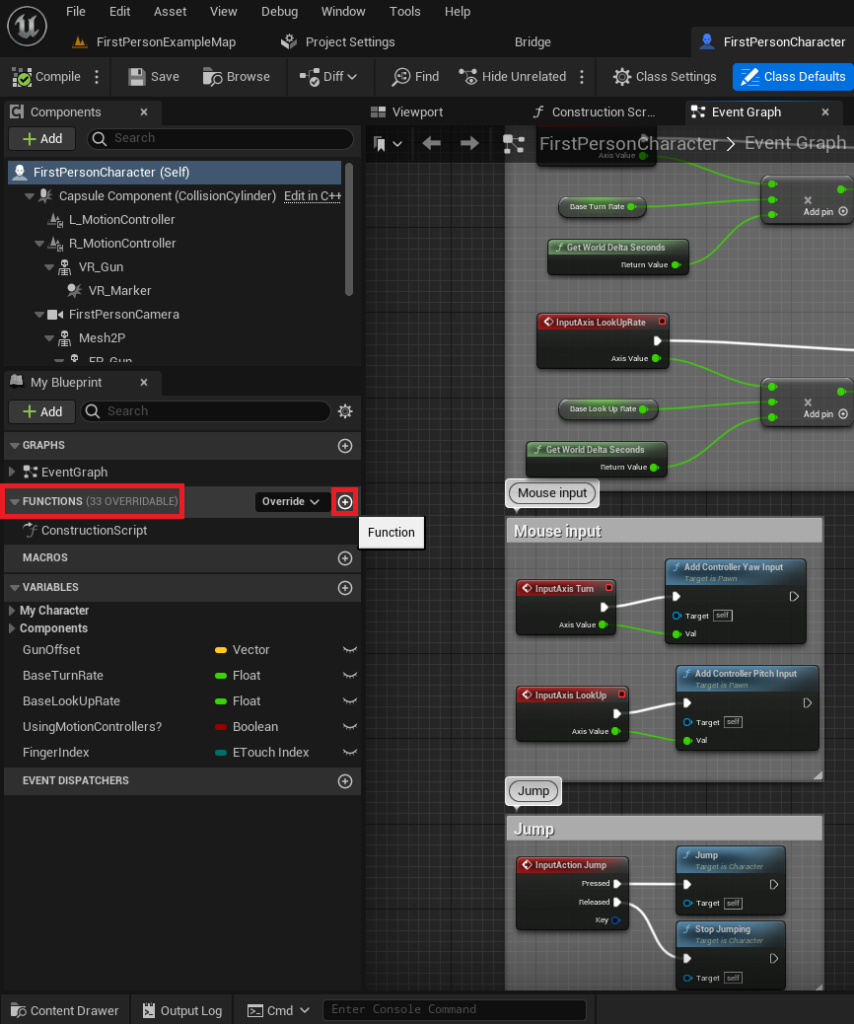
The process of creating a Blueprint Function in Unreal Engine 5 is designed to be intuitive, starting from the actor blueprint where the function’s logic will reside. For demonstration purposes, consider the FirstPersonCharacter blueprint, a common starting point in many UE5 projects.
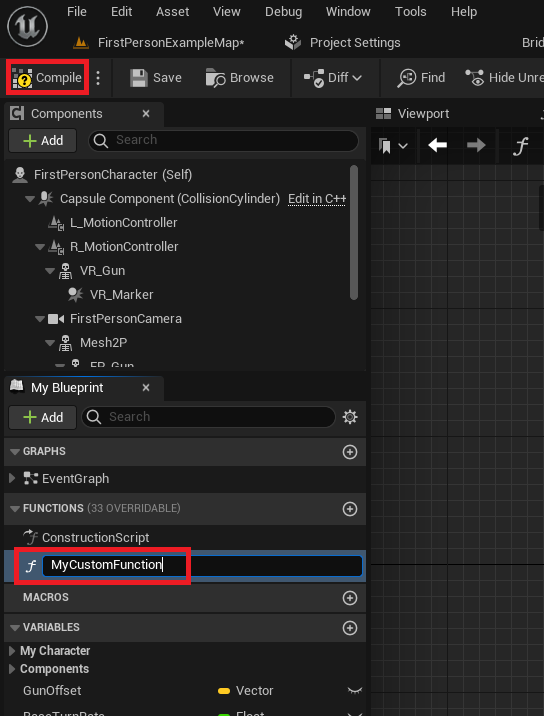
The first step involves navigating to the Blueprint editor. Within the ‘My Blueprint’ panel, typically located on the left side of the editor window, there is a dedicated ‘Functions’ section. This section serves as the repository for all functions specific to that particular blueprint actor. To initiate the creation of a new function, a developer simply clicks the ‘+’ icon adjacent to the ‘Functions’ dropdown. This action immediately prompts the user to assign a name to the newly created function.
Chronology of Function Creation:
- Blueprint Selection: Open the desired Blueprint Actor (e.g.,
FirstPersonCharacter). - Locate Functions Panel: Identify the ‘Functions’ section in the ‘My Blueprint’ panel.
- Initiate Creation: Click the ‘+’ button next to ‘Functions’.
- Naming Convention: Provide a clear, descriptive name (e.g.,
MyCustomFunction,CalculateDamage). Adherence to consistent naming conventions (e.g., verbs for actions, PascalCase) is crucial for readability and maintainability, especially in larger projects with multiple contributors. Messy or ambiguous names can quickly lead to confusion and impede development velocity. - Compilation: After naming, pressing ‘Enter’ or clicking elsewhere in the graph finalizes the function’s creation. Crucially, the blueprint must then be ‘Compiled’ to integrate the new function into the blueprint’s executable logic.
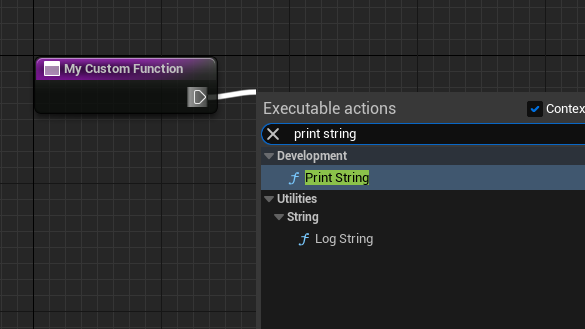
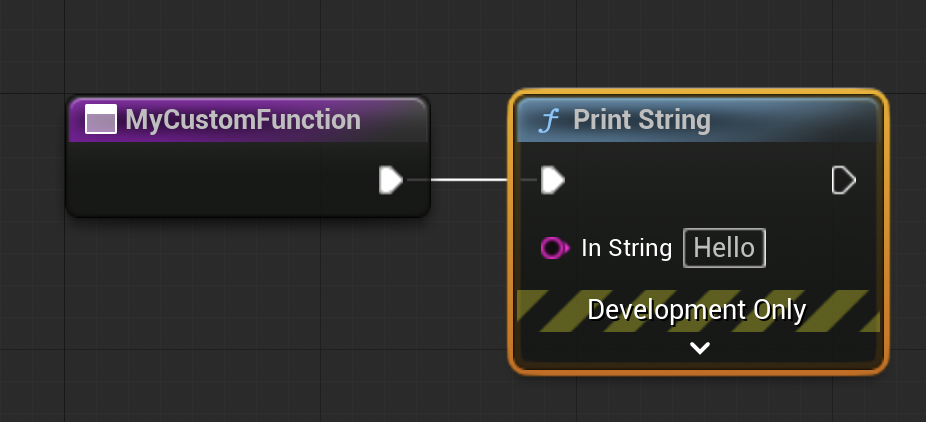
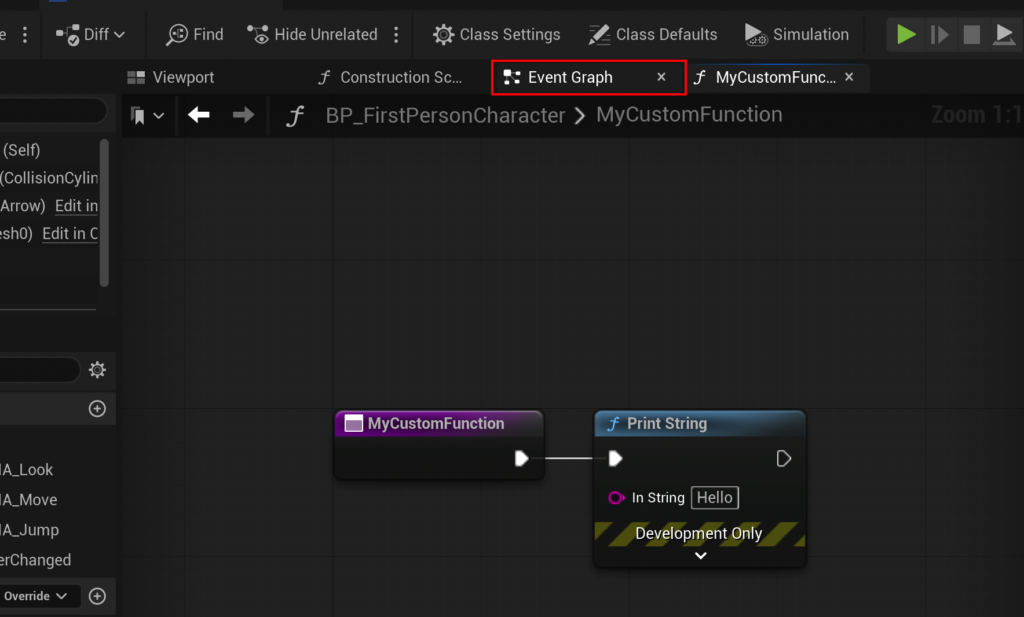
Once created and compiled, a new tab or graph panel opens, displaying the function’s empty canvas. This canvas will eventually house the nodes that define the function’s behavior. For a basic example, such as printing a string to the screen for debugging purposes, the process involves connecting an ‘exec pin’ from the function’s entry node to a ‘Print String’ node. An ‘exec pin’ (represented as a white sideways triangle) dictates the flow of execution, ensuring nodes run sequentially. By dragging from this pin and releasing the mouse, a context-sensitive menu appears, allowing the developer to search for and select the ‘Print String’ node. This automatically connects the execution flow, ensuring that when MyCustomFunction is called, the ‘Print String’ node executes its action.
Executing Functions: Events and the Control Flow
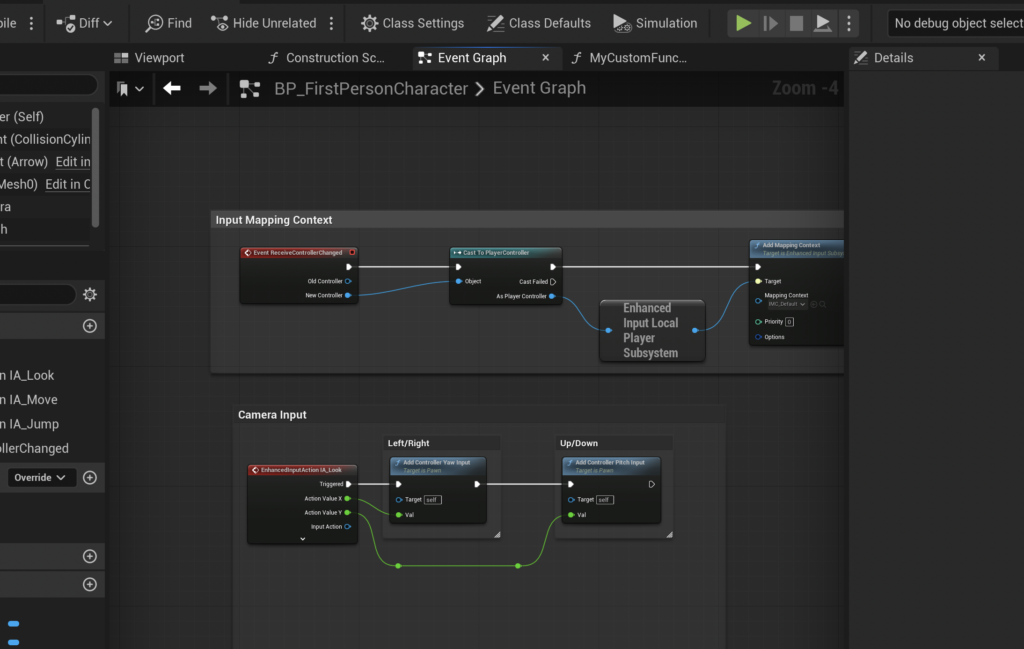
A function, once defined, does not execute automatically. It must be "called" or "run" by another piece of logic within the Blueprint. This often occurs in response to an ‘Event’. Events in Unreal Engine are trigger points that initiate a sequence of actions. They represent occurrences within the game world, such as a player pressing a button, an actor spawning, or a timer expiring.
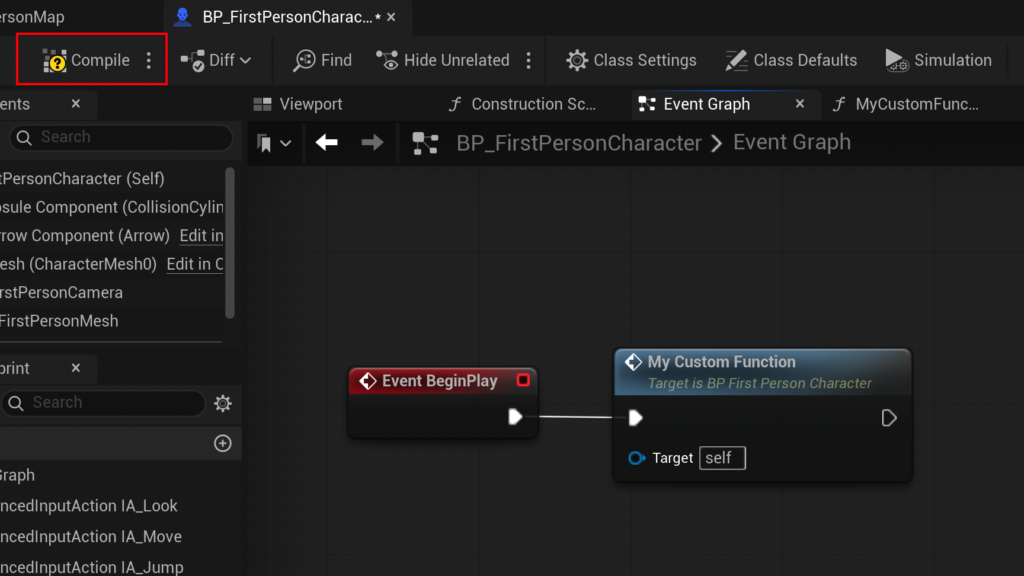
A common event used for testing and initialization is Event Begin Play. This event fires automatically when the actor is spawned into the game world or when the game starts if the actor is already placed in the level. To call our newly created MyCustomFunction at the start of the game, the developer would:
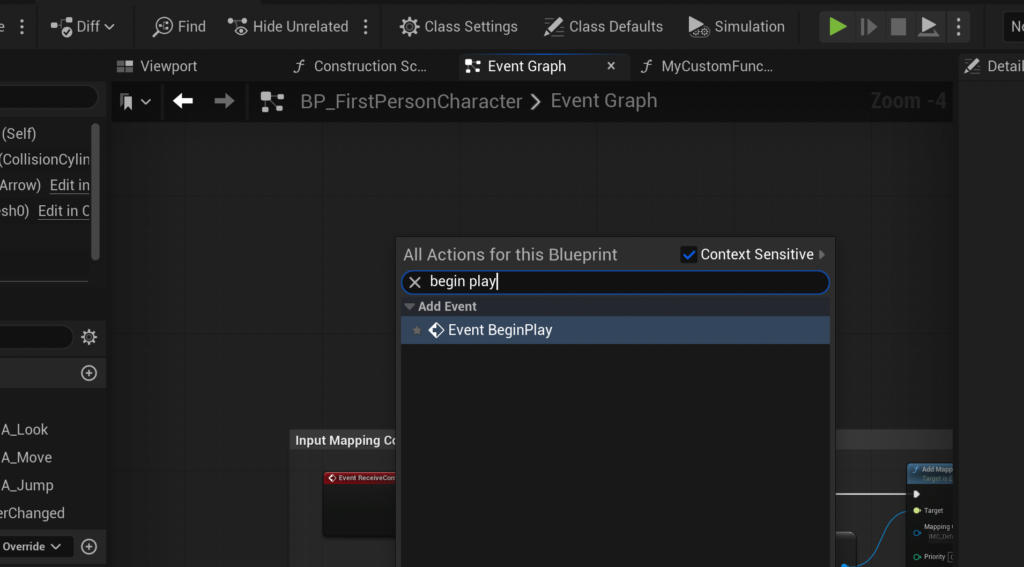
- Navigate to the Event Graph: Switch from the function’s graph to the main Event Graph of the blueprint.
- Create
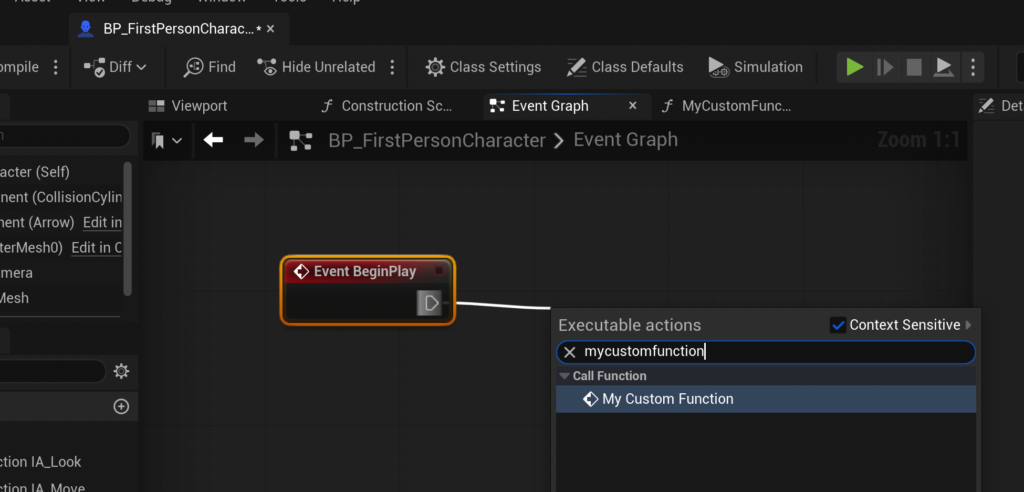
Event Begin Play: Right-click on an empty space in the Event Graph and search for "Event Begin Play" to add the node. - Call the Function: Drag an exec pin from the
Event Begin Playnode and search for the custom function by its assigned name (e.g.,MyCustomFunction). Selecting it from the list will create a "Call Function" node, linking the event to the function’s execution. - Compile and Save: Finally, compiling and saving the blueprint ensures that these changes are applied and will execute when the game runs.
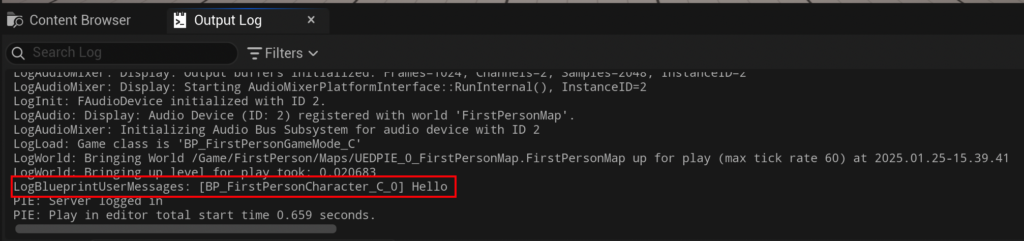
Upon playing the game, the Event Begin Play fires, which in turn calls MyCustomFunction. If MyCustomFunction contains a ‘Print String’ node, the specified text (e.g., "hello") will appear in the output log, confirming the function’s successful execution. This simple setup demonstrates the fundamental relationship between events and functions in controlling the flow of logic within an Unreal Engine game.
It is important to differentiate between Functions and Events. While both encapsulate logic, they have distinct characteristics:
- Functions: Are synchronous, execute entirely before returning control, can return values (outputs), and generally cannot contain latent (asynchronous) nodes like ‘Delay’ or ‘Timeline’ nodes.
- Events: Can be asynchronous, are typically triggered by external occurrences, cannot directly return values (though they can set variables or call functions that return values), and can contain latent nodes. The choice between a Function and a Custom Event depends on whether the logic needs to run synchronously and return a value, or if it involves time-based operations or external triggers.
Advanced Functionality: Input, Output, and Practical Applications
The true power of Blueprint Functions emerges when they are designed to accept ‘Input Parameters’ and produce ‘Output Parameters’. These parameters allow functions to operate on dynamic data, making them incredibly versatile and adaptable to various scenarios.
Consider the CalculateDamage example mentioned earlier. Instead of simply printing a fixed string, this function aims to perform a calculation based on an incoming damage value and a character’s armor, then return the resulting damage.
Making the CalculateDamage Function:
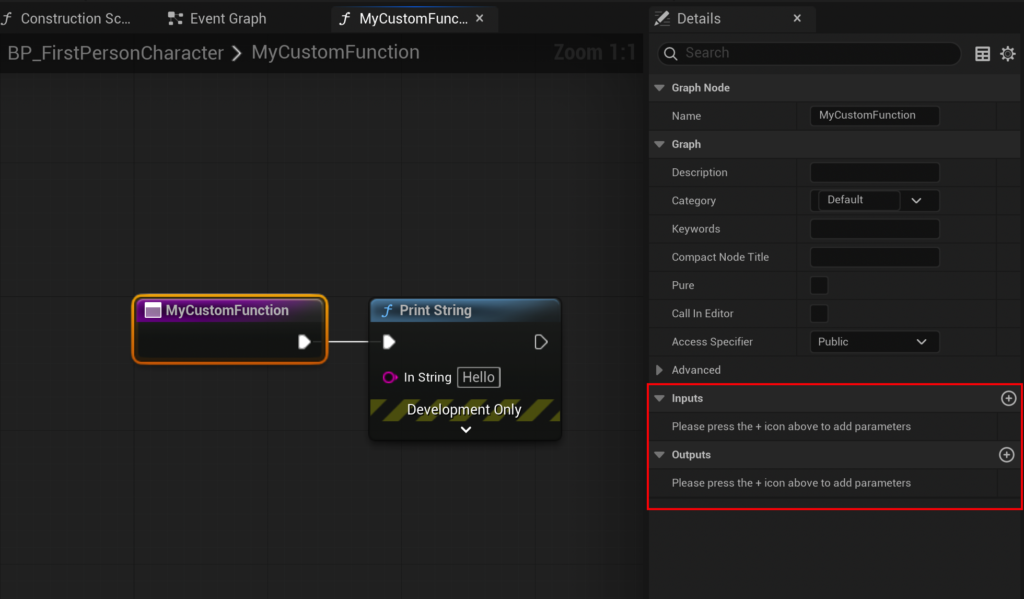
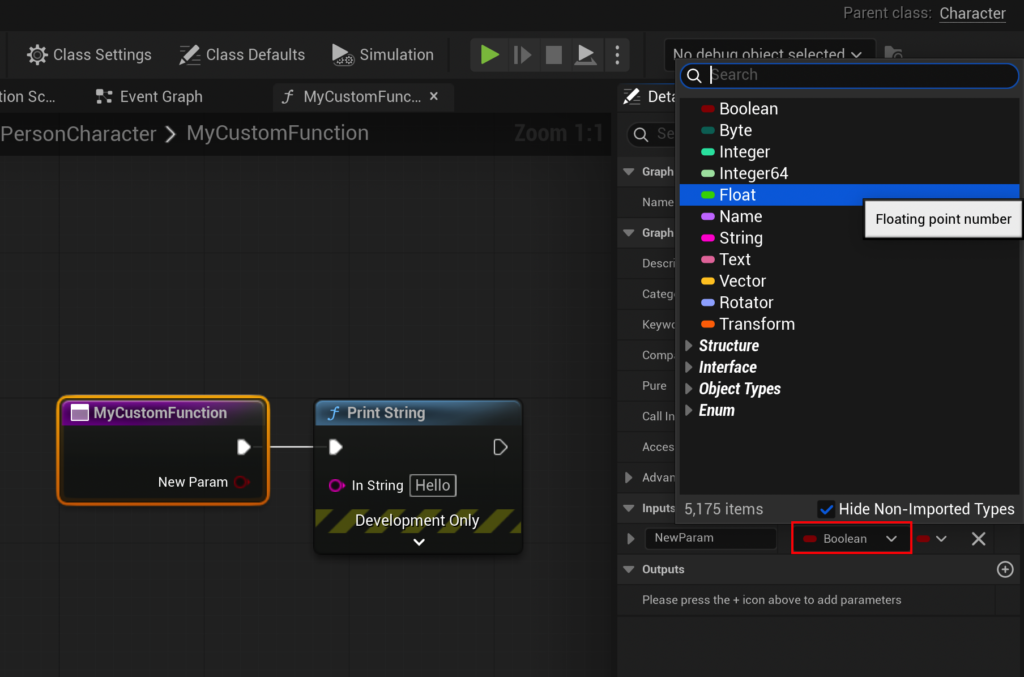
- Select Function Node: Click on the function’s entry node (e.g.,
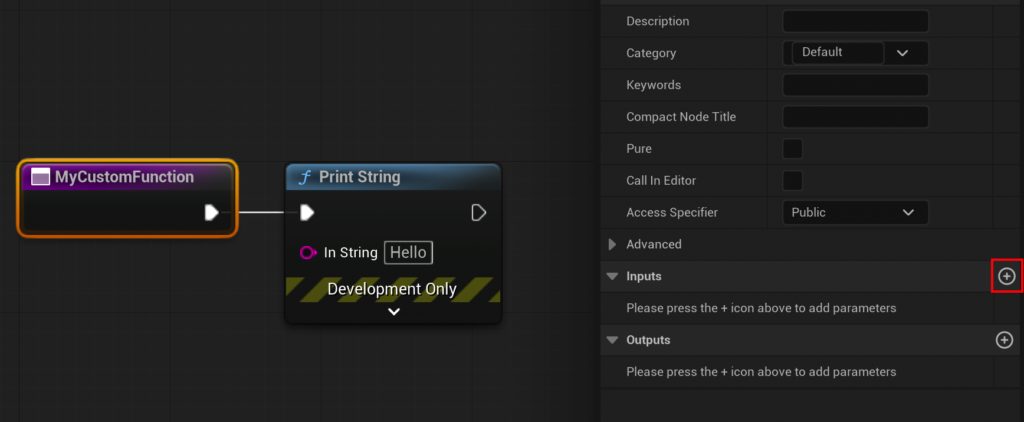
MyCustomFunction) within its graph. - Add Input Parameter: In the ‘Details’ panel (typically on the right), locate the ‘Inputs’ section and click the ‘+’ button.
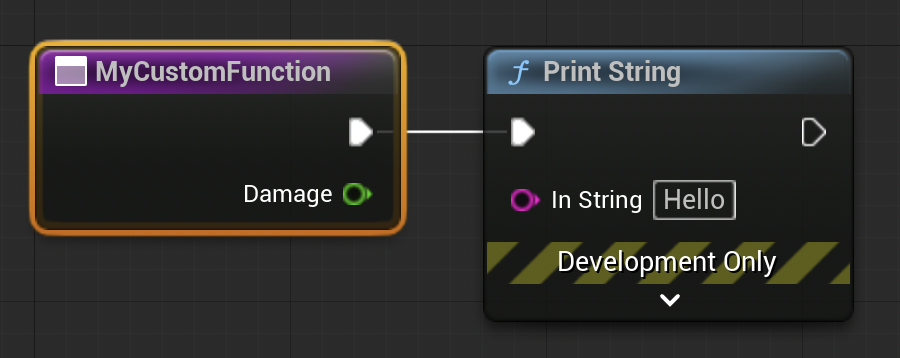
- Define Input Type and Name: Change the parameter type (e.g., from ‘Boolean’ to ‘Float’) and name it (e.g.,
Damage). UsingFloatallows for decimal values, crucial for many game calculations. - Add Internal Logic:
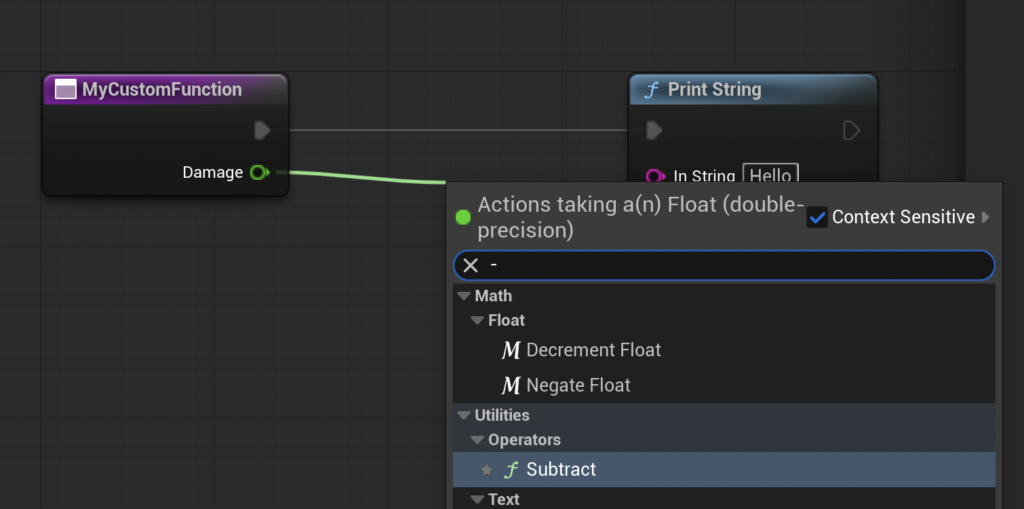
- Drag the
Damageinput pin into the graph. - Add a ‘Float – Float’ (subtraction) node.
- To represent the character’s armor, drag from the second input pin of the subtraction node and select ‘Promote to Variable’. Name this new variable
Armorand set its default value (e.g.,15.0) in the ‘Details’ panel. This variable is local to the blueprint and can be modified as needed. - Connect the
Damageinput to the top pin of the subtraction node and theArmorvariable to the bottom pin.
- Drag the
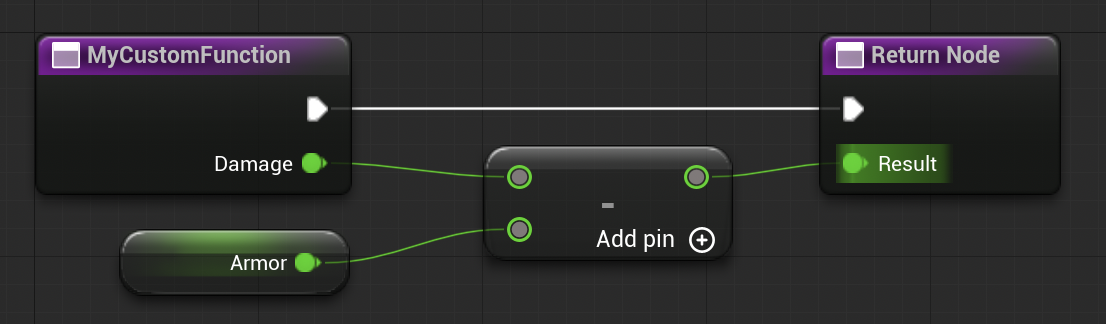
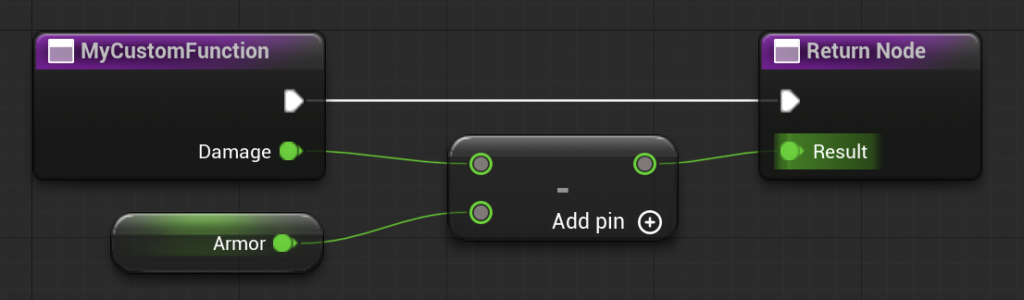
At this stage, the function calculates Damage - Armor. However, this result is currently isolated within the function. To make it useful, the function must ‘return’ this calculated value.
Returning a Value from the Function:
- Add Output Parameter: In the ‘Details’ panel for the function’s entry node, locate the ‘Outputs’ section and click the ‘+’ button.
- Define Output Type and Name: Set the output type to ‘Float’ and name it
Result. - Connect to Return Node: Unreal Engine automatically creates a ‘Return Node’ when an output parameter is added. Connect the output of the subtraction node to the
Resultpin on the ‘Return Node’. This directs the calculated value out of the function. - Refine (Optional): Remove any ‘Print String’ nodes previously used for internal debugging, as the function’s primary purpose is now to return a value.
The finished CalculateDamage function now takes a Damage value as input, subtracts a predefined Armor value, and outputs the ResultingDamage. When this function is called in the Event Graph, the ‘Call Function’ node will now display both the Damage input pin and the Result output pin.
To test this advanced functionality, one could connect the Event Begin Play to the CalculateDamage function call. Set a Damage input value (e.g., 20.0). Then, connect the Result output pin of the CalculateDamage function to a ‘Print String’ node. Upon running the game, with an Armor value of 15.0 and Damage of 20.0, the output log would display 5.0, demonstrating the successful calculation and return of the value (20 - 15 = 5).
This example highlights how input and output parameters transform functions into powerful, dynamic computational units. They become miniature processing centers that can be fed different data and consistently produce predictable results, making them ideal for core gameplay mechanics, utility calculations, and complex data transformations.
Strategic Considerations: Functions vs. Custom Events and Performance

While Blueprint Functions are incredibly versatile, understanding their limitations is crucial for robust game development. A key constraint is that Blueprint Functions generally do not support ‘latent’ (asynchronous) nodes, such as ‘Delay’, ‘Timeline’, or certain ‘Gate’ nodes. These nodes introduce a pause or time-based execution, which functions, by their synchronous nature, cannot accommodate. If a piece of logic requires such asynchronous operations, a ‘Custom Event’ is the appropriate alternative. Custom Events can be called like functions but allow for latent nodes and asynchronous execution flows. Developers often create a Custom Event to handle complex sequences involving delays or external triggers, then call this Custom Event from various points in their Blueprints.
From a performance perspective, Blueprint Functions are generally efficient. Unreal Engine optimizes Blueprint graphs, and well-structured functions contribute to cleaner, more manageable code that is easier to debug. However, for extremely performance-critical operations involving heavy mathematical computations or large data sets, C++ remains the superior choice. Experienced developers often adopt a hybrid approach: prototyping and implementing most gameplay logic in Blueprints for rapid iteration, and then migrating performance bottlenecks to C++ functions or native classes when profiling reveals a need for optimization. Epic Games continually works to improve Blueprint performance, but the overhead of visual scripting will always be slightly higher than optimized native C++ code. The key is to make informed decisions based on the specific requirements and performance targets of each project.
The Broader Impact: Streamlining Development and Fostering Collaboration
The widespread adoption and intelligent use of Blueprint Functions have profound implications for the efficiency and quality of game development.
- Enhanced Maintainability: By centralizing logic, functions drastically reduce the effort required to update or debug a project. Instead of searching through countless duplicate nodes, developers can pinpoint the single function responsible for a particular behavior. This is invaluable for long-term project health and for onboarding new team members who can quickly grasp the project’s architecture.
- Improved Scalability: As games grow in complexity, poorly organized code can quickly become a tangled mess, often referred to as "spaghetti code." Functions provide a structural framework, allowing projects to scale gracefully by breaking down large problems into smaller, manageable, and interconnected components. This modularity ensures that changes in one area are less likely to inadvertently break functionality in another.
- Facilitating Collaboration: In team environments, functions enable multiple developers to work on different aspects of the game concurrently without constantly stepping on each other’s toes. A programmer can define a core function (e.g.,
ApplyStatusEffect), and multiple designers can then call this function from different gameplay contexts (e.g., a spell, a trap, an item), confident that the underlying logic is consistent and robust. This parallel development significantly boosts team productivity. - Accessibility and Prototyping: Blueprint Functions lower the barrier to entry for non-programmers, allowing artists, designers, and even project managers to understand and contribute to game logic. This accelerates prototyping cycles, as ideas can be quickly implemented and tested visually, leading to more iterative design and better gameplay experiences.
- Consistency and Quality: By enforcing a single source of truth for specific operations, functions ensure that mechanics behave consistently across the entire game. This consistency is vital for player experience and overall game quality, reducing unexpected bugs and streamlining quality assurance processes.
Conclusion
Blueprint Functions stand as a cornerstone of modern Unreal Engine 5 development, embodying the principles of modularity, reusability, and abstraction that are critical for crafting sophisticated interactive experiences. From creating a simple debug message to implementing complex damage calculations, these self-contained visual scripting units empower developers to build cleaner, more organized, and ultimately, more manageable projects. The ability to define inputs and outputs transforms these functions into powerful, adaptable tools, enabling developers to abstract complex logic into easily digestible and reusable components.
The distinction between functions and events, alongside strategic considerations for performance, further refines a developer’s approach to Blueprint scripting, ensuring that the right tool is used for the right task. In an industry constantly pushing the boundaries of graphical fidelity and gameplay complexity, mastering Blueprint Functions in Unreal Engine 5 is not merely an optional skill but an essential competency for any developer aiming to contribute effectively to the creation of compelling and high-quality interactive content. Their role in enhancing development efficiency, fostering collaboration, and ensuring project scalability underscores their fundamental importance in the ever-evolving landscape of game development.
About the Author