

The implementation of artificial intelligence (AI) characters and enemies that dynamically chase or follow the player is a ubiquitous feature in contemporary video games, significantly contributing to player immersion and gameplay challenge. This essential functionality, often perceived as complex, is remarkably accessible within Unreal Engine 5, requiring only a few blueprint nodes to establish. This guide details the process of enabling AI characters to follow the player within the Unreal Engine 5 environment, building upon foundational navigation mesh (NavMesh) principles.
Unreal Engine 5: Empowering Developers with Accessible AI Tools
Unreal Engine 5 (UE5), developed by Epic Games, has established itself as a leading game development platform, renowned for its cutting-edge graphics capabilities, robust physics engine, and intuitive scripting system through Blueprints. The engine’s approach to AI, particularly for common behaviors like player following, exemplifies its commitment to empowering developers of all skill levels. By abstracting complex C++ code into visual, node-based scripting, UE5 democratizes advanced game mechanics, allowing for rapid prototyping and iteration. The inherent efficiency of these blueprint systems means that even sophisticated behaviors can be constructed and refined with considerable speed, reducing development timelines and resource allocation compared to traditional code-centric approaches. This accessibility has been a significant factor in UE5’s widespread adoption across indie studios and AAA development houses alike, enabling a broader spectrum of creators to bring their visions to life with high fidelity and advanced interactive elements.
The Foundation: Understanding NavMeshes and AI Pathfinding
Before diving into the specifics of AI following, it is crucial to understand the underlying infrastructure that enables intelligent movement: the Navigation Mesh, or NavMesh. A NavMesh is a core component of AI navigation in 3D environments, essentially a spatial data structure that defines the walkable areas for AI agents within a game level. Unlike simple waypoint systems, a NavMesh allows AI to dynamically calculate paths around obstacles, navigate complex terrain, and respond to environmental changes. In Unreal Engine 5, the NavMesh is typically generated automatically based on the geometry of the level, with adjustable parameters such as agent radius, height, and step height to accommodate different AI character sizes and movement capabilities.
The previous guide, "Setting up a NavMesh in Unreal Engine 5," provided the necessary steps to configure this crucial element, concluding with a basic set of blueprint nodes designed for general AI movement. These nodes, while effective for simple patrolling or random movement within a defined area, require modification to enable persistent player pursuit. The AI MoveTo node, central to AI navigation, relies heavily on an accurately generated and updated NavMesh. If the NavMesh is improperly configured or absent from a specific area, AI characters will fail to navigate, resulting in erratic behavior or complete immobility. Therefore, ensuring a robust NavMesh setup is the indispensable prerequisite for any sophisticated AI movement logic, including the player-following mechanic discussed here.
Deconstructing the Blueprint: From Basic Movement to Intelligent Pursuit
The transformation of a basic AI movement script into a dynamic player-following system involves a precise modification of existing blueprint nodes and the introduction of new ones. This process leverages Unreal Engine’s visual scripting to redefine the AI’s target from a static or randomly generated point to the player’s real-time location.
-
Phase 1: Initial Setup and Legacy Node Removal
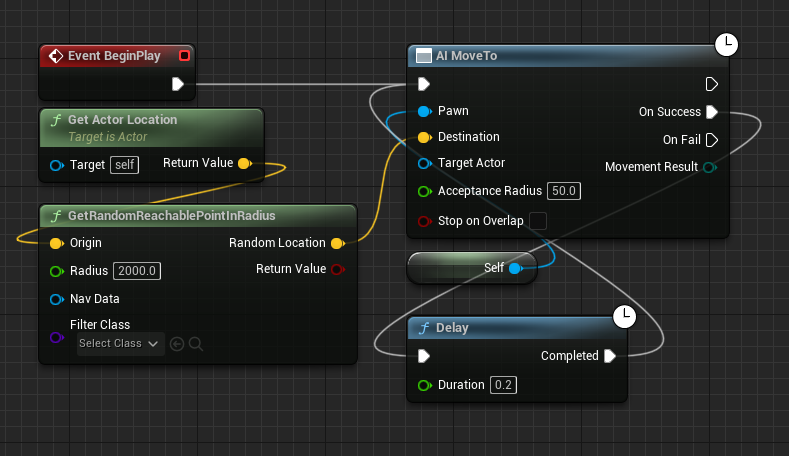
The starting point for this enhancement is the existing blueprint graph, which typically includes nodes like
AI MoveTo,Get Actor Location, andGetRandomReachablePointInRadius. The latter two nodes are responsible for identifying a random position around the AI character, a behavior suitable for non-player-aware movement patterns such as patrolling or idle wandering. To transition to a player-following paradigm, these specific nodes must be removed. TheGet Actor Locationnode, in its original context, retrieves the AI’s own location, serving as a reference point for the random destination. TheGetRandomReachablePointInRadiusnode then calculates a random, valid point on the NavMesh within a specified radius of that reference. Since the objective is now for the AI to move towards the player rather than a random self-centric point, these nodes become redundant and potentially counterproductive. Their deletion streamlines the blueprint, preparing it for the integration of player-centric targeting logic. The remainingAI MoveTonode, along with any preceding execution pins (such as aDelaynode or event trigger), forms the backbone onto which the new logic will be attached. -
Phase 2: Targeting the Player Character
With the legacy random movement nodes excised, the next step involves introducing the
Get Player Characternode into the blueprint graph. This node is fundamental for any AI system that needs to directly interact with or track the primary player-controlled entity in the game. It acts as a direct reference to the player’s pawn or character, providing a dynamic source for the AI’s target location. Once added, the blue "Return Value" pin of theGet Player Characternode, which outputs a reference to the player character, is connected to the blue "Target Actor" pin on theAI MoveTonode. This crucial connection reconfigures theAI MoveTonode’s objective. Instead of seeking a static coordinate or a random point, the AI will now continuously query the player character’s current position and attempt to pathfind towards it. This dynamic linking ensures that as the player moves, the AI’s target updates in real-time, creating the illusion of intelligent pursuit. TheAI MoveTonode then leverages the NavMesh to calculate an optimal path from the AI’s current position to the player’s location, initiating movement along that path. -
Phase 3: Ensuring Robust AI Persistence
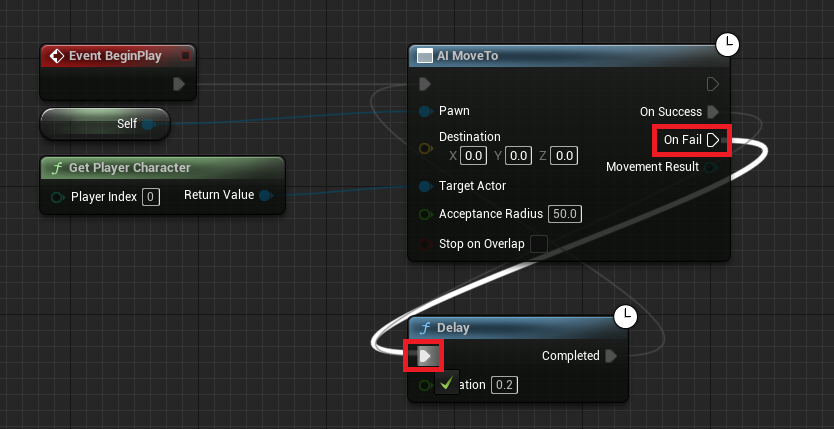
A critical consideration in AI movement, particularly in dynamic game environments, is handling potential failures. AI pathfinding can encounter various obstacles: the player moving into an unreachable area (e.g., beyond the NavMesh boundary, or through a gap too small for the AI), temporary NavMesh recalculation delays, or other unforeseen environmental blockages. Without a robust error-handling mechanism, the AI might simply stop moving if a pathfinding attempt fails. To prevent this, the "On Fail" execution pin of the
AI MoveTonode is connected back to theDelaynode that typically precedes theAI MoveTocall. This creates a loop: if the AI successfully reaches its target (the player), the "On Success" pin would trigger theDelaynode, causing a brief pause before the next movement command. However, if theAI MoveTooperation fails for any reason, the "On Fail" pin also triggers theDelaynode. This ensures that after a short delay, theAI MoveTocommand is re-executed, effectively compelling the AI to retry pathfinding to the player’s location. This retry mechanism is vital for maintaining persistent AI pursuit, ensuring that the AI continues to track the player even if momentary pathfinding issues arise, thereby enhancing the reliability and consistency of the AI’s behavior within the game world.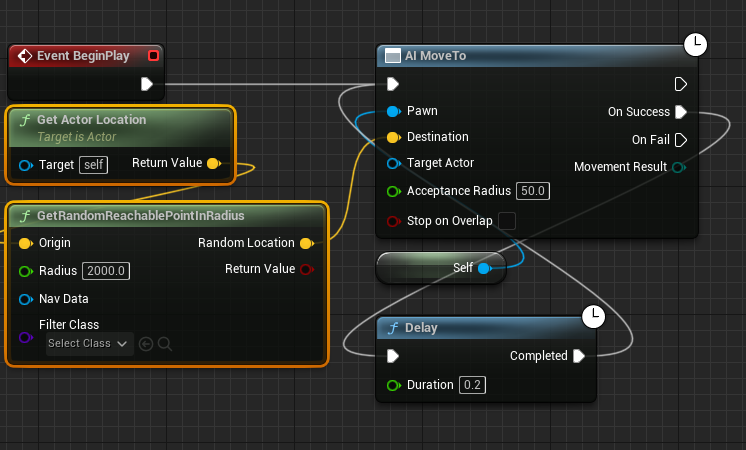
Upon completing these modifications, it is imperative to "Compile" and "Save" the blueprint editor. This action commits the changes to the game’s assets, ensuring that the new player-following logic is applied when the game is played in the editor or packaged for deployment.
Beyond the Basics: Advanced Considerations for AI Following
While the core blueprint nodes outlined provide a functional player-following AI, developing sophisticated game experiences necessitates a deeper dive into advanced considerations for performance, behavior tuning, and debugging.
-
Optimizing Performance and Scalability:
In games featuring numerous AI characters, each executing pathfinding calculations and movement updates, performance can quickly become a bottleneck. Optimizing AI following involves several strategies. TheAI MoveTonode has an "Acceptance Radius" parameter, which defines how close the AI needs to get to its target before considering the movement successful. A larger acceptance radius can reduce the frequency of precise pathfinding recalculations as the AI approaches the player, thus saving computational resources. Furthermore, the frequency at which theAI MoveTocommand is issued (controlled by theDelaynode) can be adjusted. A longer delay between movement commands reduces the CPU load but might make the AI’s movement appear less reactive. For very large numbers of AI, techniques like AI perception systems (e.g.,AIPerceptionComponent) can be employed to only activate detailed pathfinding for AI characters that are within the player’s line of sight or a specific proximity, offloading inactive AI. Level of Detail (LOD) for AI behavior, where simpler behaviors are used for distant AI, is also a common optimization. -
Fine-tuning AI Behavior: Acceptance Radius and Pathing Nuances:
The "Acceptance Radius" is not just for performance; it’s a critical tool for shaping AI behavior. A small radius results in the AI attempting to reach the player’s exact coordinates, potentially leading to "jittering" or collisions if the AI constantly overshoots and corrects. A larger radius allows the AI to stop a comfortable distance away, which can be desirable for combat scenarios where enemies need to maintain a certain range or for companion AI that should not constantly bump into the player. Additionally, NavMesh parameters like "Agent Radius" and "Agent Height" directly influence how the AI perceives its navigable space. Adjusting these can prevent AI from getting stuck in tight corridors or attempting to path through areas they cannot physically traverse. For more complex pathing, NavLink proxies can be used to define specific jump points or climbable ledges, allowing AI to traverse areas that are not directly connected by the standard NavMesh.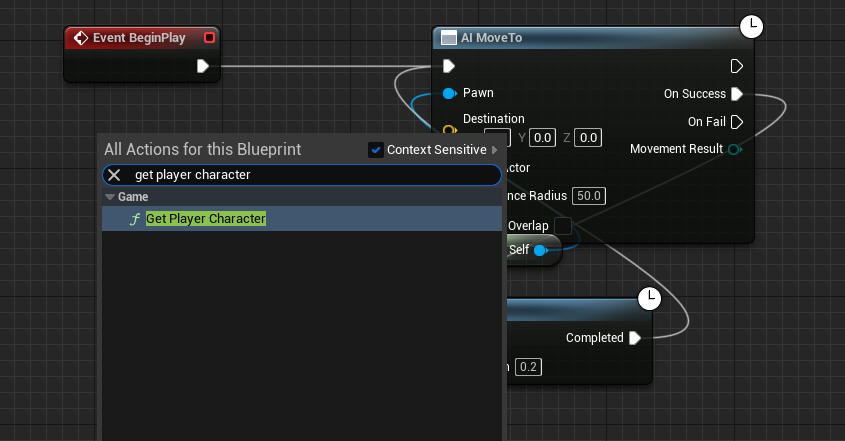
-
Debugging and Troubleshooting AI Pathfinding:
Debugging AI movement can be challenging. Unreal Engine 5 provides several powerful tools. The "Show Navigation" (P key in editor viewport) overlay visualizes the NavMesh, allowing developers to quickly identify gaps, unreachable areas, or incorrect generation. The "Recast Navigation Mesh" debug drawing options offer further insights into NavMesh generation. For real-time debugging of AI behavior, the "AI Debugger" (accessible via theGameplay Debuggertool,~key andaicommand in PIE) provides detailed information about an AI’s current state, target, path, and any active behaviors. This is invaluable for understanding why an AI might be failing to follow, getting stuck, or behaving unexpectedly. Thorough logging within blueprints can also provide specific error messages or state changes, aiding in the diagnostic process.
Diverse Applications: The Versatility of AI Following Mechanics
The basic AI following mechanic, while simple in its core implementation, serves as a fundamental building block for a vast array of AI behaviors across different game genres. Its versatility makes it an indispensable tool for game designers.
-
Engaging Adversaries: Enemies That Hunt
In action, horror, and stealth games, the ability for enemies to actively pursue the player is paramount for creating tension and challenge. This basic following logic can be expanded with additional layers such as line-of-sight checks, hearing detection, and dynamic speed adjustments based on the player’s proximity or health. For instance, a horror game monster might slowly stalk the player but burst into a sprint upon direct visual contact. Stealth game guards might follow a detected player until they lose sight, then switch to a patrol pattern. This core "chase" mechanic is foundational to creating a believable and reactive antagonist. -
Loyal Companions: AI Allies and Escorts
Beyond adversaries, AI following is crucial for implementing companion characters in RPGs, adventure games, and co-operative experiences. These AI allies might follow the player at a respectful distance, engage in combat when provoked, or assist with environmental puzzles. The "Acceptance Radius" here might be set larger to prevent the companion from constantly bumping into the player, while additional logic could dictate their combat behavior or idle animations when stationary. Escort missions, a staple in many genres, directly utilize this mechanic, often adding conditions for mission failure if the AI character strays too far or takes too much damage.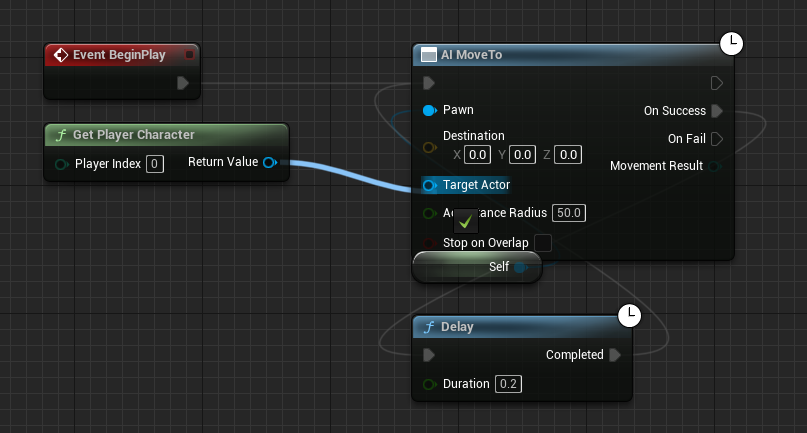
-
Dynamic Environments and Gameplay Mechanics
The utility extends to more abstract applications. Consider environmental puzzles where the player must guide a non-player character (NPC) to a specific location to activate a mechanism. In simulation or crafting games, AI characters might follow the player to gather resources, then return to a base. Even dynamic obstacles in platformers or puzzle games could be implemented using a modified following behavior, where the AI object pursues the player’s last known location or predicts their movement to create a moving challenge. This foundational behavior can be integrated into complex state machines or behavior trees, serving as a primary node for actions like "Move to Target" within a broader AI framework.
The Broader Impact: Enhancing Immersion and Developer Efficiency
The ease with which sophisticated AI behaviors like player following can be implemented in Unreal Engine 5 has a profound impact on both the player experience and the efficiency of game development. From a player’s perspective, AI that reacts intelligently and persistently to their actions creates a far more immersive and believable game world. Static, predictable AI quickly breaks immersion, whereas dynamic pursuit adds layers of strategic depth, urgency, and replayability. Players are challenged to outwit and outmaneuver intelligent adversaries or to strategically utilize helpful companions, leading to more engaging gameplay loops.
For developers, the accessibility of these tools significantly lowers the barrier to entry for creating complex interactive systems. Indie developers, often operating with limited resources, can now implement behaviors that were once the exclusive domain of large AAA studios with dedicated AI programming teams. This empowers smaller teams to focus on unique gameplay mechanics and narrative design, rather than getting bogged down in low-level AI coding. The visual nature of Blueprints also fosters collaboration between designers and programmers, allowing for faster iteration and direct involvement of designers in tuning AI behavior. This efficiency directly translates to reduced development costs and accelerated production cycles, ultimately benefiting the entire game development ecosystem.
Looking Ahead: The Future of AI in Game Development
While the blueprint nodes discussed provide a robust foundation, the field of AI in game development continues to evolve rapidly. Future iterations of game engines and AI tools are likely to integrate more advanced machine learning techniques, allowing for truly adaptive and emergent AI behaviors. Imagine AI that learns from player tactics, dynamically adjusts difficulty, or generates novel responses based on accumulated experience. Behavior Trees and Utility AI are already widely adopted in professional game development for managing more complex decision-making processes, building upon simple movement behaviors like following. These systems provide a hierarchical or score-based approach to AI actions, allowing for nuanced responses to various stimuli and environmental conditions. As hardware capabilities increase and AI research progresses, the line between pre-scripted AI and truly intelligent, autonomous in-game entities will continue to blur, promising even richer and more unpredictable interactive experiences.
Conclusion
The ability to implement AI that follows the player is a fundamental and powerful mechanic in modern game development, made remarkably accessible through Unreal Engine 5’s blueprint system. By understanding the role of the NavMesh, strategically modifying a few blueprint nodes—specifically Get Player Character and AI MoveTo—and incorporating robust error handling, developers can quickly establish a foundation for intelligent AI pursuit. This basic system is not merely a novelty but a versatile building block, enabling a vast spectrum of gameplay experiences, from intense enemy chases to loyal companion interactions. The simplicity of implementation belies the profound impact this functionality has on player immersion and developer efficiency, highlighting Unreal Engine 5’s role in democratizing advanced game development. As the industry continues to push the boundaries of interactive entertainment, these accessible AI tools will remain crucial for crafting compelling and dynamic virtual worlds.
About the Author








