
The ability to save and load game data is an indispensable feature in virtually every contemporary video game, acting as a foundational pillar of player experience and game design. Without robust persistence mechanisms, complex narratives, intricate progression systems, and player-driven worlds would be impossible to maintain. Fortunately for developers leveraging Epic Games’ powerful Unreal Engine 5 (UE5), a sophisticated, built-in SaveGame system offers an elegant and efficient solution for managing game state data. This system simplifies the crucial task of storing and retrieving player progress and world changes to and from local files, ensuring continuity and immersion across gaming sessions. This guide explores the architecture and implementation of UE5’s SaveGame system, providing a detailed walkthrough of its capabilities and best practices for its integration into game projects.
The Evolution and Importance of Game State Persistence
The journey of game saves has evolved dramatically since the early days of arcade high-score tables and simple password systems. Early console games relied on battery-backed SRAM or cumbersome external memory cards, a physical bottleneck that often limited save file sizes and accessibility. The advent of hard drives in consoles and the widespread adoption of PC gaming ushered in an era of more seamless local storage. Today, cloud saving, platform integration (e.g., Steam Cloud, PlayStation Plus cloud storage, Xbox Cloud Save), and robust local file management are standard expectations. Players now anticipate not just the ability to save, but for these saves to be reliable, secure, and often cross-platform or accessible from any device.
A well-implemented save system is critical for player retention and overall satisfaction. Data from various gaming surveys consistently highlights player frustration when progress is lost due to crashes, bugs, or poorly designed save mechanics. For instance, a 2021 study by the Game Developers Conference reported that over 60% of players abandon a game if they encounter significant data loss. Beyond mere progress, save files encapsulate a player’s emotional investment in their game world, from character customization to accumulated loot and completed quests. The Unreal Engine SaveGame system directly addresses these needs by providing a stable and easily manageable framework, reflecting Epic Games’ commitment to empowering developers with tools that enhance player experience and streamline development workflows.
Foundational Knowledge for Implementation
To effectively utilize Unreal Engine 5’s SaveGame system, developers should possess a fundamental understanding of several core engine concepts. Proficiency in Unreal Engine basics, including navigating the editor and managing projects, is paramount. A working knowledge of Blueprints, Unreal Engine’s visual scripting language, is essential, as the SaveGame system is predominantly implemented and managed through Blueprint nodes for ease of use and rapid prototyping. Furthermore, familiarity with creating and utilizing a custom Game Instance is crucial, as this class provides a persistent object that exists for the entire lifetime of a game session, making it the ideal location for centralized save/load logic. Understanding custom events and how to handle Input Actions will also facilitate triggering save and load operations within the game environment. For those seeking to solidify these prerequisites, comprehensive guides on Blueprint actors, variables, custom Game Instances, and Input Actions are readily available through official Unreal Engine documentation and community resources.
Unreal Engine’s SaveGame System: An Architectural Overview
At its core, the SaveGame system in Unreal Engine revolves around the USaveGame class. This specialized class serves as a blueprintable data container, preconfigured to handle the serialization and deserialization of variables. Developers create custom Blueprint classes derived from USaveGame, populating them with the specific data types that need to be persisted across game sessions. When a save operation is initiated, the engine takes the data stored within the variables of this USaveGame object and writes it to a binary file on the user’s machine. Conversely, during a load operation, the engine reads this binary file, reconstructs the USaveGame object, and makes its variables accessible to the game.
The save files generated by the SaveGame system are stored in standard operating system-specific locations, ensuring consistent behavior across different platforms:
- Windows: Typically found in the local AppData folder (
%LOCALAPPDATA%[YourGameName]SavedSaveGames). - macOS: Located within the user’s Library/Application Support directory (
~/Library/Application Support/[YourGameName]/Saved/SaveGames). - Linux: Stored in the local share directory (
~/.local/share/[YourGameName]/Saved/SaveGames).
This standardized approach simplifies file management for developers and users alike, ensuring that save data is accessible yet compartmentalized from core game files. A significant advantage of the SaveGame class is its broad compatibility with variable types. Almost every standard Unreal Engine variable type—ranging from simple booleans, integers, and floats to complex vectors, rotators, transforms, and even arrays of these types—can be seamlessly saved and loaded. This versatility minimizes the need for custom serialization routines for common data structures, drastically reducing development overhead. More complex data types, such as object references to actors in the world or highly custom structs, might require additional logic to ensure proper re-instantiation or custom serialization, but the foundation remains robust.

Constructing the Persistent Data Blueprint

The initial step in implementing game persistence involves defining the structure of the data that will be saved. This is achieved by creating a custom SaveGame Blueprint class.
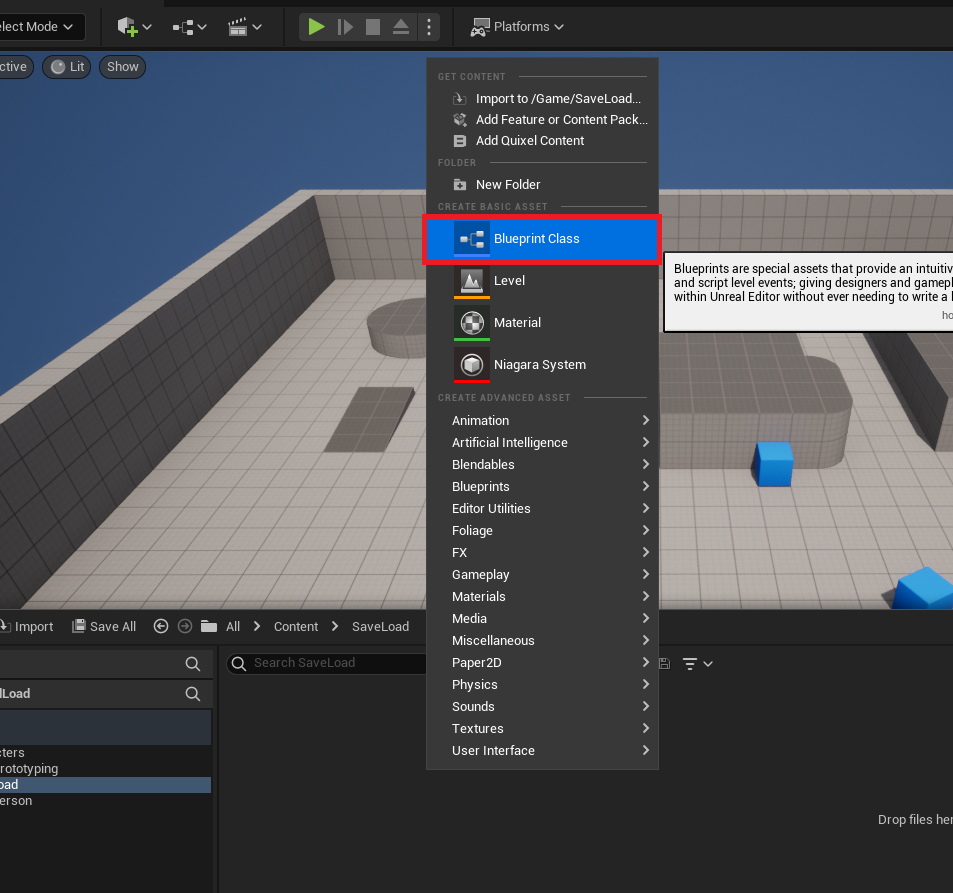
- Blueprint Class Creation: Within the Unreal Engine editor’s Content Drawer, developers initiate the creation of a new Blueprint Class. This is the fundamental step to extending engine functionality.
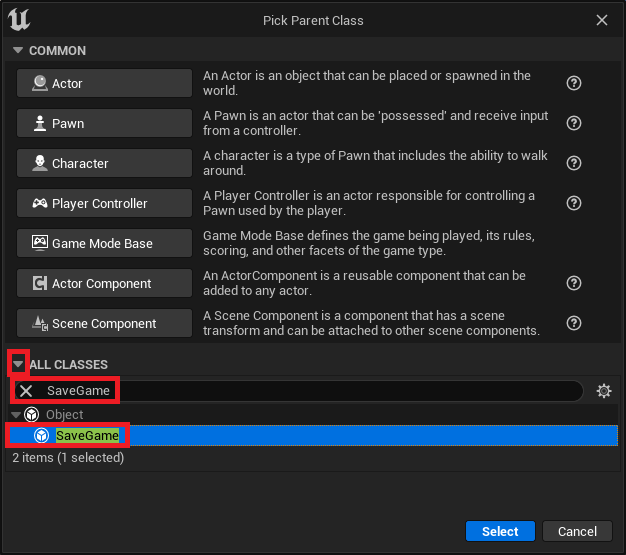
- Selecting the Parent Class: In the subsequent pop-up window, a search for "SaveGame" reveals the
SaveGameclass, which must be selected as the parent class for the new Blueprint. This inheritance grants the new class the inherent capabilities for serialization and deserialization provided by the engine. - Naming Convention: The new
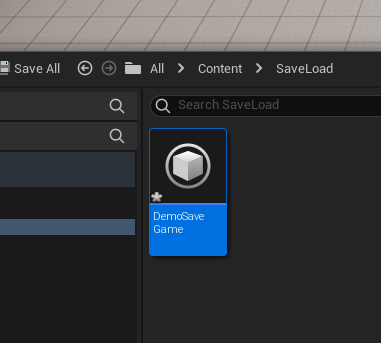
SaveGameBlueprint should be assigned a clear and memorable name, such asBP_DemoSaveGame. This name will be referenced later in the implementation process. - Defining Persistent Variables: Once the
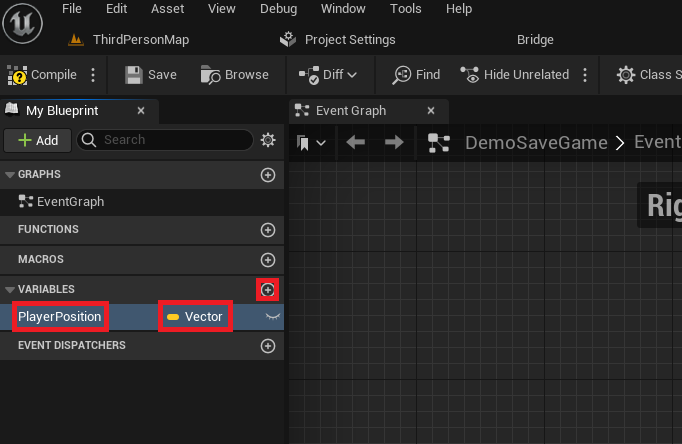
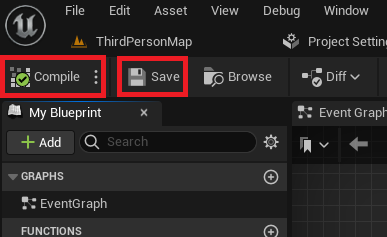
SaveGameclass is created, developers can add any variables crucial for their project’s persistence. For example, to save a player’s location, aVectorvariable named "PlayerPosition" would be added. Other common variables might include player health (float), inventory items (array of structs), quest progress (map or enum), or game settings (boolean, integer). Each variable added to thisSaveGameBlueprint becomes a piece of data that the system can automatically store and retrieve. - Compilation and Saving: After defining the necessary variables, it is imperative to Compile and Save the
SaveGameBlueprint. This action finalizes the data structure, making it available for use within the game’s logic.
Integrating Save and Load Functionality within the Game Instance
The Game Instance is a unique object in Unreal Engine; it is created when the game starts and persists throughout the entire lifetime of the game application, even across level changes. This makes it the ideal centralized hub for managing global game state, including the save and load operations.
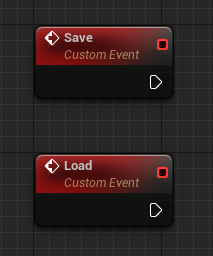
- Establishing Custom Events: Within the custom
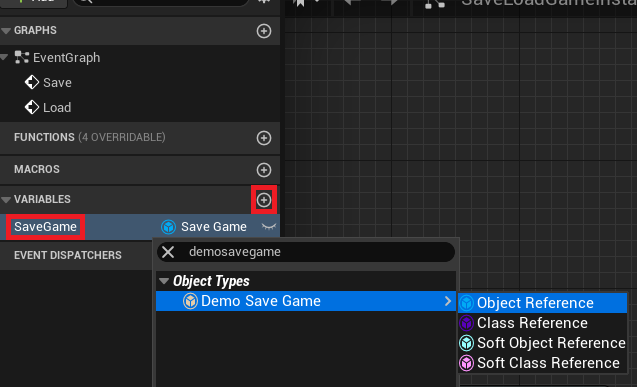
Game InstanceBlueprint, two new Custom Events are created: "Save" and "Load". These events will serve as the entry points for triggering the respective persistence operations from anywhere in the game. - Referencing the SaveGame Object: A new variable, named "SaveGame," is added to the
Game Instance. Its type is set to reference the customSaveGameclass created earlier (e.g.,BP_DemoSaveGameObject Reference). This variable will hold an instance of the save data, acting as a buffer between the game’s runtime state and the data stored on disk.
Implementing the Loading Mechanism
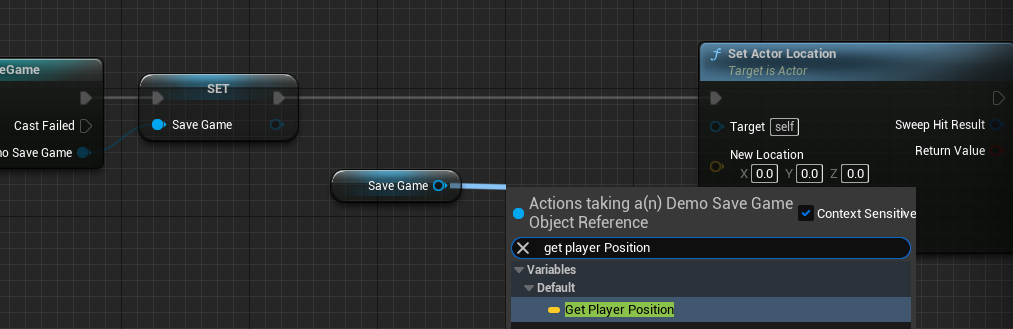
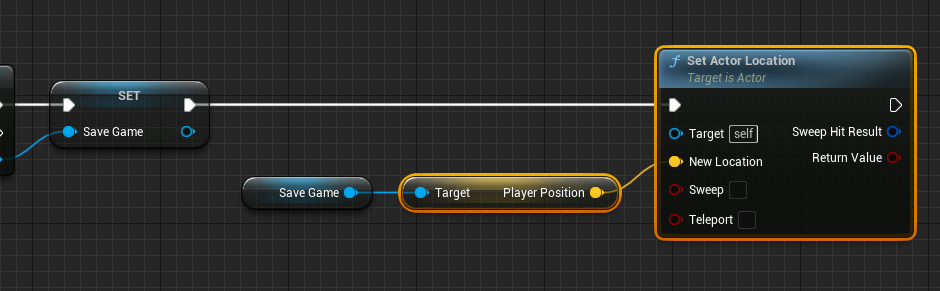
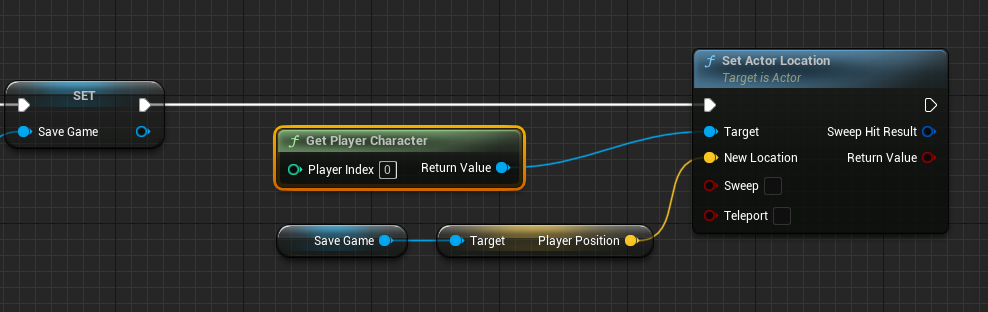
The loading process is designed to retrieve saved data from a file and apply it to the current game state. It includes crucial checks for existing save files to prevent errors and ensure a smooth player experience.
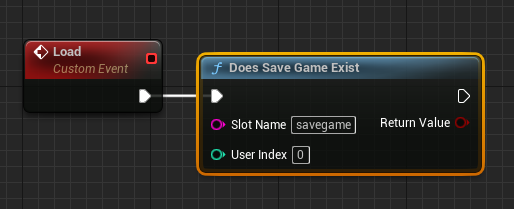
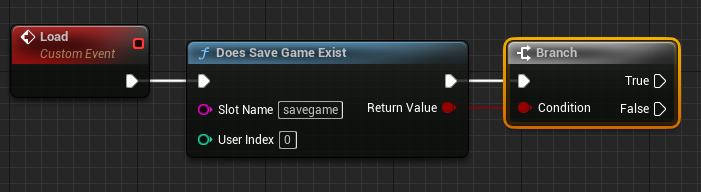
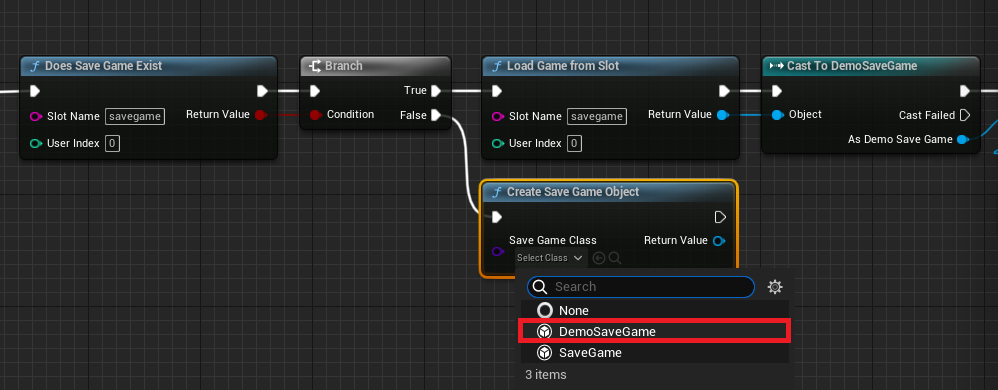
- Checking for Existing Save Files: On the "Load" event, the first action is to employ a
Does Save Game Existnode. This node checks if a save file with a specified "Slot Name" already exists on disk. The "Slot Name" is a string identifier (e.g., "savegame", "PlayerProfile1") that uniquely identifies a particular save file. Using different slot names allows for multiple save slots or distinct player profiles. - Conditional Branching: The output of
Does Save Game Existfeeds into a Branch node. This creates two distinct execution paths: one for when a save file exists (True) and one for when it does not (False). - Loading an Existing Save File (True Path):
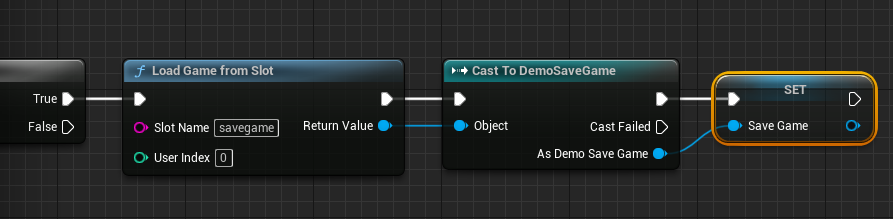
- If the save file exists, a
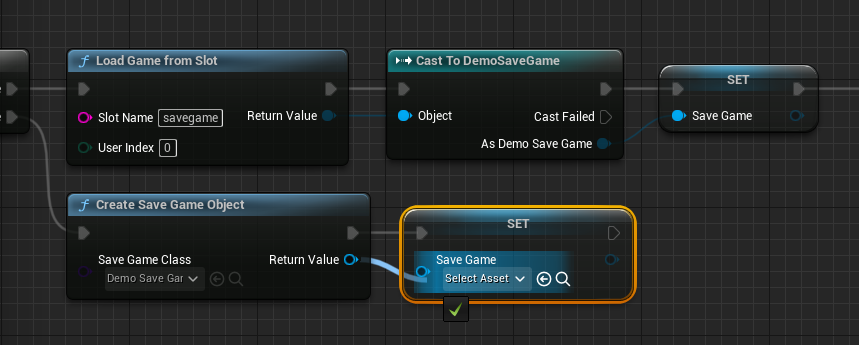
Load Game From Slotnode is executed, using the same "Slot Name." This node reads the binary data from the specified file and creates a genericUSaveGameobject. - This generic object is then
Cast Tothe specific customSaveGameclass (e.g.,Cast to BP_DemoSaveGame). This step is vital for safely accessing the custom variables defined within theBP_DemoSaveGameclass. - The returned, casted
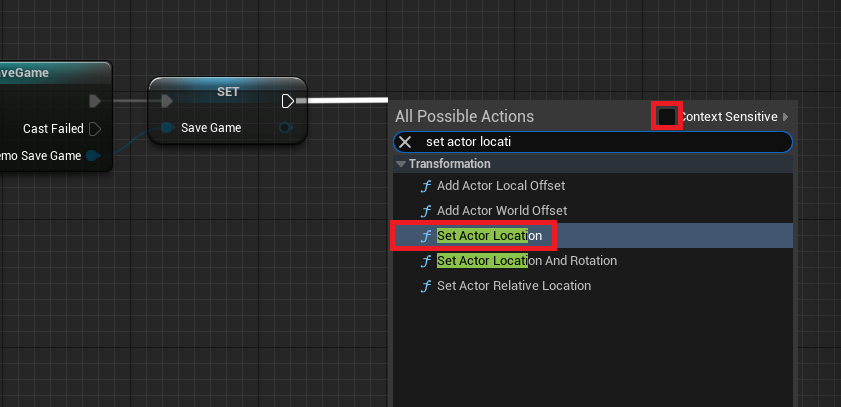
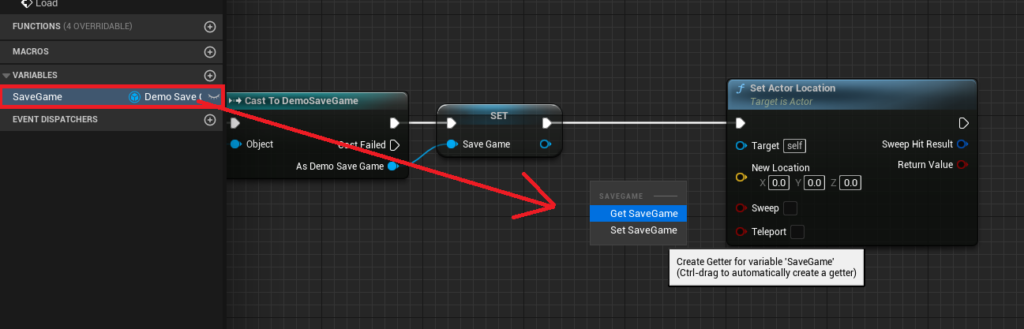
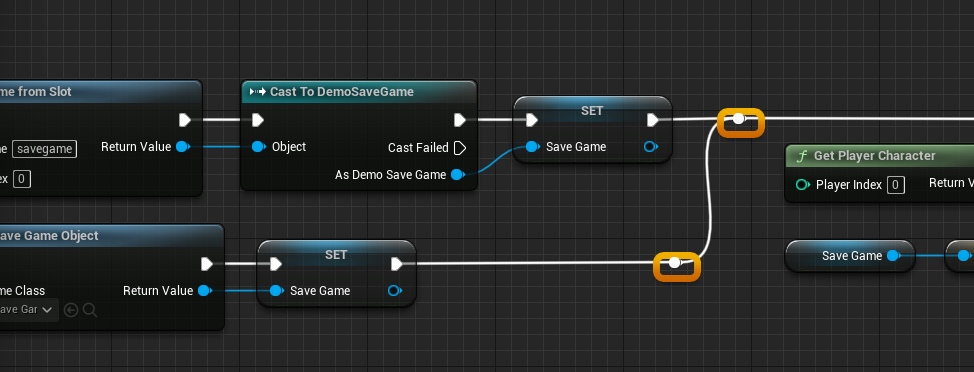
SaveGameobject is then stored in theGame Instance‘s "SaveGame" variable. This establishes a direct reference to the loaded data. - The loaded data is then applied to the game. For instance, to restore the player’s position, the "PlayerPosition" variable is retrieved from the "SaveGame" object, and a
Set Actor Locationnode is used to move thePlayer Characterto these coordinates. TheGet Player Characternode provides the necessary target reference.
- If the save file exists, a
- Creating a New Save File (False Path):
- If
Does Save Game Existreturns False (meaning no save file is found for the given slot), a new save game object must be created. This is done using aCreate Save Game Objectnode, with its "Save Game Class" input set to the customBP_DemoSaveGameclass. This effectively initializes a fresh instance of the save data with default values. - This newly created
SaveGameobject is then assigned to theGame Instance‘s "SaveGame" variable, ensuring that there’s always a validSaveGameobject in memory to work with, even for a new game. This flow is then seamlessly connected back into the main loading sequence, allowing the game to proceed with a default state if no prior save existed.
- If
Implementing the Saving Mechanism
The saving process captures the current game state and writes it to a file. It also includes checks to ensure that there is a valid SaveGame object to write to.
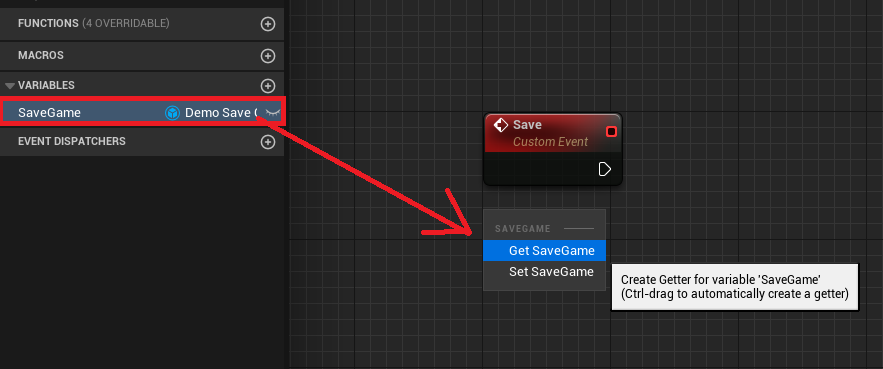
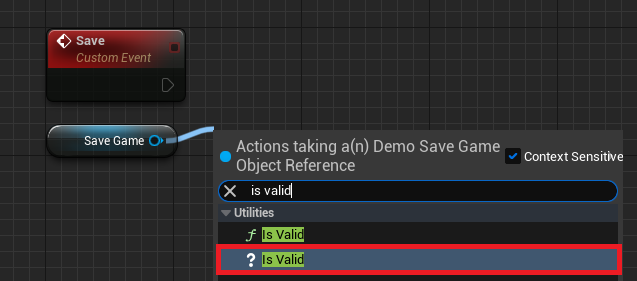
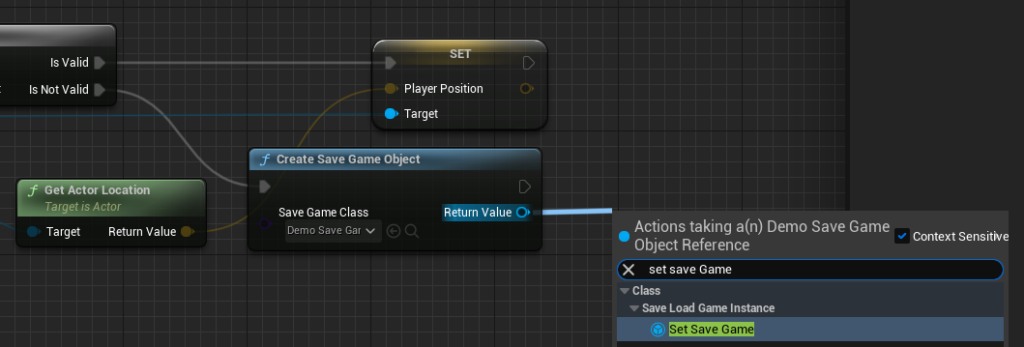
- Validating the SaveGame Object: On the "Save" event, the first action is to retrieve the
Game Instance‘s "SaveGame" variable. AnIs Validnode is then used to check if thisSaveGameobject reference is valid (i.e., not null). This is a critical error-prevention step, ensuring that data is only written if aSaveGameobject has been successfully loaded or created. - Updating Variables (Is Valid Path):
- If the
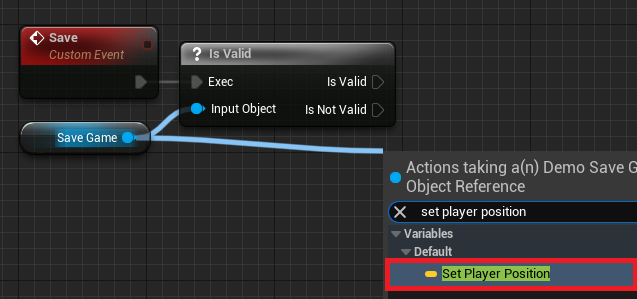
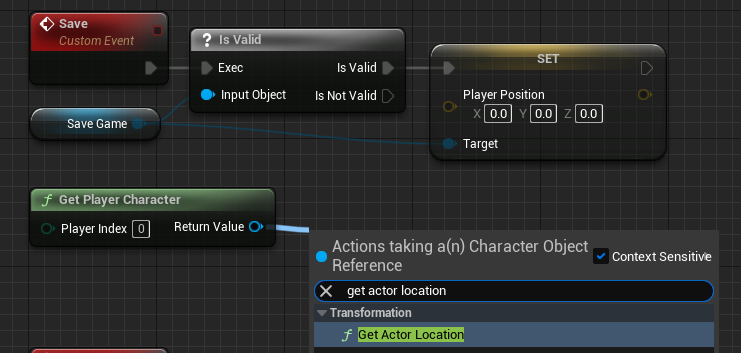
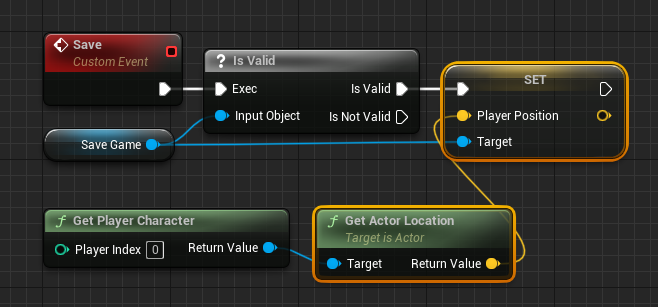
SaveGameobject is valid, the current game state is captured and used to update the variables within the "SaveGame" object. For example, to save the player’s current position, aGet Player Characternode is used to find the player, followed by aGet Actor Locationnode to retrieve their current coordinates. - This
Vectorvalue is then assigned to the "PlayerPosition" variable within the "SaveGame" object using aSet Player Positionnode (which is a setter for the variable in theBP_DemoSaveGameclass). This step populates theSaveGameobject with the latest data.
- If the
- Creating a New Save File (Is Not Valid Path):
- If the
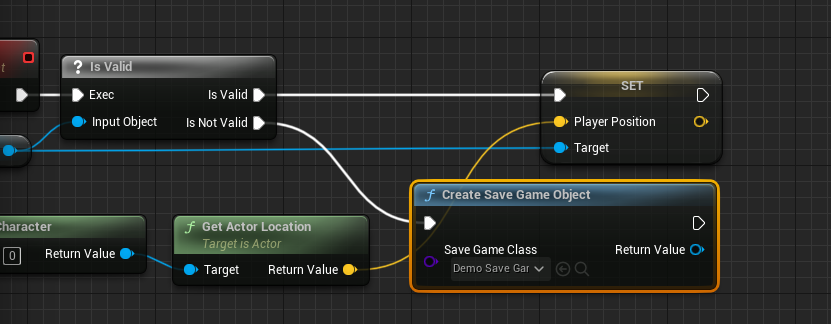
SaveGameobject is not valid (e.g., the game just started and no load operation occurred, or a previous load failed), a newSaveGameobject must be created using theCreate Save Game Objectnode, similar to the "False" path in the loading mechanism. - This newly created object is then set to the
Game Instance‘s "SaveGame" variable. The execution flow then connects to the "Set Player Position" node, ensuring that even if no save file was initially valid, a new one is created and populated with current game data before saving.
- If the
- Writing to Disk:
- Finally, the actual write operation to disk is performed using either a
Save Game to Slotor anAsync Save Game to Slotnode. Both nodes require theSaveGameobject (the "SaveGame" variable from theGame Instance) and the "Slot Name" (which must match the one used during loading). Save Game to Slot: This is a synchronous operation, meaning it executes immediately and blocks other game logic until the save is complete. It is suitable for smaller amounts of data or situations where a brief hitch is acceptable, such as saving at a checkpoint or when transitioning between menus.Async Save Game to Slot: This is an asynchronous operation, performing the save on a separate thread. This is highly recommended for larger save files or in performance-critical situations, as it prevents the game from freezing or stuttering (a "hitch") while data is being written. The asynchronous nature ensures a smoother gameplay experience, especially important in action-oriented or open-world titles. Developers must select the appropriate node based on the size of their save data and performance considerations.
- Finally, the actual write operation to disk is performed using either a
Triggering Save and Load Operations
With the save and load logic encapsulated within the Game Instance, the next step is to provide mechanisms within the game to trigger these operations. While a full game would integrate these into UI menus, checkpoints, or auto-save systems, a simple demonstration can use keyboard input.
- Input Event Integration: In the
Player CharacterBlueprint (e.g.,ThirdPersonCharacterBP),Key Press Eventsare set up. For instance, pressing the "1" key could trigger a save, and pressing the "2" key could trigger a load. - Accessing the Game Instance: From these key events, a
Get Game Instancenode is used, followed by aCast Tonode targeting the customGame InstanceBlueprint. This ensures that the correct instance of theGame Instanceis accessed. - Calling Custom Events: From the "As Game Instance" output pin of the
Cast Tonode, the "Save" and "Load" Custom Events created earlier are called. Now, pressing "1" will execute the save logic, capturing the player’s current position and writing it to the save file. Pressing "2" will execute the load logic, retrieving the saved position and teleporting the player to that location. This demonstrates a complete, end-to-end save/load cycle, where player data can be persisted across game sessions.
Security, Integrity, and Advanced Considerations
While Unreal Engine’s SaveGame system provides a robust foundation, developers must also consider security and data integrity. Local save files are inherently vulnerable to tampering, which can lead to cheating in single-player games or even exploitation in multiplayer contexts if not properly managed. For games requiring high security, techniques such as encryption of save files, checksum validation to detect alterations, or server-side saving for authoritative data are often employed.
Furthermore, robust save systems often incorporate versioning, allowing for graceful handling of save files created with older game versions that might have different data structures. Implementing backup save slots or redundant saving can also mitigate issues arising from corrupted save files. For games with dynamic, procedurally generated content or a large number of runtime-instantiated objects, more advanced serialization techniques might be required, potentially involving custom C++ serialization or more intricate Blueprint logic to correctly identify and recreate game world elements.
Broader Impact and Future Trends
The efficiency and flexibility of Unreal Engine 5’s SaveGame system significantly impact game development. It allows developers to focus on gameplay and content creation rather than reinventing core persistence mechanics. This leads to faster development cycles and more stable products. For players, it translates into seamless, uninterrupted experiences, fostering deeper engagement and satisfaction.
Looking ahead, save systems will continue to evolve, particularly with the rise of persistent online worlds, cloud gaming, and cross-platform play. The underlying principles of serialization and data management will remain, but integration with external services, real-time synchronization, and advanced data compression will become even more prevalent. Unreal Engine’s SaveGame system, with its extensible architecture, is well-positioned to adapt to these future demands, providing a scalable solution for games of all sizes and complexities.
Conclusion
The SaveGame system in Unreal Engine 5 is a testament to Epic Games’ commitment to providing comprehensive tools for game developers. By offering a straightforward yet powerful mechanism for data persistence, it addresses a critical requirement for modern game design. From defining custom data structures to implementing robust save and load logic within the Game Instance and triggering these operations through in-game events, the system ensures that player progress and game states are reliably maintained. Understanding and effectively implementing this system not only streamlines development but also significantly enhances the player experience, solidifying Unreal Engine 5’s position as a leading platform for creating immersive and enduring interactive entertainment.
About the Author








