
The burgeoning complexity of modern video game development demands robust and efficient systems for managing vast amounts of data. In this landscape, Unreal Engine 5’s Data Tables have emerged as an indispensable feature, offering programmers and designers a streamlined method to create, organize, and access pre-defined lists of information. This powerful tool facilitates data-driven design, enabling greater flexibility, faster iteration, and enhanced collaboration across development teams.
Understanding Data Tables: A Core Pillar of UE5 Development
At its essence, an Unreal Engine 5 Data Table serves as a centralized, editable asset within a project, designed to store structured data. Unlike hardcoded values or disparate configuration files, Data Tables present information in a clear, tabular format, keyed for easy retrieval. This approach ensures data persistence directly within the editor environment, allowing developers to define game parameters during the design phase and have them readily available at runtime without recompilation or complex serialization logic. For instance, attributes for game items, enemy statistics, character abilities, or level configurations can be meticulously crafted and stored, providing a single source of truth for all game logic referencing that data. The inherent ease of use and minimal setup required for Data Tables underscores their utility, positioning them as a fundamental component in Unreal Engine 5 projects striving for efficiency and scalability.
The Evolution of Data Management in Game Development
Historically, game development often grappled with cumbersome data management practices. Early approaches frequently involved embedding data directly into code, leading to "spaghetti code" that was difficult to modify, debug, and scale. As games grew in scope, developers transitioned to external files like XML or JSON, which offered better separation of data from logic but still presented challenges in terms of editor integration, validation, and runtime performance. The advent of data-driven design principles, championed by engines like Unreal, sought to address these issues by providing integrated, native solutions. Data Tables represent a significant evolution in this journey, offering a visually intuitive, editor-integrated, and highly performant method for managing game data. Their tight integration with Unreal Engine’s Blueprint visual scripting system further democratizes data management, allowing even non-programmers to define and modify critical game parameters. Industry analysts frequently point to such tools as critical enablers for the rapid prototyping and expansive content pipelines seen in contemporary AAA titles.
Streamlining Content Creation: The Data Table Workflow
The implementation of Data Tables within Unreal Engine 5 follows a logical and structured workflow, beginning with the definition of data types and culminating in the creation and population of the table itself. This systematic approach ensures data integrity and consistency throughout the development process.
-
Defining Data Structures with Enums and Structs:
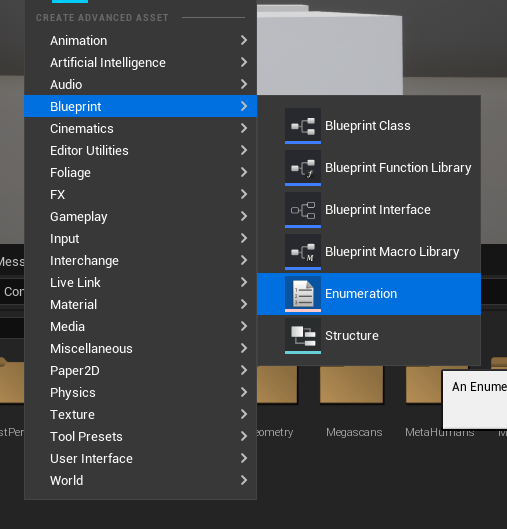
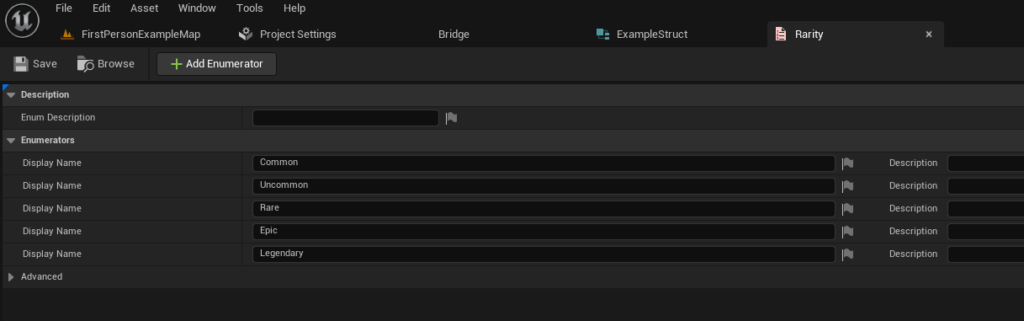
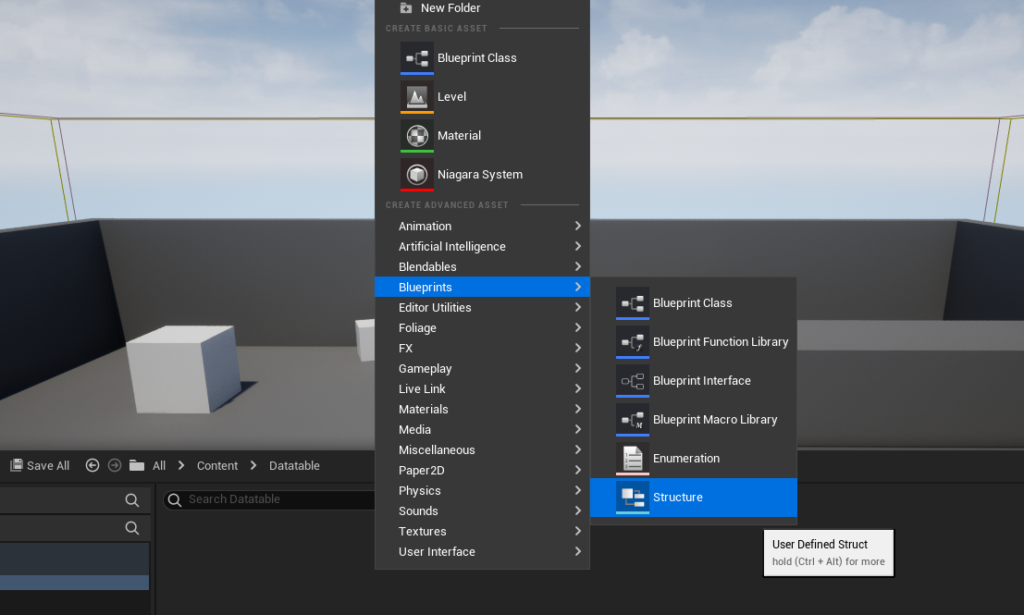
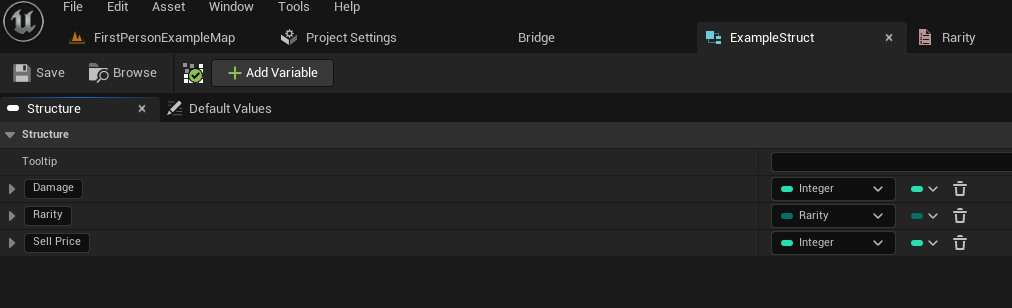
The foundational step involves defining the structure of the data that the table will hold. This typically starts with Enumerations (Enums), which provide a clear, discrete set of named constants. For example, in an RPG context, an Enum for "Item Rarity" might include values like Common, Uncommon, Rare, Epic, and Legendary. This ensures that all rarity values are consistent and prevents typos or invalid entries. Creating an Enum is a straightforward process within the Content Browser, right-clicking and selecting "Enumeration" under the Blueprint category. Developers then populate this Enum with the required values, visually represented in the editor.Following the Enum, a Structure (Struct) is created. A Struct acts as a custom data type, aggregating various variables into a single, organized unit. In the item example, a Struct might contain variables for "Damage" (Float), "Rarity" (referencing the previously created Enum), and "Sell Price" (Integer). This Struct defines the "schema" for each row in the Data Table. Similar to Enums, Structs are created via the Content Browser under the Blueprint category, and their variables are configured with appropriate types and default values. This hierarchical approach, where Enums define specific categories and Structs bundle related attributes, forms the robust backbone for data organization.
-
Populating and Managing Data:
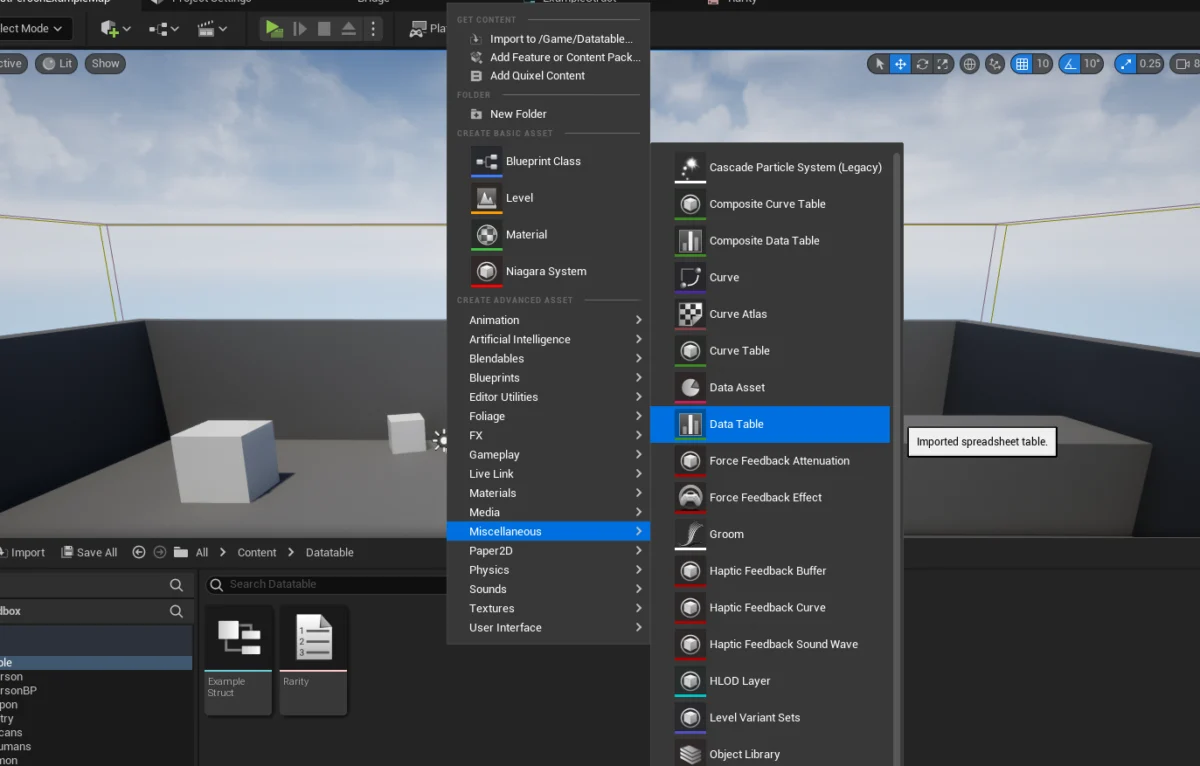
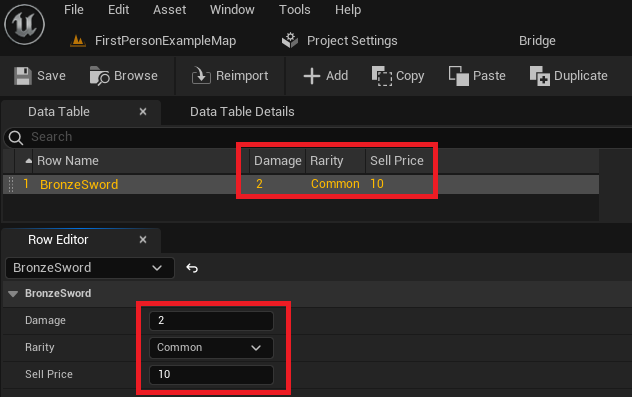
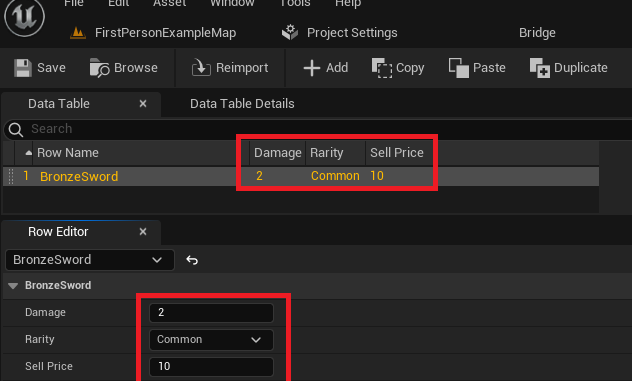
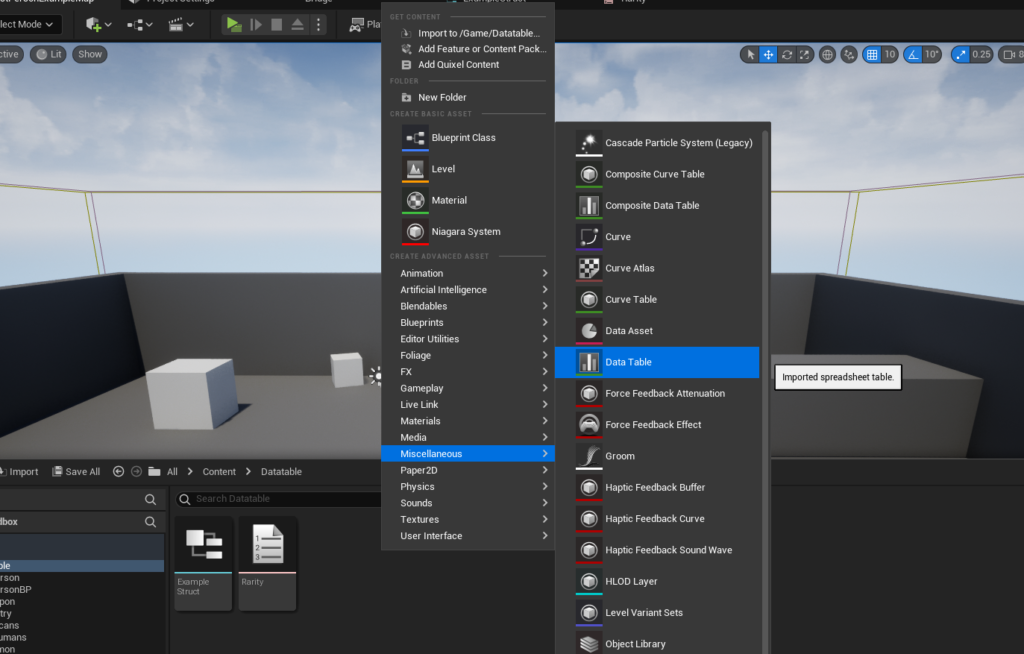
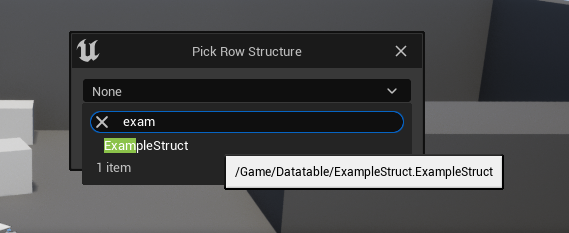
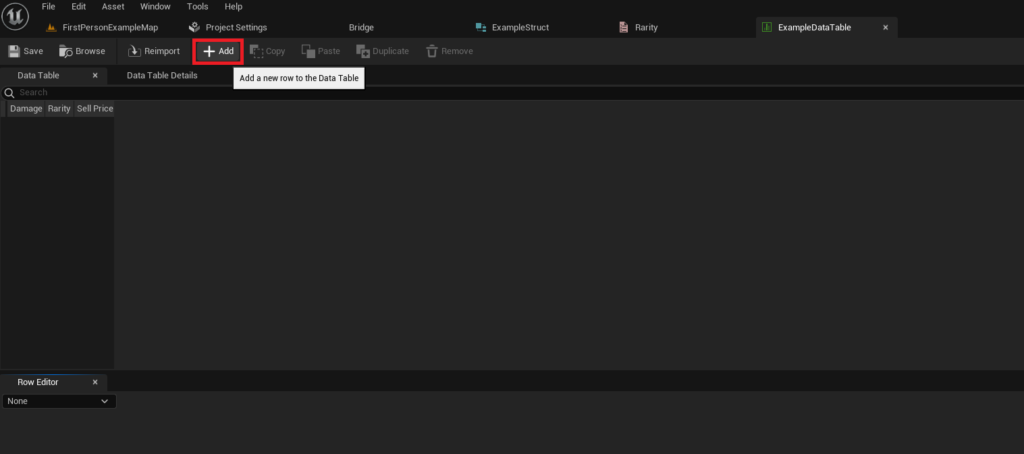
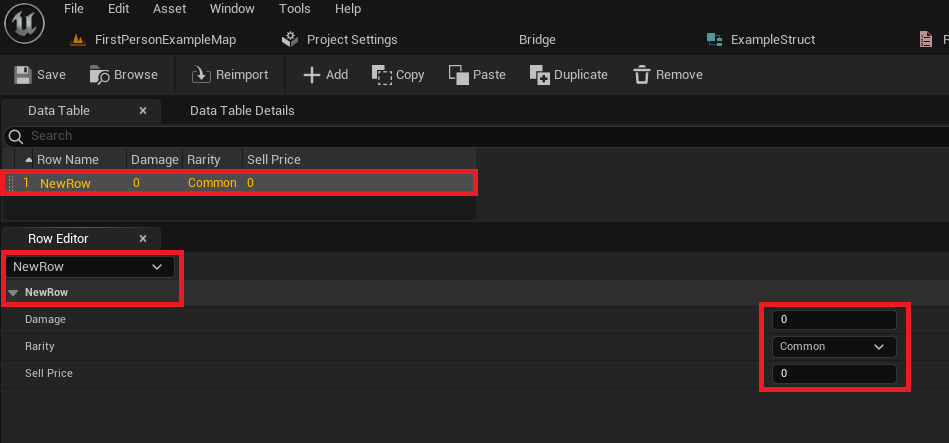
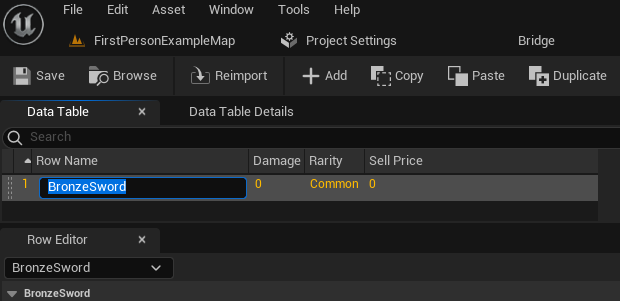
Once the underlying data structure is established, the Data Table itself can be created. This is performed by right-clicking in the Content Browser and selecting "Data Table" from the "Miscellaneous" category. Upon creation, the engine prompts the user to select the Struct that will serve as the template for the table’s rows. This critical step links the table to its predefined schema, ensuring that every entry conforms to the expected data types.With the Data Table initialized, developers can begin populating it with actual game data. The Unreal Editor provides an intuitive interface for this, allowing new rows to be added with a single click. Each new row automatically inherits the default values defined in the associated Struct. A "Row Editor" panel within the Data Table interface enables developers to modify these values for each specific entry. Crucially, each row is identified by a unique "Row Name," which acts as a key for data retrieval. For instance, an entry for a "Bronze Sword" might have a damage value of 10, a rarity of "Common," and a sell price of 50. The ability to rename rows for clarity (e.g., from "New Row" to "BronzeSword") further enhances readability and maintainability. This direct, visual editing capability within the engine significantly accelerates content creation and modification, reducing the dependency on external tools or programming intervention for designers. Regular saving is emphasized to preserve these critical data changes.
Dynamic Data Access: Powering Runtime Mechanics
The true power of Data Tables is realized when their stored information is accessed and utilized by game logic at runtime. Unreal Engine 5 provides straightforward methods, primarily through Blueprints, to interact with these data assets.
Developers typically use the "Get Data Table Row" node within Blueprints to retrieve specific data entries. This node requires two primary inputs: a reference to the Data Table asset and the "Row Name" (key) of the desired entry. If a matching row is found, the node’s "Out Row" pin outputs the complete data structure, which can then be "split" into its individual components (e.g., Damage, Rarity, Sell Price) for immediate use. A "Row Found" and "Row Not Found" execution pin also allows for conditional logic, gracefully handling cases where a requested row might not exist. This direct, key-based lookup is ideal for accessing specific items or entities, such as retrieving the stats for a weapon when a player equips it.
For scenarios requiring processing multiple data entries, such as populating an in-game shop or balancing all enemy types, Unreal Engine 5 offers efficient looping mechanisms. The "Get Data Table Row Names" node returns an array containing all row names present in a given Data Table. This array can then be fed into a "For Each Loop" node. Within each iteration of the loop, the current "Array Element" (which is a Row Name) is used as input for a "Get Data Table Row" node, allowing the game logic to process the data for every entry in the table sequentially. This capability is fundamental for creating dynamic game systems that adapt to changes in data without requiring code modifications. For example, a developer could iterate through an entire table of potion recipes to dynamically generate crafting options in a UI.
Industry Impact and Expert Perspectives
The adoption of Data Tables has been widely praised by game development professionals for its profound impact on project efficiency and team dynamics. Lead developers from various studios have highlighted how Data Tables serve as a crucial interface between different disciplines. "Data Tables allow our designers to iterate on game balance and content parameters in real-time without needing a programmer to write a single line of code," states a representative from a prominent independent studio. "This accelerates our prototyping phase significantly and fosters a much more collaborative environment."
Engine architects at Epic Games, the creators of Unreal Engine, emphasize the performance benefits and scalability. "By centralizing data in structured assets, we enable faster load times and more optimized memory usage," explains an engine specialist. "This is paramount for the ambitious open-world games and high-fidelity experiences that Unreal Engine 5 is designed to power." Furthermore, the ability to store a single source of truth within the project streamlines version control and reduces conflicts in multi-person teams, making sharing and updating project data remarkably simple.
Implications for Modern Game Design
The widespread integration of Data Tables carries significant implications for modern game design and development practices. Firstly, they promote data-driven design, where game behavior is dictated by configurable data rather than rigid code. This paradigm allows for rapid prototyping, easier A/B testing, and more flexible content updates, as changes can often be made directly in the editor without requiring code compilation. Secondly, Data Tables enhance scalability. As games grow in scope and complexity, managing hundreds or thousands of items, characters, or environmental elements becomes feasible and organized. A new item can be added simply by creating a new row in a table, rather than modifying multiple code files.
Thirdly, they foster interdisciplinary collaboration. Designers, artists, and sound engineers can contribute to game balance and content directly by modifying Data Table entries, reducing bottlenecks and empowering non-programmers. This democratizes development, allowing creative talent to directly influence gameplay mechanics. Finally, Data Tables contribute to robustness and maintainability. By enforcing a consistent data structure through Structs and Enums, they minimize errors and make it easier to understand and debug game systems. The clear separation of data from logic also simplifies future updates and expansions.
The Future of Data-Driven Development in Unreal Engine 5
As Unreal Engine 5 continues to evolve, Data Tables are poised to remain a cornerstone of efficient game development. Their inherent flexibility, combined with the engine’s powerful visual scripting capabilities, ensures that they will continue to be a go-to solution for managing game data across projects of all scales. Future enhancements might include more advanced validation tools, richer visualization options, or even tighter integration with external data sources for even more dynamic content pipelines. The emphasis on robust, accessible, and scalable data management solutions like Data Tables underscores Unreal Engine 5’s commitment to empowering developers to create increasingly complex and immersive interactive experiences. With these tools, development teams can focus more on creative output and less on the arduous task of data wrangling, paving the way for the next generation of groundbreaking games.
About the Author








