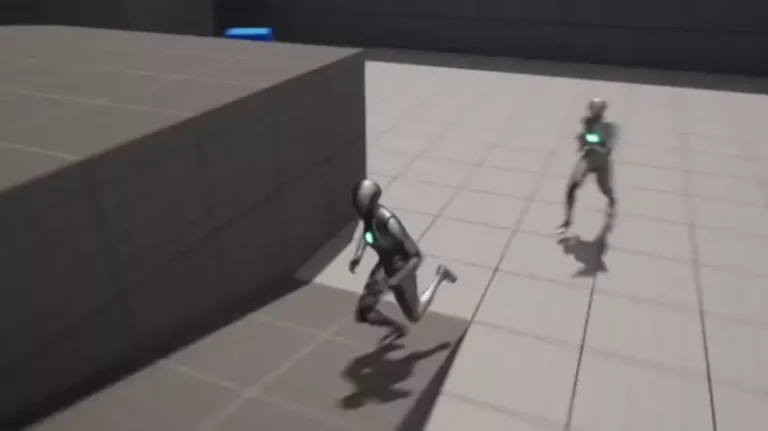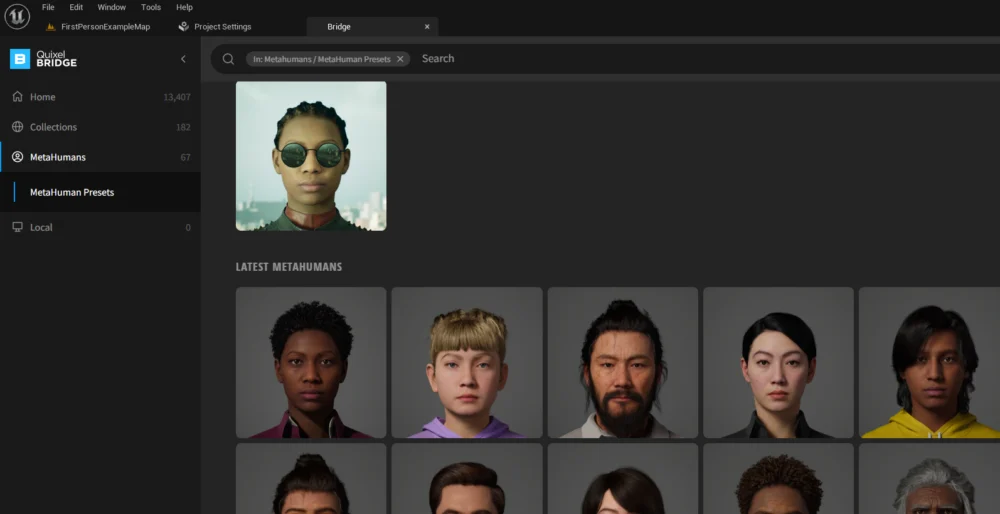
Unreal Engine 5 (UE5) has fundamentally transformed the landscape of real-time content creation, and at the forefront of this revolution is the introduction of the MetaHuman Framework. This groundbreaking library offers creators an extensive collection of high-fidelity digital humans, freely available for integration into a wide array of projects, from video games and cinematic productions to virtual reality experiences and architectural visualizations. The accessibility of these photorealistic characters marks a significant milestone in democratizing advanced digital human creation, traditionally a resource-intensive and highly specialized field. This article provides a detailed guide on how to leverage MetaHumans within your Unreal Engine 5 projects, alongside an in-depth analysis of the technology’s background, its technical underpinnings, and its profound implications for the digital entertainment and creative industries.
The Evolution of Digital Human Creation: A Historical Context
The quest for photorealistic digital humans has long been a holy grail for computer graphics artists and engineers. From the early days of rudimentary 3D models to the complex, motion-captured characters of modern cinema, the challenge of creating believable human likenesses has been immense. Key obstacles included overcoming the "uncanny valley"—the phenomenon where human replicas appear eerily unsettling as they approach, but fail to perfectly achieve, human realism—and managing the exorbitant costs and extensive time required for modeling, texturing, rigging, and animating such assets. Historically, only large studios with significant budgets and highly specialized teams could produce truly convincing digital characters, often relying on proprietary pipelines and custom tools.

Epic Games, the developer behind Unreal Engine, has been a pivotal player in pushing the boundaries of real-time graphics. With each iteration of Unreal Engine, the company has introduced innovations designed to make high-end visuals more accessible. The acquisition of Quixel in 2019, a company renowned for its Megascans library of photorealistic 3D assets, was a strategic move that laid crucial groundwork for the MetaHuman project. Quixel’s expertise in photogrammetry and asset scanning provided a robust foundation for capturing the intricate details necessary for lifelike digital humans. This acquisition signaled Epic’s commitment to providing creators with not just powerful engine features, but also an ecosystem of high-quality content that could immediately benefit from those features. The subsequent unveiling of MetaHuman Creator, a cloud-based application designed to enable users to create bespoke digital humans in minutes, further solidified Epic’s vision, with the MetaHuman character library serving as a pre-curated collection of these advanced digital avatars.
Technical Foundations: What Makes MetaHumans Unique?
The unparalleled fidelity of MetaHumans stems from a sophisticated amalgamation of advanced scanning techniques, meticulous material rendering, and cutting-edge rigging systems. These digital characters are not merely high-polygon models; they represent a holistic approach to capturing and reproducing human essence in a digital format.
Firstly, MetaHumans are built upon extensive data captured from real human scans. This photogrammetry-based approach ensures that every nuance of human anatomy, from subtle skin pores to the intricate geometry of facial features, is accurately represented. This data is then processed and optimized for real-time rendering, ensuring that while the visual quality is exceptionally high, performance remains manageable within Unreal Engine 5.
Secondly, the material fidelity is paramount. MetaHumans employ advanced skin shaders that simulate subsurface scattering (SSS), a crucial effect that allows light to penetrate the surface of the skin and scatter beneath it, giving it a soft, translucent quality that is characteristic of real human flesh. Without SSS, digital skin often appears plasticky or artificial. Coupled with intricate texture maps for color, normal, roughness, and displacement, these shaders contribute significantly to the photorealistic appearance. Hair rendering is another critical component, utilizing sophisticated grooming tools and strand-based rendering techniques that accurately depict individual hair follicles, their specular highlights, and natural movement, avoiding the "helmet hair" look common in earlier digital characters.
Thirdly, the rigging and animation systems are exceptionally robust. Each MetaHuman comes with a highly detailed skeletal rig and an advanced facial rig that supports a vast range of expressions and phonemes. This includes blend shapes, which are pre-sculpted deformations used to create specific facial poses, and a sophisticated muscle simulation system that allows for realistic muscle deformation under the skin. This level of detail ensures that MetaHumans are not only visually stunning but also highly expressive and capable of conveying a broad spectrum of human emotion through animation. Furthermore, MetaHumans are designed with multiple Levels of Detail (LODs), automatically switching between higher and lower resolution models based on their distance from the camera. This optimization is crucial for maintaining smooth performance in complex scenes without sacrificing visual quality when characters are close-up.
Accessing the MetaHuman Library: A Step-by-Step Guide
Integrating MetaHumans into an Unreal Engine 5 project is a streamlined process facilitated by the Quixel Bridge application, deeply embedded within the UE5 editor. This section outlines the precise steps required to bring these advanced digital characters into your creative pipeline.
-
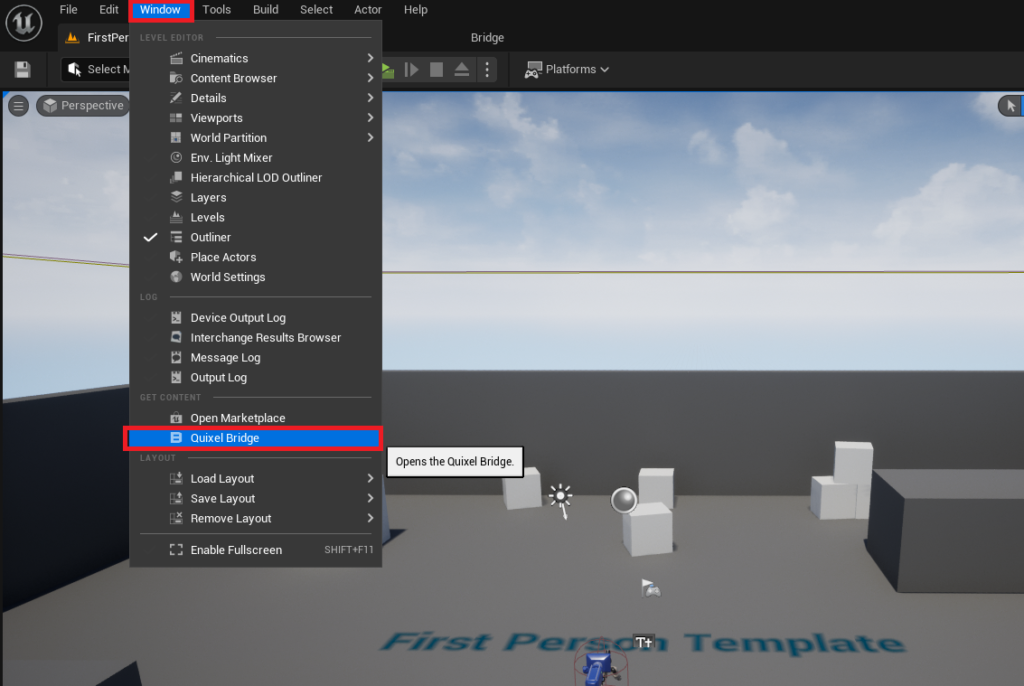
Initiating Quixel Bridge: The first step involves opening the Quixel Bridge within your Unreal Engine 5 editor. Navigate to the "Window" tab in the top menu bar of the Unreal Engine editor. From the dropdown menu, select "Quixel Bridge." This action will open the Quixel Bridge interface directly within the editor, eliminating the need for a separate application and creating a seamless workflow. Quixel Bridge acts as a comprehensive content management system, providing access to both the vast Megascans library of photorealistic assets and the specialized MetaHuman collection.
-
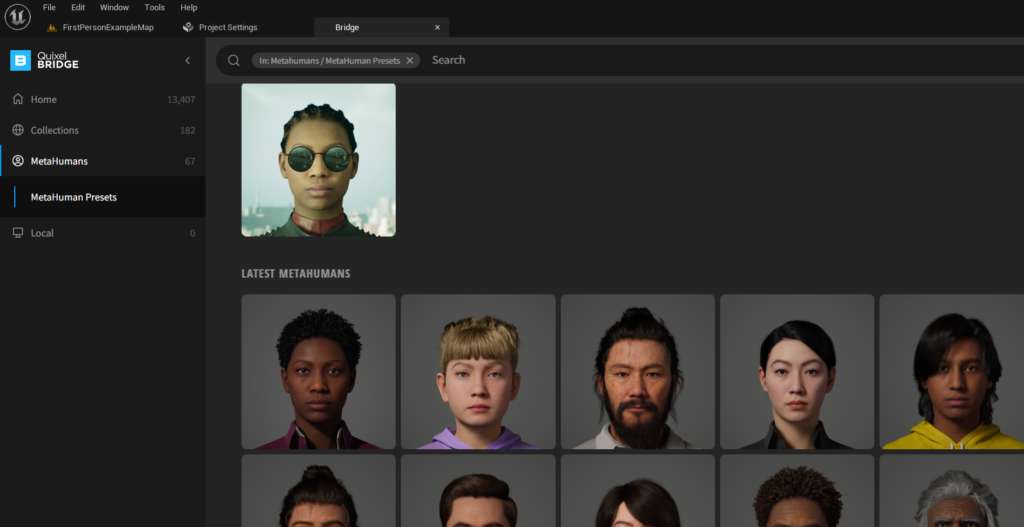
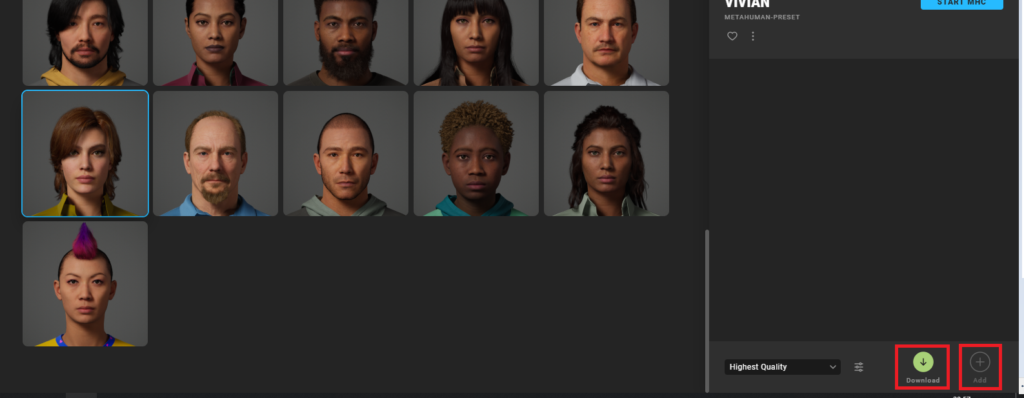
Navigating to the MetaHumans Tab: Once Quixel Bridge has successfully launched within the editor window, you will observe several tabs or categories of assets. Locate and click on the "MetaHumans" tab. This dedicated section filters the extensive Quixel library to display only the preconfigured MetaHuman characters available for download and integration. Here, you will find a curated selection of diverse digital humans, each meticulously crafted and ready for immediate use.
-
Browsing the MetaHuman Collection: The MetaHumans tab will present you with a grid of various pre-built MetaHuman avatars. These characters showcase the range and fidelity of the MetaHuman framework, offering different ethnicities, ages, genders, and styles. Take your time to browse through the collection and identify the specific MetaHuman that best suits the aesthetic and narrative requirements of your project. Each avatar represents a complete, high-fidelity digital human, equipped with all the necessary components for animation and rendering.
-
Authentication with Epic Games Account: Before you can download any MetaHuman asset, you will need to authenticate your access by logging into your Epic Games account. Upon selecting a MetaHuman avatar from the grid, you will typically see a "Sign In" button or prompt, often located in the bottom-right corner of the Quixel Bridge window. Click this button and proceed with logging into your Epic Games account credentials. This authentication step is crucial as it verifies your license to use the MetaHuman assets (which are free for use in Unreal Engine projects) and connects your project to the broader Quixel and Epic Games ecosystem. It ensures proper asset tracking and access to future updates or additional content.

-
Downloading and Adding to Project: Once successfully logged in, you can now initiate the download process for your chosen MetaHuman. Select the desired avatar again, and you will see a "Download" button appear. Click this button to begin downloading the substantial asset files, which include all the meshes, textures, materials, and rigging data for the MetaHuman. Due to the high fidelity of these characters, the download size can be significant, so a stable internet connection is recommended. After the download is complete, the "Download" button will transform into an "Add" button. Click "Add" to import the MetaHuman directly into your currently open Unreal Engine 5 project. This action will trigger the engine to begin processing and integrating all the necessary files.
Configuring the Project for MetaHumans: Essential Settings and Plugins
The integration of MetaHumans often requires specific project settings and plugins to be enabled within Unreal Engine 5 to ensure optimal performance and visual fidelity. The engine is designed to guide you through this process, but understanding why these steps are necessary is key.
-
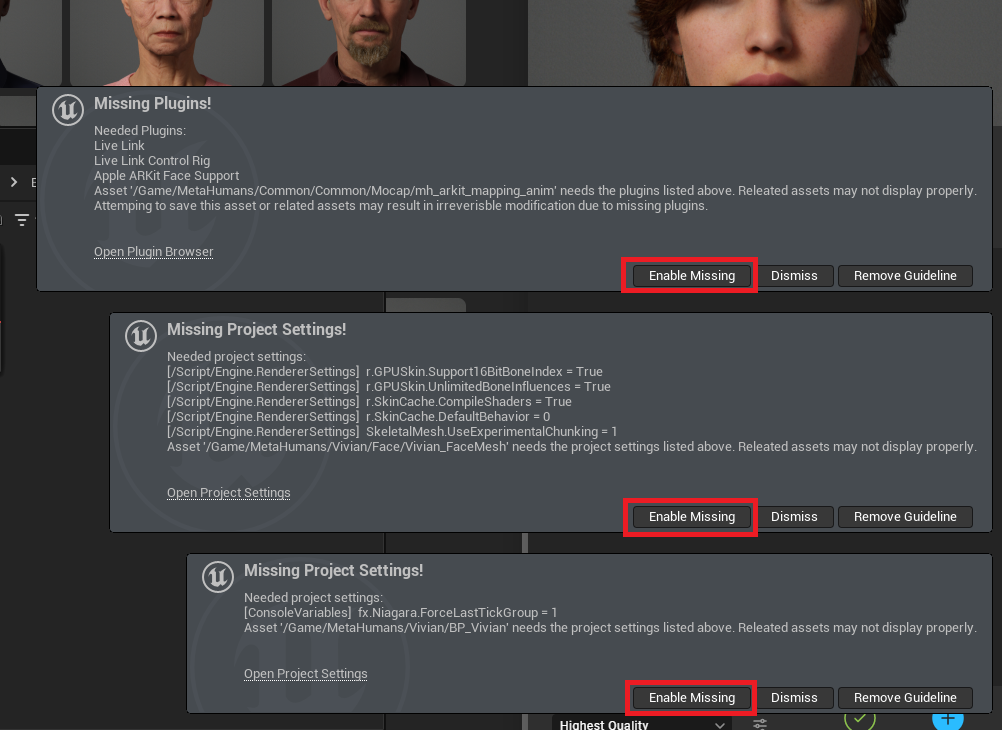
Enabling Missing Plugins and Settings: As the MetaHuman assets are imported, Unreal Engine 5 will perform an automatic check for required plugins and project settings. You may observe notifications appearing in the bottom-left corner of the editor, prompting you to "Enable Missing" features. These typically include the core "MetaHumans" plugin, which provides the foundational framework for the characters, as well as other related plugins such as "Alembic" for advanced hair and cloth simulations, and potentially "Ray Tracing" settings for enhanced lighting and reflections if your project targets high-end visuals. It is imperative to click "Enable Missing" to allow the editor to automatically configure these necessary components. These plugins and settings are vital for the MetaHuman characters to render correctly, animate smoothly, and interact realistically within your scene.

-
Restarting the Editor: After enabling the missing plugins and settings, Unreal Engine 5 will require a restart to apply these changes effectively. A "Restart Now" button will typically appear in a notification. Click this button to close and relaunch the editor. This ensures that all new configurations are properly initialized and that the MetaHuman assets function as intended within the updated project environment. Failure to restart can lead to rendering issues, missing features, or unexpected behavior from the MetaHuman characters.
Locating and Utilizing the MetaHuman Asset in Your Project
Once the editor has restarted and all necessary configurations are applied, your downloaded MetaHuman is ready to be discovered and deployed within your project.
-
Accessing the Content Drawer: Open the "Content Drawer" (or Content Browser) in your Unreal Engine 5 editor. This is where all your project’s assets are organized.
-
Navigating to the MetaHumans Folder: Within the Content Drawer, you will find a newly created folder specifically for "MetaHumans." Double-click this folder to open it. Inside, you will typically see another folder named after the specific MetaHuman character you downloaded (e.g., "M_Tall_UnkemptHair_DarkBrown").
-
Identifying the MetaHuman Blueprint: Inside the MetaHuman’s dedicated folder, locate the asset file that begins with "BP_" (e.g., "BP_M_Tall_UnkemptHairDarkBrown"). This "BP" prefix signifies that it is a Blueprint Class, which is a powerful visual scripting system in Unreal Engine. For MetaHumans, this Blueprint acts as a container that encapsulates all the character’s components: the various meshes (body, head, hair, clothing), their associated materials, the complex skeletal and facial rigs, and any initial animation logic. This single Blueprint asset represents your complete, ready-to-use MetaHuman character.
-
Deploying Your MetaHuman: You can now drag and drop this "BP_" MetaHuman Blueprint directly from the Content Drawer into your scene viewport. Once placed, your high-fidelity digital human will appear, fully rigged and ready for animation, posing, and integration into your gameplay or cinematic sequences. The modular nature of the MetaHuman blueprint means that individual meshes (e.g., head, body, specific clothing items) can often be accessed and manipulated within the Blueprint editor, allowing for further customization if desired.
Broader Impact and Implications for the Creative Industries
The advent of MetaHumans in Unreal Engine 5 represents more than just a technological advancement; it signifies a profound shift in the economics and accessibility of digital content creation.
Democratization of High-Fidelity Content: Perhaps the most significant implication is the democratization of high-quality character assets. Traditionally, creating a photorealistic human character could take months of work for a team of skilled artists and cost tens of thousands, if not hundreds of thousands, of dollars. By providing a free, readily available library of such characters, Epic Games has effectively lowered the barrier to entry for independent developers, small studios, educational institutions, and individual artists. This allows creators to focus their resources and efforts on storytelling, gameplay mechanics, or artistic direction, rather than wrestling with the technical complexities of character modeling and rigging.
Accelerated Production Workflows: For larger studios, MetaHumans offer an invaluable tool for accelerating production pipelines. Instead of building every character from scratch, teams can use MetaHumans as a base, customizing them to fit specific roles or using them as stand-ins during early development phases. This can significantly reduce development time and costs, allowing projects to move from concept to execution more rapidly. The consistency in quality across the MetaHuman library also ensures a cohesive visual style, which is often challenging to maintain when multiple artists contribute to character creation.
Versatility Across Industries: While initially celebrated by the game development community, MetaHumans’ potential extends far beyond gaming. The film and television industries can leverage them for virtual production, pre-visualization, and even final pixel characters, especially for background roles or digitally augmented scenes. Architectural visualization benefits from realistic human figures to populate virtual spaces, making designs feel more lived-in and relatable. The burgeoning metaverse and virtual reality sectors find in MetaHumans a powerful tool for creating immersive, believable avatars that enhance user presence and interaction in digital worlds. Educational and training simulations can also employ MetaHumans to create highly realistic scenarios for various fields, from medical training to emergency response.

The Future: Custom MetaHuman Creation and Beyond: The current MetaHuman library is merely the beginning. The anticipated full release of the MetaHuman Creator tool, a cloud-streamed application, promises to revolutionize personalized digital human creation. This tool will allow users to sculpt, blend, and customize MetaHumans with an unprecedented level of detail and control, generating unique characters in a matter of minutes. This capability will empower creators to design bespoke characters precisely tailored to their vision, further blurring the lines between the real and digital.
Ethical Considerations and the Uncanny Valley Revisited: As digital humans become increasingly indistinguishable from real ones, ethical considerations inevitably arise. The potential for misuse, such as in deepfakes or misleading digital content, underscores the responsibility that comes with such powerful technology. However, the primary intent remains positive: to empower creators with tools for immersive storytelling and rich digital experiences. The continuous refinement of MetaHumans also pushes the boundaries of the uncanny valley, striving to create characters that resonate with human empathy rather than discomfort.
Conclusion
Unreal Engine 5’s MetaHuman framework is a testament to Epic Games’ relentless pursuit of democratizing high-fidelity content creation. By offering a readily accessible library of photorealistic, fully rigged digital humans, Epic has significantly streamlined character development workflows and opened new avenues for creative expression across a multitude of industries. The detailed integration process, facilitated by the intuitive Quixel Bridge, ensures that creators can quickly bring these advanced assets into their projects, transforming their visions into stunning digital realities. As the MetaHuman ecosystem continues to evolve, particularly with the forthcoming custom creator tool, it promises to further redefine the standards of digital human realism and accessibility, empowering a new generation of storytellers and innovators in the digital age.
About the Author