

The ability for artificial intelligence (AI) characters or enemies to effectively chase or follow a player is a cornerstone feature in the vast majority of modern video games, contributing significantly to immersion, challenge, and dynamic gameplay. Fortunately, the robust and user-friendly development environment of Unreal Engine 5 (UE5) renders the integration of such sophisticated functionality remarkably accessible, often requiring only a minimal number of Blueprint nodes. This streamlined process democratizes advanced game development, allowing creators to implement complex AI behaviors with efficiency. This guide delves into the practical steps of enabling AI characters to follow players within Unreal Engine 5, building upon foundational navigation principles and leveraging the engine’s powerful visual scripting capabilities.
The Foundational Prerequisite: Understanding NavMesh in Unreal Engine 5
Before any AI character can intelligently navigate a game world, a robust navigational framework must be in place. Unreal Engine’s primary solution for this is the NavMesh, or Navigation Mesh. A NavMesh is an abstract representation of the traversable areas within a game level, essentially creating a simplified map that AI agents can understand and utilize for pathfinding. It is dynamically generated based on the geometry of the level, outlining areas where AI characters can walk, run, or otherwise move, while implicitly defining obstacles they must avoid.

The previous iteration of this development guide focused extensively on the critical process of setting up a NavMesh in Unreal Engine 5. This initial step is non-negotiable; without a properly configured NavMesh, AI characters would lack the spatial awareness necessary to move intelligently through the environment, instead colliding with objects or getting stuck. The NavMesh acts as a data layer, providing the AI with a navigable surface and the underlying pathfinding algorithms with the information needed to calculate efficient routes from one point to another. Its correct implementation ensures that AI characters can traverse complex terrains, navigate around static and dynamic obstacles, and ultimately reach their designated targets, which, in the context of player following, is the player’s current location.
Evolution of AI Movement: From Random Patrols to Player Pursuit
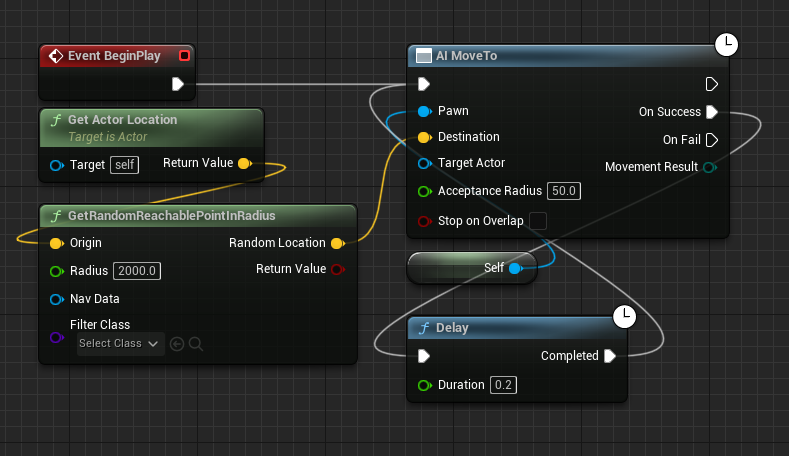
The journey to implementing sophisticated AI often begins with simpler movement patterns. In many development scenarios, AI characters are initially programmed to perform basic actions, such as patrolling random points within a given radius. This serves as an excellent starting point for testing an AI’s locomotion, collision detection, and its interaction with the NavMesh. In the context of the preceding guide, the AI character was configured to move around the level by identifying random reachable points. This involved a set of Blueprint nodes designed to acquire the AI’s current location, then utilize a GetRandomReachablePointInRadius node to calculate a new, randomized destination within a specified range, and finally, employ an AI MoveTo node to direct the AI character along the NavMesh to this chosen random point.
This initial setup, while effective for basic patrol behaviors, fundamentally differs from the objective of player pursuit. The core distinction lies in the AI’s target acquisition strategy. For random patrols, the target is self-generated and independent of any other entity in the game world. For player following, however, the target must dynamically update to reflect the player’s ever-changing position. Therefore, the first critical step in transitioning from random movement to player pursuit involves a targeted modification of the AI’s destination-finding logic.
Refining the AI’s Objective: Targeting the Player Character
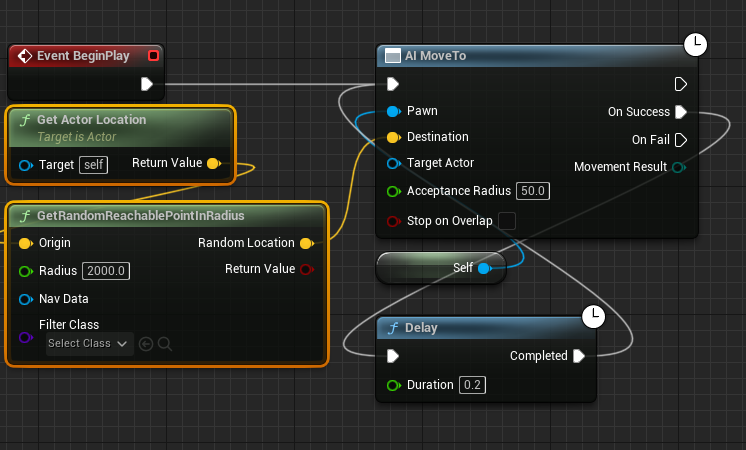
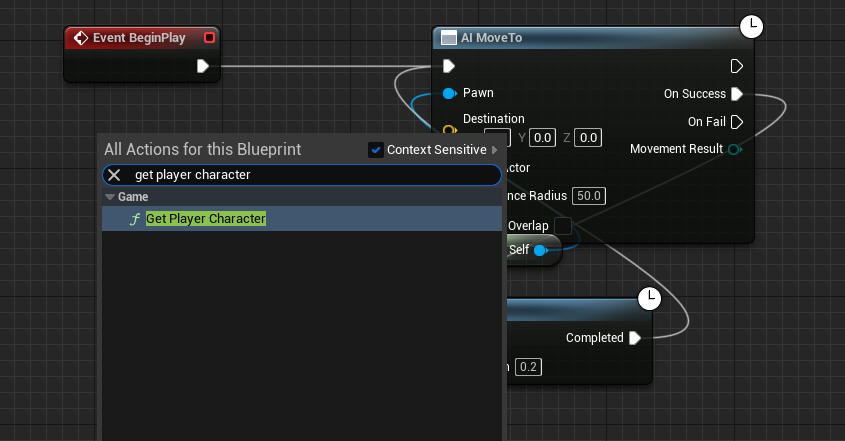
To initiate the player-following behavior, the Blueprint graph requires a precise modification. The nodes responsible for determining a random destination – specifically, the Get Actor Location node (which provided the AI’s own location as a reference for the random point) and the GetRandomReachablePointInRadius node – must be removed. These nodes, while perfectly suited for autonomous, randomized movement, are no longer relevant when the objective shifts to tracking a specific, external target: the player. Their removal clears the way for the new logic that will pinpoint the player’s whereabouts.
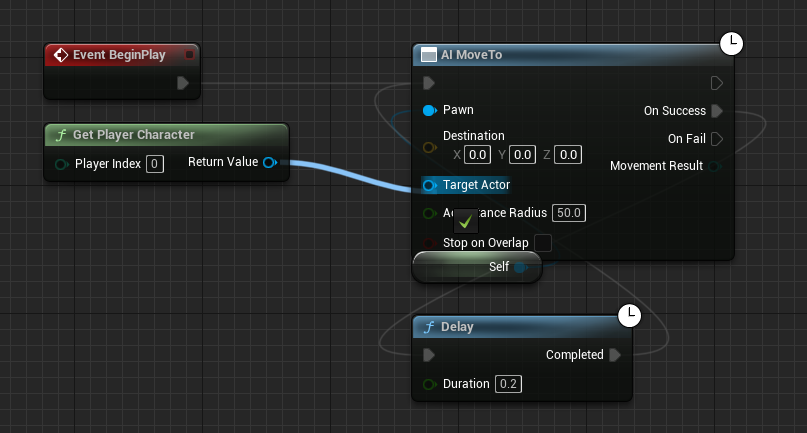
The next logical step in this re-architecting of the AI’s movement system is to introduce a mechanism for the AI to identify and locate the player character. This is achieved by adding a new Get Player Character node to the Blueprint graph. This node is a fundamental utility in Unreal Engine, providing a direct reference to the active player-controlled character within the game world. It acts as the crucial link between the AI and its new target. Once this node is placed, its blue Return Value pin, which outputs a reference to the player character, is then connected directly to the blue Target Actor pin on the existing AI MoveTo node.
This connection fundamentally alters the AI MoveTo node’s behavior. Instead of attempting to pathfind to a static or randomly generated vector location, it now dynamically retrieves the current location of the Target Actor – which is now explicitly defined as the player character. Every time the AI MoveTo node is executed, it will query the Get Player Character node for the player’s updated position, thereby instructing the AI to continuously move towards where the player currently is. This establishes the foundational loop for persistent player tracking.
Ensuring Persistence and Robustness: Handling Movement Failures
A critical aspect of developing reliable AI behavior in dynamic game environments is anticipating and mitigating potential failures. While the AI MoveTo node is powerful, it is not infallible. Several scenarios could cause an AI’s movement to fail, such as the player moving into an area unreachable by the NavMesh (e.g., flying, teleporting to an invalid location), the NavMesh itself having gaps or errors, or the AI encountering an unexpected obstruction that blocks its calculated path. If an AI MoveTo operation fails, and no corrective action is taken, the AI character would simply stop, breaking the illusion of intelligent pursuit and potentially disrupting gameplay.
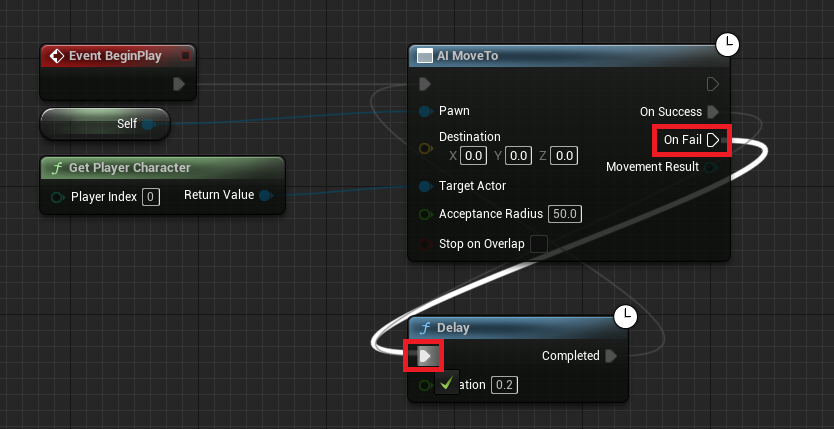
To address this, a crucial refinement is made by connecting the On Fail execution pin of the AI MoveTo node to the Delay node that was already part of the initial movement loop. In the original random movement setup, both On Success and On Fail likely looped back to the Delay node to ensure continuous movement attempts. However, specifically emphasizing the On Fail connection back to Delay (and subsequently to the AI MoveTo node’s execution input) creates a robust retry mechanism. This means that if the AI fails to reach the player for any reason – be it an unreachable location, a temporary obstruction, or a NavMesh issue – it will pause for a brief moment (determined by the Delay node’s duration) and then attempt the AI MoveTo operation again. This continuous retrying ensures that the AI remains persistent in its pursuit, adapting to changing circumstances and maintaining its function even in challenging or error-prone situations. This step is paramount for a seamless and unrelenting player-following experience, ensuring the AI never truly gives up on its target.
Finalizing the Implementation: Compile and Save
The final, yet often overlooked, step in any Blueprint modification is to Compile and Save the Blueprint editor. These actions are essential for ensuring that all the changes made to the Blueprint graph are processed by the Unreal Engine and persist beyond the current editing session. Compiling validates the Blueprint logic, checking for errors and translating the visual script into executable code. Saving then writes these validated changes back to the asset file, making them permanent. Without compiling and saving, the AI character would revert to its previous behavior or exhibit unexpected errors when the game is played, negating all the modifications made. This procedural conclusion is a fundamental best practice in Unreal Engine development, solidifying the new player-following AI logic for immediate application within the game world.
Broad Use Cases and Impact on Game Design
The implementation of this seemingly simple player-following AI, while achieved with minimal Blueprint nodes, unlocks a vast array of possibilities for game designers and developers. Its versatility makes it a fundamental building block for numerous character behaviors found across various game genres.
- Enemies and Predators: The most obvious application is for hostile AI characters. Whether it’s a zombie relentlessly shambling after the player, a stealthy alien hunter stalking its prey, or a boss character aggressively closing the distance, this basic pursuit logic forms the core of their offensive behavior. By adding additional components like attack range checks, perception systems (sight, sound), and state changes (e.g., "idle," "patrol," "chase," "attack"), this simple following mechanism evolves into a dynamic and threatening antagonist.
- Companions and Allies: Conversely, this same logic can be inverted or modified to create friendly AI companions. A loyal dog following its owner, a squad member sticking close to the player, or a quest NPC needing escort can all utilize this system. Further enhancements might include "stay" commands, defensive behaviors, or interaction prompts, all layered upon the core following mechanic.
- Quest-Givers and Guides: Non-player characters (NPCs) that need to lead the player to a specific location can employ this AI. They would follow a predetermined path or the player, waiting for the player to catch up before proceeding. This guides players through levels or towards objectives without explicit UI markers, enhancing immersion.
- Dynamic Events and Narrative Triggers: AI following can also drive dynamic events. An AI character might chase the player to trigger a cutscene upon reaching a specific point, or a group of enemies might converge on the player after an alarm is sounded, creating emergent gameplay scenarios.
- Environmental Hazards: Imagine a moving laser grid or a sentient environmental trap that tracks the player’s movement, adding a layer of dynamic challenge to platforming or puzzle segments.
The ease of implementing such a foundational AI behavior in Unreal Engine 5 significantly streamlines the development process. It empowers designers to rapidly prototype and iterate on gameplay mechanics, allowing them to focus on refining the player experience rather than wrestling with complex coding for basic movement. This accessibility fosters creativity and reduces the barrier to entry for developing engaging interactive experiences.
The Broader Context: Unreal Engine’s Role in Modern AI Development
Unreal Engine has long been a frontrunner in providing powerful tools for game development, and its approach to AI is no exception. The engine’s Blueprint visual scripting system is a significant contributor to this accessibility. Blueprints allow developers, including those without extensive programming backgrounds, to create complex gameplay systems, character behaviors, and interactive elements using a node-based interface. This visual paradigm simplifies the creation of AI logic, making it intuitive to connect actions, events, and data flow.
Beyond Blueprint, Unreal Engine offers a comprehensive suite of AI tools, including Behavior Trees for complex decision-making, AI Perception systems for sensory input (sight, hearing, etc.), and NavLink Proxies for advanced pathfinding over obstacles that a standard NavMesh might not cover (like jumping across gaps or climbing ladders). The basic player-following mechanism discussed here serves as a gateway to these more advanced systems. Developers can start with this core movement, then gradually integrate perception to make the AI only follow when the player is seen, or build a Behavior Tree that dictates when the AI should chase versus patrol or attack.
This modular and layered approach to AI development is a hallmark of modern game engines. It allows for scalable complexity, where foundational elements like NavMesh and simple AI MoveTo commands underpin intricate, lifelike AI behaviors. The industry’s trend towards more immersive and responsive AI characters is directly supported by engines like Unreal, which prioritize both power and ease of use. This democratic access to sophisticated tools means that even indie developers or small teams can create compelling AI experiences that rival those of larger studios, fostering innovation and pushing the boundaries of interactive entertainment. The continuous refinement of these tools by Epic Games, coupled with a vibrant developer community, ensures that Unreal Engine remains at the forefront of AI implementation in gaming.
Conclusion
The process of enabling AI characters to follow a player in Unreal Engine 5, as demonstrated, exemplifies the engine’s commitment to accessible yet powerful game development. By making strategic modifications to existing Blueprint nodes – specifically, removing random destination logic, introducing the Get Player Character node, and robustly handling AI MoveTo failures – developers can quickly establish a fundamental AI pursuit system. This core functionality, built upon the essential foundation of a well-configured NavMesh, is not merely a technical exercise but a crucial enabler for a multitude of gameplay mechanics, from dynamic enemy encounters to supportive companion behaviors and immersive narrative guidance. The simplicity of implementation, coupled with the vast potential for expansion into more complex AI architectures, underscores Unreal Engine 5’s position as a leading platform for crafting engaging and intelligent interactive experiences in the modern gaming landscape. This accessibility empowers a wide spectrum of creators, from seasoned professionals to aspiring hobbyists, to realize their visions with efficiency and creative freedom.
About the Author








