
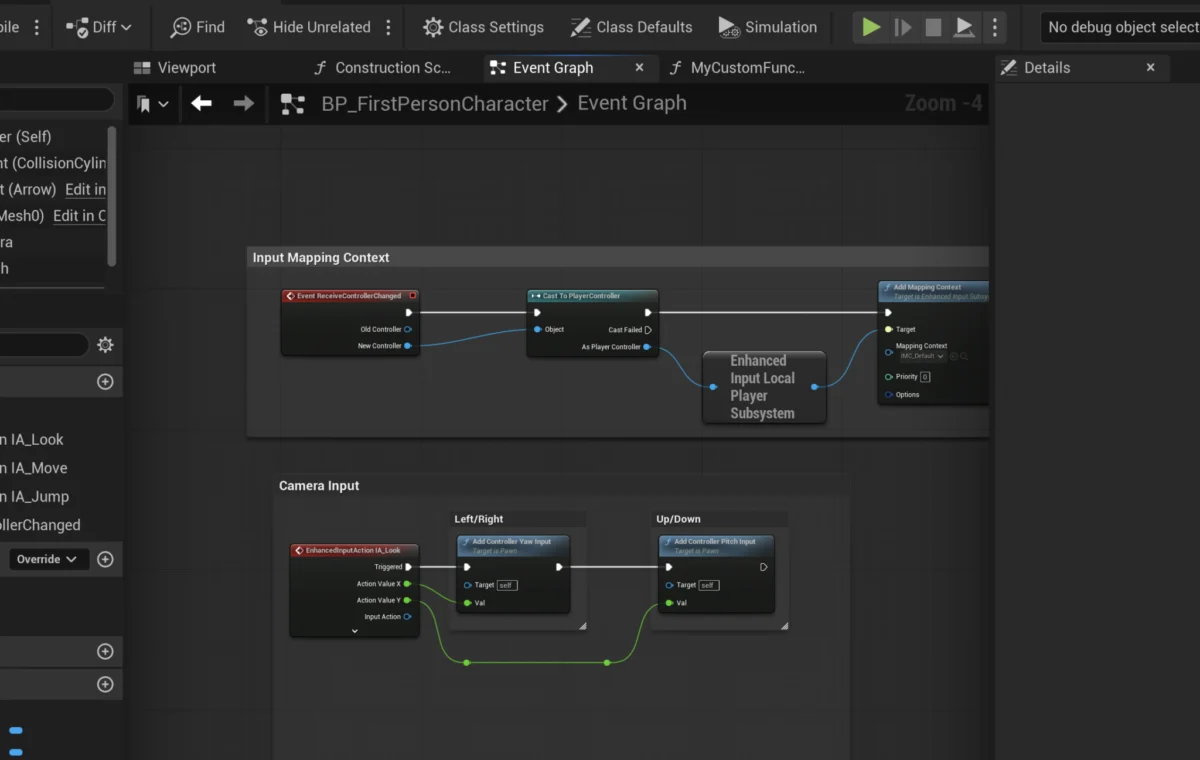
Unreal Engine 5 (UE5) continues to solidify its position as a leading development platform, empowering creators with robust tools for building immersive virtual experiences. Among its most pivotal features for streamlined development are Blueprint Functions, self-contained blocks of logic crucial for modularity, reusability, and efficient project management. This comprehensive overview delves into the fundamental role of Blueprint Functions, their technical underpinnings, practical implementation, and the profound impact they have on modern game development workflows, from rapid prototyping to large-scale AAA productions.
Understanding the Core: What is a Blueprint Function?
At its essence, a Blueprint Function in Unreal Engine 5 is a self-contained sequence of visual scripting nodes designed to perform a specific task. These functions encapsulate logic that can be executed from various points within a Blueprint Actor or other Blueprints, significantly reducing code duplication and enhancing project organization. Unlike traditional Event Graphs, functions are synchronous, meaning they execute completely within a single frame and cannot incorporate nodes that introduce delays or asynchronous operations. This characteristic ensures predictable execution flow, making them ideal for calculations, data manipulation, and sequential operations.
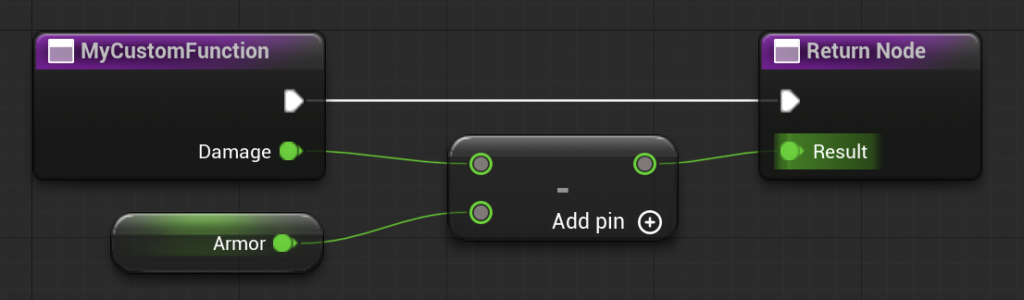
A key advantage of Blueprint Functions is their ability to accept input parameters and produce output parameters. This parameterization allows developers to feed dynamic data into a function and receive processed results, making the functions highly flexible and adaptable to different scenarios without needing to rewrite the underlying logic. For instance, instead of repeatedly scripting damage calculation logic across multiple enemy types or weapon systems, a single CalculateDamage function can be created. This function would accept parameters such as raw damage value and target armor, process these inputs, and return the final mitigated damage. Should the damage calculation formula need an update, only this single function requires modification, instantly propagating the change throughout the entire project. This principle of "write once, use many" is a cornerstone of efficient software engineering and is robustly implemented through Blueprint Functions.
Historical Context and Evolution of Visual Scripting in Unreal Engine
The concept of visual scripting within Unreal Engine has a rich history, evolving significantly to meet the demands of increasingly complex game development. Its roots can be traced back to Kismet in Unreal Engine 3 (Unreal Development Kit – UDK), which provided a basic visual scripting interface for level designers and artists to create interactive sequences without extensive C++ knowledge. Kismet, while revolutionary for its time, had limitations in terms of reusability and complex logic management.
The true paradigm shift arrived with the introduction of Blueprints in Unreal Engine 4. Blueprints represented a complete overhaul of Kismet, offering a far more powerful, flexible, and robust visual scripting system. They were designed to be a first-class citizen alongside C++ development, allowing for rapid prototyping, iteration, and even final gameplay logic implementation. Key to this evolution was the deep integration with the engine’s underlying C++ architecture, enabling Blueprints to interact seamlessly with engine systems and custom C++ code.
Unreal Engine 5 has further refined the Blueprint system, focusing on performance optimizations, improved editor usability, and expanded capabilities. While the core functionality of Blueprint Functions remains consistent with UE4, UE5’s advancements in areas like the new World Partition system, Nanite virtualized geometry, and Lumen global illumination underscore the engine’s commitment to empowering developers with high-fidelity tools. Within this ecosystem, Blueprint Functions continue to be indispensable, offering a structured way to manage the intricate logic required for cutting-edge visuals and complex gameplay mechanics. The consistent development and emphasis on Blueprints by Epic Games highlight a philosophy of democratizing game development, making powerful tools accessible to a broader range of creators, including those without traditional programming backgrounds.
The Pillars of Efficiency: Key Benefits of Blueprint Functions
The widespread adoption of Blueprint Functions in Unreal Engine 5 is driven by several compelling advantages that significantly enhance the development process:
- Modularity and Reusability: This is perhaps the most significant benefit. By encapsulating specific tasks into functions, developers create reusable components. This not only saves time by avoiding redundant work but also establishes a consistent behavior across the project. For instance, a "PlaySoundEffect" function ensures all sound effects are handled uniformly, making it easier to manage audio settings globally. Industry data consistently shows that modular codebases lead to faster development cycles and reduced technical debt.
- Enhanced Maintainability and Simplified Debugging: When logic is compartmentalized within functions, updates and bug fixes become far more manageable. If a particular calculation or sequence of operations needs adjustment, the change is made in one central function, and all instances where that function is called automatically reflect the update. This contrasts sharply with scattered, duplicated logic, where a single change might require hunting down and modifying numerous identical code blocks, increasing the risk of introducing new errors. Debugging is also streamlined, as issues can often be isolated to a specific function, rather than sifting through sprawling, monolithic graphs.
- Improved Collaboration and Team Workflows: In multi-developer environments, Blueprint Functions facilitate collaboration by allowing different team members (programmers, designers, artists) to work on distinct aspects of the game without stepping on each other’s toes. A designer can utilize a pre-defined "InteractWithObject" function without needing to understand its intricate internal workings, while a programmer can focus on optimizing and refining that function’s underlying logic. This division of labor leads to more efficient parallel development and clearer responsibilities.
- Readability and Clarity of Blueprint Graphs: Complex Event Graphs can quickly become sprawling and difficult to comprehend. Functions act as "black boxes" that condense complex logic into a single, identifiable node. This significantly improves the readability of main Event Graphs, making them easier to navigate, understand, and review, even for developers unfamiliar with specific sections of the project.
- Performance Considerations: While often perceived as less performant than C++, well-structured Blueprint Functions compiled within the engine are highly optimized. For most gameplay logic, the performance difference is negligible. Furthermore, the efficiency gained from faster iteration and reduced bugs often outweighs minor performance discrepancies, especially during the prototyping and iteration phases. Epic Games has continuously improved Blueprint compilation and execution speed, ensuring they remain a viable and performant option for a wide range of tasks.
A Practical Deep Dive: Implementing Blueprint Functions in UE5
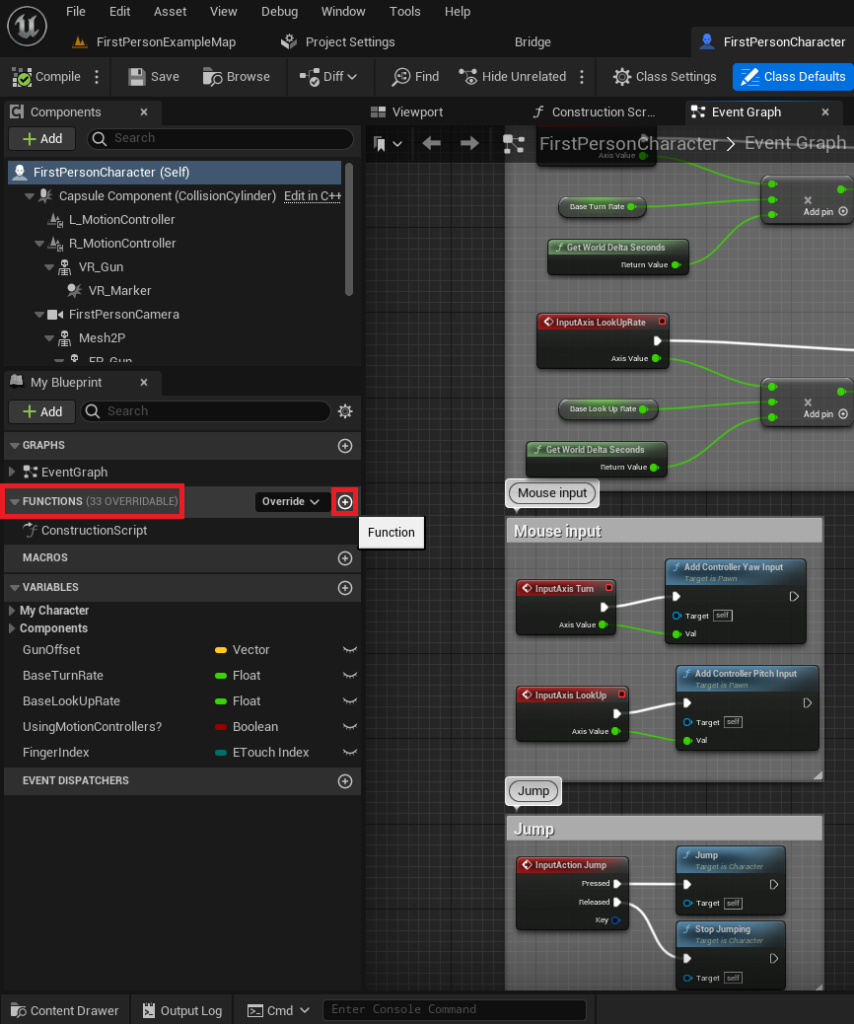
The practical application of Blueprint Functions begins within the Blueprint Editor. We can illustrate the process using the example of a FirstPersonCharacter Blueprint from Unreal Engine’s standard templates.
Creating a Basic Function:
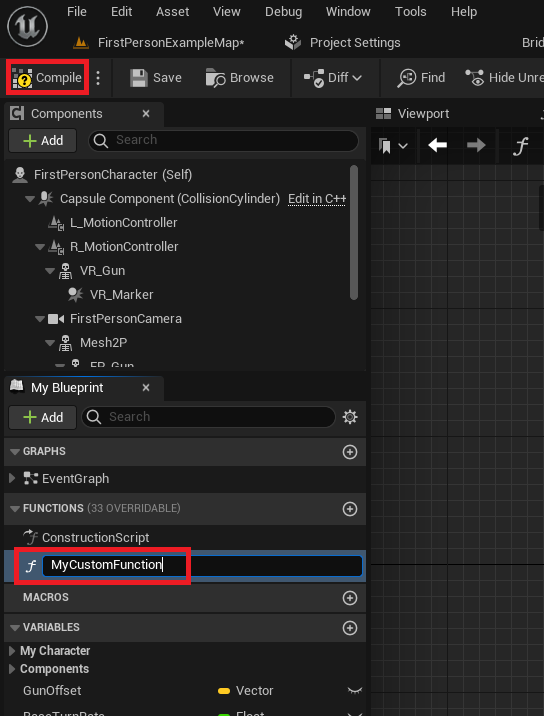
To initiate a new function, a developer first opens the target Blueprint Actor. Within the Blueprint Editor’s left-hand "My Blueprint" panel, a "Functions" section is prominently displayed. Clicking the "Add Function" button (a circle with a plus symbol) creates a new function entry. It is paramount to adhere to clear and descriptive naming conventions (e.g., CalculateDamage, InitializePlayerHealth, PrintDebugMessage) to ensure long-term project maintainability. Once named, compiling the Blueprint integrates the new function, making it ready for logic implementation. This initial setup transforms a blank canvas into a dedicated space for reusable logic.
Adding Logic and Execution Flow:
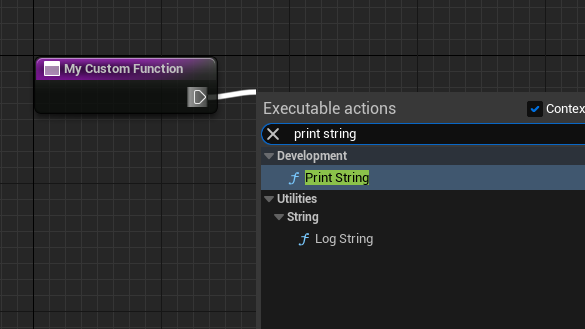
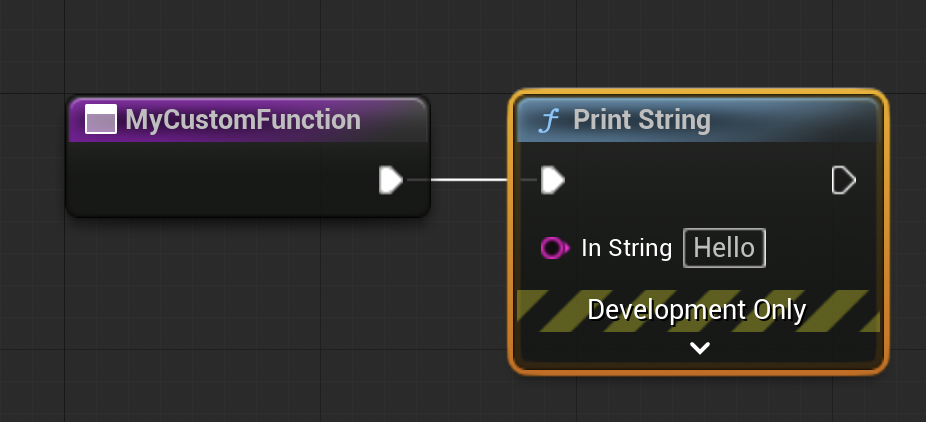
Upon creation, a new function graph opens. This graph features an entry node (often named after the function itself), characterized by a white execution (exec) pin. This exec pin dictates the sequential flow of operations. Dragging from this pin and releasing the mouse button on the grid brings up a context-sensitive menu, allowing developers to search for and add various Blueprint nodes. For a simple demonstration, a "Print String" node can be added. This node, connected to the function’s entry exec pin, will execute its task (printing a string to the screen) whenever the function is called. This connection establishes the flow: when the function starts, the "Print String" node is executed immediately thereafter. The terminology of "calling" or "running" a function is interchangeable and refers to initiating its execution sequence.
Function Execution: The Role of Events:
Blueprint Functions, being self-contained, do not execute autonomously. They must be "called" or "invoked" from another part of the Blueprint’s logic, typically from an Event Graph or another function. The Event Graph serves as the primary hub for reactive logic, responding to game events such as player input, actor spawning, or timer completions.
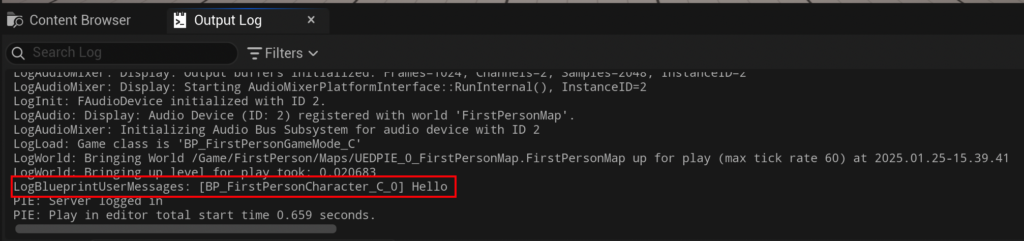
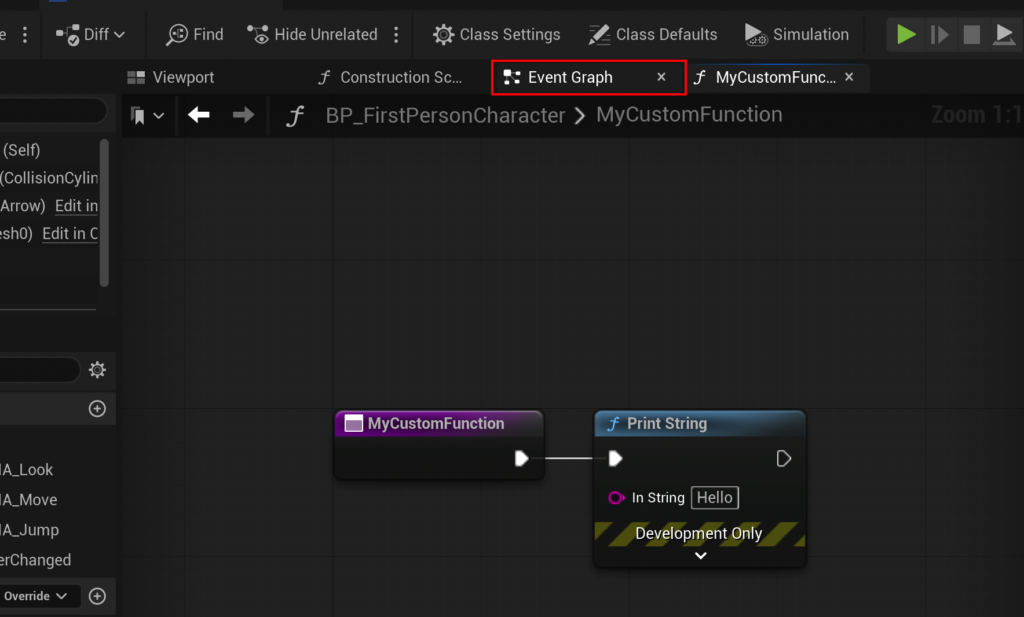
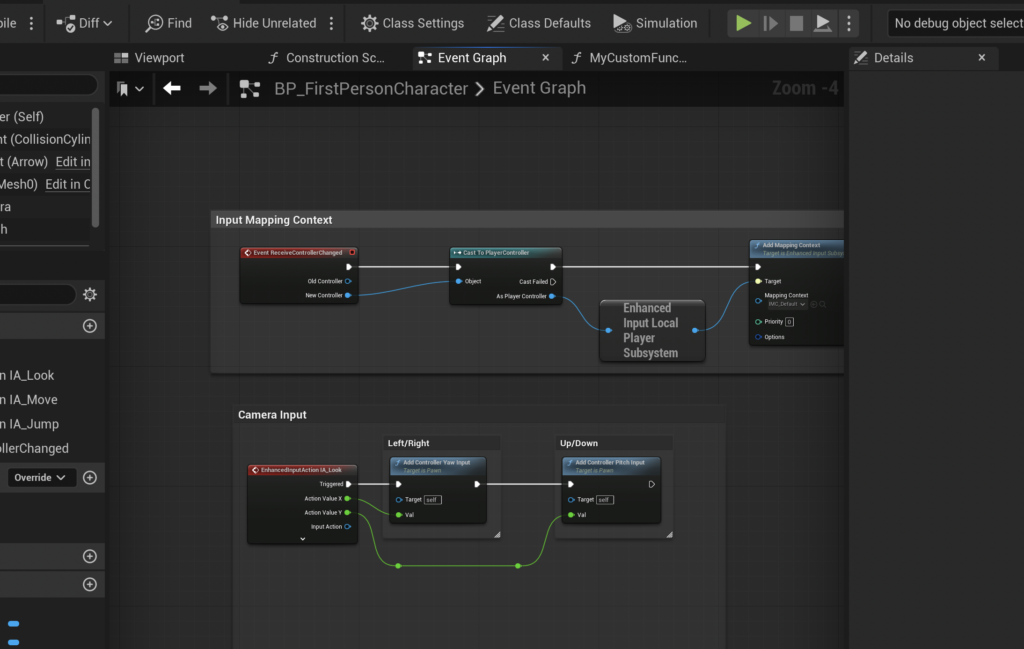
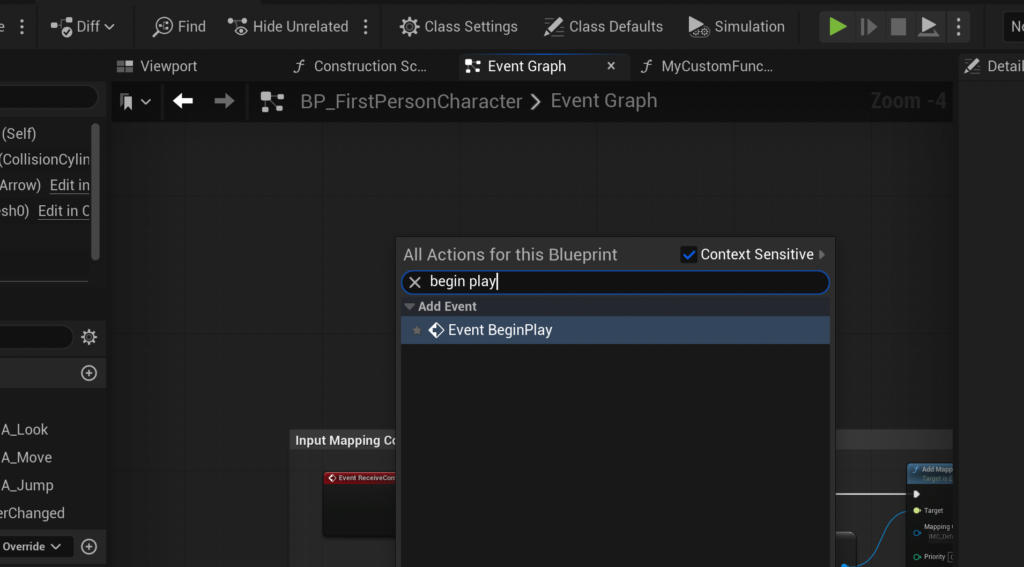
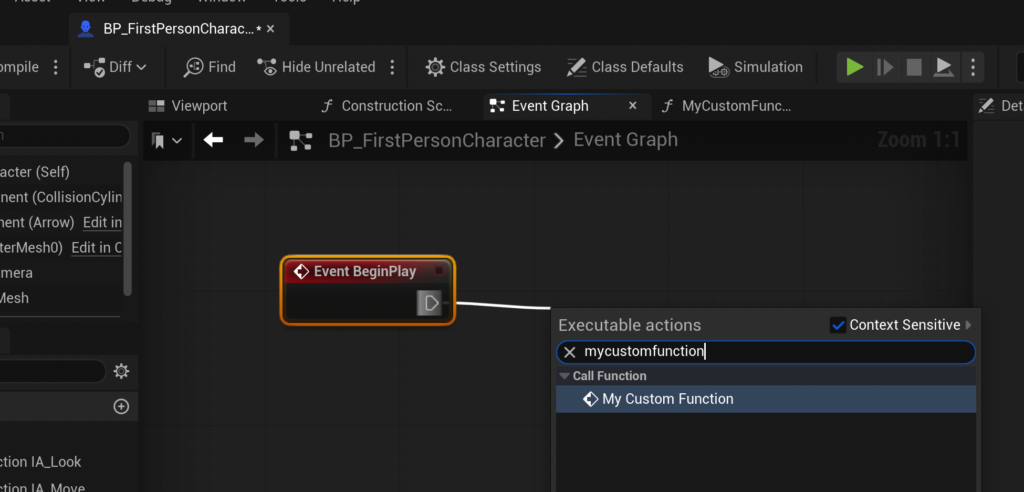
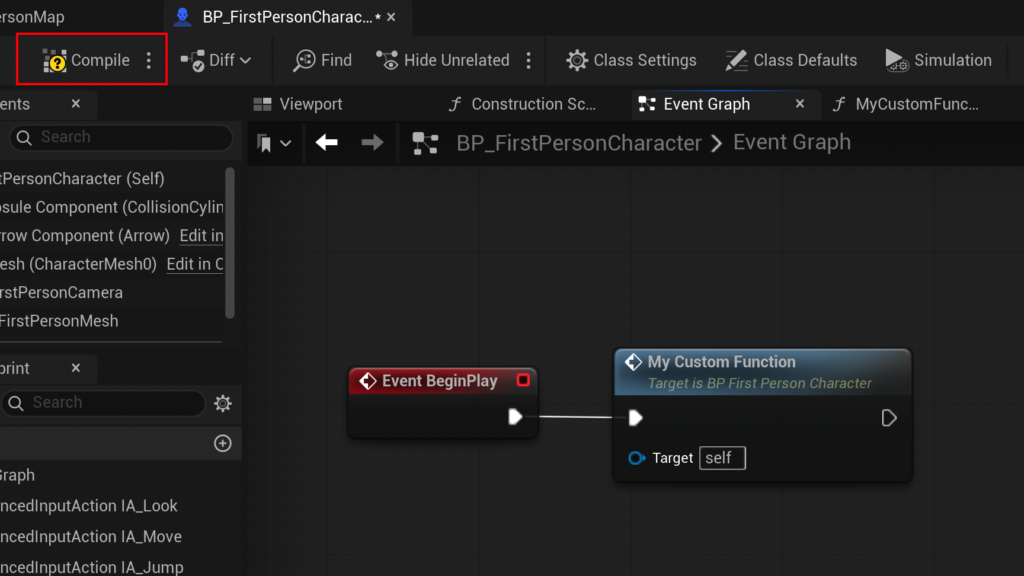
A common entry point for logic execution is the "Event BeginPlay" node. This event fires automatically when an actor is spawned into the game world or when the game level starts. To test a newly created function, a developer would navigate to the Event Graph (accessible via a button at the top of the Blueprint Editor). By right-clicking in an empty space and searching for "Event BeginPlay," this event can be added. From the Event BeginPlay‘s exec pin, the developer then drags and searches for the custom function (e.g., MyCustomFunction). Connecting these two nodes ensures that when the game starts, Event BeginPlay triggers, which in turn calls MyCustomFunction, executing its internal logic (e.g., printing "hello" to the output log). After compiling and saving the Blueprint, running the game will demonstrate the function’s execution in the output log, confirming the foundational setup. It’s important to note the distinction: events can handle asynchronous operations (like delays), while functions are strictly synchronous and cannot contain such nodes. This architectural choice reinforces functions as deterministic, predictable logic blocks.
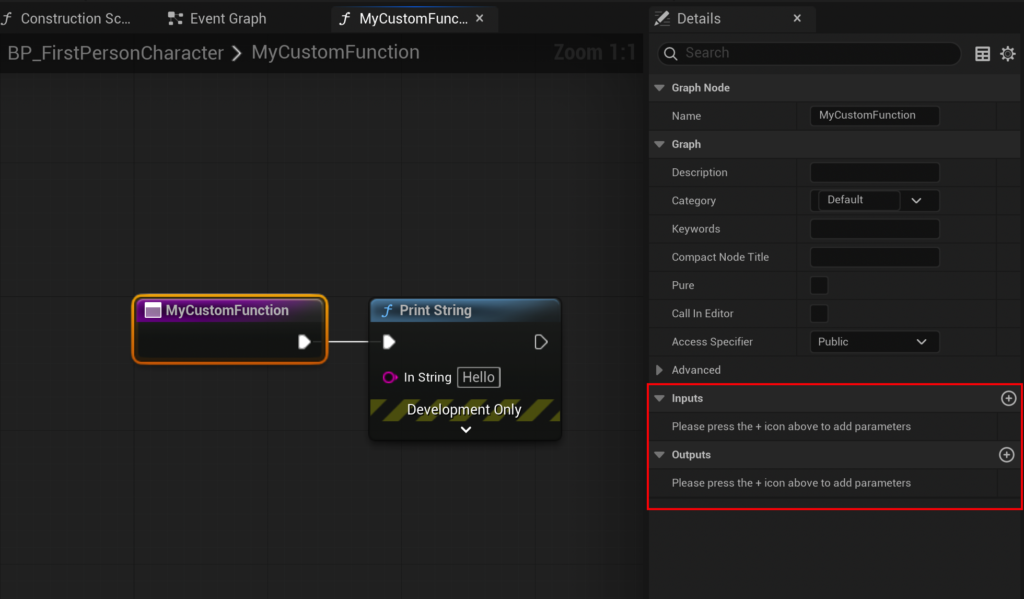
Advanced Functionality: Inputs, Outputs, and Parameterization
The true power and flexibility of Blueprint Functions become apparent when incorporating input and output parameters. These allow functions to operate on dynamic data and return calculated results, making them highly versatile.
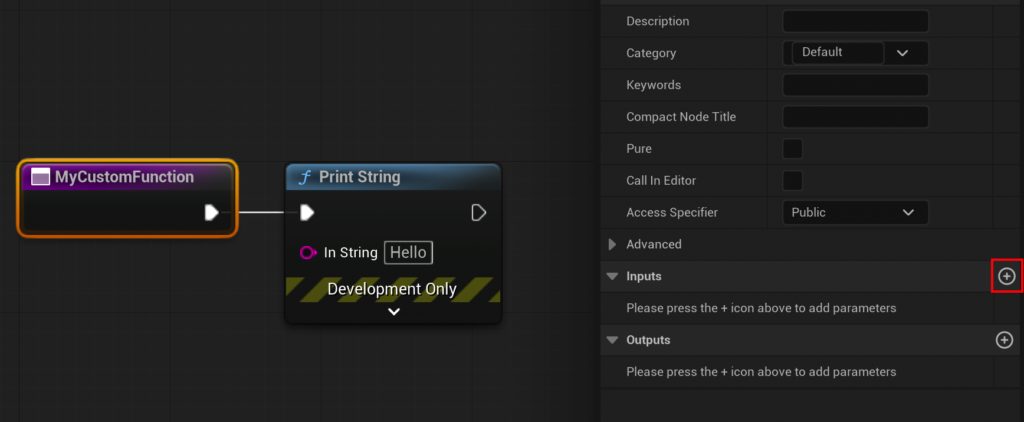
The Power of Input Parameters:
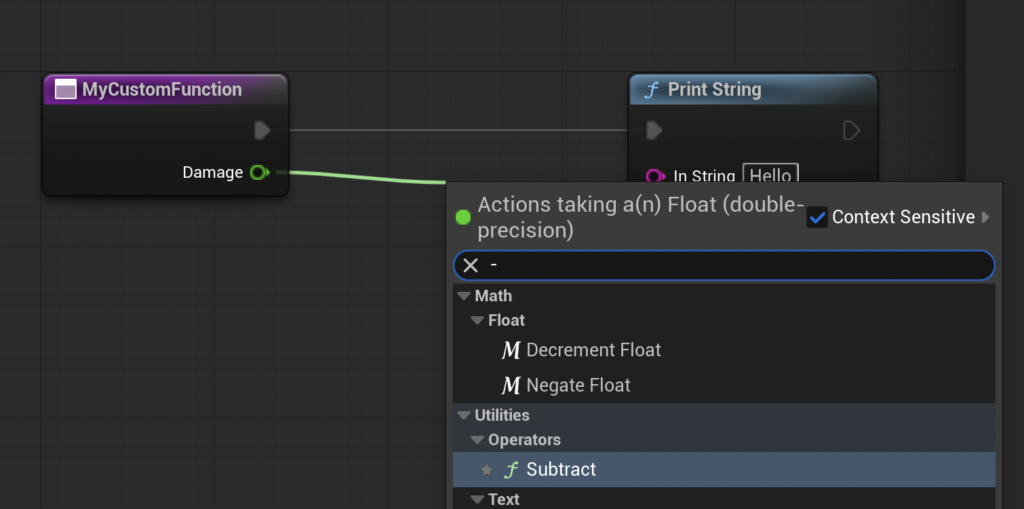
To make a function dynamic, it needs to accept external data. By selecting the function’s entry node within its graph, the "Details" panel on the right side of the editor reveals "Inputs" and "Outputs" sections. Clicking the "Add" button under "Inputs" creates a new parameter. For our CalculateDamage example, we would add an input parameter, rename it to "Damage," and set its type to "Float" (a decimal number). This creates a new green pin on the function’s entry node, allowing a numerical damage value to be passed into the function when it’s called.

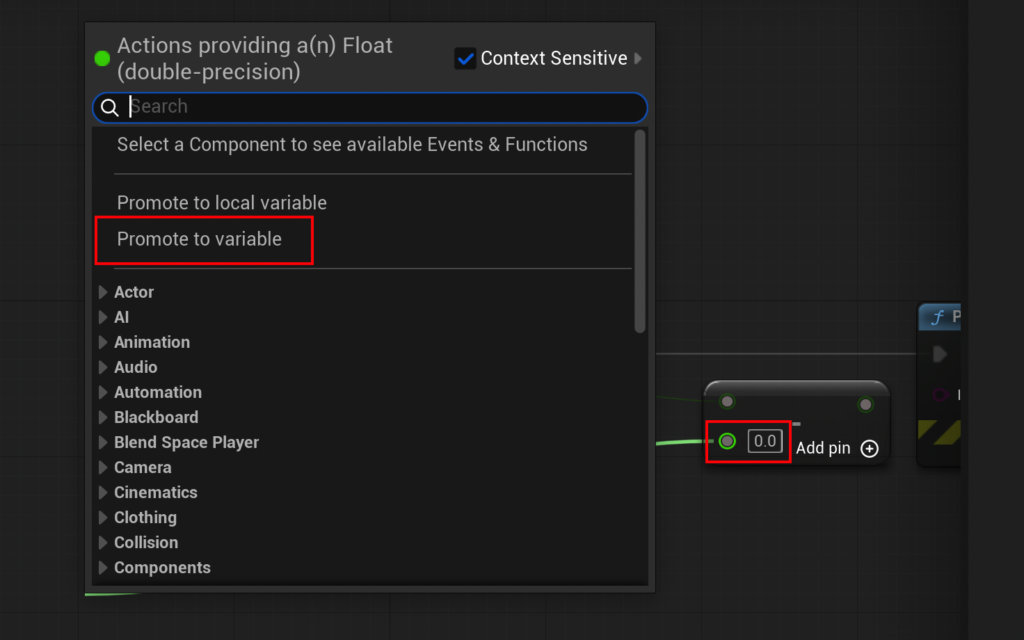
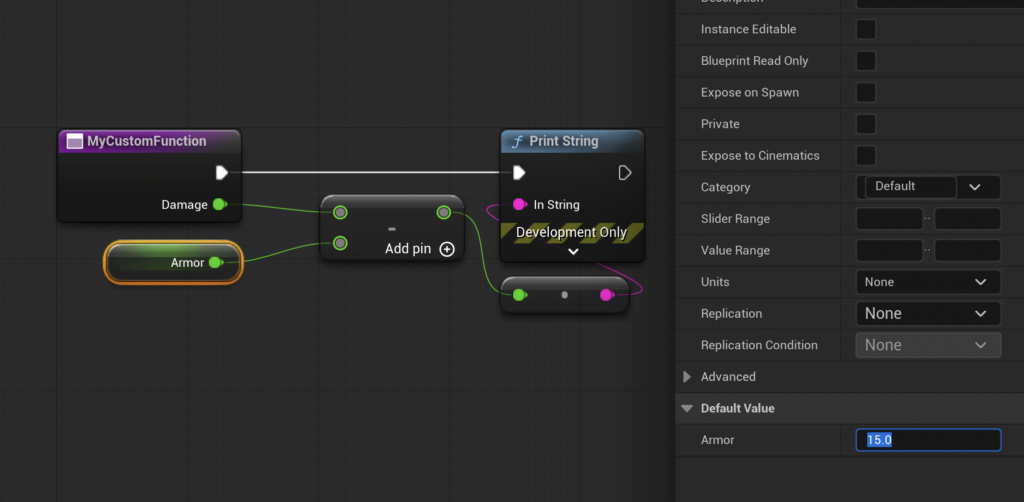
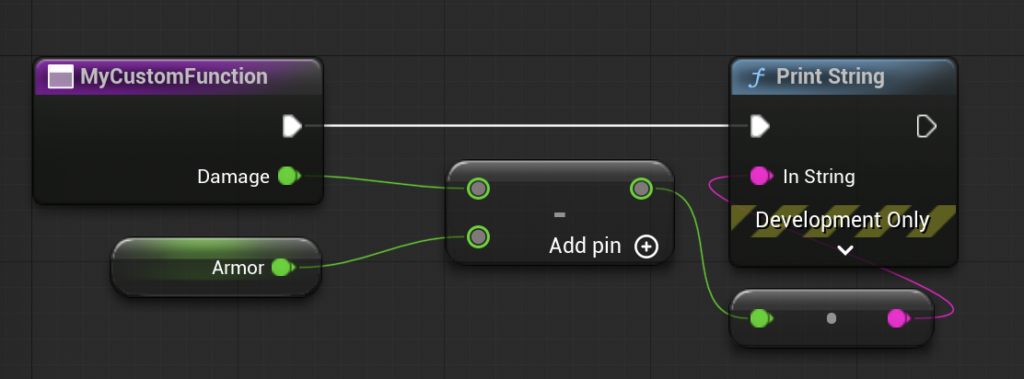
The internal logic of the function can then utilize this input. For instance, to calculate damage after armor reduction, a "Subtract" node (Float - Float) would be added. The "Damage" input parameter would connect to the first operand of the subtract node. To represent the character’s armor, the second operand of the subtract node can be "Promoted to Variable." This action automatically creates a new variable (e.g., "Armor") of the appropriate type (Float) and connects it. The default value of this "Armor" variable can then be set in the Details panel (e.g., to 15.0). The combined setup now takes incoming damage, subtracts the character’s armor value, and produces a new, mitigated damage value.
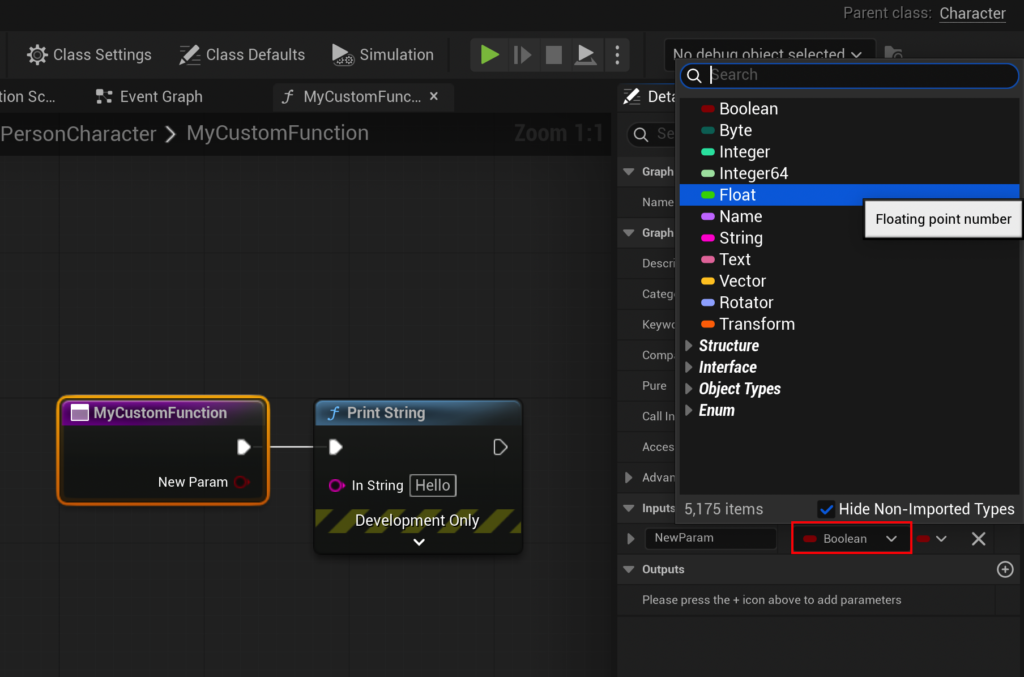
Returning Values: The Output Parameter:
Just as functions can take inputs, they can also provide outputs, or "return" values. This allows the result of the function’s internal calculations to be used by the calling graph. Similar to adding inputs, an output parameter is added by clicking the "Add" button under the "Outputs" section in the function’s Details panel. For CalculateDamage, an output parameter named "Result" of type "Float" would be created.
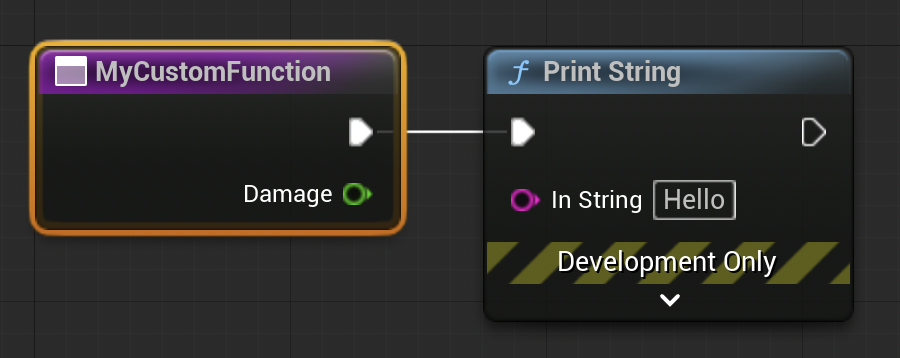
When an output parameter is added, the engine automatically generates a "Return Node" within the function’s graph. This node acts as the exit point for the function, and its output pins correspond to the defined output parameters. The calculated mitigated damage (the output of the "Subtract" node) is then connected to the "Result" pin of the "Return Node." This finalizes the function’s logic: it takes damage, subtracts armor, and then returns the computed result. Any previous "Print String" nodes used for intermediate testing within the function can now be removed, as the function’s primary role is to compute and return a value.
Demonstration Walkthrough: The CalculateDamage Function in Action:
After compiling the CalculateDamage function, its node in the Event Graph will now display the "Damage" input pin and the "Result" output pin. To test, the Event BeginPlay can be used to call CalculateDamage. An arbitrary value, say 20.0, is fed into the "Damage" input. The "Result" output pin of CalculateDamage can then be connected to a "Print String" node.
When the game is run, the Event BeginPlay triggers CalculateDamage with an input of 20.0. Inside the function, 15.0 (our armor value) is subtracted from 20.0, yielding 5.0. This 5.0 is then returned via the "Result" output. Finally, the "Print String" node in the Event Graph receives 5.0 and displays it in the output log. This concise demonstration powerfully illustrates the full lifecycle of a Blueprint Function: receiving dynamic inputs, performing encapsulated logic, and returning a computed output for further use.
Broader Implications for Game Development
The strategic use of Blueprint Functions transcends mere code organization; it profoundly impacts the entire game development lifecycle:
- Democratization of Development: Blueprint Functions, as part of the broader Blueprint system, significantly lower the barrier to entry for game development. Artists, designers, and other non-programmers can implement complex gameplay mechanics, interactive elements, and UI logic without writing a single line of C++. This expands the creative bandwidth of development teams, allowing more individuals to directly contribute to the game’s functional aspects.
- Scalability for Large Projects: In the context of large-scale titles with hundreds or thousands of Blueprints, functions are indispensable for managing complexity. They allow developers to build libraries of reusable logic, ensuring consistency and reducing the overall development time required for intricate systems. The ability to abstract complex operations into simple function calls is critical for maintaining clarity in sprawling projects.
- Rapid Prototyping and Iteration: The visual nature of Blueprints, combined with the modularity of functions, enables extremely rapid prototyping. Ideas can be quickly implemented, tested, and iterated upon without the compile times associated with C++ code. This agile approach is invaluable in the early stages of development, allowing teams to quickly validate concepts and pivot designs.
- Impact on Team Structures: The clear separation of concerns offered by functions facilitates a more efficient team structure. Programmers can focus on creating optimized core systems and complex C++ components, which can then be exposed as Blueprint-callable functions. Designers and artists can then integrate and manipulate these systems through intuitive Blueprint interfaces, fostering a more collaborative and less bottlenecked development environment.
- Quality Assurance and Testing: Consistent use of functions makes it easier to write unit tests for specific logic blocks. Changes to a function can be tested in isolation, reducing the likelihood of regressions in other parts of the game.
Conclusion
Blueprint Functions are not merely a convenience; they are an essential architectural component within Unreal Engine 5, foundational for building maintainable, scalable, and collaborative game projects. From simple utility tasks like printing messages to complex calculations like damage mitigation, these self-contained logic blocks empower developers to craft robust gameplay systems with unparalleled efficiency. By mastering the creation, parameterization, and utilization of Blueprint Functions, developers can significantly streamline their workflows, enhance project clarity, and contribute to the broader goal of democratizing high-quality game development. As Unreal Engine continues to evolve, the principles of modularity and reusability embodied by Blueprint Functions will remain paramount for creating the next generation of interactive experiences.
About the Author








