

The dynamic interaction between players and non-player characters (NPCs) forms the bedrock of immersive gaming experiences. A fundamental yet critical aspect of this interaction is the ability for AI-controlled entities to intelligently pursue or follow the player character, a feature ubiquitous across genres, from vigilant enemies to helpful companions. This capability, while seemingly complex, is remarkably accessible within modern game development environments, particularly Unreal Engine 5, thanks to its intuitive visual scripting system, Blueprints. This guide details the precise, step-by-step process for implementing AI player-following functionality, transforming static AI into responsive, dynamic elements that significantly enrich gameplay.
The Evolution of AI in Gaming and Unreal Engine 5’s Role
Artificial intelligence in video games has undergone a profound evolution, moving from rudimentary, scripted movements in early titles to sophisticated, adaptive behaviors in contemporary blockbusters. Initially, AI characters were largely predictable, adhering to simple patrol paths or direct, often linear, pursuit logic. As hardware capabilities advanced and game design philosophies matured, so did the complexity of in-game AI. Modern AI aims to create believable adversaries, allies, and environmental elements that react intelligently to player actions, contributing to a sense of realism and emergent gameplay.
Unreal Engine 5 stands at the forefront of this evolution, offering developers powerful tools that democratize complex features like AI pathfinding and behavior implementation. Its Blueprint visual scripting system is a cornerstone of this accessibility, allowing designers and developers without extensive C++ programming knowledge to construct intricate gameplay mechanics. Blueprints translate complex code into a series of interconnected nodes, making the logic transparent and manageable. This approach drastically reduces development time and iteration cycles, empowering a wider range of creators to bring their visions to life. The ability to quickly prototype and deploy intelligent AI behaviors, such as player following, is a testament to the engine’s robust architecture and user-friendly interface.
Prerequisites for Intelligent AI Movement: The NavMesh
Before delving into the specific Blueprint modifications for AI pursuit, it is imperative to establish the foundational environment for AI navigation: the Navigation Mesh, or NavMesh. As outlined in previous guides, "Setting up a NavMesh in Unreal Engine 5," this critical component defines the walkable areas within a level, providing the AI with a spatial map to calculate paths. Without a properly configured NavMesh, AI characters would be unable to discern navigable terrain from obstacles, leading to erratic movement, collision issues, or complete immobility. The NavMesh acts as the AI’s "eyes" and "brain" for spatial awareness, allowing it to traverse complex environments, avoid hazards, and, crucially, find a path to its target. It is automatically generated based on the geometry of the level and can be dynamically updated to account for environmental changes, ensuring that AI remains adaptable.
The initial setup of AI movement often involves basic, undirected patrolling or movement to random points within the NavMesh. This baseline functionality typically employs nodes that query the AI’s current location and then calculate a random, reachable destination. To transition from this random wandering to targeted player pursuit, these initial nodes must be re-evaluated and replaced with logic specifically designed to track the player’s position.
Chronology of Blueprint Modifications for Player Chasing
The process of reconfiguring the AI’s movement logic from random patrolling to player pursuit involves a precise sequence of Blueprint node modifications. This transformation is achieved within the AI character’s Blueprint, where its behavior is defined.
-
Decommissioning Random Movement Nodes:
The existing Blueprint graph, typically configured for arbitrary movement, utilizes nodes such asGet Actor LocationandGetRandomReachablePointInRadius. TheGet Actor Locationnode retrieves the AI character’s current position, serving as the origin point for its movement calculations. TheGetRandomReachablePointInRadiusnode then leverages this origin to identify a random, valid coordinate within a specified radius on the NavMesh. These two nodes collectively dictate the AI’s undirected wandering behavior. For the AI to shift its focus from random destinations to the player’s dynamic position, these nodes become obsolete. Their removal is the first critical step, clearing the path for the new target acquisition logic. By deleting these nodes, we explicitly instruct the AI to cease its independent exploration and prepare to receive new movement instructions based on a specific target. This action streamlines the Blueprint graph, ensuring that no conflicting movement logic interferes with the desired player-following behavior. -
Introducing the Player Character as the Target:
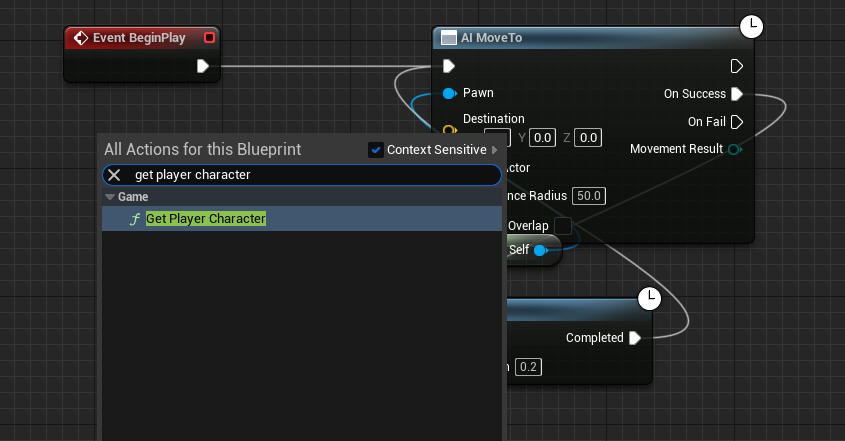
With the random movement nodes removed, the next step is to introduce the player character as the AI’s designated target. This is achieved by adding a newGet Player Characternode to the Blueprint graph. This node is fundamental as it provides a direct reference to the active player controller’s pawn in the game world. TheGet Player Characternode dynamically identifies the player character, regardless of its current position or state, making it an ideal, persistent target for AI pursuit. This node acts as a gateway to retrieving the player’s current location and other relevant data necessary for the AI’s movement calculations. Its inclusion is pivotal, as it establishes the direct link between the AI’s movement logic and the player’s presence in the game environment. -
Establishing the Target Actor Connection:
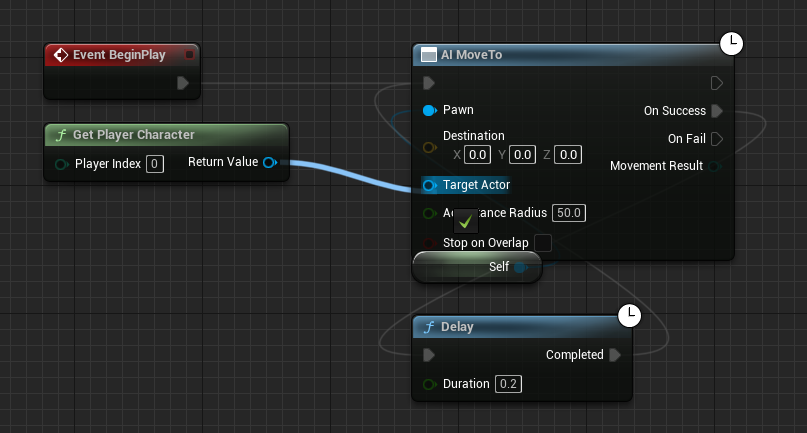
Once theGet Player Characternode is in place, its output must be connected to theAI MoveTonode. TheAI MoveTonode is the core component responsible for initiating and managing the AI’s navigation across the NavMesh. It requires a "Target Actor" or a "Destination" vector to function. By connecting the blueReturn Valuepin from theGet Player Characternode to the blueTarget Actorpin on theAI MoveTonode, a direct data flow is established. This connection informs theAI MoveTonode that its objective is now to navigate towards the location of the actor returned byGet Player Character– specifically, the player. This is a crucial logical link, transforming the AI’s movement directive from an arbitrary point to a dynamic, player-centric objective. TheAI MoveTonode will then continuously calculate the optimal path to the player, taking into account obstacles and the NavMesh, and command the AI character to move along that path.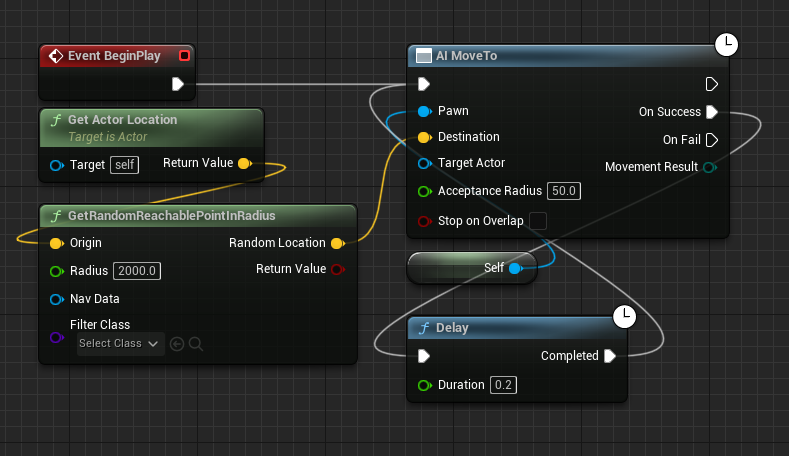
-
Ensuring Robustness: Handling Movement Failures:
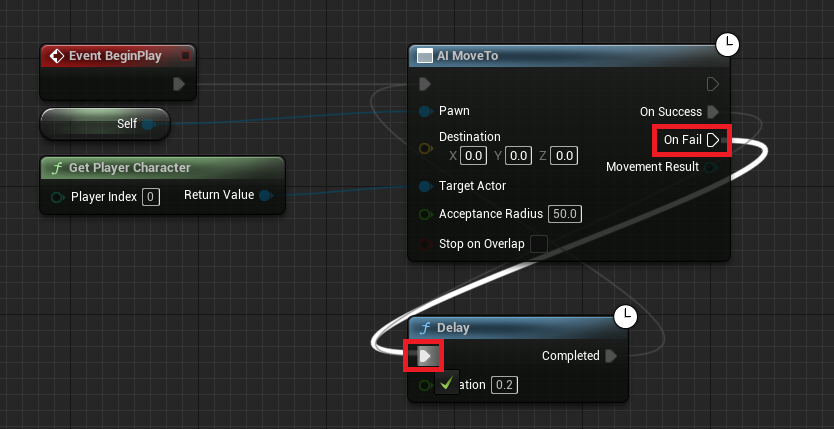
AI movement, particularly in complex game environments, is not always guaranteed to succeed on the first attempt. Various factors can lead to a movement failure: the player might move into an unreachable area (e.g., outside the NavMesh, behind an impassable barrier), the NavMesh might be temporarily invalid, or other unforeseen computational issues could arise. To prevent the AI from becoming stuck or ceasing its pursuit, a robust error-handling mechanism is essential. This is implemented by connecting theOn Failexecution pin of theAI MoveTonode to aDelaynode, which then loops back to re-initiate theAI MoveTocommand.When the
AI MoveTonode fails to reach its target (the player) for any reason, theOn Failpin triggers. This signal is immediately routed to aDelaynode, which pauses the execution for a brief, specified duration (e.g., 0.5 to 1 second). After this delay, the execution flow continues, looping back to the initial trigger for theAI MoveTocommand. This creates a resilient retry mechanism. If the player was temporarily out of reach or the path was blocked, the AI will wait a moment and then attempt to calculate a new path and resume pursuit. This ensures that the AI remains persistently engaged in following the player, overcoming transient navigation challenges and maintaining its intended behavior throughout the gameplay session. This step is vital for creating reliable and believable AI, preventing frustrating scenarios where AI companions or enemies inexplicably stop functioning. -
Compiling and Saving Changes:
The final, indispensable step after making any modifications to a Blueprint graph is to compile and save the changes. In Unreal Engine, Blueprints are compiled into executable code. Failing to compile means the engine will not recognize the new logic. Saving ensures that these compiled changes are permanently stored within the project. The "Compile" and "Save" buttons are typically located in the Blueprint editor’s toolbar. Neglecting this step would result in the AI character retaining its old, pre-modification behavior, rendering all the previous steps ineffective during gameplay. This final action confirms that the newly defined player-following logic is correctly integrated and ready for execution within the game world.
Technical Deep Dive: Underpinnings of AI Navigation
The seemingly simple act of connecting a few Blueprint nodes belies the sophisticated underlying systems that enable intelligent AI movement in Unreal Engine 5.
-
Navigation Mesh (NavMesh) Mechanics: At the heart of AI pathfinding is the NavMesh. It’s not just a surface; it’s a volumetric representation of walkable space, generated by analyzing the level geometry. Pathfinding algorithms, most notably A (A-star), operate on this NavMesh. When an
AI MoveTocommand is issued, the A algorithm calculates the shortest, most efficient path from the AI’s current position to the target location, avoiding obstacles and non-navigable areas. The NavMesh can be configured with various parameters, including agent radius, height, and step height, to ensure that AI characters navigate realistically according to their physical dimensions. Dynamic NavMeshes can even adapt to changing environments, such as opening doors or collapsing structures, allowing for highly reactive AI.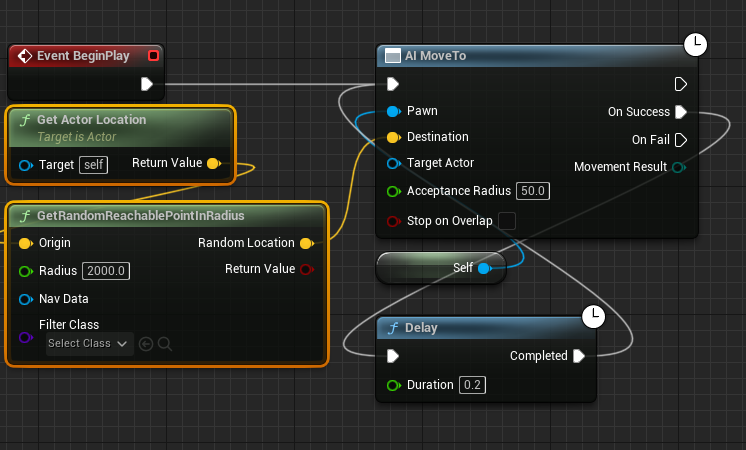
-
Blueprint System Advantages: The Blueprint visual scripting system offers profound benefits for AI development. Its intuitive drag-and-drop interface significantly lowers the barrier to entry for game designers and artists, enabling them to implement complex logic without needing to write C++ code. This facilitates rapid prototyping, allowing developers to quickly test and iterate on AI behaviors. Blueprints also promote modularity and reusability, as common AI routines can be encapsulated in functions or macros and shared across multiple AI agents. While C++ offers ultimate performance and control, Blueprints provide a highly efficient workflow for the majority of AI implementation tasks, striking an excellent balance between power and accessibility.
-
AI Controller Role: Although not explicitly manipulated in this basic tutorial, the AI Controller is a crucial component in the Unreal Engine AI framework. Every AI-controlled pawn typically has an associated AI Controller, which acts as its "brain." The AI Controller is responsible for orchestrating the AI’s behavior, including pathfinding, decision-making, perception (e.g., seeing or hearing the player), and executing commands like
AI MoveTo. In more advanced AI setups, Behavior Trees or Environmental Query Systems (EQS) are often managed by the AI Controller to create highly complex and adaptive behaviors, building upon foundational movement commands like player following. -
Performance Considerations and Scalability: While a few AI characters following the player might have negligible performance impact, scaling this to dozens or hundreds of AI agents requires careful consideration. Efficient NavMesh generation, optimized pathfinding algorithms, and sensible update frequencies for AI movement are critical. Unreal Engine provides tools for profiling AI performance, allowing developers to identify and address bottlenecks. This basic player-following setup can be scaled and integrated into more complex AI architectures. For instance, the
AI MoveTonode can be a leaf node within a Behavior Tree, allowing the AI to choose between following the player, patrolling, attacking, or reacting to other stimuli based on defined conditions and priorities.
Broader Impact and Implications for Game Design
The implementation of basic player-following AI, while a fundamental building block, carries significant implications for overall game design and player experience.
-
Enhanced Immersion and Believability: Dynamic AI that responds to the player’s movements makes the game world feel more alive and reactive. Enemies that relentlessly pursue, companions that stay close, or NPCs that guide the player all contribute to a heightened sense of presence and immersion. This eliminates the "static world" feeling, where NPCs merely exist rather than interact meaningfully.
-
Foundation for Complex Gameplay Mechanics: This simple pursuit logic is the backbone for a myriad of complex gameplay mechanics:
- Combat AI: Enemies can chase, flank, and reposition dynamically during encounters.
- Stealth Mechanics: Patrolling guards can detect and pursue the player, initiating tense chase sequences.
- Companion Systems: Player-controlled allies can follow, provide support, and interact contextually.
- Escort Missions: NPCs can be programmed to follow the player to a destination, creating specific mission objectives.
- Environmental Storytelling: NPCs can lead the player through areas, revealing narrative elements or points of interest.
- Horror Games: A persistently following antagonist creates a constant sense of dread and threat, a hallmark of many successful horror titles.
-
Increased Challenge and Engagement: Enemies that actively chase and adapt to player movement present a more engaging and challenging experience than those with predictable, static patterns. This forces players to think strategically about movement, positioning, and evasion.
-
Developer Efficiency and Creative Freedom: By providing an accessible and robust system for core AI behaviors, Unreal Engine 5 allows developers to allocate more resources to higher-level design, unique gameplay features, and creative storytelling. They can focus on what the AI should do rather than how to make it move, fostering greater innovation in game mechanics.
-
Future-Proofing Game Development: As game worlds become larger and more complex, and player expectations for intelligent AI continue to rise, foundational systems like this ensure that developers can build scalable and sophisticated AI without constantly reinventing basic movement logic.
Expanded Use Cases for Player-Following AI
Beyond the immediate goal of having an AI character simply chase the player, this core functionality branches out into a vast array of sophisticated game design applications.
-
Dynamic Enemy Encounters: Instead of enemies remaining stationary or only reacting when within a small predefined zone, implementing player-following allows for relentless pursuit. In survival horror games, a persistent monster creates constant tension. In action games, enemies can actively flank the player, break line of sight, and re-engage from new angles, transforming static firefights into dynamic tactical engagements. This also facilitates "hunted" mechanics where a powerful adversary continuously tracks the player across the map.
-
Supportive Companion AI: In role-playing games or cooperative experiences, AI companions are often crucial. This system ensures they stay close to the player, ready to offer assistance, engage in combat, or provide narrative exposition. More advanced companion AI could dynamically adjust their follow distance, take cover when under fire, or even lead the player to specific objectives, all built upon the fundamental
AI MoveToto player logic. -
Interactive Objective Markers and Guides: Imagine an NPC whose role is to guide the player through a complex labyrinth or to a hidden objective. Instead of relying on static waypoints or UI indicators, the NPC can actively lead the way, stopping at points of interest, interacting with environmental elements, and responding to the player’s pace. This creates a more organic and immersive quest-giving experience.
-
Environmental Storytelling and Puzzles: Certain environmental elements or props could be programmed with AI to "follow" the player under specific conditions. For example, a magical artifact that floats behind the player once picked up, or a light source that shadows their path, adding atmospheric depth or serving as a puzzle mechanic where the object’s position relative to the player is key.
-
Stealth and Evasion Mechanics: In stealth games, enemy AI patrolling routes are common. However, once detected, the AI’s ability to intelligently pursue the player through complex environments becomes paramount. This system allows for realistic chase sequences where the player must outmaneuver the AI, break line of sight, and find hiding spots, rather than simply outrunning a linear pursuit. The
On Failretry mechanism is particularly vital here, ensuring the AI doesn’t get stuck on minor obstacles during a high-stakes chase. -
Pets, Mounts, and Minions: Beyond humanoids, this logic applies perfectly to creature AI. A player’s pet could follow them faithfully, a summoned minion could accompany them into battle, or a mount could return to the player when whistled for. The basic chase logic is the foundation for all these diverse applications, requiring only minor adjustments for specific behaviors like pathing around obstacles unique to the AI’s size or speed.
-
Dynamic Game Events and Triggering: The continuous tracking of the player by an AI can be used to trigger other game events. For instance, if an enemy AI gets within a certain proximity while following, it could trigger an attack animation, a dialogue sequence, or activate a defensive ability. This allows for highly responsive and contextual gameplay moments driven by the AI’s interaction with the player.
Conclusion
The ability to implement AI that intelligently follows the player is a cornerstone of modern game development, profoundly impacting immersion, challenge, and the overall player experience. As demonstrated, Unreal Engine 5, through its powerful and accessible Blueprint visual scripting system, simplifies this seemingly complex task into a few logical node connections. From decommissioning outdated random movement nodes to establishing a robust retry mechanism for pathfinding failures, each step contributes to building a resilient and dynamic AI behavior.
This foundational technique is not merely about making an AI chase; it unlocks a vast spectrum of creative possibilities, enabling sophisticated enemy AI, loyal companions, interactive guides, and unique environmental storytelling elements across virtually every game genre. The combination of Unreal Engine 5’s robust NavMesh system, the intuitive Blueprint interface, and the underlying AI Controller framework empowers developers to craft rich, believable, and engaging virtual worlds where non-player characters are no longer static bystanders but active, responsive participants in the player’s journey. By mastering this fundamental AI behavior, developers can significantly elevate the quality and depth of their game projects, delivering compelling experiences that resonate with players.
About the Author