The landscape of modern game development is continually shaped by advancements in software tools, with Unreal Engine 5 (UE5) standing at the forefront of innovation. A fundamental concept critical to efficient and scalable development within UE5, particularly for those utilizing its powerful visual scripting system, Blueprints, is the function. Functions serve as self-contained blocks of code or logic, designed to be reusable and callable from various points within a project, thereby streamlining development workflows and enhancing project maintainability. This comprehensive guide, adapted into a journalistic overview, delves into the essence of Blueprint Functions, their practical application, and their broader implications for the game development community.
The Core Concept: What is a Function?
At its heart, a function in programming, and specifically within Unreal Engine 5 Blueprints, is a modular unit encapsulating a specific task or piece of logic. These self-contained entities can be created once and executed multiple times across different sections of a Blueprint. A key feature distinguishing functions is their capacity to accept input parameters and produce output parameters, offering unparalleled flexibility and adaptability. For instance, instead of writing identical logic repeatedly to calculate damage across various combat scenarios, a developer can create a single CalculateDamage function. This function can then be invoked whenever damage calculation is needed, with different damage values and armor types passed in as inputs. Should the damage calculation formula require adjustment, the change needs only be made in one central location – the function itself – propagating the update automatically across all instances where it is called. It is crucial to note that, typically, a function is intrinsically tied to the specific Blueprint actor it is created within, meaning its direct utility is scoped to that actor.
Historical Context and the Rise of Visual Scripting
The evolution of programming methodologies has consistently pushed towards greater modularity and reusability. From the early days of procedural programming to the widespread adoption of object-oriented paradigms, the concept of encapsulating logic into callable units has been a bedrock principle. Epic Games, with its Unreal Engine, has been a significant driver of this trend, particularly through the introduction and continuous refinement of its visual scripting system, Blueprints.
Blueprints, first prominently featured in Unreal Engine 4 and significantly enhanced in UE5, democratized game development by offering a code-free alternative to C++ programming. This visual approach, where logic is constructed by connecting nodes rather than writing lines of text, has made game development accessible to a broader audience, including designers, artists, and those without extensive coding backgrounds. However, even with visual scripting, the challenge of managing complex, sprawling logic graphs – often dubbed "spaghetti code" – quickly emerged. Functions within Blueprints were introduced as a direct solution to this challenge, enabling developers to break down intricate systems into manageable, logical components. This iterative refinement of Blueprint capabilities underscores Epic Games’ commitment to providing tools that balance power with user-friendliness, aligning with broader industry trends towards more intuitive and efficient development environments.
Practical Implementation: A Step-by-Step Approach to Blueprint Functions
Understanding the theoretical benefits of functions is one thing; implementing them effectively is another. The process of creating and utilizing Blueprint Functions in Unreal Engine 5 is designed to be intuitive, starting from basic functionality and scaling up to complex operational logic.
Initiating a Function: The Foundation
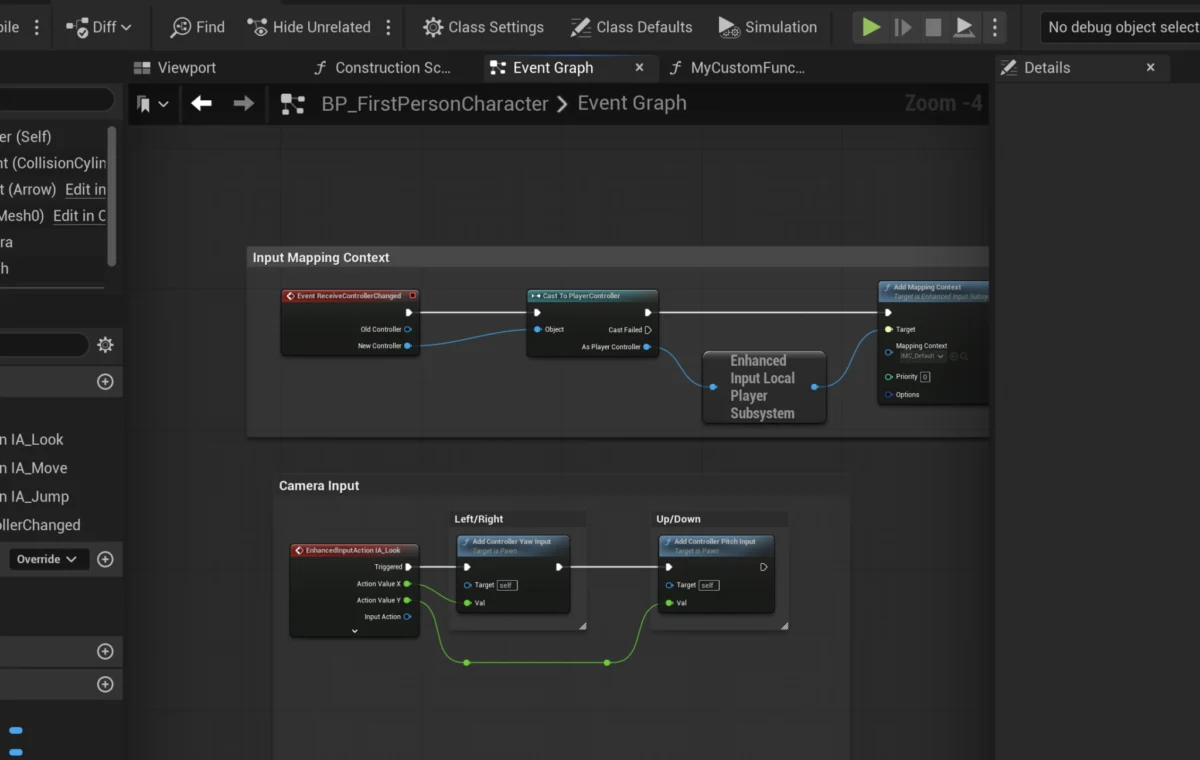
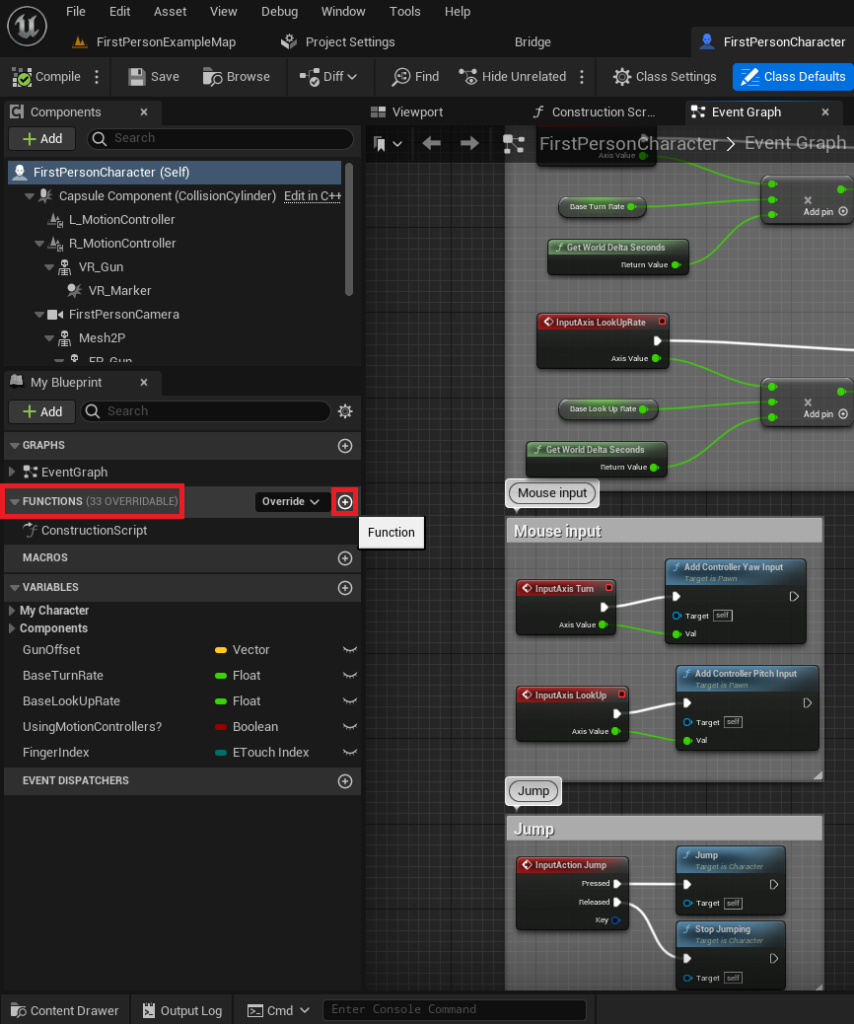
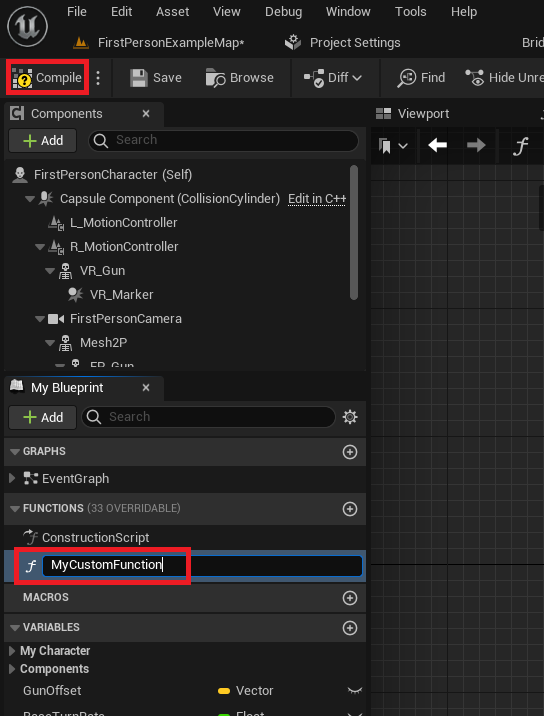
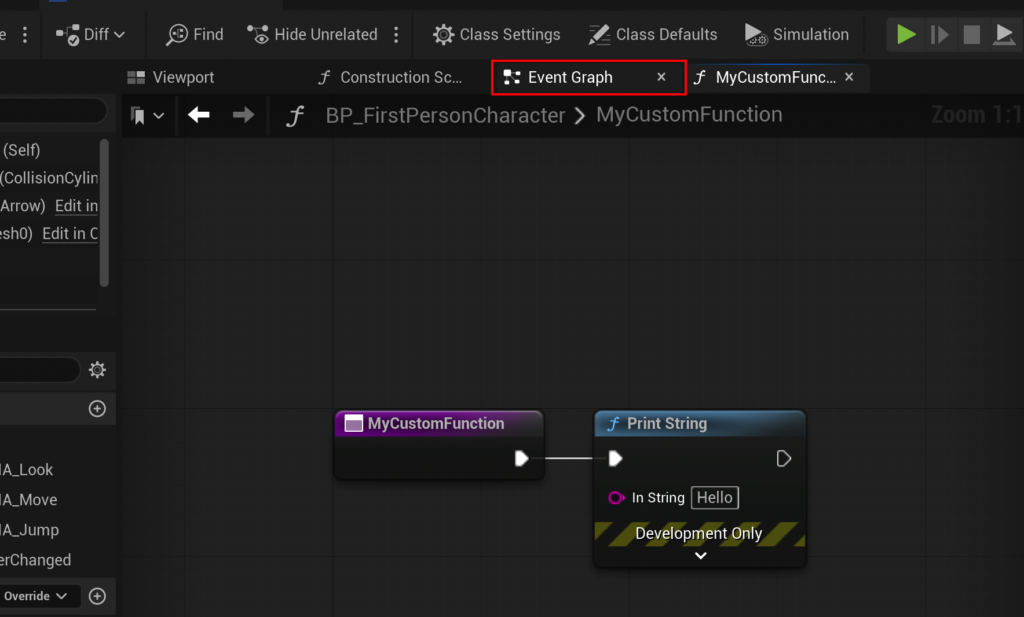
The journey begins within an existing Blueprint actor. For demonstration purposes, developers often use templates like the FirstPersonCharacter Blueprint from Unreal Engine’s First Person Shooter template. Within the Blueprint editor, the "Functions" section on the left-hand side serves as the repository for all functions specific to that Blueprint. A new function is instantiated by clicking the ‘+’ icon adjacent to this section. Naming conventions are critical here; clear, descriptive names (e.g., CalculateDamage, PlayerJump, ToggleDoor) are vital for maintaining a clean, readable project, especially in large-scale productions involving multiple developers. After naming, compiling the Blueprint integrates the new, empty function into the actor’s logic framework, making it ready for implementation.
Building Core Logic: The "Print String" Example
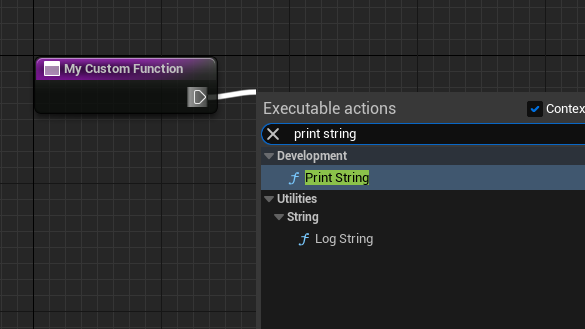
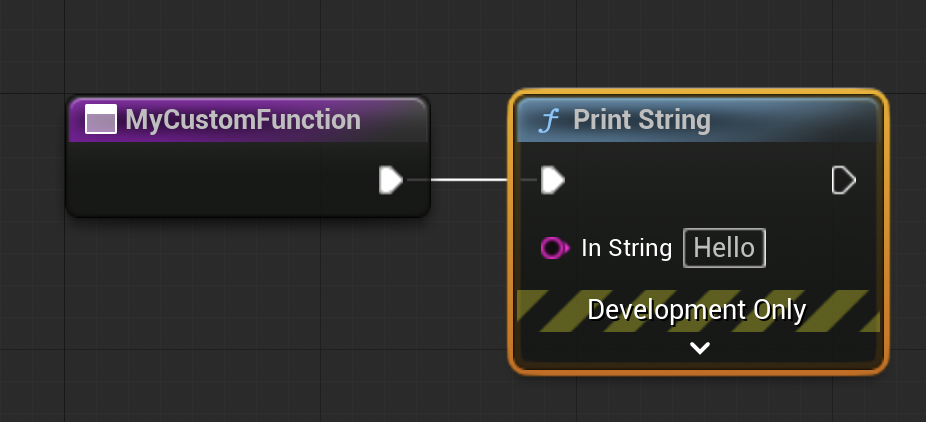
Upon creation, a new function is essentially a blank canvas. The first step in adding functionality involves connecting nodes within the function’s graph. A simple illustrative example is to make the function print a string to the screen. This is achieved by dragging from the function’s initial execution pin (the white sideways triangle) and selecting a Print String node from the contextual menu. This action sequentially links the Print String node to the function’s execution flow. When the function is "called" or "run," it will execute the connected Print String node. The terminology of "calling" a function is universally used in programming to describe initiating its execution.
Integrating Functions with Game Events: The "Begin Play" Scenario
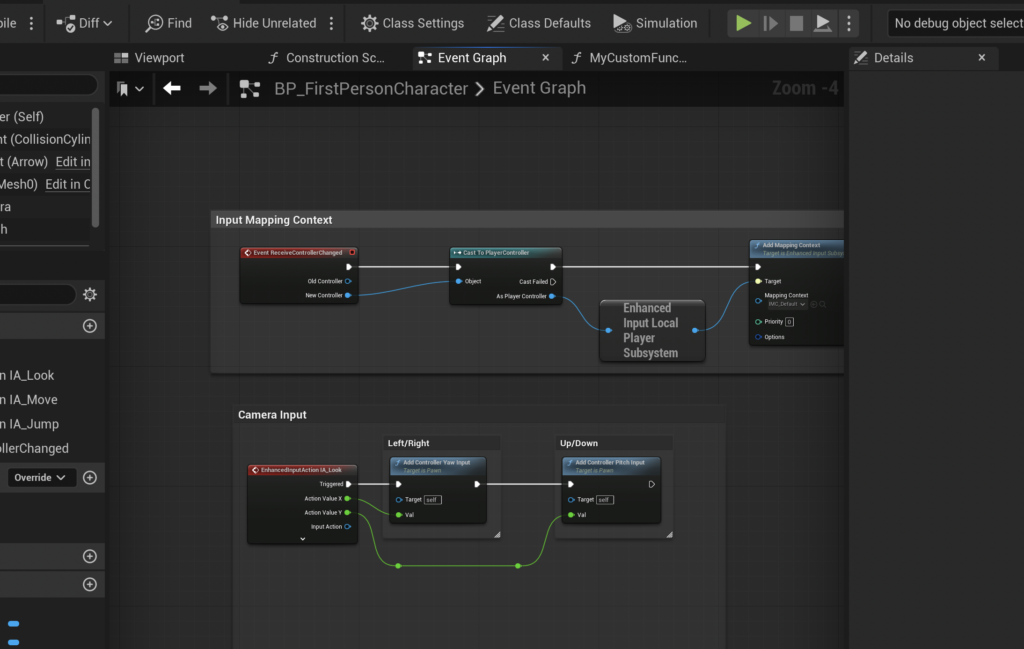
For a function to be useful, it must be triggered by an event. Events in Unreal Engine are specific occurrences (like a character spawning or a key being pressed) that initiate a chain of logic. Unlike functions, events typically do not return values and can execute certain asynchronous nodes (like delays) that functions cannot. A common and straightforward way to test a newly created function is to call it during the Event Begin Play.
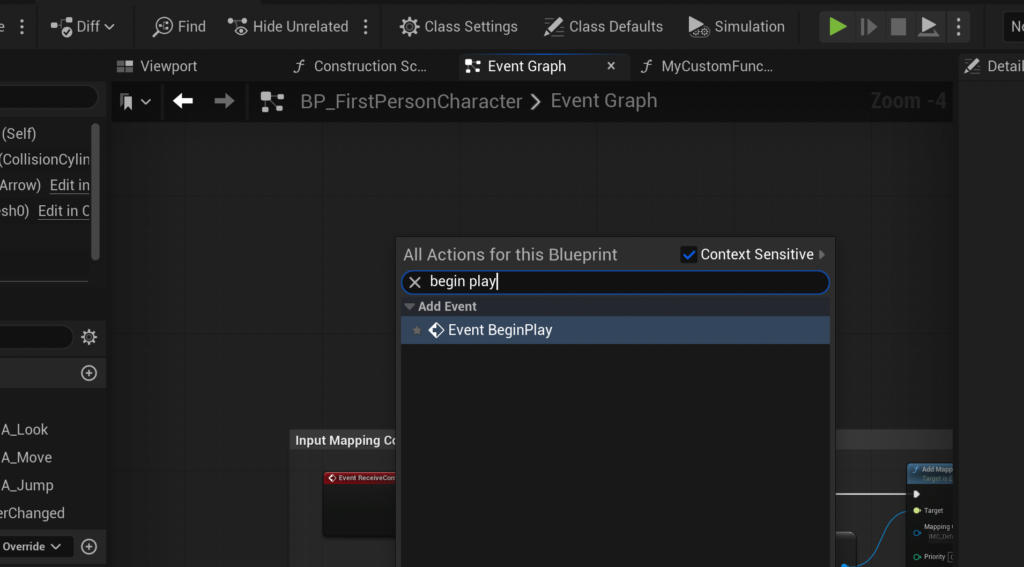
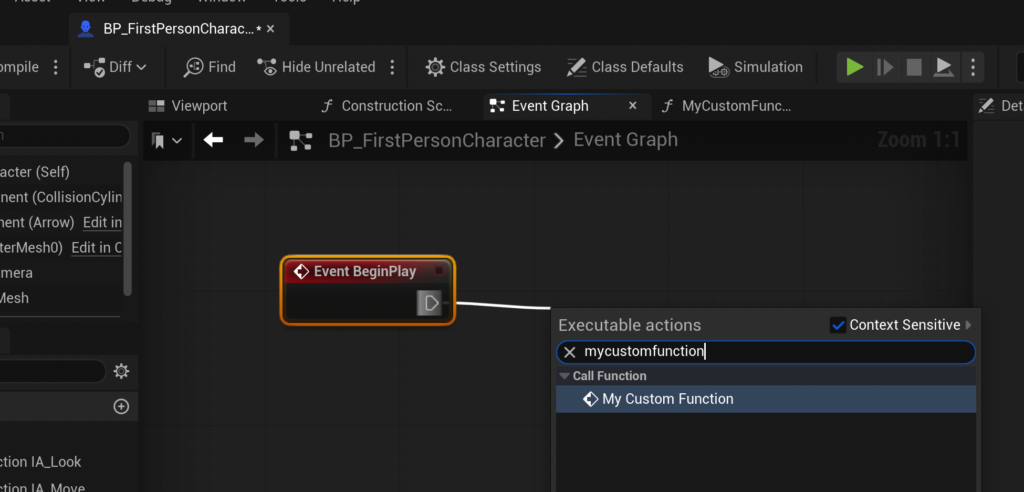
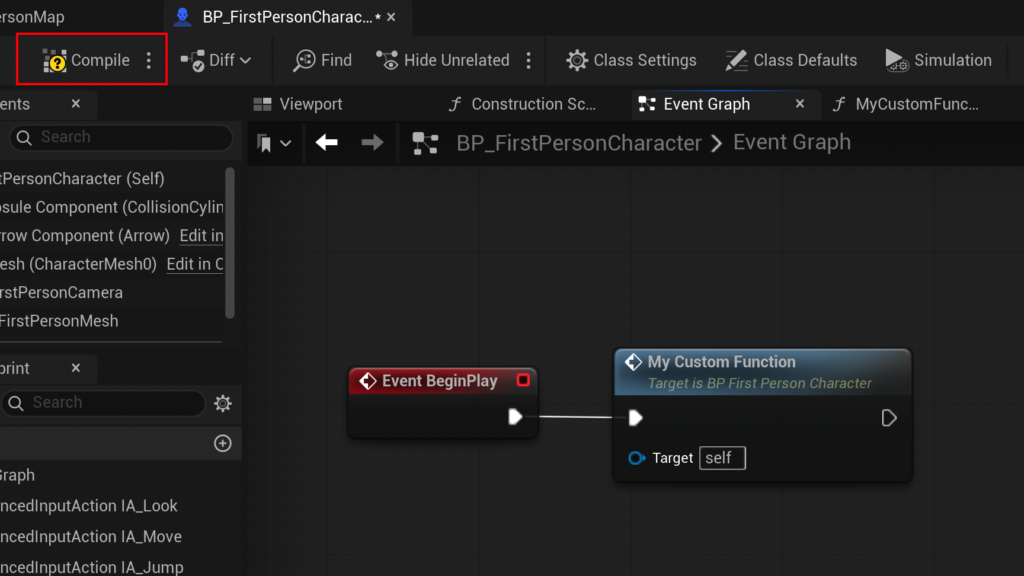
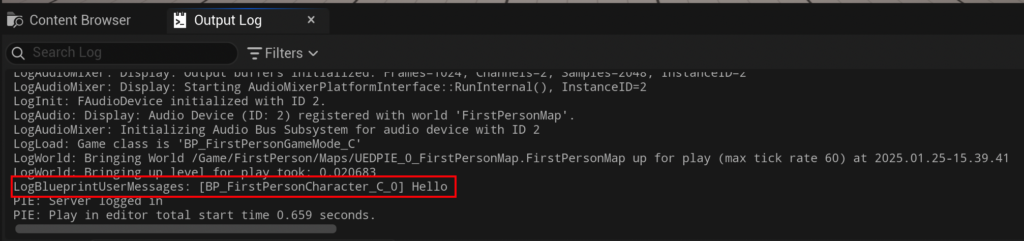
The Event Begin Play is an event that fires automatically when an actor is spawned into the game world or when the game starts if the actor is already placed in the level. To connect our custom function to this event, a developer navigates to the Blueprint’s Event Graph, right-clicks on an empty space, and searches for Event Begin Play. Once the event node is placed, dragging an execution pin from Event Begin Play and searching for the custom function (MyCustomFunction in the example) creates a callable instance of the function. Compiling and saving the Blueprint, then running the game, will demonstrate the function’s execution, with the specified string appearing in the output log. This simple demonstration highlights the fundamental principle of event-driven function calls, a cornerstone of interactive game logic.
Advanced Functionality: The CalculateDamage Case Study
While printing strings is useful for debugging, the true power of functions lies in their ability to process data and produce results. The CalculateDamage example serves as an excellent illustration of how functions handle inputs and outputs.
Handling Data Flow: Inputs and Outputs
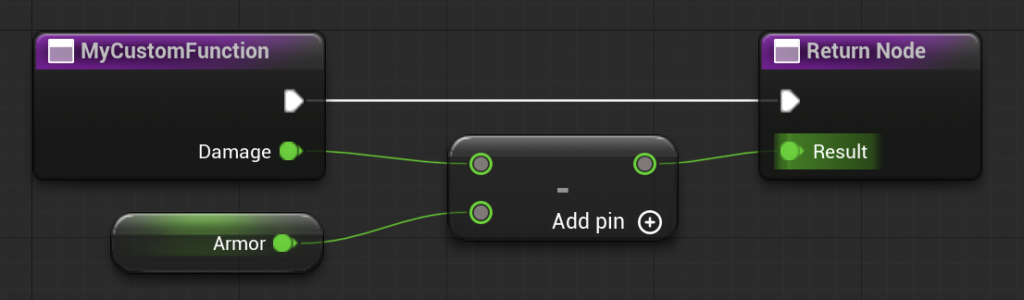
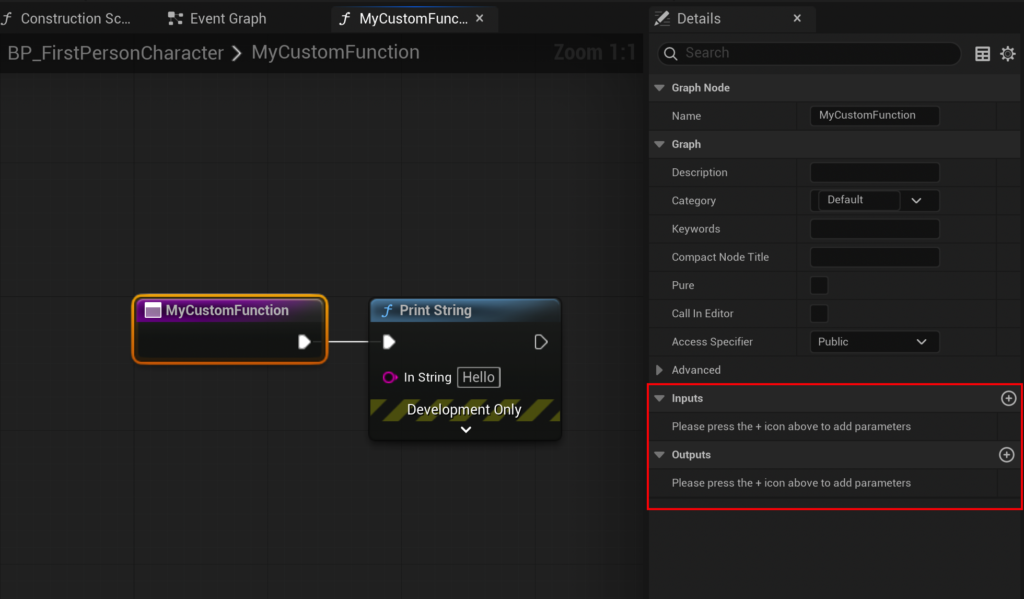
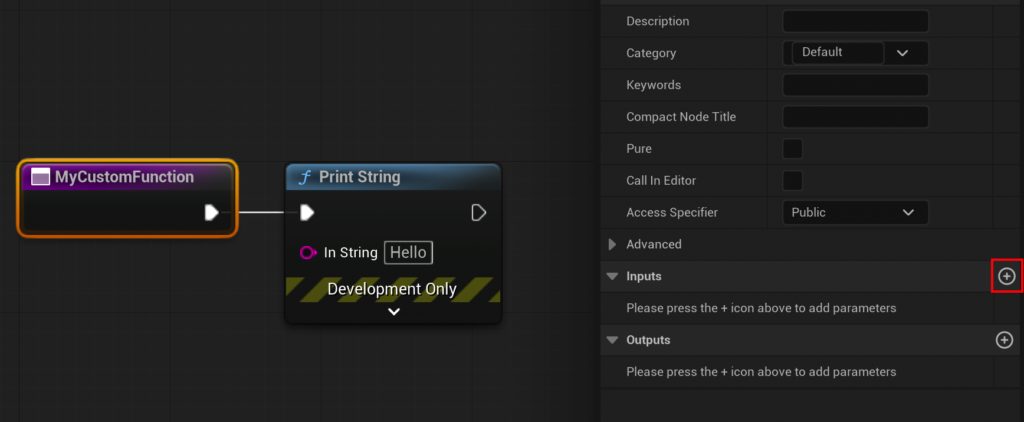
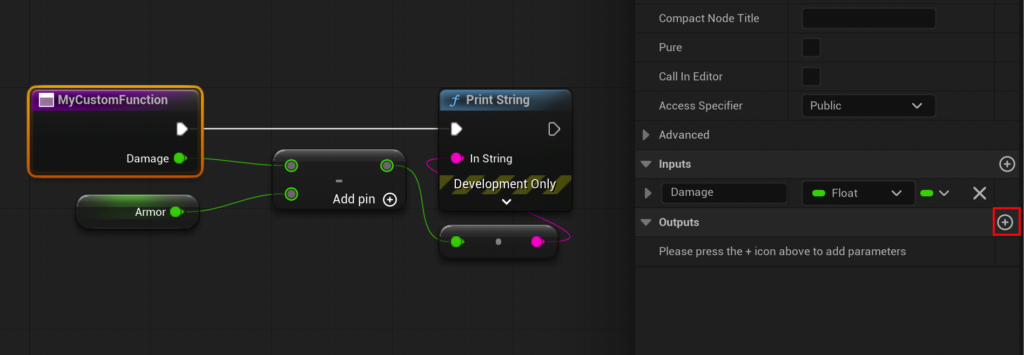
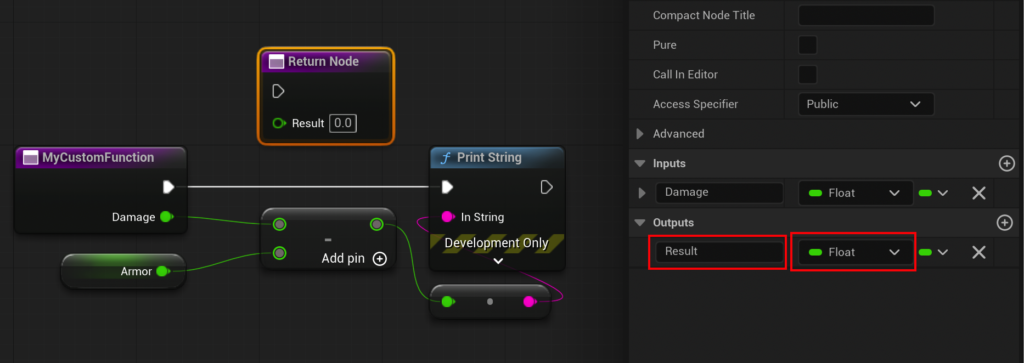
The CalculateDamage function aims to take an initial damage value, subtract a character’s armor, and return the resulting damage. This requires both input and output parameters. By selecting the main function node within its graph, the "Details" panel on the right reveals "Inputs" and "Outputs" sections.
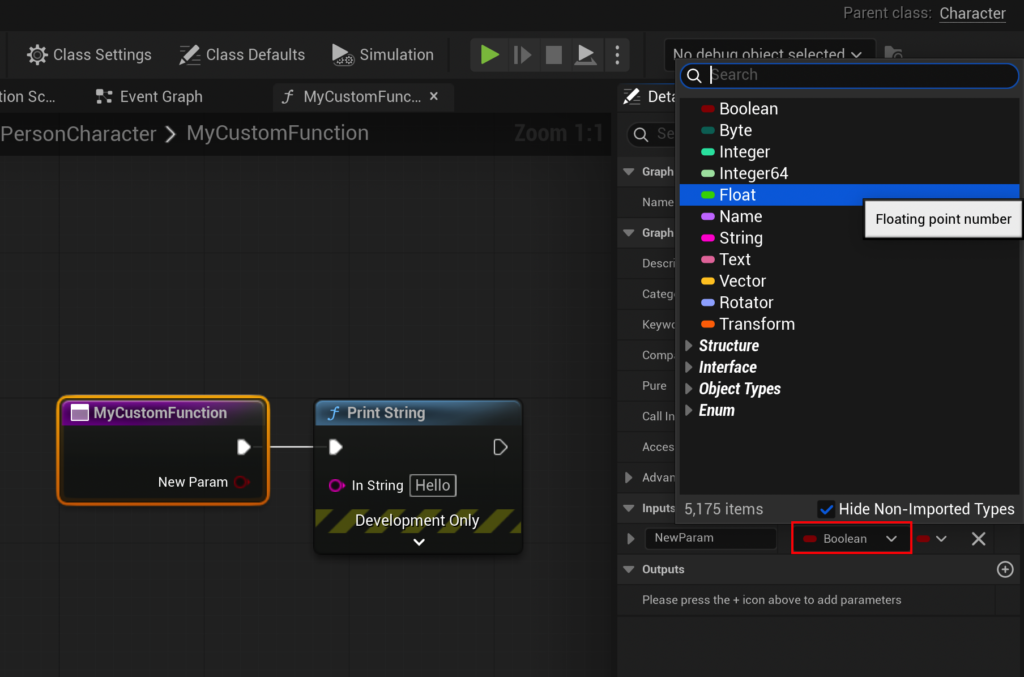
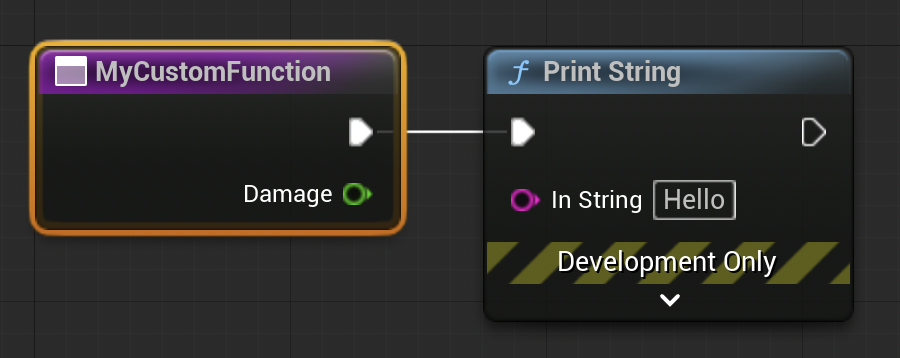
To add an input, a developer clicks the ‘+’ button in the "Inputs" section. The new parameter is then configured: its type is set (e.g., Float for numerical damage) and given a descriptive name (e.g., Damage). This input parameter visually appears as a pin on the function node within the graph, allowing values to be fed into the function.
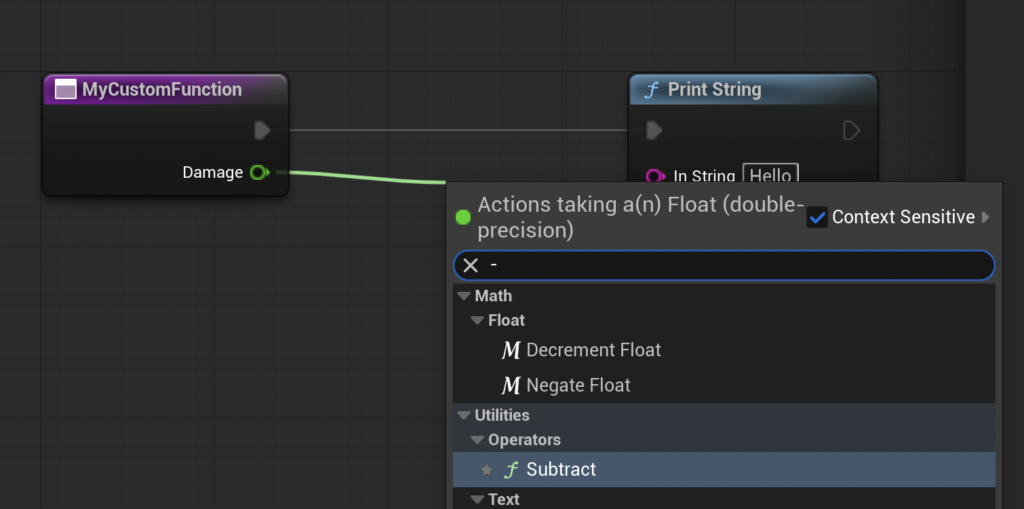
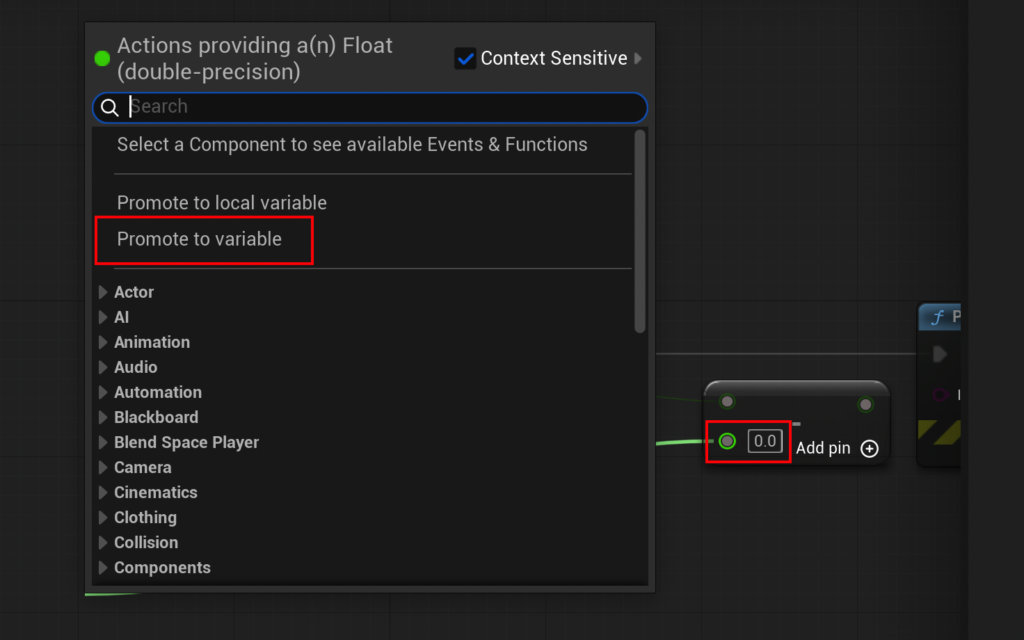
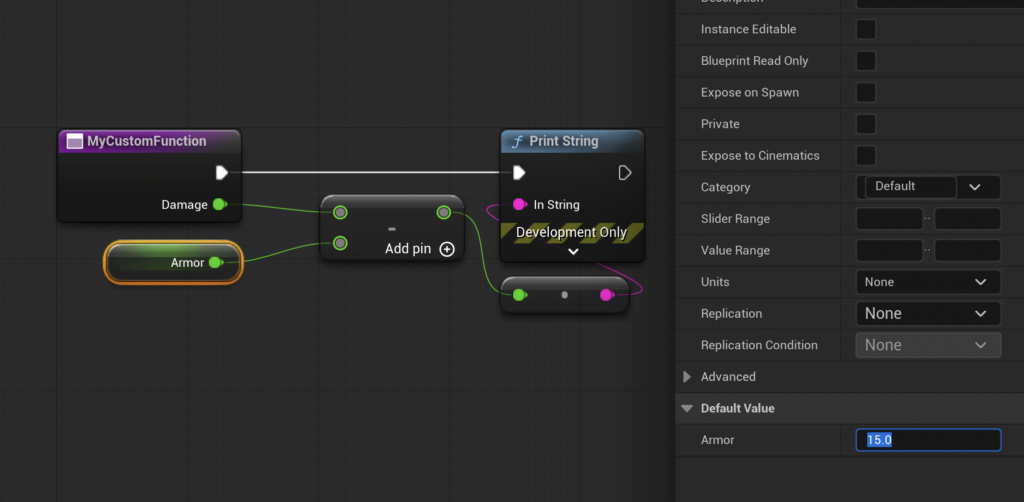
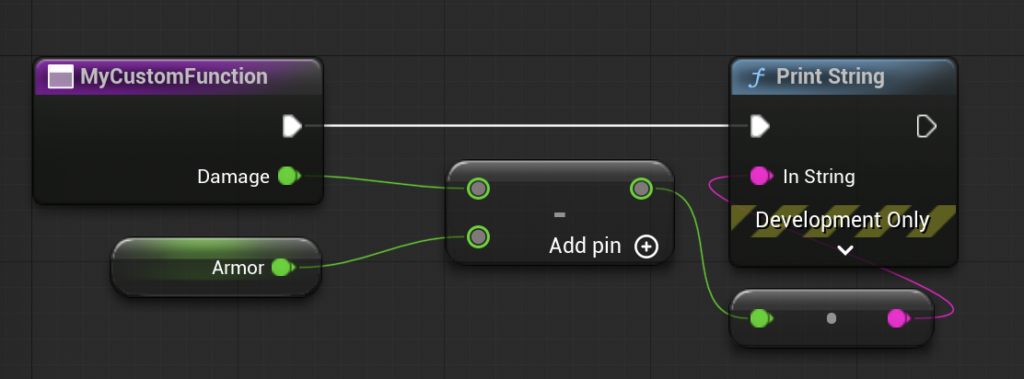
The core logic of CalculateDamage involves a subtraction operation. The Damage input pin is dragged into the graph, and a Float - Float (subtract) node is added. The second operand of the subtraction can be promoted to a new variable, Armor, which can then be assigned a default value (e.g., 15.0). This setup calculates the damage after armor reduction.
Crucially, for this calculated value to be useful outside the function, it must be "returned." Similar to adding an input, an output parameter is added via the "Outputs" section in the "Details" panel, configured as a Float type and named Result. Unreal Engine automatically generates a Return Node in the function graph. The output of the subtraction node is then connected to the Result pin of the Return Node. This establishes the function’s output, making the calculated value available wherever the function is called. The Print String node, used for initial testing, is typically removed at this stage, as the function’s purpose shifts from direct output to returning a value for further processing.

Demonstration: Real-World Application and Verification
Back in the Event Graph, the MyCustomFunction node (now effectively CalculateDamage) will display its new Damage input pin and Result output pin. By setting an input Damage value (e.g., 20.0) and connecting the Result output to a Print String node, the function’s efficacy can be verified. With Damage at 20 and Armor (internally set in the function) at 15, the output log will display 5, confirming that the calculation 20 - 15 = 5 has been successfully performed and returned.
This example highlights the reusability and modularity that functions provide. Any Blueprint actor needing to calculate damage can simply call this CalculateDamage function, providing a damage input and receiving the processed result, without needing to replicate the subtraction logic each time.
Implications for Game Development
The effective use of Blueprint Functions carries significant implications for game development projects, influencing everything from individual productivity to large-team collaboration and long-term project viability.
Enhanced Efficiency and Productivity
By encapsulating reusable logic, functions drastically reduce the need for repetitive code. This not only speeds up initial development but also minimizes errors. When a piece of logic needs to be updated, only the function itself requires modification, rather than hunting down and altering numerous duplicate nodes across various Blueprints. This centralized control is a massive time-saver, particularly in complex games with interconnected systems. Industry best practices suggest that well-organized projects leveraging modular components can see debugging times reduced by up to 30%, directly impacting development cycles and time-to-market.
Improved Code Maintainability and Readability
Functions contribute to a cleaner, more organized Blueprint graph. Instead of sprawling networks of nodes, developers can abstract complex operations into single, clearly named function nodes. This improves the readability of the overall Blueprint, making it easier for team members (including new hires) to understand the logic flow without getting lost in granular details. Maintenance tasks become less daunting, and the risk of introducing new bugs when modifying existing systems is significantly lowered.
Facilitating Team Collaboration
In a team environment, functions are invaluable. Different developers can work on separate functions concurrently without interfering with each other’s core logic. Designers can call functions created by programmers, fostering a more collaborative workflow where roles can leverage each other’s work seamlessly. This separation of concerns ensures that the project progresses smoothly, reducing conflicts and integration headaches.
Scalability and Project Longevity
As games grow in complexity, a well-structured codebase (or Blueprint graph) becomes paramount. Functions enable projects to scale effectively by preventing the accumulation of technical debt. Modular design, driven by functions, ensures that new features can be integrated with minimal disruption, and existing systems can be expanded or refactored with greater ease. This longevity is crucial for games that undergo continuous updates, expansions, or even sequels built upon the same codebase.
Industry Perspectives and Expert Insights
Epic Games has consistently emphasized the importance of modularity and good practices in Blueprint development. In various GDC talks and official documentation, Epic’s engineers advocate for the strategic use of functions, along with other structural elements like Macros and Custom Events, to build robust and performant games. Developers globally echo these sentiments, frequently citing that a disciplined approach to Blueprint functions is a hallmark of professional Unreal Engine projects. Surveys among Unreal Engine developers often highlight "code organization" and "reusability" as top priorities, directly reinforcing the value of functions.

The Future of Visual Scripting
The trajectory of game development tools points towards continued innovation in visual scripting. As engines become more powerful and accessible, the demand for sophisticated yet intuitive ways to manage complex logic will only increase. Blueprint Functions, alongside advancements in editor tools and AI-assisted development, are poised to remain a cornerstone of this evolution, empowering creators to build increasingly ambitious and intricate virtual worlds.
Conclusion
The journey into Unreal Engine 5 Blueprint Functions, from understanding their fundamental nature to implementing complex input/output logic, reveals an essential tool for any aspiring or experienced game developer. These self-contained units of logic are more than just a programming convenience; they are a strategic imperative for building efficient, maintainable, and scalable game projects. By embracing functions, developers can transform convoluted Blueprint graphs into organized, readable, and robust systems, ultimately making the dream of creating compelling interactive experiences easier to manage and realize. The foundational knowledge provided by exploring functions serves as a critical stepping stone, empowering developers to navigate the complexities of modern game development with greater confidence and efficiency.
About the Author