
The advent of sophisticated game worlds demands equally sophisticated methods for handling vast quantities of dynamic and static data. Traditional approaches, often relying on hard-coded values or scattered individual assets, quickly become unwieldy, prone to errors, and significantly impede collaborative workflows. Unreal Engine 5’s Data Tables emerge as a robust solution to these challenges, centralizing information into easily manageable assets that are both human-readable within the editor and efficiently accessible at runtime. This methodology champions a "single source of truth" principle, ensuring consistency and simplifying the iterative design process for complex game systems such as inventory management, character statistics, enemy behaviors, and quest parameters.
Understanding the Core Mechanism: What is a Data Table?
In Unreal Engine 5, a Data Table is fundamentally an asset that holds a collection of rows, where each row represents a distinct entry and adheres to a predefined structure. This structure, known as a Struct (or FTableRowBase in C++), dictates the types and names of the columns within the table, ensuring data integrity and consistency across all entries. Each row in a Data Table is uniquely identified by a Row Name, which acts as a key, allowing for rapid and precise data retrieval. This key-value pair paradigm is a cornerstone of efficient data access in programming, and its implementation within Unreal Engine provides a highly optimized system for game logic.
Unlike manually configured individual assets or programmatic arrays, Data Tables offer a visual, spreadsheet-like interface within the Unreal Editor. This not only makes them incredibly intuitive for non-programmers, such as game designers and content creators, but also ensures that data remains persistent across development sessions. The ability to define data while developing, and then seamlessly utilize it during gameplay, drastically accelerates iteration cycles and reduces the need for constant recompilation or manual asset linking. For instance, parameters for an item, like its damage output, rarity level, or sell price, can be meticulously set and adjusted by a designer without requiring a programmer to touch a single line of code, embodying a true separation of concerns that is vital in large-scale productions. Epic Games, through its extensive documentation and community support, consistently advocates for such structured data approaches to streamline content pipelines and empower broader development teams.
The Foundational Elements: Enums and Structs
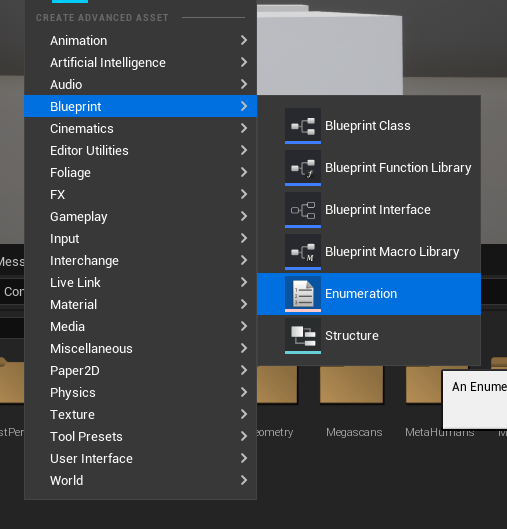
The effective utilization of Data Tables begins with the careful definition of their underlying data structures. Before a Data Table can be instantiated, Unreal Engine requires a Struct to serve as its blueprint, outlining the specific data fields each row will contain. Often, these Structs leverage Enumerations (Enums) to define discrete, manageable categories, enhancing both readability and maintainability. This chronological order of asset creation — Enum first, then Struct, then Data Table — is fundamental to establishing a robust data hierarchy.
-
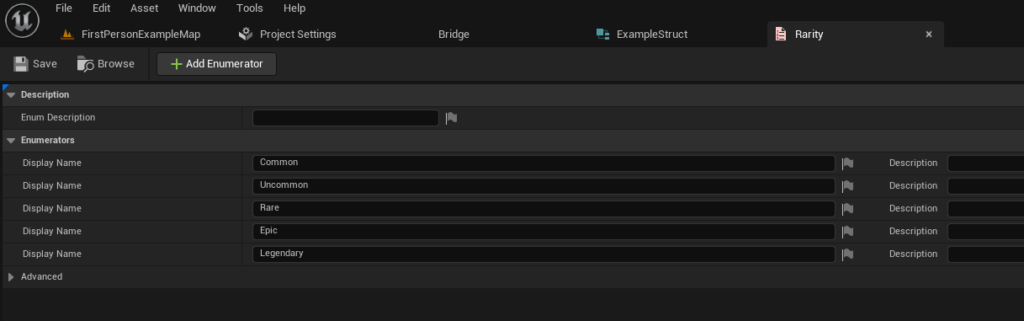
Creating an Enumeration (Enum): Enums are crucial for representing a fixed set of named values. In the context of game development, this could be anything from item rarities (e.g., Common, Uncommon, Rare, Epic, Legendary) to enemy types, status effects, or quest states. By creating an Enum, developers establish a standardized list of options, preventing typos and ensuring consistent data entry. For example, to define item rarity for an RPG, one would typically create an Enumeration asset in the Content Browser, populate it with desired rarity levels, and assign them appropriate display names. This simple yet powerful step lays the groundwork for robust categorization within the Data Table, allowing designers to select from predefined options rather than entering free-form text, thus minimizing errors and standardizing nomenclature across the project.
-
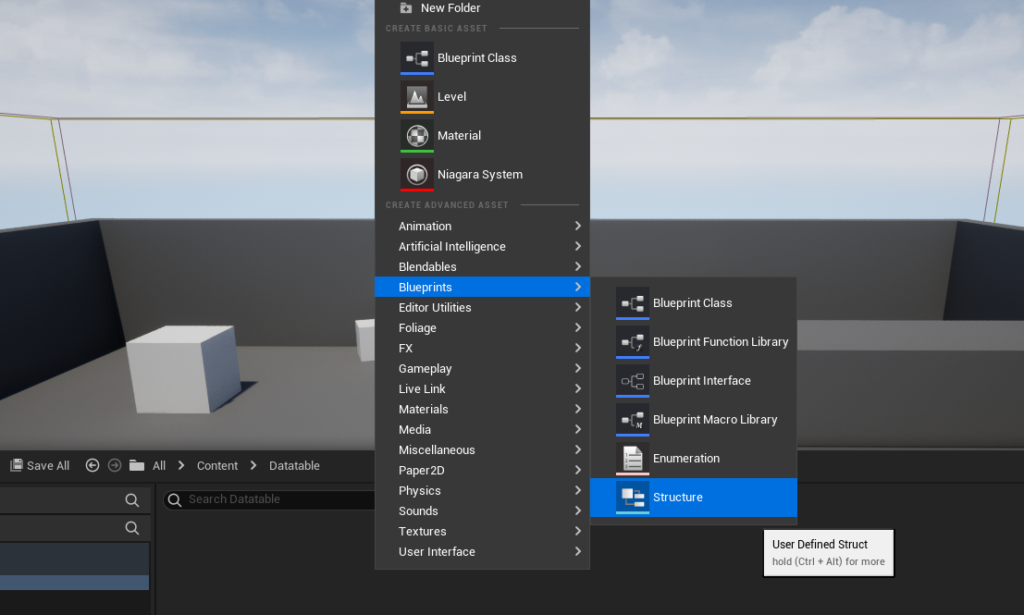
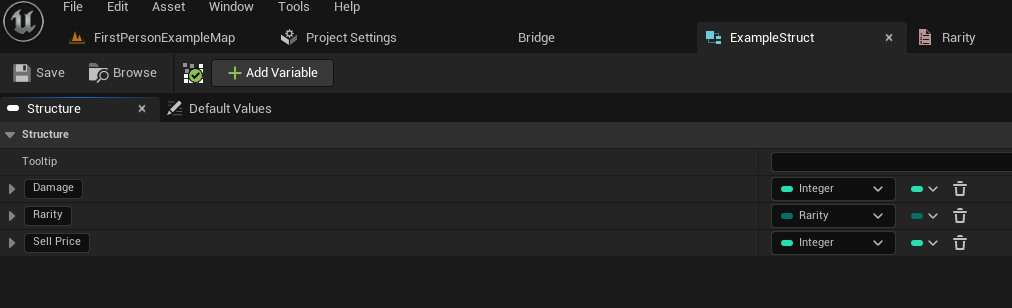
Defining the Structure (Struct): Once an Enum is established, the next logical step is to create a
Structthat will house the various properties of a game entity. AStructis a composite data type that groups several variables (members) under a single name. For an item in an RPG, thisStructmight include fields forDamage(an integer or float),Rarity(using the previously defined Enum), andSellPrice(another integer). The creation of aStructinvolves defining each member variable’s type and name, effectively designing the "schema" for each row in the future Data Table. This step is critical as it dictates what kind of information can be stored and accessed for each entry, offering flexibility through various data types, from simple booleans and integers to more complex types like vectors, references to other assets, or even nested Structs. This architectural decision by developers ensures that all data within a given table adheres to a consistent format, which is paramount for scalability and maintainability.
Constructing the Data Table Asset: The Central Repository
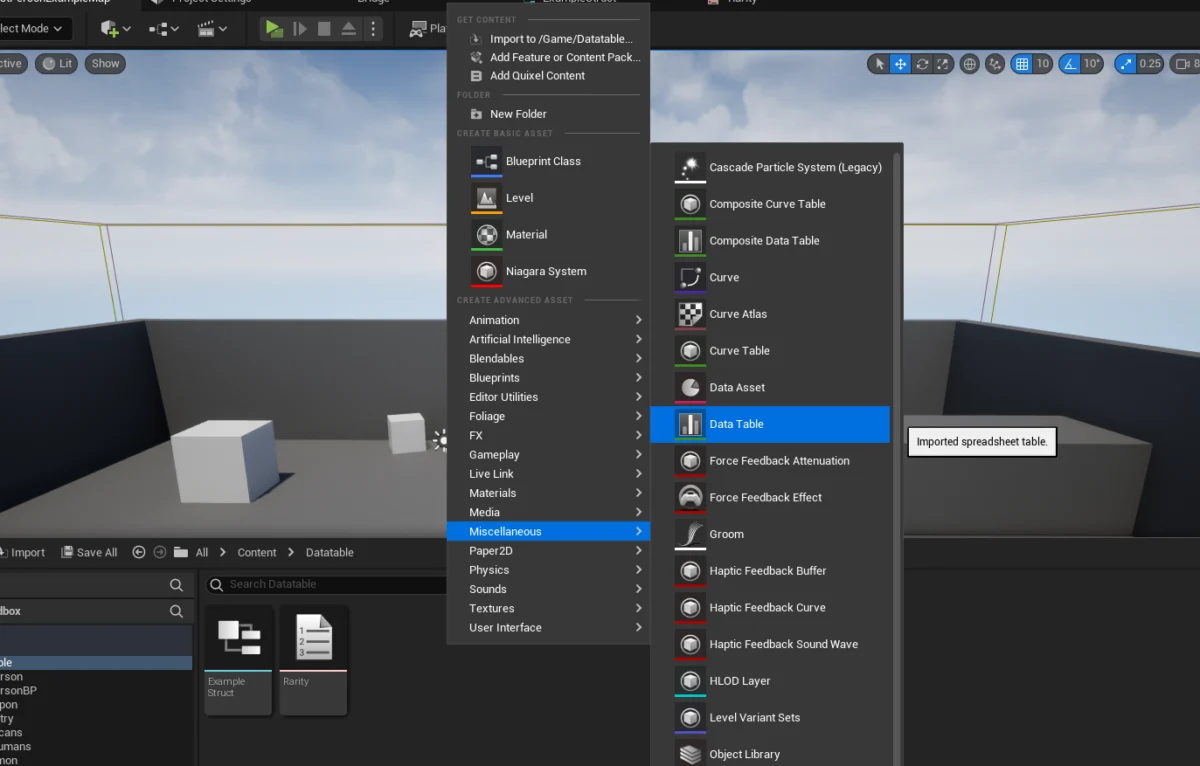
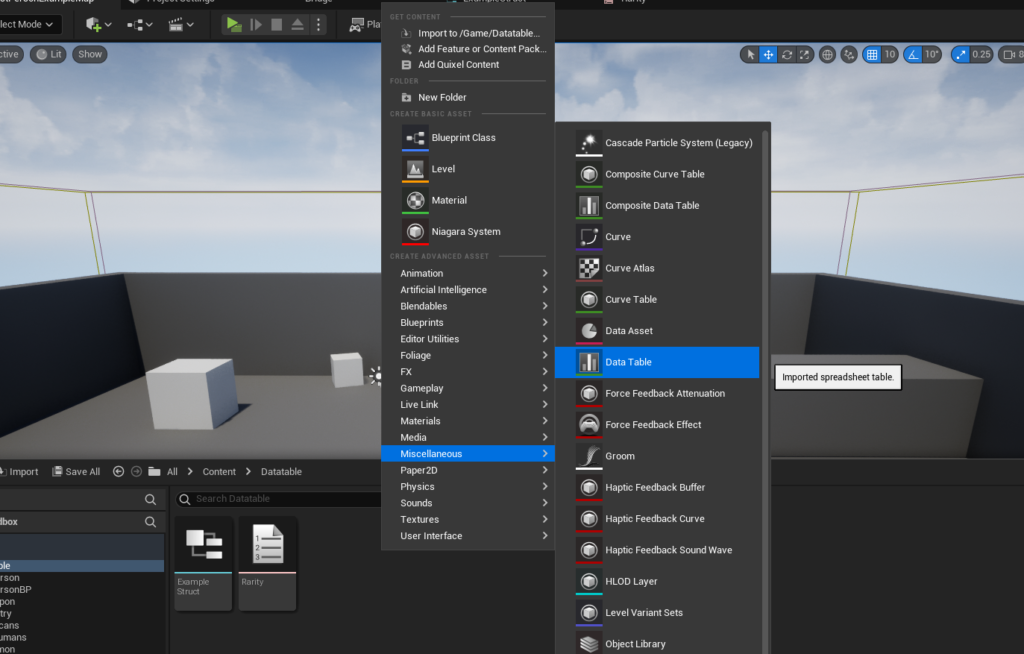
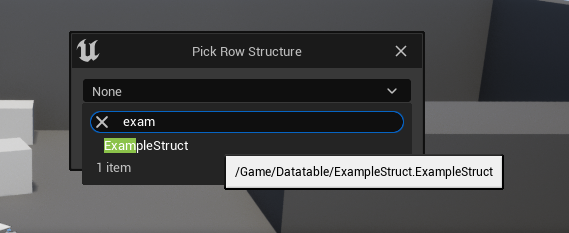
With the foundational Enum and Struct in place, the process culminates in the creation of the Data Table asset itself. This is achieved through a straightforward workflow within the Unreal Editor’s Content Browser. By navigating to the Miscellaneous category, developers can select the Data Table option. A critical prompt then appears, requiring the selection of the Struct that will define the Data Table’s row structure. This explicit link between the Data Table and its Struct is what enforces the data schema, ensuring that every row added conforms to the expected set of properties. This design choice by Epic Games underscores the engine’s commitment to structured data management, preventing malformed entries and facilitating clear data contracts that benefit all members of a development team.
Populating and Managing Data within the Editor: Empowering Designers
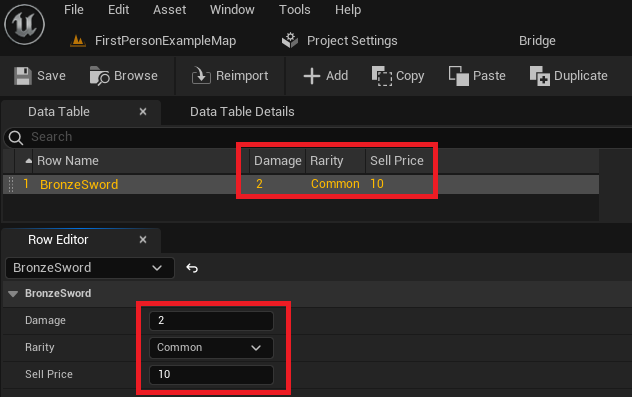
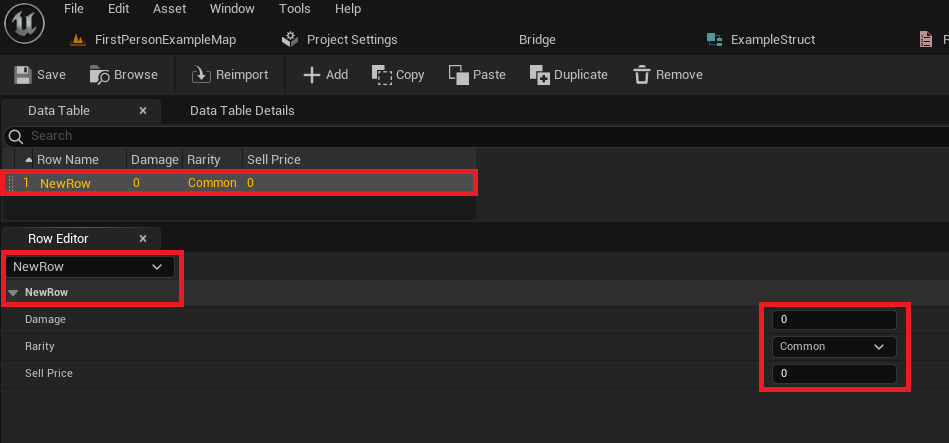
Once created and linked to its Struct, the Data Table opens into a powerful, interactive editor interface. This interface resembles a spreadsheet, displaying rows and columns that directly correspond to the Struct‘s members. The primary method for adding new entries is through an "Add" button, which instantly creates a new row populated with default values derived from the Struct‘s member definitions.
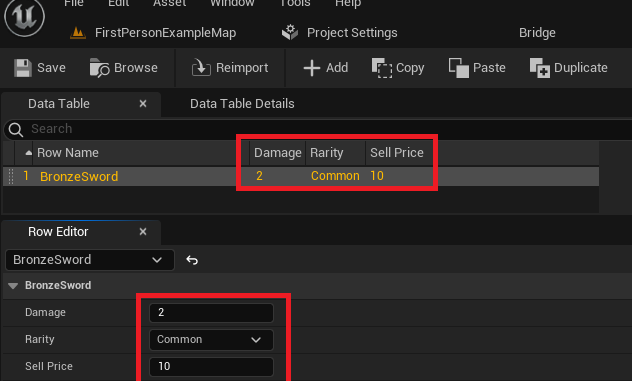
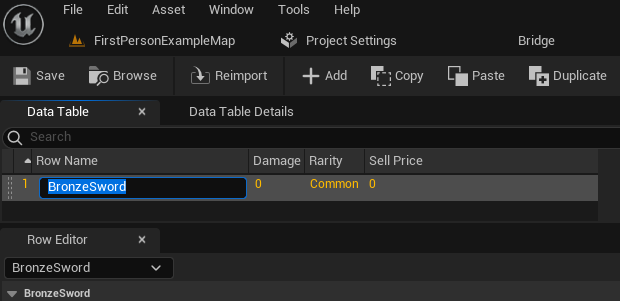
Each row features a Row Name field, which is paramount for data retrieval. Developers can assign descriptive, unique names to each row (e.g., "BronzeSword," "IronShield," "HealingPotion"). This alphanumeric key is what the game logic will use to request specific data sets. Below the main table view, a "Row Editor" panel provides a detailed view of the currently selected row’s properties. Here, designers can meticulously input and adjust values for Damage, Rarity, Sell Price, and any other fields defined in the Struct. The changes made in the Row Editor are immediately reflected in the table view, offering real-time feedback. This intuitive, visual approach empowers designers to rapidly iterate on game balance, content parameters, and system configurations without requiring any programming intervention. The persistence of this data within the editor environment means that once values are set and saved, they are ready for use during gameplay, significantly accelerating the content pipeline. Industry best practices, often echoed by seasoned game developers, consistently emphasize the importance of saving frequently to prevent any loss of carefully curated data, especially within complex editor environments.
Accessing Data Tables in Blueprint and C++: Integrating Data into Gameplay
The true utility of Data Tables manifests in their seamless integration with Unreal Engine’s scripting environments: Blueprints and C++. Accessing the stored data is both efficient and flexible, catering to various game logic requirements, from individual item lookups to dynamic content generation.
-
Retrieving Specific Rows with
Get Data Table Row: For accessing a single, specific entry, theGet Data Table Rownode in Blueprint is the primary method. This node requires two key inputs: a reference to the Data Table asset itself and theRow Name(the unique key) of the desired entry. Upon execution, the node provides two output pins:Row FoundandRow Not Found. This conditional execution path allows developers to gracefully handle scenarios where a requested row might not exist, preventing potential errors. If the row is found, anOut Rowpin provides the data, structured according to the associatedStruct. By right-clicking thisOut Rowpin and selecting "Split Struct Pin," developers can expose all individual members of theStruct(e.g.,Damage,Rarity,Sell Price) for direct use in game logic. This explicit feedback mechanism and direct access to structured data makeGet Data Table Rowan essential node for item instantiation, enemy stat lookups, dialogue line retrieval, and other context-specific data needs. The flexibility to either hard-code theRow Namevia a dropdown populated with existing entries or dynamically input it via a connected variable further enhances its utility, allowing for both static and dynamic data retrieval based on gameplay events. -
Iterating Through Data Tables with
Get Data Table Row Namesand Loops: Many game systems require processing multiple or all entries within a Data Table, such as populating a shop inventory, displaying a bestiary of enemies, or performing global balancing checks. For these scenarios, Unreal Engine provides a powerful combination of nodes. TheGet Data Table Row Namesnode, when provided with a Data Table reference, returns anArraycontaining all theRow Namespresent in that table. This array can then be fed into aFor Each Loopnode. TheFor Each Loopiterates through eachRow Namein the array, executing a "Loop Body" for every entry. Inside this loop, theArray Element(which is the currentRow Name) can be connected to aGet Data Table Rownode. This setup allows developers to retrieve and process the data for each row sequentially, enabling dynamic content generation, comprehensive data analysis, or the application of global game rules. This looping mechanism is particularly valuable for systems that need to react to or display all available data points, ensuring that game logic remains robust and scalable regardless of the number of entries in a Data Table. This capability is frequently leveraged in procedural generation or content streaming, where lists of items or entities need to be dynamically managed.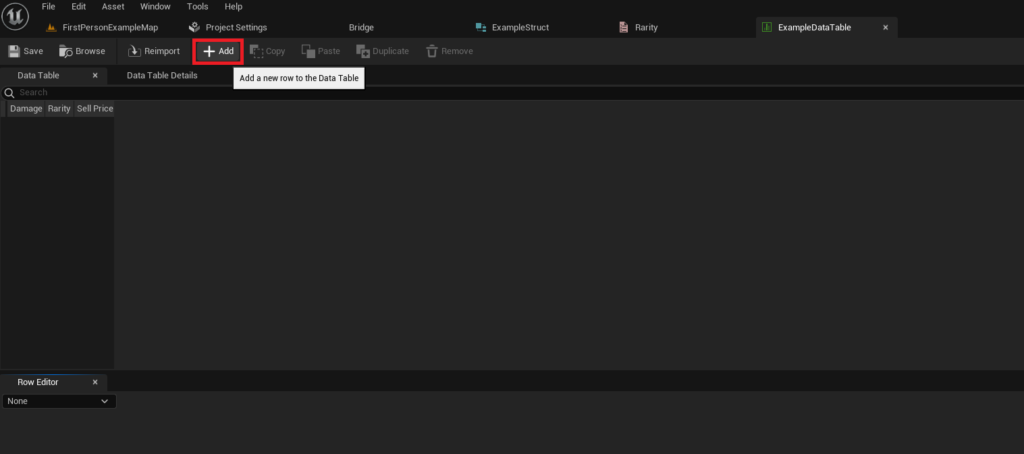
Strategic Implications and Broader Impact
The strategic adoption of Data Tables in Unreal Engine 5 extends far beyond mere convenience; it fundamentally reshapes development workflows and project scalability, offering significant advantages across various dimensions:
- Enhanced Collaboration and Workflow Efficiency: Data Tables foster a highly collaborative environment. Programmers define the structural framework (Structs), while designers, balancing specialists, and content creators can directly populate and modify the data without needing programming knowledge. This clear separation of responsibilities reduces bottlenecks, allowing teams to work in parallel. Designers can iterate on game balance or item properties in real-time within the editor, drastically shortening feedback loops and accelerating the content creation pipeline. This democratization of data entry empowers non-technical team members, making them active participants in the game’s core design.
- Scalability for Projects of All Sizes: From small indie titles to sprawling AAA productions, Data Tables provide a scalable solution for managing game data. As projects grow in complexity and content volume, a centralized, structured data system becomes indispensable. Data Tables handle hundreds or thousands of entries efficiently, ensuring that performance remains robust even with extensive datasets. Their ability to be imported from external CSV or JSON files further enhances scalability, allowing for programmatic generation or integration with external data management tools, often seen in larger studios employing dedicated content pipelines.
- Maintainability and Reduced Error Rates: By centralizing data and enforcing a strict schema via
Structs, Data Tables significantly improve project maintainability. Updates and bug fixes related to game data become much simpler, as changes can be made in one place and instantly propagated throughout the project. The structured nature also reduces the likelihood of human error, as data types are enforced, and valid entries (like Enum values) are presented as dropdowns rather than free-form text. This inherent validation reduces runtime bugs related to malformed data. - Facilitating Iterative Design and Balancing: Game development is an inherently iterative process, especially when it comes to balancing gameplay mechanics. Data Tables are a designer’s best friend in this regard. Adjusting weapon damage, enemy health, or currency values is as simple as tweaking numbers in a table, without requiring any code changes or lengthy compilation times. This rapid iteration capability allows for extensive playtesting and fine-tuning, leading to a more polished and enjoyable player experience. This agility is crucial in today’s fast-paced game development landscape.
- A "Single Source of Truth": Data Tables enforce the principle of a single source of truth for game data. Instead of having item properties scattered across multiple Blueprints, C++ classes, or individual assets, all related data resides in one definitive location. This eliminates discrepancies, ensures consistency, and simplifies tracking and version control for content changes, a critical aspect in large team environments.
While Data Tables offer immense power, it is crucial for developers to design their Structs thoughtfully. Overly complex Structs or poor data organization can negate some of the benefits. For exceptionally intricate data relationships or runtime data modification requirements, Data Tables might be combined with other Unreal Engine features like Data Assets, Save Game systems, or even custom C++ data managers, creating a layered approach to data architecture that maximizes flexibility and performance.
Conclusion
Unreal Engine 5’s Data Tables represent a cornerstone feature for modern game development, offering an elegant and powerful solution for managing complex game data. By providing a clear, structured, and easily accessible method for defining, populating, and utilizing information, they empower multidisciplinary teams, streamline workflows, and enhance the overall scalability and maintainability of projects. From defining intricate item statistics to configuring dynamic questlines, Data Tables ensure that critical game information is always organized, consistent, and readily available, enabling developers to focus on crafting immersive and engaging interactive experiences without getting bogged down by cumbersome data management challenges. Their intuitive interface and robust integration capabilities solidify their position as an indispensable tool in any Unreal Engine 5 developer’s arsenal, proving that effective data architecture is as vital as compelling graphics and innovative gameplay.
About the Author








