
The ability to perform a double jump, a fundamental and beloved mechanic in numerous video games, is now remarkably accessible for developers utilizing Unreal Engine 5 (UE5). This widely adopted feature, integral to the platforming elements of iconic titles ranging from retro classics like Castlevania: Symphony of the Night and Crash Bandicoot to the whimsical adventures of the Kirby series and Banjo-Kazooie, empowers players with enhanced aerial maneuverability, crucial for navigating complex environments and engaging in dynamic combat scenarios. Unreal Engine 5 streamlines the integration of this advanced movement capability, offering a straightforward path for both novice and experienced developers to enrich their projects.
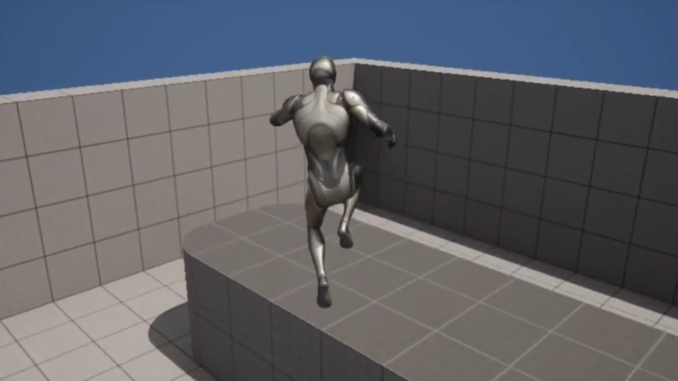
The double jump, a concept often taken for granted in modern game design, holds a significant place in the history and evolution of platforming games. Its genesis can be traced back to the late 1980s and early 1990s, where early platformers experimented with various movement paradigms to offer players more control and enable increasingly intricate level designs. While single jumps provided basic verticality, the introduction of a second, mid-air jump fundamentally altered player perception of space and timing, opening up new avenues for level design puzzles, secret areas, and combat strategies. Games like Kid Icarus (1986) and later, Super Mario World (1990) with its cape feather power-up, laid early groundwork for enhanced aerial control, though the explicit "double jump" as a core character ability gained widespread prominence in titles like Mega Man X (1993) and Castlevania: Symphony of the Night (1997). Its enduring appeal lies in the satisfaction derived from mastering air control and the strategic depth it adds to otherwise simple movement. For many developers, the inclusion of a double jump is not merely an optional feature but a foundational expectation for character controllers in 3D platformers and action-adventure games.
Unreal Engine 5, Epic Games’ latest iteration of its powerful game development suite, continues to lower the barrier to entry for complex game mechanics, making sophisticated features like the double jump achievable with minimal friction. The engine’s robust Blueprint visual scripting system is a cornerstone of this accessibility, allowing developers to implement intricate logic without writing a single line of code. This democratizes game development, enabling smaller studios and independent creators to compete with larger, more resourced teams in terms of feature richness and gameplay polish. The streamlined process for double jump integration within UE5 exemplifies this philosophy, ensuring that developers can focus more on creative design and less on the underlying technical hurdles.
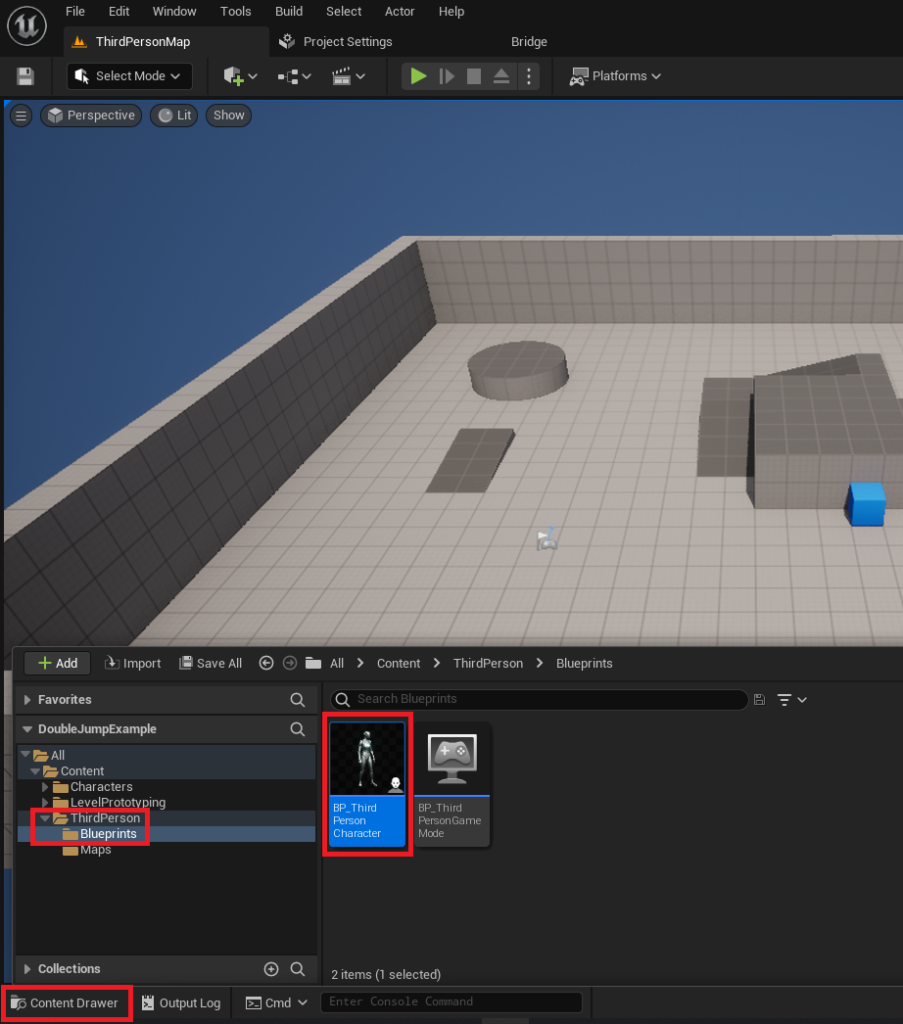
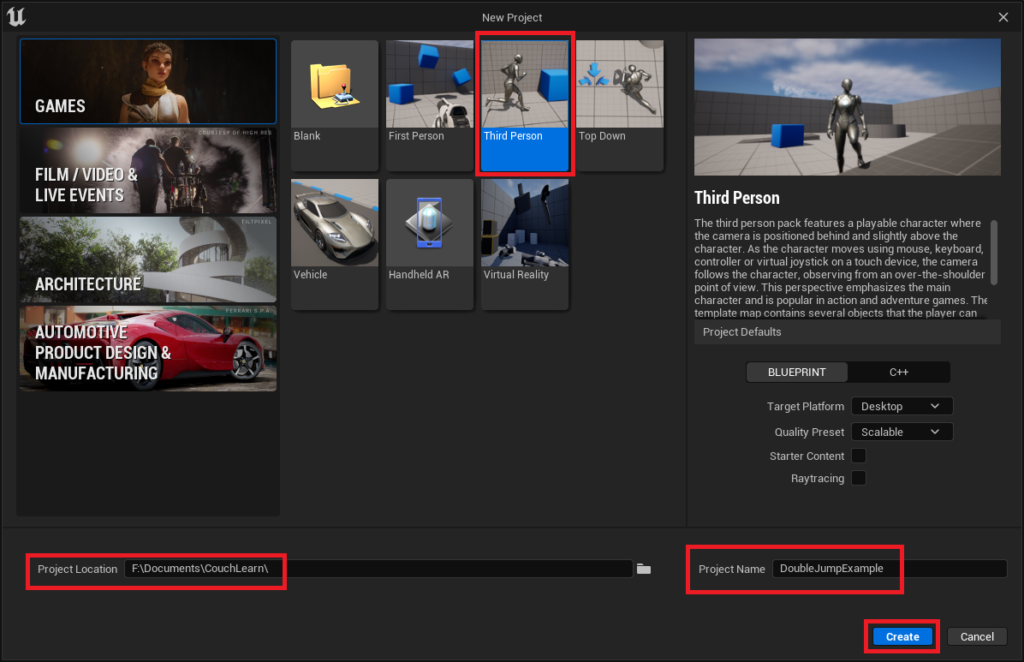
The journey to integrate double jump functionality into an Unreal Engine 5 project typically begins with establishing a foundational character blueprint. For developers initiating a new project, the UE5 Third Person template offers an ideal starting point, providing a pre-configured character and control scheme that serves as a robust base. This template expedites the initial setup phase, allowing creators to bypass the complexities of building a character controller from scratch and instead, dive directly into implementing and refining specific mechanics. The process involves creating a new project, selecting the Third Person template, defining a project location, and assigning a name. Once the Unreal Engine editor initializes the new project, the core character blueprint, typically designated as BP_ThirdPersonCharacter, becomes the focal point for subsequent modifications. This blueprint, located within the Content/ThirdPerson/Blueprints directory, encapsulates all the character’s movement logic, input handling, and visual representation. Developers with existing projects already featuring a character blueprint can seamlessly integrate these steps into their current setup, bypassing the initial project creation phase.
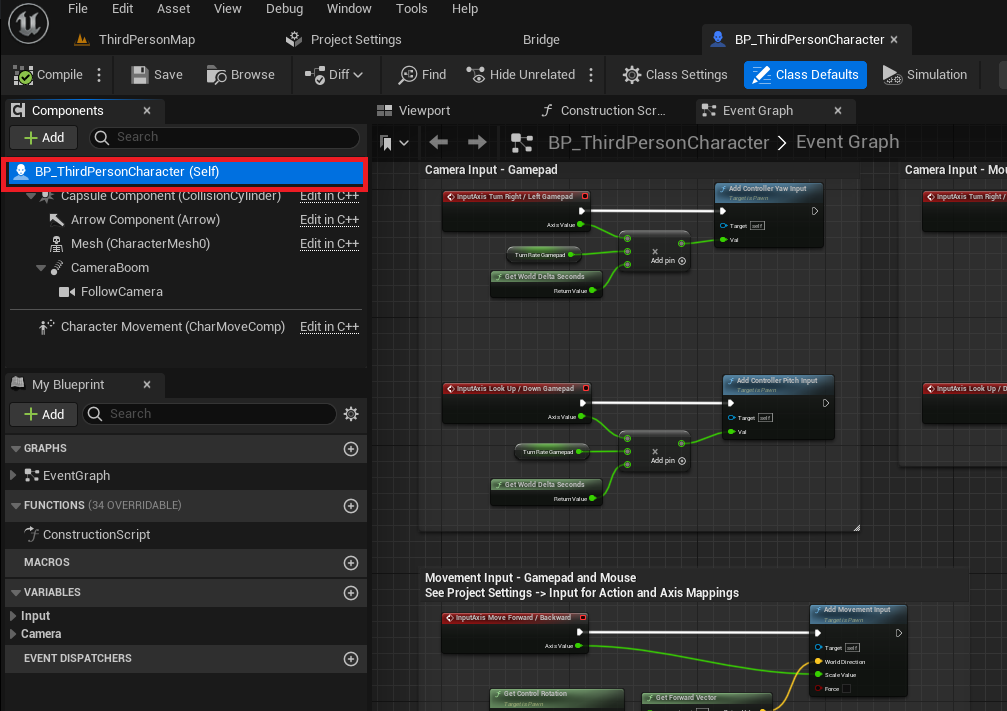
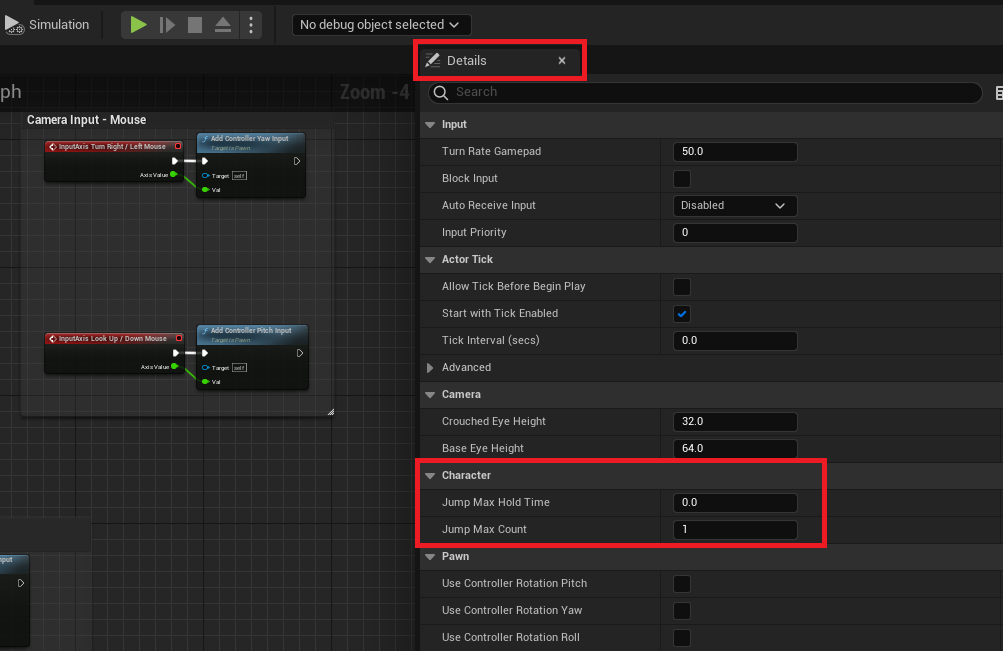
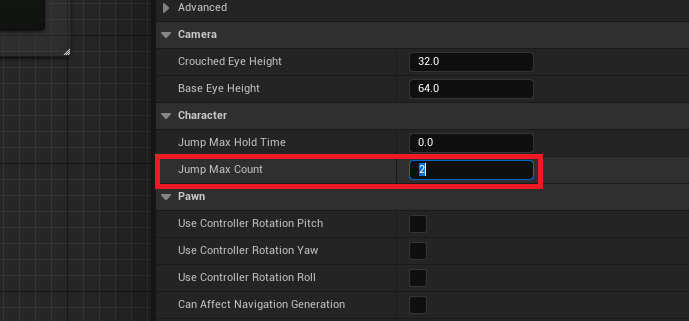
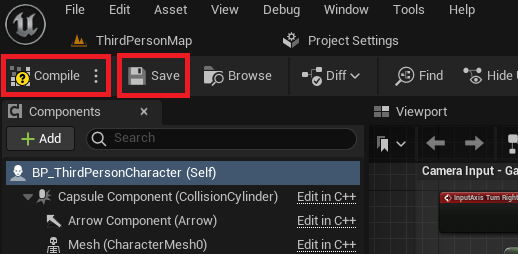
The fundamental activation of the double jump capability within Unreal Engine 5 is surprisingly straightforward, leveraging an inherent property within the engine’s character movement component. Within the BP_ThirdPersonCharacter blueprint, selecting the main blueprint node (often labeled BP_ThirdPersonCharacter (Self)) reveals a comprehensive "Details" panel on the right side of the editor. This panel houses a multitude of parameters governing the character’s behavior. A critical setting under the "Character" category is "Jump Max Count," which by default is set to 1. This value dictates the maximum number of consecutive jumps a character can perform before needing to touch the ground again. By simply changing this value to 2, developers instantly grant their character the ability to execute a double jump. For games requiring more elaborate aerial maneuvers, such as triple jumps or infinite jumps (often seen in creative modes or specific character abilities), this value can be adjusted accordingly to 3 or higher. This single parameter modification underscores UE5’s efficiency in handling core gameplay mechanics, requiring no complex scripting or event graphs for basic functionality. Following this adjustment, it is imperative to compile and save the blueprint to ensure the changes are applied and persistent within the project. This fundamental step immediately enables the double jump, allowing developers to test the core mechanic within their game world.
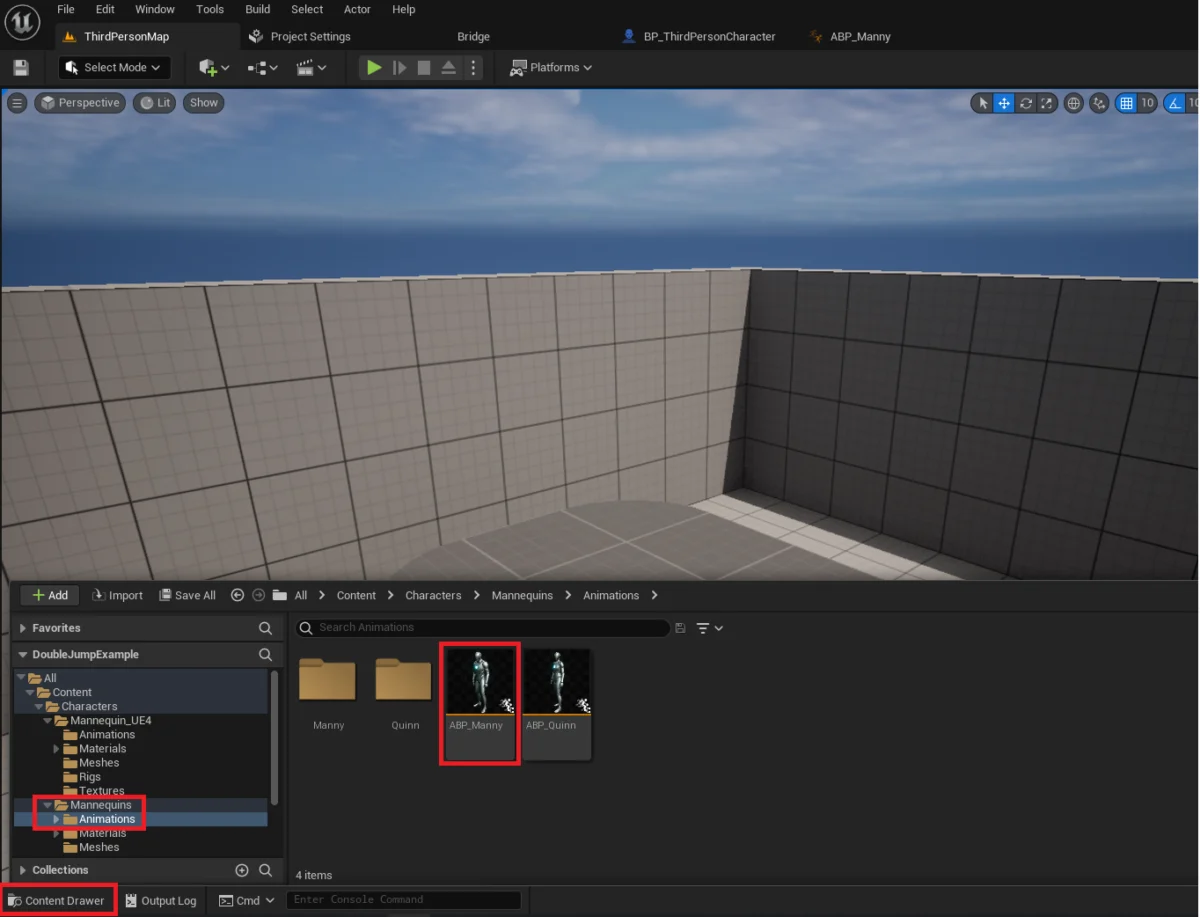
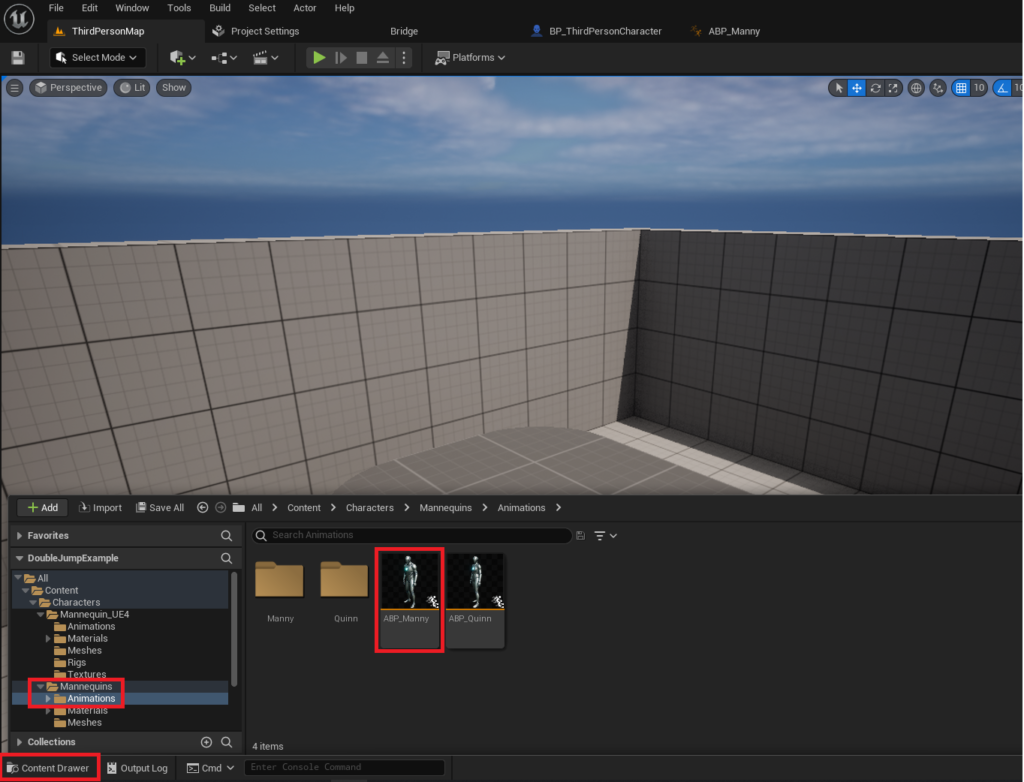
While the basic double jump functionality is achieved with remarkable ease, a truly polished player experience necessitates attention to visual feedback. The initial implementation, though functional, often results in a visual discrepancy where the character’s jump animation plays only once, irrespective of how many jumps are performed mid-air. This lack of visual cues can diminish the player’s sense of control and the overall responsiveness of the character. Addressing this requires venturing into the realm of animation blueprints, an intermediate-level task that significantly enhances the perceived quality of the double jump. The animation blueprint, specifically ABP_Manny (or ABP_Quinn depending on the template character chosen), located in the Content/Characters/Mannequins/Animations folder, governs how the character’s skeletal mesh responds to various gameplay states, including jumping and falling.
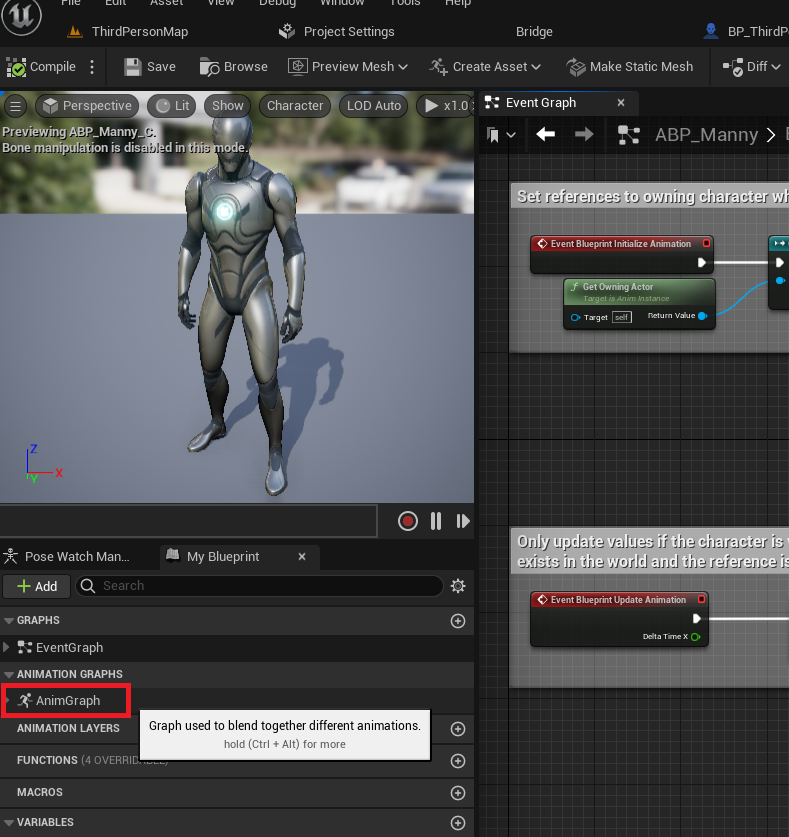
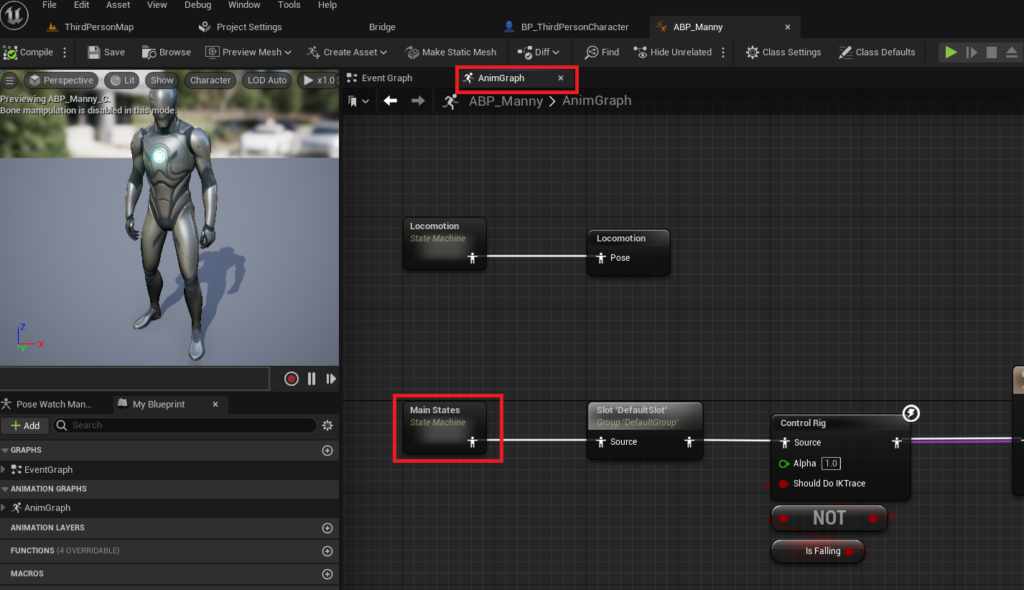
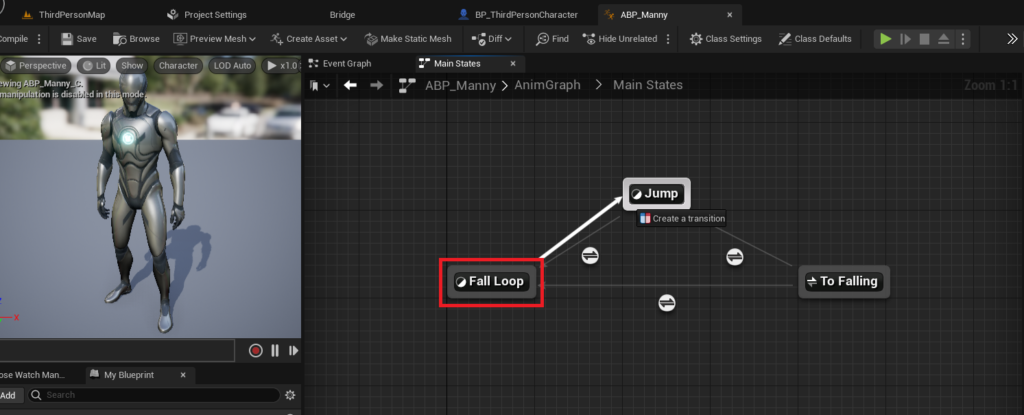
The process of refining the double jump animation involves modifying the animation state machine within the ABP_Manny blueprint. After opening the animation blueprint editor, developers must navigate to the "AnimGraph," which visually represents the flow of animation states. Within the AnimGraph, the "Main States" state machine orchestrates the transitions between different animations, such as idle, running, jumping, and falling. The key to re-triggering the jump animation during a double jump lies in establishing a specific transition rule. By dragging a connection from the "Fall Loop" state to the "Jump" state within the "Main States" state machine, a new transition path is created. This transition path, represented by an arrow, requires a specific condition to be met before the animation can move from the falling state back into the jumping state.
Opening the newly created transition editor allows for the implementation of the necessary blueprint nodes to control this animation flow. The logic here hinges on monitoring the character’s vertical velocity and jump count. Specifically, the animation state should transition from "Fall Loop" back to "Jump" if the character is currently falling (negative Z velocity) but then performs another jump, indicated by an increment in the JumpCurrentCount and the IsFalling boolean being true. A typical setup involves checking if the character’s Z velocity is greater than a small negative threshold (meaning they are moving upwards or have just initiated an upward thrust), and crucially, verifying that JumpCurrentCount is greater than 1 (confirming it’s a subsequent jump, not the initial one) while still being IsFalling. These conditions, combined using logical AND gates, ensure that the jump animation is re-triggered precisely when a double jump is executed mid-air, providing immediate and accurate visual feedback to the player. Once these blueprint nodes are correctly configured, compiled, and saved, the character’s double jump will exhibit a much more fluid and responsive animation, significantly improving the player experience.
This two-tiered approach to implementing double jump in Unreal Engine 5—first, the simple numerical adjustment for functionality, and second, the intermediate animation blueprint refinement for polish—highlights UE5’s flexible development ecosystem. The ease with which such a fundamental mechanic can be integrated empowers developers of all skill levels. For independent game studios and solo developers, this accessibility translates into faster prototyping and iteration cycles, allowing them to focus more resources on unique gameplay elements, narrative, and artistic direction, rather than wrestling with core engine mechanics. The availability of robust, built-in features and powerful visual scripting tools like Blueprints significantly lowers the entry barrier to creating professional-grade games, fostering a more diverse and innovative industry landscape.
The broader implications of such accessible development tools extend beyond individual projects. They contribute to a higher baseline quality across the game development industry. As features like double jumping become simpler to implement and animate correctly, player expectations for character controllers and movement mechanics continue to rise. This pushes developers to innovate further, building upon these solid foundations with unique twists and enhancements. Furthermore, the extensive documentation and community support surrounding Unreal Engine ensure that even complex challenges have readily available solutions, fostering a collaborative environment where knowledge sharing is paramount. Epic Games’ continued investment in features that simplify common development tasks reinforces its position as a leading engine for both AAA and indie titles, continually expanding the possibilities for what creators can achieve.
In conclusion, the integration of double jump functionality in an Unreal Engine 5 project is a testament to the engine’s design philosophy: powerful, yet accessible. From a single parameter adjustment that activates the core mechanic to the more nuanced animation blueprint modifications that provide crucial visual feedback, UE5 offers a clear and efficient pathway for developers to enhance their character controllers. This capability not only enriches the gameplay experience by offering dynamic aerial movement but also empowers developers by streamlining a process that might otherwise consume significant time and resources. As game development continues to evolve, tools that simplify the implementation of common, player-loved features will remain indispensable, allowing creators to focus their energy on true innovation and delivering unforgettable interactive experiences.
Further exploration into character setup and advanced movement mechanics can be found in the official Unreal Engine documentation, including guides on setting up new character meshes in UE5 and detailed ACharacter documentation for advanced jump settings in C++. These resources provide deeper insights for those looking to customize their character controllers even further, offering a comprehensive suite of options for every development need.
About the Author








