
The advent of Unreal Engine 5 (UE5) has marked a significant paradigm shift in real-time 3D content creation, particularly with the introduction of its groundbreaking MetaHuman character library. These meticulously crafted, high-fidelity digital humans are not merely static models but fully rigged, animation-ready assets freely available for integration into diverse projects. This guide delves into the process of leveraging MetaHumans within a UE5 environment, exploring the technological underpinnings, the strategic implications, and the step-by-step procedure for deployment.
The Dawn of Digital Humans: Context and Innovation
The pursuit of photorealistic digital humans has long been a holy grail in computer graphics, traditionally requiring immense artistic talent, technical expertise, and substantial resources. From the early days of motion capture to sophisticated facial rigging systems, the journey has been fraught with challenges, often limiting hyper-realistic characters to high-budget film productions and AAA game titles. Epic Games, through its Unreal Engine and strategic acquisitions, has systematically worked to democratize this capability. The launch of Unreal Engine 5, with its revolutionary Lumen global illumination and Nanite virtualized geometry systems, provided the perfect canvas for rendering incredibly detailed assets at unprecedented performance levels.

Concurrent with UE5’s development, Epic’s acquisition of Quixel in 2019 was a pivotal moment. Quixel, renowned for its Megascans library of photogrammetry-scanned 3D assets, brought a wealth of real-world detail and material fidelity to the Epic ecosystem. This merger laid the groundwork for the MetaHuman project, which sought to combine Quixel’s scanning prowess with Epic’s advanced character rigging and animation technologies. The result was a system capable of generating believable digital humans with astonishing speed and fidelity.
MetaHumans are more than just pretty faces; they represent a complete, ready-to-animate digital human framework. Each MetaHuman comes with detailed skeletal and facial rigs, a comprehensive set of blend shapes for nuanced expressions, realistic hair generated with strand-based techniques, and high-resolution skin shaders that react authentically to light. This level of detail, previously the exclusive domain of specialized character artists and large studios, is now accessible to a broader audience, from independent developers to virtual production teams and architectural visualization artists.
Accessing the MetaHuman Library: The Quixel Bridge Gateway
The primary portal for accessing the MetaHuman library within Unreal Engine 5 is the Quixel Bridge application, seamlessly integrated into the editor. This integration underscores Epic’s vision of a cohesive content creation pipeline, where high-quality assets are readily available and easily imported.
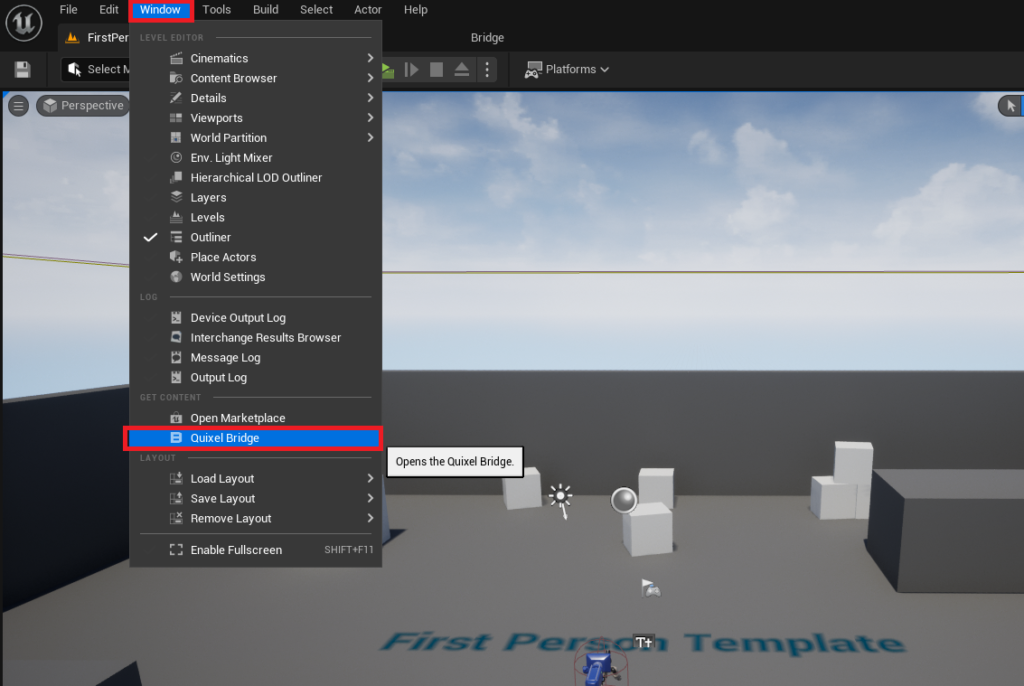
To initiate the process, developers must first navigate to the "Window" tab within the Unreal Engine editor’s main menu. From the dropdown options, selecting "Quixel Bridge" will launch the integrated application. Quixel Bridge serves as a comprehensive asset management tool, providing access not only to MetaHumans but also to the vast Quixel Megascans library, which includes surfaces, 3D assets, decals, and more.
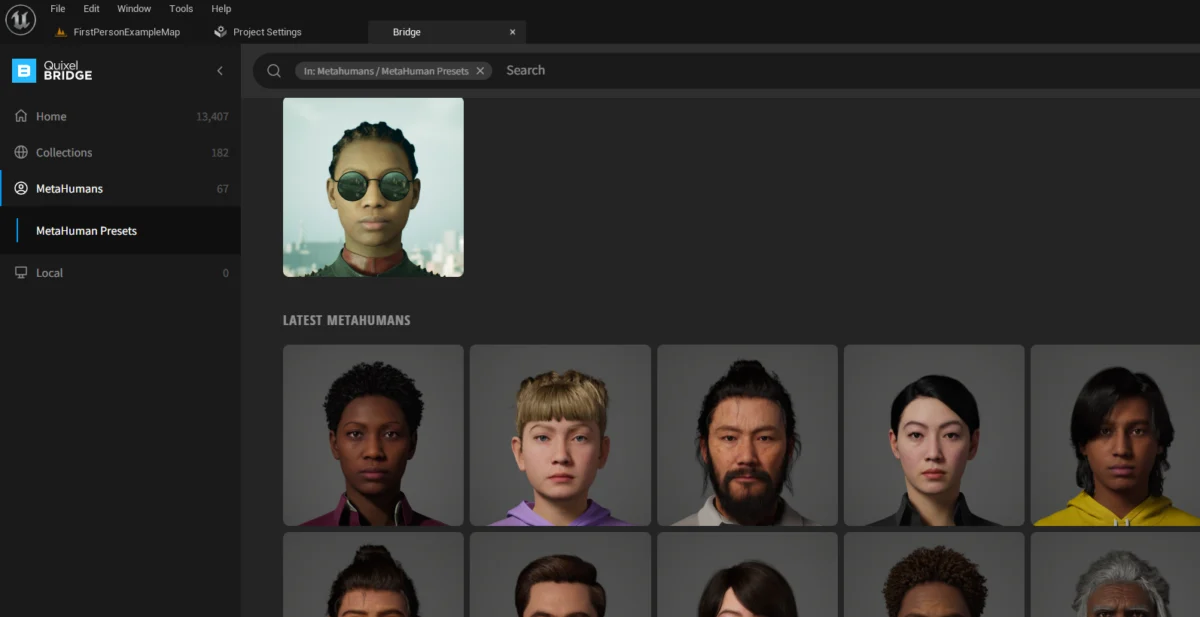
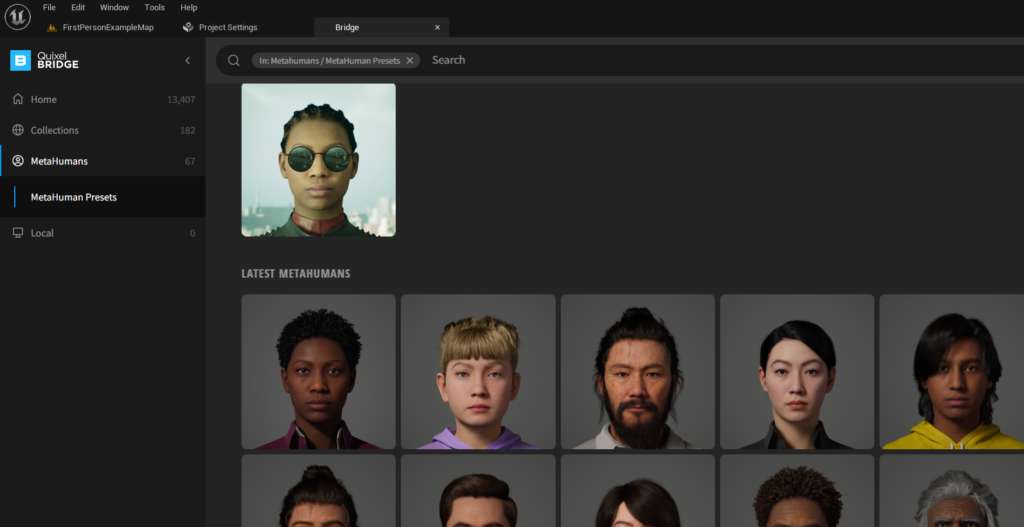
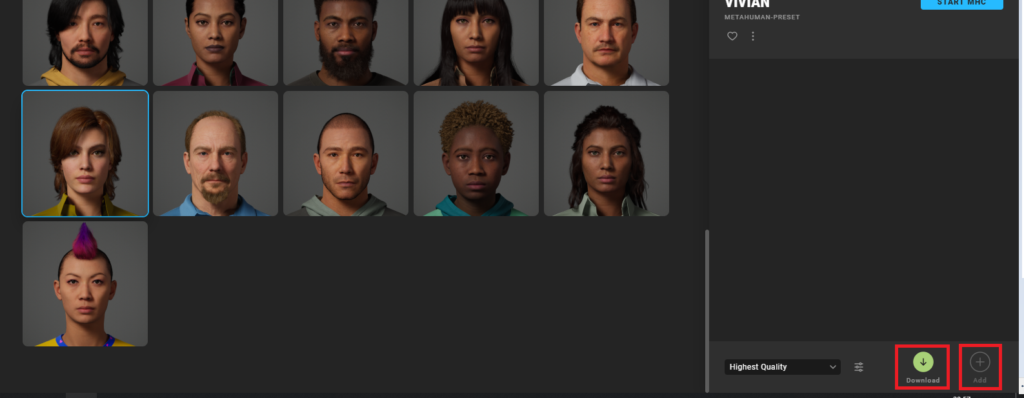
Upon opening Quixel Bridge, users will observe several distinct tabs. The crucial step for MetaHuman integration is to click the dedicated "MetaHumans" tab. This action filters the extensive Quixel library to display only the preconfigured MetaHuman characters available for download and use. The interface presents a grid of diverse digital human avatars, showcasing a range of ages, ethnicities, and styles, all rendered with a consistent level of photorealistic detail.
Authentication and Asset Selection
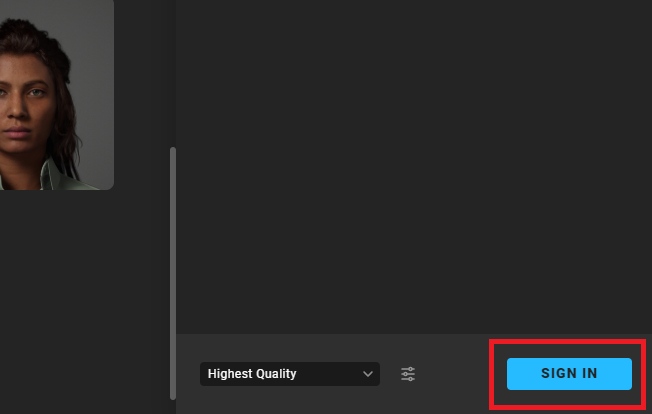
Before any MetaHuman can be downloaded, an authentication step is required. When a user selects one of the avatars in the MetaHuman grid, a "Sign In" button typically appears in the bottom right corner of the Quixel Bridge window. This prompts the user to log in with their Epic Games account. This step is critical because the MetaHuman library, while free to use in projects, is part of the broader Epic Games ecosystem and requires an associated account for asset management and licensing purposes. Successfully logging in grants full access to both the Quixel Megascans and MetaHuman libraries, ensuring compliance with Epic’s terms of service and enabling seamless asset transfer.
The availability of a diverse array of preconfigured MetaHumans offers immediate utility for projects requiring high-quality characters without the need for extensive customization or character design from scratch. This significantly accelerates development timelines, allowing artists and developers to focus on animation, storytelling, and overall project design rather than the laborious process of character creation. The selection ranges from realistic human archetypes to more stylized variations, providing a robust starting point for many creative endeavors.
Adding the Character to Your Project: Download and Integration
Once authenticated and a desired MetaHuman avatar has been chosen, the next step is to download the asset. Clicking on the selected MetaHuman will reveal a "Download" button. The download process will retrieve all the necessary components for the MetaHuman, including its high-resolution meshes, textures, materials, and complex skeletal and facial rigs. Depending on the internet connection speed and the complexity of the MetaHuman (some come with multiple levels of detail, or LODs), this download might take some time due to the substantial file sizes associated with photorealistic assets.
Following a successful download, the "Download" button will transform into an "Add" button. Clicking "Add" initiates the integration of the MetaHuman into the currently open Unreal Engine 5 project. This is where the engine begins to process the asset, import its various components, and prepare it for use within the development environment.

Enabling Essential Plugins and Project Settings
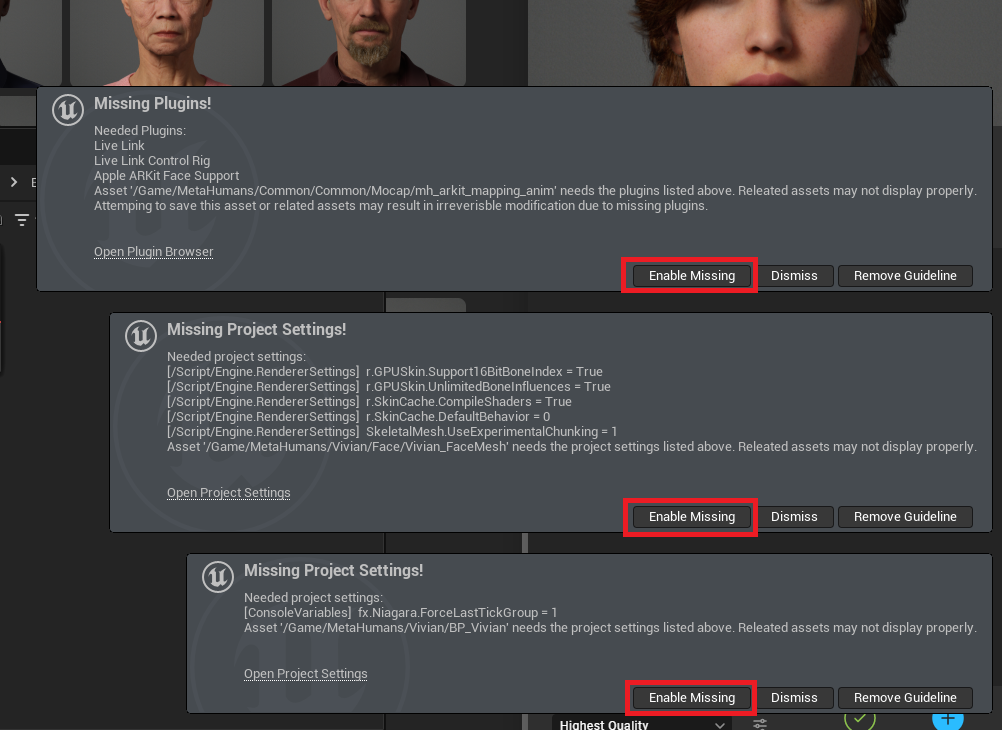
The sophisticated nature of MetaHumans requires specific Unreal Engine plugins and project settings to be enabled for optimal functionality and rendering. As the MetaHuman is imported, the editor will often display notifications, typically in the bottom left corner of the interface, indicating that certain "missing" plugins or project configurations are required. These notifications are crucial and should not be ignored.
To ensure the MetaHuman functions correctly and renders with its intended fidelity, users must press the "Enable Missing" option within these notifications. This action triggers Unreal Engine to automatically activate the necessary plugins—such as the "MetaHuman" plugin itself, "Alembic Groom" for hair simulation, and potentially others related to virtual textures or ray tracing—and adjust relevant project settings. These settings often include configurations for rendering pipelines that are optimized for high-fidelity assets, such as enabling specific virtual texture support or ensuring proper skeletal mesh and animation blueprint settings are in place.
After enabling the missing settings and plugins, Unreal Engine 5 will prompt for a restart. A "Restart Now" button will appear, and it is imperative to click this to apply all the new configurations. Restarting the editor ensures that all newly enabled plugins are properly loaded and that the project settings take effect, allowing the MetaHuman assets to be fully recognized and utilized by the engine. This restart is a standard procedure when major engine configurations or plugin changes are made, guaranteeing a stable and correctly configured development environment.
Locating Your Integrated MetaHuman Blueprint
Upon the editor restarting, the newly imported MetaHuman will be accessible within the project’s content browser, specifically in the "Content Drawer." To locate the MetaHuman, users should navigate into the "MetaHumans" folder, which is automatically created during the import process. Inside this folder, there will be another subfolder named after the specific MetaHuman chosen for download (e.g., "MetaHuman_Name").
Within this specific MetaHuman’s folder, developers will find a collection of assets. The most important asset for immediate use is the Blueprint, identifiable by its "BP_" prefix (e.g., "BPMetaHumanName"). An Unreal Engine Blueprint is a visual scripting system that allows developers to create game elements and logic without writing C++ code. In the case of MetaHumans, this Blueprint encapsulates the entire character: its skeletal mesh, facial rig, hair groom assets, materials, and any associated animation logic. This means that dragging and dropping the "BP" asset into the scene will instantly spawn a fully functional, high-fidelity MetaHuman character, ready for interaction and animation.
The Broader Impact and Implications of MetaHumans
The introduction of the MetaHuman library marks a significant milestone in digital content creation, extending far beyond just game development.
Democratization of High-End Content: Perhaps the most profound impact is the democratization of hyper-realistic digital characters. Historically, creating a character of MetaHuman quality would cost tens of thousands, if not hundreds of thousands, of dollars and months of work from a team of specialized artists. By providing a free, ready-to-use library, Epic Games significantly lowers the barrier to entry for indie developers, students, educational institutions, and small studios. This allows creators to focus their resources and time on innovative gameplay, narrative, and artistic direction, rather than the intricate technicalities of character modeling and rigging.
Efficiency and Speed in Production: For larger studios, MetaHumans offer unparalleled efficiency. They can serve as high-quality placeholders during early production, accelerate prototyping, and provide a solid foundation for unique character designs. The time saved in character creation pipelines can be redirected towards other critical aspects of development, leading to faster iteration cycles and potentially higher overall production quality. In virtual production, MetaHumans can populate virtual sets with believable extras or serve as digital doubles, blurring the lines between physical and digital performances.
Setting New Industry Standards: MetaHumans set a new benchmark for digital human fidelity accessible to a broad audience. This pushes the entire industry forward, encouraging higher quality standards across the board. The advanced rigging and facial animation systems within MetaHumans leverage years of research and development, offering a level of expressiveness that enhances immersion in any interactive or linear experience.
Future of Customization: The MetaHuman Creator: While the pre-built library is powerful, Epic Games’ vision extends further with the MetaHuman Creator. This cloud-streamed application, accessible via a web browser, allows users to sculpt, blend, and customize digital humans from a vast array of scanned human data. It offers intuitive controls for adjusting facial features, body proportions, hair, clothing, and skin tones, providing an almost infinite number of unique digital human variations. The ability to generate custom MetaHumans and then seamlessly export them to Unreal Engine 5 projects through Quixel Bridge completes the ecosystem, offering both speed through pre-sets and unparalleled flexibility for bespoke character design. This tool addresses the need for unique protagonists, antagonists, and supporting characters that define a project’s identity.
Challenges and Considerations: Despite their immense benefits, integrating MetaHumans comes with its own set of considerations. The high fidelity of these assets naturally translates to significant computational demands. Developers must be mindful of performance implications, especially for projects targeting lower-end hardware or requiring large crowds of MetaHumans. Optimizing LODs (Levels of Detail), carefully managing material complexity, and leveraging UE5’s performance features like Nanite and Lumen are crucial for maintaining smooth frame rates. Additionally, while the integration process is streamlined, a basic understanding of Unreal Engine’s content management, Blueprint system, and rendering pipeline is beneficial for maximizing the potential of MetaHumans.
Conclusion
The integration of the MetaHuman library into Unreal Engine 5 represents a transformative leap in digital character creation. By providing access to photorealistic, animation-ready digital humans through a straightforward process via Quixel Bridge, Epic Games has empowered creators across industries. From the initial access through Quixel Bridge, through the essential login and download steps, to the critical enabling of plugins and the final placement of the MetaHuman Blueprint in a project, the workflow is designed for efficiency and accessibility. As the Unreal Engine ecosystem continues to evolve, especially with the maturation of tools like the MetaHuman Creator, the boundaries of what’s possible in real-time digital content creation will undoubtedly expand, fostering a new era of immersive and visually stunning experiences. The availability of fully rigged, ready-to-use MetaHuman blueprints serves not just as a convenience but as a catalyst for innovation, enabling creators to bring their visions to life with unprecedented realism and ease.
About the Author








