In the intricate world of modern game development, particularly within powerful engines like Unreal Engine 5 (UE5), developers frequently navigate a crucial dichotomy: the rapid prototyping and visual clarity offered by Blueprint scripting versus the raw performance and extensive capabilities of C++ programming. While Blueprints empower designers and programmers alike with an intuitive, node-based visual scripting interface, their inherent overhead can, in demanding scenarios, lead to performance bottlenecks that hinder optimization efforts. Conversely, writing entire game systems in C++ offers unparalleled speed and access to low-level engine features but often necessitates a complete restructuring of projects, potentially disrupting existing Blueprint-centric workflows. A pivotal solution to this challenge, seamlessly integrating the best of both worlds, lies in the strategic implementation of C++ Blueprint Function Libraries. These libraries serve as a robust bridge, allowing developers to harness the computational efficiency and advanced functionalities of C++ code while maintaining effortless integration into existing Blueprint graphs.
The necessity for such a hybrid approach is increasingly evident as game projects grow in complexity and scale. Blueprints, while excellent for scripting game logic, UI interactions, and sequential events, can become less efficient when handling computationally intensive tasks such as complex mathematical calculations, large-scale data processing, or high-frequency operations. When Blueprint code reaches its optimization limits, a common point of frustration for development teams, the traditional alternatives have been stark. One option is a full C++ rewrite, a time-consuming and resource-intensive undertaking that risks introducing new bugs and resetting development timelines. Another is to simply accept the performance hit, which is rarely a viable option for delivering high-quality, responsive user experiences. This is where C++ Blueprint Function Libraries emerge as an elegant and powerful middle ground, offering a surgical approach to performance enhancement without sacrificing workflow agility.
Unreal Engine’s architecture has long championed this interoperability. Since its early iterations, with Kismet in UE3 and the subsequent evolution to Blueprint in UE4 and UE5, Epic Games has consistently aimed to provide tools that cater to diverse skill sets within a development team. The C++ Blueprint Function Library is a testament to this philosophy, acting as a built-in Unreal Engine class designed specifically to expose C++ functions for use within both C++ modules and, critically, Blueprint graphs. This means that resource-intensive Blueprint nodes can be refactored and reimplemented in optimized C++ code, which can then be called directly from Blueprints, retaining the visual scripting interface while gaining significant speed improvements. Moreover, C++ features that lack direct Blueprint node equivalents—such as specific platform APIs, advanced memory management techniques, or highly specialized third-party library integrations—can be encapsulated within these libraries, making them accessible to Blueprint-only parts of a project without complex workarounds.
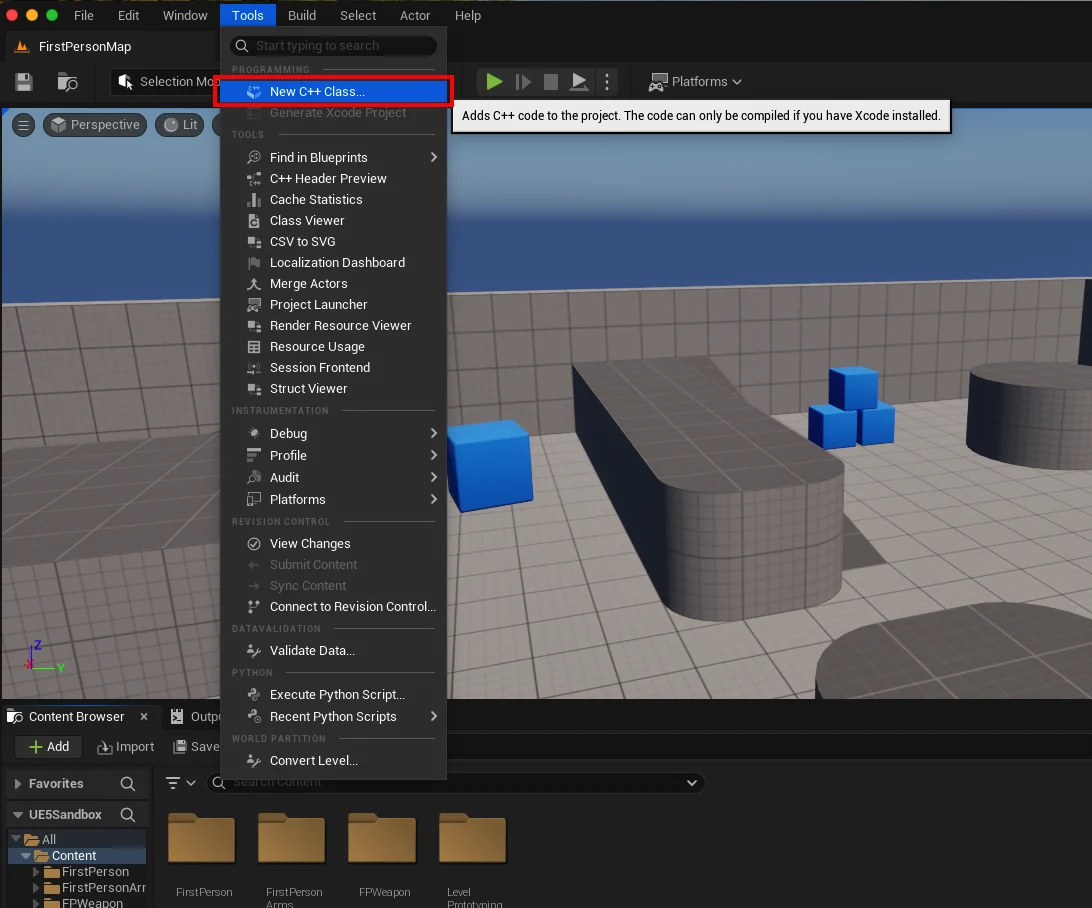
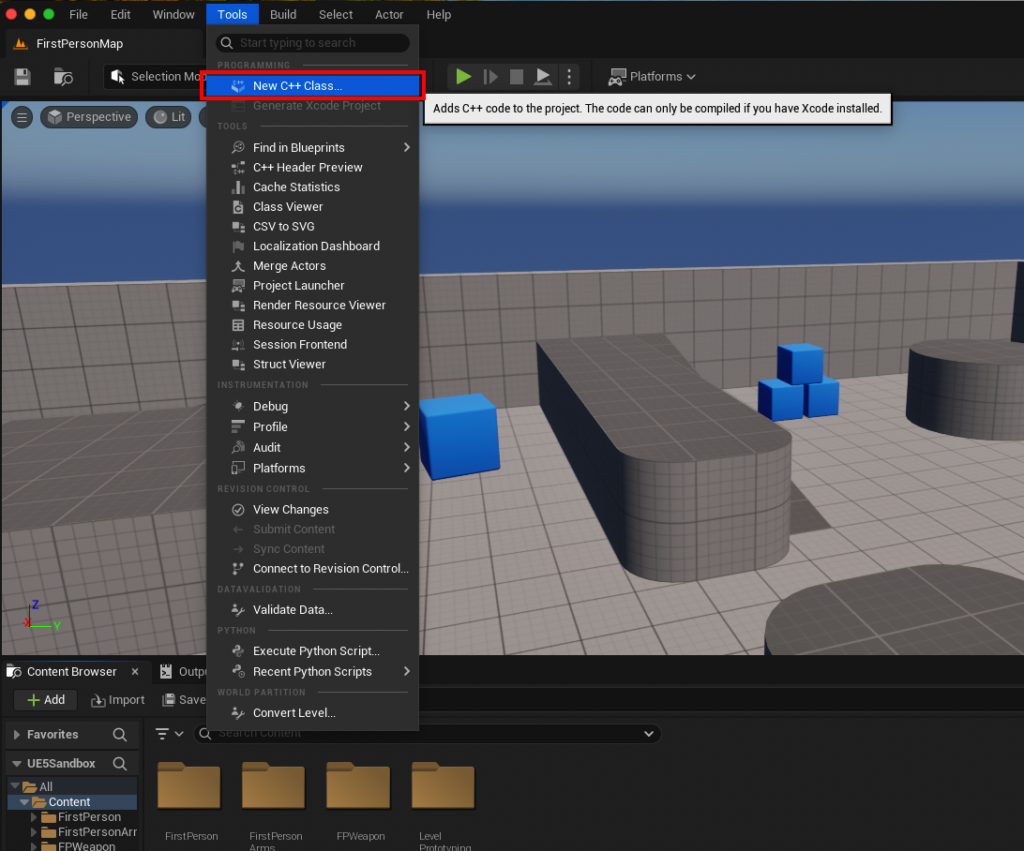
The process of establishing a C++ Blueprint Function Library begins with ensuring the project is C++ enabled, a fundamental requirement for any C++ integration. For projects initiated solely as Blueprint projects, this typically involves adding a new C++ class, which prompts the engine to set up the necessary C++ development environment. Integrated Development Environments (IDEs) such as Visual Studio on Windows, Xcode on macOS, or Visual Studio Code with appropriate extensions, are prerequisites for compiling C++ code. Without an IDE, the engine will guide the user through the installation process. Once the C++ environment is confirmed, developers can initiate the creation of a new C++ class through the Unreal Editor’s ‘Tools’ dropdown menu.
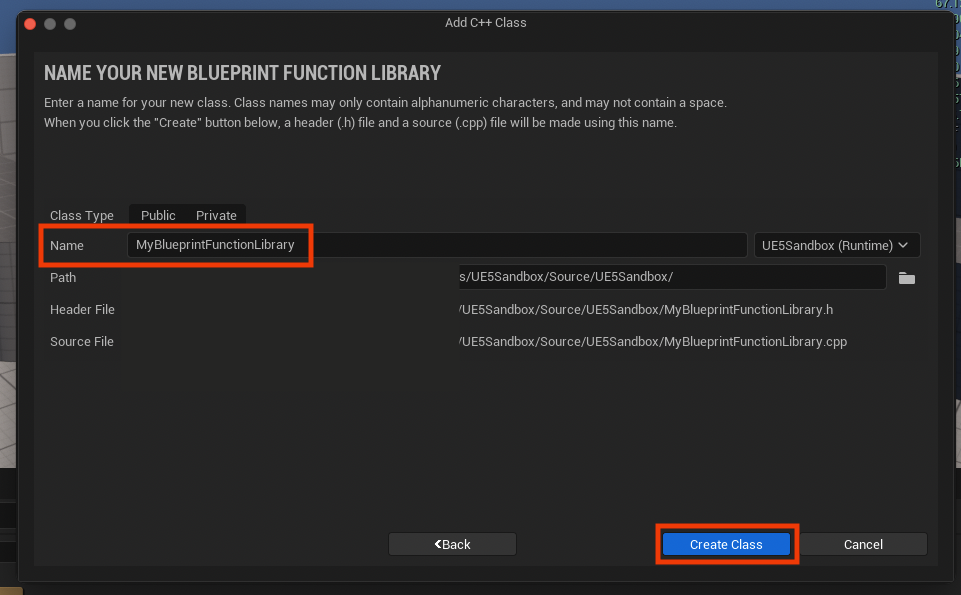
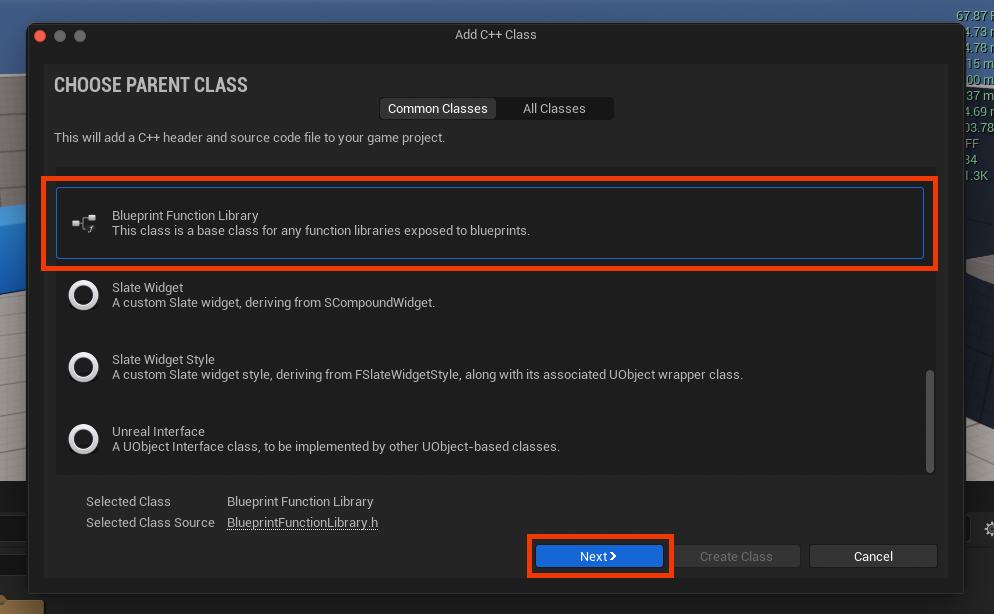
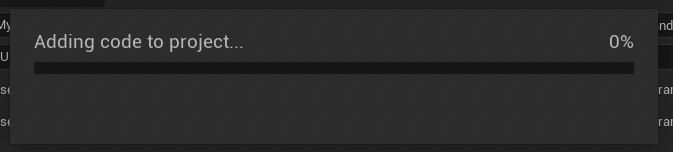
When prompted to select a "Parent Class," the crucial step is to choose "Blueprint Function Library." This selection informs the engine that the new C++ class will inherit from UBlueprintFunctionLibrary, the base class that provides the framework for exposing static C++ functions to Blueprints. Naming conventions are important here; adhering to Unreal Engine’s standards, a clear name with PascalCase (e.g., MyBlueprintFunctionLibrary) ensures readability and consistency across the project. Upon creation, the engine compiles the new C++ files, generating a .h header file for declarations and a .cpp source file for implementation. This compilation phase is vital, as it integrates the new C++ module into the project, making it ready for code development.
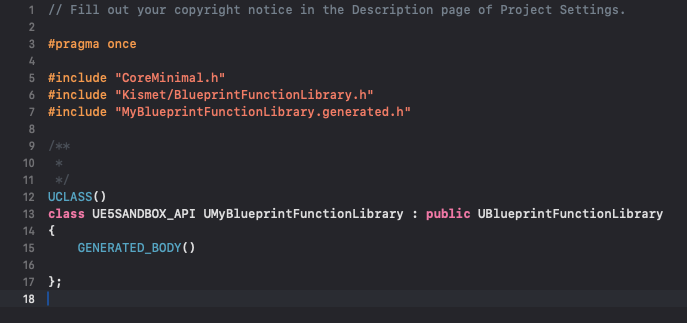
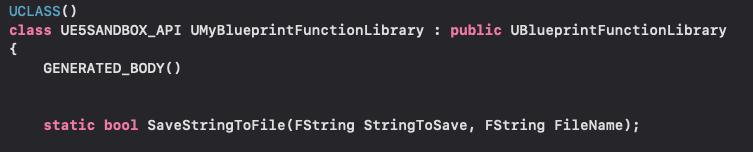
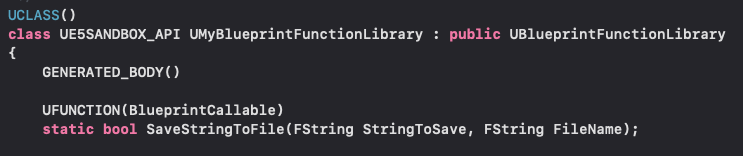
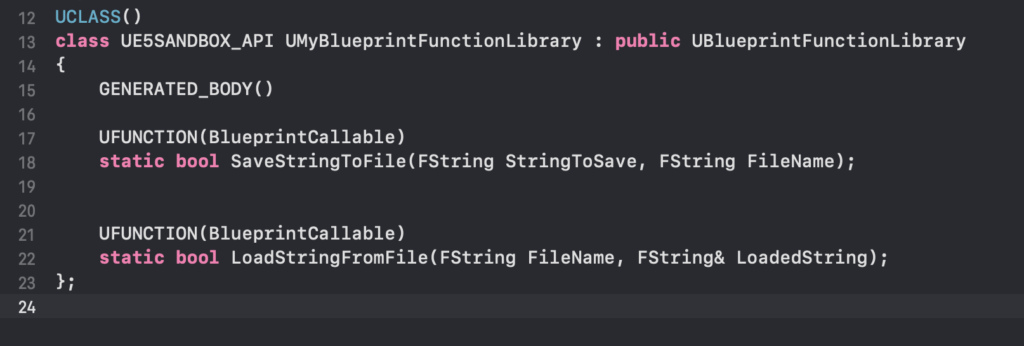
Inside the chosen IDE, developers will find the generated .h and .cpp files. The header file initially contains basic includes and class inheritance. To expose functions to Blueprints, specific modifications are required. The most critical aspect is declaring functions as static within the header file. The static keyword ensures that the function can be called directly without needing an object instance, making it immediately accessible throughout any Blueprint graph. Furthermore, each function intended for Blueprint exposure must be prefixed with the UFUNCTION macro. This macro, a cornerstone of Unreal Engine’s reflection system, signals to the engine’s build tool (Unreal Header Tool, or UHT) that the function should be exposed to the editor and Blueprints. The BlueprintCallable specifier within the UFUNCTION macro explicitly designates the function for Blueprint use.

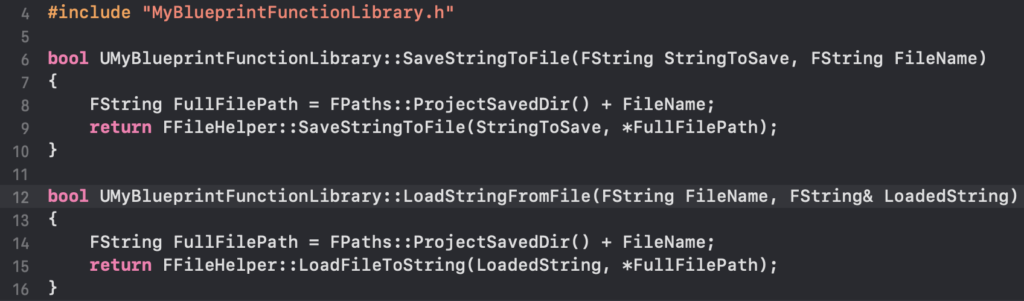
For illustrative purposes, consider a practical application like a robust file read/write system. While Blueprints offer basic file operations, a C++ implementation can provide greater control, error handling, and performance, especially for frequent or large data transactions. A C++ Blueprint Function Library could include two static functions: SaveStringToFile and LoadStringFromFile. The SaveStringToFile function would take a string and a file path as input, returning a boolean indicating success or failure. The LoadStringFromFile function would take a file path and output the content as a string, also returning a boolean for success. These functions would leverage Unreal Engine’s FFileHelper class within their .cpp implementations, providing efficient and robust file system interactions that are then effortlessly accessible from Blueprints. Once these functions are coded and the project is recompiled, the Unreal Editor, upon relaunch, will recognize and integrate them.
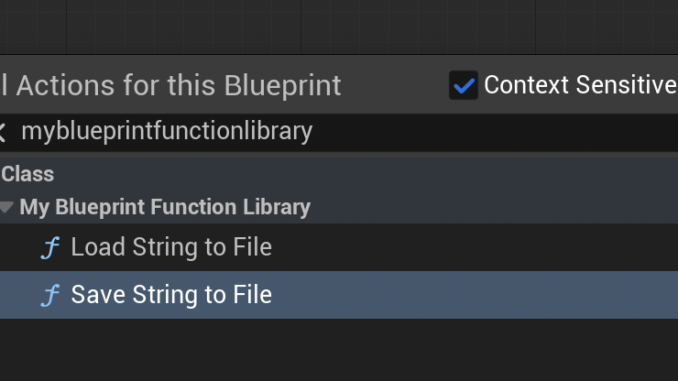
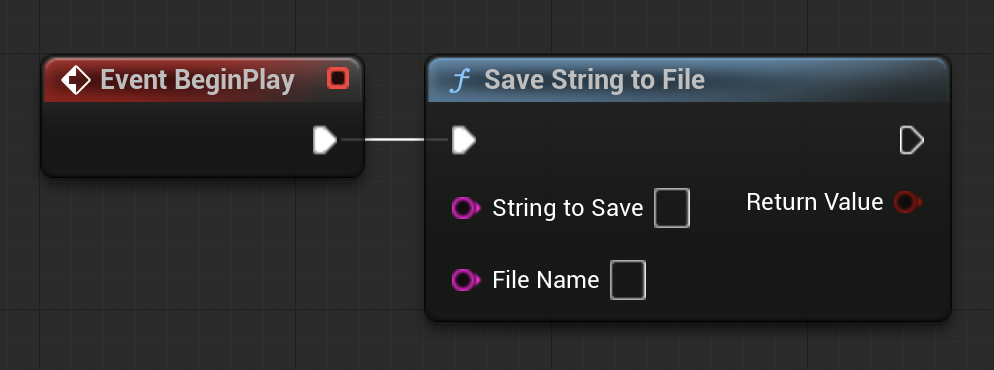
The immediate benefit of this approach becomes apparent when opening any Blueprint editor. By simply searching for the name of the newly created Blueprint Function Library (e.g., "MyBlueprintFunctionLibrary"), developers will find the C++ functions (SaveStringToFile, LoadStringFromFile) listed as callable nodes. This seamless exposure allows Blueprint programmers to drag and drop these C++-backed nodes into their graphs, connecting them with existing Blueprint logic. For instance, a BeginPlay event in a level Blueprint could trigger SaveStringToFile to store game state or user preferences, or LoadStringFromFile to retrieve configuration data. Demonstrations typically show a string like "Save Test" being written to a textfile-test.txt in the project’s /Saved folder, verifying the write operation. Similarly, a pre-populated loadtest.txt file containing "Loading Test" can be read using LoadStringFromFile and displayed on screen via a Print String node, confirming successful data retrieval.
The implications of C++ Blueprint Function Libraries extend far beyond simple file I/O. They represent a fundamental shift in how complex game development can be structured in Unreal Engine. Performance Improvements are often the primary driver. Operations that might take milliseconds or even seconds in pure Blueprint, due to interpreted execution and node overhead, can be reduced to microseconds in optimized C++. This is critical for systems demanding high frame rates, such as AI pathfinding, complex physics calculations, procedural generation algorithms, or large-scale data manipulations. For example, a developer might implement a custom raycasting function in C++ to avoid Blueprint’s overhead for frequent collision checks, or create a sophisticated inventory management system that rapidly processes item data.
Beyond raw speed, these libraries unlock Enhanced Functionality. Many advanced engine features, external libraries, or low-level operating system interactions are primarily exposed through C++. Without a C++ Blueprint Function Library, integrating such features into Blueprint-heavy projects would be cumbersome, requiring custom C++ classes and components, or even significant engine modifications. By encapsulating these functionalities within a library, developers democratize access, allowing designers and technical artists who primarily work in Blueprints to utilize powerful C++ tools without delving into the C++ codebase directly. This fosters greater collaboration and innovation across multidisciplinary teams.
Furthermore, C++ Blueprint Function Libraries contribute significantly to Improved Workflow and Scalability. In large projects, maintaining complex Blueprint graphs can become challenging. By offloading intricate or performance-critical logic to C++ functions, Blueprint graphs can become cleaner, more focused, and easier to debug. This modularity also aids in Maintainability, as C++ code, when well-structured, can be more easily tested, version-controlled, and updated than sprawling Blueprint networks. It encourages a hybrid development model where Blueprints handle high-level game flow and rapid iteration, while C++ underpins the core engine logic and performance-sensitive systems.
Industry experts and the development philosophy espoused by Epic Games consistently emphasize the value of this integration. As projects push the boundaries of real-time rendering and interactive experiences, the ability to selectively optimize code paths without disrupting the broader development cycle becomes indispensable. The C++ Blueprint Function Library is not merely a technical workaround; it is a strategically designed feature that acknowledges the diverse needs of modern game development teams. It enables developers to create highly performant, feature-rich games while maintaining the flexibility and rapid iteration capabilities that have made Unreal Engine a dominant force in the industry.
In conclusion, understanding and implementing C++ Blueprint Function Libraries in Unreal Engine 5 is a critical skill for any developer aiming to push the boundaries of their projects. These libraries offer tangible performance improvements, unlock hidden C++ functionality, and provide a streamlined approach to hybrid development. They empower teams to leverage the strengths of both C++ and Blueprints, leading to more robust, scalable, and ultimately, more immersive game experiences. As the demands on game engines continue to grow, the seamless integration provided by these function libraries will remain a cornerstone of efficient and high-performance Unreal Engine development.
About the Author