
Unreal Engine 5 developers are increasingly leveraging C++ Blueprint Function Libraries as a strategic solution to overcome performance bottlenecks and unlock advanced functionalities within their projects. This integrated approach allows development teams to harness the raw speed and efficiency of C++ for computationally intensive tasks while maintaining the flexibility and rapid iteration capabilities of Unreal Engine’s visual scripting system, Blueprint. The method offers a pragmatic alternative to extensive C++ refactoring, ensuring smoother workflows and superior game performance.
The Evolution of Scripting in Game Development and Unreal Engine’s Dual Approach
The landscape of game development has long been characterized by a dynamic interplay between high-level scripting languages and low-level compiled code. Historically, game engines provided limited visual scripting options, forcing developers into complex C++ (or similar) environments for almost all game logic. This presented a steep learning curve and slowed down prototyping. Unreal Engine, particularly since UE4, revolutionized this with Blueprint, a powerful visual scripting system designed to empower designers and artists to implement game logic without writing a single line of code. Blueprint quickly became celebrated for its accessibility, rapid prototyping capabilities, and intuitive visual interface, fostering an environment where ideas could be quickly translated into interactive experiences.
However, as projects grow in scope and complexity, the inherent trade-offs of an interpreted visual scripting language become apparent. While Blueprint excels in handling event-driven logic, UI interactions, and general game flow, it introduces performance overhead for operations requiring significant computational power, such as complex mathematical calculations, custom physics simulations, or extensive data processing. Developers frequently encounter a "tipping point" where certain Blueprint graphs, despite being logically sound, begin to impact frame rates or introduce noticeable delays, necessitating optimization. A complete restructuring of an existing Blueprint-heavy project into pure C++ is often a daunting, time-consuming, and resource-intensive endeavor, potentially disrupting established development pipelines and reintroducing the very accessibility barriers Blueprint sought to remove.
Furthermore, C++ offers direct access to the engine’s underlying architecture and a vast array of system-level functionalities that may not have direct Blueprint nodes available. This includes advanced memory management, multi-threading capabilities, specific operating system interactions, or integration with external libraries. The inability to access these features directly through Blueprint can limit a project’s potential, forcing developers to seek workarounds or compromise on desired functionalities.
The Strategic Solution: C++ Blueprint Function Libraries
It is within this context that C++ Blueprint Function Libraries emerge as a critical tool. These libraries are a built-in Unreal Engine class designed to bridge the gap between the compiled performance of C++ and the visual accessibility of Blueprint. They allow developers to encapsulate optimized C++ code into callable functions that can be seamlessly invoked from any Blueprint graph, offering a "best of both worlds" scenario.
The primary benefits of integrating C++ Blueprint Function Libraries are multi-fold:
- Performance Enhancement: By offloading performance-critical calculations and logic from Blueprint to C++, developers can achieve significant speed improvements. C++ code, being compiled directly to machine code, executes much faster than Blueprint’s interpreted bytecode, often resulting in orders of magnitude greater efficiency for intensive operations.
- Extended Functionality: These libraries provide a conduit to utilize any C++ feature or external library within Unreal Engine, irrespective of whether a corresponding Blueprint node exists. This unlocks a new realm of possibilities for custom game mechanics, system integrations, and highly specialized operations that would otherwise be impractical or impossible in Blueprint alone.
- Seamless Integration: The design of Blueprint Function Libraries ensures that the C++ functions appear as native nodes within the Blueprint editor. This allows Blueprint-focused designers to utilize powerful C++ backends without needing to understand the underlying C++ code, preserving their workflow and productivity.
- Modularity and Maintainability: Encapsulating complex logic within C++ libraries promotes cleaner, more modular code. Instead of sprawling Blueprint graphs, developers can create concise Blueprint nodes that call robust C++ functions, improving readability, debugging, and long-term project maintainability.
Technical Implementation and Workflow: A Step-by-Step Guide
Integrating C++ Blueprint Function Libraries into an Unreal Engine 5 project involves a structured process, beginning with fundamental prerequisites and moving through code creation and exposure.
Prerequisites for Integration
Before diving into code, developers need a basic understanding of C++ programming principles within the Unreal Engine context. This includes familiarity with Unreal Engine’s object model, macros, and common C++ data types. Crucially, a suitable Integrated Development Environment (IDE) must be installed and configured. Popular choices include:
- Visual Studio (Windows): The industry standard for C++ development on Windows, offering robust debugging and project management features.
- Xcode (macOS): Apple’s IDE, essential for C++ development on macOS platforms.
- Rider for Unreal Engine (Cross-platform): A powerful alternative from JetBrains, known for its superior code analysis and navigation, compatible with both Windows and macOS.
These IDEs are vital for compiling C++ code into the Unreal Engine project; without one, the engine will prompt installation.
Establishing a C++ Enabled Project
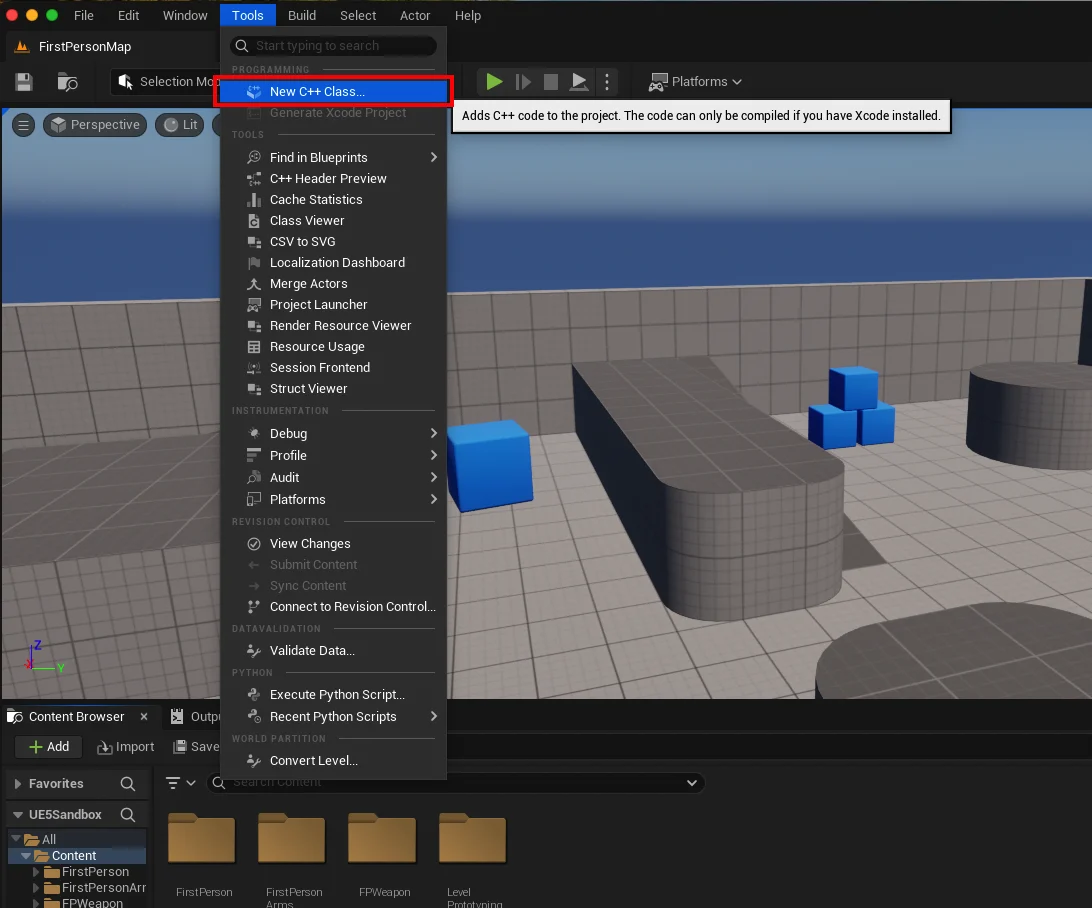
The first step in creating a C++ Blueprint Function Library is to ensure the Unreal Engine project is C++ enabled. This is easily verifiable by navigating to the "Tools" dropdown menu at the top of the Unreal Editor and selecting "New C++ Class." If the project is Blueprint-only, this action will prompt the engine to add the necessary C++ project files and compile them, transitioning the project into a hybrid C++/Blueprint environment. This initial compilation process is critical as it sets up the project structure for C++ development.
Creating the Function Library
Once the project is C++ enabled, the actual Blueprint Function Library can be created.

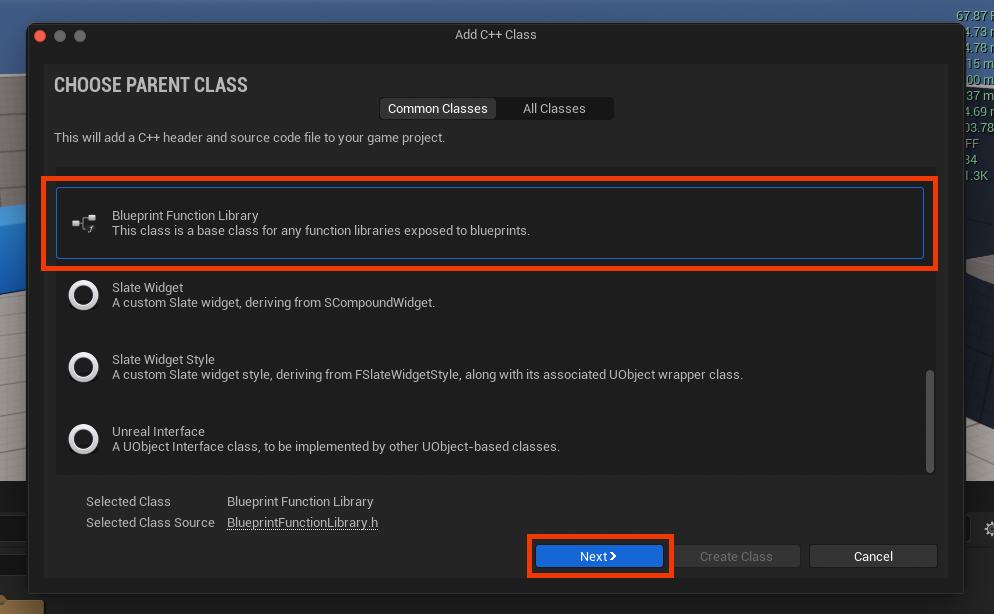
- Select Parent Class: Within the "New C++ Class" dialog, developers must scroll through the list of parent classes and select "Blueprint Function Library." This class serves as the foundation for the custom C++ functions, providing the necessary framework for Blueprint integration.
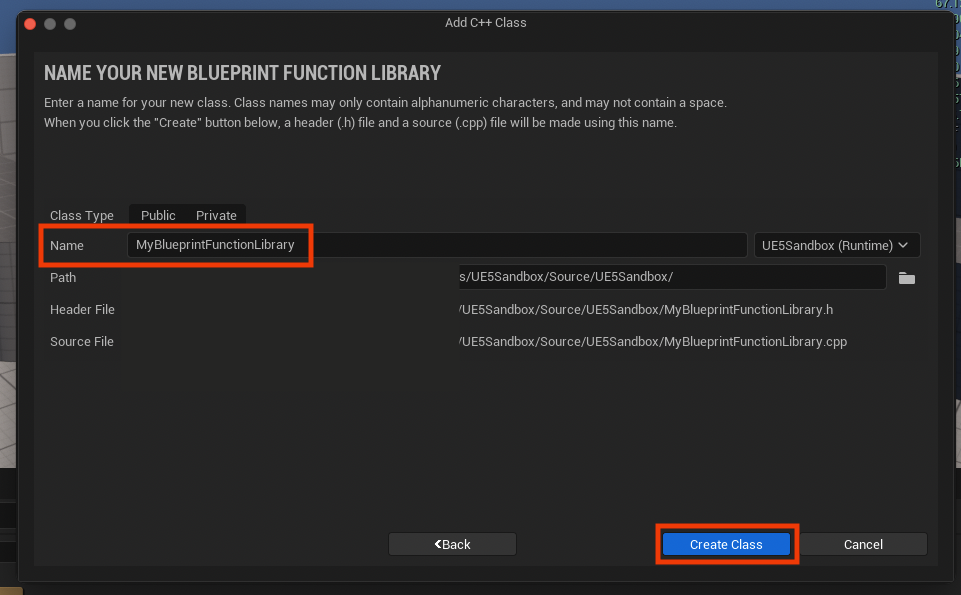
- Naming Convention: A clear and descriptive name is crucial for the new class, adhering to Unreal Engine’s naming conventions (e.g.,
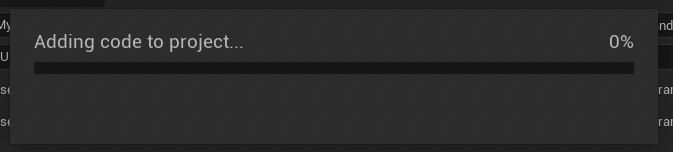
MyBlueprintFunctionLibrary,GameSaveLoadLibrary). Using PascalCase (capitalizing the first letter of each word) enhances readability and consistency. - Initial Compilation: After naming the class and clicking "Create Class," Unreal Engine compiles the new C++ files. This step generates the
.h(header) and.cpp(source) files for the new library and integrates them into the project’s build system. Developers must wait for this compilation to complete before proceeding, as any subsequent code changes will rely on these newly generated files.
Crafting C++ Functions for Blueprint Exposure
With the basic library structure in place, developers can now add their custom C++ functions. This involves modifying the generated header and source files within the chosen IDE.
-
Header File (
.h): The header file (e.g.,MyBlueprintFunctionLibrary.h) declares the functions that will be exposed to Blueprint.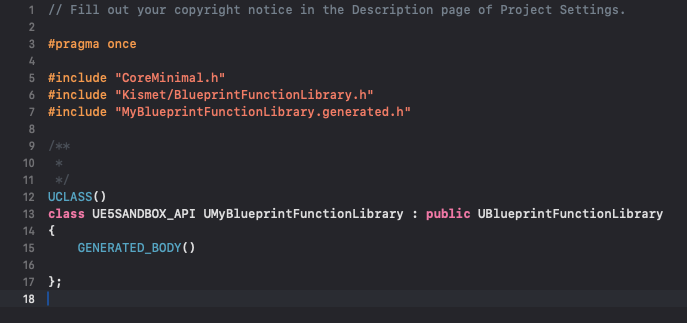
- Static Keyword: A crucial aspect is the use of the
statickeyword in the function declaration. Static functions belong to the class itself, not to an instance of the class. This means they can be called directly without needing to create an object reference, making them ideal for utility functions accessible globally within Blueprint. - UFUNCTION Macro: The
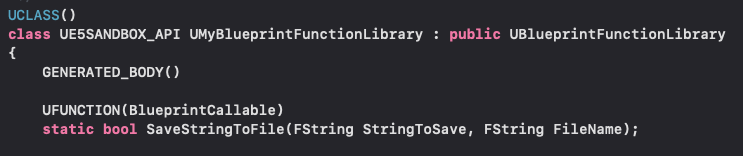
UFUNCTIONmacro is paramount for exposing C++ functions to the Blueprint editor. This macro informs the Unreal Header Tool (UHT) that the function should be reflected in the editor. Key specifiers often used withUFUNCTIONinclude:BlueprintCallable: Makes the function callable from any Blueprint.Category="MyCustomCategory": Organizes the function within the Blueprint editor’s context menu, improving discoverability.DisplayName="My Custom Function Name": Provides a user-friendly name for the node in Blueprint.
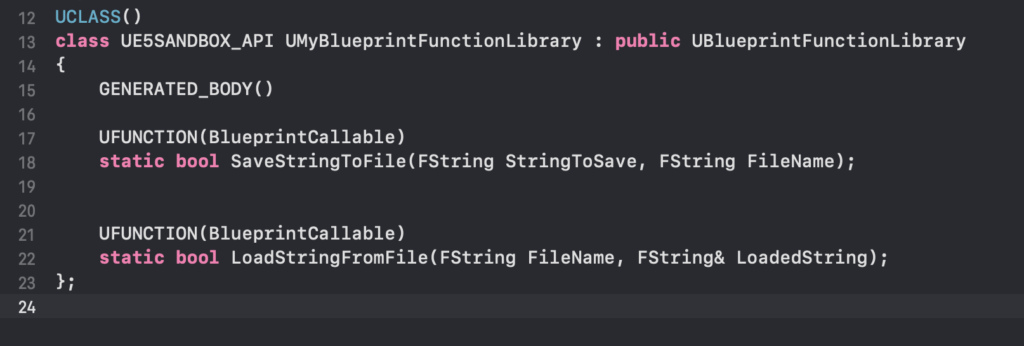
For example, to implement a string save/load system, the header file might include declarations like:
#pragma once #include "CoreMinimal.h" #include "Kismet/BlueprintFunctionLibrary.h" #include "MyBlueprintFunctionLibrary.generated.h" UCLASS() class MYPROJECT_API UMyBlueprintFunctionLibrary : public UBlueprintFunctionLibrary GENERATED_BODY() public: UFUNCTION(BlueprintCallable, Category = "File IO") static bool SaveStringToFile(FString SaveDirectory, FString FileName, FString SaveText, bool bReplaceExisting = false); UFUNCTION(BlueprintCallable, Category = "File IO") static FString LoadStringFromFile(FString LoadDirectory, FString FileName, bool& bOutSuccess); ; - Static Keyword: A crucial aspect is the use of the
-
Source File (
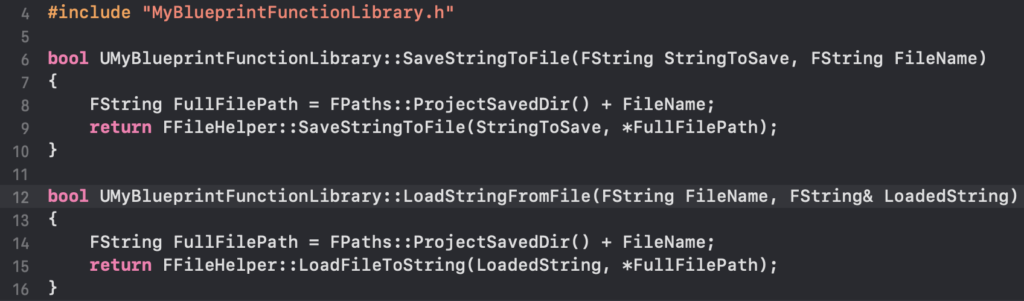
.cpp): The source file (e.g.,MyBlueprintFunctionLibrary.cpp) contains the actual implementation of the declared C++ functions. This is where the core logic and performance benefits are realized. For the string save/load example, theFFileHelperclass from Unreal Engine’s API provides robust functionalities for file operations.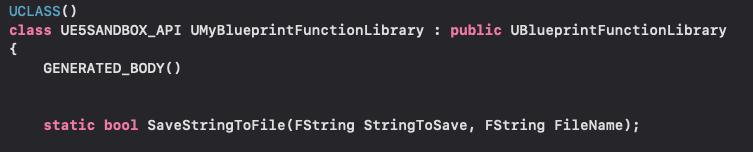
#include "MyBlueprintFunctionLibrary.h"
#include "HAL/FileManager.h" // Required for IFileManager
#include "Misc/FileHelper.h" // Required for FFileHelper

bool UMyBlueprintFunctionLibrary::SaveStringToFile(FString SaveDirectory, FString FileName, FString SaveText, bool bReplaceExisting)

    // ... (Logic for combining path, checking directory, saving file)
    FString AbsoluteFilePath = FPaths::Combine(SaveDirectory, FileName);
    if (!bReplaceExisting && IFileManager::Get().FileExists(*AbsoluteFilePath))

        // Optionally handle error or return false if file exists and replacement is not allowed
        return false;

    return FFileHelper::SaveStringToFile(SaveText, *AbsoluteFilePath);


FString UMyBlueprintFunctionLibrary::LoadStringFromFile(FString LoadDirectory, FString FileName, bool& bOutSuccess)

    // ... (Logic for combining path, checking file existence)
    FString AbsoluteFilePath = FPaths::Combine(LoadDirectory, FileName);
    FString ResultString;
    bOutSuccess = FFileHelper::LoadFileToString(ResultString, *AbsoluteFilePath);
    return ResultString;
This code demonstrates how a powerful C++ library,
FFileHelper, can be exposed through simple Blueprint nodes. After implementing the C++ functions, the project must be compiled again from the IDE. This recompilation integrates the new C++ logic into the engine, making it available for use in the editor.
Integration and Demonstration in Blueprint
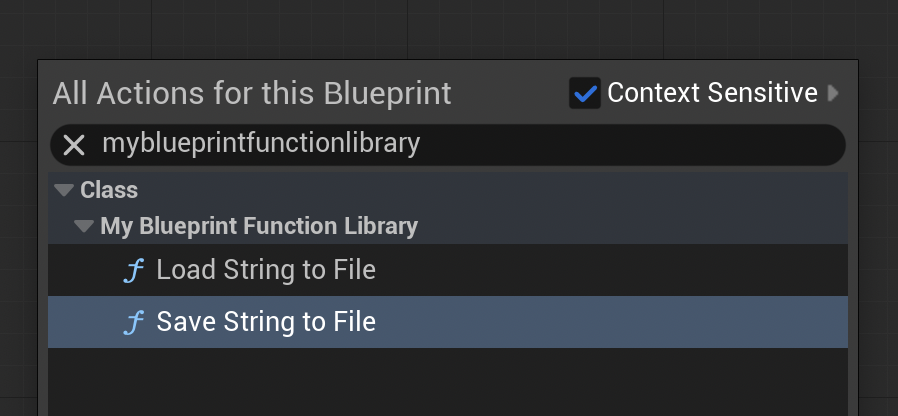
Once the C++ code is compiled, the functions become instantly accessible within any Blueprint editor. By right-clicking in the Blueprint graph and typing the name of the function library or the specific function, the custom C++ nodes will appear alongside native Blueprint nodes.
Real-World Application: File I/O Example
To illustrate the functionality, consider the previously defined SaveStringToFile and LoadStringFromFile functions.
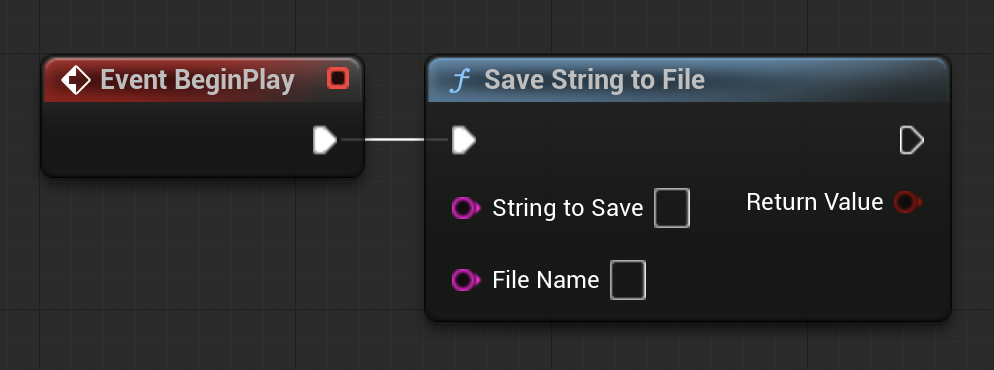
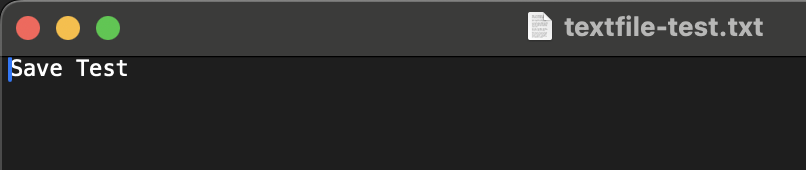
- Saving Data: In a Level Blueprint, for instance, a
BeginPlayevent can trigger theSaveStringToFilenode. Developers can input a string (e.g., "Save Test") and a file name (e.g., "textfile-test.txt"). Upon playing the project in the editor, the C++ function executes, creating the specified file within the project’s/Saveddirectory and writing the string into it. This demonstrates a seamless way to implement persistent data saving without complex Blueprint graphs. - Loading Data: Similarly, to demonstrate
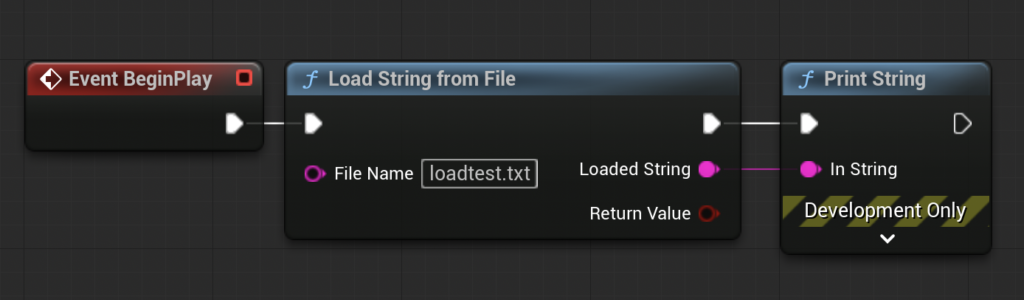
LoadStringFromFile, a text file (e.g., "loadtest.txt") can be manually created in the/Savedfolder with content like "Loading Test." ABeginPlayevent can then call theLoadStringFromFilenode, providing the file path. The output string from this node can be connected to aPrint Stringnode. When the project runs, the C++ function efficiently reads the file, and the "Loading Test" string is displayed on the screen, verifying the successful retrieval of data.
These demonstrations underscore the power of C++ Blueprint Function Libraries: complex, performance-critical operations are abstracted behind simple, intuitive Blueprint nodes, empowering non-programmers to leverage advanced functionalities.
Broader Implications and Industry Impact
The strategic use of C++ Blueprint Function Libraries has significant implications for modern game development, particularly within the Unreal Engine ecosystem.
Performance and Scalability: The ability to selectively optimize critical sections of code in C++ addresses one of Blueprint’s primary limitations. This allows development teams to build large, ambitious titles with complex systems that might otherwise struggle with performance if entirely implemented in Blueprint. It enhances the scalability of projects, ensuring that performance remains robust even as features are added and game worlds become more detailed.
Empowering Diverse Teams: This hybrid approach fosters better collaboration between C++ programmers and Blueprint-focused designers and artists. C++ programmers can develop high-performance, robust back-end systems and expose them as user-friendly Blueprint nodes. Designers can then integrate these powerful functionalities into their game logic without delving into C++ code, accelerating iteration times and reducing dependencies. This division of labor allows each team member to work within their expertise, maximizing productivity and creative output.
Access to Cutting-Edge Features: Unreal Engine is constantly evolving, with new C++ features and integrations often preceding Blueprint node availability. C++ Blueprint Function Libraries provide an immediate pathway for developers to access and utilize these new capabilities, staying at the forefront of engine advancements. This is particularly relevant for integrating third-party SDKs, custom hardware interfaces, or novel computational algorithms.
Maintainability and Debugging: While C++ development generally requires more rigorous attention to detail, the modular nature of Blueprint Function Libraries can paradoxically improve overall project maintainability. By consolidating complex logic into well-tested C++ functions, Blueprint graphs become simpler and less prone to visual clutter, making them easier for designers to understand and modify. When issues arise, the problem can often be narrowed down to either the C++ library (handled by programmers) or the Blueprint logic (handled by designers), streamlining the debugging process.
Future Trends: Epic Games continues to invest heavily in refining the C++/Blueprint interoperation, recognizing its importance to the engine’s versatility. Tools like UFUNCTION macros and the robust reflection system are continuously improved, solidifying this hybrid workflow as a cornerstone of Unreal Engine development. As game complexity increases, the demand for such flexible and performant development paradigms will only grow.

Conclusion
C++ Blueprint Function Libraries represent an indispensable tool for Unreal Engine 5 developers striving for optimal performance, expanded functionality, and efficient project workflows. By strategically integrating compiled C++ code with the accessible visual scripting of Blueprint, teams can overcome inherent limitations, empower diverse skill sets, and unlock the full potential of the Unreal Engine. This hybrid development methodology is not merely a workaround but a sophisticated strategy for building high-quality, performant, and scalable interactive experiences in the modern era of game development.
Further Reading
- Official blueprint function library documentation from Epic Games
- Click here to read more of our C++ guides for Unreal Engine
About the Author








