
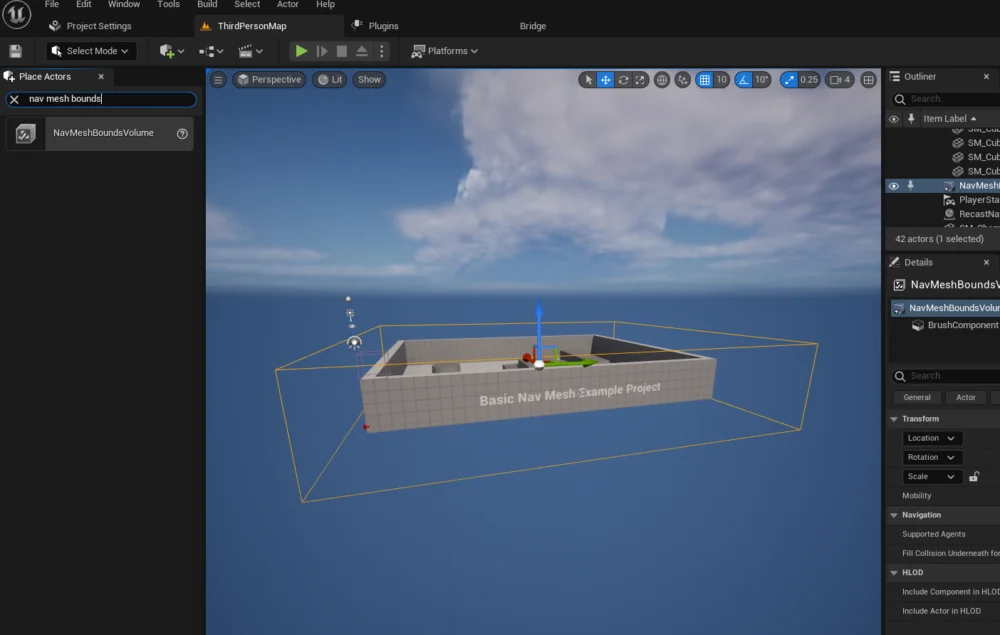
Modern video games frequently feature artificial intelligence (AI) controlled characters, integral to enriching scene atmosphere, providing dynamic gameplay, and creating challenging interactions for players. The implementation of such intelligent agents within advanced development platforms like Unreal Engine 5 (UE5) hinges on two fundamental components: a generated navigation mesh (NavMesh) that defines traversable areas, and a properly configured AI character with integrated navigation logic. While these steps are designed to be intuitive, meticulous setup is crucial to avoid common pitfalls that can hinder AI performance and player immersion.

The evolution of artificial intelligence in video games represents a journey from rudimentary, script-driven routines to sophisticated, reactive systems capable of complex decision-making and environmental interaction. Early game AI often relied on predefined paths or simple state machines, leading to predictable and often exploitable enemy behaviors. With the advent of 3D environments and more powerful hardware, the need for robust pathfinding solutions became paramount. This necessity gave rise to the navigation mesh, or NavMesh, a data structure that fundamentally changed how AI characters perceive and move through their virtual worlds. Unlike older grid-based pathfinding algorithms that struggled with varying terrain heights and complex geometry, a NavMesh intelligently represents the walkable surfaces within a 3D space, allowing AI agents to navigate fluidly and realistically across diverse terrains, up slopes, and around complex obstacles.
Unreal Engine 5 stands at the forefront of game development technology, offering a comprehensive suite of tools that democratize the creation of highly detailed and interactive experiences. Its built-in navigation system, leveraging the power of NavMesh, is a testament to this philosophy, simplifying what was once a complex, code-intensive task into an accessible, visually driven process. This approach not only accelerates development cycles but also empowers a broader range of creators, from independent developers to large studios, to integrate sophisticated AI into their projects without needing deep expertise in advanced algorithmic programming. The impact on player experience is profound; well-implemented AI navigation enhances realism, provides believable challenges, and contributes significantly to the overall immersion, preventing the jarring breaks in continuity that often occur when AI characters exhibit unnatural or "stuck" behaviors. Industry analysts consistently report that player satisfaction is directly correlated with the quality and responsiveness of in-game AI, underscoring the critical importance of robust navigation systems.
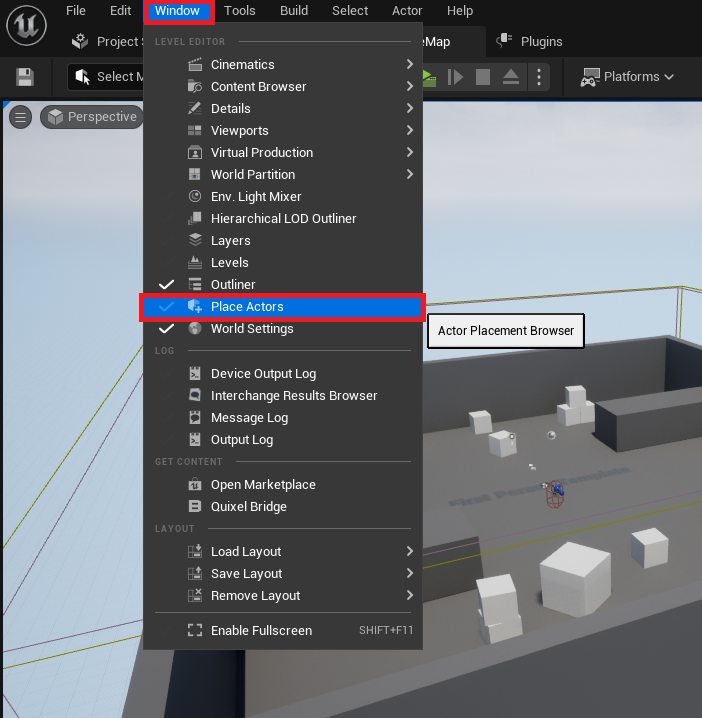
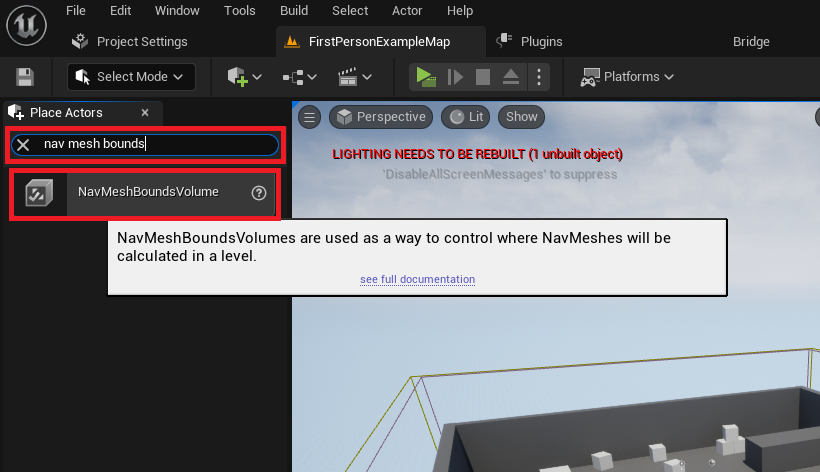
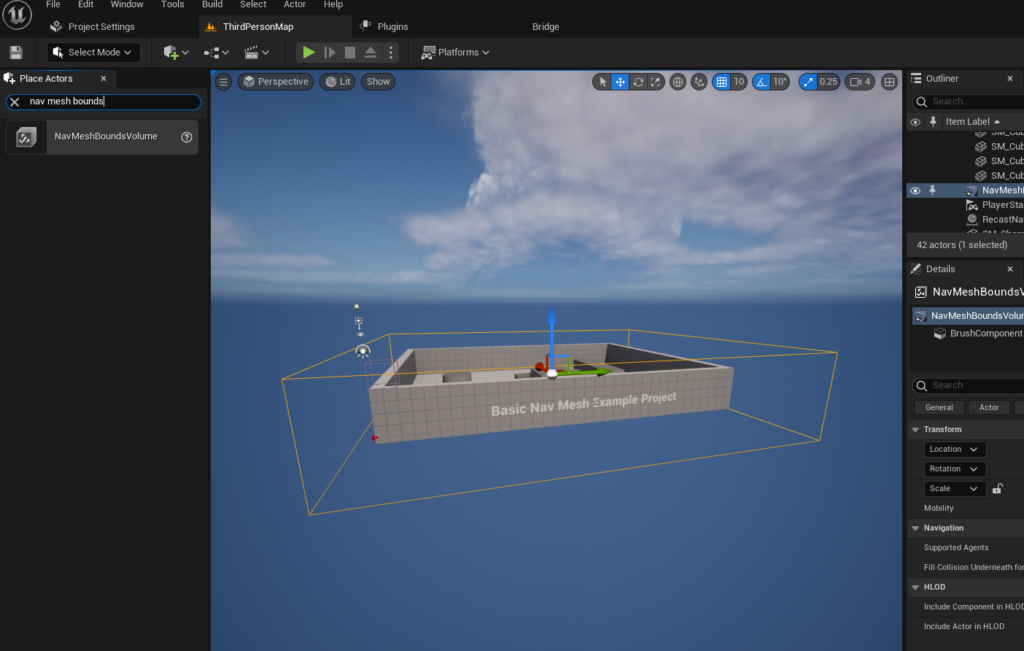
The initial phase of integrating AI navigation into an Unreal Engine 5 level begins with defining the physical boundaries within which AI characters can operate. This process is initiated by accessing the "Place Actors" window within the UE5 editor, a versatile interface that serves as the gateway for spawning a wide array of basic objects and interactive volumes into the digital landscape. From this panel, developers locate and introduce the NavMeshBoundsVolume actor into their scene. This specialized volume is not merely a visual element but a critical computational boundary. Its primary function is to delineate the specific regions of the level where the engine should compute and generate the navigation mesh. The strategic placement and scaling of this volume are paramount, as it directly dictates the navigable space available to AI entities. Whether encompassing a sprawling open-world environment, a multi-story building, or a confined interior space, the NavMeshBoundsVolume must be precisely scaled and positioned to accurately reflect the desired AI movement zones. Over-extending it can lead to unnecessary computational overhead during mesh generation, potentially impacting editor performance and build times, while under-sizing it will restrict AI movement, potentially leading to unresponsive or static characters confined to unintended areas.
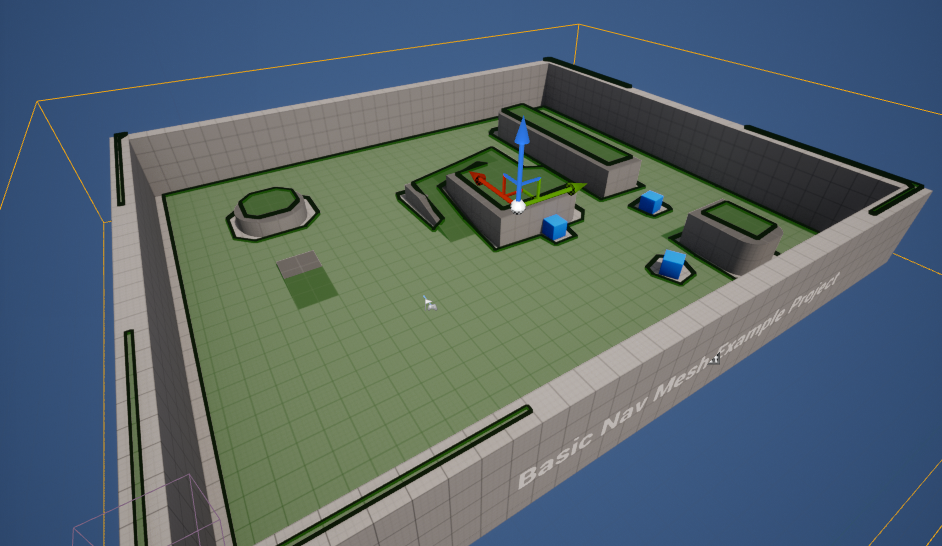
Once the NavMeshBoundsVolume is correctly positioned and scaled, the Unreal Engine automatically processes the enclosed geometry to construct the NavMesh. This intelligent mesh, often visualized as a network of interconnected polygons, represents all the walkable surfaces, slopes, and pathways accessible to AI characters, intelligently avoiding obstacles, gaps, and non-traversable areas. Developers are then provided with a crucial verification step: pressing the ‘P’ key on the keyboard. This action toggles a debug visualization, overlaying the generated NavMesh onto the level geometry. A clearly defined, unbroken green overlay indicates a successful generation, confirming that the AI has a coherent map to follow. Conversely, gaps or irregular patterns in the mesh signal potential issues with the volume’s placement, underlying geometry, or navigation settings, necessitating adjustments to ensure seamless AI operation. For projects with vast or dynamically changing environments, Unreal Engine also offers advanced options for dynamic NavMesh generation, a feature that optimizes performance by recalculating only necessary portions of the mesh as the environment changes, thereby reducing generation times and enhancing adaptability in complex scenarios, such as games with destructible environments or procedurally generated content.
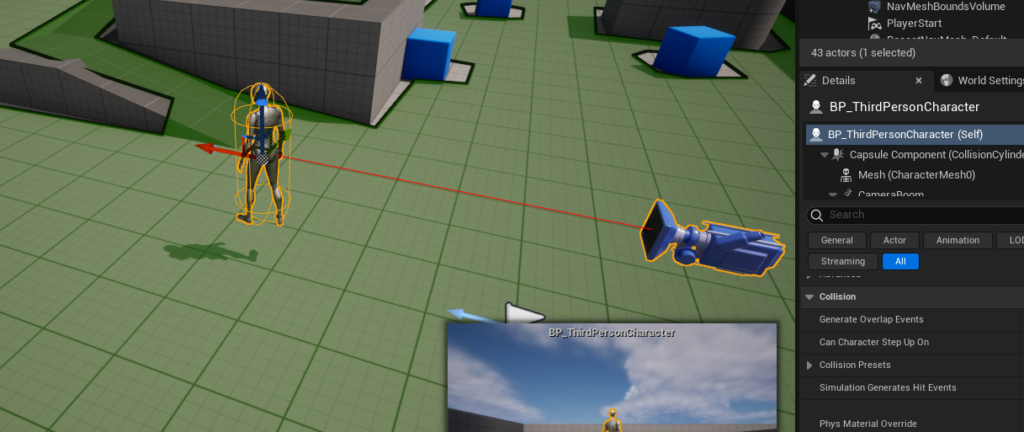
With the NavMesh established, the subsequent phase involves configuring the AI character’s behavior logic. For demonstration purposes, and commonly in production, developers often leverage the pre-existing assets provided by Unreal Engine’s templates, such as the Third Person Template. This template includes a fully animated character blueprint, serving as an ideal foundation for testing AI navigation without the overhead of creating a character from scratch. The character blueprint, a visual scripting asset unique to Unreal Engine, becomes the canvas for defining the AI’s autonomous actions. This visual scripting paradigm, a hallmark of UE development, allows for complex logic to be assembled through nodes and connections, making AI programming accessible to non-programmers and accelerating prototyping.
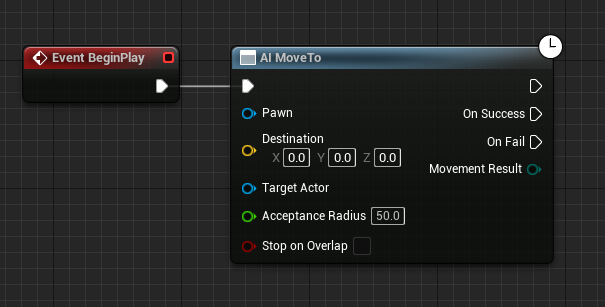
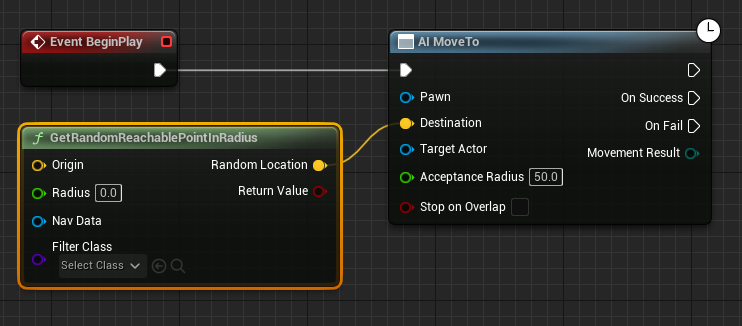
The core of the AI’s navigational behavior is orchestrated within the blueprint editor, starting with the Event BeginPlay node. This node acts as the initial trigger, executing a sequence of actions as soon as the game level loads or the character is spawned. Connected to Event BeginPlay is the pivotal AI MoveTo node. This node is the primary instruction for the AI character, commanding it to pathfind and move towards a specified destination. Its strength lies in its ability to automatically utilize the generated NavMesh, calculating the most efficient and traversable route from the AI’s current location to its target, circumventing obstacles along the way. The AI MoveTo node internally handles complex tasks such as obstacle avoidance and path smoothing, freeing developers from low-level movement computations.
To imbue the AI with an element of non-linear, exploratory movement, the GetRandomReachablePointInRadius node is integrated. This node intelligently queries the NavMesh to find a valid, walkable point within a specified radial distance from a given origin. The output of this node, a yellow vector pin representing the chosen random destination, feeds directly into the Destination input pin of the AI MoveTo node. This crucial connection ensures that the AI MoveTo command is constantly provided with a new, valid target within the AI’s designated roaming area, preventing repetitive, fixed patrol routes.
The "Origin" for this random point generation is typically the AI character’s current location, established by connecting a Get Actor Location node to the Origin input of GetRandomReachablePointInRadius. This setup anchors the AI’s roaming behavior around its current position, creating a localized yet dynamic movement pattern. The Radius parameter, a green pin on the GetRandomReachablePointInRadius node, dictates the maximum distance from the origin within which a random point can be chosen. A value of "2000" units, as often used in examples, allows for a substantial roaming area, providing visible and varied AI movement. This parameter offers developers fine control over the AI’s spatial behavior, enabling them to define everything from tight patrol loops within a small room to broad exploratory sweeps across a large landscape, without manual waypoint placement.
To ensure the AI MoveTo node operates on the correct character, a Reference to Self node is created and connected to the Pawn input pin. This self-reference explicitly tells the AI MoveTo node that the character whose blueprint is being edited is the agent that should perform the navigation. This clarity in assignment is vital in environments where multiple AI characters might exist, each with its own distinct behaviors and navigation requirements.
Finally, to create a continuous and autonomous roaming behavior, a Delay node is introduced after the On Success output pin of the AI MoveTo node. The On Success pin fires once the AI character successfully reaches its target destination. The Delay node pauses the execution flow for a specified duration, allowing the character to momentarily "settle" or simulate a brief stop before initiating its next movement command. Crucially, the output of this Delay node is then looped back into the input of the AI MoveTo node. This creates an infinite loop: the AI moves to a random point, waits for a short duration upon arrival, and then immediately requests a new random destination, perpetually navigating the level within its defined parameters. This simple yet effective looping mechanism forms the backbone of many background AI behaviors, adding life and activity to game worlds without requiring complex scripting for every individual movement decision. The Delay can be adjusted to create more frantic or more leisurely roaming patterns, directly influencing the character’s perceived personality and role within the game world.
The foundational principles demonstrated through this basic NavMesh and AI setup extend far beyond simple roaming characters. Industry experts frequently emphasize the versatility and efficiency of Unreal Engine’s navigation system. Data from game development surveys consistently show that robust AI tools are among the most valued features in modern game engines, directly impacting productivity and the quality of the final product. The ability to quickly prototype and iterate on AI behaviors using Blueprint visual scripting is routinely praised by developers, allowing for rapid experimentation and refinement without the typical compilation times associated with traditional coding. This accessibility has played a significant role in the explosion of independent game development, where smaller teams can achieve results previously only possible for large studios. In 2023, the global video game market was valued at over $200 billion, with AI-driven gameplay being a key differentiator for success, according to various market research firms.
Beyond its utility in games, the underlying concepts of navigation meshes and intelligent pathfinding have critical applications in other sectors. Robotics, for instance, heavily relies on similar environmental mapping and pathfinding algorithms for autonomous movement in complex physical spaces, from factory floors to planetary exploration. Virtual reality and augmented reality simulations, particularly those used for training, architectural visualization, or digital twin applications, also leverage these technologies to guide virtual agents or provide interactive walkthroughs. The precise, collision-avoiding paths generated by NavMeshes are indispensable in these contexts, ensuring that virtual entities behave realistically and interact appropriately with their simulated environments, enhancing the fidelity and effectiveness of the simulation.
While Unreal Engine 5 provides a powerful and intuitive foundation, the realm of AI in games continues to evolve. Basic NavMesh navigation, while effective, is merely the starting point. More advanced AI systems often incorporate Behavior Trees, State Machines, and Environmental Query Systems (EQS) to create truly intelligent and reactive characters. Behavior Trees allow for complex decision-making hierarchies, enabling AI to switch between behaviors like patrolling, chasing, or seeking cover based on dynamic game states. State Machines provide a structured way to manage different character states and transitions, ensuring logical and consistent behavior. EQS, on the other hand, allows AI to intelligently query their surroundings for optimal positions or targets, leading to highly tactical and believable actions. These advanced techniques build upon the reliable pathfinding provided by the NavMesh, adding layers of cognitive complexity to AI agents. Developers often start with NavMesh for fundamental movement and then layer these more sophisticated systems on top to achieve nuanced and dynamic AI personalities and challenges.
The implications for the future of interactive media are vast. As hardware capabilities increase and AI algorithms become more sophisticated, we can anticipate characters that not only navigate intelligently but also learn, adapt, and even form relationships with players or other AI entities. The integration of machine learning into game AI, for example, promises characters that can dynamically adjust their strategies based on player behavior, leading to infinitely replayable and unpredictable challenges. Unreal Engine 5’s continuous development, with its emphasis on performance, scalability, and developer-friendly tools, ensures that it remains a critical platform for pushing these boundaries. Its comprehensive ecosystem, which combines cutting-edge rendering with robust AI and physics simulations, positions it as an unparalleled engine for crafting the next generation of immersive digital experiences. The ongoing research into AI ethics and bias within digital characters also suggests a future where AI not only moves intelligently but also behaves responsibly and inclusively.
In conclusion, the effective setup of NavMesh and basic AI character navigation in Unreal Engine 5 is a cornerstone of modern game development, transforming static environments into dynamic, interactive worlds. From the careful definition of traversable areas using the NavMeshBoundsVolume to the precise orchestration of movement logic through Blueprint scripting, UE5 offers accessible yet powerful tools that empower developers to bring intelligent, believable characters to life. This foundational understanding is not only essential for creating engaging gameplay but also serves as a gateway to more advanced AI behaviors, ultimately shaping the immersive and compelling interactive narratives that define the gaming landscape of today and tomorrow. The ease with which developers can implement these core AI functionalities within Unreal Engine 5 underscores its position as a leading platform, continuously pushing the boundaries of what is possible in interactive entertainment and beyond.
About the Author








